Be familiar with the Photoshop environment
Understand the concept and use the Photoshop
Create graphics and manipulate images using the
different tools and plug-ins Photoshop
ADOBE PHOTSHOP
Photoshop is the leading professional image
editing program, released by Adobe Photoshop
is useful for both creating and editing images
to be used in print or online. Easy to use, but
full of high-quality features, photoshop is the
best choice for any image manipulation job.
USING PHOTOSHOP
 PowerPoint presentations
 Publications and layouts
 www – graphics, web design
 Video segmenting
 Digital materials
PHOTOSHOP – START MENU
Click the “start” menu and go to the
“programs” folder.
INTERFACE
INTERFACE
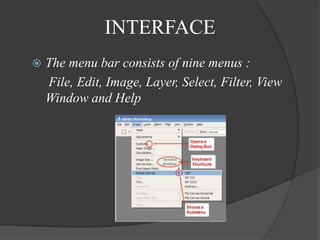
 The menu bar consists of nine menus :
File, Edit, Image, Layer, Select, Filter, View
Window and Help
TOOLBOX
 The Toolbox
contains many of
the tools working
with in
photoshop. This
contains tools for
working with
images in
photoshop
LAYERS
 Photoshop’s most powerful features is the
ability to create and use multiple layers within
the same image.
 One layer on top of another, all of which can
be edited independently of each other and laid
on top of or beneath one another, and then
later combined to forma single, flat image

Unit3

  • 1.
    Be familiar withthe Photoshop environment Understand the concept and use the Photoshop Create graphics and manipulate images using the different tools and plug-ins Photoshop
  • 2.
    ADOBE PHOTSHOP Photoshop isthe leading professional image editing program, released by Adobe Photoshop is useful for both creating and editing images to be used in print or online. Easy to use, but full of high-quality features, photoshop is the best choice for any image manipulation job.
  • 3.
    USING PHOTOSHOP  PowerPointpresentations  Publications and layouts  www – graphics, web design  Video segmenting  Digital materials
  • 4.
    PHOTOSHOP – STARTMENU Click the “start” menu and go to the “programs” folder.
  • 5.
  • 6.
    INTERFACE  The menubar consists of nine menus : File, Edit, Image, Layer, Select, Filter, View Window and Help
  • 7.
    TOOLBOX  The Toolbox containsmany of the tools working with in photoshop. This contains tools for working with images in photoshop
  • 8.
    LAYERS  Photoshop’s mostpowerful features is the ability to create and use multiple layers within the same image.  One layer on top of another, all of which can be edited independently of each other and laid on top of or beneath one another, and then later combined to forma single, flat image