Unipro UGENE: an open-source toolkit for complex genome analysisKonstantin Okonechnikov, Novosibirsk State UniversityOlga Golosova, Alexey Varlamov, Mikhail FursovUnipro Company
Unipro UGENE projectWhat is UGENE?A multiplatform open-source application for molecular biologistsProject goal: Quality integration of popular bioinformatics tools into theunified visual and computational solutionHistoryStarted 5 years ago as years ago as a set of small collaborative projects with several academic organizationsFor last 3 years rapidly developed due to the Unipro company support Winner of several global Russian competitions
UGENE internalsWritten in C++/QtModular structureIntegrated plugin system Automated testing > 4000 testsUGENE “Core” team:Mostly graduates of Novosibirsk State UniversityHave professional skills in bioinformatics and software development
UGENEfeatures: algorithms   Rich library of popular bioinformatics algorithms and computational methods Smith-Waterman, Clustal, Muscle, KAlign, Blast, Phylip, HMM, Primer3, Psipred, Bowtie, UGENE Genome Aligner…+ several dozens more    Some algorithms are unique: contributed by  local research labs and academia
UGENEfeatures: data formatsSupport of popular biological data formats (~ 20 formats)FASTA, Genbank, Stockholm, PDB, Newick, Nexus(Mega), ClustalW, SAM, BAM… Retrieve information from remote databases:NCBI, PDB, Swissprot…
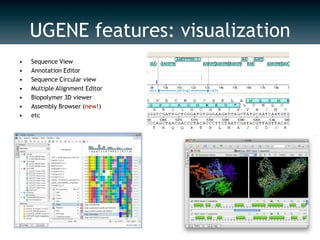
UGENE features: visualizationSequence View Annotation EditorSequence Circular viewMultiple Alignment EditorBiopolymer 3D viewerAssembly Browser (new!)etc
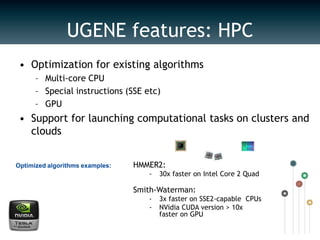
Optimization for existing algorithmsMulti-core CPUSpecial instructions (SSE etc)GPUSupport for launching computational tasks on clusters and  cloudsHMMER2:30x faster on Intel Core 2 QuadSmith-Waterman:3x faster on SSE2-capable  CPUs
NVidia CUDA version > 10x faster on GPUOptimized algorithms examples:UGENE features: HPC
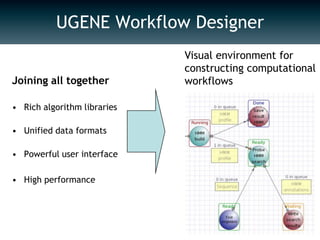
UGENE Workflow DesignerVisual environment for constructing computational workflowsJoining all togetherRich algorithm librariesUnified data formatsPowerful user interfaceHigh performance
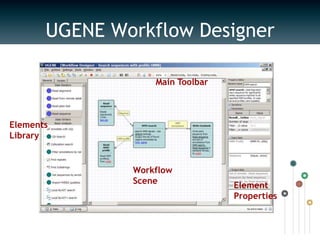
Main ToolbarElements LibraryWorkflow SceneElement PropertiesUGENE Workflow Designer
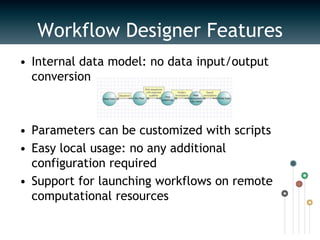
Workflow Designer FeaturesInternal data model: no data input/output conversionParameters can be customized with scriptsEasy local usage: no any additional configuration required Support for launching workflows on remote computational resources
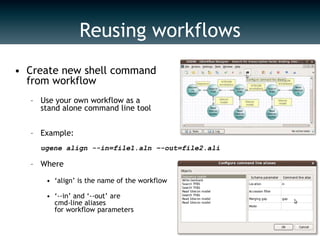
Create new shell command from workflowUse your own workflow as a stand alone command line toolExample: ugene align --in=file1.aln –-out=file2.aliWhere‘align’ is the name of the workflow‘--in’ and ‘--out’ are cmd-line aliases for workflow parametersReusing workflows
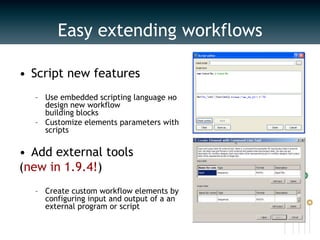
Easy extending workflowsScript new features Use embedded scripting language нo design new workflow building blocksCustomize elements parameters with scriptsAdd external tools (new in 1.9.4!) Create custom workflow elements by configuring input and output of a an external program or script
UGENE: future plansWeb environment for workflow designerView & share workflowsLaunch workflows on cloud resourcesSupport for NGS data analysisNew algorithms: align, assembly, SNP/indelsBAM viewer
UGENE communityOver 500 downloads every month, users all over the worldIncluded into major Linux distributions: Ubuntu, Fedora, SUSE etc…Issue tracker, forum, SVN (links on next slide)New members are welcome!

Unipro ugene bosc 2011 update

  • 1.
    Unipro UGENE: anopen-source toolkit for complex genome analysisKonstantin Okonechnikov, Novosibirsk State UniversityOlga Golosova, Alexey Varlamov, Mikhail FursovUnipro Company
  • 2.
    Unipro UGENE projectWhatis UGENE?A multiplatform open-source application for molecular biologistsProject goal: Quality integration of popular bioinformatics tools into theunified visual and computational solutionHistoryStarted 5 years ago as years ago as a set of small collaborative projects with several academic organizationsFor last 3 years rapidly developed due to the Unipro company support Winner of several global Russian competitions
  • 3.
    UGENE internalsWritten inC++/QtModular structureIntegrated plugin system Automated testing > 4000 testsUGENE “Core” team:Mostly graduates of Novosibirsk State UniversityHave professional skills in bioinformatics and software development
  • 4.
    UGENEfeatures: algorithms Rich library of popular bioinformatics algorithms and computational methods Smith-Waterman, Clustal, Muscle, KAlign, Blast, Phylip, HMM, Primer3, Psipred, Bowtie, UGENE Genome Aligner…+ several dozens more Some algorithms are unique: contributed by local research labs and academia
  • 5.
    UGENEfeatures: data formatsSupportof popular biological data formats (~ 20 formats)FASTA, Genbank, Stockholm, PDB, Newick, Nexus(Mega), ClustalW, SAM, BAM… Retrieve information from remote databases:NCBI, PDB, Swissprot…
  • 6.
    UGENE features: visualizationSequenceView Annotation EditorSequence Circular viewMultiple Alignment EditorBiopolymer 3D viewerAssembly Browser (new!)etc
  • 7.
    Optimization for existingalgorithmsMulti-core CPUSpecial instructions (SSE etc)GPUSupport for launching computational tasks on clusters and cloudsHMMER2:30x faster on Intel Core 2 QuadSmith-Waterman:3x faster on SSE2-capable CPUs
  • 8.
    NVidia CUDA version> 10x faster on GPUOptimized algorithms examples:UGENE features: HPC
  • 9.
    UGENE Workflow DesignerVisualenvironment for constructing computational workflowsJoining all togetherRich algorithm librariesUnified data formatsPowerful user interfaceHigh performance
  • 10.
    Main ToolbarElements LibraryWorkflowSceneElement PropertiesUGENE Workflow Designer
  • 11.
    Workflow Designer FeaturesInternaldata model: no data input/output conversionParameters can be customized with scriptsEasy local usage: no any additional configuration required Support for launching workflows on remote computational resources
  • 12.
    Create new shellcommand from workflowUse your own workflow as a stand alone command line toolExample: ugene align --in=file1.aln –-out=file2.aliWhere‘align’ is the name of the workflow‘--in’ and ‘--out’ are cmd-line aliases for workflow parametersReusing workflows
  • 13.
    Easy extending workflowsScriptnew features Use embedded scripting language нo design new workflow building blocksCustomize elements parameters with scriptsAdd external tools (new in 1.9.4!) Create custom workflow elements by configuring input and output of a an external program or script
  • 14.
    UGENE: future plansWebenvironment for workflow designerView & share workflowsLaunch workflows on cloud resourcesSupport for NGS data analysisNew algorithms: align, assembly, SNP/indelsBAM viewer
  • 15.
    UGENE communityOver 500downloads every month, users all over the worldIncluded into major Linux distributions: Ubuntu, Fedora, SUSE etc…Issue tracker, forum, SVN (links on next slide)New members are welcome!