P A G E 1
The Domain Name System (DNS) is one of the most important
components of Internet infrastructure. If DNS is unavailable,
you’ll have difficulty finding resources on the Internet and,
likewise, others will be unable to find you. That’s because DNS
is the phone book that translates names such as www.nytimes.com
to Internet protocol (IP) addresses such as 199.239.136.245,
and vice versa. DNS saves us from having to remember the IP
addresses of all of our favorite sites, and it allows Web pages
to link to others by name, not by IP address. Finding hosts by
name allows IP addresses to change over time, allowing sites to
grow, change location, or reconfigure. But, DNS does a whole
lot more than just name-to-address mapping. Understanding the
basic structure, function, and operations of DNS is an important
foundation for all modern-day IT professionals.
DNS is a hierarchical, distributed database with delegated
authority. The “delegated authority” part means that you’re
responsible for providing a way for Internet users to look up an
IP address associated with your organization’s domain. Many
organizations let their ISPs manage DNS for them, but that’s a
risky proposition at best. A configuration mistake or failure at
your ISP can make your company appear offline for at least a
portion of the Internet. A political issue could cause you to lose
control of your domain information. And, unless you’re your
ISP’s largest customer, you have to wait in line with everyone else
when you need to make a change to one of your DNS records.
DNS holds the key to your existence on the Internet, which
is why you want to control DNS for your domain. DNS is
even more than that. DNS is an anti-phishing mechanism, it
helps your organization to reject email spam, and it’s a privacy
mechanism that helps to hide your internal network topology.
Here are just a few ways DNS helps in these areas:
Anti-phishing„„ . Imagine how quickly your personal
information would be lost if you couldn’t trust the identity
of your online bookseller or bank. When DNS is working
correctly, it helps you to reach the real site, not the imitation
one run by an identity thief.
Anti-spam„„ . Do you think that you get a lot of spam? You’d be
getting a lot more if DNS weren’t working for you. Your mail
server can verify domain names on incoming email messages,
helping to weed out spam. New DNS mechanisms, including
the Sender Policy Framework (SPF,
www.openspf.org) or DomainKeys (DKIM, www.dkim.org),
identify who is allowed to send mail on behalf of a domain
so you can reject email from imposters. Real-time blacklists
(RBLs) let your mail server quickly check to see whether a
sender is a known spammer or a known infected machine.
RBLs such as www.spamhaus.org use DNS as a lightweight
query-response mechanism for checking the addresses of
email senders.
Privacy„„ . DNS reveals to external clients only what you
want the public to see about your network. Likewise, it lets
internal users and servers see whatever is appropriate for
them to see. DNS helps you mask addresses by giving them
different names depending on whether they’re accessed from
the inside or outside of your network, helping to increase
your network’s security.
DNS from top to bottom
In the days before DNS, administrators managed hosts files that
kept track of all known systems, a manual mechanism with
limited ability to scale. The original DNS specification, and the
first reference implementation, was developed at U.C. Berkeley
in 1983–1984. Today, the DNS specification evolves through
updates to the RFC documents. The reference implementation
that the majority of organizations use is known as the Berkeley
Internet Name Daemon (BIND). BIND was primarily made
commercially viable through the efforts of Paul Vixie and his
followers.
DNS is a distributed database. DNS maps names into
IP addresses. The servers that implement DNS are distributed
around the world, making the service resilient to failures
and attacks, as well as making it high performance: there are
mechanisms for making sure that you use the DNS servers that
are closest to you from a network topology perspective.
Responsibility is delegated. The DNS architecture uses
delegated authority to ensure that those who know best about
mapping names to IP addresses (called “forward mapping”) are
the ones responsible. When it comes to translating names to IP
addresses within your domain, your organization is responsible.
If your organization is large enough, you may even delegate parts
of your domain into subdomains such as eng.barkingseal.com or
mktg.barkingseal.com. Each subdomain, such as eng or mktg,
can be managed by different servers and different parts of the
organization. When it comes to mapping IP addresses back to
host names (called “reverse mapping”), responsibility is delegated
to the owner of the IP addresses themselves. If your ISP has
assigned a set of IP addresses to you, the ISP can delegate the
reverse mapping back to you. It’s important to have a consistent
set of forward and reverse maps.
Understanding DNS: Essential knowledge for all IT
professionals
P A G E 2
Naming is hierarchical. Naming in DNS is hierarchical,
and names are parsed from right to left. Though the details are
always hidden from users, a domain name always ends with an
implicit period, or dot. This represents the root of the hierarchy
that a nameserver traverses when looking up an address. A DNS
server always knows where to find the root servers that can tell it
the locations of servers that understand top-level domains (such
as com, net, and org). Because DNS is distributed and hierarchical,
looking up a domain name can take the query around the world
to servers knowing answers to the query.
Some definitions
Before delving into that worldwide trip, some definitions can help
make it a smooth one.
A fully-qualified host name„„ is the name of a host plus its
domain name, venus.eng.barkingseal.com, for example. The
host name venus can be used within the domain
eng.barkingseal.com without ambiguity because it must be
unique within that domain.
A„„ domain name is everything but the unqualified host name.
In this example, take off venus and its domain is
eng.barkingseal.com.When a domain has more than a top-level
domain (com) and a second-level domain (barkingseal), it’s
referred to as a subdomain.
An„„ authoritative nameserver is a server that has been
designated by the proper authority as providing name
mapping for a particular domain. Depending on what the
server’s level of the hierarchy is, the proper authority for
making this determination varies.
A„„ caching nameserver is one that stores the results of previous
queries so that each request for an IP address doesn’t result
in a long foray across the Internet.
A„„ recursive nameserver is one that will traverse the
hierarchical name space to resolve a query.
A nameserver can have any combination of authoritative, caching,
and recursive characteristics. For example, an authoritative server
that provides address mappings to the outside world usually
does not allow recursive queries from the outside. Authoritative
servers providing internal address mappings are often recursive
and caching. Nameservers can be configured to provide different
services to different users.
Name mapping example
Going through the steps of mapping a name to an IP address
helps to illustrate the distributed nature of DNS, and it shows
where and how delegation occurs. This example assumes that
your nameserver is ns.atrust.com, and this is the first time that the
address venus.eng.barkingseal.com is looked up. No server has the
address cached, and the entire hierarchy has to be traversed. The
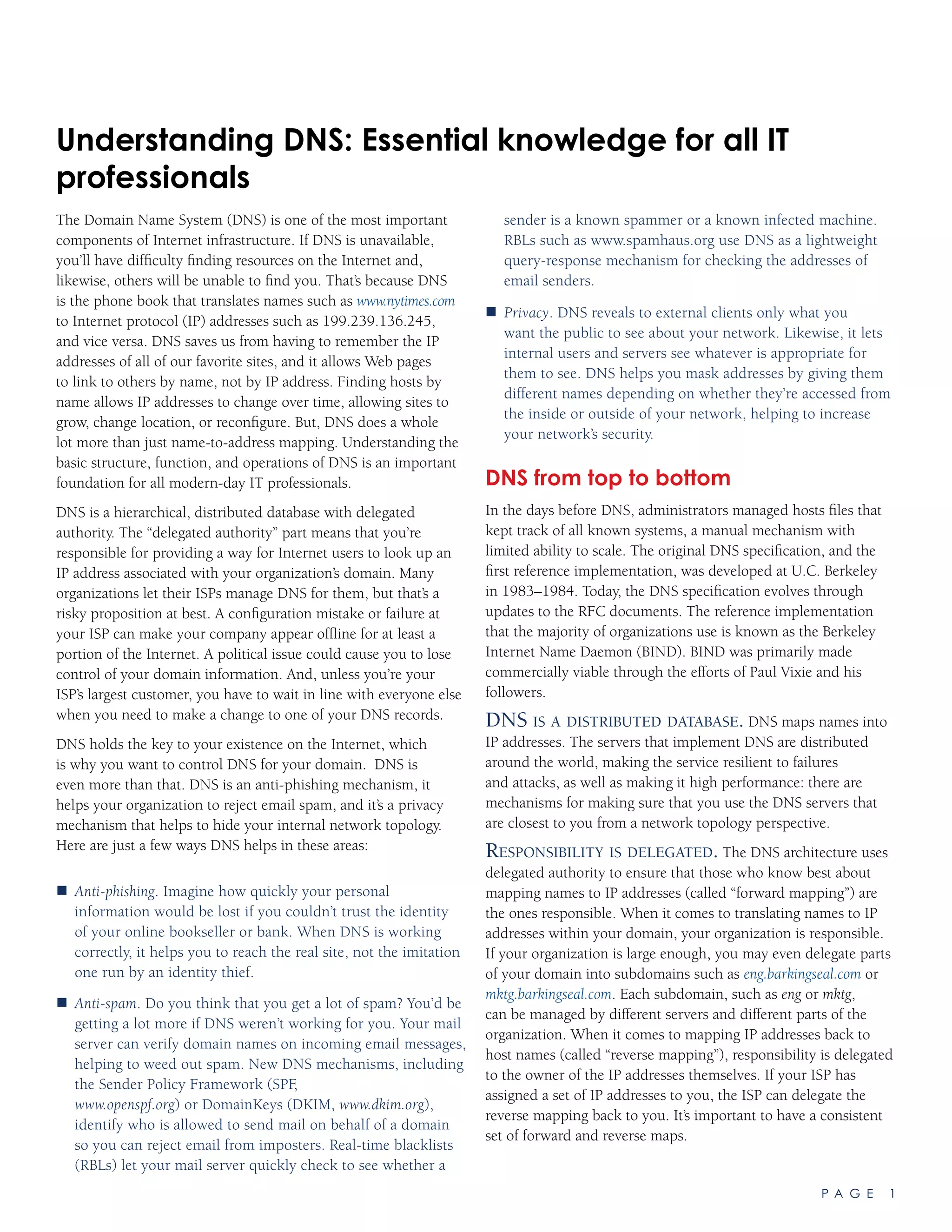
sequence is portrayed graphically in Figure 1.
1.	 Your workstation contains a resolver that talks to your
nameserver and provides answers to applications (such as
Web browsers, email clients, and instant-messaging software)
when they ask for name mappings. Your resolver asks your
nameserver (let’s call it ns.atrust.com) about the address for
venus.eng.barkingseal.com. The ns.atrust.com nameserver is
a caching server — so that if anyone else asks for the same
address, they get an immediate response. For the purpose of
this example, ns.atrust.com is also recursive so it is the one that
can traverse the DNS hierarchy to obtain the name mapping.
2.	 Your caching, recursive nameserver has a list of hard-coded IP
addresses for the root servers (these are named [A-K].ROOT-
SERVERS.NET.) These authoritative servers, distributed across
the world, are able to point a nameserver to the ones that
know about the top-level domain that you’re asking about (in
Figure 1: A DNS query follows a hierarchical path across a distributed set of servers, ending up querying the nameservers to which responsibility is delegated
for a domain.
[A-K].ROOT-SERVERS.NET
[A-K].GTLDSERVERS.NET
ns1.eng.barkingseal.com
ns1.barkingseal.com
venus.eng.barkingseal.com?
Ask ns1.barkingseal.com
venus.eng.barkingseal.com?
Ask ns1.eng.barkingseal.com
63.173.189.132
venus.eng.barkingseal.com?
Ask the gTLD servers
ns.atrust.com
6
5
4
3
1
2
Note that through the magic of anycast, some root servers, such as the F root server, simultaneously exist
in more than one geographic location. See RFC 3258 for more details on this clever hack.
P A G E 3
this case, com.) Your nameserver asks one of the root servers
where to find an address for venus.eng.barkingseal.com. Your
server queries for the fully qualified domain name all down
the hierarchy so that if one of the nameservers along the way
has the answer, the query process can stop.
3.	 The root server says: “I can’t help you, but why don’t you ask
one of the generic top-level domain (gTLD) servers on this
list?” The answer is called a referral, and for a .com address the
response includes addresses for six gTLD servers named [A-F].
GTLDSERVERS.NET. The root server always responds with a
referral that depends on political and business factors that are
all subject to change. The gTLD servers [A-F].GTLDSERVERS.
NET know about some generic top-level domains including
com, while others know about TLDs such as edu. If you’re
querying for a TLD that is a country code (us for the United
States, jp for Japan, and so on), the query may be referred to
servers run by the country in question, or by someone that’s
hijacked the country’s TLD for profiteering (like Tuvalu,
or .tv).
4.	 Your nameserver asks one of the gTLD servers where to find
the name you’re interested in, and the gTLD server refers the
request to the nameservers for barkingseal.com. Remember
when you registered your domain and you had to provide the
names and addresses for your nameservers? Your registration
information is propagated to the appropriate gTLD servers and
up to the root servers. The gTLD servers return the addresses
of nameservers for barkingseal.com. This is the point in the
query where the responsibility shifts to the owners of the
domain.
5.	 The nameserver for barkingseal.com, perhaps named ns1.
barkingseal.com, knows about names within barkingseal.com.
In many small and medium-sized organizations, the query
would end here, as ns1.barkingseal.com would know about
all names within barkingseal.com. If barkingseal.com is a large
organization, it might have subdomains such as eng and mktg
delegated to other parts of the company. So for the purpose
of this example, ns1.barkingseal.com responds to the query by
referring your nameserver to a nameserver for the subdomain
eng, in this case ns1.eng.barkingseal.com.
6.	 Your nameserver asks ns1.eng.barkingseal.com
for the address, and the response is “sure, the address for
venus.eng.barkingseal.com is 63.173.189.132.”
The lengthy process of traversing the hierarchy from the root
servers to a domain’s own nameservers only requires a few
milliseconds, but it underscores the importance of caching. Your
resolver should talk to a caching nameserver that remembers
previous queries. This helps to speed applications such as Web
browsers, which can request name mappings for dozens of names
per Web page. Caching servers should be placed closed to users;
if your company has multiple locations, you should have at least
two caching servers at each site.
Caching means that name-to-address mappings for your domain
are stored for some period of time in caching nameservers and
resolvers all around the Internet. This means that there is latency
between the time you change an entry in your nameserver and
when everyone on the Internet has obtained the new information.
You have some control over latency by adjusting the records’
Time to Live (TTL.) Updating addresses for your authoritative
nameservers requires a minimum of 72 hours under the best
circumstances, as new information has to be propagated to
gTLD and root servers worldwide. The bottom line is that you
need to be careful and methodical when you make changes
related to DNS, as it can take days to fix any problems that you
inadvertently create. Once a record has been cached, its data is
under the administrative control of hundreds or thousands of
external entities; therefore it is not possible to “force” an instant
update when you make a mistake such as forgetting to lower the
Time to Live for a record ahead of a change. As a result, it’s often
best to get expert advice before executing a plan to migrate your
authoritative nameservers.
Reverse mapping
So far the discussion has focused on mapping names to IP
addresses, or forward mapping. Reverse mapping provides the
name given an IP address. It is used, for example, by a mail server
doing sanity checks when another mail server connects to it.
Reverse mapping works similarly to forward mapping except that
(for a bunch of historical reasons) the TLD for a reverse lookup is
in-addr.arpa, and the components of the IP address are reversed.
So a request for the name corresponding to 216.139.219.58
would query 58.219.139.216.in-addr.arpa. Delegation can happen
between the various octets in an IP address. A simplistic way
to look at it is that upper octets are generally owned by large
organizations and the lower ones are owned by mere mortals.
This is why the octets are reversed: as the reverse lookup
proceeds from right to left, the organizations to which the reverse
lookups are delegated become smaller and more numerous.
If you have an entire lower octet or more allocated to your
company, you should take responsibility for the reverse
mapping so that you can keep both forward and reverse maps
synchronized. If your ISP has allocated you less than a whole
octet, your ISP can, using some tricks, delegate the reverse
lookups for individual IP addresses to your nameserver (See
Nemeth, et.al., Linux Administration Handbook, Second Edition,
p. 400). This is important so that you can maintain consistency
between what forward and reverse lookups find.
Although you should always keep your reverse lookup map up to
date, don’t always trust what you get back from a reverse query.
The reason is that some spammers spoof their reverse maps to
make them appear trustworthy. For example, they might send
a flurry of spam out from one server claiming to be something
well known, such as mail.att.net, and for the duration of their
spamming, the reverse maps match the From: header of their
email. But do the same reverse lookup an hour later, and they
may claim to be another well-known domain such as ebay.com.
P A G E 4
Windows Active Directory
A Windows-based network typically runs Microsoft Active
Directory, which provides directory services for workstations
running Microsoft Windows operating systems. It provides
directory services for users and their computers. It facilitates trust
relationships, defining who can log in to what machines in which
organizations. It defines the resources that a user is allowed to
access. For Microsoft-based email, Active Directory works with
Microsoft Exchange, keeping track of user mailboxes and their
attributes.
DNS is a component of an Active Directory server. Your life will
be easier if you support your internal Microsoft Windows systems
using the DNS components of Active Directory. In addition to
providing standard DNS features such as caching and recursion,
Active Directory uses record types that are not part of the DNS
standard, so they are not always supported (easily) in BIND.
Active Directory uses multi-master replication to provide
redundancy within the Windows environment, which
supplements the more traditional master-slave architecture that
BIND directly implements. One nice feature of Active Directory is
that, as with BIND, it supports secure dynamic updates that allow
workstations to update their DNS records. This is particularly
useful if you have a number of laptops that might be plugged
into different networks across the company at different times.
When they are given a new IP address (usually via DHCP), the
laptop can tell its Active Directory server about its new location,
and now its new address is registered and propagated across the
company so that everyone can find it.
We recommend that Active Directory be implemented in
conjunction with BIND, with Active Directory delegated naming
authority for a subdomain of your internal network. Because of
the large vulnerability footprint of the platform, it is not a good
idea for Active Directory to provide authoritative name services
on the Internet, only on internal networks. To delegate naming
authority to an Active Directory server, you’ll need to set up one
or more nameserver records and corresponding address records
to give the servers addresses. The example delegation in the
nameserver record example of Table 1 shows naming authority
for the subdomain eng.barkingseal.com delegated to two servers,
[ns1,ns2].eng.barkingseal.com. Later on in the zone file, A records
would provide addresses corresponding to the two nameservers.
More than just naming
The introduction to this article mentioned how DNS is used for
many things other than just looking up names. Here are some of
the details.
Anti-phishing
Phishing emails purporting to be from your bank or your favorite
auction site will almost always contain a link that, if clicked on,
takes you to a phishing site identified by IP address, not by name.
Use the name of your bank’s site, not an IP address provided in
someone’s email, to avoid falling prey to phishing attacks.
But what if a hacker could fool your DNS into mapping a name
such as www.bankofamerica.com to their phishing site? This is
possible through a technique known as cache poisoning. A major
DNS flaw was recently discovered (and announced in July 2008)
that makes this a real possibility. Always keep your nameserver
up to date to guard against such attacks, and make sure that it
is directly mapped to a public (non-RFC 1918) IP address (do
not use Network Address Translation for any externally-exposed
caching nameserver)
Real-time blacklists
Several organizations (see www.spamhaus.org or www.spamcop.
net) operate real-time blacklists that help mail servers distinguish
sources of legitimate email from sources of spam. They blacklist
specific IP addresses based on their own criteria, and you can
have your mail server check incoming mail against one or more
RBLs, rejecting any that comes from a blacklisted address.
RBLs use DNS as a query-response mechanism. When a mail
server subscribing to an RBL receives a connection from another
mail server, it forms a DNS query based on the IP address it
detects. The query contains the reversed octets of the IP address
followed by the name of the blacklist. For example, if a mail
server wanted to check to see if it should accept mail from
63.173.189.1 using the RBL sbl.spamhaus.org, it would ask its
nameserver for the address of 1.189.173.63.sbl.spamhaus.org. The
response indicates whether or not the sender is on its blacklist.
Because this is just a DNS query, all of the nice features of DNS,
such as caching, come along for free.
Sender Policy Framework
SPF is a relatively new mechanism for letting others know which
IP addresses are allowed to send email on your behalf. If you
set up SPF in your nameserver, then other mail servers that pay
attention to SPF information will reject email claiming to be
coming from your domain but that is actually coming from a
spammer’s machine. What this means is that if you set up SPF, as
more mail servers observe them, spammers will no longer be able
to spoof email to appear as if it is coming from your domain.
SPF is probably the most promising DNS-based anti-spam
mechanism, and it will become more effective as more domains
use it to identify the addresses authorized to send mail on their
behalf. A relative of SPF, Domain Keys Identified Mail (DKIM), is
not gaining the widespread acceptance that SPF is.
SPF is implemented through a TXT record (see Table 1) that
allows other nameservers to retrieve arbitrary text. You can visit
www.openspf.org and fill out an online form that generates the
correct text to implement SFP at your site.
Putting DNS to work
Knowing how queries work, and the difference between
authoritative and caching nameservers, puts you most of the way
to understanding DNS best practices. The remaining important
concepts are the topology of how and where you deploy DNS
servers, and the configuration files that dictate how they operate.
P A G E 5
Network topology„„ . Redundancy helps your domain continue
to exist even if a server fails or a network cable is cut
somewhere in the world. BIND supports redundancy
through a master-slave relationship where a master
nameserver pushes its name mappings to one or more slave
servers through a zone transfer.
C„„ onfiguration files. BIND’s configuration is in a file named.
conf. The named.conf file tells the server whether it is
authoritative and/or caching, and whether it is the master
or slave for a given zone. The file points to zone files that
contain actual name mapping information. Zone files contain
lines, or records, that define, among other things, name-to-
address and address-to-name mappings for a specific domain
or range of addresses. Some of the most important record
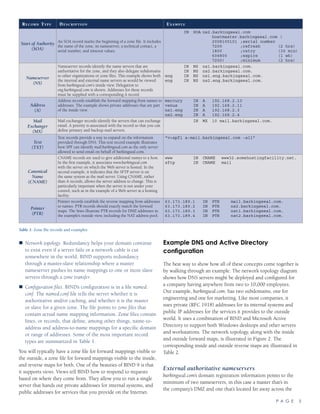
types are summarized in Table 1.
You will typically have a zone file for forward mappings visible to
the outside, a zone file for forward mappings visible to the inside,
and reverse maps for both. One of the beauties of BIND 9 is that
it supports views. Views tell BIND how to respond to requests
based on where they come from. They allow you to run a single
server that hands out private addresses for internal systems, and
public addresses for services that you provide on the Internet.
Example DNS and Active Directory
configuration
The best way to show how all of these concepts come together is
by walking through an example. The network topology diagram
shows how DNS servers might be deployed and configured for
a company having anywhere from two to 10,000 employees.
Our example, barkingseal.com, has two subdomains, one for
engineering and one for marketing. Like most companies, it
uses private (RFC 1918) addresses for its internal systems and
public IP addresses for the services it provides to the outside
world. It uses a combination of BIND and Microsoft Active
Directory to support both Windows desktops and other servers
and workstations. The network topology, along with the inside
and outside forward maps, is illustrated in Figure 2. The
corresponding inside and outside reverse maps are illustrated in
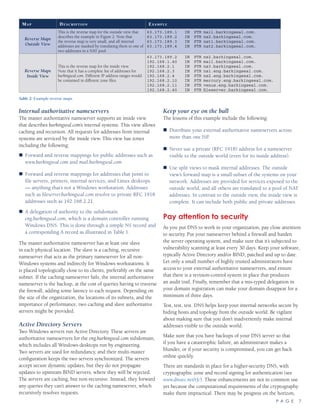
Table 2.
External authoritative nameservers
barkingseal.com’s domain registration information points to the
minimum of two nameservers, in this case a master that’s in
the company’s DMZ and one that’s located far away across the
Record Type Description Example
Start of Authority
(SOA)
An SOA record marks the beginning of a zone file. It includes
the name of the zone, its nameserver, a technical contact, a
serial number, and timeout values.
		 IN	 SOA	ns2.barkingseal.com
					 hostmaster.barkingseal.com (
					 2008100101	;serial number
					 7200		 ;refresh		 (2 hrs)
					 1800		 ;retry			 (30 min)
					 604800		 ;expire			 (1 wk)
					 7200)		 ;minimum		 (2 hrs)
Nameserver
(NS)
Nameserver records identify the name servers that are
authoritative for the zone, and they also delegate subdomains
to other organizations or zone files. This example shows both
the internal and external name servers as would be viewed
from barkingseal.com’s inside view. Delegation to
eng.barkingseal.com is shown. Addresses for these records
must be supplied with a corresponding A record.
		 IN	 NS	 ns1.barkingseal.com.
		 IN	 NS	 ns2.barkingseal.com.
eng		 IN	 NS	 ns1.eng.barkingseal.com.
eng		 IN	 NS	 ns2.eng.barkingseal.com.
Address
(A)
Address records establish the forward mapping from names to
addresses. The example shows private addresses that are part
of the inside view.
mercury		 IN	 A	 192.168.2.10
venus		 IN	 A	 192.168.2.11
ns1.eng		 IN	 A	 192.168.2.3
ns2.eng		 IN	 A	 192.168.2.4
Mail
Exchanger
(MX)
Mail exchanger records identify the servers that can exchange
email. A priority is associated with the record so that you can
define primary and backup mail servers.
			 IN	 MX	 10 mail.barkingseal.com.
Text
(TXT)
Text records provide a way to expand on the information
provided through DNS. This text record example illustrates
how SPF can identify mail.barkingseal.com as the only server
allowed to send email on behalf of barkingseal.com.
“v=spf1 a:mail.barkingseal.com ~all”
Canonical
Name
(CNAME)
CNAME records are used to give additional names to a host.
In the first example, it associates www.barkingseal.com
with the server on which the Web server is hosted. In the
second example, it indicates that the SFTP server is on
the same system as the mail server. Using CNAME, rather
than A records, allows the server address to change. This is
particularly important when the server is not under your
control, such as in the example of a Web server at a hosting
facility.
www			 IN	 CNAME	 www32.somehostingfacility.net.
sftp		 IN	 CNAME	 mail
Pointer
(PTR)
Pointer records establish the reverse mapping from addresses
to names. PTR records should exactly match the forward
maps. The lines illustrate PTR records for DMZ addresses in
the example’s outside view, including the NAT address pool.
63.173.189.1	 IN	 PTR		 mail.barkingseal.com.
63.173.189.2	 IN	 PTR		 ns2.barkingseal.com.
63.173.189.3	 IN	 PTR		 nat1.barkingseal.com.
63.173.189.4	 IN	 PTR		 nat2.barkingseal.com.
Table 1: Zone file records and examples
P A G E 6
Internet so that a failure that takes the company offline doesn’t
make the domain disappear. Always, always, have a slave
nameserver on a different network (a different ISP backbone) in
a different location than your master. If you don’t want to host
one yourself, there are DNS hosting services that will do it for a
fee. Protect your authoritative nameservers with a firewall, but
don’t hide them with network address translation. You want
them to be available at the same address whether accessed from
inside or outside of your network, and there is a specific, serious
vulnerability that can occur if you put NAT in front of a caching
nameserver.
The master authoritative nameserver supports an inside view and
an outside view. The outside view provides forward and reverse
mappings for the following two classes of public addresses. The
outside view does not support caching or recursion.
Public addresses are for externally provided services, such as„„
Web (www.barkingseal.com) and mail (mail.barkingseal.com)
servers.
Masked NAT addresses are the public addresses used when„„
internal systems request external services. This is usually
a pool of addresses that your firewall uses when passing
requests from internal, private addresses to external, public
ones. Network address translation masks your internal
network topology, and DNS helps to support that masking.
The example in Figure 1 translates internal, private addresses
to one of two public addresses, nat[1,2].barkingseal.com.
Regardless of what addresses you do or don’t mask, for a variety
of reasons forward and reverse maps should be an exact mirror of
one another.
MARKETING
WINDOWS
DESKTOP
SYSTEMS
INTERNET
SLAVE
AUTHORITATIVE
NAME SERVER
MASTER
AUTHORITATIVE
NAME SERVER
OUTSIDE
VIEW
INSIDE
VIEW
PUBLIC
ADDRESSES
PRIVATE
ADDRESSES
DMZ
$
R
$
R
$ $
FILE
SERVERSESESERVRVRVERERER
mail.barkingseal.com
63.173.189.1
mail.barkingseal.com
192.168.1.40
ns1.barkingseal.com
82.165.253.123
Never use a private IP address
for your public nameserver
www32.somehostingfacility.net
75.101.140.175
www32.somehostingfacility.net
75.101.140.175
DNS HOSTING
FACILITY
WEB HOSTING
PROVIDER
NANANAMEMEME SSSERERERVEVEVERRR
$$$$
MARKETTTTTTTTINNN
nat1.barkingseal.com
63.173.189.3
fileserver.barkingseal.com
192.168.2.21
nat1.barkingseal.com
63.173.189.3
ns3.barkingseal.com
192.168.2.1
nat1.barkingseal.com
63.173.189.3
ns2.eng.barkingseal.com
192.168.2.4
nat2.barkingseal.com
63.173.189.4
mercury.eng.barkingseal.com
192.168.2.10
nat2.barkingseal.com
63.173.189.4
venus.eng.barkingseal.com
192.168.2.11
barkingseal.com
eng.barkingseal.com
mktg.barkingseal.com
ACTIVE DIRECTORY SERVERS
NANAMEME SSERERVEVERR
ns2.barkingseal.com
63.173.189.2
Never use a private IP address
for your public nameserver
nat1.barkingseal.com
63.173.189.3
ns1.eng.barkingseal.com
192.168.2.3
SLAVE AUTHORITATIVE
NAME SERVER
WEB SERVER
MAIL SERVER
$ = Caching
R = Recursive
Delegation
Queries
Zone Transfers
KEY
Forward Map
DOMAIN REGISTRATION
BARKINGSEAL.COM
ns1.barkingseal.com
ns2.barkingseal.com
outside view
inside view
Figure 2: An example DNS and Active Directory configuration illustrates network placement of nameservers, delegation of authority, and the inside and outside view
of each system’s name and address.
P A G E 7
Internal authoritative nameservers
The master authoritative nameserver supports an inside view
that describes barkingseal.com’s internal systems. This view allows
caching and recursion. All requests for addresses from internal
systems are serviced by the inside view. This view has zones
including the following:
Forward and reverse mappings for public addresses such as„„
www.barkingseal.com and mail.barkingseal.com.
Forward and reverse mappings for addresses that point to„„
file servers, printers, internal services, and Linux desktops
— anything that’s not a Windows workstation. Addresses
such as fileserver.barkingseal.com resolve to private RFC 1918
addresses such as 192.168.2.21.
A delegation of authority to the subdomain„„
eng.barkingseal.com, which is a domain controller running
Windows DNS. This is done through a simple NS record and
a corresponding A record as illustrated in Table 1.
The master authoritative nameserver has at least one slave
in each physical location. The slave is a caching, recursive
nameserver that acts as the primary nameserver for all non-
Windows systems and indirectly for Windows workstations. It
is placed topologically close to its clients, preferably on the same
subnet. If the caching nameserver fails, the internal authoritative
nameserver is the backup, at the cost of queries having to traverse
the firewall, adding some latency to each request. Depending on
the size of the organization, the locations of its subnets, and the
importance of performance, two caching and slave authoritative
servers might be provided.
Active Directory Servers
Two Windows servers run Active Directory. These servers are
authoritative nameservers for the eng.barkingseal.com subdomain,
which includes all Windows desktops run by engineering.
Two servers are used for redundancy, and their multi-master
configuration keeps the two servers synchronized. The servers
accept secure dynamic updates, but they do not propagate
updates to upstream BIND servers, where they will be rejected.
The servers are caching, but non-recursive. Instead, they forward
any queries they can’t answer to the caching nameserver, which
recursively resolves requests.
Keep your eye on the ball
The lessons of this example include the following:
Distribute your external authoritative nameservers across„„
more than one ISP.
Never use a private (RFC 1918) address for a nameserver„„
visible to the outside world (even for its inside address).
Use split views to mask internal addresses. The outside„„
view’s forward map is a small subset of the systems on your
network. Addresses are provided for services exposed to the
outside world, and all others are translated to a pool of NAT
addresses. In contrast to the outside view, the inside view is
complete. It can include both public and private addresses.
Pay attention to security
As you put DNS to work in your organization, pay close attention
to security. Put your nameserver behind a firewall and harden
the server operating system, and make sure that it’s subjected to
vulnerability scanning at least every 30 days. Keep your software,
typically Active Directory and/or BIND, patched and up to date.
Let only a small number of highly trusted administrators have
access to your external authoritative nameservers, and ensure
that there is a revision-control system in place that produces
an audit trail. Finally, remember that a mis-typed delegation in
your domain registration can make your domain disappear for a
minimum of three days.
Test, test, test. DNS helps keep your internal networks secure by
hiding hosts and topology from the outside world. Be vigilant
about making sure that you don’t inadvertently make internal
addresses visible to the outside world.
Make sure that you have backups of your DNS server so that
if you have a catastrophic failure, an administrator makes a
blunder, or if your security is compromised, you can get back
online quickly.
There are standards in place for a higher-security DNS, with
cryptographic zone and record signing for authentication (see
www.dnssec.net/rfc). These enhancements are not in common use
yet because the computational requirements of the cryptography
make them impractical. There may be progress on the horizon,
Map Description Example
Reverse Maps
Outside View
This is the reverse map for the outside view that
describes the example in Figure 2. Note that
the reverse map is very small, and all internal
addresses are masked by translating them to one of
two addresses in a NAT pool.
63.173.189.1	 IN	 PTR	mail.barkingseal.com.
63.173.189.2	 IN	 PTR	ns2.barkingseal.com.
63.173.189.3	 IN	 PTR	nat1.barkingseal.com.
63.173.189.4	 IN	 PTR	nat2.barkingseal.com.
Reverse Maps
Inside View
This is the reverse map for the inside view.
Note that it has a complete list of addresses for
barkingseal.com. Different IP address ranges would
be contained in different zone files.
63.173.189.2	 IN	 PTR	ns2.barkingseal.com.
192.168.1.40	 IN	 PTR	mail.barkingseal.com.
192.168.2.1		 IN	 PTR	ns3.barkingseal.com.
192.168.2.3		 IN	 PTR	ns1.eng.barkingseal.com.
192.168.2.4		 IN	 PTR	ns2.eng.barkingseal.com.
192.168.2.10	 IN	 PTR	mercury.eng.barkingseal.com.
192.168.2.11	 IN	 PTR	venus.eng.barkingseal.com.
192.168.2.40	 IN	 PTR	fileserver.barkingseal.com.
Table 2: Example reverse maps
P A G E 8
however, as the federal government has mandated the use of
DNSSEC for the .gov TLD by January 2009.
Keep the lights on
As far as your presence on the Internet goes, having an accurate,
secure, and high-performance DNS implementation is as
important as having lights in your offices. Make an investment in
your DNS infrastructure by taking control over your domain so
that it gets care and feeding commensurate with its importance.
Without DNS, the Internet is just a bunch of standalone
computers that can’t find each other.
Applied Trust has engineers that have been working with DNS,
BIND, and other Internet infrastructure since the mid-1980s.
Call us if we can help improve your organization’s use of these
technologies.
This article was reprinted from the Q1 2009 issue of The Barking Seal, a publication of Applied Trust. You can subscribe to The Barking
Seal online at http://www.appliedtrust.com/barkingseal. “Applied Trust” and the “Seal on a Rock” Applied Trust Engineering logo are
registered service marks of Applied Trust. All other trademarks are registered to their respective owners.

understanding-dns-essential

  • 1.
    P A GE 1 The Domain Name System (DNS) is one of the most important components of Internet infrastructure. If DNS is unavailable, you’ll have difficulty finding resources on the Internet and, likewise, others will be unable to find you. That’s because DNS is the phone book that translates names such as www.nytimes.com to Internet protocol (IP) addresses such as 199.239.136.245, and vice versa. DNS saves us from having to remember the IP addresses of all of our favorite sites, and it allows Web pages to link to others by name, not by IP address. Finding hosts by name allows IP addresses to change over time, allowing sites to grow, change location, or reconfigure. But, DNS does a whole lot more than just name-to-address mapping. Understanding the basic structure, function, and operations of DNS is an important foundation for all modern-day IT professionals. DNS is a hierarchical, distributed database with delegated authority. The “delegated authority” part means that you’re responsible for providing a way for Internet users to look up an IP address associated with your organization’s domain. Many organizations let their ISPs manage DNS for them, but that’s a risky proposition at best. A configuration mistake or failure at your ISP can make your company appear offline for at least a portion of the Internet. A political issue could cause you to lose control of your domain information. And, unless you’re your ISP’s largest customer, you have to wait in line with everyone else when you need to make a change to one of your DNS records. DNS holds the key to your existence on the Internet, which is why you want to control DNS for your domain. DNS is even more than that. DNS is an anti-phishing mechanism, it helps your organization to reject email spam, and it’s a privacy mechanism that helps to hide your internal network topology. Here are just a few ways DNS helps in these areas: Anti-phishing„„ . Imagine how quickly your personal information would be lost if you couldn’t trust the identity of your online bookseller or bank. When DNS is working correctly, it helps you to reach the real site, not the imitation one run by an identity thief. Anti-spam„„ . Do you think that you get a lot of spam? You’d be getting a lot more if DNS weren’t working for you. Your mail server can verify domain names on incoming email messages, helping to weed out spam. New DNS mechanisms, including the Sender Policy Framework (SPF, www.openspf.org) or DomainKeys (DKIM, www.dkim.org), identify who is allowed to send mail on behalf of a domain so you can reject email from imposters. Real-time blacklists (RBLs) let your mail server quickly check to see whether a sender is a known spammer or a known infected machine. RBLs such as www.spamhaus.org use DNS as a lightweight query-response mechanism for checking the addresses of email senders. Privacy„„ . DNS reveals to external clients only what you want the public to see about your network. Likewise, it lets internal users and servers see whatever is appropriate for them to see. DNS helps you mask addresses by giving them different names depending on whether they’re accessed from the inside or outside of your network, helping to increase your network’s security. DNS from top to bottom In the days before DNS, administrators managed hosts files that kept track of all known systems, a manual mechanism with limited ability to scale. The original DNS specification, and the first reference implementation, was developed at U.C. Berkeley in 1983–1984. Today, the DNS specification evolves through updates to the RFC documents. The reference implementation that the majority of organizations use is known as the Berkeley Internet Name Daemon (BIND). BIND was primarily made commercially viable through the efforts of Paul Vixie and his followers. DNS is a distributed database. DNS maps names into IP addresses. The servers that implement DNS are distributed around the world, making the service resilient to failures and attacks, as well as making it high performance: there are mechanisms for making sure that you use the DNS servers that are closest to you from a network topology perspective. Responsibility is delegated. The DNS architecture uses delegated authority to ensure that those who know best about mapping names to IP addresses (called “forward mapping”) are the ones responsible. When it comes to translating names to IP addresses within your domain, your organization is responsible. If your organization is large enough, you may even delegate parts of your domain into subdomains such as eng.barkingseal.com or mktg.barkingseal.com. Each subdomain, such as eng or mktg, can be managed by different servers and different parts of the organization. When it comes to mapping IP addresses back to host names (called “reverse mapping”), responsibility is delegated to the owner of the IP addresses themselves. If your ISP has assigned a set of IP addresses to you, the ISP can delegate the reverse mapping back to you. It’s important to have a consistent set of forward and reverse maps. Understanding DNS: Essential knowledge for all IT professionals
  • 2.
    P A GE 2 Naming is hierarchical. Naming in DNS is hierarchical, and names are parsed from right to left. Though the details are always hidden from users, a domain name always ends with an implicit period, or dot. This represents the root of the hierarchy that a nameserver traverses when looking up an address. A DNS server always knows where to find the root servers that can tell it the locations of servers that understand top-level domains (such as com, net, and org). Because DNS is distributed and hierarchical, looking up a domain name can take the query around the world to servers knowing answers to the query. Some definitions Before delving into that worldwide trip, some definitions can help make it a smooth one. A fully-qualified host name„„ is the name of a host plus its domain name, venus.eng.barkingseal.com, for example. The host name venus can be used within the domain eng.barkingseal.com without ambiguity because it must be unique within that domain. A„„ domain name is everything but the unqualified host name. In this example, take off venus and its domain is eng.barkingseal.com.When a domain has more than a top-level domain (com) and a second-level domain (barkingseal), it’s referred to as a subdomain. An„„ authoritative nameserver is a server that has been designated by the proper authority as providing name mapping for a particular domain. Depending on what the server’s level of the hierarchy is, the proper authority for making this determination varies. A„„ caching nameserver is one that stores the results of previous queries so that each request for an IP address doesn’t result in a long foray across the Internet. A„„ recursive nameserver is one that will traverse the hierarchical name space to resolve a query. A nameserver can have any combination of authoritative, caching, and recursive characteristics. For example, an authoritative server that provides address mappings to the outside world usually does not allow recursive queries from the outside. Authoritative servers providing internal address mappings are often recursive and caching. Nameservers can be configured to provide different services to different users. Name mapping example Going through the steps of mapping a name to an IP address helps to illustrate the distributed nature of DNS, and it shows where and how delegation occurs. This example assumes that your nameserver is ns.atrust.com, and this is the first time that the address venus.eng.barkingseal.com is looked up. No server has the address cached, and the entire hierarchy has to be traversed. The sequence is portrayed graphically in Figure 1. 1. Your workstation contains a resolver that talks to your nameserver and provides answers to applications (such as Web browsers, email clients, and instant-messaging software) when they ask for name mappings. Your resolver asks your nameserver (let’s call it ns.atrust.com) about the address for venus.eng.barkingseal.com. The ns.atrust.com nameserver is a caching server — so that if anyone else asks for the same address, they get an immediate response. For the purpose of this example, ns.atrust.com is also recursive so it is the one that can traverse the DNS hierarchy to obtain the name mapping. 2. Your caching, recursive nameserver has a list of hard-coded IP addresses for the root servers (these are named [A-K].ROOT- SERVERS.NET.) These authoritative servers, distributed across the world, are able to point a nameserver to the ones that know about the top-level domain that you’re asking about (in Figure 1: A DNS query follows a hierarchical path across a distributed set of servers, ending up querying the nameservers to which responsibility is delegated for a domain. [A-K].ROOT-SERVERS.NET [A-K].GTLDSERVERS.NET ns1.eng.barkingseal.com ns1.barkingseal.com venus.eng.barkingseal.com? Ask ns1.barkingseal.com venus.eng.barkingseal.com? Ask ns1.eng.barkingseal.com 63.173.189.132 venus.eng.barkingseal.com? venus.eng.barkingseal.com? Ask the gTLD servers ns.atrust.com 6 5 4 3 1 2 Note that through the magic of anycast, some root servers, such as the F root server, simultaneously exist in more than one geographic location. See RFC 3258 for more details on this clever hack.
  • 3.
    P A GE 3 this case, com.) Your nameserver asks one of the root servers where to find an address for venus.eng.barkingseal.com. Your server queries for the fully qualified domain name all down the hierarchy so that if one of the nameservers along the way has the answer, the query process can stop. 3. The root server says: “I can’t help you, but why don’t you ask one of the generic top-level domain (gTLD) servers on this list?” The answer is called a referral, and for a .com address the response includes addresses for six gTLD servers named [A-F]. GTLDSERVERS.NET. The root server always responds with a referral that depends on political and business factors that are all subject to change. The gTLD servers [A-F].GTLDSERVERS. NET know about some generic top-level domains including com, while others know about TLDs such as edu. If you’re querying for a TLD that is a country code (us for the United States, jp for Japan, and so on), the query may be referred to servers run by the country in question, or by someone that’s hijacked the country’s TLD for profiteering (like Tuvalu, or .tv). 4. Your nameserver asks one of the gTLD servers where to find the name you’re interested in, and the gTLD server refers the request to the nameservers for barkingseal.com. Remember when you registered your domain and you had to provide the names and addresses for your nameservers? Your registration information is propagated to the appropriate gTLD servers and up to the root servers. The gTLD servers return the addresses of nameservers for barkingseal.com. This is the point in the query where the responsibility shifts to the owners of the domain. 5. The nameserver for barkingseal.com, perhaps named ns1. barkingseal.com, knows about names within barkingseal.com. In many small and medium-sized organizations, the query would end here, as ns1.barkingseal.com would know about all names within barkingseal.com. If barkingseal.com is a large organization, it might have subdomains such as eng and mktg delegated to other parts of the company. So for the purpose of this example, ns1.barkingseal.com responds to the query by referring your nameserver to a nameserver for the subdomain eng, in this case ns1.eng.barkingseal.com. 6. Your nameserver asks ns1.eng.barkingseal.com for the address, and the response is “sure, the address for venus.eng.barkingseal.com is 63.173.189.132.” The lengthy process of traversing the hierarchy from the root servers to a domain’s own nameservers only requires a few milliseconds, but it underscores the importance of caching. Your resolver should talk to a caching nameserver that remembers previous queries. This helps to speed applications such as Web browsers, which can request name mappings for dozens of names per Web page. Caching servers should be placed closed to users; if your company has multiple locations, you should have at least two caching servers at each site. Caching means that name-to-address mappings for your domain are stored for some period of time in caching nameservers and resolvers all around the Internet. This means that there is latency between the time you change an entry in your nameserver and when everyone on the Internet has obtained the new information. You have some control over latency by adjusting the records’ Time to Live (TTL.) Updating addresses for your authoritative nameservers requires a minimum of 72 hours under the best circumstances, as new information has to be propagated to gTLD and root servers worldwide. The bottom line is that you need to be careful and methodical when you make changes related to DNS, as it can take days to fix any problems that you inadvertently create. Once a record has been cached, its data is under the administrative control of hundreds or thousands of external entities; therefore it is not possible to “force” an instant update when you make a mistake such as forgetting to lower the Time to Live for a record ahead of a change. As a result, it’s often best to get expert advice before executing a plan to migrate your authoritative nameservers. Reverse mapping So far the discussion has focused on mapping names to IP addresses, or forward mapping. Reverse mapping provides the name given an IP address. It is used, for example, by a mail server doing sanity checks when another mail server connects to it. Reverse mapping works similarly to forward mapping except that (for a bunch of historical reasons) the TLD for a reverse lookup is in-addr.arpa, and the components of the IP address are reversed. So a request for the name corresponding to 216.139.219.58 would query 58.219.139.216.in-addr.arpa. Delegation can happen between the various octets in an IP address. A simplistic way to look at it is that upper octets are generally owned by large organizations and the lower ones are owned by mere mortals. This is why the octets are reversed: as the reverse lookup proceeds from right to left, the organizations to which the reverse lookups are delegated become smaller and more numerous. If you have an entire lower octet or more allocated to your company, you should take responsibility for the reverse mapping so that you can keep both forward and reverse maps synchronized. If your ISP has allocated you less than a whole octet, your ISP can, using some tricks, delegate the reverse lookups for individual IP addresses to your nameserver (See Nemeth, et.al., Linux Administration Handbook, Second Edition, p. 400). This is important so that you can maintain consistency between what forward and reverse lookups find. Although you should always keep your reverse lookup map up to date, don’t always trust what you get back from a reverse query. The reason is that some spammers spoof their reverse maps to make them appear trustworthy. For example, they might send a flurry of spam out from one server claiming to be something well known, such as mail.att.net, and for the duration of their spamming, the reverse maps match the From: header of their email. But do the same reverse lookup an hour later, and they may claim to be another well-known domain such as ebay.com.
  • 4.
    P A GE 4 Windows Active Directory A Windows-based network typically runs Microsoft Active Directory, which provides directory services for workstations running Microsoft Windows operating systems. It provides directory services for users and their computers. It facilitates trust relationships, defining who can log in to what machines in which organizations. It defines the resources that a user is allowed to access. For Microsoft-based email, Active Directory works with Microsoft Exchange, keeping track of user mailboxes and their attributes. DNS is a component of an Active Directory server. Your life will be easier if you support your internal Microsoft Windows systems using the DNS components of Active Directory. In addition to providing standard DNS features such as caching and recursion, Active Directory uses record types that are not part of the DNS standard, so they are not always supported (easily) in BIND. Active Directory uses multi-master replication to provide redundancy within the Windows environment, which supplements the more traditional master-slave architecture that BIND directly implements. One nice feature of Active Directory is that, as with BIND, it supports secure dynamic updates that allow workstations to update their DNS records. This is particularly useful if you have a number of laptops that might be plugged into different networks across the company at different times. When they are given a new IP address (usually via DHCP), the laptop can tell its Active Directory server about its new location, and now its new address is registered and propagated across the company so that everyone can find it. We recommend that Active Directory be implemented in conjunction with BIND, with Active Directory delegated naming authority for a subdomain of your internal network. Because of the large vulnerability footprint of the platform, it is not a good idea for Active Directory to provide authoritative name services on the Internet, only on internal networks. To delegate naming authority to an Active Directory server, you’ll need to set up one or more nameserver records and corresponding address records to give the servers addresses. The example delegation in the nameserver record example of Table 1 shows naming authority for the subdomain eng.barkingseal.com delegated to two servers, [ns1,ns2].eng.barkingseal.com. Later on in the zone file, A records would provide addresses corresponding to the two nameservers. More than just naming The introduction to this article mentioned how DNS is used for many things other than just looking up names. Here are some of the details. Anti-phishing Phishing emails purporting to be from your bank or your favorite auction site will almost always contain a link that, if clicked on, takes you to a phishing site identified by IP address, not by name. Use the name of your bank’s site, not an IP address provided in someone’s email, to avoid falling prey to phishing attacks. But what if a hacker could fool your DNS into mapping a name such as www.bankofamerica.com to their phishing site? This is possible through a technique known as cache poisoning. A major DNS flaw was recently discovered (and announced in July 2008) that makes this a real possibility. Always keep your nameserver up to date to guard against such attacks, and make sure that it is directly mapped to a public (non-RFC 1918) IP address (do not use Network Address Translation for any externally-exposed caching nameserver) Real-time blacklists Several organizations (see www.spamhaus.org or www.spamcop. net) operate real-time blacklists that help mail servers distinguish sources of legitimate email from sources of spam. They blacklist specific IP addresses based on their own criteria, and you can have your mail server check incoming mail against one or more RBLs, rejecting any that comes from a blacklisted address. RBLs use DNS as a query-response mechanism. When a mail server subscribing to an RBL receives a connection from another mail server, it forms a DNS query based on the IP address it detects. The query contains the reversed octets of the IP address followed by the name of the blacklist. For example, if a mail server wanted to check to see if it should accept mail from 63.173.189.1 using the RBL sbl.spamhaus.org, it would ask its nameserver for the address of 1.189.173.63.sbl.spamhaus.org. The response indicates whether or not the sender is on its blacklist. Because this is just a DNS query, all of the nice features of DNS, such as caching, come along for free. Sender Policy Framework SPF is a relatively new mechanism for letting others know which IP addresses are allowed to send email on your behalf. If you set up SPF in your nameserver, then other mail servers that pay attention to SPF information will reject email claiming to be coming from your domain but that is actually coming from a spammer’s machine. What this means is that if you set up SPF, as more mail servers observe them, spammers will no longer be able to spoof email to appear as if it is coming from your domain. SPF is probably the most promising DNS-based anti-spam mechanism, and it will become more effective as more domains use it to identify the addresses authorized to send mail on their behalf. A relative of SPF, Domain Keys Identified Mail (DKIM), is not gaining the widespread acceptance that SPF is. SPF is implemented through a TXT record (see Table 1) that allows other nameservers to retrieve arbitrary text. You can visit www.openspf.org and fill out an online form that generates the correct text to implement SFP at your site. Putting DNS to work Knowing how queries work, and the difference between authoritative and caching nameservers, puts you most of the way to understanding DNS best practices. The remaining important concepts are the topology of how and where you deploy DNS servers, and the configuration files that dictate how they operate.
  • 5.
    P A GE 5 Network topology„„ . Redundancy helps your domain continue to exist even if a server fails or a network cable is cut somewhere in the world. BIND supports redundancy through a master-slave relationship where a master nameserver pushes its name mappings to one or more slave servers through a zone transfer. C„„ onfiguration files. BIND’s configuration is in a file named. conf. The named.conf file tells the server whether it is authoritative and/or caching, and whether it is the master or slave for a given zone. The file points to zone files that contain actual name mapping information. Zone files contain lines, or records, that define, among other things, name-to- address and address-to-name mappings for a specific domain or range of addresses. Some of the most important record types are summarized in Table 1. You will typically have a zone file for forward mappings visible to the outside, a zone file for forward mappings visible to the inside, and reverse maps for both. One of the beauties of BIND 9 is that it supports views. Views tell BIND how to respond to requests based on where they come from. They allow you to run a single server that hands out private addresses for internal systems, and public addresses for services that you provide on the Internet. Example DNS and Active Directory configuration The best way to show how all of these concepts come together is by walking through an example. The network topology diagram shows how DNS servers might be deployed and configured for a company having anywhere from two to 10,000 employees. Our example, barkingseal.com, has two subdomains, one for engineering and one for marketing. Like most companies, it uses private (RFC 1918) addresses for its internal systems and public IP addresses for the services it provides to the outside world. It uses a combination of BIND and Microsoft Active Directory to support both Windows desktops and other servers and workstations. The network topology, along with the inside and outside forward maps, is illustrated in Figure 2. The corresponding inside and outside reverse maps are illustrated in Table 2. External authoritative nameservers barkingseal.com’s domain registration information points to the minimum of two nameservers, in this case a master that’s in the company’s DMZ and one that’s located far away across the Record Type Description Example Start of Authority (SOA) An SOA record marks the beginning of a zone file. It includes the name of the zone, its nameserver, a technical contact, a serial number, and timeout values. IN SOA ns2.barkingseal.com hostmaster.barkingseal.com ( 2008100101 ;serial number 7200 ;refresh (2 hrs) 1800 ;retry (30 min) 604800 ;expire (1 wk) 7200) ;minimum (2 hrs) Nameserver (NS) Nameserver records identify the name servers that are authoritative for the zone, and they also delegate subdomains to other organizations or zone files. This example shows both the internal and external name servers as would be viewed from barkingseal.com’s inside view. Delegation to eng.barkingseal.com is shown. Addresses for these records must be supplied with a corresponding A record. IN NS ns1.barkingseal.com. IN NS ns2.barkingseal.com. eng IN NS ns1.eng.barkingseal.com. eng IN NS ns2.eng.barkingseal.com. Address (A) Address records establish the forward mapping from names to addresses. The example shows private addresses that are part of the inside view. mercury IN A 192.168.2.10 venus IN A 192.168.2.11 ns1.eng IN A 192.168.2.3 ns2.eng IN A 192.168.2.4 Mail Exchanger (MX) Mail exchanger records identify the servers that can exchange email. A priority is associated with the record so that you can define primary and backup mail servers. IN MX 10 mail.barkingseal.com. Text (TXT) Text records provide a way to expand on the information provided through DNS. This text record example illustrates how SPF can identify mail.barkingseal.com as the only server allowed to send email on behalf of barkingseal.com. “v=spf1 a:mail.barkingseal.com ~all” Canonical Name (CNAME) CNAME records are used to give additional names to a host. In the first example, it associates www.barkingseal.com with the server on which the Web server is hosted. In the second example, it indicates that the SFTP server is on the same system as the mail server. Using CNAME, rather than A records, allows the server address to change. This is particularly important when the server is not under your control, such as in the example of a Web server at a hosting facility. www IN CNAME www32.somehostingfacility.net. sftp IN CNAME mail Pointer (PTR) Pointer records establish the reverse mapping from addresses to names. PTR records should exactly match the forward maps. The lines illustrate PTR records for DMZ addresses in the example’s outside view, including the NAT address pool. 63.173.189.1 IN PTR mail.barkingseal.com. 63.173.189.2 IN PTR ns2.barkingseal.com. 63.173.189.3 IN PTR nat1.barkingseal.com. 63.173.189.4 IN PTR nat2.barkingseal.com. Table 1: Zone file records and examples
  • 6.
    P A GE 6 Internet so that a failure that takes the company offline doesn’t make the domain disappear. Always, always, have a slave nameserver on a different network (a different ISP backbone) in a different location than your master. If you don’t want to host one yourself, there are DNS hosting services that will do it for a fee. Protect your authoritative nameservers with a firewall, but don’t hide them with network address translation. You want them to be available at the same address whether accessed from inside or outside of your network, and there is a specific, serious vulnerability that can occur if you put NAT in front of a caching nameserver. The master authoritative nameserver supports an inside view and an outside view. The outside view provides forward and reverse mappings for the following two classes of public addresses. The outside view does not support caching or recursion. Public addresses are for externally provided services, such as„„ Web (www.barkingseal.com) and mail (mail.barkingseal.com) servers. Masked NAT addresses are the public addresses used when„„ internal systems request external services. This is usually a pool of addresses that your firewall uses when passing requests from internal, private addresses to external, public ones. Network address translation masks your internal network topology, and DNS helps to support that masking. The example in Figure 1 translates internal, private addresses to one of two public addresses, nat[1,2].barkingseal.com. Regardless of what addresses you do or don’t mask, for a variety of reasons forward and reverse maps should be an exact mirror of one another. MARKETING WINDOWS DESKTOP SYSTEMS INTERNET SLAVE AUTHORITATIVE NAME SERVER MASTER AUTHORITATIVE NAME SERVER OUTSIDE VIEW INSIDE VIEW PUBLIC ADDRESSES PRIVATE ADDRESSES DMZ $ R $ R $ $ FILE SERVERSESESERVRVRVERERER mail.barkingseal.com 63.173.189.1 mail.barkingseal.com 192.168.1.40 ns1.barkingseal.com 82.165.253.123 Never use a private IP address for your public nameserver www32.somehostingfacility.net 75.101.140.175 www32.somehostingfacility.net 75.101.140.175 DNS HOSTING FACILITY WEB HOSTING PROVIDER NANANAMEMEME SSSERERERVEVEVERRR $$$$ MARKETTTTTTTTINNN nat1.barkingseal.com 63.173.189.3 fileserver.barkingseal.com 192.168.2.21 nat1.barkingseal.com 63.173.189.3 ns3.barkingseal.com 192.168.2.1 nat1.barkingseal.com 63.173.189.3 ns2.eng.barkingseal.com 192.168.2.4 nat2.barkingseal.com 63.173.189.4 mercury.eng.barkingseal.com 192.168.2.10 nat2.barkingseal.com 63.173.189.4 venus.eng.barkingseal.com 192.168.2.11 barkingseal.com eng.barkingseal.com mktg.barkingseal.com ACTIVE DIRECTORY SERVERS NANAMEME SSERERVEVERR ns2.barkingseal.com 63.173.189.2 Never use a private IP address for your public nameserver nat1.barkingseal.com 63.173.189.3 ns1.eng.barkingseal.com 192.168.2.3 SLAVE AUTHORITATIVE NAME SERVER WEB SERVER MAIL SERVER $ = Caching R = Recursive Delegation Queries Zone Transfers KEY Forward Map DOMAIN REGISTRATION BARKINGSEAL.COM ns1.barkingseal.com ns2.barkingseal.com outside view inside view Figure 2: An example DNS and Active Directory configuration illustrates network placement of nameservers, delegation of authority, and the inside and outside view of each system’s name and address.
  • 7.
    P A GE 7 Internal authoritative nameservers The master authoritative nameserver supports an inside view that describes barkingseal.com’s internal systems. This view allows caching and recursion. All requests for addresses from internal systems are serviced by the inside view. This view has zones including the following: Forward and reverse mappings for public addresses such as„„ www.barkingseal.com and mail.barkingseal.com. Forward and reverse mappings for addresses that point to„„ file servers, printers, internal services, and Linux desktops — anything that’s not a Windows workstation. Addresses such as fileserver.barkingseal.com resolve to private RFC 1918 addresses such as 192.168.2.21. A delegation of authority to the subdomain„„ eng.barkingseal.com, which is a domain controller running Windows DNS. This is done through a simple NS record and a corresponding A record as illustrated in Table 1. The master authoritative nameserver has at least one slave in each physical location. The slave is a caching, recursive nameserver that acts as the primary nameserver for all non- Windows systems and indirectly for Windows workstations. It is placed topologically close to its clients, preferably on the same subnet. If the caching nameserver fails, the internal authoritative nameserver is the backup, at the cost of queries having to traverse the firewall, adding some latency to each request. Depending on the size of the organization, the locations of its subnets, and the importance of performance, two caching and slave authoritative servers might be provided. Active Directory Servers Two Windows servers run Active Directory. These servers are authoritative nameservers for the eng.barkingseal.com subdomain, which includes all Windows desktops run by engineering. Two servers are used for redundancy, and their multi-master configuration keeps the two servers synchronized. The servers accept secure dynamic updates, but they do not propagate updates to upstream BIND servers, where they will be rejected. The servers are caching, but non-recursive. Instead, they forward any queries they can’t answer to the caching nameserver, which recursively resolves requests. Keep your eye on the ball The lessons of this example include the following: Distribute your external authoritative nameservers across„„ more than one ISP. Never use a private (RFC 1918) address for a nameserver„„ visible to the outside world (even for its inside address). Use split views to mask internal addresses. The outside„„ view’s forward map is a small subset of the systems on your network. Addresses are provided for services exposed to the outside world, and all others are translated to a pool of NAT addresses. In contrast to the outside view, the inside view is complete. It can include both public and private addresses. Pay attention to security As you put DNS to work in your organization, pay close attention to security. Put your nameserver behind a firewall and harden the server operating system, and make sure that it’s subjected to vulnerability scanning at least every 30 days. Keep your software, typically Active Directory and/or BIND, patched and up to date. Let only a small number of highly trusted administrators have access to your external authoritative nameservers, and ensure that there is a revision-control system in place that produces an audit trail. Finally, remember that a mis-typed delegation in your domain registration can make your domain disappear for a minimum of three days. Test, test, test. DNS helps keep your internal networks secure by hiding hosts and topology from the outside world. Be vigilant about making sure that you don’t inadvertently make internal addresses visible to the outside world. Make sure that you have backups of your DNS server so that if you have a catastrophic failure, an administrator makes a blunder, or if your security is compromised, you can get back online quickly. There are standards in place for a higher-security DNS, with cryptographic zone and record signing for authentication (see www.dnssec.net/rfc). These enhancements are not in common use yet because the computational requirements of the cryptography make them impractical. There may be progress on the horizon, Map Description Example Reverse Maps Outside View This is the reverse map for the outside view that describes the example in Figure 2. Note that the reverse map is very small, and all internal addresses are masked by translating them to one of two addresses in a NAT pool. 63.173.189.1 IN PTR mail.barkingseal.com. 63.173.189.2 IN PTR ns2.barkingseal.com. 63.173.189.3 IN PTR nat1.barkingseal.com. 63.173.189.4 IN PTR nat2.barkingseal.com. Reverse Maps Inside View This is the reverse map for the inside view. Note that it has a complete list of addresses for barkingseal.com. Different IP address ranges would be contained in different zone files. 63.173.189.2 IN PTR ns2.barkingseal.com. 192.168.1.40 IN PTR mail.barkingseal.com. 192.168.2.1 IN PTR ns3.barkingseal.com. 192.168.2.3 IN PTR ns1.eng.barkingseal.com. 192.168.2.4 IN PTR ns2.eng.barkingseal.com. 192.168.2.10 IN PTR mercury.eng.barkingseal.com. 192.168.2.11 IN PTR venus.eng.barkingseal.com. 192.168.2.40 IN PTR fileserver.barkingseal.com. Table 2: Example reverse maps
  • 8.
    P A GE 8 however, as the federal government has mandated the use of DNSSEC for the .gov TLD by January 2009. Keep the lights on As far as your presence on the Internet goes, having an accurate, secure, and high-performance DNS implementation is as important as having lights in your offices. Make an investment in your DNS infrastructure by taking control over your domain so that it gets care and feeding commensurate with its importance. Without DNS, the Internet is just a bunch of standalone computers that can’t find each other. Applied Trust has engineers that have been working with DNS, BIND, and other Internet infrastructure since the mid-1980s. Call us if we can help improve your organization’s use of these technologies. This article was reprinted from the Q1 2009 issue of The Barking Seal, a publication of Applied Trust. You can subscribe to The Barking Seal online at http://www.appliedtrust.com/barkingseal. “Applied Trust” and the “Seal on a Rock” Applied Trust Engineering logo are registered service marks of Applied Trust. All other trademarks are registered to their respective owners.