Dr. Indira Koneru
eLearning Department
IBS India
E-mail: indkon@gmail.com
Indira.Koneru@ibsindia.org
This work is licensed under a Creative Commons Attribution 4.0 International License.
Understanding &
T4E 2016
???
03/12/2016 2
Agenda
• Understanding OER & CC Licenses
• Exploring various OER
03/12/2016 3
Open Educational Resources (OER)
• “Open Educational Resources (OER) are teaching, learning, and research
materials in any medium that reside in the public domain or have been released
under an open license that permits their free use and re-purposing by others.”
(Hewlett Foundation)
• Technology-enabled, open provision of educational resources for consultation,
use and adaptation by a community of users for non-commercial purposes
(UNESCO, 2002).
• “OER include full courses, course materials, modules, textbooks, streaming
videos, tests, software, and any other tools, materials, or techniques used to
support access to knowledge” (Hewlett Foundation)
• Teaching-learning and research materials released with an open license to permit
reuse and repurpose in whole or in part
• Core of OER is how a resource is licensed for use, rather than the format of the
resource itself
03/12/2016 4
Creative Commons (CC) License
• Creative Commons founded by Lary Lessig et al. in 2001
• Provides easy-to-use open licenses for creative works
• Provide simple and flexible licenses
• Some Rights Reserved - authors reserve some rights & grant share,
use, repurpose permissions
03/12/2016 5
CC Licences
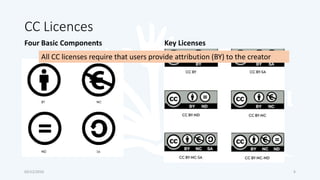
Four Basic Components Key Licenses
03/12/2016 6
All CC licenses require that users provide attribution (BY) to the creator
Most Open to Least Open CC Licence
03/12/2016
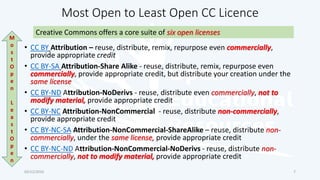
Creative Commons offers a core suite of six open licenses
M
o
s
t
O
p
e
n
L
e
a
s
t
O
p
e
n
7
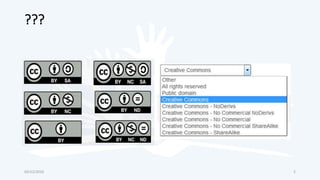
• CC BY Attribution – reuse, distribute, remix, repurpose even commercially,
provide appropriate credit
• CC BY-SA Attribution-Share Alike - reuse, distribute, remix, repurpose even
commercially, provide appropriate credit, but distribute your creation under the
same license
• CC BY-ND Attribution-NoDerivs - reuse, distribute even commercially, not to
modify material, provide appropriate credit
• CC BY-NC Attribution-NonCommercial - reuse, distribute non-commercially,
provide appropriate credit
• CC BY-NC-SA Attribution-NonCommercial-ShareAlike – reuse, distribute non-
commercially, under the same license, provide appropriate credit
• CC BY-NC-ND Attribution-NonCommercial-NoDerivs - reuse, distribute non-
commercially, not to modify material, provide appropriate credit
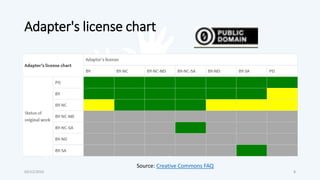
Adapter's license chart
03/12/2016 8
Source: Creative Commons FAQ
CC Ported vs. Global License
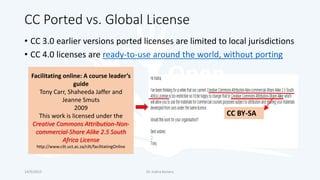
• CC 3.0 earlier versions ported licenses are limited to local jurisdictions
• CC 4.0 licenses are ready-to-use around the world, without porting
14/9/2015 Dr. Indira Koneru
Facilitating online: A course leader’s
guide
Tony Carr, Shaheeda Jaffer and
Jeanne Smuts
2009
This work is licensed under the
Creative Commons Attribution-Non-
commercial-Share Alike 2.5 South
Africa License
http://www.cilt.uct.ac.za/cilt/facilitatingOnline
CC BY-SA
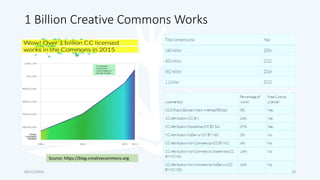
1 Billion Creative Commons Works
Source: https://blog.creativecommons.org
03/12/2016 10
How to attribute a CC Licensed Work!
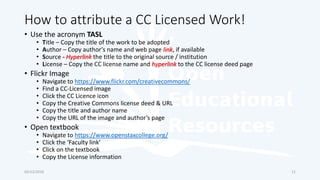
• Use the acronym TASL
• Title – Copy the title of the work to be adopted
• Author – Copy author’s name and web page link, if available
• Source - Hyperlink the title to the original source / institution
• License – Copy the CC license name and hyperlink to the CC license deed page
• Flickr Image
• Navigate to https://www.flickr.com/creativecommons/
• Find a CC-Licensed image
• Click the CC Licence icon
• Copy the Creative Commons license deed & URL
• Copy the title and author name
• Copy the URL of the image and author’s page
• Open textbook
• Navigate to https://www.openstaxcollege.org/
• Click the ‘Faculty link’
• Click on the textbook
• Copy the License information
03/12/2016 11
OER Key Developments
03/12/2016
• Learning Object (Hodgins, 1994)
• Technical Standards (IMS, LOM, SCORM, 1995)
• Open Content (David Wiley, 1998)
• Creative Commons (Larry Lessig, 2001)
• MIT OCW (2001)
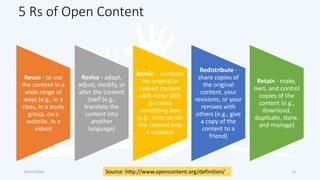
• UNESCO Forum on the Impact of Open Courseware for Higher
Education in Developing Countries (2002) – OER defined
• Open Courseware Consortium (2005)
• Open Learn (OU, 2006)
• COL and UNESCO guidelines on OER in HE (2011)
12
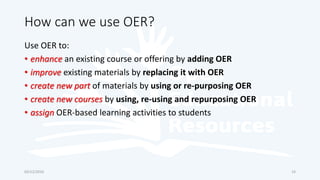
5 Rs of Open Content
Reuse - to use
the content in a
wide range of
ways (e.g., in a
class, in a study
group, on a
website, in a
video)
Revise - adapt,
adjust, modify, or
alter the content
itself (e.g.,
translate the
content into
another
language)
Remix - combine
the original or
revised content
with other OER
to create
something new
(e.g., incorporate
the content into
a mashup)
Redistribute -
share copies of
the original
content, your
revisions, or your
remixes with
others (e.g., give
a copy of the
content to a
friend)
Retain - make,
own, and control
copies of the
content (e.g.,
download,
duplicate, store,
and manage)
03/12/2016 13Source: http://www.opencontent.org/definition/
How can we use OER?
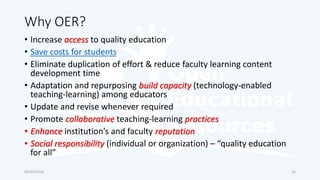
Use OER to:
• enhance an existing course or offering by adding OER
• improve existing materials by replacing it with OER
• create new part of materials by using or re-purposing OER
• create new courses by using, re-using and repurposing OER
• assign OER-based learning activities to students
03/12/2016 14
Why OER?
• Increase access to quality education
• Save costs for students
• Eliminate duplication of effort & reduce faculty learning content
development time
• Adaptation and repurposing build capacity (technology-enabled
teaching-learning) among educators
• Update and revise whenever required
• Promote collaborative teaching-learning practices
• Enhance institution’s and faculty reputation
• Social responsibility (individual or organization) – “quality education
for all”
03/12/2016 15
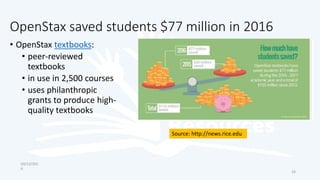
OpenStax saved students $77 million in 2016
• OpenStax textbooks:
• peer-reviewed
textbooks
• in use in 2,500 courses
• uses philanthropic
grants to produce high-
quality textbooks
03/12/201
6
16
Source: http://news.rice.edu
Sources of OER
• Open Education Consortium
• OER Consortium
• OER Commons
• OpenStax College
• Open Textbooks, BC Campus
• Saylor
• Open Textbook Library University of
Minnesota
• Open Textbooks SUNY
• Open Access Textbooks
• MERLOT
• Open.Michigan
• University of Edinburgh
• MIT OCW
• John Hopkins OCW
• Tufts OCW
• OER Arcia
• COL DOER
• Open Education Europa
• Open Learn , UK OU
• CMU OLI
• MOOC
• Yale Open Courses
• DOAB
• DOAJ
• Flickr Images
• NPTEL
• NROER
• Spoken Tutorial, IITB
03/12/2016 17
Open Education Initiatives in India
• NPTEL National Programme on
Technology Enhanced Learning (7 IITs &
IISc)
• Virtual Labs - remote-access to Labs in
Science & Engineering
• IIT Bombay
• ET Research Resources
• Teaching Resources
• Spoken Tutorial – learn FOSS (Free and
Open Source Software) CC BY-SA 4.0
• ePathshala – (MHRD & NME-ICT) e-
content in 71 subjects at PG level)
• MOOC
• NPTEL - seven IITs and IISc
• IITBombayX
• Partners
• IIMBx
• ISB
• SWAYAM
28/12/201
6 18
Open Textbooks
• OpenStax (Rice University)
• BC Open Textbooks
• CK-12 FlexBook® textbooks: open source digital textbooks
• University of Minnesota Open Textbooks
• College Open Textbooks: not a content provider, provides links to
open textbooks
• Open SUNY Textbooks: State University of New York libraries
03/12/2016 19
Open Courseware
• MIT OCW
• John Hopkins OCW
• Tufts OCW
03/12/2016 20
Open Online Courses
• Open Learn , UK OU
• CMU OLI
• Open Course Library
• Saylor Academy
• Yale Open Courses
• NPTEL Online Courses
• OERu
• MOOC (edX, FutureLearn,
Coursera, Canvas, Udacity, NovoEd,
Moodle etc.)
• Moodle.net: free content and
courses shared by Moodle users
with CC BY 4.0 License
• courses you can download and use
• courses you can enrol in and
participate
• ATEP CC BY 4.0 License
• ATEP - Biotechnology Module A
• ATEP - Biotechnology Module B
• Guest access / download and restore
on your Moodle
28/12/201
6 21
Publish Your Course on
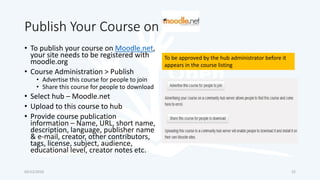
• To publish your course on Moodle.net,
your site needs to be registered with
moodle.org
• Course Administration > Publish
• Advertise this course for people to join
• Share this course for people to download
• Select hub – Moodle.net
• Upload to this course to hub
• Provide course publication
information – Name, URL, short name,
description, language, publisher name
& e-mail, creator, other contributors,
tags, license, subject, audience,
educational level, creator notes etc.
03/12/2016 22
To be approved by the hub administrator before it
appears in the course listing
Creating & Sharing OER
• Share your own content as OER
• Create content on MS Word /
PPT
• Add tags
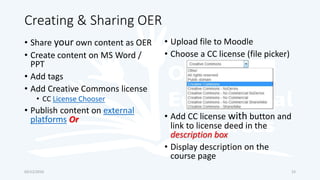
• Add Creative Commons license
• CC License Chooser
• Publish content on external
platforms Or
• Upload file to Moodle
• Choose a CC license (file picker)
• Add CC license with button and
link to license deed in the
description box
• Display description on the
course page
03/12/2016 23
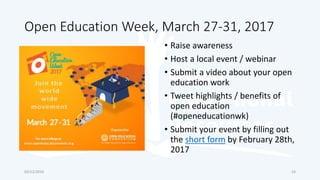
Open Education Week, March 27-31, 2017
• Raise awareness
• Host a local event / webinar
• Submit a video about your open
education work
• Tweet highlights / benefits of
open education
(#openeducationwk)
• Submit your event by filling out
the short form by February 28th,
2017
03/12/2016 24

Understanding OER and CC Licenses

  • 1.
    Dr. Indira Koneru eLearningDepartment IBS India E-mail: indkon@gmail.com Indira.Koneru@ibsindia.org This work is licensed under a Creative Commons Attribution 4.0 International License. Understanding & T4E 2016
  • 2.
  • 3.
    Agenda • Understanding OER& CC Licenses • Exploring various OER 03/12/2016 3
  • 4.
    Open Educational Resources(OER) • “Open Educational Resources (OER) are teaching, learning, and research materials in any medium that reside in the public domain or have been released under an open license that permits their free use and re-purposing by others.” (Hewlett Foundation) • Technology-enabled, open provision of educational resources for consultation, use and adaptation by a community of users for non-commercial purposes (UNESCO, 2002). • “OER include full courses, course materials, modules, textbooks, streaming videos, tests, software, and any other tools, materials, or techniques used to support access to knowledge” (Hewlett Foundation) • Teaching-learning and research materials released with an open license to permit reuse and repurpose in whole or in part • Core of OER is how a resource is licensed for use, rather than the format of the resource itself 03/12/2016 4
  • 5.
    Creative Commons (CC)License • Creative Commons founded by Lary Lessig et al. in 2001 • Provides easy-to-use open licenses for creative works • Provide simple and flexible licenses • Some Rights Reserved - authors reserve some rights & grant share, use, repurpose permissions 03/12/2016 5
  • 6.
    CC Licences Four BasicComponents Key Licenses 03/12/2016 6 All CC licenses require that users provide attribution (BY) to the creator
  • 7.
    Most Open toLeast Open CC Licence 03/12/2016 Creative Commons offers a core suite of six open licenses M o s t O p e n L e a s t O p e n 7 • CC BY Attribution – reuse, distribute, remix, repurpose even commercially, provide appropriate credit • CC BY-SA Attribution-Share Alike - reuse, distribute, remix, repurpose even commercially, provide appropriate credit, but distribute your creation under the same license • CC BY-ND Attribution-NoDerivs - reuse, distribute even commercially, not to modify material, provide appropriate credit • CC BY-NC Attribution-NonCommercial - reuse, distribute non-commercially, provide appropriate credit • CC BY-NC-SA Attribution-NonCommercial-ShareAlike – reuse, distribute non- commercially, under the same license, provide appropriate credit • CC BY-NC-ND Attribution-NonCommercial-NoDerivs - reuse, distribute non- commercially, not to modify material, provide appropriate credit
  • 8.
    Adapter's license chart 03/12/20168 Source: Creative Commons FAQ
  • 9.
    CC Ported vs.Global License • CC 3.0 earlier versions ported licenses are limited to local jurisdictions • CC 4.0 licenses are ready-to-use around the world, without porting 14/9/2015 Dr. Indira Koneru Facilitating online: A course leader’s guide Tony Carr, Shaheeda Jaffer and Jeanne Smuts 2009 This work is licensed under the Creative Commons Attribution-Non- commercial-Share Alike 2.5 South Africa License http://www.cilt.uct.ac.za/cilt/facilitatingOnline CC BY-SA
  • 10.
    1 Billion CreativeCommons Works Source: https://blog.creativecommons.org 03/12/2016 10
  • 11.
    How to attributea CC Licensed Work! • Use the acronym TASL • Title – Copy the title of the work to be adopted • Author – Copy author’s name and web page link, if available • Source - Hyperlink the title to the original source / institution • License – Copy the CC license name and hyperlink to the CC license deed page • Flickr Image • Navigate to https://www.flickr.com/creativecommons/ • Find a CC-Licensed image • Click the CC Licence icon • Copy the Creative Commons license deed & URL • Copy the title and author name • Copy the URL of the image and author’s page • Open textbook • Navigate to https://www.openstaxcollege.org/ • Click the ‘Faculty link’ • Click on the textbook • Copy the License information 03/12/2016 11
  • 12.
    OER Key Developments 03/12/2016 •Learning Object (Hodgins, 1994) • Technical Standards (IMS, LOM, SCORM, 1995) • Open Content (David Wiley, 1998) • Creative Commons (Larry Lessig, 2001) • MIT OCW (2001) • UNESCO Forum on the Impact of Open Courseware for Higher Education in Developing Countries (2002) – OER defined • Open Courseware Consortium (2005) • Open Learn (OU, 2006) • COL and UNESCO guidelines on OER in HE (2011) 12
  • 13.
    5 Rs ofOpen Content Reuse - to use the content in a wide range of ways (e.g., in a class, in a study group, on a website, in a video) Revise - adapt, adjust, modify, or alter the content itself (e.g., translate the content into another language) Remix - combine the original or revised content with other OER to create something new (e.g., incorporate the content into a mashup) Redistribute - share copies of the original content, your revisions, or your remixes with others (e.g., give a copy of the content to a friend) Retain - make, own, and control copies of the content (e.g., download, duplicate, store, and manage) 03/12/2016 13Source: http://www.opencontent.org/definition/
  • 14.
    How can weuse OER? Use OER to: • enhance an existing course or offering by adding OER • improve existing materials by replacing it with OER • create new part of materials by using or re-purposing OER • create new courses by using, re-using and repurposing OER • assign OER-based learning activities to students 03/12/2016 14
  • 15.
    Why OER? • Increaseaccess to quality education • Save costs for students • Eliminate duplication of effort & reduce faculty learning content development time • Adaptation and repurposing build capacity (technology-enabled teaching-learning) among educators • Update and revise whenever required • Promote collaborative teaching-learning practices • Enhance institution’s and faculty reputation • Social responsibility (individual or organization) – “quality education for all” 03/12/2016 15
  • 16.
    OpenStax saved students$77 million in 2016 • OpenStax textbooks: • peer-reviewed textbooks • in use in 2,500 courses • uses philanthropic grants to produce high- quality textbooks 03/12/201 6 16 Source: http://news.rice.edu
  • 17.
    Sources of OER •Open Education Consortium • OER Consortium • OER Commons • OpenStax College • Open Textbooks, BC Campus • Saylor • Open Textbook Library University of Minnesota • Open Textbooks SUNY • Open Access Textbooks • MERLOT • Open.Michigan • University of Edinburgh • MIT OCW • John Hopkins OCW • Tufts OCW • OER Arcia • COL DOER • Open Education Europa • Open Learn , UK OU • CMU OLI • MOOC • Yale Open Courses • DOAB • DOAJ • Flickr Images • NPTEL • NROER • Spoken Tutorial, IITB 03/12/2016 17
  • 18.
    Open Education Initiativesin India • NPTEL National Programme on Technology Enhanced Learning (7 IITs & IISc) • Virtual Labs - remote-access to Labs in Science & Engineering • IIT Bombay • ET Research Resources • Teaching Resources • Spoken Tutorial – learn FOSS (Free and Open Source Software) CC BY-SA 4.0 • ePathshala – (MHRD & NME-ICT) e- content in 71 subjects at PG level) • MOOC • NPTEL - seven IITs and IISc • IITBombayX • Partners • IIMBx • ISB • SWAYAM 28/12/201 6 18
  • 19.
    Open Textbooks • OpenStax(Rice University) • BC Open Textbooks • CK-12 FlexBook® textbooks: open source digital textbooks • University of Minnesota Open Textbooks • College Open Textbooks: not a content provider, provides links to open textbooks • Open SUNY Textbooks: State University of New York libraries 03/12/2016 19
  • 20.
    Open Courseware • MITOCW • John Hopkins OCW • Tufts OCW 03/12/2016 20
  • 21.
    Open Online Courses •Open Learn , UK OU • CMU OLI • Open Course Library • Saylor Academy • Yale Open Courses • NPTEL Online Courses • OERu • MOOC (edX, FutureLearn, Coursera, Canvas, Udacity, NovoEd, Moodle etc.) • Moodle.net: free content and courses shared by Moodle users with CC BY 4.0 License • courses you can download and use • courses you can enrol in and participate • ATEP CC BY 4.0 License • ATEP - Biotechnology Module A • ATEP - Biotechnology Module B • Guest access / download and restore on your Moodle 28/12/201 6 21
  • 22.
    Publish Your Courseon • To publish your course on Moodle.net, your site needs to be registered with moodle.org • Course Administration > Publish • Advertise this course for people to join • Share this course for people to download • Select hub – Moodle.net • Upload to this course to hub • Provide course publication information – Name, URL, short name, description, language, publisher name & e-mail, creator, other contributors, tags, license, subject, audience, educational level, creator notes etc. 03/12/2016 22 To be approved by the hub administrator before it appears in the course listing
  • 23.
    Creating & SharingOER • Share your own content as OER • Create content on MS Word / PPT • Add tags • Add Creative Commons license • CC License Chooser • Publish content on external platforms Or • Upload file to Moodle • Choose a CC license (file picker) • Add CC license with button and link to license deed in the description box • Display description on the course page 03/12/2016 23
  • 24.
    Open Education Week,March 27-31, 2017 • Raise awareness • Host a local event / webinar • Submit a video about your open education work • Tweet highlights / benefits of open education (#openeducationwk) • Submit your event by filling out the short form by February 28th, 2017 03/12/2016 24

Editor's Notes

  • #6 "All Rights Reserved“ vs. "Some Rights Reserved."
  • #7 https://creativecommons.org/faq/ identify which of the six licenses you are applying to your material, which of the six licenses has been applied to material that you intend to use, and in both cases the specific version.
  • #9 https://creativecommons.org/faq/#if-i-derive-or-adapt-material-offered-under-a-creative-commons-license-which-cc-licenses-can-i-use
  • #13 OpenLearn gives free access to learning materials from The Open University. COL and UNESCO guidelines on OER in HE - purpose is to encourage decision makers in governments and institutions to invest in the systematic production, adaptation and use of OER and to bring them into the mainstream of higher education in order to improve the quality of curricula and teaching and to reduce costs. https://youtu.be/i2VOcdndYxo?list=PL0FGLDlsHh48nnfNehXbam-8mv2nodrut
  • #14 The term “Open” in OER describes any copyrightable work that is licensed in a manner that provides users with free and perpetual permission to engage in any of the "5R" activities:
  • #15 OERR Rubric
  • #16 This improvement cycle contrasts with traditional materials that typically have to be used by students for several years until a new edition is published or even the next purchasing cycle.
  • #19 Quality Enhancement in Engineering Education Coursepack - A supplement study material with lecture notes, live class videos, discussion forums, assessment and evaluation tools to serve as a reference material for QEEE courses. Livelabs - To provide virtual hands-on experience to students on experiments undertaken remotely. It creates an opportunity to work on a real lab experiment tailored to suit their syllabus and curriculum. Bridge programs - To bridge the gap between the initial skills of individuals and what they need to enter and succeed in postsecondary education and career-path employment Spoken Tutorial You can start with any of the software course that we offer- Basic IT Skills, Blender, Linux, C, C++, Java, Python, Ruby, PERL, LibreOffice Suite, LATeX, PHP and MySQL, ORCA, Oscad, Thunderbird, Firefox, GeoGebra, GIMP, GSChem Paint, etc.
  • #22 Advanced Technological Educational Pathways Project Moodle site is created to provide valuable materials to educators around the world. This material is based upon work supported by the National Science Foundation under Grant No. 1104253.