OSPF

Routing Protocols and
Concepts – Chapter 11

ITE PC v4.0
Chapter 1

© 2007 Cisco Systems, Inc. All rights reserved.

Cisco Public

1
Objectives


Describe the background and basic features of OSPF



Identify and apply the basic OSPF configuration
commands



Describe, modify and calculate the metric used by
OSPF



Describe the Designated Router/Backup Designated
Router (DR/BDR) election process in multiaccess
networks



Describe the uses of additional configuration
commands in OSPF

ITE PC v4.0
Chapter 1

© 2007 Cisco Systems, Inc. All rights reserved.

Cisco Public

2
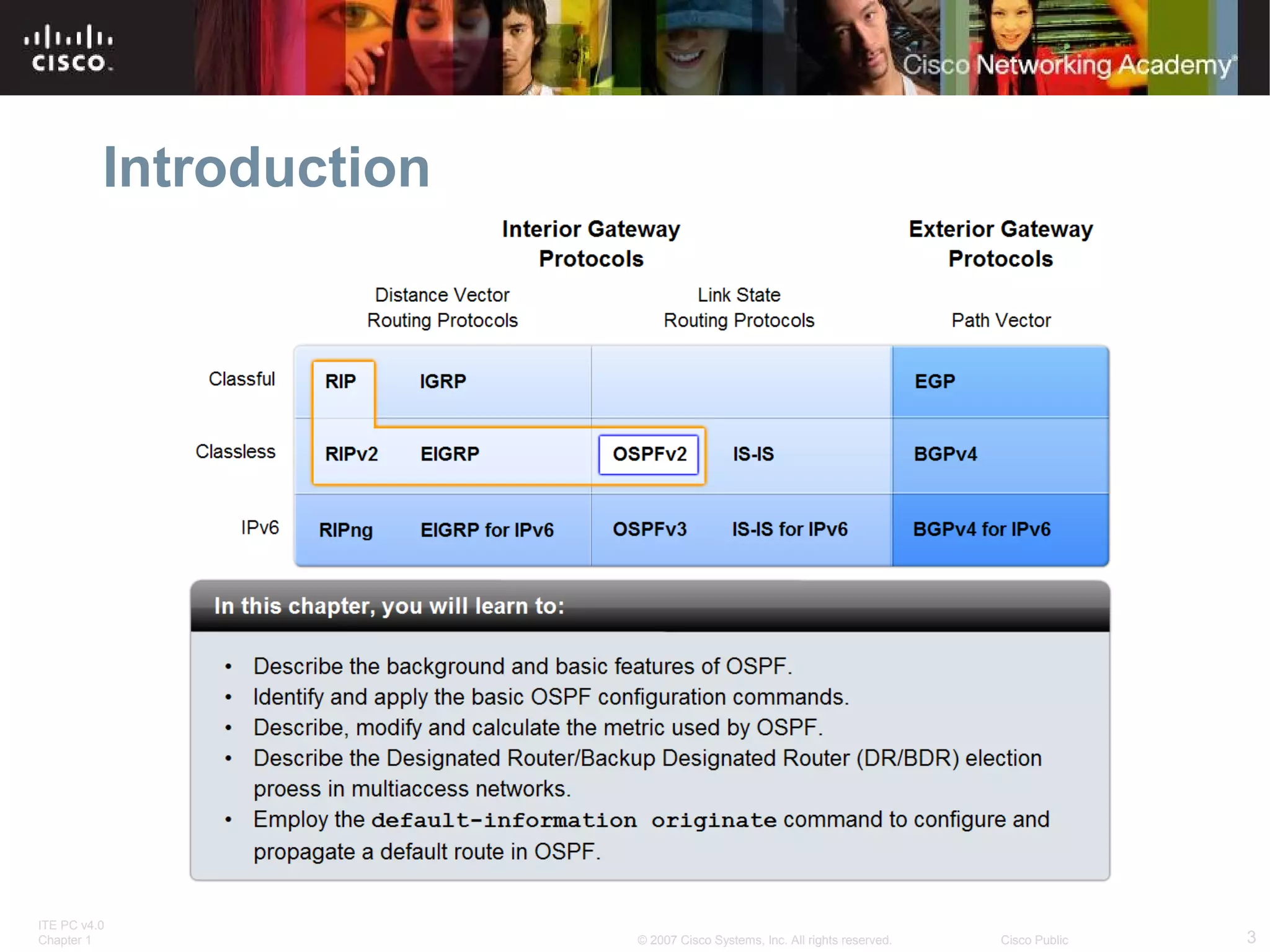
Introduction

ITE PC v4.0
Chapter 1

© 2007 Cisco Systems, Inc. All rights reserved.

Cisco Public

3
Introduction to OSPF
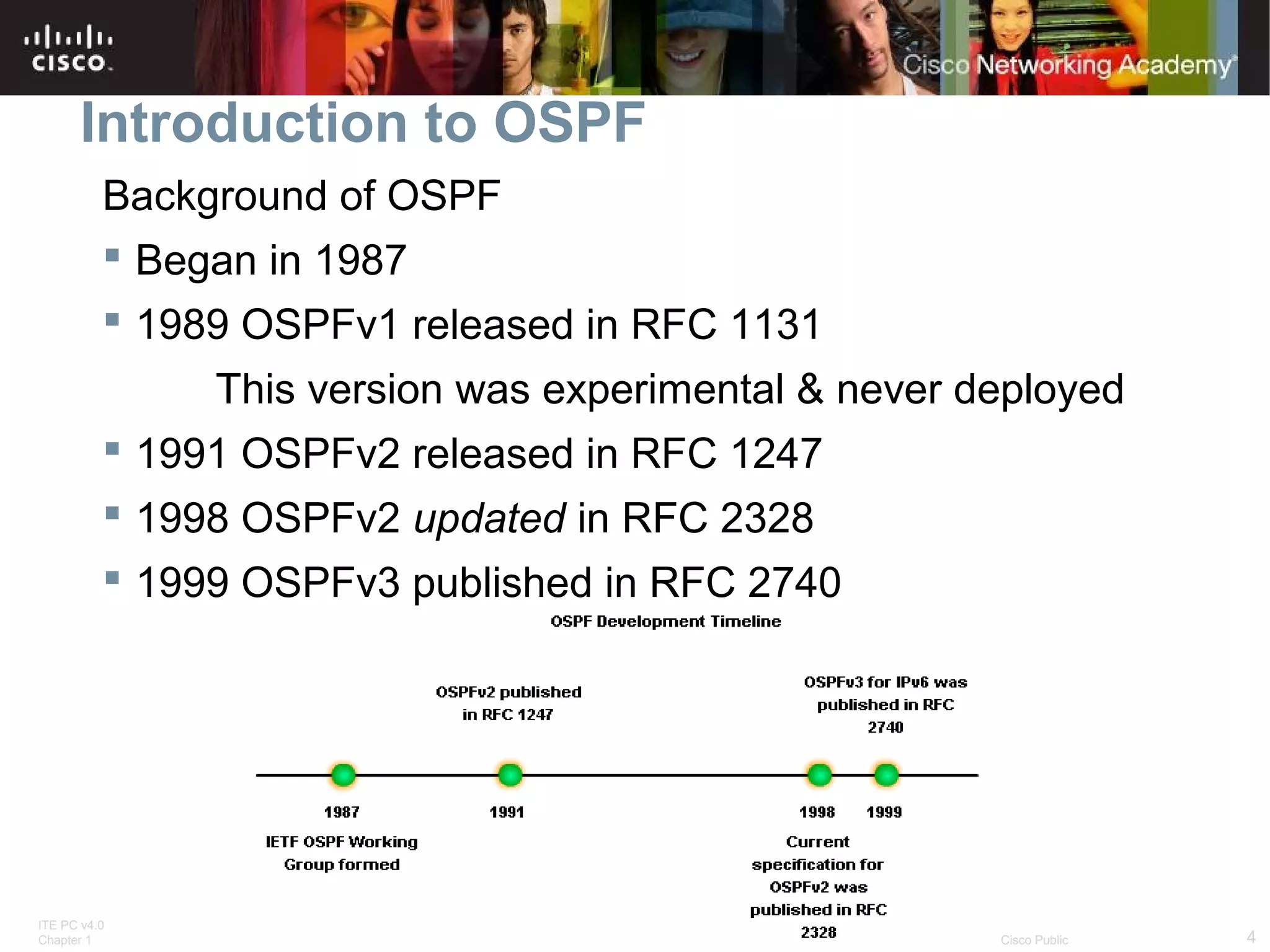
Background of OSPF
 Began in 1987
 1989 OSPFv1 released in RFC 1131
This version was experimental & never deployed
 1991 OSPFv2 released in RFC 1247
 1998 OSPFv2 updated in RFC 2328
 1999 OSPFv3 published in RFC 2740

ITE PC v4.0
Chapter 1

© 2007 Cisco Systems, Inc. All rights reserved.

Cisco Public

4
Introduction to OSPF
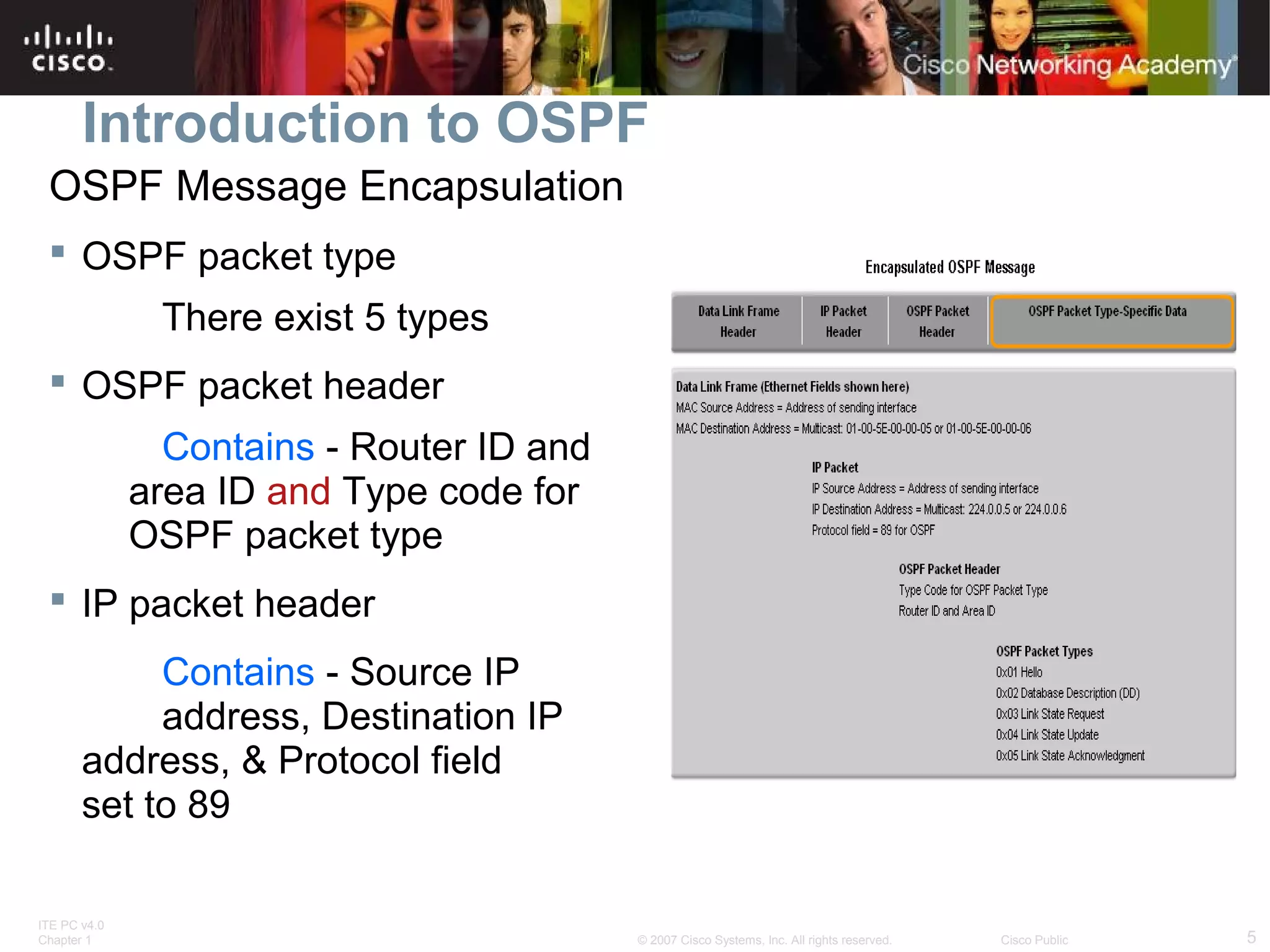
OSPF Message Encapsulation
 OSPF packet type
There exist 5 types
 OSPF packet header
Contains - Router ID and
area ID and Type code for
OSPF packet type
 IP packet header
Contains - Source IP
address, Destination IP
address, & Protocol field
set to 89
ITE PC v4.0
Chapter 1

© 2007 Cisco Systems, Inc. All rights reserved.

Cisco Public

5
Introduction to OSPF
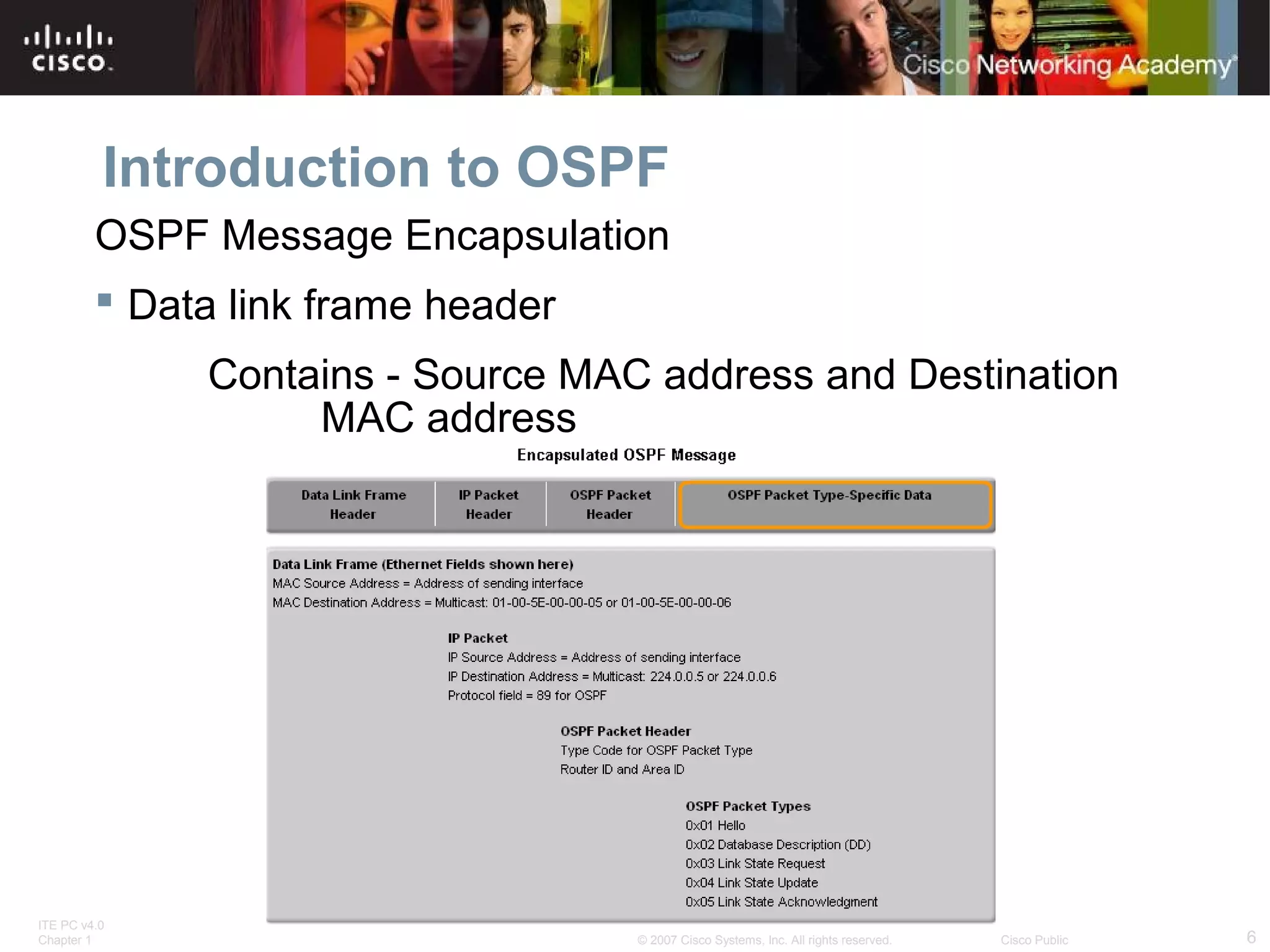
OSPF Message Encapsulation
 Data link frame header
Contains - Source MAC address and Destination
MAC address

ITE PC v4.0
Chapter 1

© 2007 Cisco Systems, Inc. All rights reserved.

Cisco Public

6
Introduction to OSPF
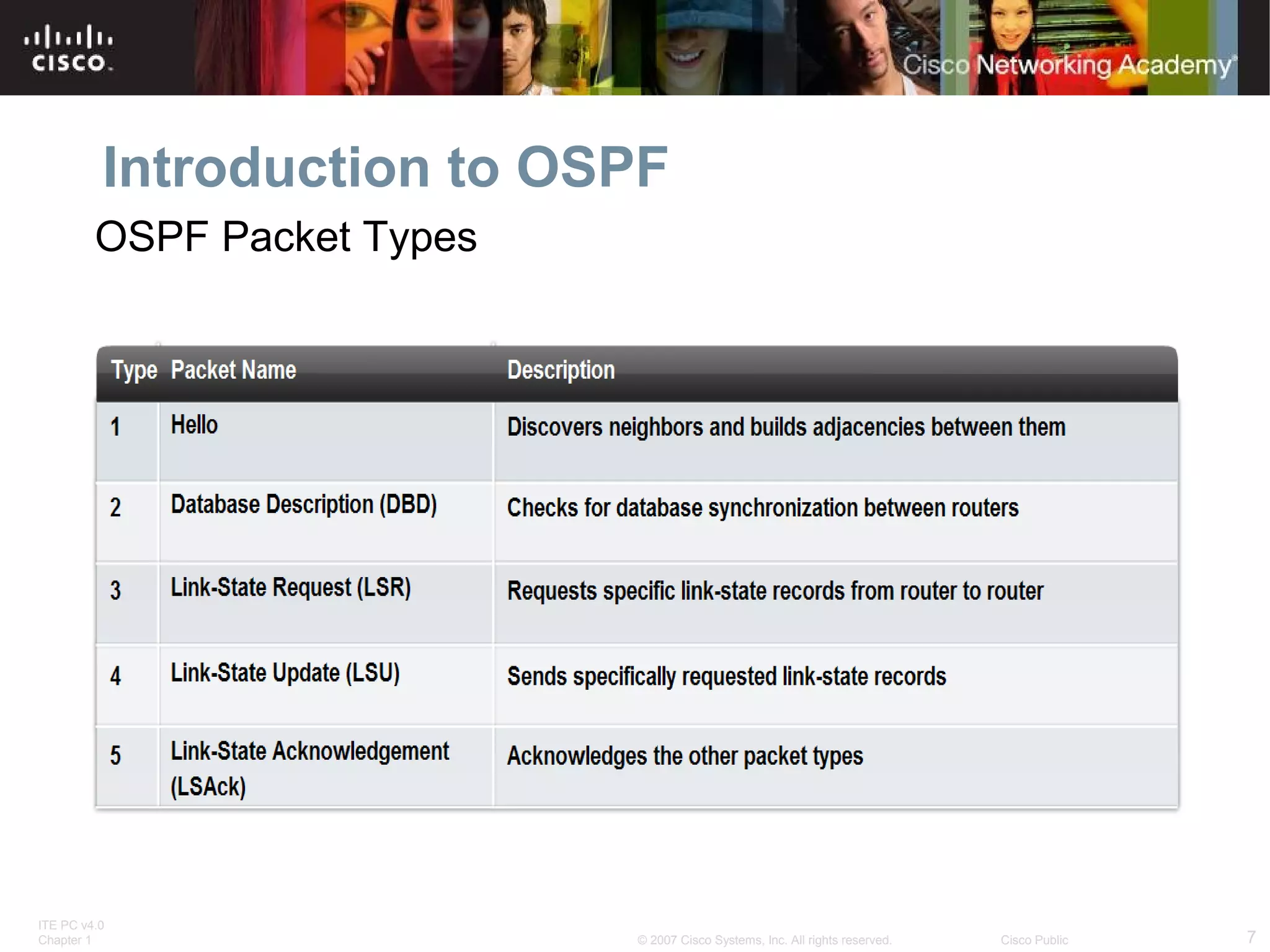
OSPF Packet Types

ITE PC v4.0
Chapter 1

© 2007 Cisco Systems, Inc. All rights reserved.

Cisco Public

7
Introduction to OSPF

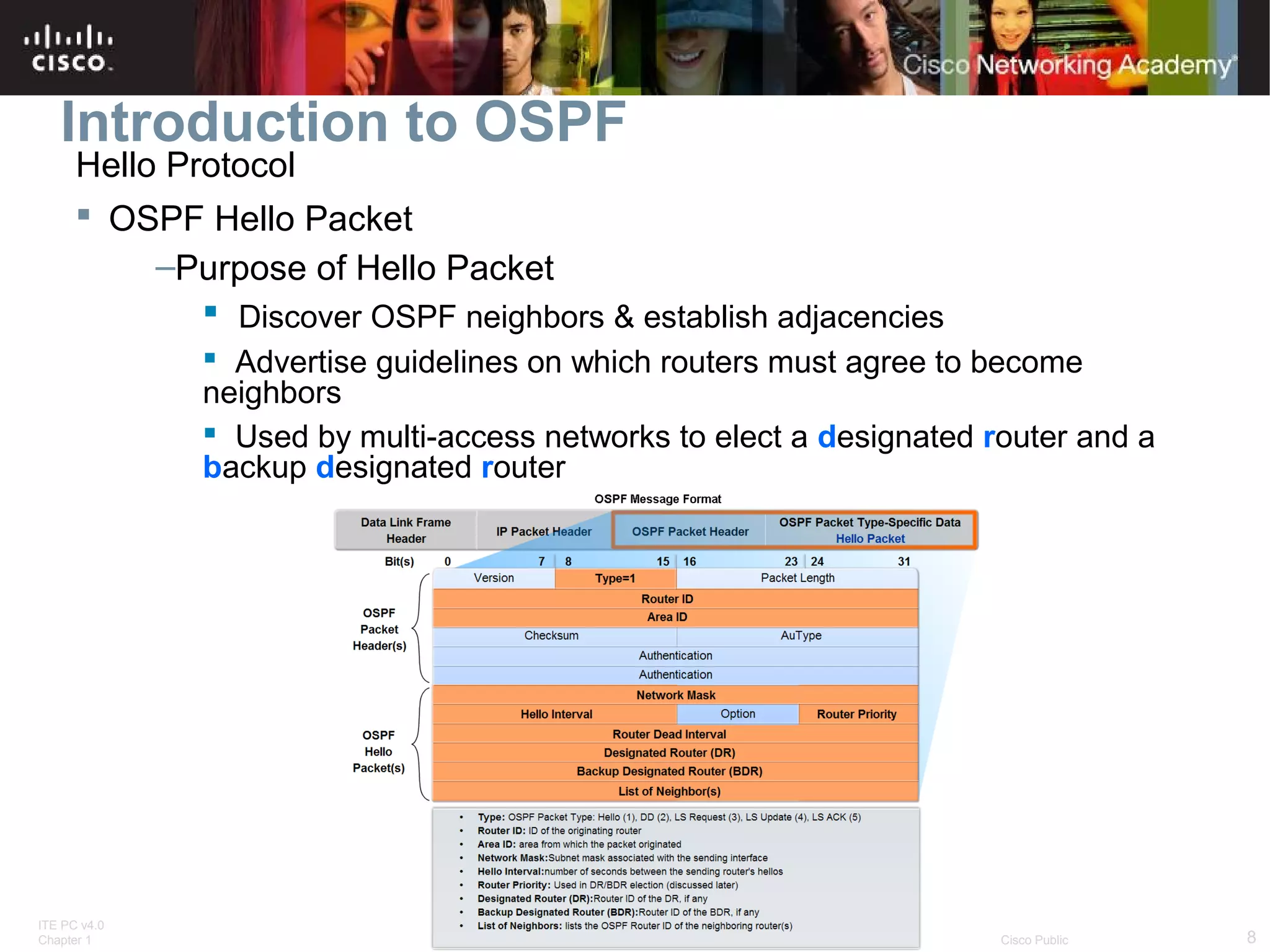
Hello Protocol
 OSPF Hello Packet
–Purpose of Hello Packet
 Discover OSPF neighbors & establish adjacencies
 Advertise guidelines on which routers must agree to become
neighbors
 Used by multi-access networks to elect a designated router and a
backup designated router

ITE PC v4.0
Chapter 1

© 2007 Cisco Systems, Inc. All rights reserved.

Cisco Public

8
Introduction to OSPF
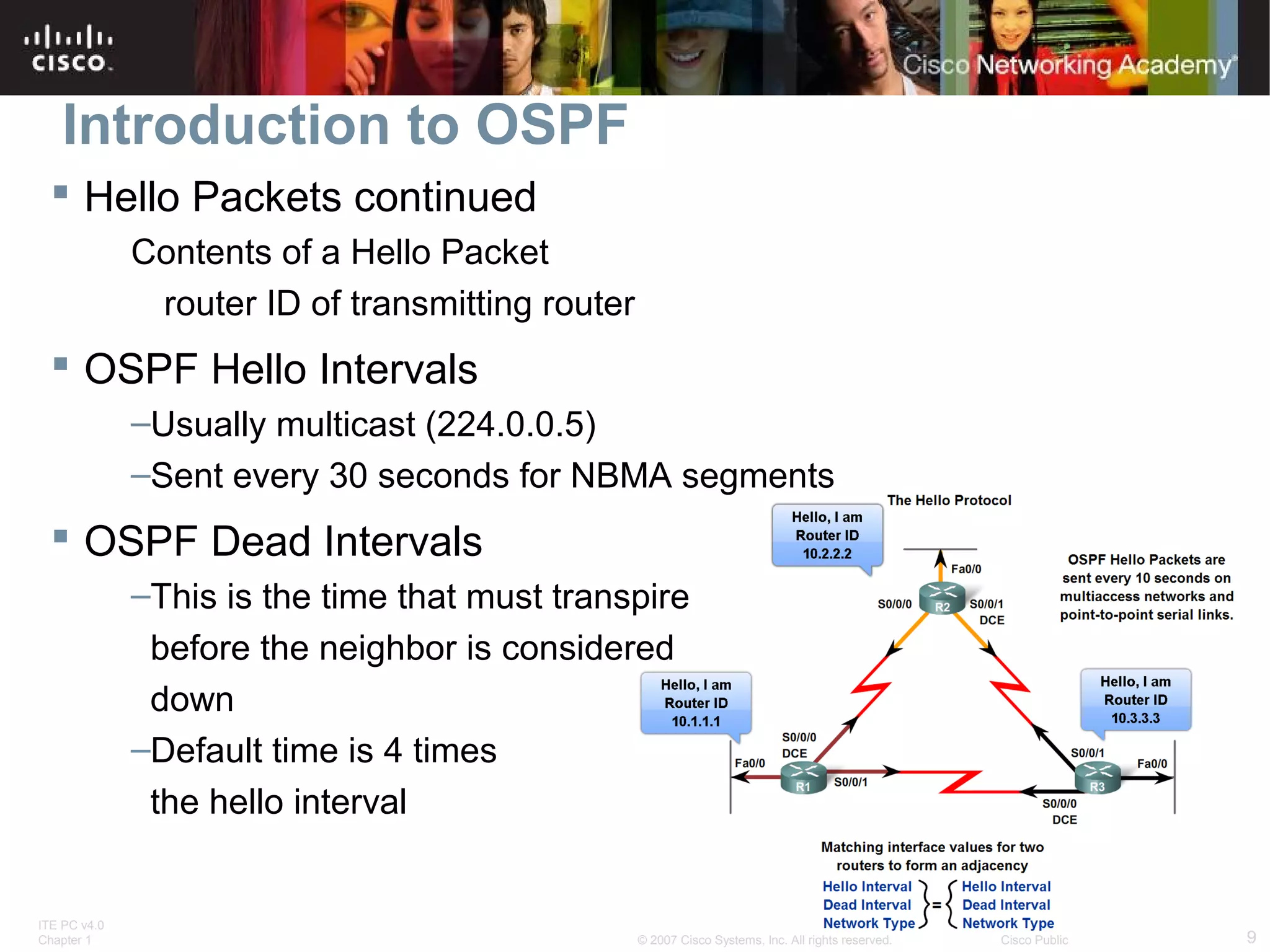
 Hello Packets continued
Contents of a Hello Packet
router ID of transmitting router

 OSPF Hello Intervals
–Usually multicast (224.0.0.5)
–Sent every 30 seconds for NBMA segments

 OSPF Dead Intervals
–This is the time that must transpire
before the neighbor is considered
down
–Default time is 4 times
the hello interval

ITE PC v4.0
Chapter 1

© 2007 Cisco Systems, Inc. All rights reserved.

Cisco Public

9
Introduction to OSPF
 Hello protocol packets contain information that is used
in electing
-Designated Router (DR)
 DR is responsible for updating all other OSPF routers
-Backup Designated Router (BDR)
 This router takes over DR’s responsibilities if DR fails

ITE PC v4.0
Chapter 1

© 2007 Cisco Systems, Inc. All rights reserved.

Cisco Public

10
Introduction to OSPF

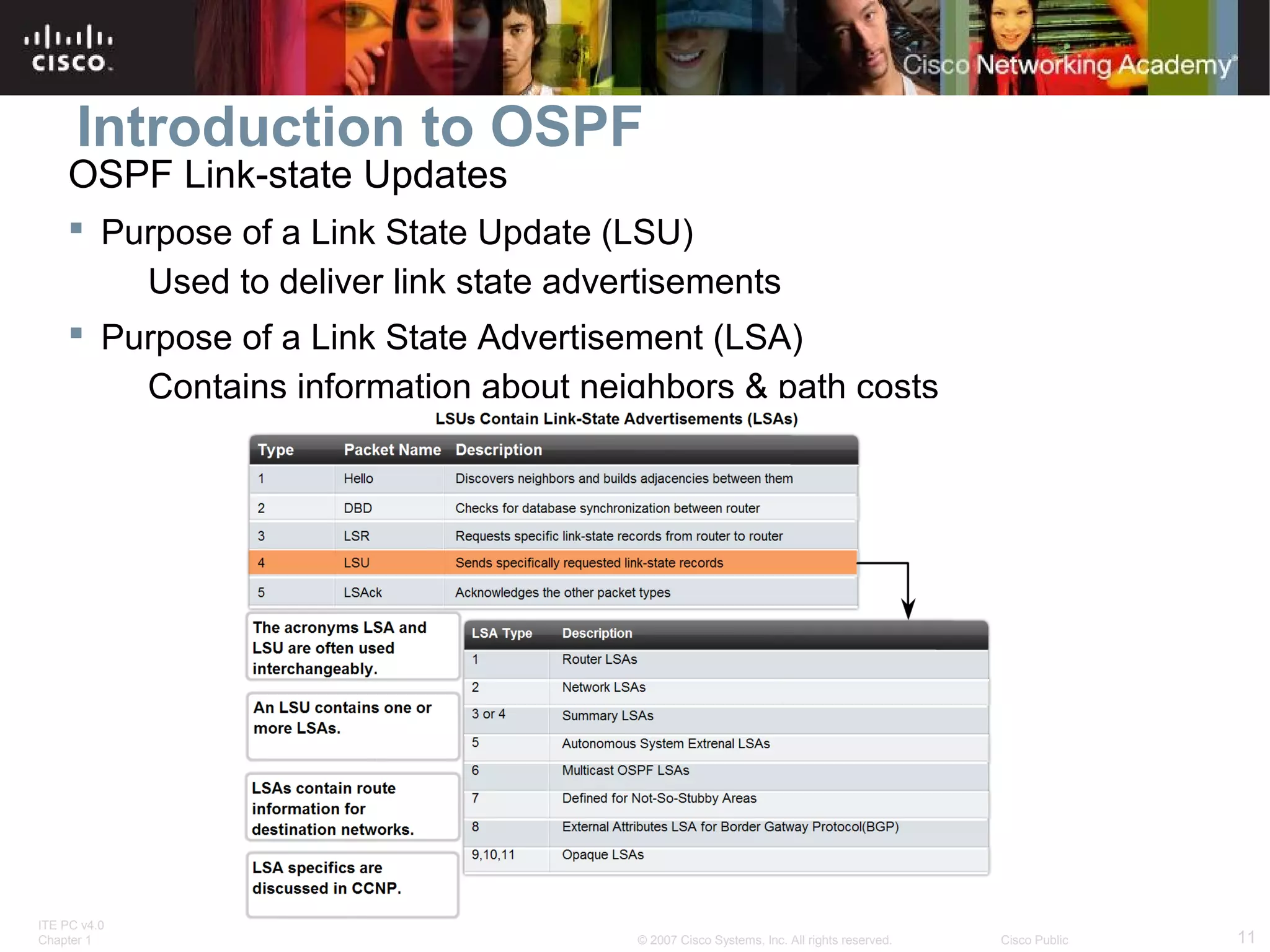
OSPF Link-state Updates

 Purpose of a Link State Update (LSU)
Used to deliver link state advertisements
 Purpose of a Link State Advertisement (LSA)
Contains information about neighbors & path costs

ITE PC v4.0
Chapter 1

© 2007 Cisco Systems, Inc. All rights reserved.

Cisco Public

11
Introduction to OSPF
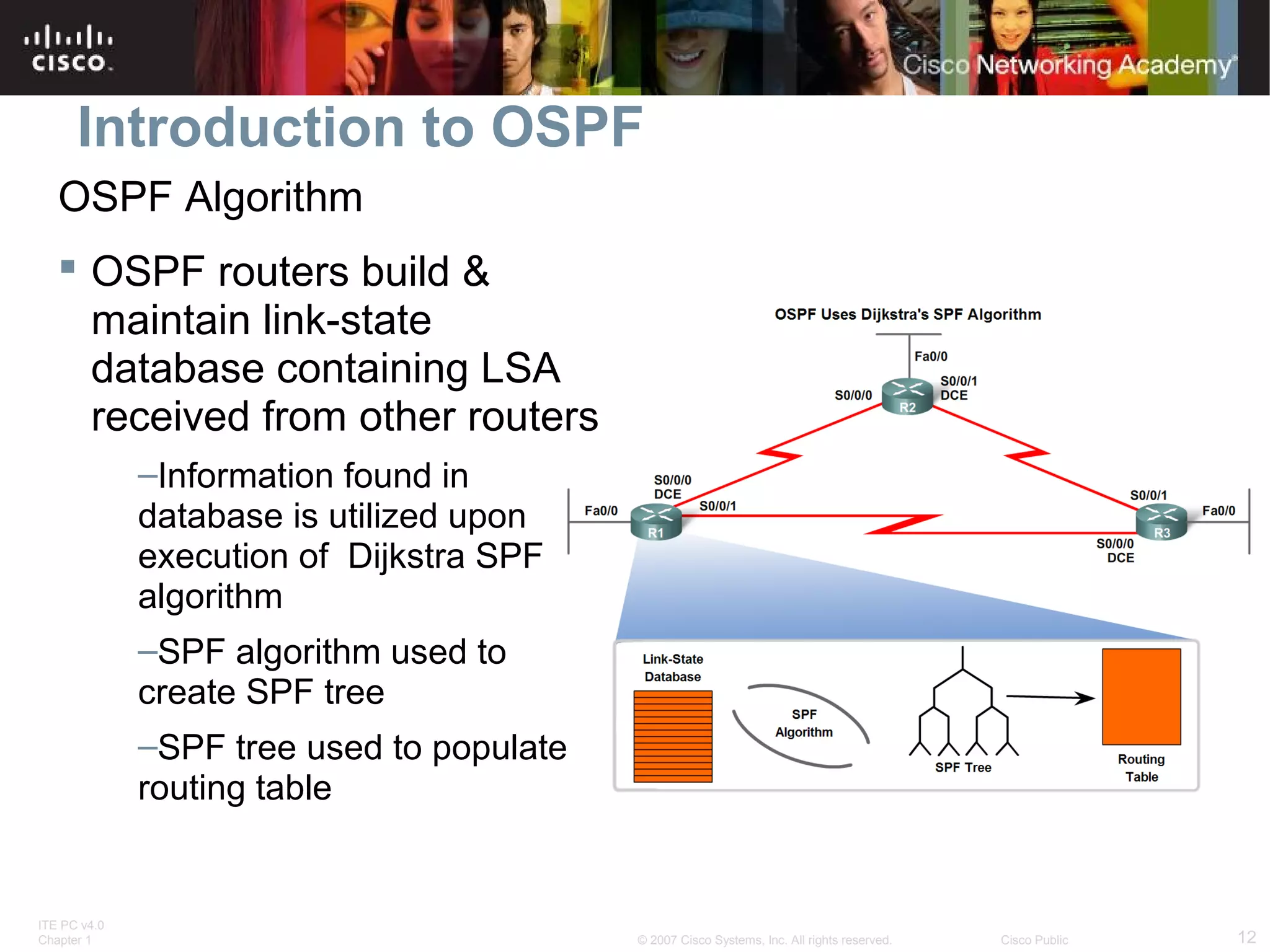
OSPF Algorithm
 OSPF routers build &
maintain link-state
database containing LSA
received from other routers
–Information found in
database is utilized upon
execution of Dijkstra SPF
algorithm
–SPF algorithm used to
create SPF tree
–SPF tree used to populate
routing table

ITE PC v4.0
Chapter 1

© 2007 Cisco Systems, Inc. All rights reserved.

Cisco Public

12
Introduction to OSPF
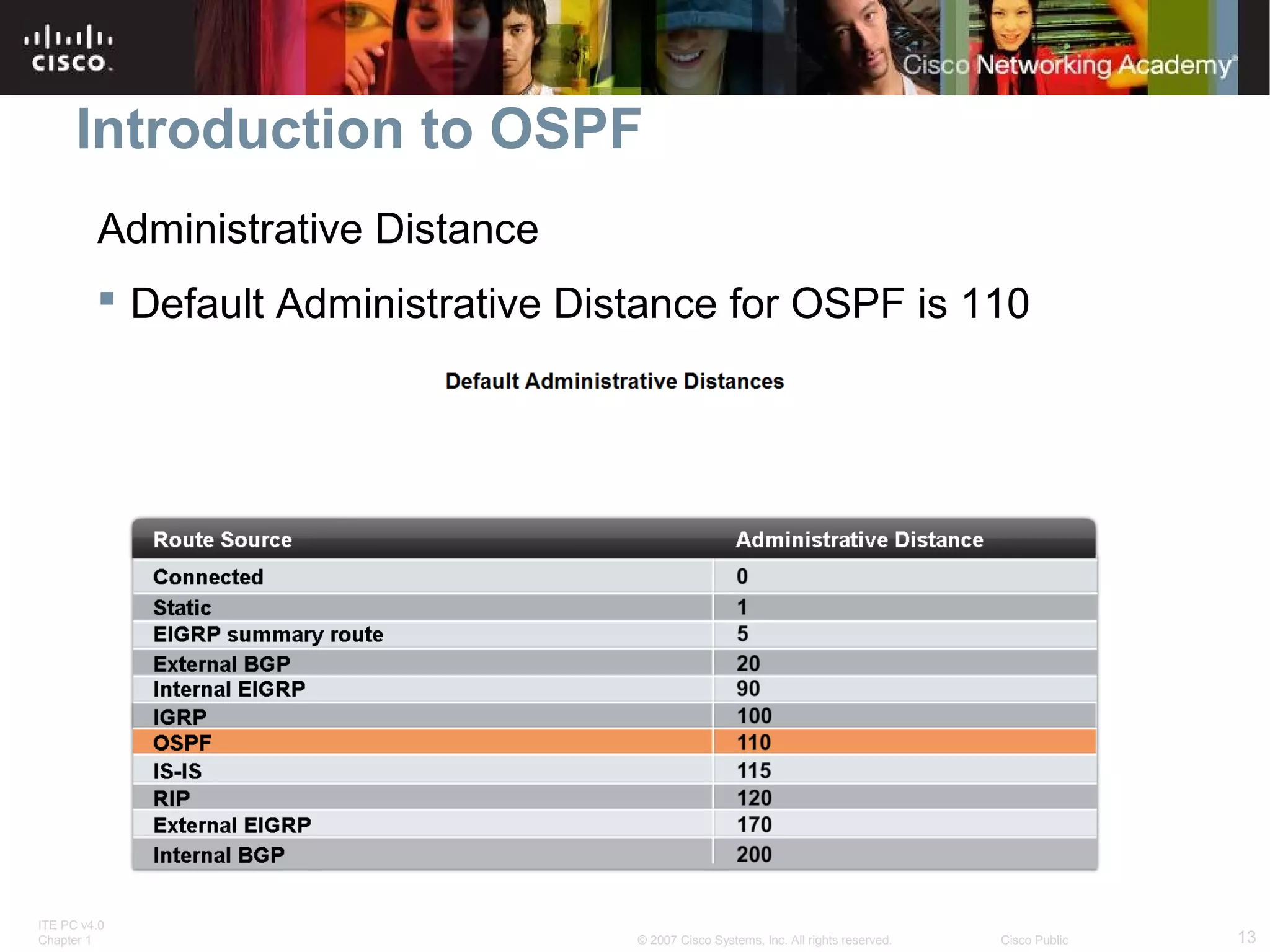
Administrative Distance
 Default Administrative Distance for OSPF is 110

ITE PC v4.0
Chapter 1

© 2007 Cisco Systems, Inc. All rights reserved.

Cisco Public

13
Introduction to OSPF

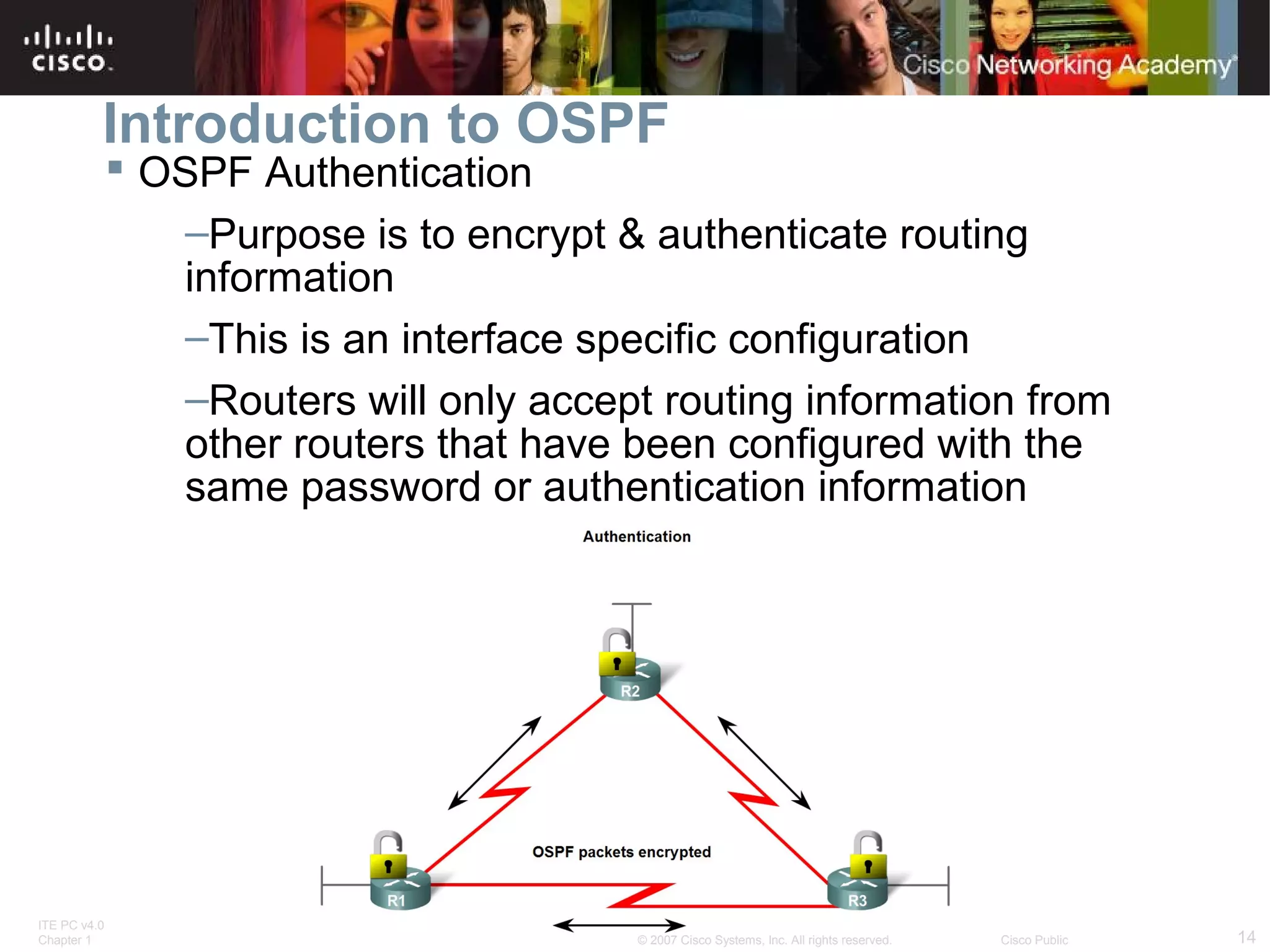
 OSPF Authentication
–Purpose is to encrypt & authenticate routing
information
–This is an interface specific configuration
–Routers will only accept routing information from
other routers that have been configured with the
same password or authentication information

ITE PC v4.0
Chapter 1

© 2007 Cisco Systems, Inc. All rights reserved.

Cisco Public

14
Basic OSPF Configuration
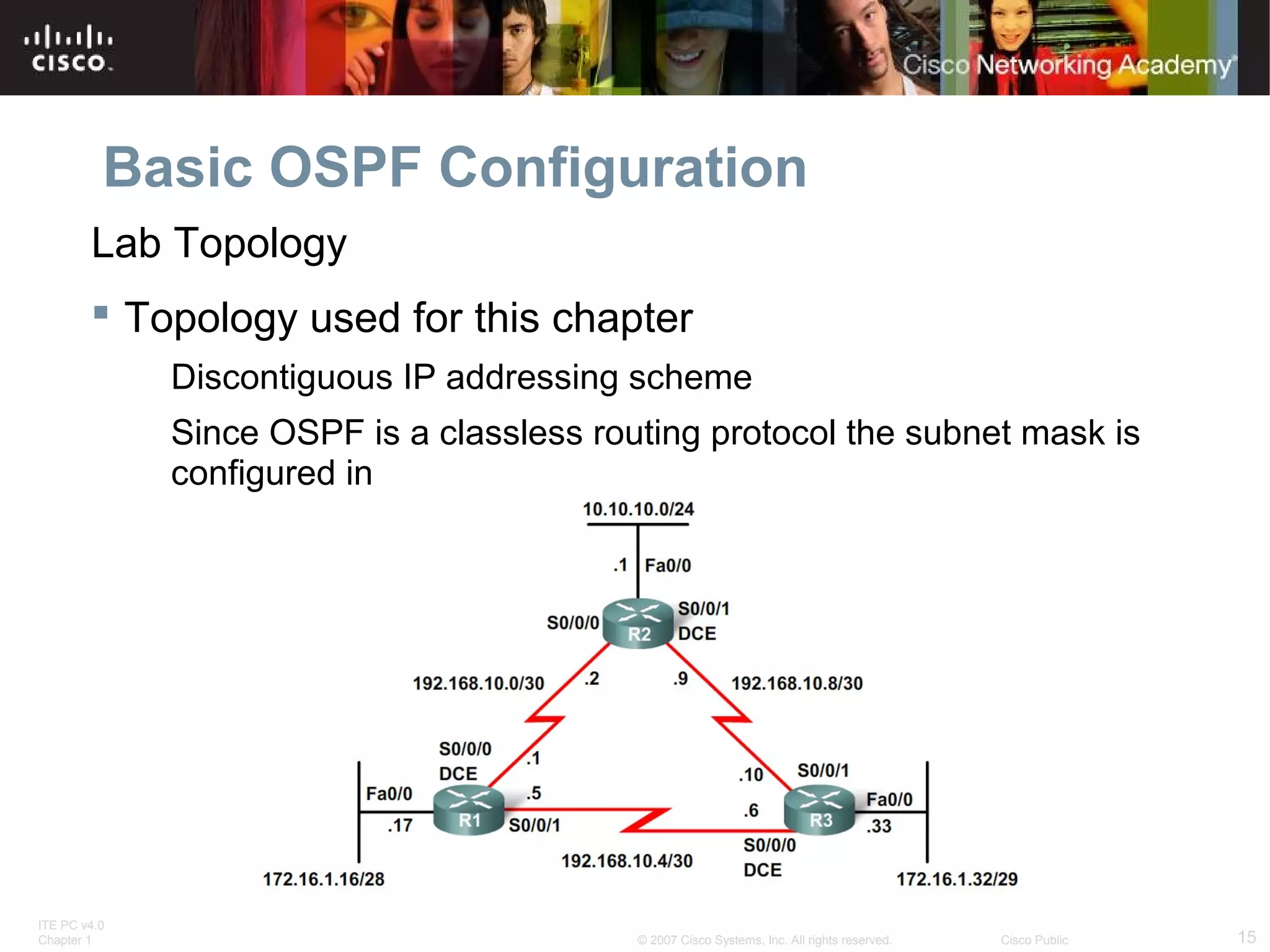
Lab Topology
 Topology used for this chapter
Discontiguous IP addressing scheme
Since OSPF is a classless routing protocol the subnet mask is
configured in

ITE PC v4.0
Chapter 1

© 2007 Cisco Systems, Inc. All rights reserved.

Cisco Public

15
Basic OSPF Configuration
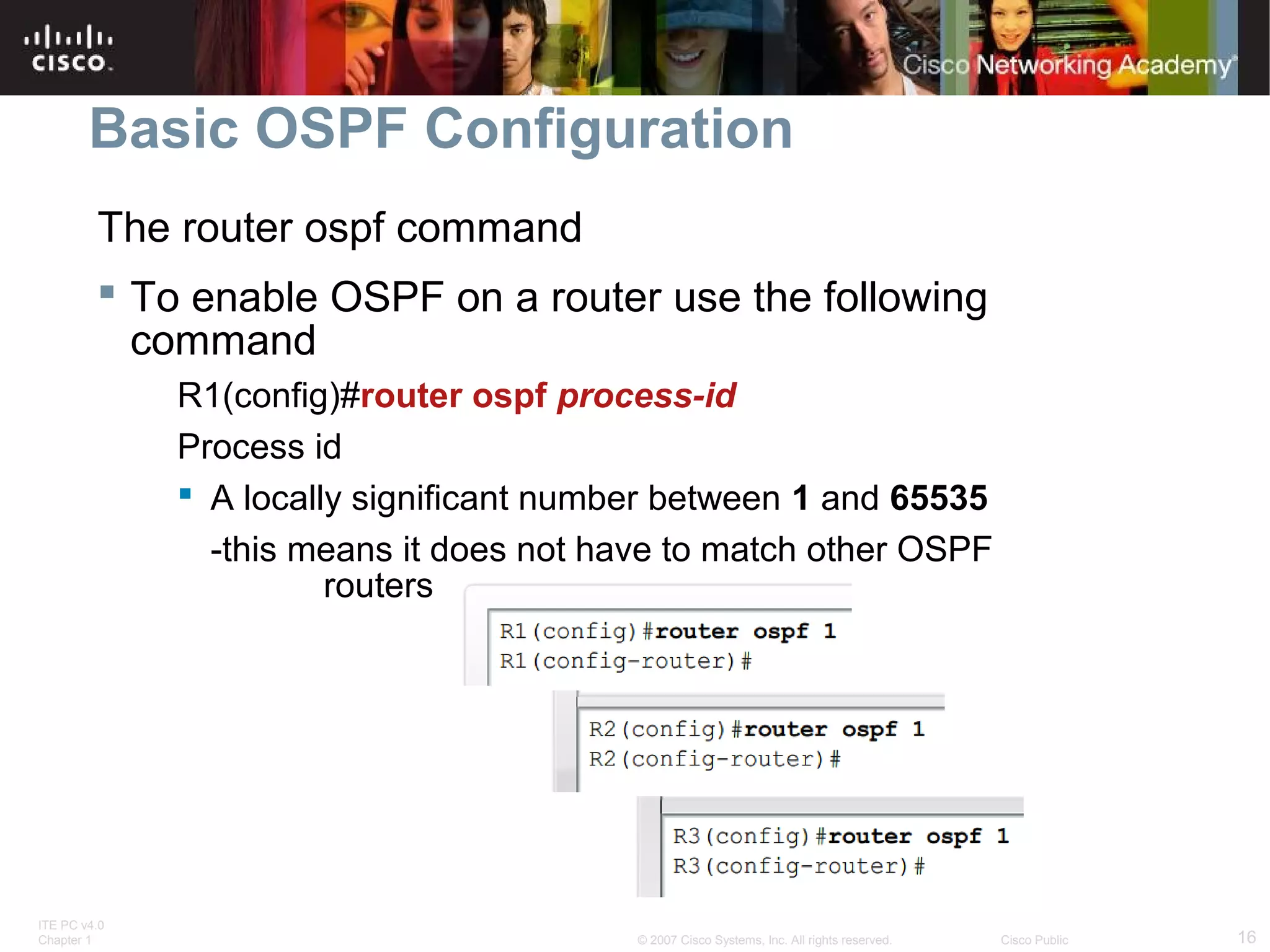
The router ospf command
 To enable OSPF on a router use the following
command
R1(config)#router ospf process-id
Process id
 A locally significant number between 1 and 65535
-this means it does not have to match other OSPF
routers

ITE PC v4.0
Chapter 1

© 2007 Cisco Systems, Inc. All rights reserved.

Cisco Public

16
Basic OSPF Configuration
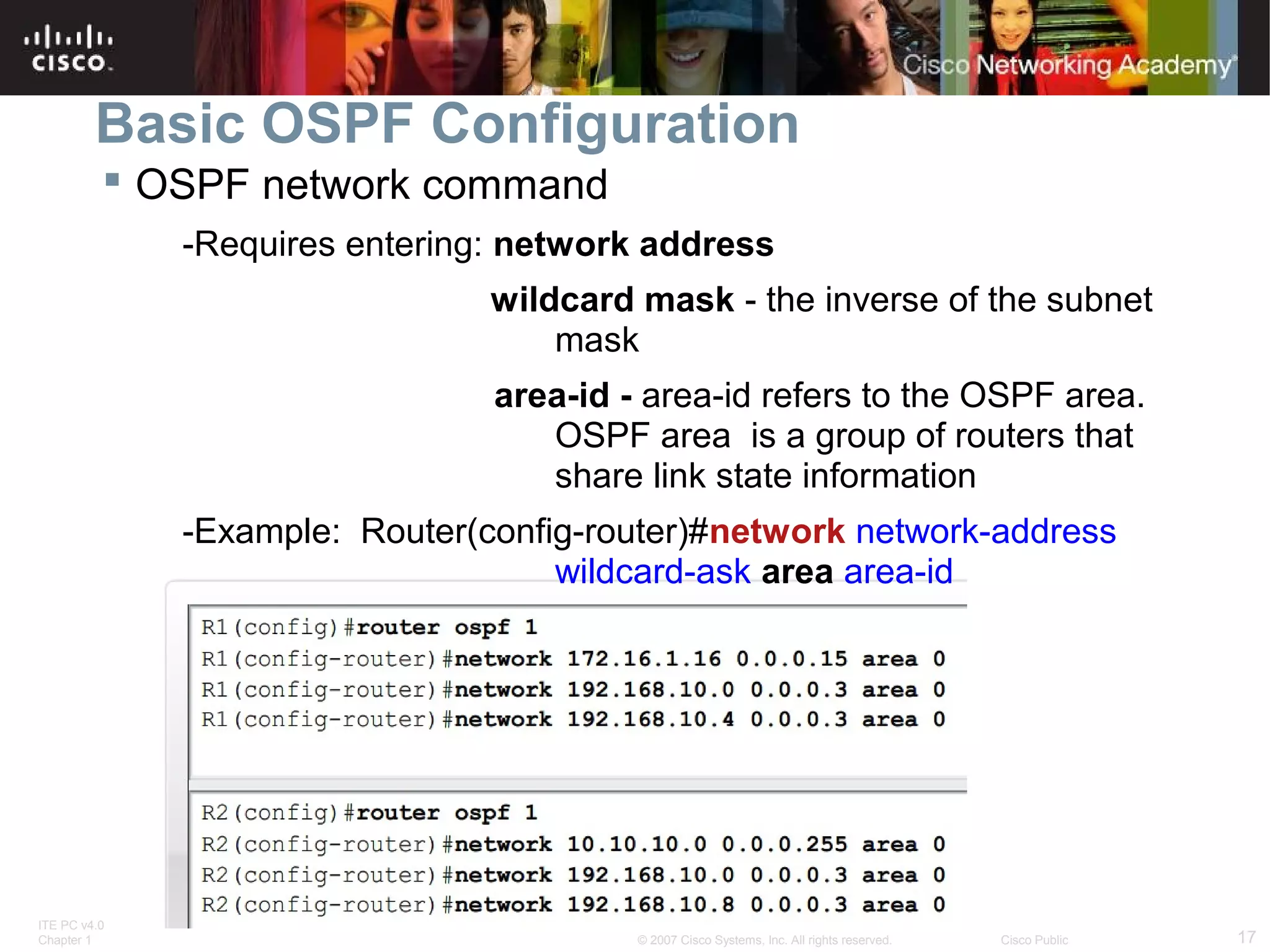
 OSPF network command
-Requires entering: network address
wildcard mask - the inverse of the subnet
mask
area-id - area-id refers to the OSPF area.
OSPF area is a group of routers that
share link state information
-Example: Router(config-router)#network network-address
wildcard-ask area area-id

ITE PC v4.0
Chapter 1

© 2007 Cisco Systems, Inc. All rights reserved.

Cisco Public

17
Basic OSPF Configuration
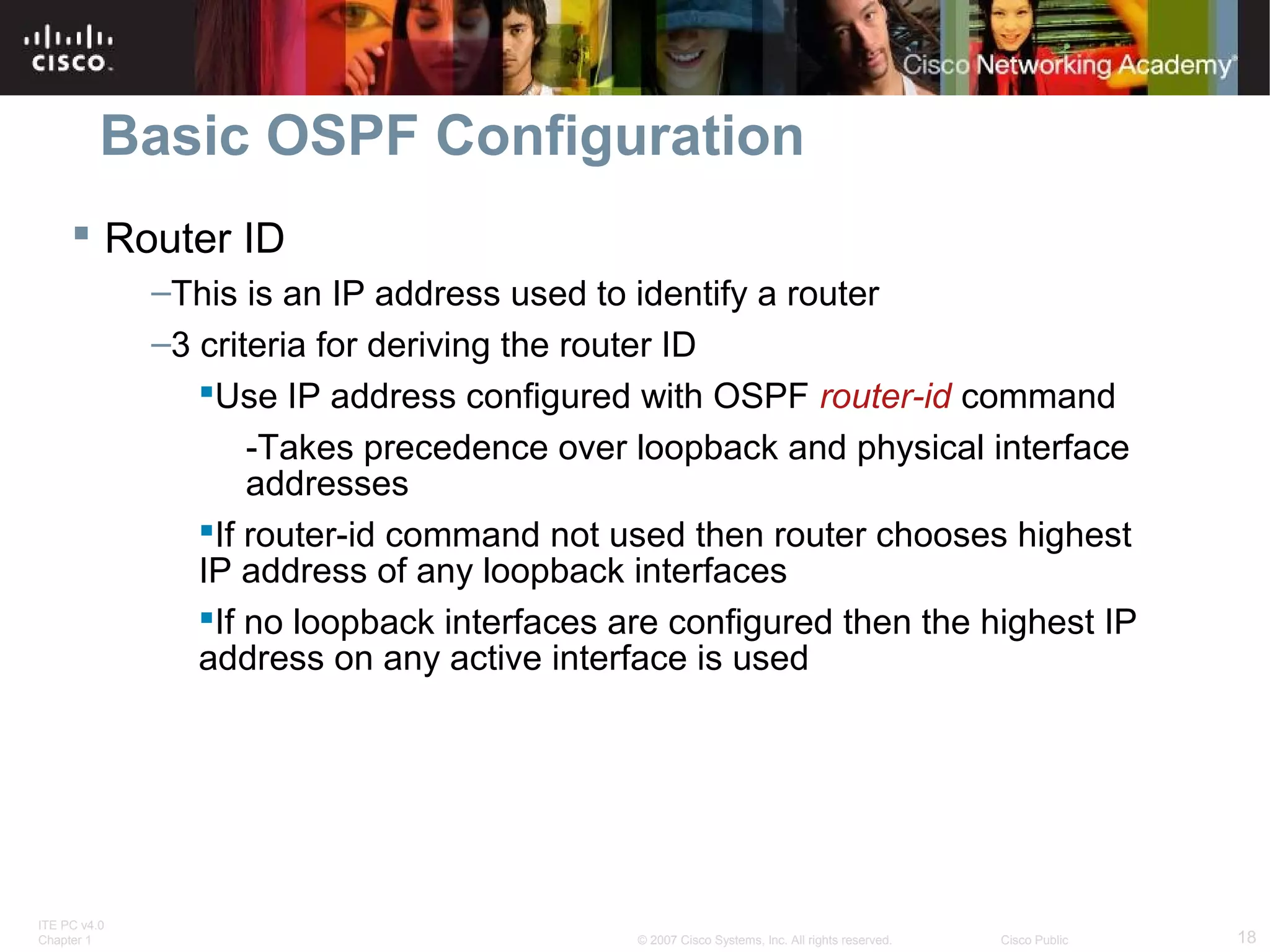
 Router ID
–This is an IP address used to identify a router
–3 criteria for deriving the router ID
Use IP address configured with OSPF router-id command
-Takes precedence over loopback and physical interface
addresses
If router-id command not used then router chooses highest
IP address of any loopback interfaces
If no loopback interfaces are configured then the highest IP
address on any active interface is used

ITE PC v4.0
Chapter 1

© 2007 Cisco Systems, Inc. All rights reserved.

Cisco Public

18
Basic OSPF Configuration
OSPF Router ID
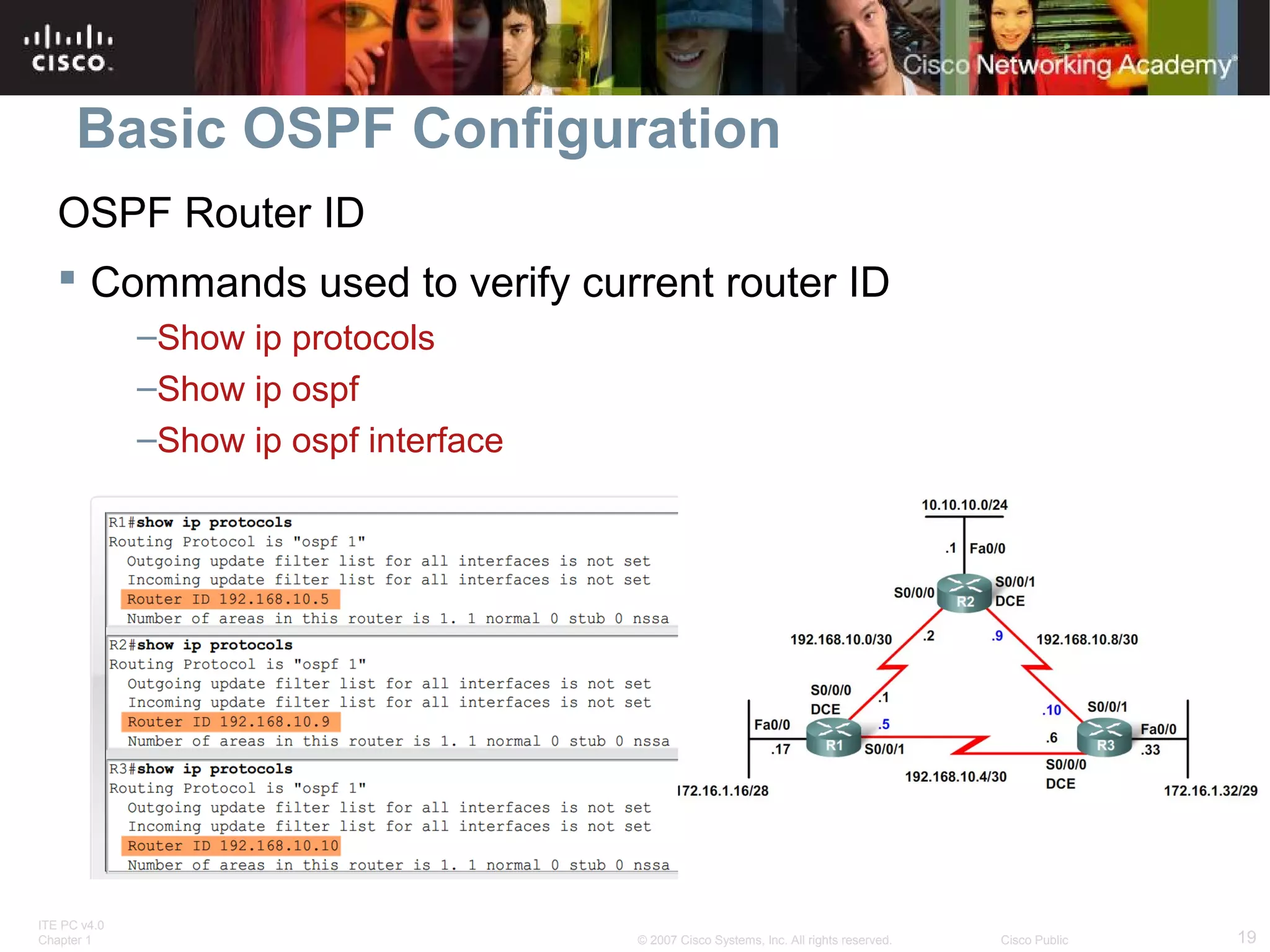
 Commands used to verify current router ID
–Show ip protocols
–Show ip ospf
–Show ip ospf interface

ITE PC v4.0
Chapter 1

© 2007 Cisco Systems, Inc. All rights reserved.

Cisco Public

19
Basic OSPF Configuration
OSPF Router ID
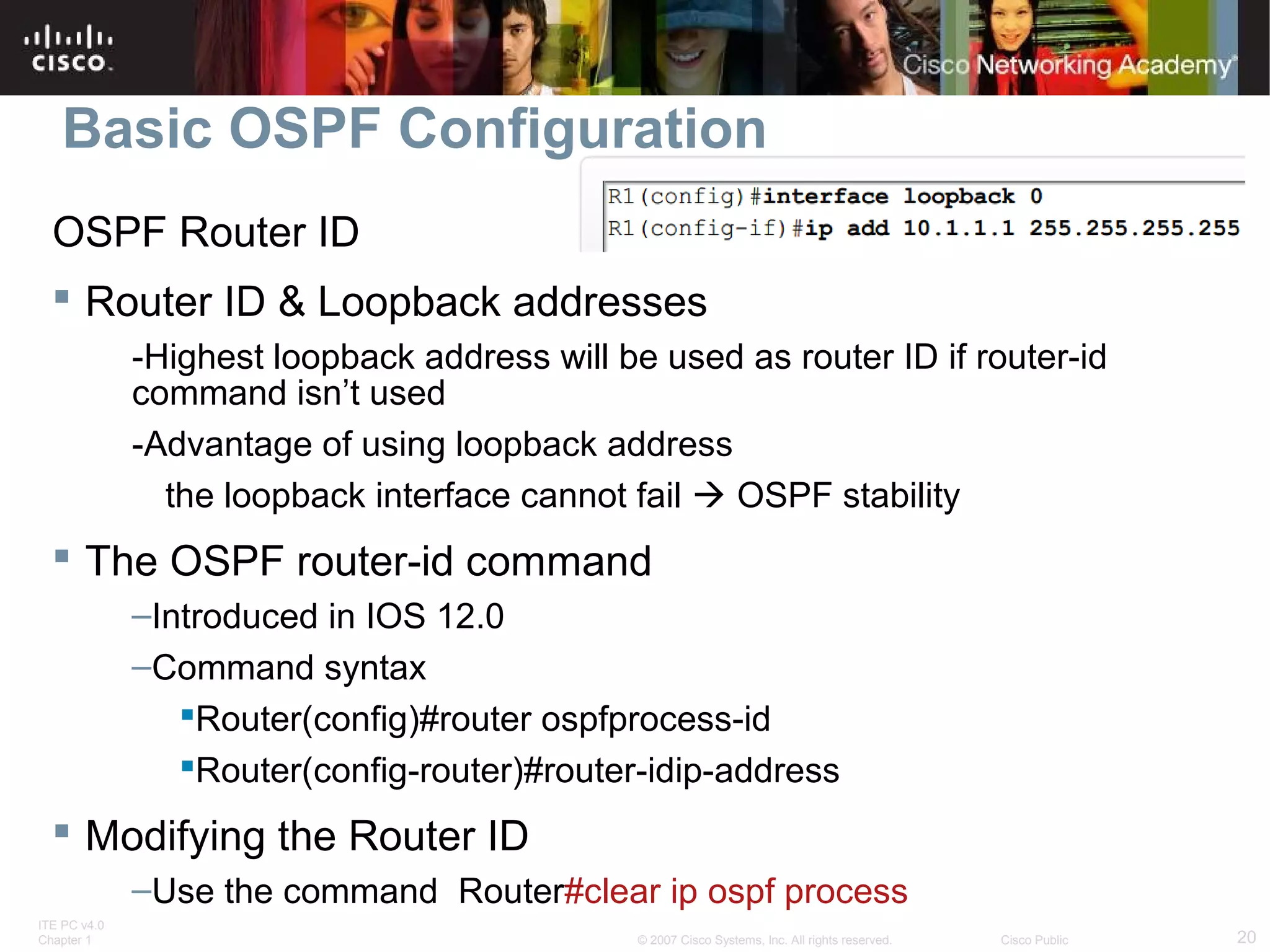
 Router ID & Loopback addresses
-Highest loopback address will be used as router ID if router-id
command isn’t used
-Advantage of using loopback address
the loopback interface cannot fail  OSPF stability

 The OSPF router-id command
–Introduced in IOS 12.0
–Command syntax
Router(config)#router ospfprocess-id
Router(config-router)#router-idip-address

 Modifying the Router ID
–Use the command Router#clear ip ospf process
ITE PC v4.0
Chapter 1

© 2007 Cisco Systems, Inc. All rights reserved.

Cisco Public

20
Basic OSPF Configuration
Verifying OSPF
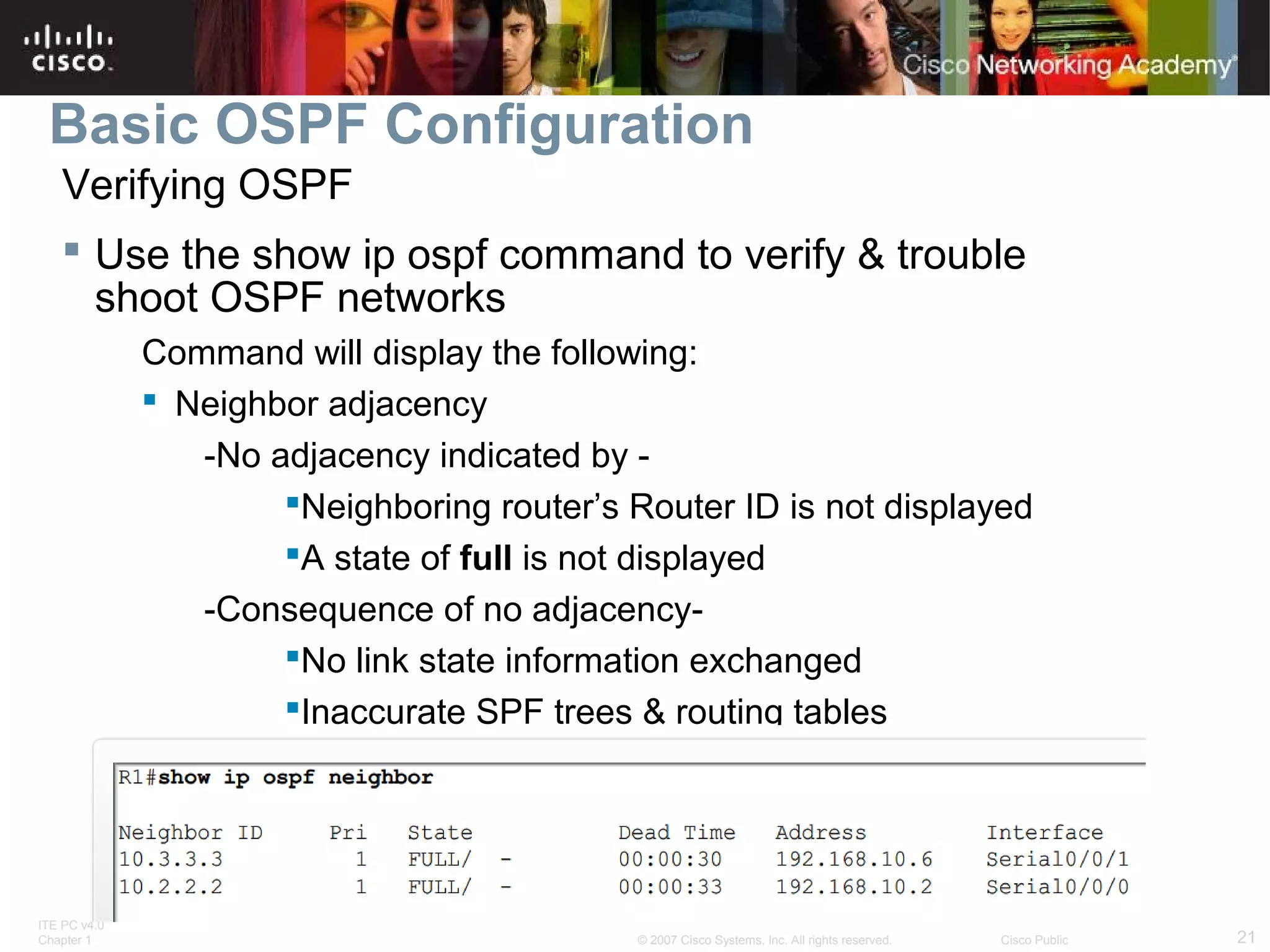
 Use the show ip ospf command to verify & trouble
shoot OSPF networks
Command will display the following:
 Neighbor adjacency
-No adjacency indicated by Neighboring router’s Router ID is not displayed
A state of full is not displayed
-Consequence of no adjacencyNo link state information exchanged
Inaccurate SPF trees & routing tables

ITE PC v4.0
Chapter 1

© 2007 Cisco Systems, Inc. All rights reserved.

Cisco Public

21
Basic OSPF Configuration
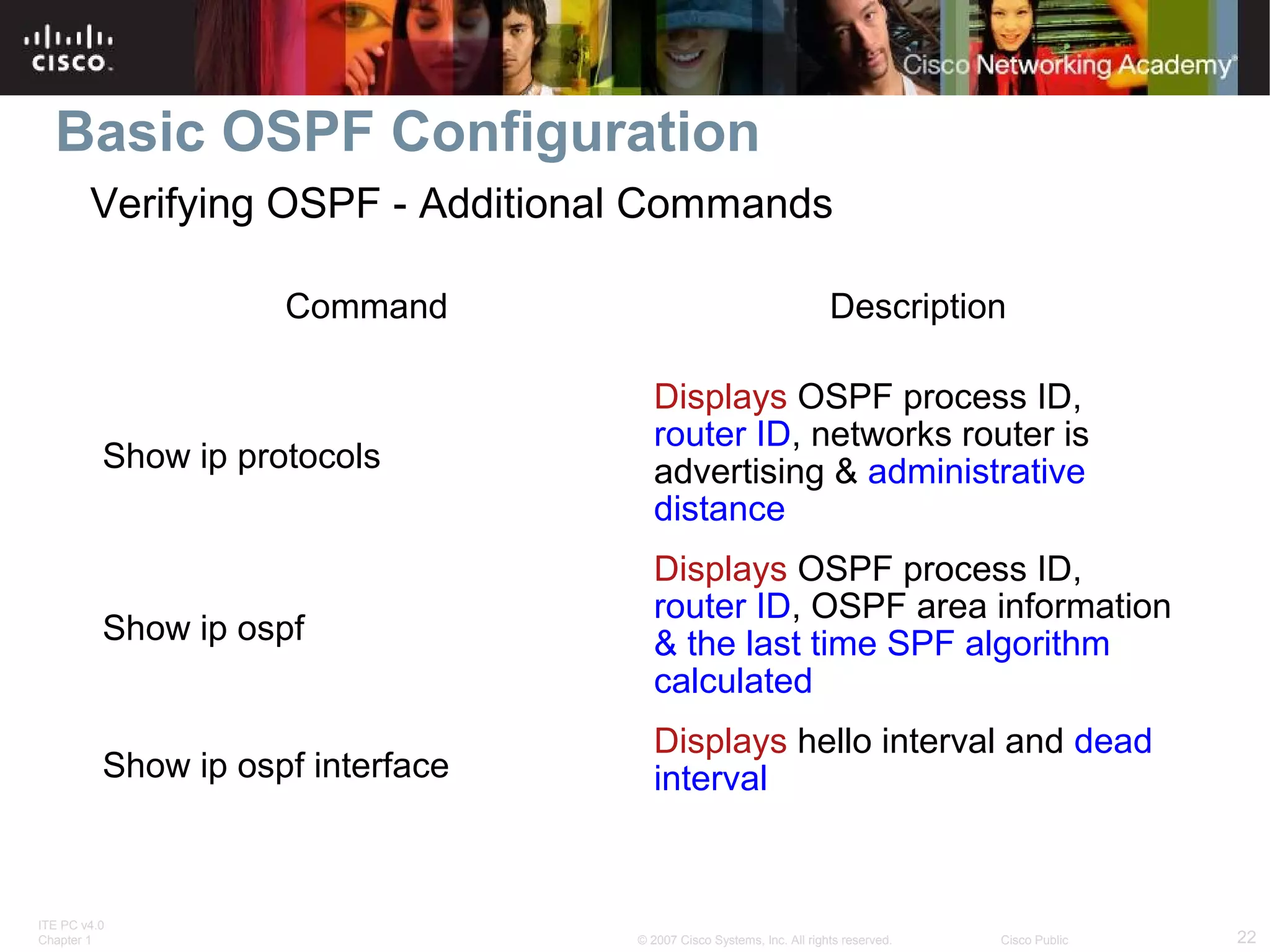
Verifying OSPF - Additional Commands
Command

Description

Show ip protocols

Displays OSPF process ID,
router ID, networks router is
advertising & administrative
distance

Show ip ospf

Displays OSPF process ID,
router ID, OSPF area information
& the last time SPF algorithm
calculated

Show ip ospf interface

Displays hello interval and dead
interval

ITE PC v4.0
Chapter 1

© 2007 Cisco Systems, Inc. All rights reserved.

Cisco Public

22
Basic OSPF Configuration
Examining the routing table
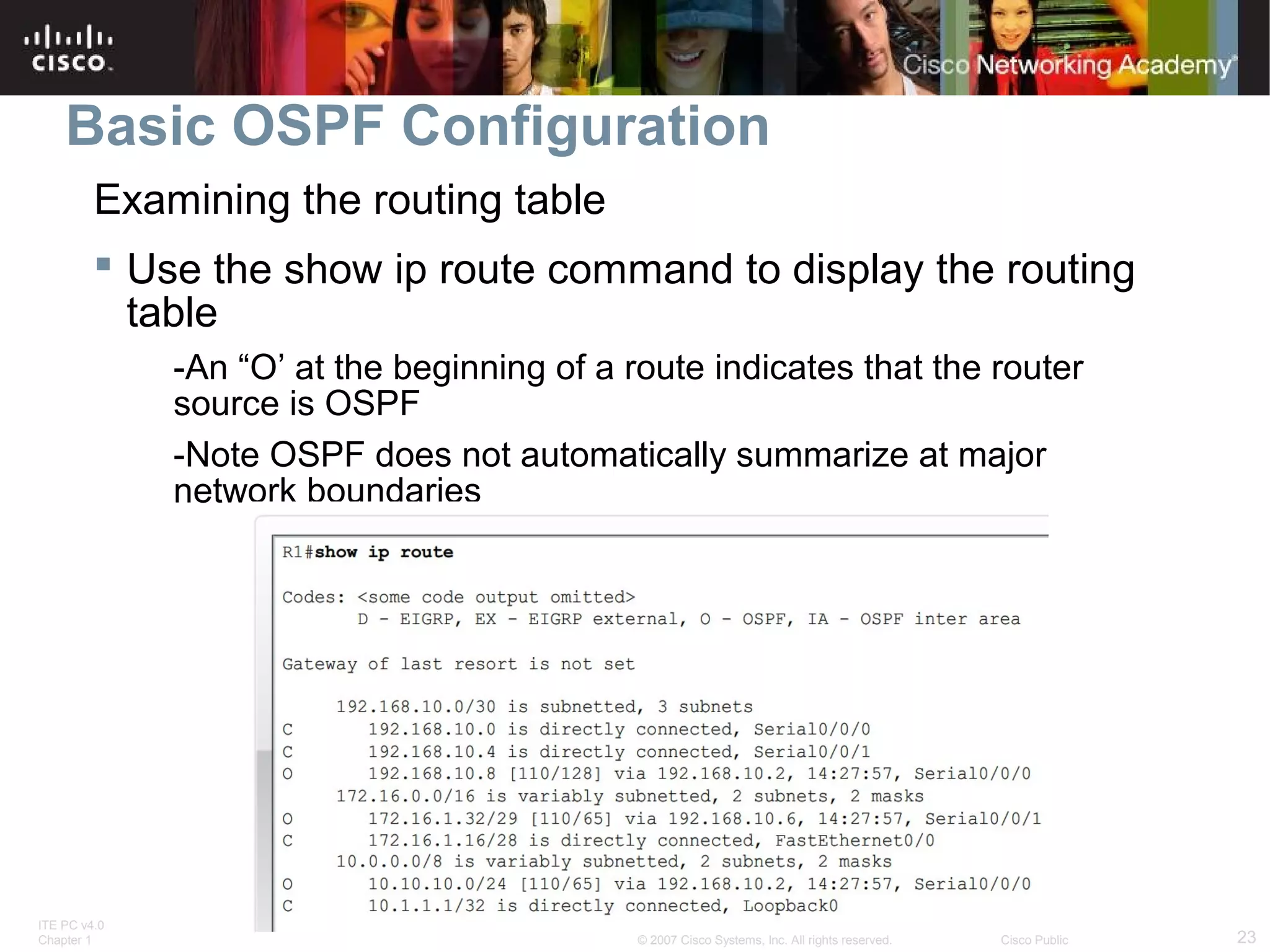
 Use the show ip route command to display the routing
table
-An “O’ at the beginning of a route indicates that the router
source is OSPF
-Note OSPF does not automatically summarize at major
network boundaries

ITE PC v4.0
Chapter 1

© 2007 Cisco Systems, Inc. All rights reserved.

Cisco Public

23
OSPF Metric
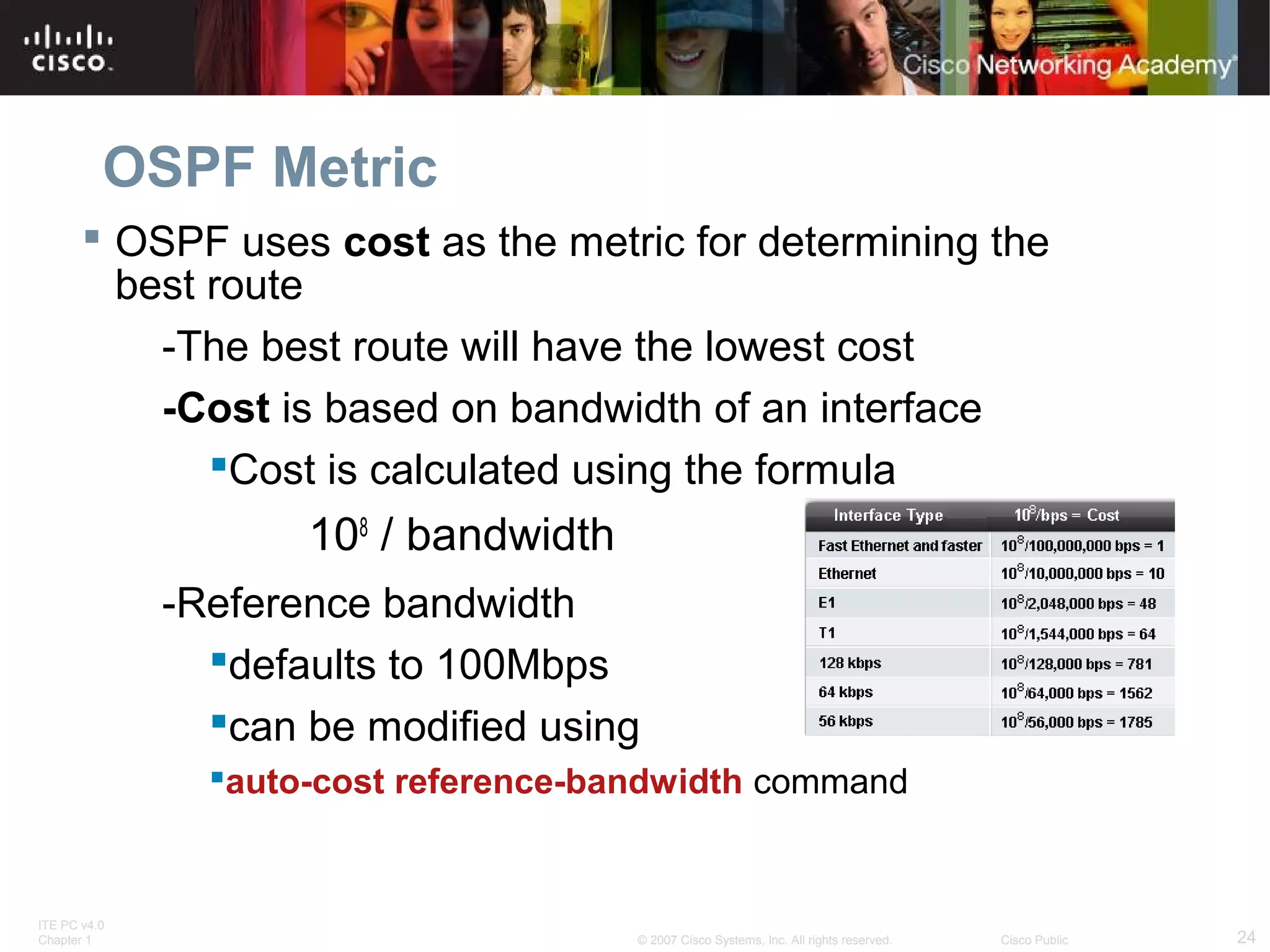
 OSPF uses cost as the metric for determining the
best route
-The best route will have the lowest cost
-Cost is based on bandwidth of an interface
Cost is calculated using the formula

108 / bandwidth
-Reference bandwidth
defaults to 100Mbps
can be modified using
auto-cost reference-bandwidth command

ITE PC v4.0
Chapter 1

© 2007 Cisco Systems, Inc. All rights reserved.

Cisco Public

24
OSPF Metric
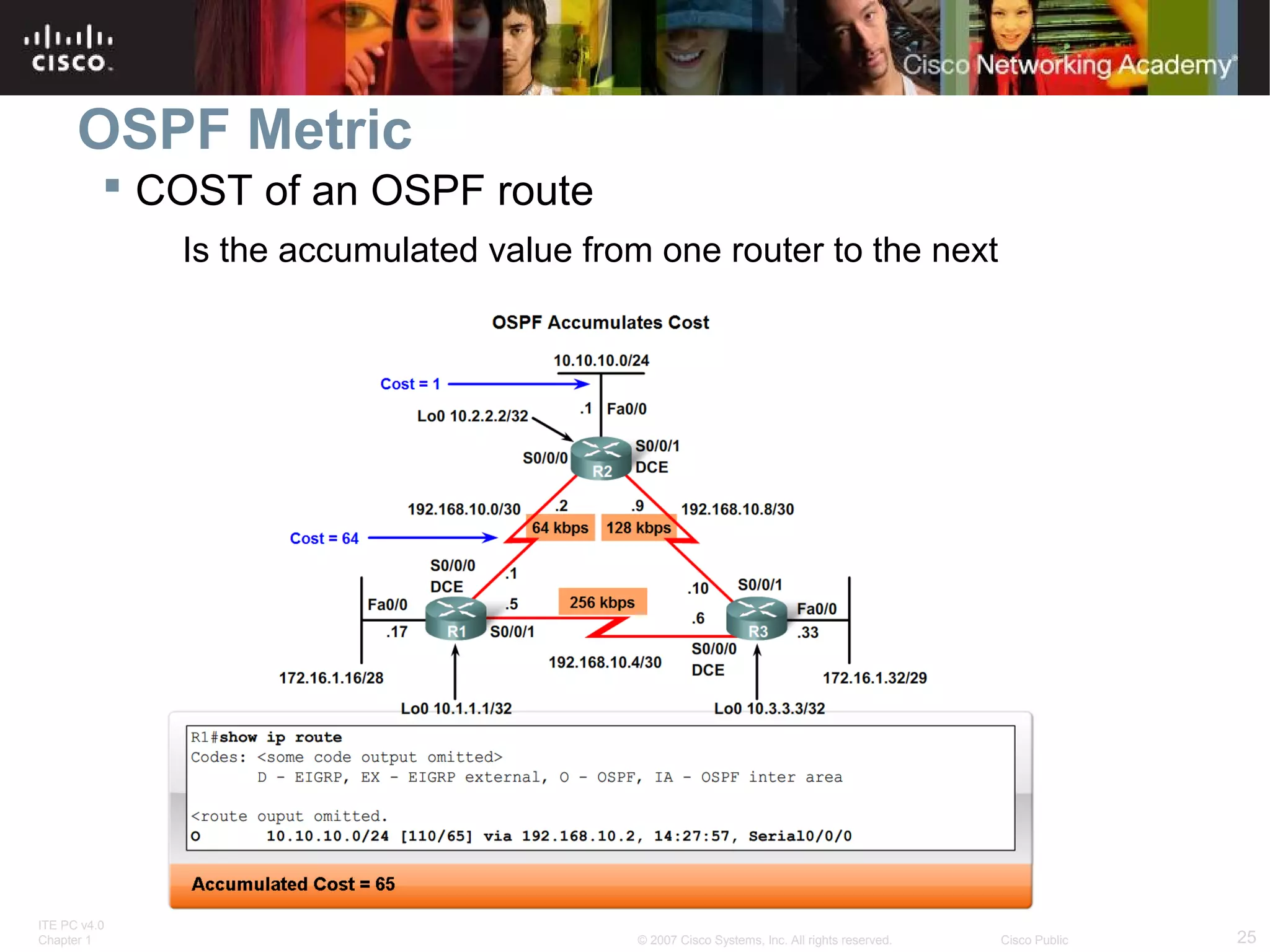
 COST of an OSPF route
Is the accumulated value from one router to the next

ITE PC v4.0
Chapter 1

© 2007 Cisco Systems, Inc. All rights reserved.

Cisco Public

25
OSPF Metric
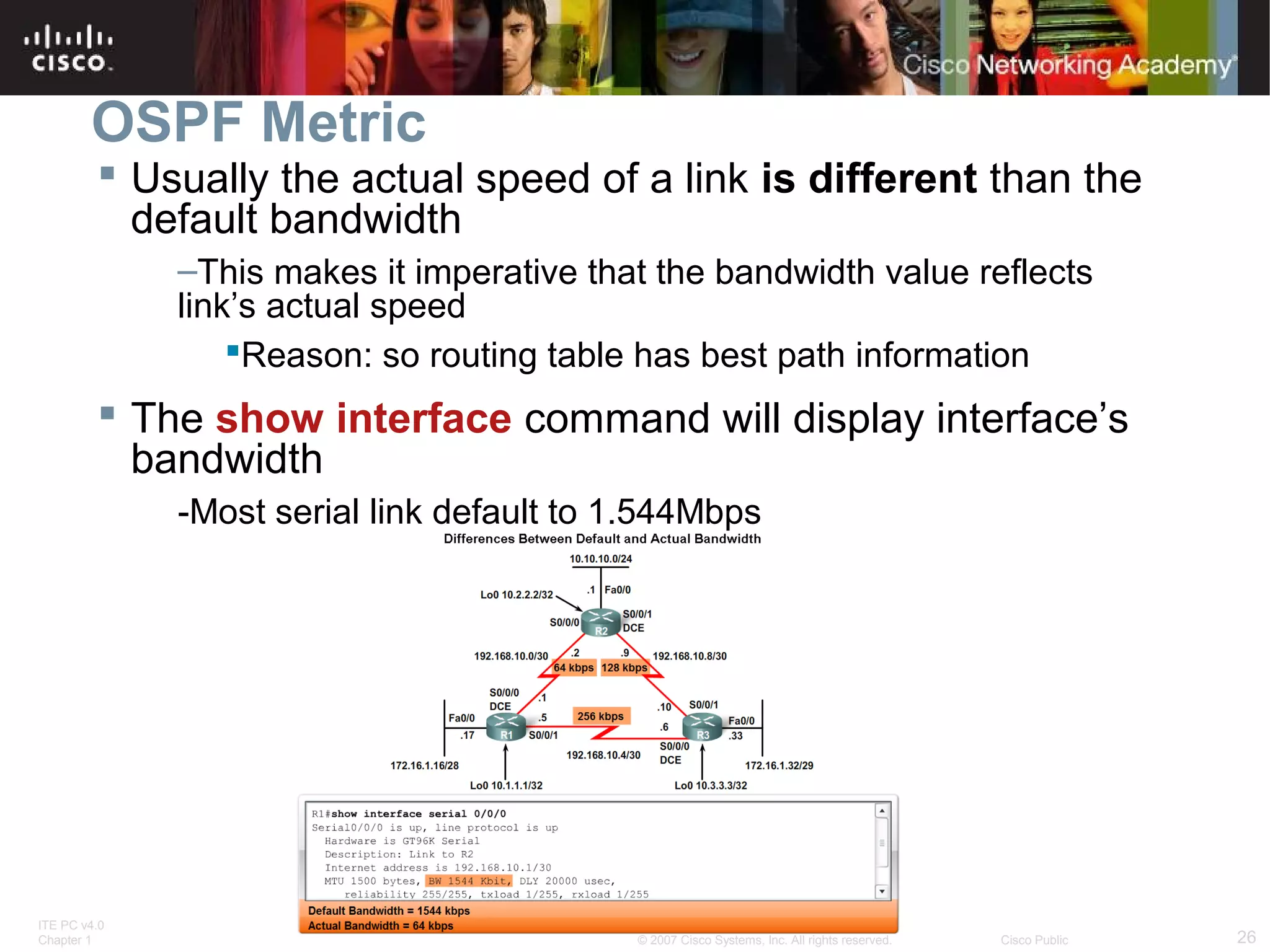
 Usually the actual speed of a link is different than the
default bandwidth
–This makes it imperative that the bandwidth value reflects
link’s actual speed
Reason: so routing table has best path information

 The show interface command will display interface’s
bandwidth
-Most serial link default to 1.544Mbps

ITE PC v4.0
Chapter 1

© 2007 Cisco Systems, Inc. All rights reserved.

Cisco Public

26
Basic OSPF Configuration
Modifying the Cost of a link
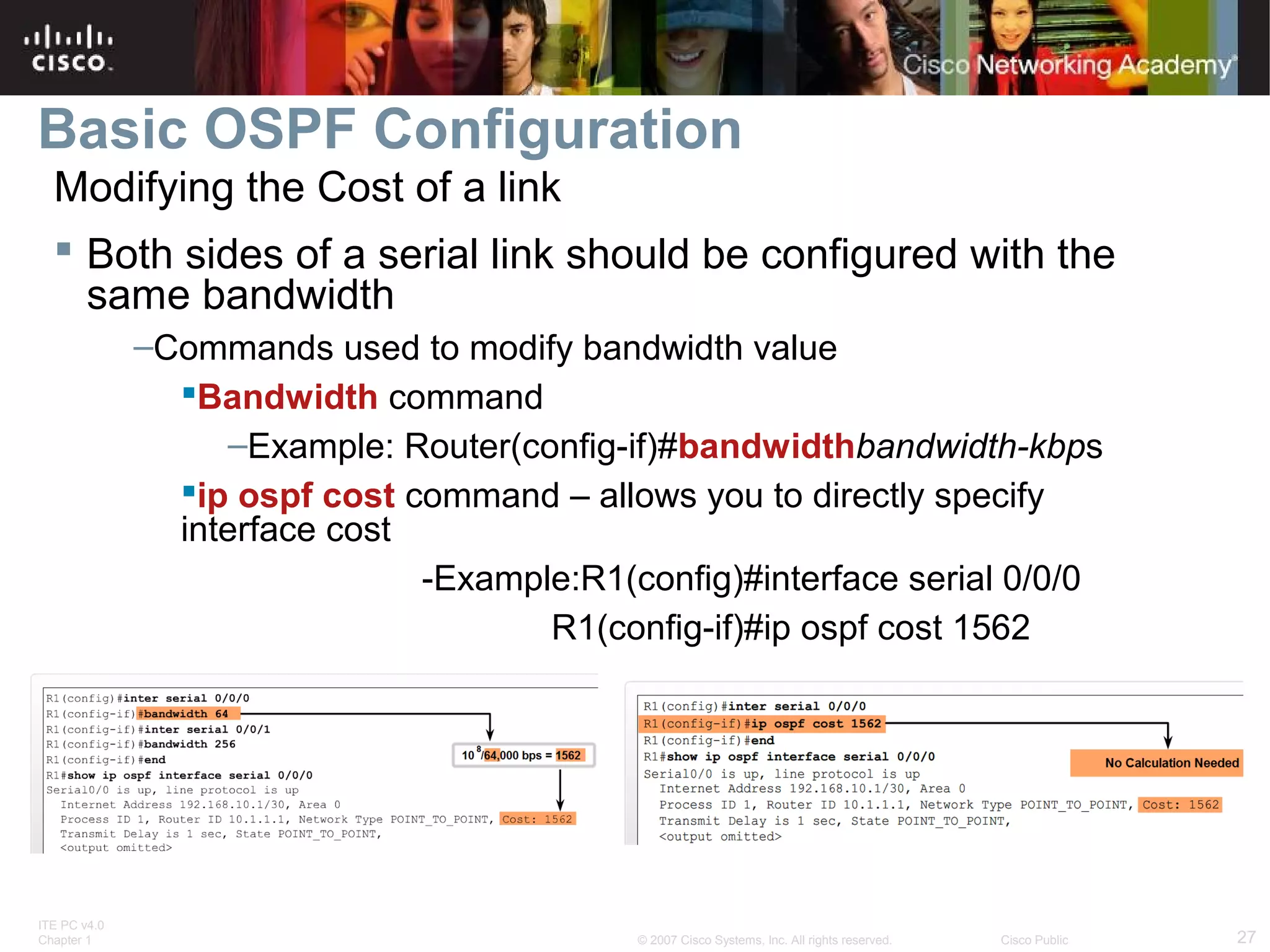
 Both sides of a serial link should be configured with the
same bandwidth
–Commands used to modify bandwidth value
Bandwidth command
–Example: Router(config-if)#bandwidthbandwidth-kbps
ip ospf cost command – allows you to directly specify
interface cost
-Example:R1(config)#interface serial 0/0/0
R1(config-if)#ip ospf cost 1562

ITE PC v4.0
Chapter 1

© 2007 Cisco Systems, Inc. All rights reserved.

Cisco Public

27
Basic OSPF Configuration
Modifying the Cost of the link
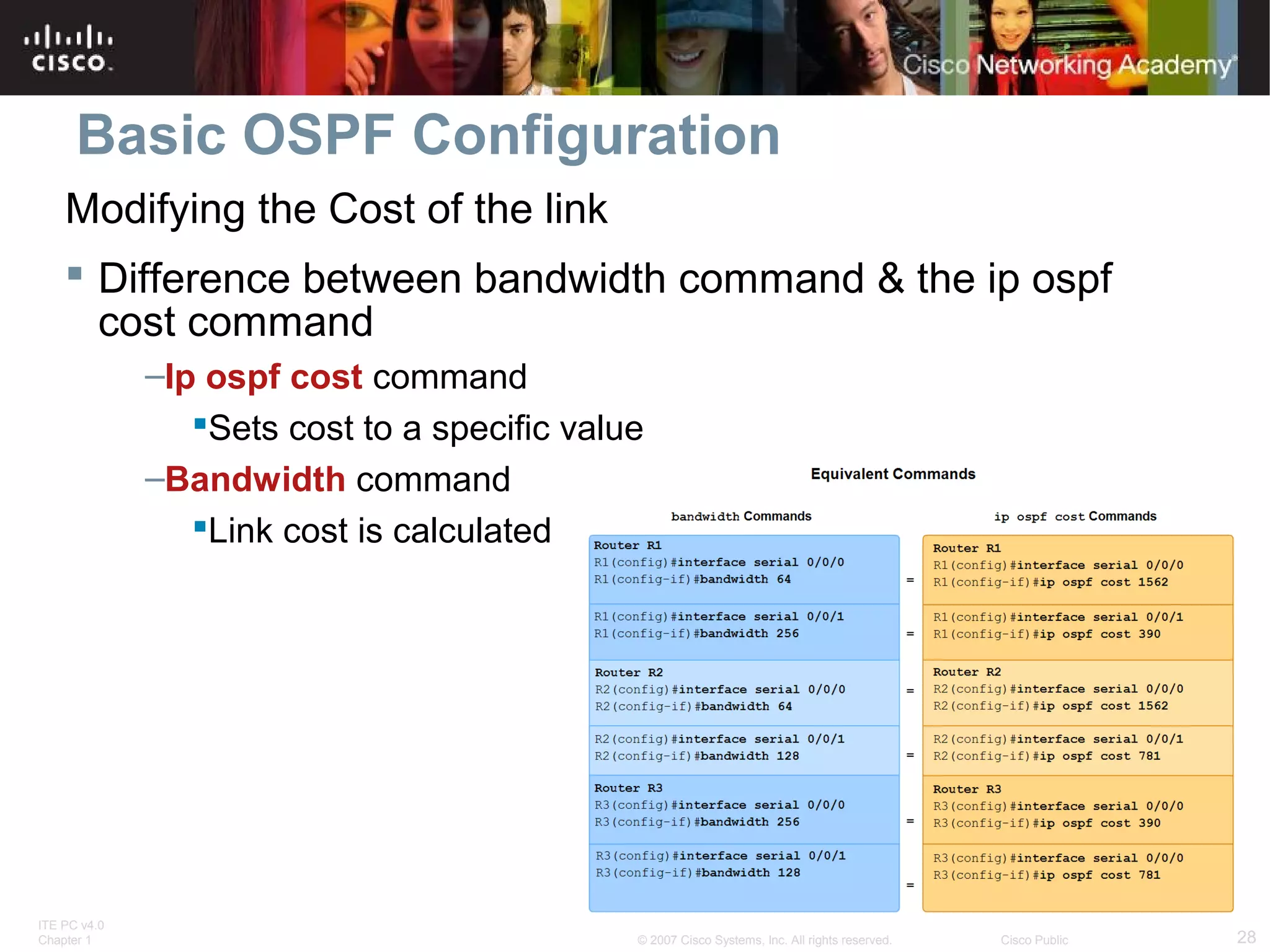
 Difference between bandwidth command & the ip ospf
cost command
–Ip ospf cost command
Sets cost to a specific value
–Bandwidth command
Link cost is calculated

ITE PC v4.0
Chapter 1

© 2007 Cisco Systems, Inc. All rights reserved.

Cisco Public

28
OSPF and Multiaccess Networks
Challenges in Multiaccess Networks
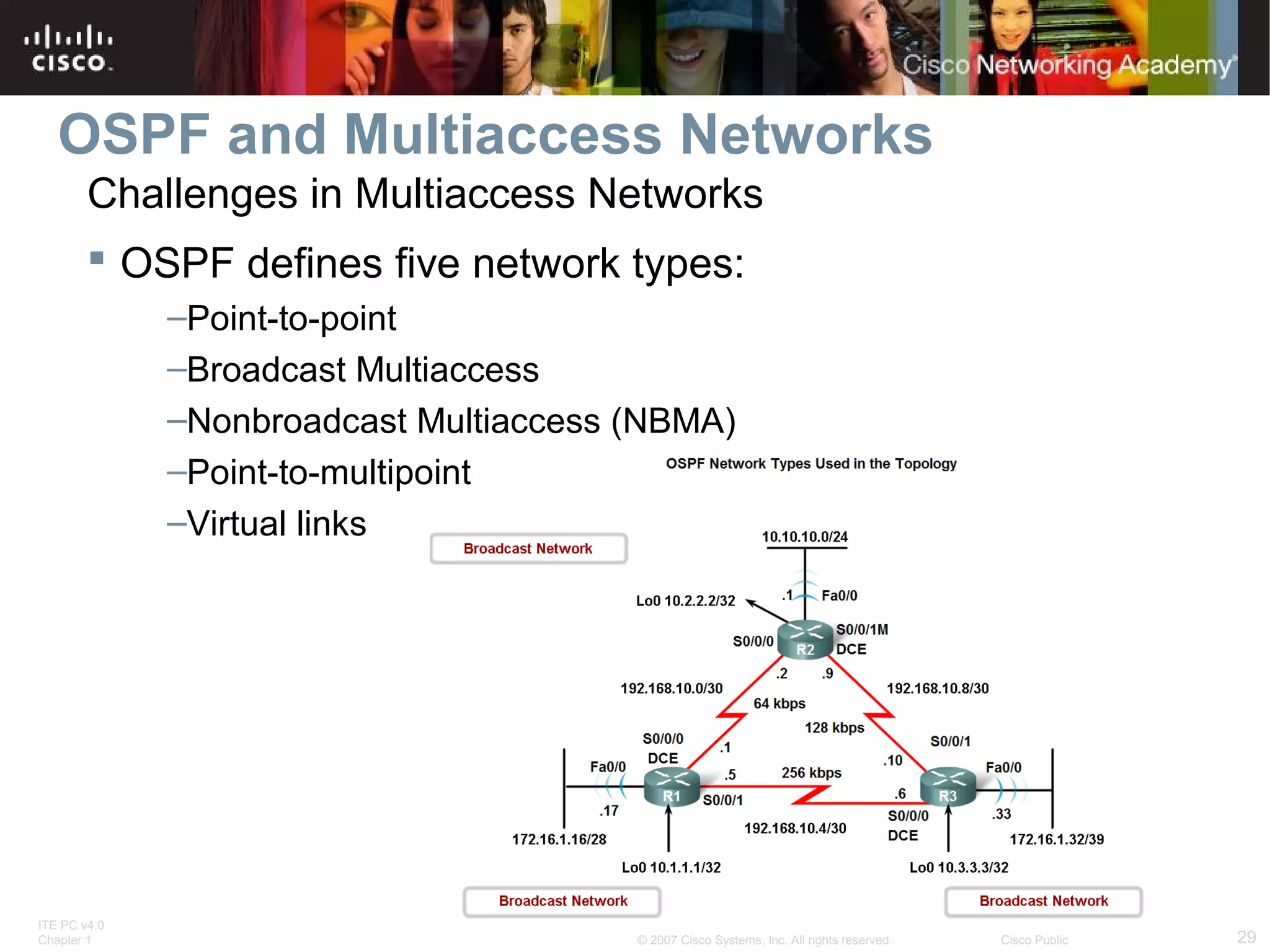
 OSPF defines five network types:
–Point-to-point
–Broadcast Multiaccess
–Nonbroadcast Multiaccess (NBMA)
–Point-to-multipoint
–Virtual links

ITE PC v4.0
Chapter 1

© 2007 Cisco Systems, Inc. All rights reserved.

Cisco Public

29
OSPF in Multiaccess Networks
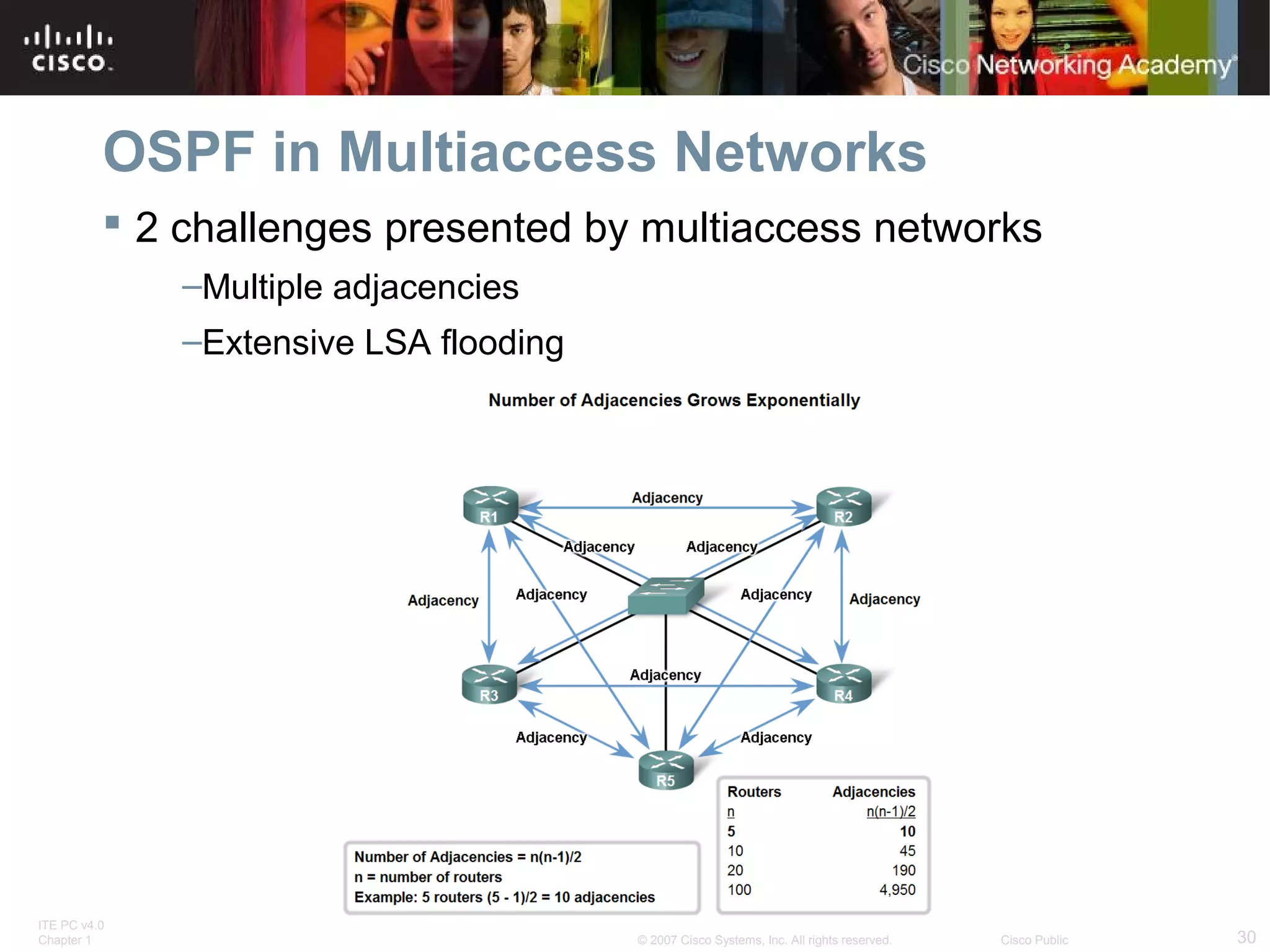
 2 challenges presented by multiaccess networks
–Multiple adjacencies
–Extensive LSA flooding

ITE PC v4.0
Chapter 1

© 2007 Cisco Systems, Inc. All rights reserved.

Cisco Public

30
OSPF in Multiaccess Networks
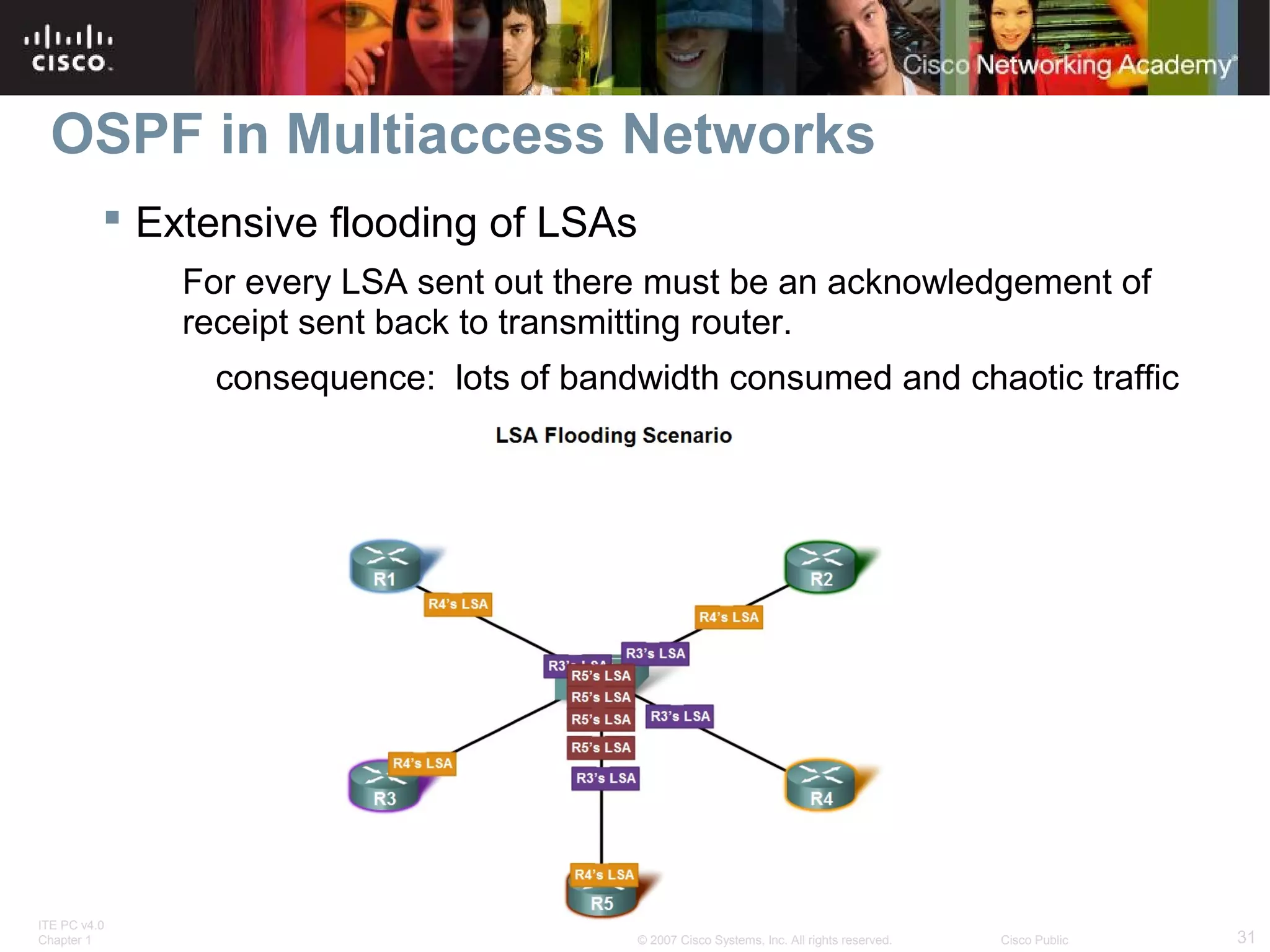
 Extensive flooding of LSAs
For every LSA sent out there must be an acknowledgement of
receipt sent back to transmitting router.
consequence: lots of bandwidth consumed and chaotic traffic

ITE PC v4.0
Chapter 1

© 2007 Cisco Systems, Inc. All rights reserved.

Cisco Public

31
OSPF in Multiaccess Networks
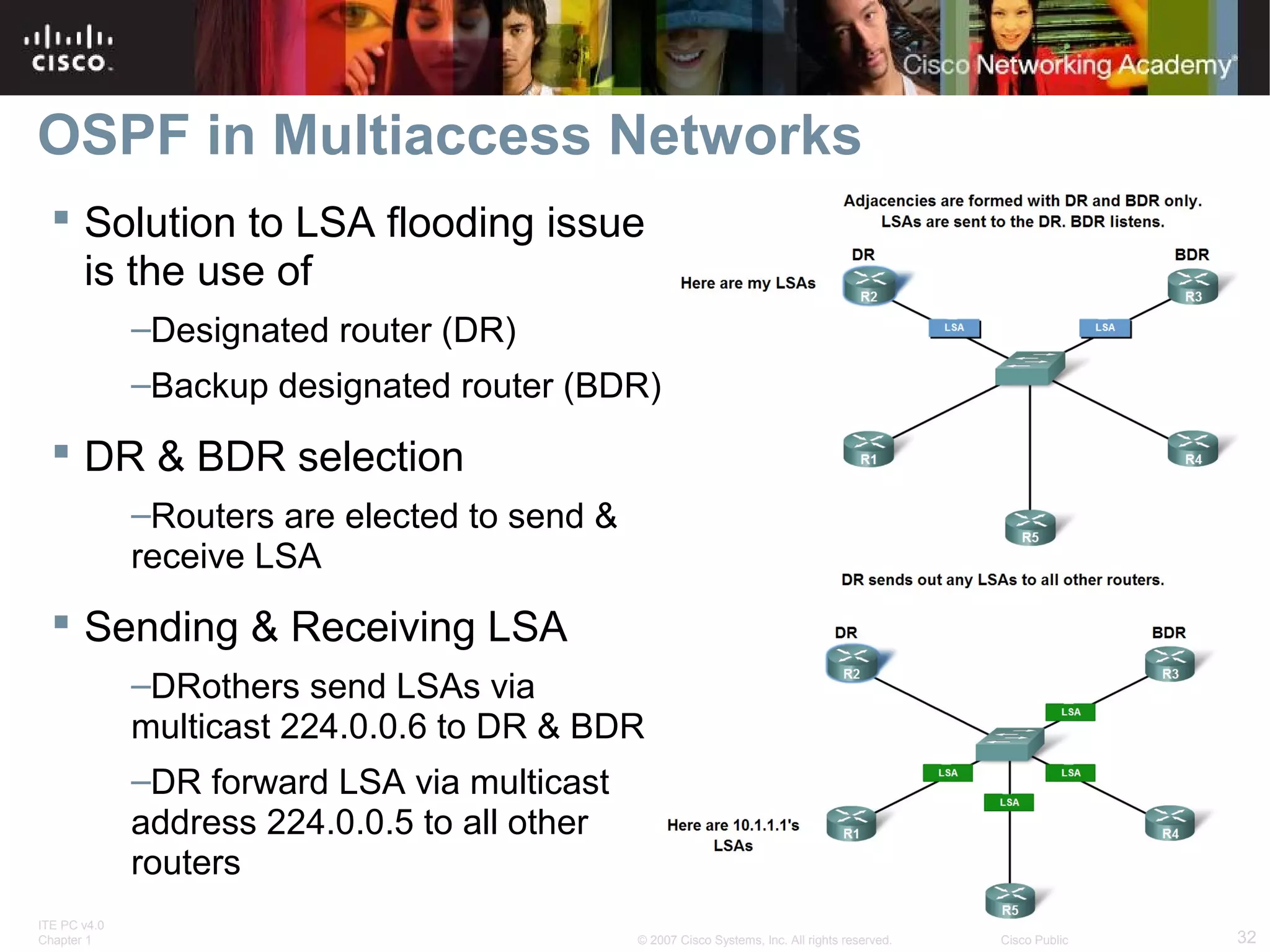
 Solution to LSA flooding issue
is the use of
–Designated router (DR)
–Backup designated router (BDR)

 DR & BDR selection
–Routers are elected to send &
receive LSA

 Sending & Receiving LSA
–DRothers send LSAs via
multicast 224.0.0.6 to DR & BDR
–DR forward LSA via multicast
address 224.0.0.5 to all other
routers
ITE PC v4.0
Chapter 1

© 2007 Cisco Systems, Inc. All rights reserved.

Cisco Public

32
OSPF in Multiaccess Networks
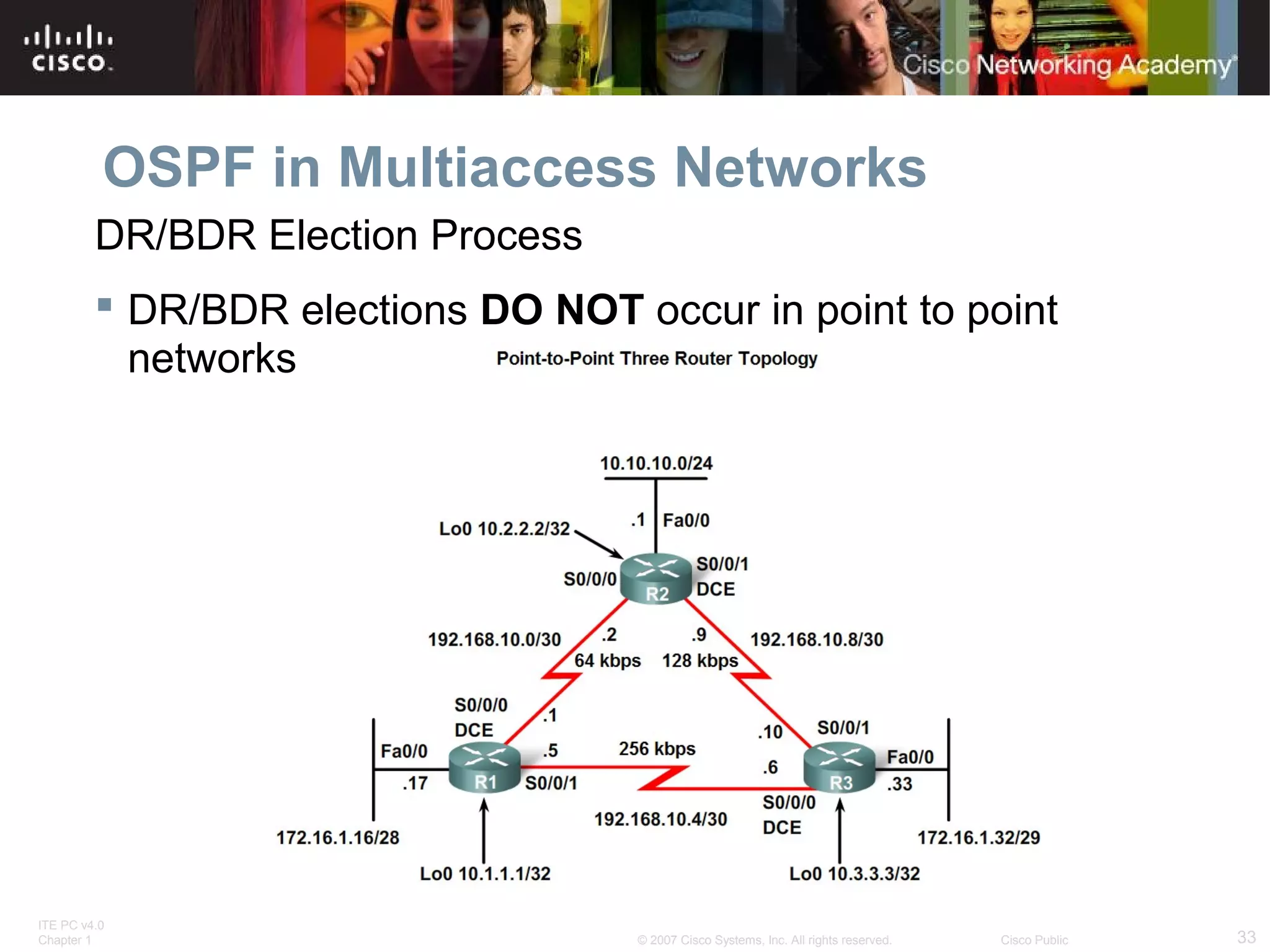
DR/BDR Election Process
 DR/BDR elections DO NOT occur in point to point
networks

ITE PC v4.0
Chapter 1

© 2007 Cisco Systems, Inc. All rights reserved.

Cisco Public

33
OSPF in Multiaccess Networks
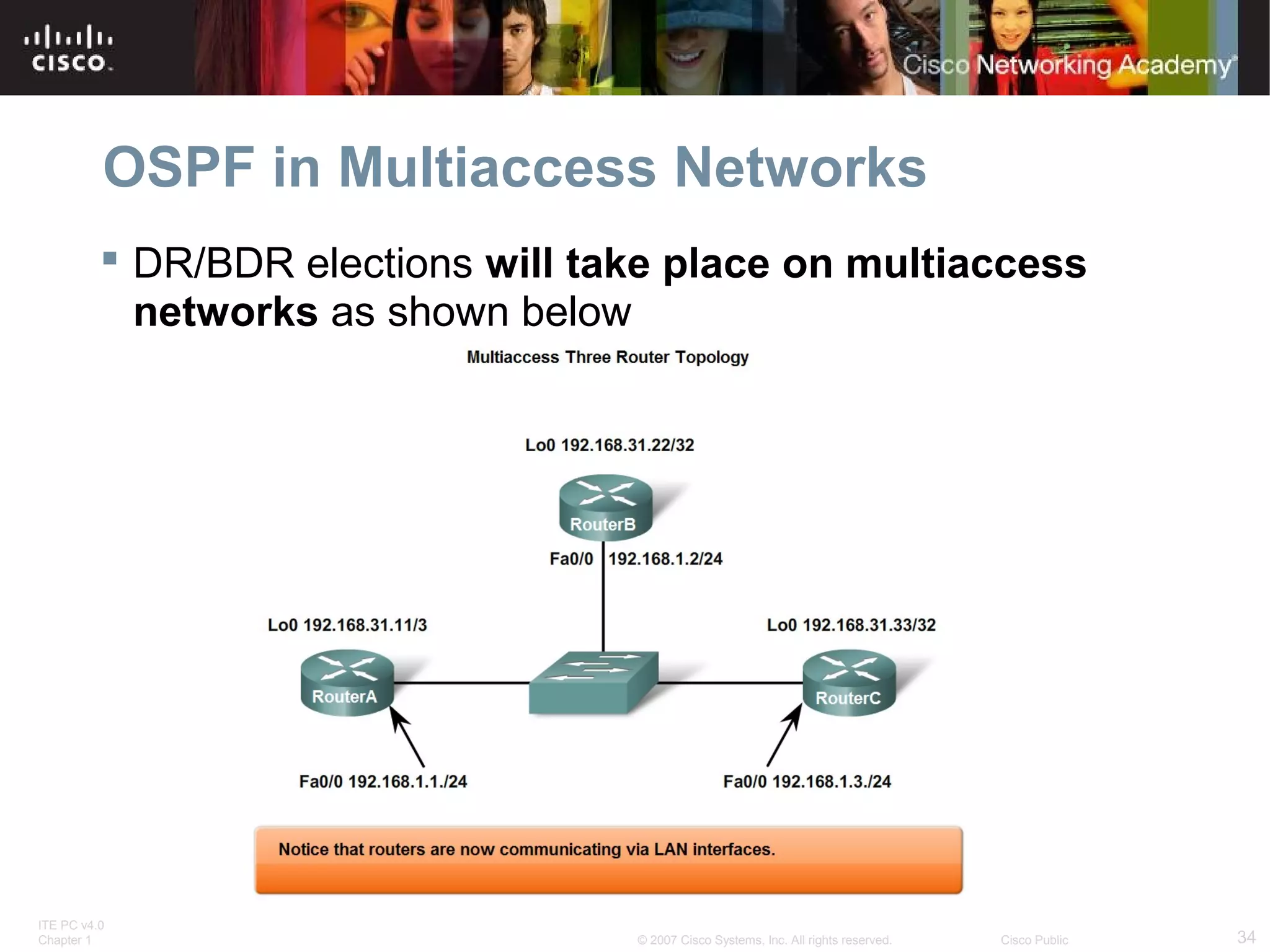
 DR/BDR elections will take place on multiaccess
networks as shown below

ITE PC v4.0
Chapter 1

© 2007 Cisco Systems, Inc. All rights reserved.

Cisco Public

34
OSPF in Multiaccess Networks
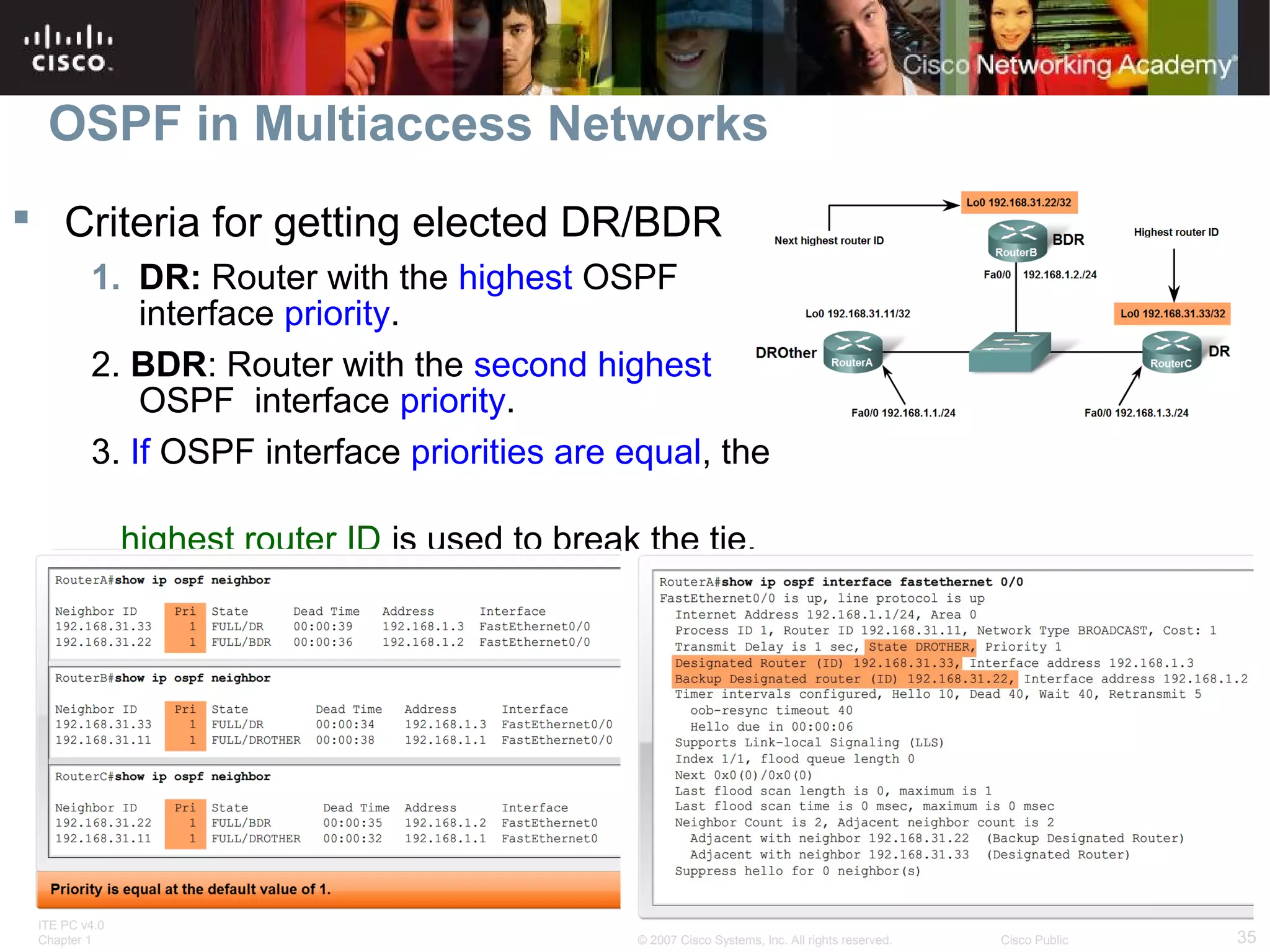
 Criteria for getting elected DR/BDR
1. DR: Router with the highest OSPF
interface priority.
2. BDR: Router with the second highest
OSPF interface priority.
3. If OSPF interface priorities are equal, the
highest router ID is used to break the tie.

ITE PC v4.0
Chapter 1

© 2007 Cisco Systems, Inc. All rights reserved.

Cisco Public

35
OSPF in Multiaccess Networks
 Timing of DR/BDR Election
–Occurs as soon as 1st router has its interface enabled on
multiaccess network
When a DR is elected it remains as the DR until one of the
following occurs
-The DR fails.
-The OSPF process on the DR fails.
-The multiaccess interface on the DR fails.

ITE PC v4.0
Chapter 1

© 2007 Cisco Systems, Inc. All rights reserved.

Cisco Public

36
OSPF in Multiaccess Networks
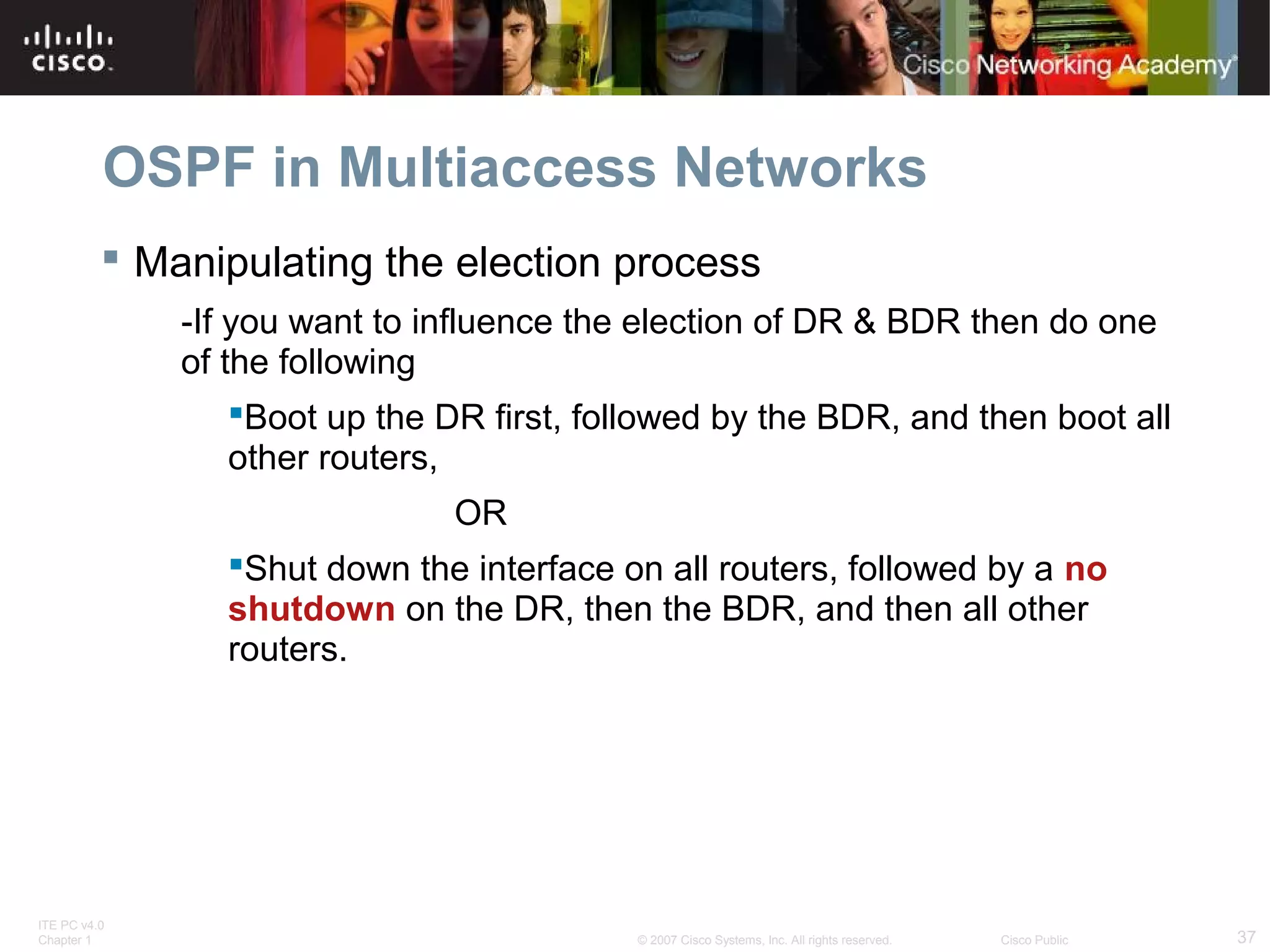
 Manipulating the election process
-If you want to influence the election of DR & BDR then do one
of the following
Boot up the DR first, followed by the BDR, and then boot all
other routers,
OR
Shut down the interface on all routers, followed by a no
shutdown on the DR, then the BDR, and then all other
routers.

ITE PC v4.0
Chapter 1

© 2007 Cisco Systems, Inc. All rights reserved.

Cisco Public

37
OSPF in Multiaccess Networks
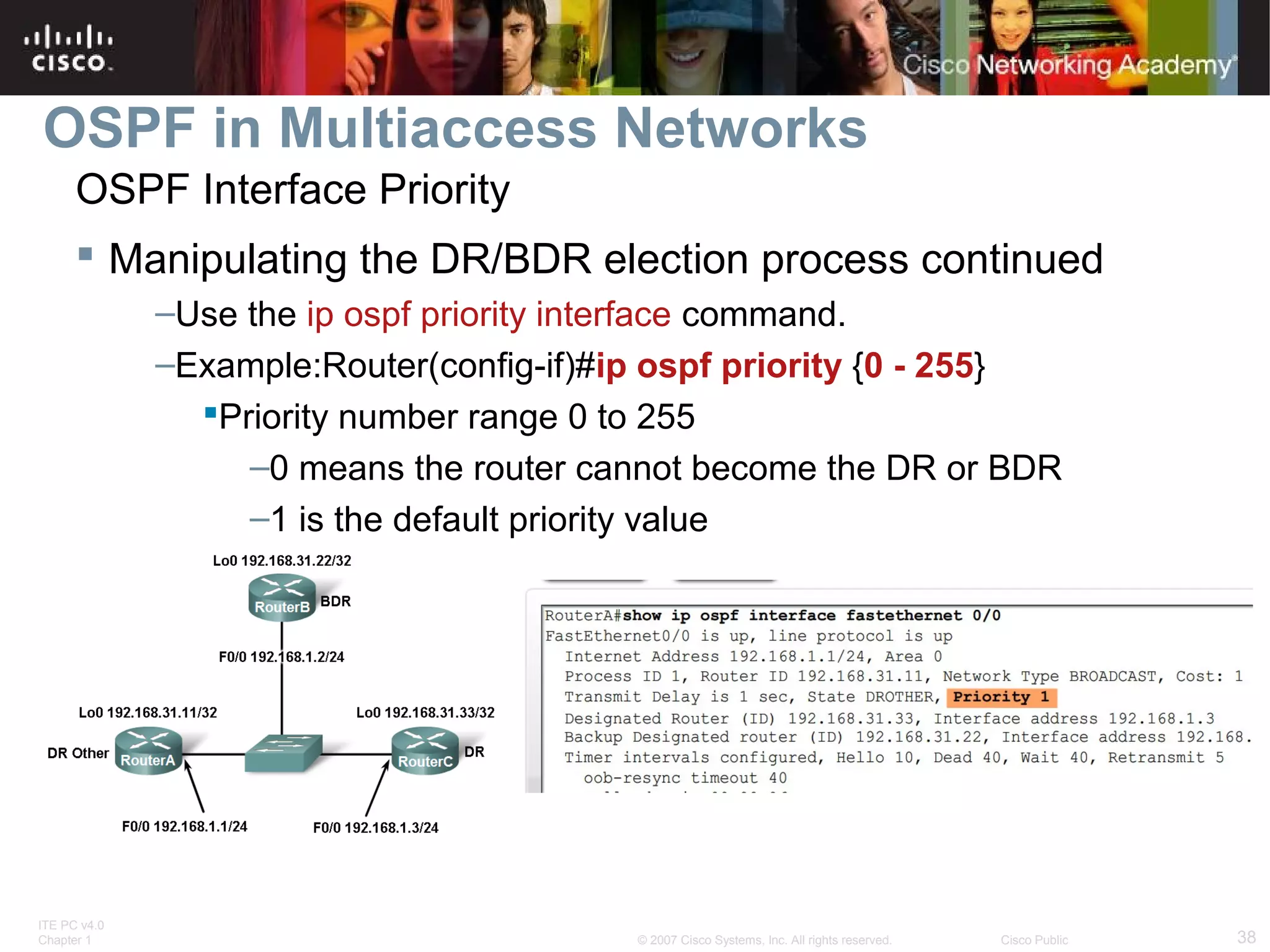
OSPF Interface Priority
 Manipulating the DR/BDR election process continued
–Use the ip ospf priority interface command.
–Example:Router(config-if)#ip ospf priority {0 - 255}
Priority number range 0 to 255
–0 means the router cannot become the DR or BDR
–1 is the default priority value

ITE PC v4.0
Chapter 1

© 2007 Cisco Systems, Inc. All rights reserved.

Cisco Public

38
More OSPF Configuration
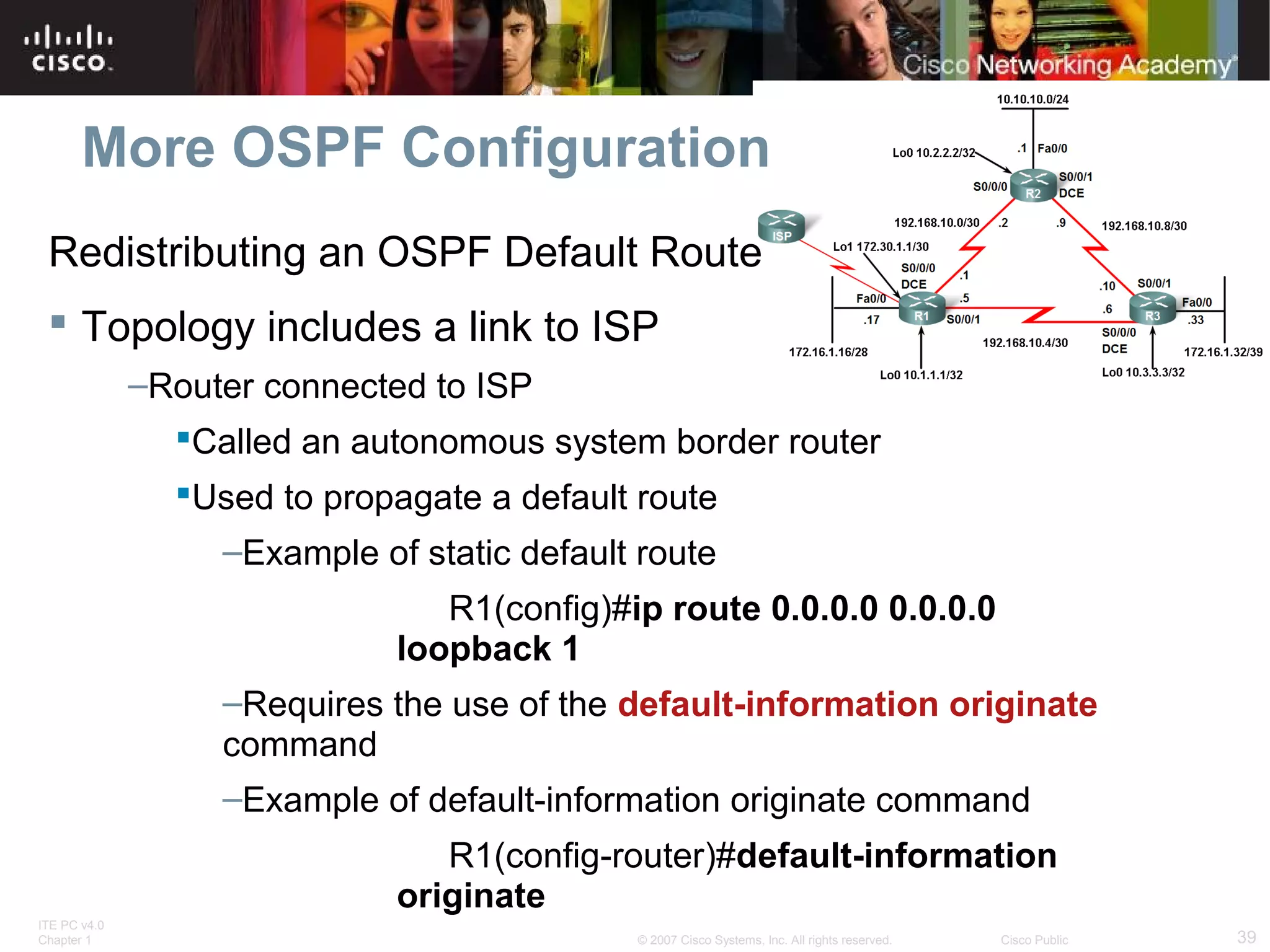
Redistributing an OSPF Default Route
 Topology includes a link to ISP
–Router connected to ISP
Called an autonomous system border router
Used to propagate a default route
–Example of static default route
R1(config)#ip route 0.0.0.0 0.0.0.0
loopback 1
–Requires the use of the default-information originate
command
–Example of default-information originate command
R1(config-router)#default-information
originate
ITE PC v4.0
Chapter 1

© 2007 Cisco Systems, Inc. All rights reserved.

Cisco Public

39
More OSPF Configuration
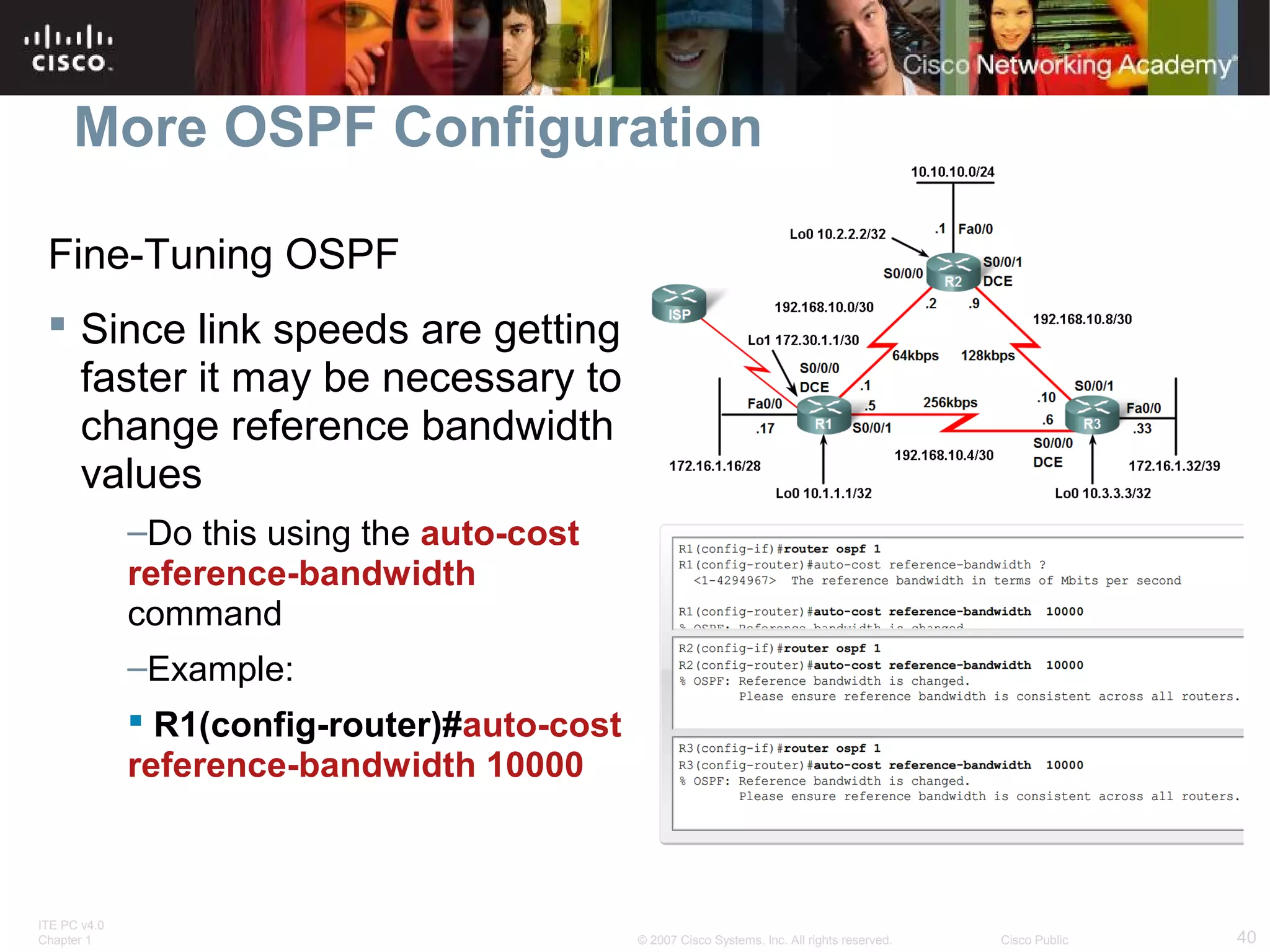
Fine-Tuning OSPF
 Since link speeds are getting
faster it may be necessary to
change reference bandwidth
values
–Do this using the auto-cost
reference-bandwidth
command
–Example:
 R1(config-router)#auto-cost
reference-bandwidth 10000

ITE PC v4.0
Chapter 1

© 2007 Cisco Systems, Inc. All rights reserved.

Cisco Public

40
More OSPF Configuration
Fine-Tuning OSPF
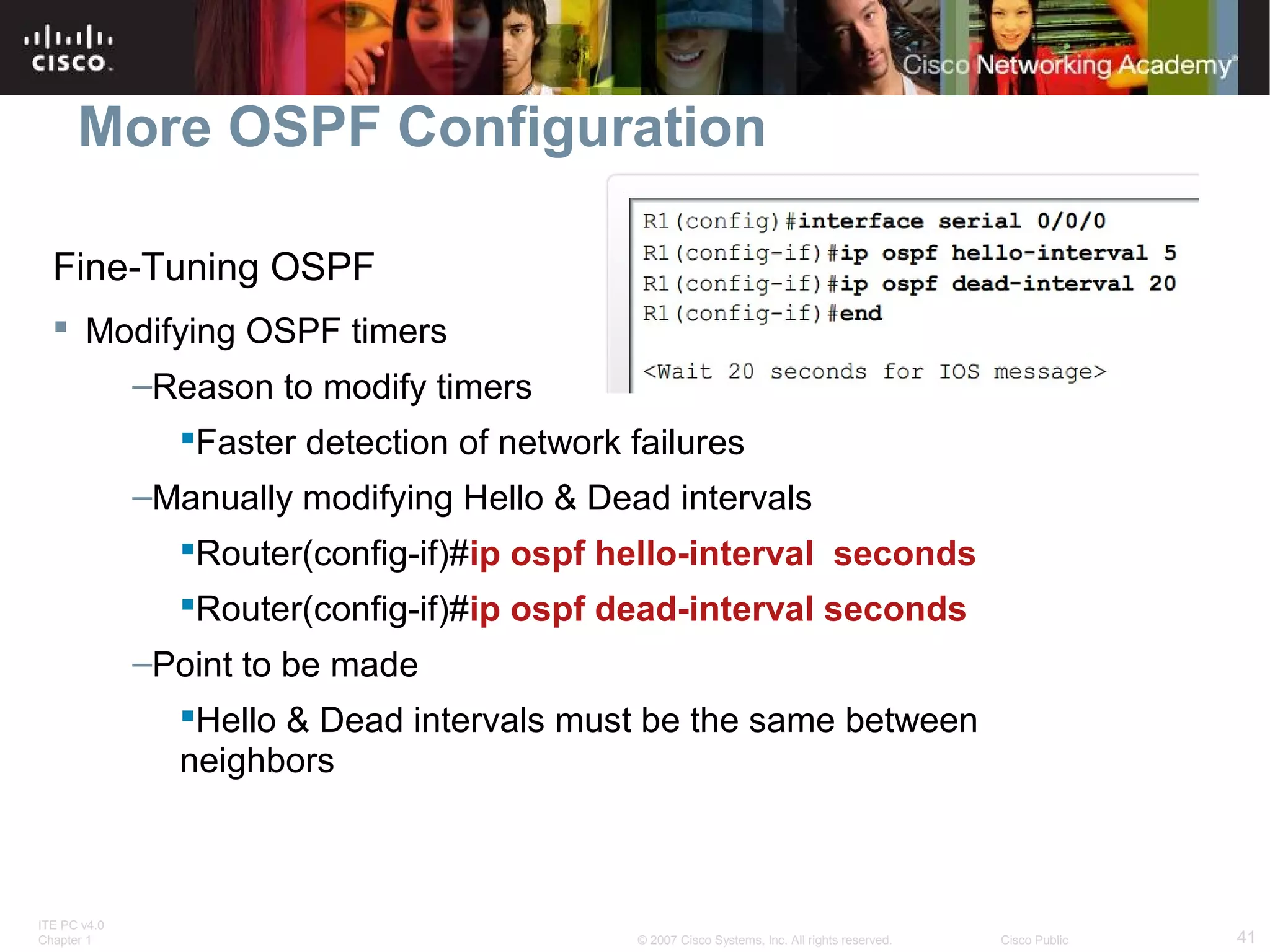
 Modifying OSPF timers
–Reason to modify timers
Faster detection of network failures
–Manually modifying Hello & Dead intervals
Router(config-if)#ip ospf hello-interval seconds
Router(config-if)#ip ospf dead-interval seconds
–Point to be made
Hello & Dead intervals must be the same between
neighbors

ITE PC v4.0
Chapter 1

© 2007 Cisco Systems, Inc. All rights reserved.

Cisco Public

41
Summary
 RFC 2328 describes OSPF link state concepts and
operations
 OSPF Characteristics
–A commonly deployed link state routing protocol
–Employs DRs & BDRs on multi-access networks
DRs & BDRs are elected
DR & BDRs are used to transmit and receive LSAs
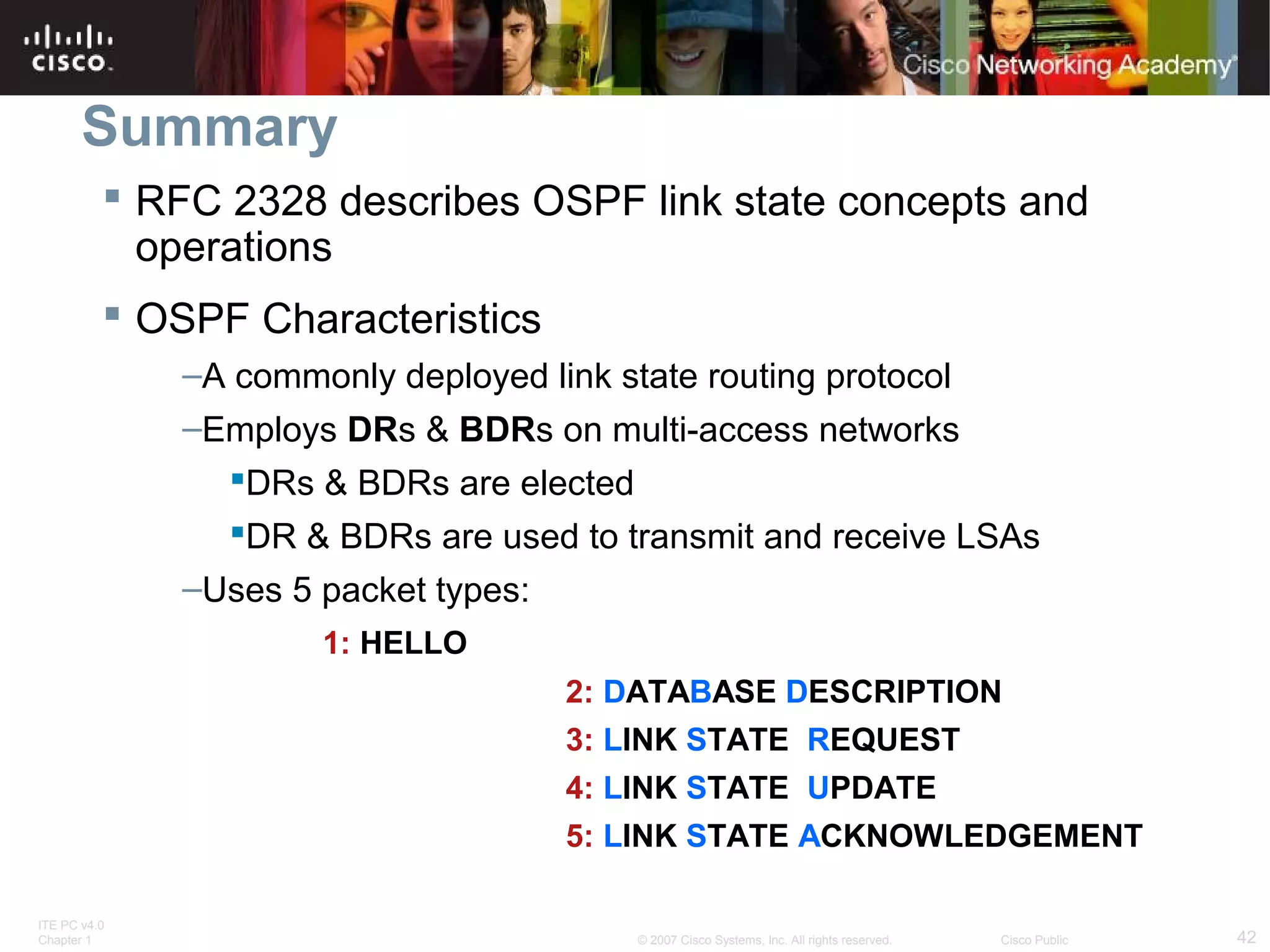
–Uses 5 packet types:
1: HELLO
2: DATABASE DESCRIPTION
3: LINK STATE REQUEST
4: LINK STATE UPDATE
5: LINK STATE ACKNOWLEDGEMENT
ITE PC v4.0
Chapter 1

© 2007 Cisco Systems, Inc. All rights reserved.

Cisco Public

42
Summary
 OSPF Characteristics
–Metric = cost
Lowest cost = best path

 Configuration
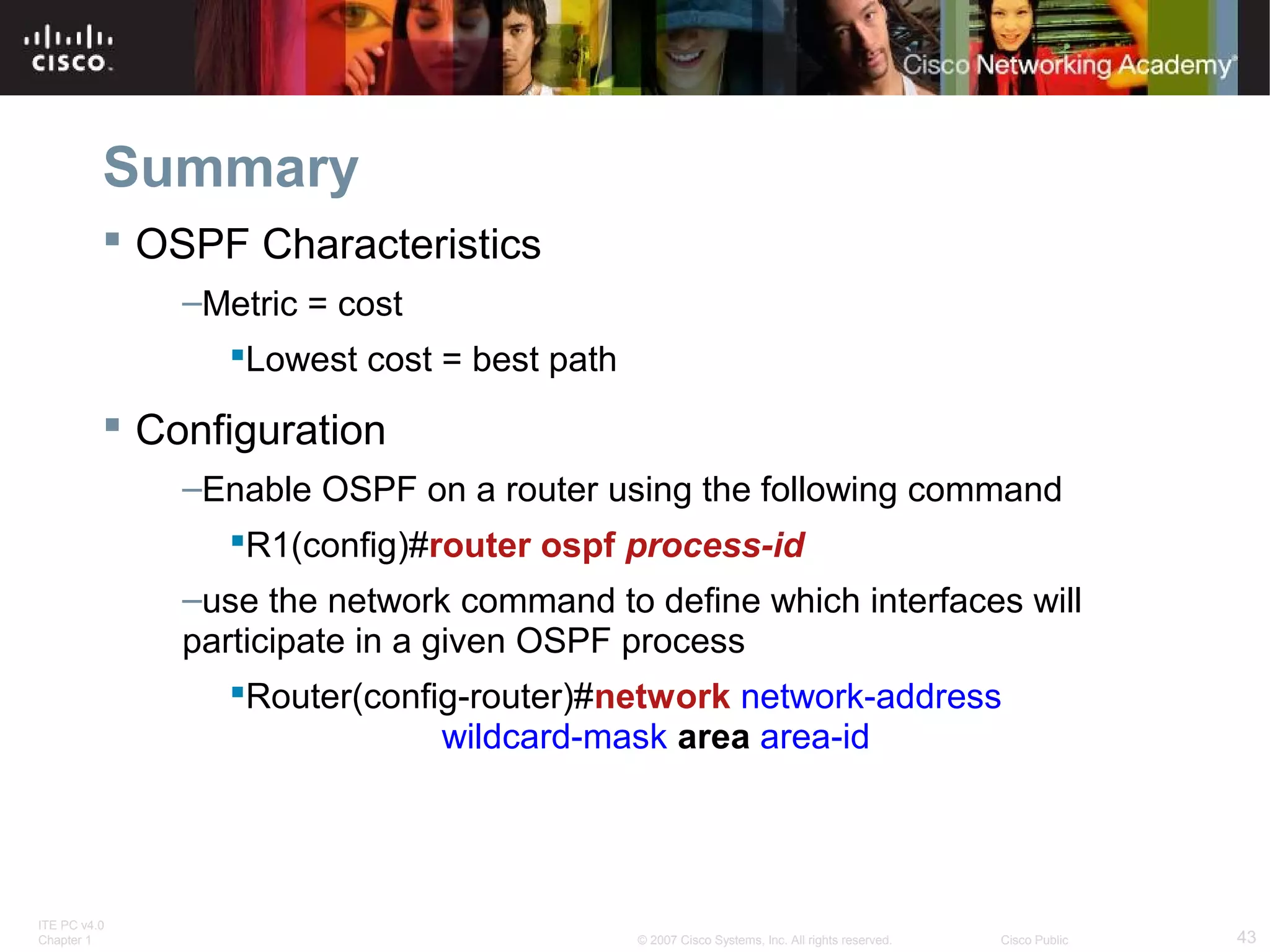
–Enable OSPF on a router using the following command
R1(config)#router ospf process-id
–use the network command to define which interfaces will
participate in a given OSPF process
Router(config-router)#network network-address
wildcard-mask area area-id

ITE PC v4.0
Chapter 1

© 2007 Cisco Systems, Inc. All rights reserved.

Cisco Public

43
Summary
 Verifying OSPF configuration
–Use the following commands
show ip protocol
show ip route
show ip ospf interface
show ip ospf neighbor

ITE PC v4.0
Chapter 1

© 2007 Cisco Systems, Inc. All rights reserved.

Cisco Public

44
ITE PC v4.0
Chapter 1

© 2007 Cisco Systems, Inc. All rights reserved.

Cisco Public

45

Exploration routing chapter_11

  • 1.
    OSPF Routing Protocols and Concepts– Chapter 11 ITE PC v4.0 Chapter 1 © 2007 Cisco Systems, Inc. All rights reserved. Cisco Public 1
  • 2.
    Objectives  Describe the backgroundand basic features of OSPF  Identify and apply the basic OSPF configuration commands  Describe, modify and calculate the metric used by OSPF  Describe the Designated Router/Backup Designated Router (DR/BDR) election process in multiaccess networks  Describe the uses of additional configuration commands in OSPF ITE PC v4.0 Chapter 1 © 2007 Cisco Systems, Inc. All rights reserved. Cisco Public 2
  • 3.
    Introduction ITE PC v4.0 Chapter1 © 2007 Cisco Systems, Inc. All rights reserved. Cisco Public 3
  • 4.
    Introduction to OSPF Backgroundof OSPF  Began in 1987  1989 OSPFv1 released in RFC 1131 This version was experimental & never deployed  1991 OSPFv2 released in RFC 1247  1998 OSPFv2 updated in RFC 2328  1999 OSPFv3 published in RFC 2740 ITE PC v4.0 Chapter 1 © 2007 Cisco Systems, Inc. All rights reserved. Cisco Public 4
  • 5.
    Introduction to OSPF OSPFMessage Encapsulation  OSPF packet type There exist 5 types  OSPF packet header Contains - Router ID and area ID and Type code for OSPF packet type  IP packet header Contains - Source IP address, Destination IP address, & Protocol field set to 89 ITE PC v4.0 Chapter 1 © 2007 Cisco Systems, Inc. All rights reserved. Cisco Public 5
  • 6.
    Introduction to OSPF OSPFMessage Encapsulation  Data link frame header Contains - Source MAC address and Destination MAC address ITE PC v4.0 Chapter 1 © 2007 Cisco Systems, Inc. All rights reserved. Cisco Public 6
  • 7.
    Introduction to OSPF OSPFPacket Types ITE PC v4.0 Chapter 1 © 2007 Cisco Systems, Inc. All rights reserved. Cisco Public 7
  • 8.
    Introduction to OSPF HelloProtocol  OSPF Hello Packet –Purpose of Hello Packet  Discover OSPF neighbors & establish adjacencies  Advertise guidelines on which routers must agree to become neighbors  Used by multi-access networks to elect a designated router and a backup designated router ITE PC v4.0 Chapter 1 © 2007 Cisco Systems, Inc. All rights reserved. Cisco Public 8
  • 9.
    Introduction to OSPF Hello Packets continued Contents of a Hello Packet router ID of transmitting router  OSPF Hello Intervals –Usually multicast (224.0.0.5) –Sent every 30 seconds for NBMA segments  OSPF Dead Intervals –This is the time that must transpire before the neighbor is considered down –Default time is 4 times the hello interval ITE PC v4.0 Chapter 1 © 2007 Cisco Systems, Inc. All rights reserved. Cisco Public 9
  • 10.
    Introduction to OSPF Hello protocol packets contain information that is used in electing -Designated Router (DR)  DR is responsible for updating all other OSPF routers -Backup Designated Router (BDR)  This router takes over DR’s responsibilities if DR fails ITE PC v4.0 Chapter 1 © 2007 Cisco Systems, Inc. All rights reserved. Cisco Public 10
  • 11.
    Introduction to OSPF OSPFLink-state Updates  Purpose of a Link State Update (LSU) Used to deliver link state advertisements  Purpose of a Link State Advertisement (LSA) Contains information about neighbors & path costs ITE PC v4.0 Chapter 1 © 2007 Cisco Systems, Inc. All rights reserved. Cisco Public 11
  • 12.
    Introduction to OSPF OSPFAlgorithm  OSPF routers build & maintain link-state database containing LSA received from other routers –Information found in database is utilized upon execution of Dijkstra SPF algorithm –SPF algorithm used to create SPF tree –SPF tree used to populate routing table ITE PC v4.0 Chapter 1 © 2007 Cisco Systems, Inc. All rights reserved. Cisco Public 12
  • 13.
    Introduction to OSPF AdministrativeDistance  Default Administrative Distance for OSPF is 110 ITE PC v4.0 Chapter 1 © 2007 Cisco Systems, Inc. All rights reserved. Cisco Public 13
  • 14.
    Introduction to OSPF OSPF Authentication –Purpose is to encrypt & authenticate routing information –This is an interface specific configuration –Routers will only accept routing information from other routers that have been configured with the same password or authentication information ITE PC v4.0 Chapter 1 © 2007 Cisco Systems, Inc. All rights reserved. Cisco Public 14
  • 15.
    Basic OSPF Configuration LabTopology  Topology used for this chapter Discontiguous IP addressing scheme Since OSPF is a classless routing protocol the subnet mask is configured in ITE PC v4.0 Chapter 1 © 2007 Cisco Systems, Inc. All rights reserved. Cisco Public 15
  • 16.
    Basic OSPF Configuration Therouter ospf command  To enable OSPF on a router use the following command R1(config)#router ospf process-id Process id  A locally significant number between 1 and 65535 -this means it does not have to match other OSPF routers ITE PC v4.0 Chapter 1 © 2007 Cisco Systems, Inc. All rights reserved. Cisco Public 16
  • 17.
    Basic OSPF Configuration OSPF network command -Requires entering: network address wildcard mask - the inverse of the subnet mask area-id - area-id refers to the OSPF area. OSPF area is a group of routers that share link state information -Example: Router(config-router)#network network-address wildcard-ask area area-id ITE PC v4.0 Chapter 1 © 2007 Cisco Systems, Inc. All rights reserved. Cisco Public 17
  • 18.
    Basic OSPF Configuration Router ID –This is an IP address used to identify a router –3 criteria for deriving the router ID Use IP address configured with OSPF router-id command -Takes precedence over loopback and physical interface addresses If router-id command not used then router chooses highest IP address of any loopback interfaces If no loopback interfaces are configured then the highest IP address on any active interface is used ITE PC v4.0 Chapter 1 © 2007 Cisco Systems, Inc. All rights reserved. Cisco Public 18
  • 19.
    Basic OSPF Configuration OSPFRouter ID  Commands used to verify current router ID –Show ip protocols –Show ip ospf –Show ip ospf interface ITE PC v4.0 Chapter 1 © 2007 Cisco Systems, Inc. All rights reserved. Cisco Public 19
  • 20.
    Basic OSPF Configuration OSPFRouter ID  Router ID & Loopback addresses -Highest loopback address will be used as router ID if router-id command isn’t used -Advantage of using loopback address the loopback interface cannot fail  OSPF stability  The OSPF router-id command –Introduced in IOS 12.0 –Command syntax Router(config)#router ospfprocess-id Router(config-router)#router-idip-address  Modifying the Router ID –Use the command Router#clear ip ospf process ITE PC v4.0 Chapter 1 © 2007 Cisco Systems, Inc. All rights reserved. Cisco Public 20
  • 21.
    Basic OSPF Configuration VerifyingOSPF  Use the show ip ospf command to verify & trouble shoot OSPF networks Command will display the following:  Neighbor adjacency -No adjacency indicated by Neighboring router’s Router ID is not displayed A state of full is not displayed -Consequence of no adjacencyNo link state information exchanged Inaccurate SPF trees & routing tables ITE PC v4.0 Chapter 1 © 2007 Cisco Systems, Inc. All rights reserved. Cisco Public 21
  • 22.
    Basic OSPF Configuration VerifyingOSPF - Additional Commands Command Description Show ip protocols Displays OSPF process ID, router ID, networks router is advertising & administrative distance Show ip ospf Displays OSPF process ID, router ID, OSPF area information & the last time SPF algorithm calculated Show ip ospf interface Displays hello interval and dead interval ITE PC v4.0 Chapter 1 © 2007 Cisco Systems, Inc. All rights reserved. Cisco Public 22
  • 23.
    Basic OSPF Configuration Examiningthe routing table  Use the show ip route command to display the routing table -An “O’ at the beginning of a route indicates that the router source is OSPF -Note OSPF does not automatically summarize at major network boundaries ITE PC v4.0 Chapter 1 © 2007 Cisco Systems, Inc. All rights reserved. Cisco Public 23
  • 24.
    OSPF Metric  OSPFuses cost as the metric for determining the best route -The best route will have the lowest cost -Cost is based on bandwidth of an interface Cost is calculated using the formula 108 / bandwidth -Reference bandwidth defaults to 100Mbps can be modified using auto-cost reference-bandwidth command ITE PC v4.0 Chapter 1 © 2007 Cisco Systems, Inc. All rights reserved. Cisco Public 24
  • 25.
    OSPF Metric  COSTof an OSPF route Is the accumulated value from one router to the next ITE PC v4.0 Chapter 1 © 2007 Cisco Systems, Inc. All rights reserved. Cisco Public 25
  • 26.
    OSPF Metric  Usuallythe actual speed of a link is different than the default bandwidth –This makes it imperative that the bandwidth value reflects link’s actual speed Reason: so routing table has best path information  The show interface command will display interface’s bandwidth -Most serial link default to 1.544Mbps ITE PC v4.0 Chapter 1 © 2007 Cisco Systems, Inc. All rights reserved. Cisco Public 26
  • 27.
    Basic OSPF Configuration Modifyingthe Cost of a link  Both sides of a serial link should be configured with the same bandwidth –Commands used to modify bandwidth value Bandwidth command –Example: Router(config-if)#bandwidthbandwidth-kbps ip ospf cost command – allows you to directly specify interface cost -Example:R1(config)#interface serial 0/0/0 R1(config-if)#ip ospf cost 1562 ITE PC v4.0 Chapter 1 © 2007 Cisco Systems, Inc. All rights reserved. Cisco Public 27
  • 28.
    Basic OSPF Configuration Modifyingthe Cost of the link  Difference between bandwidth command & the ip ospf cost command –Ip ospf cost command Sets cost to a specific value –Bandwidth command Link cost is calculated ITE PC v4.0 Chapter 1 © 2007 Cisco Systems, Inc. All rights reserved. Cisco Public 28
  • 29.
    OSPF and MultiaccessNetworks Challenges in Multiaccess Networks  OSPF defines five network types: –Point-to-point –Broadcast Multiaccess –Nonbroadcast Multiaccess (NBMA) –Point-to-multipoint –Virtual links ITE PC v4.0 Chapter 1 © 2007 Cisco Systems, Inc. All rights reserved. Cisco Public 29
  • 30.
    OSPF in MultiaccessNetworks  2 challenges presented by multiaccess networks –Multiple adjacencies –Extensive LSA flooding ITE PC v4.0 Chapter 1 © 2007 Cisco Systems, Inc. All rights reserved. Cisco Public 30
  • 31.
    OSPF in MultiaccessNetworks  Extensive flooding of LSAs For every LSA sent out there must be an acknowledgement of receipt sent back to transmitting router. consequence: lots of bandwidth consumed and chaotic traffic ITE PC v4.0 Chapter 1 © 2007 Cisco Systems, Inc. All rights reserved. Cisco Public 31
  • 32.
    OSPF in MultiaccessNetworks  Solution to LSA flooding issue is the use of –Designated router (DR) –Backup designated router (BDR)  DR & BDR selection –Routers are elected to send & receive LSA  Sending & Receiving LSA –DRothers send LSAs via multicast 224.0.0.6 to DR & BDR –DR forward LSA via multicast address 224.0.0.5 to all other routers ITE PC v4.0 Chapter 1 © 2007 Cisco Systems, Inc. All rights reserved. Cisco Public 32
  • 33.
    OSPF in MultiaccessNetworks DR/BDR Election Process  DR/BDR elections DO NOT occur in point to point networks ITE PC v4.0 Chapter 1 © 2007 Cisco Systems, Inc. All rights reserved. Cisco Public 33
  • 34.
    OSPF in MultiaccessNetworks  DR/BDR elections will take place on multiaccess networks as shown below ITE PC v4.0 Chapter 1 © 2007 Cisco Systems, Inc. All rights reserved. Cisco Public 34
  • 35.
    OSPF in MultiaccessNetworks  Criteria for getting elected DR/BDR 1. DR: Router with the highest OSPF interface priority. 2. BDR: Router with the second highest OSPF interface priority. 3. If OSPF interface priorities are equal, the highest router ID is used to break the tie. ITE PC v4.0 Chapter 1 © 2007 Cisco Systems, Inc. All rights reserved. Cisco Public 35
  • 36.
    OSPF in MultiaccessNetworks  Timing of DR/BDR Election –Occurs as soon as 1st router has its interface enabled on multiaccess network When a DR is elected it remains as the DR until one of the following occurs -The DR fails. -The OSPF process on the DR fails. -The multiaccess interface on the DR fails. ITE PC v4.0 Chapter 1 © 2007 Cisco Systems, Inc. All rights reserved. Cisco Public 36
  • 37.
    OSPF in MultiaccessNetworks  Manipulating the election process -If you want to influence the election of DR & BDR then do one of the following Boot up the DR first, followed by the BDR, and then boot all other routers, OR Shut down the interface on all routers, followed by a no shutdown on the DR, then the BDR, and then all other routers. ITE PC v4.0 Chapter 1 © 2007 Cisco Systems, Inc. All rights reserved. Cisco Public 37
  • 38.
    OSPF in MultiaccessNetworks OSPF Interface Priority  Manipulating the DR/BDR election process continued –Use the ip ospf priority interface command. –Example:Router(config-if)#ip ospf priority {0 - 255} Priority number range 0 to 255 –0 means the router cannot become the DR or BDR –1 is the default priority value ITE PC v4.0 Chapter 1 © 2007 Cisco Systems, Inc. All rights reserved. Cisco Public 38
  • 39.
    More OSPF Configuration Redistributingan OSPF Default Route  Topology includes a link to ISP –Router connected to ISP Called an autonomous system border router Used to propagate a default route –Example of static default route R1(config)#ip route 0.0.0.0 0.0.0.0 loopback 1 –Requires the use of the default-information originate command –Example of default-information originate command R1(config-router)#default-information originate ITE PC v4.0 Chapter 1 © 2007 Cisco Systems, Inc. All rights reserved. Cisco Public 39
  • 40.
    More OSPF Configuration Fine-TuningOSPF  Since link speeds are getting faster it may be necessary to change reference bandwidth values –Do this using the auto-cost reference-bandwidth command –Example:  R1(config-router)#auto-cost reference-bandwidth 10000 ITE PC v4.0 Chapter 1 © 2007 Cisco Systems, Inc. All rights reserved. Cisco Public 40
  • 41.
    More OSPF Configuration Fine-TuningOSPF  Modifying OSPF timers –Reason to modify timers Faster detection of network failures –Manually modifying Hello & Dead intervals Router(config-if)#ip ospf hello-interval seconds Router(config-if)#ip ospf dead-interval seconds –Point to be made Hello & Dead intervals must be the same between neighbors ITE PC v4.0 Chapter 1 © 2007 Cisco Systems, Inc. All rights reserved. Cisco Public 41
  • 42.
    Summary  RFC 2328describes OSPF link state concepts and operations  OSPF Characteristics –A commonly deployed link state routing protocol –Employs DRs & BDRs on multi-access networks DRs & BDRs are elected DR & BDRs are used to transmit and receive LSAs –Uses 5 packet types: 1: HELLO 2: DATABASE DESCRIPTION 3: LINK STATE REQUEST 4: LINK STATE UPDATE 5: LINK STATE ACKNOWLEDGEMENT ITE PC v4.0 Chapter 1 © 2007 Cisco Systems, Inc. All rights reserved. Cisco Public 42
  • 43.
    Summary  OSPF Characteristics –Metric= cost Lowest cost = best path  Configuration –Enable OSPF on a router using the following command R1(config)#router ospf process-id –use the network command to define which interfaces will participate in a given OSPF process Router(config-router)#network network-address wildcard-mask area area-id ITE PC v4.0 Chapter 1 © 2007 Cisco Systems, Inc. All rights reserved. Cisco Public 43
  • 44.
    Summary  Verifying OSPFconfiguration –Use the following commands show ip protocol show ip route show ip ospf interface show ip ospf neighbor ITE PC v4.0 Chapter 1 © 2007 Cisco Systems, Inc. All rights reserved. Cisco Public 44
  • 45.
    ITE PC v4.0 Chapter1 © 2007 Cisco Systems, Inc. All rights reserved. Cisco Public 45