How to upload UAN based
ECR in new PF Website
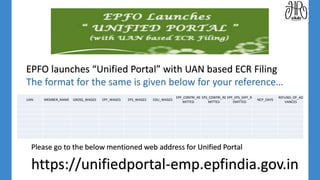
https://unifiedportal-emp.epfindia.gov.in
UAN MEMBER_NAME GROSS_WAGES EPF_WAGES EPS_WAGES EDLI_WAGES
EPF_CONTRI_RE
MITTED
EPS_CONTRI_RE
MITTED
EPF_EPS_DIFF_R
EMITTED
NCP_DAYS
REFUND_OF_AD
VANCES
EPFO launches “Unified Portal” with UAN based ECR Filing
The format for the same is given below for your reference…
Please go to the below mentioned web address for Unified Portal
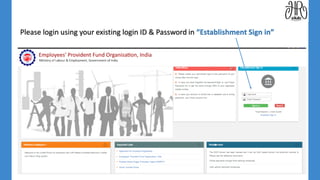
Please login using your existing login ID & Password in “Establishment Sign in”
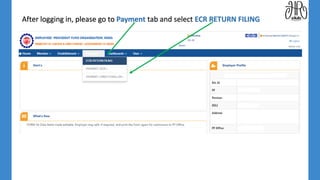
After logging in, please go to Payment tab and select ECR RETURN FILING
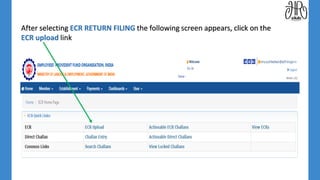
After selecting ECR RETURN FILING the following screen appears, click on the
ECR upload link
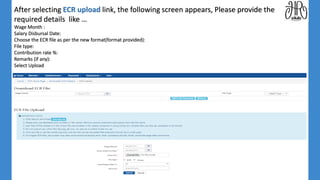
After selecting ECR upload link, the following screen appears, Please provide the
required details like …
Wage Month :
Salary Disbursal Date:
Choose the ECR file as per the new format(format provided):
File type:
Contribution rate %:
Remarks (if any):
Select Upload
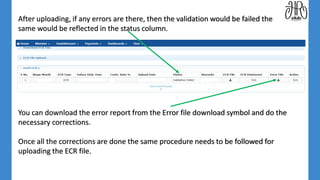
After uploading, if any errors are there, then the validation would be failed the
same would be reflected in the status column.
You can download the error report from the Error file download symbol and do the
necessary corrections.
Once all the corrections are done the same procedure needs to be followed for
uploading the ECR file.
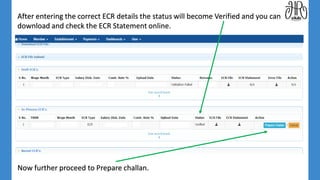
After entering the correct ECR details the status will become Verified and you can
download and check the ECR Statement online.
Now further proceed to Prepare challan.
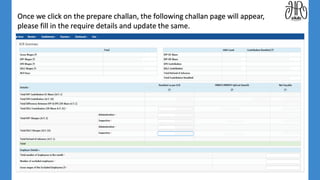
Once we click on the prepare challan, the following challan page will appear,
please fill in the require details and update the same.
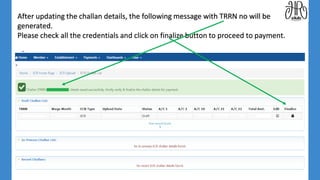
After updating the challan details, the following message with TRRN no will be
generated.
Please check all the credentials and click on finalize button to proceed to payment.
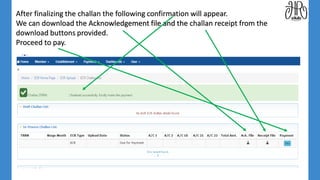
After finalizing the challan the following confirmation will appear.
We can download the Acknowledgement file and the challan receipt from the
download buttons provided.
Proceed to pay.
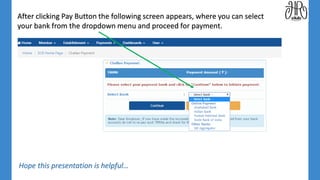
After clicking Pay Button the following screen appears, where you can select
your bank from the dropdown menu and proceed for payment.
Hope this presentation is helpful…
Thank You & Stay Connected…
Do share your Feedback…
Email : joinclubhr@gmail.com;
Follow us on twitter & facebook;
For more Presentations and Learning please visit www.clubhr.co.in.
ClubHR was founded with a very simple goal of providing information for the entire HR fraternity with the core objective including but
not limited to sharing of best practices and professional networking within the Indian and global HR communities in order to take the HR
profession higher through continuous and collaborative learning.

Uan based ecr for new pf portal

  • 1.
    How to uploadUAN based ECR in new PF Website
  • 2.
    https://unifiedportal-emp.epfindia.gov.in UAN MEMBER_NAME GROSS_WAGESEPF_WAGES EPS_WAGES EDLI_WAGES EPF_CONTRI_RE MITTED EPS_CONTRI_RE MITTED EPF_EPS_DIFF_R EMITTED NCP_DAYS REFUND_OF_AD VANCES EPFO launches “Unified Portal” with UAN based ECR Filing The format for the same is given below for your reference… Please go to the below mentioned web address for Unified Portal
  • 3.
    Please login usingyour existing login ID & Password in “Establishment Sign in”
  • 4.
    After logging in,please go to Payment tab and select ECR RETURN FILING
  • 5.
    After selecting ECRRETURN FILING the following screen appears, click on the ECR upload link
  • 6.
    After selecting ECRupload link, the following screen appears, Please provide the required details like … Wage Month : Salary Disbursal Date: Choose the ECR file as per the new format(format provided): File type: Contribution rate %: Remarks (if any): Select Upload
  • 7.
    After uploading, ifany errors are there, then the validation would be failed the same would be reflected in the status column. You can download the error report from the Error file download symbol and do the necessary corrections. Once all the corrections are done the same procedure needs to be followed for uploading the ECR file.
  • 8.
    After entering thecorrect ECR details the status will become Verified and you can download and check the ECR Statement online. Now further proceed to Prepare challan.
  • 9.
    Once we clickon the prepare challan, the following challan page will appear, please fill in the require details and update the same.
  • 10.
    After updating thechallan details, the following message with TRRN no will be generated. Please check all the credentials and click on finalize button to proceed to payment.
  • 11.
    After finalizing thechallan the following confirmation will appear. We can download the Acknowledgement file and the challan receipt from the download buttons provided. Proceed to pay.
  • 12.
    After clicking PayButton the following screen appears, where you can select your bank from the dropdown menu and proceed for payment. Hope this presentation is helpful…
  • 13.
    Thank You &Stay Connected… Do share your Feedback… Email : joinclubhr@gmail.com; Follow us on twitter & facebook; For more Presentations and Learning please visit www.clubhr.co.in. ClubHR was founded with a very simple goal of providing information for the entire HR fraternity with the core objective including but not limited to sharing of best practices and professional networking within the Indian and global HR communities in order to take the HR profession higher through continuous and collaborative learning.