Two simple ways to save and
access knowledge
with SharePoint 2013 out of the box
Jeff ANGAMA
• 6 years of experience (in Paris and SG) implementing digital workplace
(intranet, social network), using SharePoint / Newsgator Sitrion
• As a technical consultant (developer, architect, involved in pre sales)
Twitter : @jeffangama
Blog : http://jeff-sharepoint-notes.fr
Email : jeff.angama@supinfo.com
Agenda
• Challenges addressed by knowledge management
• Quick intro to what is Knowledge Management (KM)
• Use Cases
• Demonstration : Two simple ways to share and access your team
knowledge
• To Go further…
• Q/A
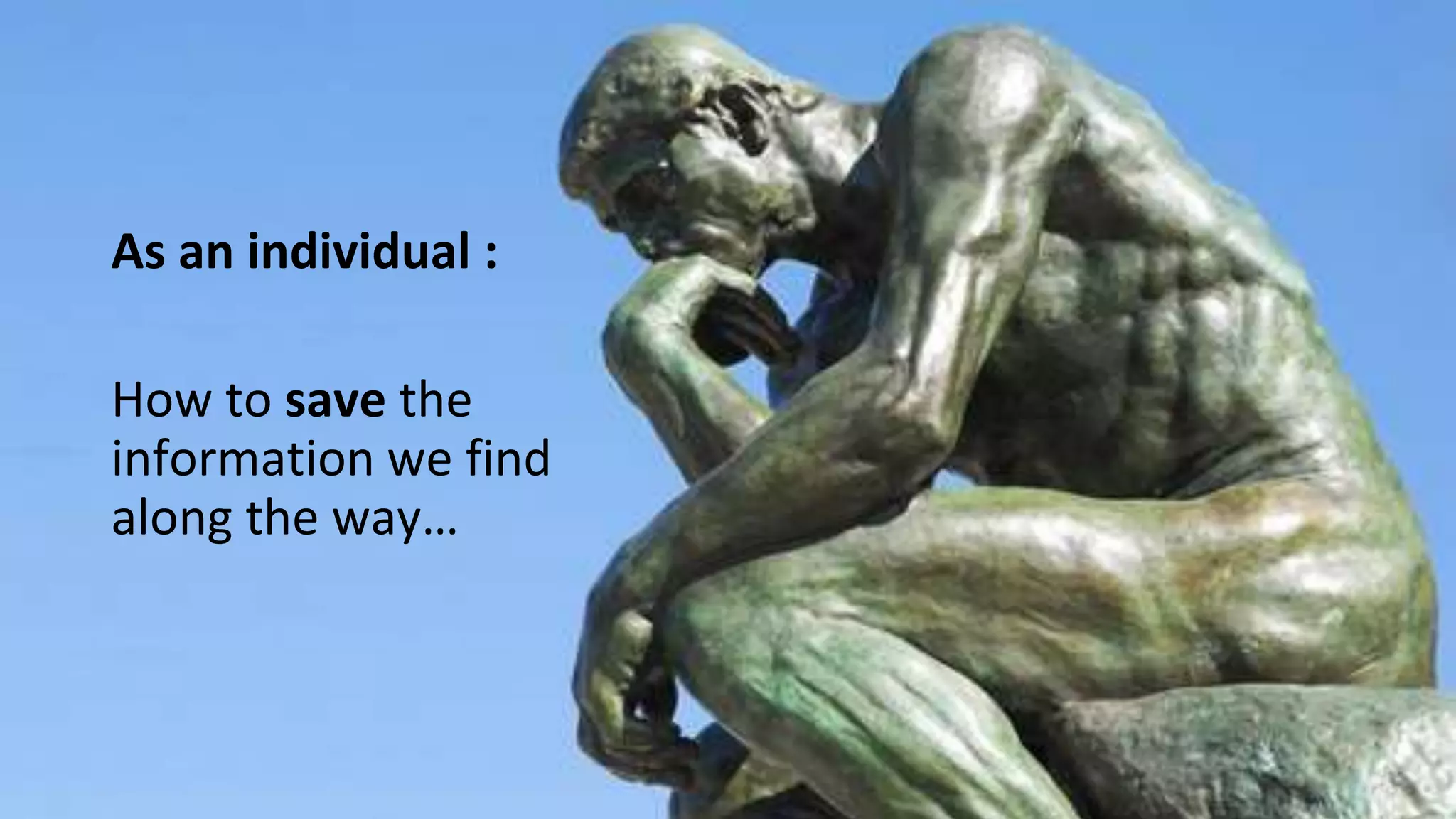
As an individual :
How to save the
information we find
along the way…
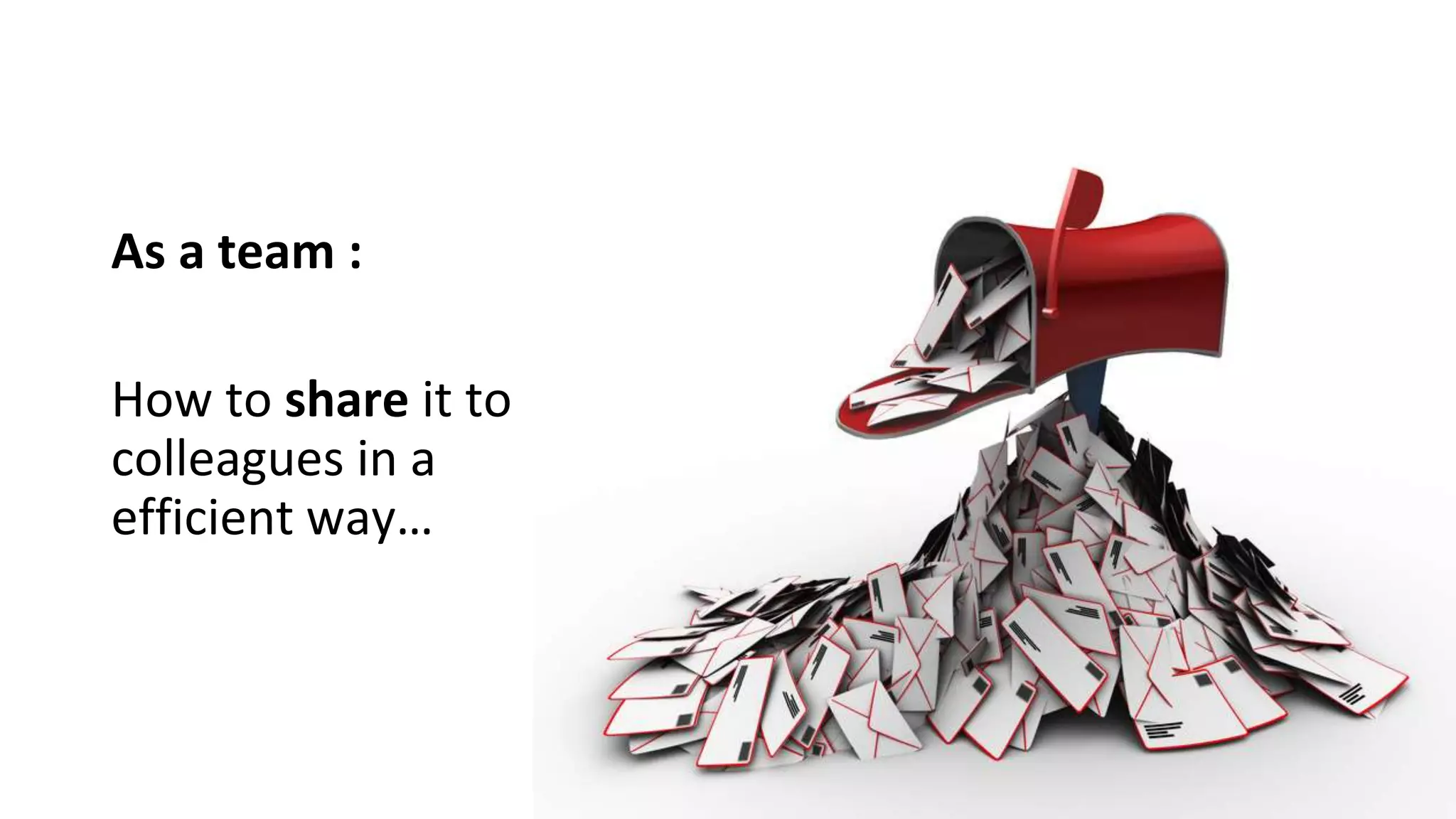
As a team :
How to share it to
colleagues in a
efficient way…
As a company :
…How to save the maximum
information from the employee leaving
the company
As a company :
…When a new employee join, how to
understand quickly the procedures, and rules
?
“ How to deploy on the UAT environment ? “
Knowledge Management
Definition : Knowledge Management
• Knowledge management (KM) is the process of capturing, developing,
sharing, and effectively using organizational knowledge.
• It refers to a multi-disciplinary approach to achieving organizational
objectives by making the best use of knowledge.
https://en.wikipedia.org/wiki/Knowledge_management
Knowledge
The knowledge can be defined as ‘an
organized body of facts, principles,
procedures and information acquired
over time’. (N. Blanchard and J. Thacker, 2009)
knowledge refers to what individuals or
teams of employees know or know how
to do (human and social knowledge) as
well as a company’s rules, processes,
tools, and routines (structured
knowledge). (R. Noe, 2008)
To remain competitive companies need to
develop strategies to retain knowledge from
older workers and transfer it successfully to
other employees in the corporation. (T. Calo, 2008)
“As the Baby Boomer generation
prepares for retirement, many firms want to
be sure that the knowledge and experience
gained by the current leadership does not
walk out the door when they do” (S. Glick, 2007)
From Enterprise Brain - Nicolas Georgeault
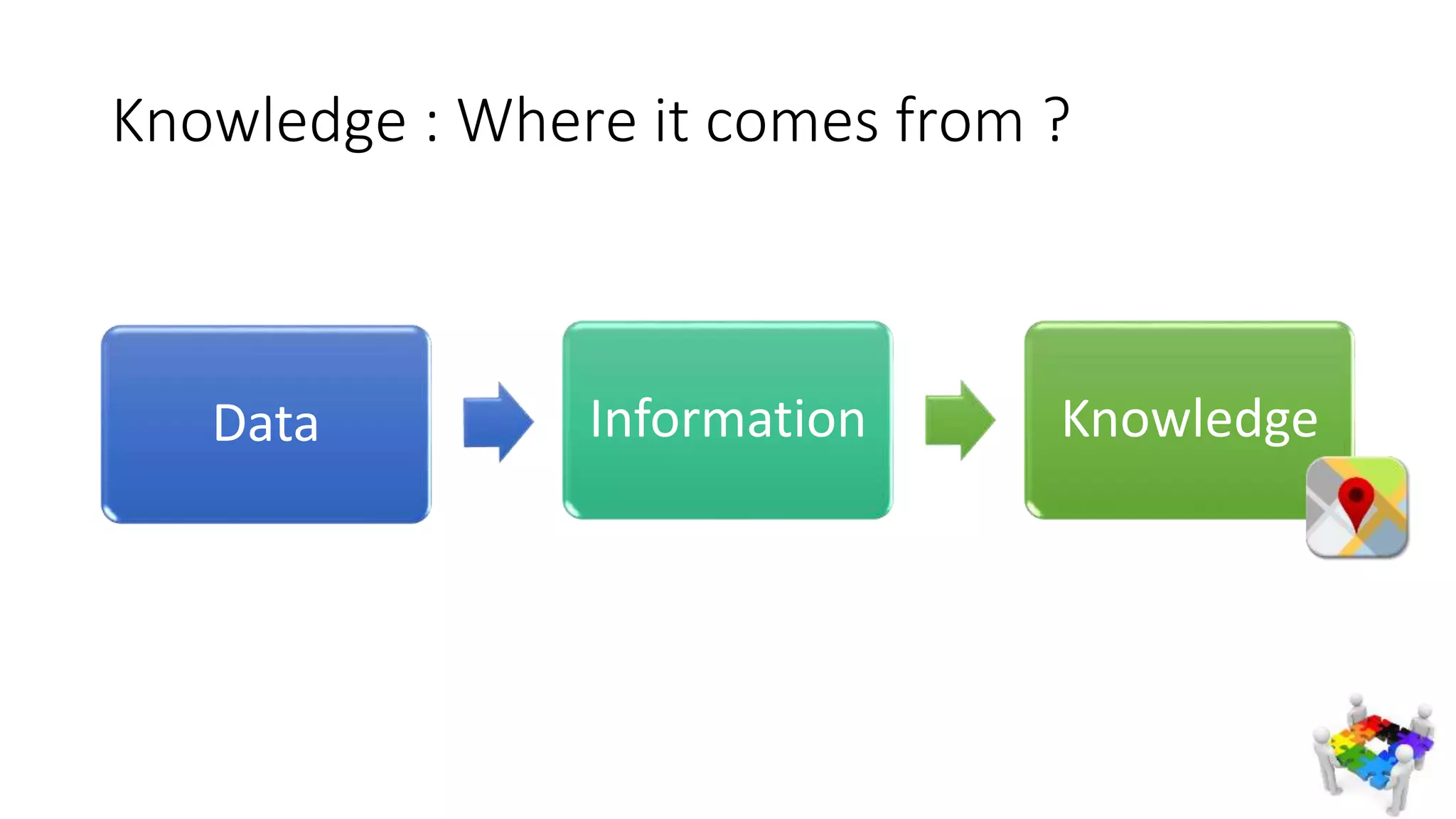
Knowledge : Where it comes from ?
Data Information Knowledge
Knowledge Database
• One of the Knowledge Management Practice, allowing to capitalize a
knowledge across the organization
• A knowledge base (KB) is a technology used to store complex
structured and unstructured information used by a computer system
Use Case 1 : 2500 PowerPoint tender
presentations shared
• Company context
• An IT Consulting Service company
• 40 000 it services employees
• 1000 managers responding to RFQ
• Requirement
• As a pre sale : Quickly respond with quality to a RFQs
• I wish I can re-use powerpoint / words from other colleagues
• I also need a guide line to write RFQ

How it has been done :
SharePoint 2010 documents libraries with taxonomy
Search Center per content types
FAQ with how to build a successful presentation
Use Case 1 : 2500 PowerPoint tender
presentations shared
Use Case 1 : 2500 PowerPoint tender
presentations shared
• Benefits
• “I don’t have to spend hours creating fancy slides” – Pre sale consultant
• Challenges :
• To motivate people to share their documents : gamification has been used
(reward, gifts based on contribution)
Use Case 2 : Developer Knowledge Centre
• As lead developer I think it will be more productive and
efficient if every developers could access the knowledge
of each other before searching on GOOGLE
Use Case 2 : Developer Knowledge Centre
How it has been done
Shared One Note
Lists, taxonomy
Fast Search
Use Case 2 : Developer Knowledge Centre
• Benefits
 Re use hours of research and findings, from others
“The Getting Started for using google map API quickly written by my colleague
put me on the right track” – SharePoint Developer
• Challenges
• What to share and how detail
… How to start a knowledge database for your company or your customers ?
…With employees facing difficulties to share their knowledge : lacking of time
Demo
Knowledge Centre of an IT Service Company
• One note in SharePoint : Save technical tips everyday day around dev, archi, UI
integration, fastest way.
• List with managed taxonomy : Save best practices, easier to find back thanks to
tags
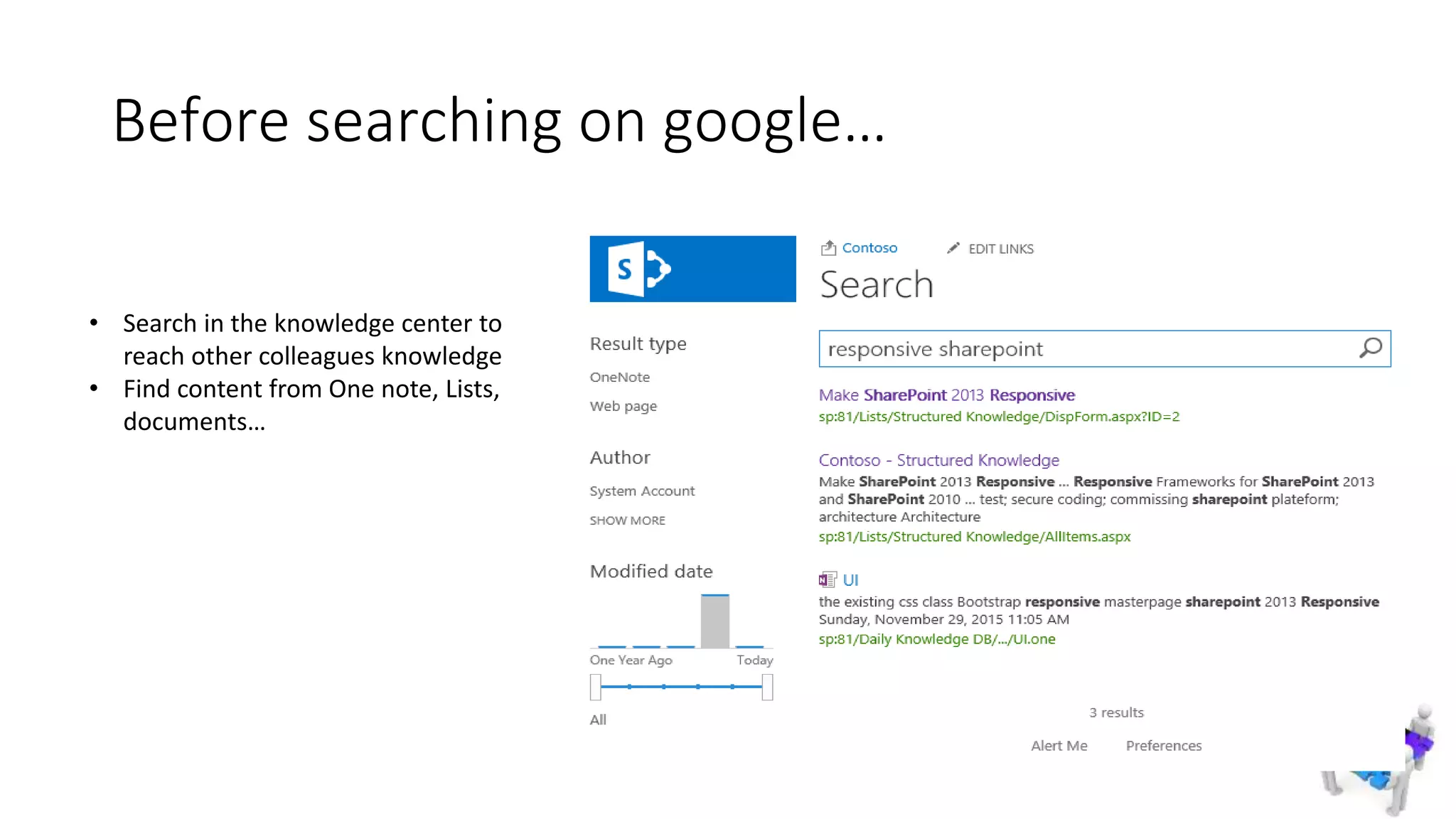
Before searching on google…
• Search in the knowledge center to
reach other colleagues knowledge
• Find content from One note, Lists,
documents…
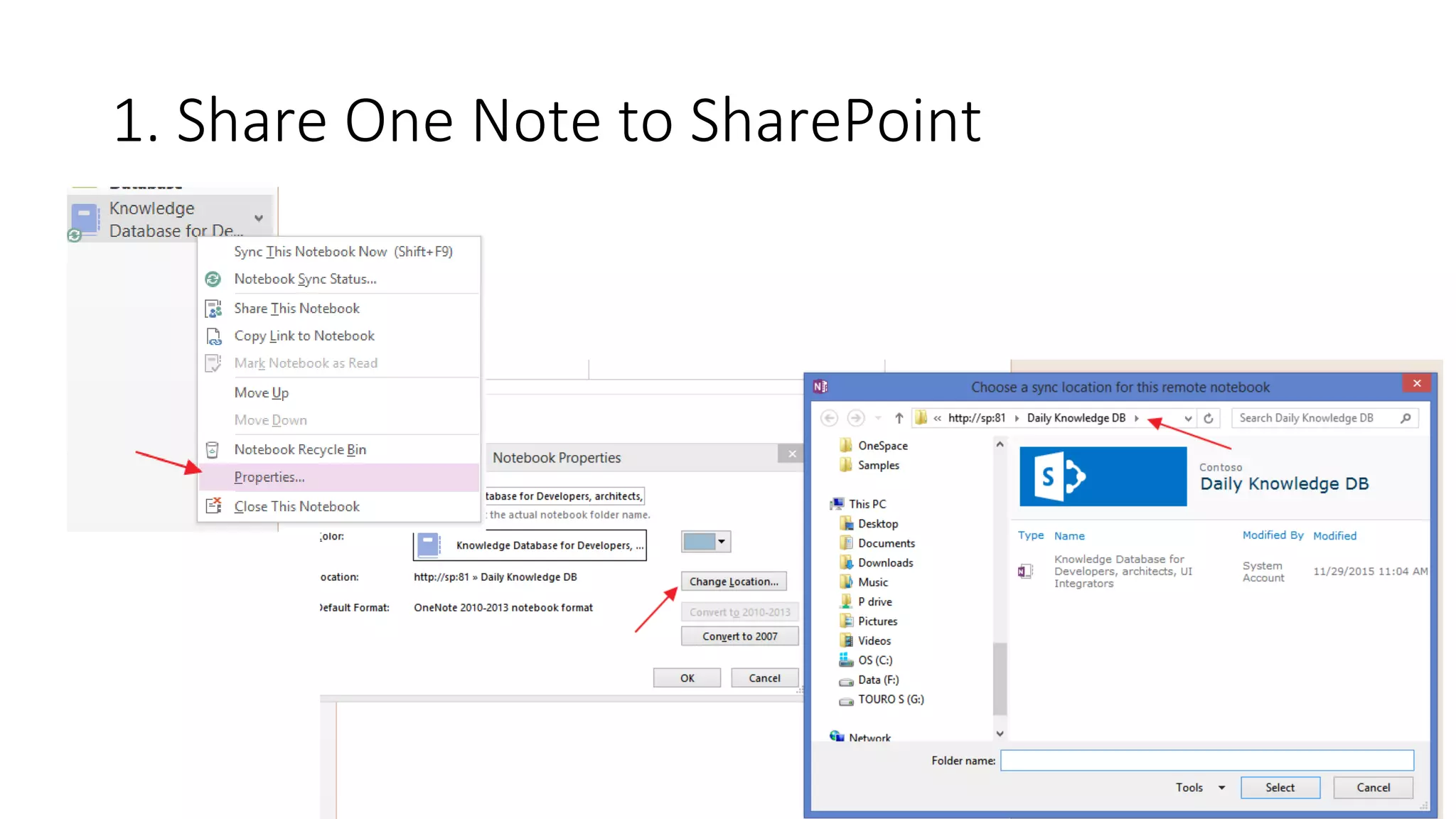
1. Share One Note to SharePoint
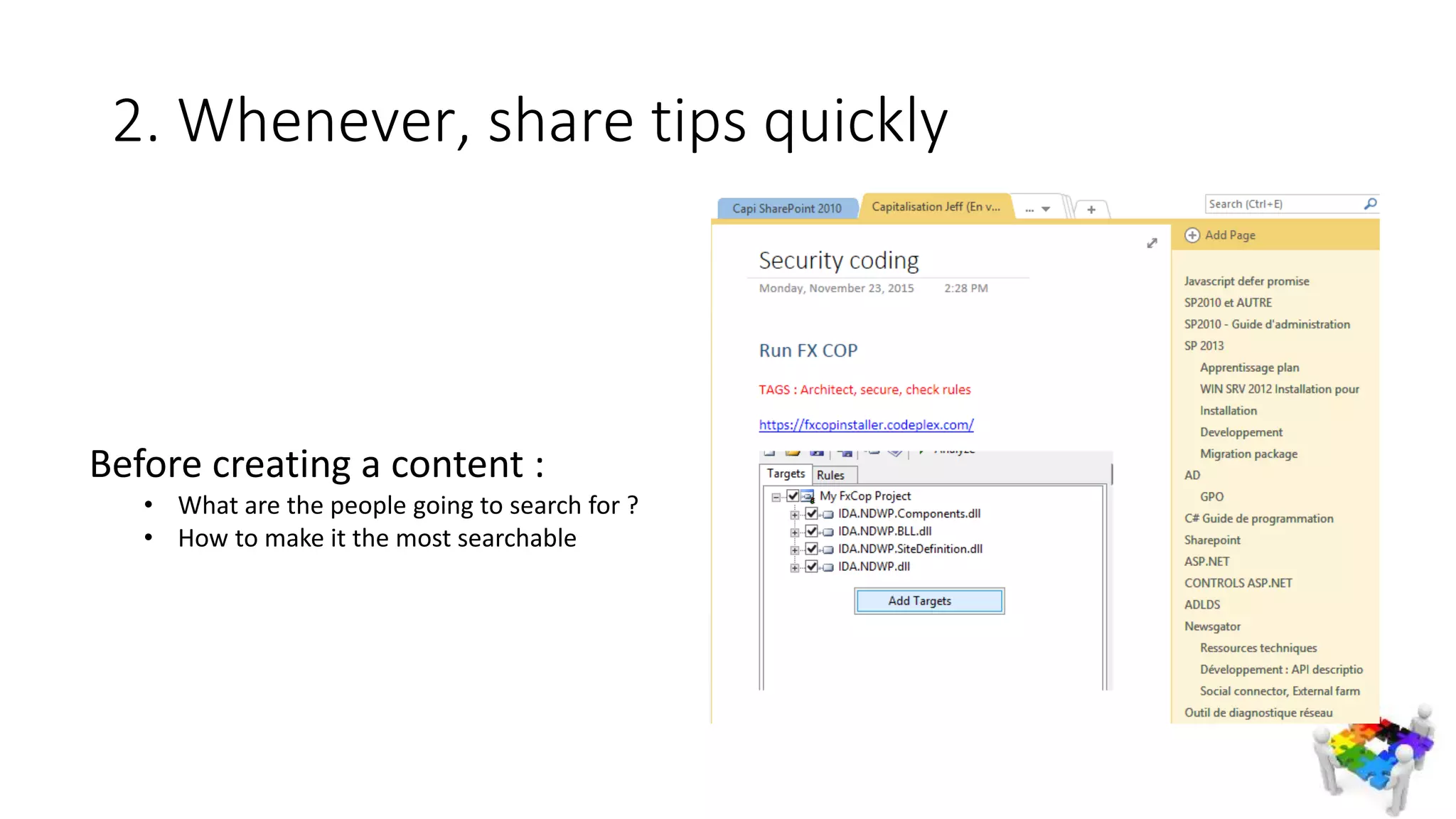
2. Whenever, share tips quickly
Before creating a content :
• What are the people going to search for ?
• How to make it the most searchable
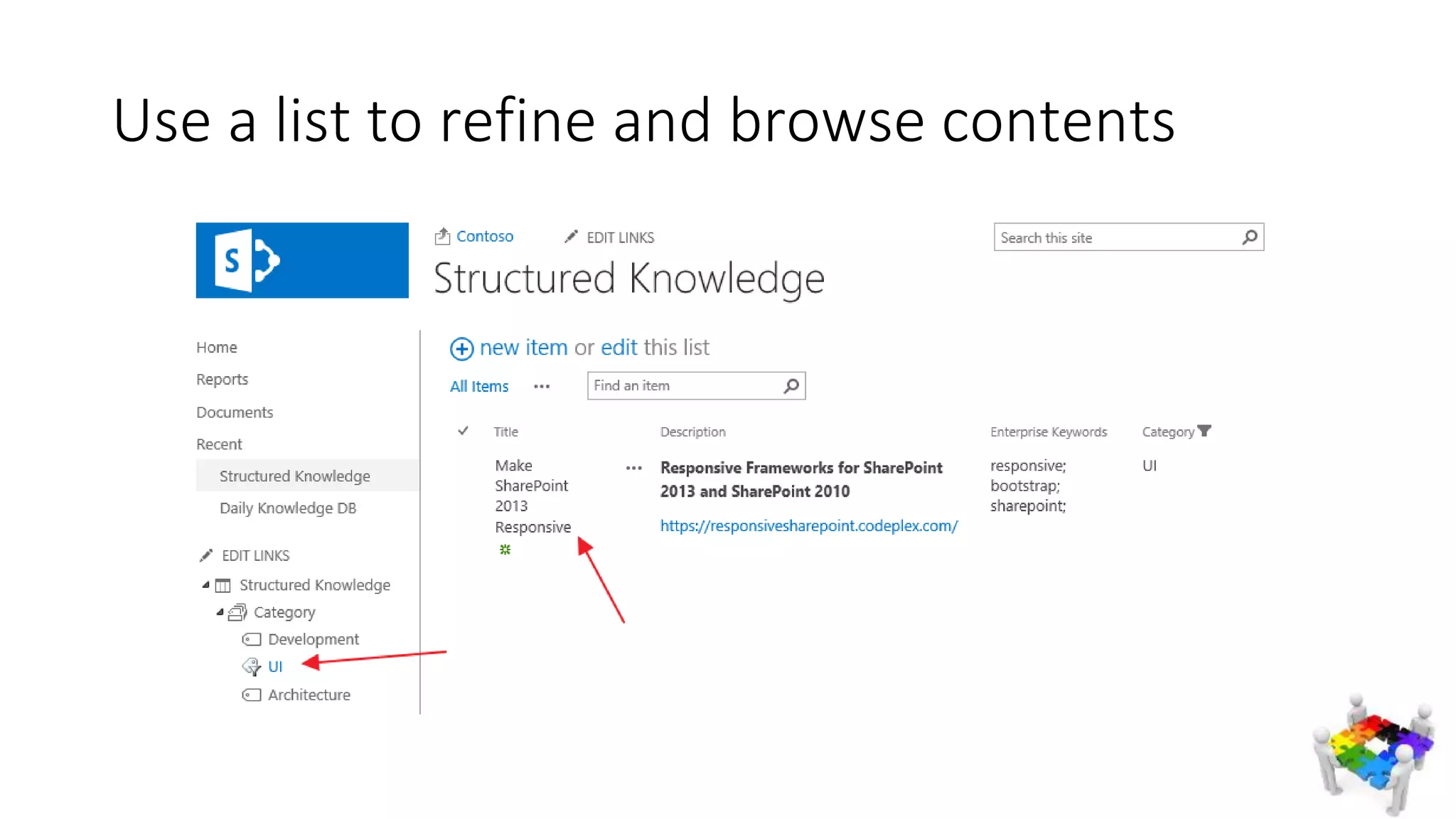
Use a list to refine and browse contents
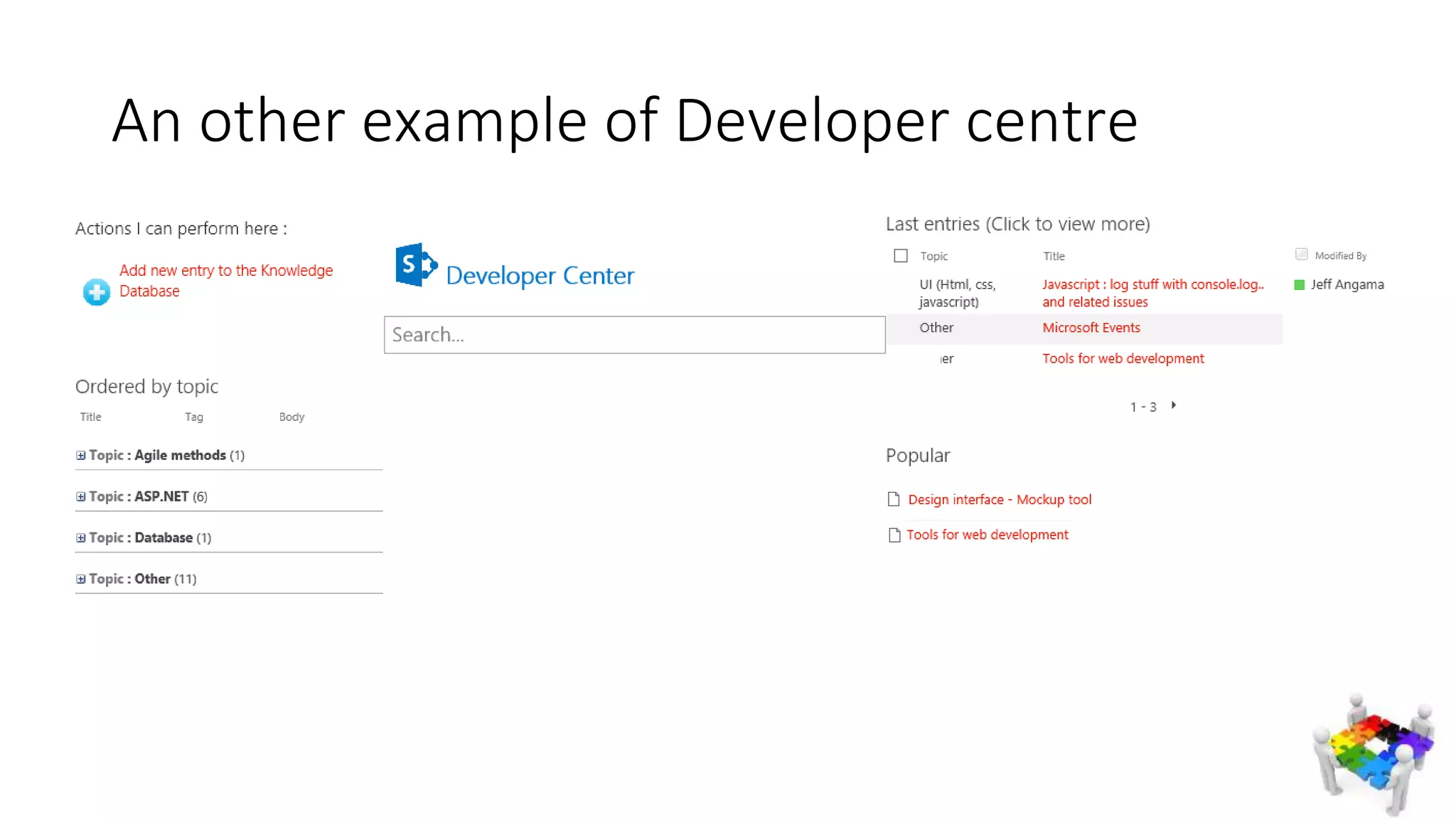
An other example of Developer centre
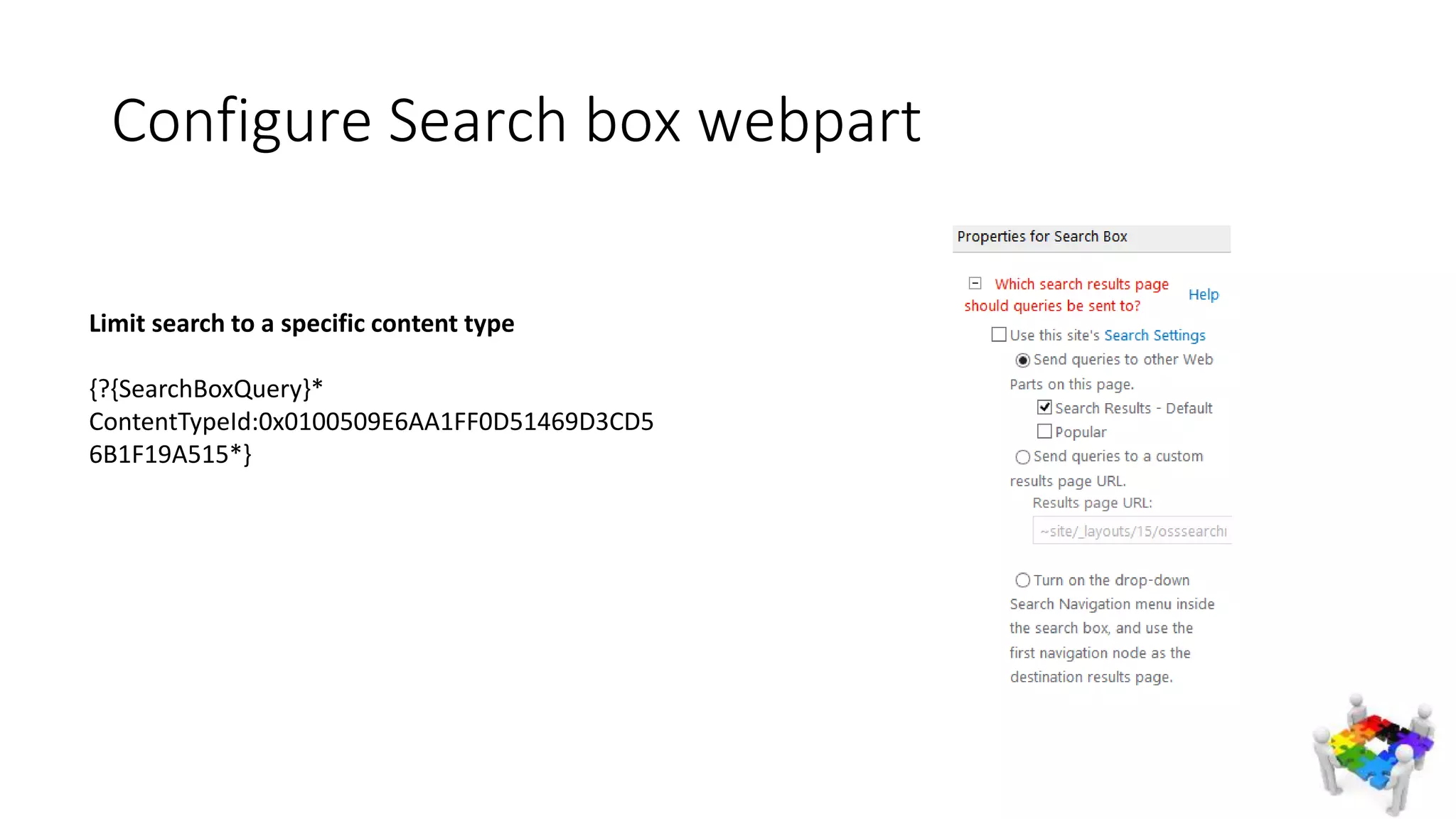
Configure Search box webpart
Limit search to a specific content type
{?{SearchBoxQuery}*
ContentTypeId:0x0100509E6AA1FF0D51469D3CD5
6B1F19A515*}
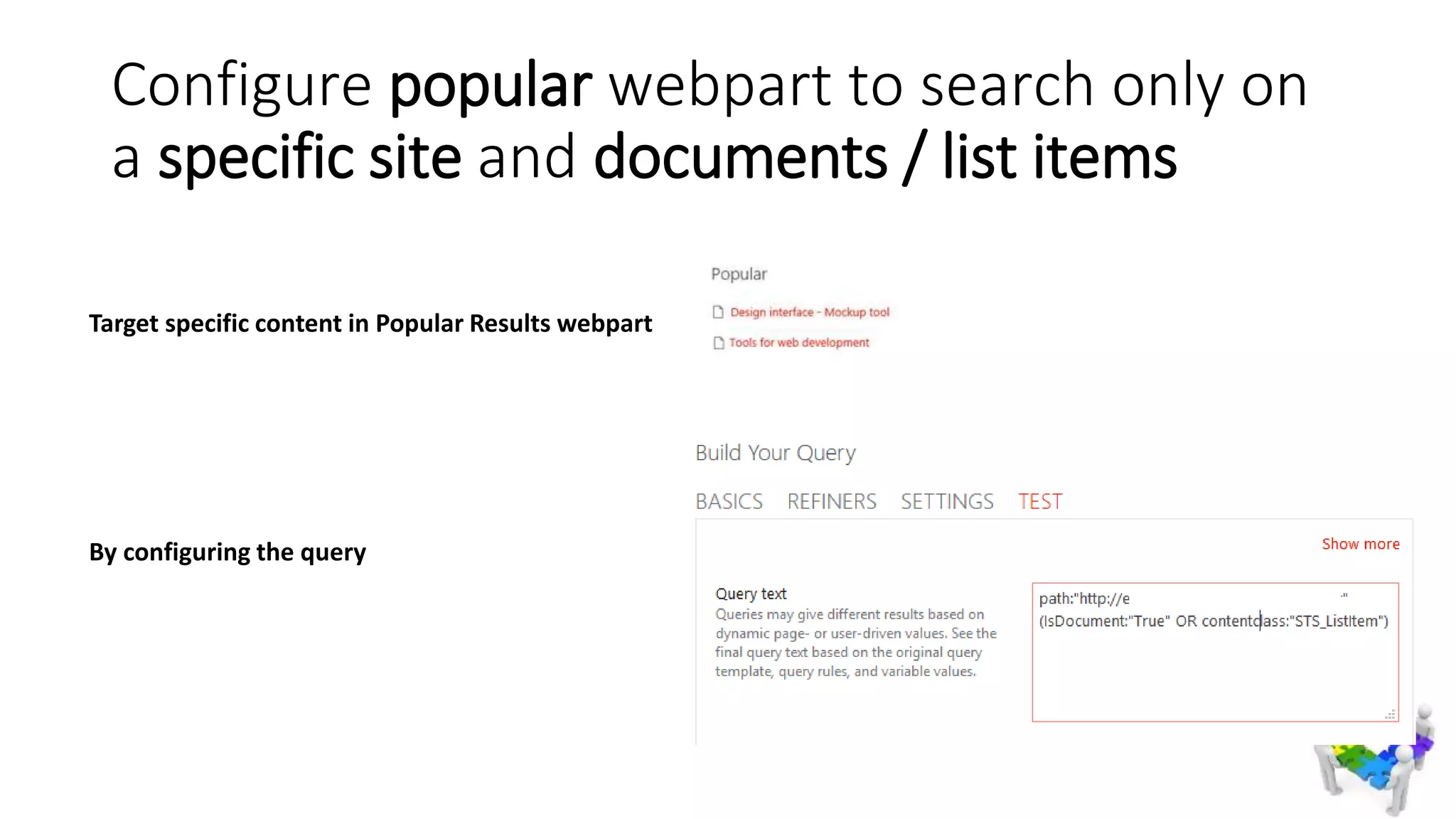
Configure popular webpart to search only on
a specific site and documents / list items
Target specific content in Popular Results webpart
By configuring the query
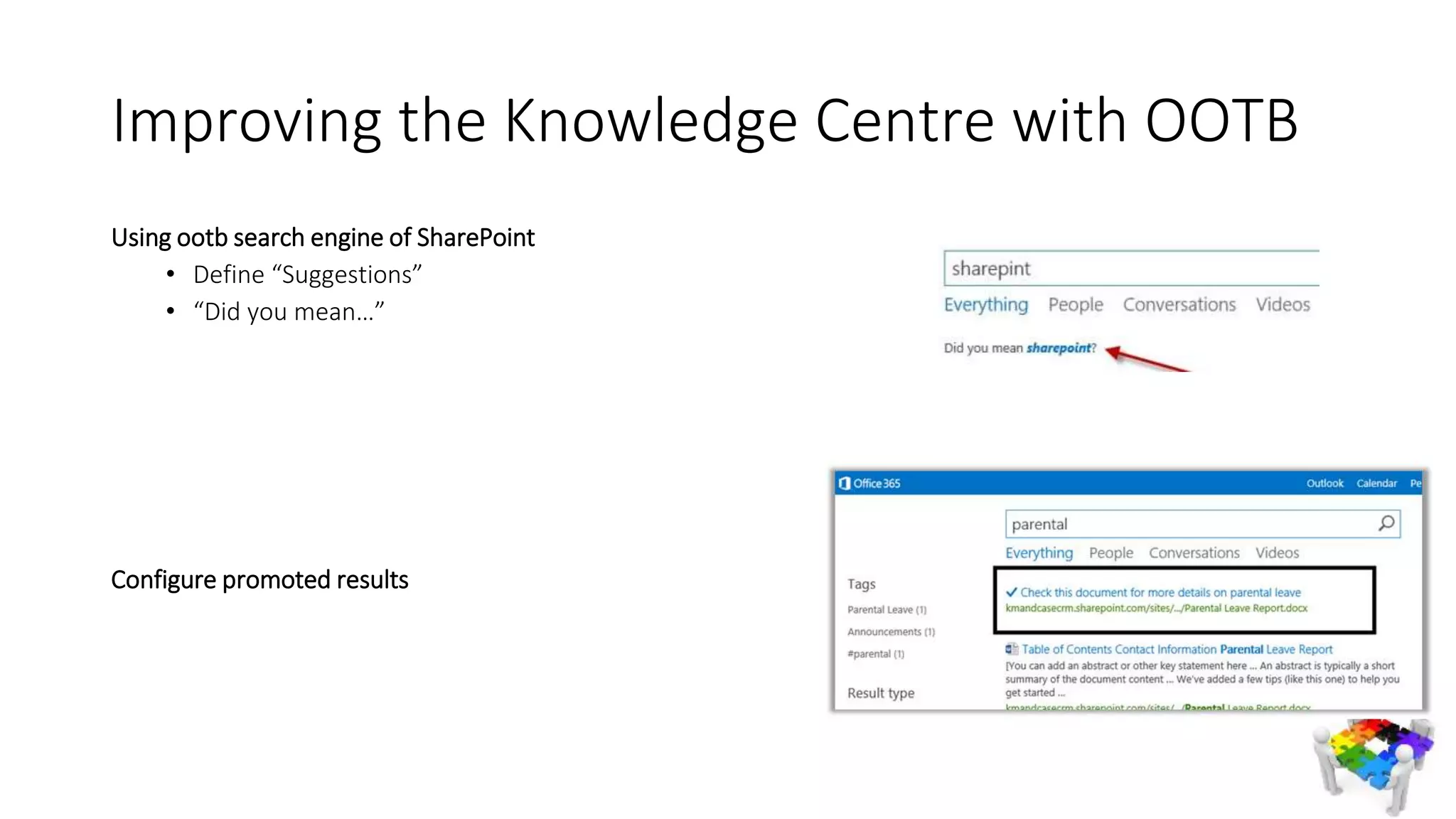
Improving the Knowledge Centre with OOTB
Using ootb search engine of SharePoint

• Define “Suggestions”
• “Did you mean…”
Configure promoted results
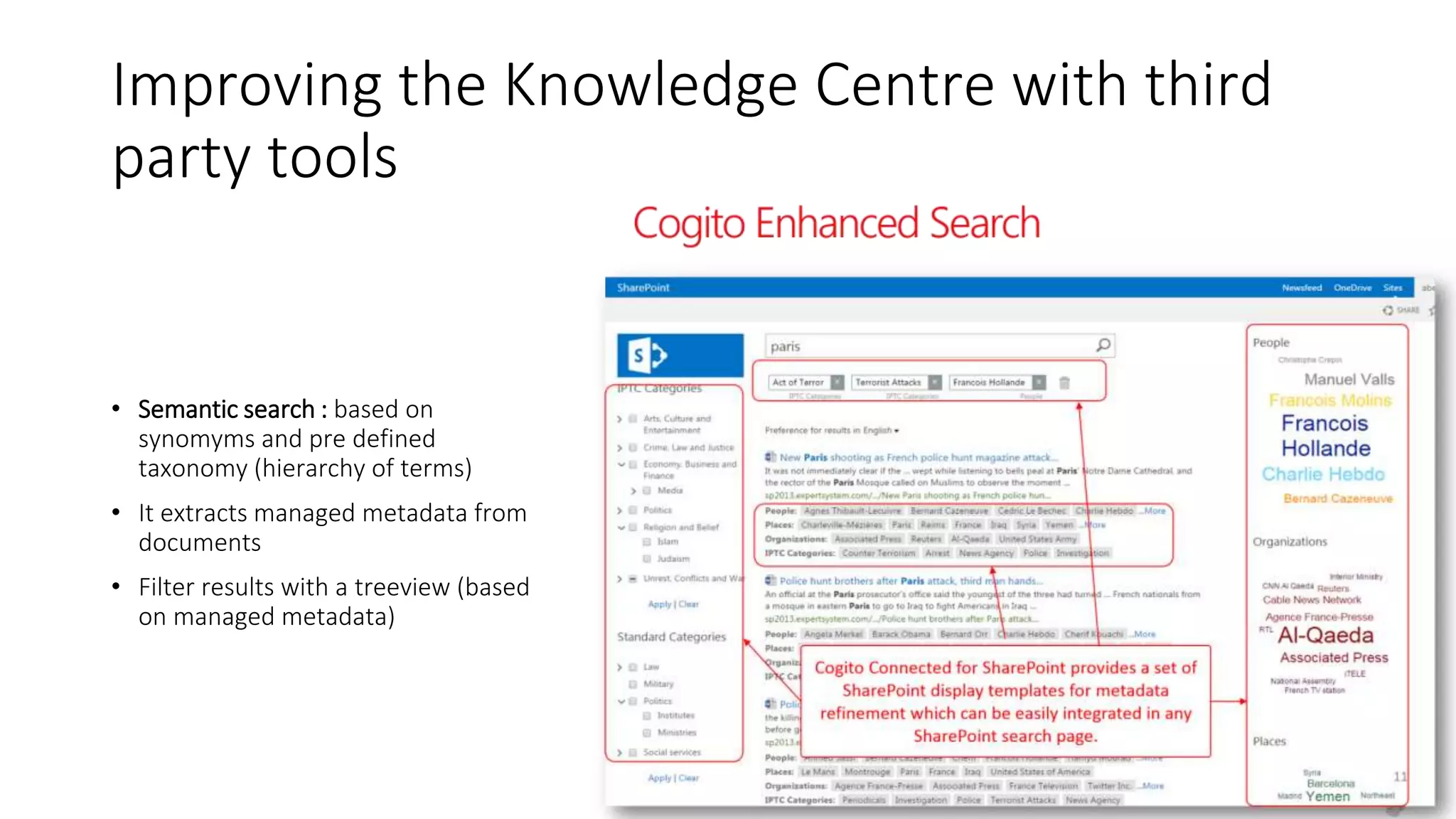
Improving the Knowledge Centre with third
party tools
• Semantic search : based on
synomyms and pre defined
taxonomy (hierarchy of terms)
• It extracts managed metadata from
documents
• Filter results with a treeview (based
on managed metadata)
Office 365 “Next Gen Portals”
Features in development (presented during Ignite conference in May 2015)
Board
• Present information as tiles, as Pinterest you can pin documents from Office Delve
Micro Site
• Mini sites containing articles, boards, navigation with magazine experience
Knowledge Management Portal “InfoPedia”
• Contains micro site, for more structured content, providing suggestions
To conclude…
• Information exchanged in emails are lost !!! Not searchable by new
employees, not categorized
• Agile concept : write less do more... But SHARE MORE and DO LESS !
Knowledge increases by sharing
To conclude
To conclude : Bring the change...
• Start Small, Think Big
• Adjust along the way, example : Define an approver for the KB if the
content is growing in a disorganized way
Thanks for your attention
Annex
• Office 365 Next Gen portals
• http://www.sharepointnutsandbolts.com/2015/05/Office-365-NextGen-
portals-Microsites-Boards-Knowledge-Management-portal.html
• Save a one note to SharePoint
• http://blog.thefullcircle.com/2012/01/moving-a-onenote-notebook-to-
sharepoint-2010/
• Definition of Knowledge Management
• https://en.wikipedia.org/wiki/Knowledge_management#CITEREFNonaka1991
Two simples and quick ways to Save and Share your company Knowledge

Two simples and quick ways to Save and Share your company Knowledge

  • 1.
    Two simple waysto save and access knowledge with SharePoint 2013 out of the box
  • 2.
    Jeff ANGAMA • 6years of experience (in Paris and SG) implementing digital workplace (intranet, social network), using SharePoint / Newsgator Sitrion • As a technical consultant (developer, architect, involved in pre sales) Twitter : @jeffangama Blog : http://jeff-sharepoint-notes.fr Email : jeff.angama@supinfo.com
  • 3.
    Agenda • Challenges addressedby knowledge management • Quick intro to what is Knowledge Management (KM) • Use Cases • Demonstration : Two simple ways to share and access your team knowledge • To Go further… • Q/A
  • 4.
    As an individual: How to save the information we find along the way…
  • 5.
    As a team: How to share it to colleagues in a efficient way…
  • 6.
    As a company: …How to save the maximum information from the employee leaving the company
  • 7.
    As a company: …When a new employee join, how to understand quickly the procedures, and rules ? “ How to deploy on the UAT environment ? “
  • 8.
  • 9.
    Definition : KnowledgeManagement • Knowledge management (KM) is the process of capturing, developing, sharing, and effectively using organizational knowledge. • It refers to a multi-disciplinary approach to achieving organizational objectives by making the best use of knowledge. https://en.wikipedia.org/wiki/Knowledge_management
  • 10.
    Knowledge The knowledge canbe defined as ‘an organized body of facts, principles, procedures and information acquired over time’. (N. Blanchard and J. Thacker, 2009) knowledge refers to what individuals or teams of employees know or know how to do (human and social knowledge) as well as a company’s rules, processes, tools, and routines (structured knowledge). (R. Noe, 2008) To remain competitive companies need to develop strategies to retain knowledge from older workers and transfer it successfully to other employees in the corporation. (T. Calo, 2008) “As the Baby Boomer generation prepares for retirement, many firms want to be sure that the knowledge and experience gained by the current leadership does not walk out the door when they do” (S. Glick, 2007) From Enterprise Brain - Nicolas Georgeault
  • 11.
    Knowledge : Whereit comes from ? Data Information Knowledge
  • 12.
    Knowledge Database • Oneof the Knowledge Management Practice, allowing to capitalize a knowledge across the organization • A knowledge base (KB) is a technology used to store complex structured and unstructured information used by a computer system
  • 13.
    Use Case 1: 2500 PowerPoint tender presentations shared • Company context • An IT Consulting Service company • 40 000 it services employees • 1000 managers responding to RFQ • Requirement • As a pre sale : Quickly respond with quality to a RFQs • I wish I can re-use powerpoint / words from other colleagues • I also need a guide line to write RFQ
  • 14.
    How it hasbeen done : SharePoint 2010 documents libraries with taxonomy Search Center per content types FAQ with how to build a successful presentation Use Case 1 : 2500 PowerPoint tender presentations shared
  • 15.
    Use Case 1: 2500 PowerPoint tender presentations shared • Benefits • “I don’t have to spend hours creating fancy slides” – Pre sale consultant • Challenges : • To motivate people to share their documents : gamification has been used (reward, gifts based on contribution)
  • 16.
    Use Case 2: Developer Knowledge Centre • As lead developer I think it will be more productive and efficient if every developers could access the knowledge of each other before searching on GOOGLE
  • 17.
    Use Case 2: Developer Knowledge Centre How it has been done Shared One Note Lists, taxonomy Fast Search
  • 18.
    Use Case 2: Developer Knowledge Centre • Benefits  Re use hours of research and findings, from others “The Getting Started for using google map API quickly written by my colleague put me on the right track” – SharePoint Developer • Challenges • What to share and how detail
  • 19.
    … How tostart a knowledge database for your company or your customers ? …With employees facing difficulties to share their knowledge : lacking of time
  • 21.
    Demo Knowledge Centre ofan IT Service Company • One note in SharePoint : Save technical tips everyday day around dev, archi, UI integration, fastest way. • List with managed taxonomy : Save best practices, easier to find back thanks to tags
  • 22.
    Before searching ongoogle… • Search in the knowledge center to reach other colleagues knowledge • Find content from One note, Lists, documents…
  • 23.
    1. Share OneNote to SharePoint
  • 24.
    2. Whenever, sharetips quickly Before creating a content : • What are the people going to search for ? • How to make it the most searchable
  • 25.
    Use a listto refine and browse contents
  • 26.
    An other exampleof Developer centre
  • 27.
    Configure Search boxwebpart Limit search to a specific content type {?{SearchBoxQuery}* ContentTypeId:0x0100509E6AA1FF0D51469D3CD5 6B1F19A515*}
  • 28.
    Configure popular webpartto search only on a specific site and documents / list items Target specific content in Popular Results webpart By configuring the query
  • 29.
    Improving the KnowledgeCentre with OOTB Using ootb search engine of SharePoint • Define “Suggestions” • “Did you mean…” Configure promoted results
  • 30.
    Improving the KnowledgeCentre with third party tools • Semantic search : based on synomyms and pre defined taxonomy (hierarchy of terms) • It extracts managed metadata from documents • Filter results with a treeview (based on managed metadata)
  • 31.
    Office 365 “NextGen Portals” Features in development (presented during Ignite conference in May 2015) Board • Present information as tiles, as Pinterest you can pin documents from Office Delve Micro Site • Mini sites containing articles, boards, navigation with magazine experience Knowledge Management Portal “InfoPedia” • Contains micro site, for more structured content, providing suggestions
  • 32.
  • 33.
    • Information exchangedin emails are lost !!! Not searchable by new employees, not categorized • Agile concept : write less do more... But SHARE MORE and DO LESS ! Knowledge increases by sharing To conclude
  • 34.
    To conclude :Bring the change... • Start Small, Think Big • Adjust along the way, example : Define an approver for the KB if the content is growing in a disorganized way
  • 36.
    Thanks for yourattention
  • 37.
    Annex • Office 365Next Gen portals • http://www.sharepointnutsandbolts.com/2015/05/Office-365-NextGen- portals-Microsites-Boards-Knowledge-Management-portal.html • Save a one note to SharePoint • http://blog.thefullcircle.com/2012/01/moving-a-onenote-notebook-to- sharepoint-2010/ • Definition of Knowledge Management • https://en.wikipedia.org/wiki/Knowledge_management#CITEREFNonaka1991

Editor's Notes

  • #2 Thx organizer Let me know if french Intro subject But before : introduction
  • #3 Experience in implementing intranet, social network Don’t hesitate to connect online
  • #4 SLIDE : Announce agenda Quick intro to KM to put this in the context of KM Please ask questions along the way
  • #5 As I start to work… how to save ? Save in notepad, in one note Poll
  • #6 How to share to colleagues ? Talk to colleagues Send email to reach next door colleague… but if not read its lost Don’t share
  • #7 Companies today face same individual problem Even more crucial
  • #8 New employee joins and learns from the intranet Any knowledge center shared by his colleagues ? Information is generally exchanged verbally… is it enough ?
  • #9 Knowledge Management is supposed to address those challenge First what is it
  • #10 SLIDE Since 1991 improved performance, competitive advantage, innovation, the sharing of lessons learned, integration and continuous improvement of the organisation
  • #11 Procedure and information acquired over time How to do Companies develop strategy to retain it Should make sure it does not walk out the door before an employee get retired
  • #12 Data: Facts, a description of the World. cant change Information: Captured Data and Knowledge at a certain point of time. can be wrong or right depending on when it has been written. coming from the interpretation of data Knowledge: Our personal map/model of the World. decision maker, how to do smth based on information we have? http://www.infogineering.net/wp-content/uploads/2009/08/model.jpg
  • #14 Need to Respond to rfq
  • #15 -i want to re use knowledge, info to respond to RFQ
  • #16 Quote Create knowledge teams
  • #19 2 previous implementation for two previous teams (5 developers). Allowed me to learn powershell for example Allowed people how to package to sharepoint visual studio using apps
  • #20 Suggestion for a dev team, or technical team…
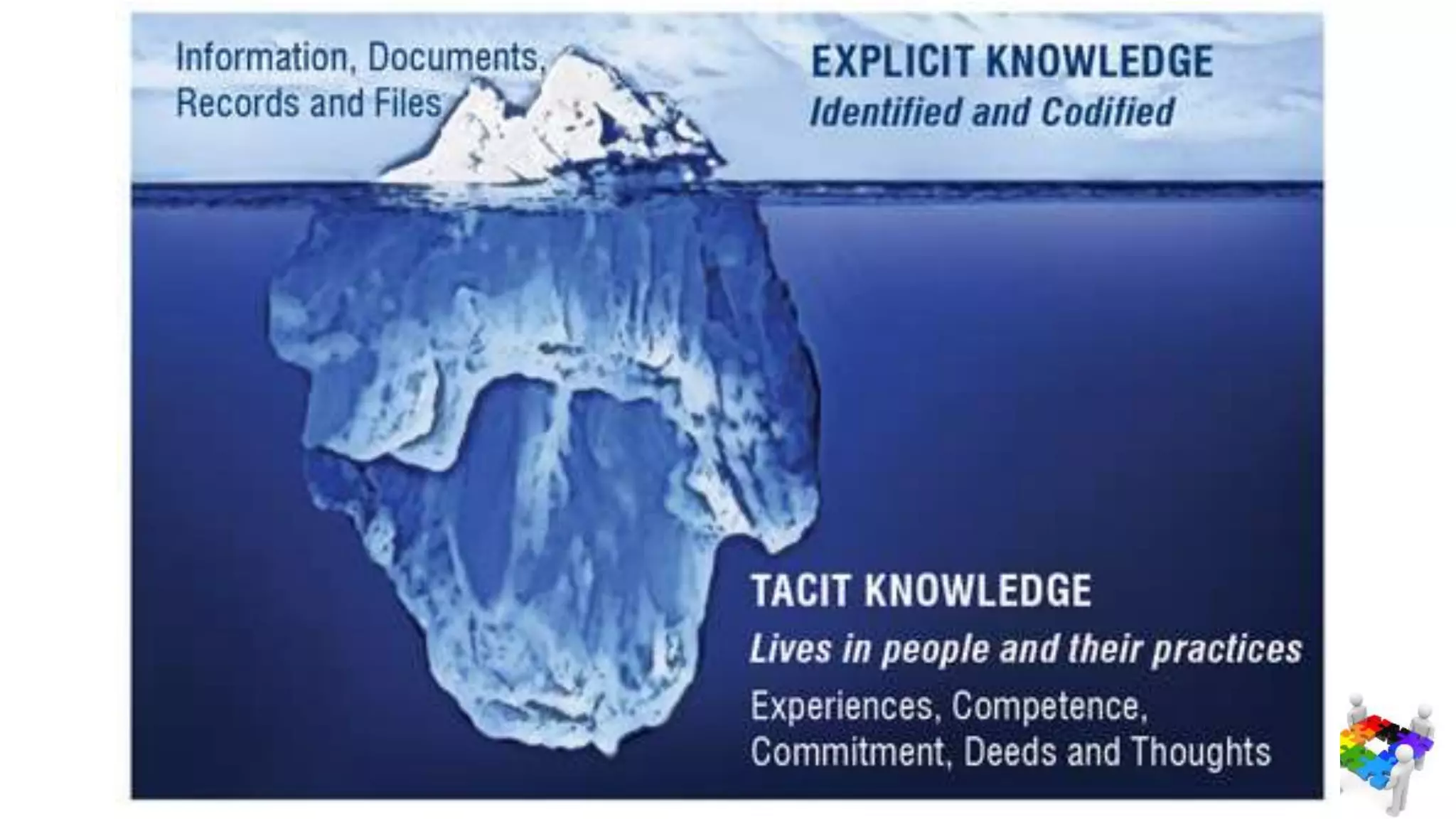
  • #21 Explicit knowledge : What you write in docs, share though a knowledge DB, that you are aware of (even if sometimes not) Tacit knowledge : Knowledge of playing an instrument… speaking a language… how to transmit it ? Though regular interaction, eye contact, practice
  • #22 What u can create is…
  • #23 Why note fetch results from Google ?
  • #24 Set it up Rename slode torle
  • #25 Start sharing
  • #26 Start sharing
  • #27 Left : See tips / best practice Middle : Search Right : Last entries, popular entries, to motivate the user to come again
  • #28 Search box will by default search for everything For the knowledge centre we want to search only for specific content type (the list we just configured)
  • #29 Same for popular item, we limit to this current Knowledge Centre
  • #30 SLIDES This was a suggestion among solutions of how to manage how to manage ur team knowledge Share with u a third party tool
  • #31 SCREENSHOT IN THE CONTEXT GOV AGENCY The tool is based on Semantic search: Synonyms, Extracting tags automatically to enhance filtering, Based on the company terms Before I Conclude… Microsoft ignite around KM
  • #32 Ready to go portal Use more , build less ….that is relevant to them (with recommendations) ….that is organized around their company ….and with a brand new search experience Able to be fetch from on premise environment for sp2013 and 2016
  • #34 SLIDES
  • #35 SLIDES
  • #39  Before following knowledge, he followed his imagination. He said : He feels certain that he his right without knowing the reason, thx to his imagination and feeling I d say : this is way more important than acquiring knowledge since imagination Leads u and your knowledge So I let up to you now to imagine ways to set the knowledge management in your company