Knowledge Management with
Semantic MediaWiki and SharePoint
Michael Erdmann

February 7, 2014
Karlsruhe, Germany
About DIQA GmbH
DIQA is an independent software vendor of knowledge
management tools for ECM portals.
Our vision:
We provide our customers with services and products that turn their
ECM portals into smart portals by introducing semantic web
technologies. Smart portals let end-users better find, organize,
process, control and govern unstructured content.
Founded:
Team:
Location:

May 2012
3 employees
Germany, Karlsruhe

Knowledge Management with
Semantic MediaWiki and SharePoint

© 2014 DIQA Projektmanagement GmbH | www.diqa-pm.com | Slide 2
Agenda

•
•
•
•
•
•
•

Goals of KM
Use Case1: Semantic MediaWiki
The notion of Information Architecture
Use Case 2: SharePoint
Metadata/Taxonomies in SharePoint
Comparison
Conclusion

Knowledge Management with
Semantic MediaWiki and SharePoint

© 2014 DIQA Projektmanagement GmbH | www.diqa-pm.com | Slide 3
Knowledge Work
• Knowledge workers are workers whose main
capital is knowledge, i.e. who "think for a
living", e.g. software engineers, doctors,
architects, engineers, scientists.
• They conduct "non-routine" problem solving
that requires a combination of convergent,
divergent, and creative thinking.
• Other work processes can also contain
knowledge work, e.g.
• Risk assessment when selling an insurance policy
• Purchasing a complex electronic device

Knowledge Management with
Semantic MediaWiki and SharePoint

© 2014 DIQA Projektmanagement GmbH | www.diqa-pm.com | Slide 4
Goals of KM
• Ensure effectively use of knowledge
• Share and reuse knowledge
• Make knowledge of individuals available
for the organization
• Ensure availability of knowledge over time
and independent of location
• Embed knowledge in work processes
“Make the right knowledge available, when it is
needed, where it is needed to whoever needs it.”
Knowledge Management with
Semantic MediaWiki and SharePoint

© 2014 DIQA Projektmanagement GmbH | www.diqa-pm.com | Slide 5
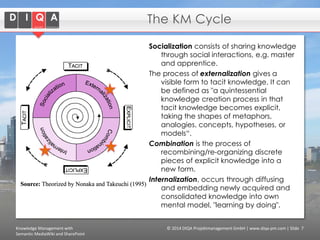
The KM Cycle
Socialization consists of sharing knowledge
through social interactions, e.g. master
and apprentice.
The process of externalization gives a
visible form to tacit knowledge. It can
be defined as "a quintessential
knowledge creation process in that
tacit knowledge becomes explicit,
taking the shapes of metaphors,
analogies, concepts, hypotheses, or
models“.
Combination is the process of
recombining/re-organizing discrete
pieces of explicit knowledge into a
new form.
Internalization, occurs through diffusing
and embedding newly acquired and
consolidated knowledge into own
mental model, "learning by doing".
Knowledge Management with
Semantic MediaWiki and SharePoint

© 2014 DIQA Projektmanagement GmbH | www.diqa-pm.com | Slide 7
Agenda

•
•
•
•
•
•
•

Goals of KM
Use Case1: Semantic MediaWiki
The notion of Information Architecture
Use Case 2: SharePoint
Metadata/Taxonomies in SharePoint
Comparison
Conclusion

Knowledge Management with
Semantic MediaWiki and SharePoint

© 2014 DIQA Projektmanagement GmbH | www.diqa-pm.com | Slide 9
What is Semantic Media Wiki (SMW)?
It’s a content management system for
• Richly formatted hypertext documents
• Structured data

It’s based on the “Wiki Way”:
• User-governed
• Collaborative
• Easy to use

Knowledge Management with
Semantic MediaWiki and SharePoint

© 2014 DIQA Projektmanagement GmbH | www.diqa-pm.com | Slide 10
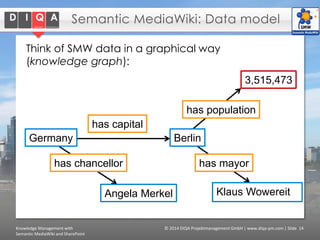
Semantic MediaWiki: Data model
Think of SMW data in a graphical way
(knowledge graph):
3,515,473
has population

has capital
Germany

Berlin

has chancellor

has mayor

Angela Merkel

Knowledge Management with
Semantic MediaWiki and SharePoint

Klaus Wowereit

© 2014 DIQA Projektmanagement GmbH | www.diqa-pm.com | Slide 14
Why is Semantic MediaWiki good for KM?

• Can handle text, images and data
(structured, semi-structured and unstructured
content)
• Collaborative platform

• Everyone can contribute, page history, authorship,
…

• Automatic sharing of wiki pages

• Web- based, one-data store, accessible from
anywhere

• Templates and forms define structure
• Knowledge graph

• Automatic lists via queries
• Reuse of knowledge in different contexts
• Faceted search enables interactive navigation

Knowledge Management with
Semantic MediaWiki and SharePoint

© 2014 DIQA Projektmanagement GmbH | www.diqa-pm.com | Slide 16
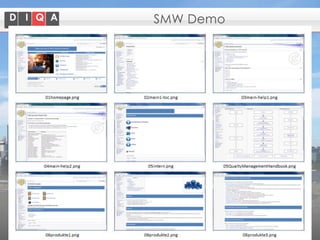
Use Case: SMW for Engineering SME
• What knowledge is contained in the wiki?
• Administrative
• Technical
• test protocols (aligned with the test database)
• Sales
• Products
• Quality Management handbook
• Processes, how-to’s

• Who uses it?
• 5-6 knowledge providers
• Essentially all employees use the wiki (consumes
knowledge)
• Staff from the production line shares one account
Knowledge Management with
Semantic MediaWiki and SharePoint

© 2014 DIQA Projektmanagement GmbH | www.diqa-pm.com | Slide 17
SMW Demo

Knowledge Management with
Semantic MediaWiki and SharePoint

© 2014 DIQA Projektmanagement GmbH | www.diqa-pm.com | Slide 18
Use Case: SMW for Engineering SME
• Why does the company use SMW?
•
•
•
•
•

Right mix of structure and freedom
Right mix of data and free-form text
No license costs
Active developer community
Easy (setup and )administration

• Particularities

• Documents
• No documents are shared via the wiki, due to privacy
concerns.
• Documents are stored on a file share with
appropriate user management (ActiveDirecory).
• Links to documents in the wiki
• Champion
• CEO is a strong proponent and agent for Knowledge
Management with SMW

Knowledge Management with
Semantic MediaWiki and SharePoint

© 2014 DIQA Projektmanagement GmbH | www.diqa-pm.com | Slide 19
Agenda

•
•
•
•
•
•
•

Goals of KM
Use Case1: Semantic MediaWiki
The notion of Information Architecture
Use Case 2: SharePoint
Metadata/Taxonomies in SharePoint
Comparison
Conclusion

Knowledge Management with
Semantic MediaWiki and SharePoint

© 2014 DIQA Projektmanagement GmbH | www.diqa-pm.com | Slide 21
Information Architecture
• Information architecture is the structural
design of shared information environments
(e.g. websites, intranets, online communities,
content management system), a blueprint
upon which all other aspects are built – form,
function, metaphor, navigation and interface,
interaction, and visual design
• including
•
•
•
•

Data model or concept of information
Users model and user roles
Activities and workflows
Policies and governance guidelines

Knowledge Management with
Semantic MediaWiki and SharePoint

© 2014 DIQA Projektmanagement GmbH | www.diqa-pm.com | Slide 22
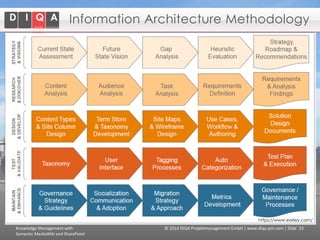
Information Architecture Methodology

https://www.earley.com/

Knowledge Management with
Semantic MediaWiki and SharePoint

© 2014 DIQA Projektmanagement GmbH | www.diqa-pm.com | Slide 23
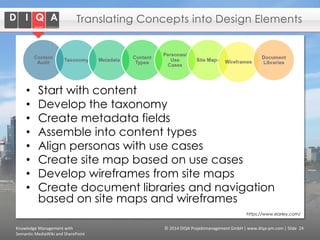
Translating Concepts into Design Elements

•
•
•
•
•
•
•
•

Start with content
Develop the taxonomy
Create metadata fields
Assemble into content types
Align personas with use cases
Create site map based on use cases
Develop wireframes from site maps
Create document libraries and navigation
based on site maps and wireframes
https://www.earley.com/

Knowledge Management with
Semantic MediaWiki and SharePoint

© 2014 DIQA Projektmanagement GmbH | www.diqa-pm.com | Slide 24
Agenda

•
•
•
•
•
•
•

Goals of KM
Use Case1: Semantic MediaWiki
The notion of Information Architecture
Use Case 2: SharePoint
Metadata/Taxonomies in SharePoint
Comparison
Conclusion

Knowledge Management with
Semantic MediaWiki and SharePoint

© 2014 DIQA Projektmanagement GmbH | www.diqa-pm.com | Slide 25
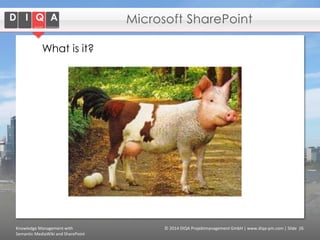
Microsoft SharePoint
What is it?

Knowledge Management with
Semantic MediaWiki and SharePoint

© 2014 DIQA Projektmanagement GmbH | www.diqa-pm.com | Slide 26
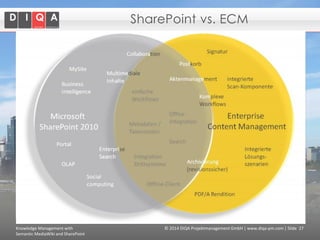
SharePoint vs. ECM

Knowledge Management with
Semantic MediaWiki and SharePoint

© 2014 DIQA Projektmanagement GmbH | www.diqa-pm.com | Slide 27
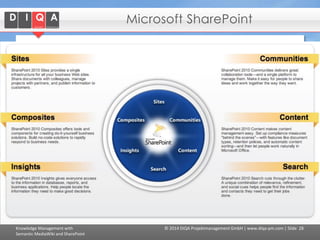
Microsoft SharePoint

Knowledge Management with
Semantic MediaWiki and SharePoint

© 2014 DIQA Projektmanagement GmbH | www.diqa-pm.com | Slide 28
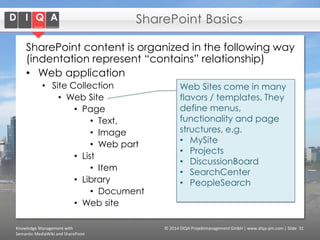
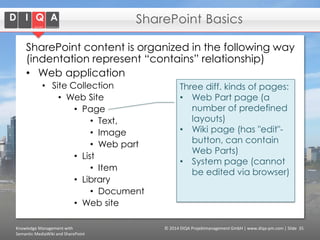
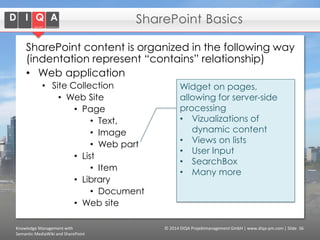
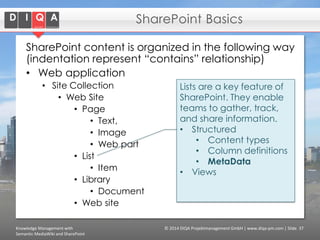
SharePoint Basics
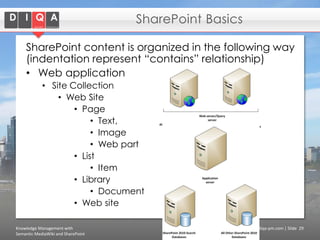
SharePoint content is organized in the following way
(indentation represent “contains” relationship)
• Web application
• Site Collection
• Web Site
• Page
• Text,
• Image
• Web part
• List
• Item
• Library
• Document
• Web site
Knowledge Management with
Semantic MediaWiki and SharePoint

© 2014 DIQA Projektmanagement GmbH | www.diqa-pm.com | Slide 29
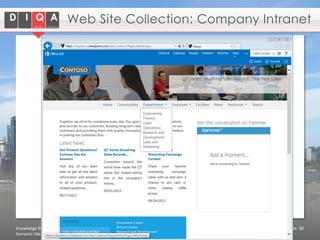
Web Site Collection: Company Intranet

Knowledge Management with
Semantic MediaWiki and SharePoint

© 2014 DIQA Projektmanagement GmbH | www.diqa-pm.com | Slide 30
SharePoint Basics
SharePoint content is organized in the following way
(indentation represent “contains” relationship)
• Web application
• Site Collection
• Web Site
• Page
• Text,
• Image
• Web part
• List
• Item
• Library
• Document
• Web site
Knowledge Management with
Semantic MediaWiki and SharePoint

Web Sites come in many
flavors / templates. They
define menus,
functionality and page
structures, e.g.
• MySite
• Projects
• DiscussionBoard
• SearchCenter
• PeopleSearch

© 2014 DIQA Projektmanagement GmbH | www.diqa-pm.com | Slide 31
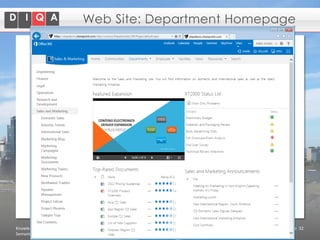
Web Site: Department Homepage

Knowledge Management with
Semantic MediaWiki and SharePoint

© 2014 DIQA Projektmanagement GmbH | www.diqa-pm.com | Slide 32
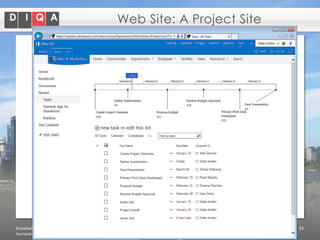
Web Site: A Project Site

Knowledge Management with
Semantic MediaWiki and SharePoint

© 2014 DIQA Projektmanagement GmbH | www.diqa-pm.com | Slide 33
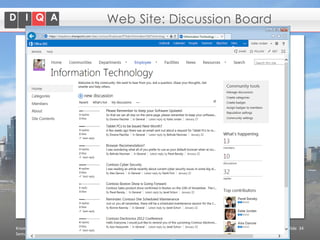
Web Site: Discussion Board

Knowledge Management with
Semantic MediaWiki and SharePoint

© 2014 DIQA Projektmanagement GmbH | www.diqa-pm.com | Slide 34
SharePoint Basics
SharePoint content is organized in the following way
(indentation represent “contains” relationship)
• Web application
• Site Collection
• Web Site
• Page
• Text,
• Image
• Web part
• List
• Item
• Library
• Document
• Web site
Knowledge Management with
Semantic MediaWiki and SharePoint

Three diff. kinds of pages:
• Web Part page (a
number of predefined
layouts)
• Wiki page (has "edit"button, can contain
Web Parts)
• System page (cannot
be edited via browser)

© 2014 DIQA Projektmanagement GmbH | www.diqa-pm.com | Slide 35
SharePoint Basics
SharePoint content is organized in the following way
(indentation represent “contains” relationship)
• Web application
• Site Collection
• Web Site
• Page
• Text,
• Image
• Web part
• List
• Item
• Library
• Document
• Web site
Knowledge Management with
Semantic MediaWiki and SharePoint

Widget on pages,
allowing for server-side
processing
• Vizualizations of
dynamic content
• Views on lists
• User Input
• SearchBox
• Many more

© 2014 DIQA Projektmanagement GmbH | www.diqa-pm.com | Slide 36
SharePoint Basics
SharePoint content is organized in the following way
(indentation represent “contains” relationship)
• Web application
• Site Collection
• Web Site
• Page
• Text,
• Image
• Web part
• List
• Item
• Library
• Document
• Web site
Knowledge Management with
Semantic MediaWiki and SharePoint

Lists are a key feature of
SharePoint. They enable
teams to gather, track,
and share information.
• Structured
• Content types
• Column definitions
• MetaData
• Views

© 2014 DIQA Projektmanagement GmbH | www.diqa-pm.com | Slide 37
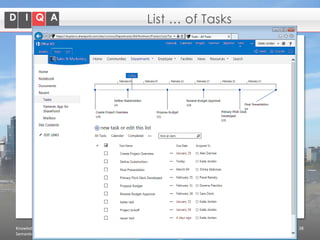
List … of Tasks

Knowledge Management with
Semantic MediaWiki and SharePoint

© 2014 DIQA Projektmanagement GmbH | www.diqa-pm.com | Slide 38
SharePoint Basics
SharePoint content is organized in the following way
(indentation represent “contains” relationship)
• Web application
• Site Collection
• Web Site
• Page
• Text,
• Image
• Web part
• List
• Item
• Library
• Document
• Web site
Knowledge Management with
Semantic MediaWiki and SharePoint

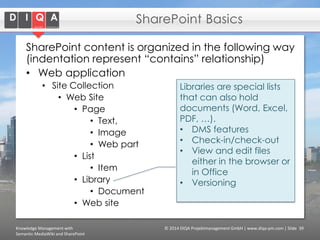
Libraries are special lists
that can also hold
documents (Word, Excel,
PDF, …).
• DMS features
• Check-in/check-out
• View and edit files
either in the browser or
in Office
• Versioning

© 2014 DIQA Projektmanagement GmbH | www.diqa-pm.com | Slide 39
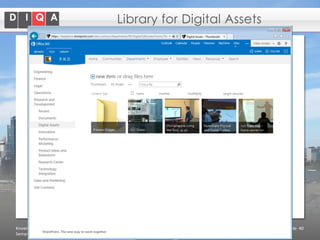
Library for Digital Assets

Knowledge Management with
Semantic MediaWiki and SharePoint

© 2014 DIQA Projektmanagement GmbH | www.diqa-pm.com | Slide 40
SharePoint Basics
• Although sites are separated, they can
share information
• E.g. Search Sites

• Every user can have his/her own Site
• MySite

Knowledge Management with
Semantic MediaWiki and SharePoint

© 2014 DIQA Projektmanagement GmbH | www.diqa-pm.com | Slide 41
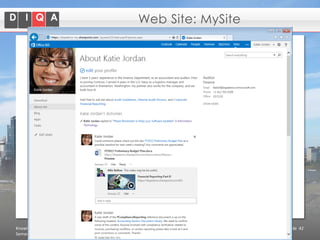
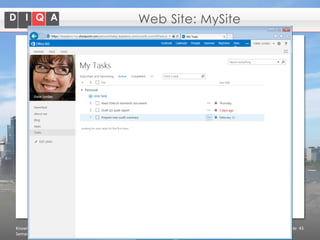
Web Site: MySite

Knowledge Management with
Semantic MediaWiki and SharePoint

© 2014 DIQA Projektmanagement GmbH | www.diqa-pm.com | Slide 42
Web Site: MySite

Knowledge Management with
Semantic MediaWiki and SharePoint

© 2014 DIQA Projektmanagement GmbH | www.diqa-pm.com | Slide 43
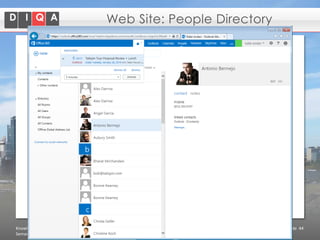
Web Site: People Directory

Knowledge Management with
Semantic MediaWiki and SharePoint

© 2014 DIQA Projektmanagement GmbH | www.diqa-pm.com | Slide 44
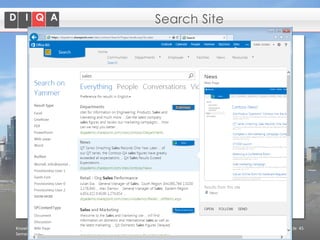
Search Site

Knowledge Management with
Semantic MediaWiki and SharePoint

© 2014 DIQA Projektmanagement GmbH | www.diqa-pm.com | Slide 45
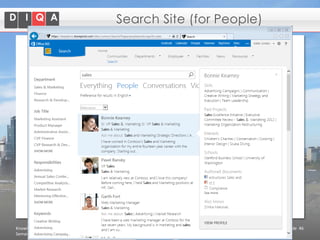
Search Site (for People)

Knowledge Management with
Semantic MediaWiki and SharePoint

© 2014 DIQA Projektmanagement GmbH | www.diqa-pm.com | Slide 46
Agenda

•
•
•
•
•
•
•

Goals of KM
Use Case1: Semantic MediaWiki
The notion of Information Architecture
Use Case 2: SharePoint
Metadata/Taxonomies in SharePoint
Comparison
Conclusion

Knowledge Management with
Semantic MediaWiki and SharePoint

© 2014 DIQA Projektmanagement GmbH | www.diqa-pm.com | Slide 47
Findability
• Any KM(-like) system strives to create views of
information in the context of work processes
•
•
•
•
•

content/document management applications
search tools
workflow applications
customer relationship management systems
…

• Requires, a common language in which to:
• Describe
• Communicate
• Translate information between applications and
between user audiences

 terminology, taxonomy, ontology, metadata
Knowledge Management with
Semantic MediaWiki and SharePoint

© 2014 DIQA Projektmanagement GmbH | www.diqa-pm.com | Slide 48
Taxonomy in SharePoint
• TermStore
• Hierarchy of terms (with synonyms)

• Managed Metadata columns used for:
Content enrichment
Workflow s
Managing information lifecycle
Sorting, filtering and grouping documents
and/or list items
• Faceted search
•
•
•
•

Knowledge Management with
Semantic MediaWiki and SharePoint

© 2014 DIQA Projektmanagement GmbH | www.diqa-pm.com | Slide 49
DIQA’s extensions to SharePoint
DIQA products for SharePoint
• GRASP – Graphs for SharePoint

• GRASP-SemanticWeb
• SPARQL-WebPart
• BCD-Connector for SPARQL-Endpoints
• GRASP-TermManager
• SKOS import/export
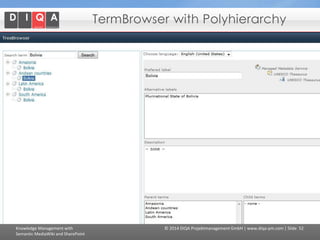
• Poly hierarchies
• Relations between Terms

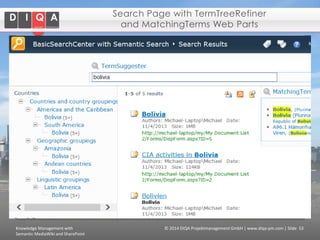
• SemanticSearch WebParts

• Suggest terms in the SearchBox WebPart
• Display term tree in Refiner WebPart
• Find documents for related tems

Knowledge Management with
Semantic MediaWiki and SharePoint

© 2014 DIQA Projektmanagement GmbH | www.diqa-pm.com | Slide 50
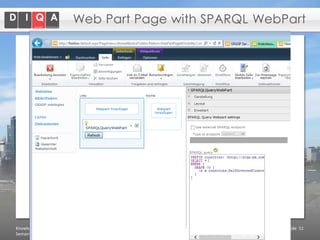
Web Part Page with SPARQL WebPart

Knowledge Management with
Semantic MediaWiki and SharePoint

© 2014 DIQA Projektmanagement GmbH | www.diqa-pm.com | Slide 51
TermBrowser with Polyhierarchy

Knowledge Management with
Semantic MediaWiki and SharePoint

© 2014 DIQA Projektmanagement GmbH | www.diqa-pm.com | Slide 52
Search Page with TermTreeRefiner
and MatchingTerms Web Parts

Knowledge Management with
Semantic MediaWiki and SharePoint

© 2014 DIQA Projektmanagement GmbH | www.diqa-pm.com | Slide 53
Challenge: Content Classification
• People love the power that comes from
metadata, but not if they actually have to
touch the metadata. We want the assets
found, reports built, and processes
automated, but only if we don’t have to
be the individuals actually making it
possible.
https://www.earley.com/

Knowledge Management with
Semantic MediaWiki and SharePoint

© 2014 DIQA Projektmanagement GmbH | www.diqa-pm.com | Slide 54
Content Classification
• Auto-Tagging
• Keyword/term based
• IE
• Context-based
• Posted to which site or library
• Created in which workflow
• Uploaded by which user/role

Knowledge Management with
Semantic MediaWiki and SharePoint

© 2014 DIQA Projektmanagement GmbH | www.diqa-pm.com | Slide 55
Agenda

•
•
•
•
•
•
•

Goals of KM
Use Case1: Semantic MediaWiki
The notion of Information Architecture
Use Case 2: SharePoint
Metadata/Taxonomies in SharePoint
Comparison
Conclusions

Knowledge Management with
Semantic MediaWiki and SharePoint

© 2014 DIQA Projektmanagement GmbH | www.diqa-pm.com | Slide 56
Comparison of SMW and SharePoint
Both support explicit metadata
SMW much more agile
open source vs. closed source
Community development vs. proprietary
Completely open vs. elaborate user rights
management
• Wiki markup vs. MS Office integration
• Essentially free vs. substantial investment
•
•
•
•
•

Knowledge Management with
Semantic MediaWiki and SharePoint

© 2014 DIQA Projektmanagement GmbH | www.diqa-pm.com | Slide 57
Conclusions
• There are no off-the-shelf KM systems
• Every client is different
• Platforms like SMW or SharePoint are good
starting points

• Knowledge Management is a challenge
nonetheless
• IT infrastructure is only one dimension
• Organizational culture is even more important

• Think big, start small!
• A little semantics can go a long way.
• Metadata creation should be easy, seamless,
automatic
Knowledge Management with
Semantic MediaWiki and SharePoint

© 2014 DIQA Projektmanagement GmbH | www.diqa-pm.com | Slide 58
Thank you!
Questions, Discussion, …?

erdmann@diqa-pm.com
+49 721 609 517 24

www.diqa-pm.com

DIQA Projektmanagement GmbH
Pfinztalstr. 90
76227 Karlsruhe
Germany
Handelsregister:
Amtsgericht Mannheim HRB 715454
USt-IdNr: DE283037270
Geschäftsführer:
Dr. Michael Erdmann, Dipl.-Wirtsch.Inf. Daniel Hansch

Knowlede Management with SMW and SharePoint

  • 1.
    Knowledge Management with SemanticMediaWiki and SharePoint Michael Erdmann February 7, 2014 Karlsruhe, Germany
  • 2.
    About DIQA GmbH DIQAis an independent software vendor of knowledge management tools for ECM portals. Our vision: We provide our customers with services and products that turn their ECM portals into smart portals by introducing semantic web technologies. Smart portals let end-users better find, organize, process, control and govern unstructured content. Founded: Team: Location: May 2012 3 employees Germany, Karlsruhe Knowledge Management with Semantic MediaWiki and SharePoint © 2014 DIQA Projektmanagement GmbH | www.diqa-pm.com | Slide 2
  • 3.
    Agenda • • • • • • • Goals of KM UseCase1: Semantic MediaWiki The notion of Information Architecture Use Case 2: SharePoint Metadata/Taxonomies in SharePoint Comparison Conclusion Knowledge Management with Semantic MediaWiki and SharePoint © 2014 DIQA Projektmanagement GmbH | www.diqa-pm.com | Slide 3
  • 4.
    Knowledge Work • Knowledgeworkers are workers whose main capital is knowledge, i.e. who "think for a living", e.g. software engineers, doctors, architects, engineers, scientists. • They conduct "non-routine" problem solving that requires a combination of convergent, divergent, and creative thinking. • Other work processes can also contain knowledge work, e.g. • Risk assessment when selling an insurance policy • Purchasing a complex electronic device Knowledge Management with Semantic MediaWiki and SharePoint © 2014 DIQA Projektmanagement GmbH | www.diqa-pm.com | Slide 4
  • 5.
    Goals of KM •Ensure effectively use of knowledge • Share and reuse knowledge • Make knowledge of individuals available for the organization • Ensure availability of knowledge over time and independent of location • Embed knowledge in work processes “Make the right knowledge available, when it is needed, where it is needed to whoever needs it.” Knowledge Management with Semantic MediaWiki and SharePoint © 2014 DIQA Projektmanagement GmbH | www.diqa-pm.com | Slide 5
  • 6.
    The KM Cycle Socializationconsists of sharing knowledge through social interactions, e.g. master and apprentice. The process of externalization gives a visible form to tacit knowledge. It can be defined as "a quintessential knowledge creation process in that tacit knowledge becomes explicit, taking the shapes of metaphors, analogies, concepts, hypotheses, or models“. Combination is the process of recombining/re-organizing discrete pieces of explicit knowledge into a new form. Internalization, occurs through diffusing and embedding newly acquired and consolidated knowledge into own mental model, "learning by doing". Knowledge Management with Semantic MediaWiki and SharePoint © 2014 DIQA Projektmanagement GmbH | www.diqa-pm.com | Slide 7
  • 7.
    Agenda • • • • • • • Goals of KM UseCase1: Semantic MediaWiki The notion of Information Architecture Use Case 2: SharePoint Metadata/Taxonomies in SharePoint Comparison Conclusion Knowledge Management with Semantic MediaWiki and SharePoint © 2014 DIQA Projektmanagement GmbH | www.diqa-pm.com | Slide 9
  • 8.
    What is SemanticMedia Wiki (SMW)? It’s a content management system for • Richly formatted hypertext documents • Structured data It’s based on the “Wiki Way”: • User-governed • Collaborative • Easy to use Knowledge Management with Semantic MediaWiki and SharePoint © 2014 DIQA Projektmanagement GmbH | www.diqa-pm.com | Slide 10
  • 9.
    Semantic MediaWiki: Datamodel Think of SMW data in a graphical way (knowledge graph): 3,515,473 has population has capital Germany Berlin has chancellor has mayor Angela Merkel Knowledge Management with Semantic MediaWiki and SharePoint Klaus Wowereit © 2014 DIQA Projektmanagement GmbH | www.diqa-pm.com | Slide 14
  • 10.
    Why is SemanticMediaWiki good for KM? • Can handle text, images and data (structured, semi-structured and unstructured content) • Collaborative platform • Everyone can contribute, page history, authorship, … • Automatic sharing of wiki pages • Web- based, one-data store, accessible from anywhere • Templates and forms define structure • Knowledge graph • Automatic lists via queries • Reuse of knowledge in different contexts • Faceted search enables interactive navigation Knowledge Management with Semantic MediaWiki and SharePoint © 2014 DIQA Projektmanagement GmbH | www.diqa-pm.com | Slide 16
  • 11.
    Use Case: SMWfor Engineering SME • What knowledge is contained in the wiki? • Administrative • Technical • test protocols (aligned with the test database) • Sales • Products • Quality Management handbook • Processes, how-to’s • Who uses it? • 5-6 knowledge providers • Essentially all employees use the wiki (consumes knowledge) • Staff from the production line shares one account Knowledge Management with Semantic MediaWiki and SharePoint © 2014 DIQA Projektmanagement GmbH | www.diqa-pm.com | Slide 17
  • 12.
    SMW Demo Knowledge Managementwith Semantic MediaWiki and SharePoint © 2014 DIQA Projektmanagement GmbH | www.diqa-pm.com | Slide 18
  • 13.
    Use Case: SMWfor Engineering SME • Why does the company use SMW? • • • • • Right mix of structure and freedom Right mix of data and free-form text No license costs Active developer community Easy (setup and )administration • Particularities • Documents • No documents are shared via the wiki, due to privacy concerns. • Documents are stored on a file share with appropriate user management (ActiveDirecory). • Links to documents in the wiki • Champion • CEO is a strong proponent and agent for Knowledge Management with SMW Knowledge Management with Semantic MediaWiki and SharePoint © 2014 DIQA Projektmanagement GmbH | www.diqa-pm.com | Slide 19
  • 14.
    Agenda • • • • • • • Goals of KM UseCase1: Semantic MediaWiki The notion of Information Architecture Use Case 2: SharePoint Metadata/Taxonomies in SharePoint Comparison Conclusion Knowledge Management with Semantic MediaWiki and SharePoint © 2014 DIQA Projektmanagement GmbH | www.diqa-pm.com | Slide 21
  • 15.
    Information Architecture • Informationarchitecture is the structural design of shared information environments (e.g. websites, intranets, online communities, content management system), a blueprint upon which all other aspects are built – form, function, metaphor, navigation and interface, interaction, and visual design • including • • • • Data model or concept of information Users model and user roles Activities and workflows Policies and governance guidelines Knowledge Management with Semantic MediaWiki and SharePoint © 2014 DIQA Projektmanagement GmbH | www.diqa-pm.com | Slide 22
  • 16.
    Information Architecture Methodology https://www.earley.com/ KnowledgeManagement with Semantic MediaWiki and SharePoint © 2014 DIQA Projektmanagement GmbH | www.diqa-pm.com | Slide 23
  • 17.
    Translating Concepts intoDesign Elements • • • • • • • • Start with content Develop the taxonomy Create metadata fields Assemble into content types Align personas with use cases Create site map based on use cases Develop wireframes from site maps Create document libraries and navigation based on site maps and wireframes https://www.earley.com/ Knowledge Management with Semantic MediaWiki and SharePoint © 2014 DIQA Projektmanagement GmbH | www.diqa-pm.com | Slide 24
  • 18.
    Agenda • • • • • • • Goals of KM UseCase1: Semantic MediaWiki The notion of Information Architecture Use Case 2: SharePoint Metadata/Taxonomies in SharePoint Comparison Conclusion Knowledge Management with Semantic MediaWiki and SharePoint © 2014 DIQA Projektmanagement GmbH | www.diqa-pm.com | Slide 25
  • 19.
    Microsoft SharePoint What isit? Knowledge Management with Semantic MediaWiki and SharePoint © 2014 DIQA Projektmanagement GmbH | www.diqa-pm.com | Slide 26
  • 20.
    SharePoint vs. ECM KnowledgeManagement with Semantic MediaWiki and SharePoint © 2014 DIQA Projektmanagement GmbH | www.diqa-pm.com | Slide 27
  • 21.
    Microsoft SharePoint Knowledge Managementwith Semantic MediaWiki and SharePoint © 2014 DIQA Projektmanagement GmbH | www.diqa-pm.com | Slide 28
  • 22.
    SharePoint Basics SharePoint contentis organized in the following way (indentation represent “contains” relationship) • Web application • Site Collection • Web Site • Page • Text, • Image • Web part • List • Item • Library • Document • Web site Knowledge Management with Semantic MediaWiki and SharePoint © 2014 DIQA Projektmanagement GmbH | www.diqa-pm.com | Slide 29
  • 23.
    Web Site Collection:Company Intranet Knowledge Management with Semantic MediaWiki and SharePoint © 2014 DIQA Projektmanagement GmbH | www.diqa-pm.com | Slide 30
  • 24.
    SharePoint Basics SharePoint contentis organized in the following way (indentation represent “contains” relationship) • Web application • Site Collection • Web Site • Page • Text, • Image • Web part • List • Item • Library • Document • Web site Knowledge Management with Semantic MediaWiki and SharePoint Web Sites come in many flavors / templates. They define menus, functionality and page structures, e.g. • MySite • Projects • DiscussionBoard • SearchCenter • PeopleSearch © 2014 DIQA Projektmanagement GmbH | www.diqa-pm.com | Slide 31
  • 25.
    Web Site: DepartmentHomepage Knowledge Management with Semantic MediaWiki and SharePoint © 2014 DIQA Projektmanagement GmbH | www.diqa-pm.com | Slide 32
  • 26.
    Web Site: AProject Site Knowledge Management with Semantic MediaWiki and SharePoint © 2014 DIQA Projektmanagement GmbH | www.diqa-pm.com | Slide 33
  • 27.
    Web Site: DiscussionBoard Knowledge Management with Semantic MediaWiki and SharePoint © 2014 DIQA Projektmanagement GmbH | www.diqa-pm.com | Slide 34
  • 28.
    SharePoint Basics SharePoint contentis organized in the following way (indentation represent “contains” relationship) • Web application • Site Collection • Web Site • Page • Text, • Image • Web part • List • Item • Library • Document • Web site Knowledge Management with Semantic MediaWiki and SharePoint Three diff. kinds of pages: • Web Part page (a number of predefined layouts) • Wiki page (has "edit"button, can contain Web Parts) • System page (cannot be edited via browser) © 2014 DIQA Projektmanagement GmbH | www.diqa-pm.com | Slide 35
  • 29.
    SharePoint Basics SharePoint contentis organized in the following way (indentation represent “contains” relationship) • Web application • Site Collection • Web Site • Page • Text, • Image • Web part • List • Item • Library • Document • Web site Knowledge Management with Semantic MediaWiki and SharePoint Widget on pages, allowing for server-side processing • Vizualizations of dynamic content • Views on lists • User Input • SearchBox • Many more © 2014 DIQA Projektmanagement GmbH | www.diqa-pm.com | Slide 36
  • 30.
    SharePoint Basics SharePoint contentis organized in the following way (indentation represent “contains” relationship) • Web application • Site Collection • Web Site • Page • Text, • Image • Web part • List • Item • Library • Document • Web site Knowledge Management with Semantic MediaWiki and SharePoint Lists are a key feature of SharePoint. They enable teams to gather, track, and share information. • Structured • Content types • Column definitions • MetaData • Views © 2014 DIQA Projektmanagement GmbH | www.diqa-pm.com | Slide 37
  • 31.
    List … ofTasks Knowledge Management with Semantic MediaWiki and SharePoint © 2014 DIQA Projektmanagement GmbH | www.diqa-pm.com | Slide 38
  • 32.
    SharePoint Basics SharePoint contentis organized in the following way (indentation represent “contains” relationship) • Web application • Site Collection • Web Site • Page • Text, • Image • Web part • List • Item • Library • Document • Web site Knowledge Management with Semantic MediaWiki and SharePoint Libraries are special lists that can also hold documents (Word, Excel, PDF, …). • DMS features • Check-in/check-out • View and edit files either in the browser or in Office • Versioning © 2014 DIQA Projektmanagement GmbH | www.diqa-pm.com | Slide 39
  • 33.
    Library for DigitalAssets Knowledge Management with Semantic MediaWiki and SharePoint © 2014 DIQA Projektmanagement GmbH | www.diqa-pm.com | Slide 40
  • 34.
    SharePoint Basics • Althoughsites are separated, they can share information • E.g. Search Sites • Every user can have his/her own Site • MySite Knowledge Management with Semantic MediaWiki and SharePoint © 2014 DIQA Projektmanagement GmbH | www.diqa-pm.com | Slide 41
  • 35.
    Web Site: MySite KnowledgeManagement with Semantic MediaWiki and SharePoint © 2014 DIQA Projektmanagement GmbH | www.diqa-pm.com | Slide 42
  • 36.
    Web Site: MySite KnowledgeManagement with Semantic MediaWiki and SharePoint © 2014 DIQA Projektmanagement GmbH | www.diqa-pm.com | Slide 43
  • 37.
    Web Site: PeopleDirectory Knowledge Management with Semantic MediaWiki and SharePoint © 2014 DIQA Projektmanagement GmbH | www.diqa-pm.com | Slide 44
  • 38.
    Search Site Knowledge Managementwith Semantic MediaWiki and SharePoint © 2014 DIQA Projektmanagement GmbH | www.diqa-pm.com | Slide 45
  • 39.
    Search Site (forPeople) Knowledge Management with Semantic MediaWiki and SharePoint © 2014 DIQA Projektmanagement GmbH | www.diqa-pm.com | Slide 46
  • 40.
    Agenda • • • • • • • Goals of KM UseCase1: Semantic MediaWiki The notion of Information Architecture Use Case 2: SharePoint Metadata/Taxonomies in SharePoint Comparison Conclusion Knowledge Management with Semantic MediaWiki and SharePoint © 2014 DIQA Projektmanagement GmbH | www.diqa-pm.com | Slide 47
  • 41.
    Findability • Any KM(-like)system strives to create views of information in the context of work processes • • • • • content/document management applications search tools workflow applications customer relationship management systems … • Requires, a common language in which to: • Describe • Communicate • Translate information between applications and between user audiences  terminology, taxonomy, ontology, metadata Knowledge Management with Semantic MediaWiki and SharePoint © 2014 DIQA Projektmanagement GmbH | www.diqa-pm.com | Slide 48
  • 42.
    Taxonomy in SharePoint •TermStore • Hierarchy of terms (with synonyms) • Managed Metadata columns used for: Content enrichment Workflow s Managing information lifecycle Sorting, filtering and grouping documents and/or list items • Faceted search • • • • Knowledge Management with Semantic MediaWiki and SharePoint © 2014 DIQA Projektmanagement GmbH | www.diqa-pm.com | Slide 49
  • 43.
    DIQA’s extensions toSharePoint DIQA products for SharePoint • GRASP – Graphs for SharePoint • GRASP-SemanticWeb • SPARQL-WebPart • BCD-Connector for SPARQL-Endpoints • GRASP-TermManager • SKOS import/export • Poly hierarchies • Relations between Terms • SemanticSearch WebParts • Suggest terms in the SearchBox WebPart • Display term tree in Refiner WebPart • Find documents for related tems Knowledge Management with Semantic MediaWiki and SharePoint © 2014 DIQA Projektmanagement GmbH | www.diqa-pm.com | Slide 50
  • 44.
    Web Part Pagewith SPARQL WebPart Knowledge Management with Semantic MediaWiki and SharePoint © 2014 DIQA Projektmanagement GmbH | www.diqa-pm.com | Slide 51
  • 45.
    TermBrowser with Polyhierarchy KnowledgeManagement with Semantic MediaWiki and SharePoint © 2014 DIQA Projektmanagement GmbH | www.diqa-pm.com | Slide 52
  • 46.
    Search Page withTermTreeRefiner and MatchingTerms Web Parts Knowledge Management with Semantic MediaWiki and SharePoint © 2014 DIQA Projektmanagement GmbH | www.diqa-pm.com | Slide 53
  • 47.
    Challenge: Content Classification •People love the power that comes from metadata, but not if they actually have to touch the metadata. We want the assets found, reports built, and processes automated, but only if we don’t have to be the individuals actually making it possible. https://www.earley.com/ Knowledge Management with Semantic MediaWiki and SharePoint © 2014 DIQA Projektmanagement GmbH | www.diqa-pm.com | Slide 54
  • 48.
    Content Classification • Auto-Tagging •Keyword/term based • IE • Context-based • Posted to which site or library • Created in which workflow • Uploaded by which user/role Knowledge Management with Semantic MediaWiki and SharePoint © 2014 DIQA Projektmanagement GmbH | www.diqa-pm.com | Slide 55
  • 49.
    Agenda • • • • • • • Goals of KM UseCase1: Semantic MediaWiki The notion of Information Architecture Use Case 2: SharePoint Metadata/Taxonomies in SharePoint Comparison Conclusions Knowledge Management with Semantic MediaWiki and SharePoint © 2014 DIQA Projektmanagement GmbH | www.diqa-pm.com | Slide 56
  • 50.
    Comparison of SMWand SharePoint Both support explicit metadata SMW much more agile open source vs. closed source Community development vs. proprietary Completely open vs. elaborate user rights management • Wiki markup vs. MS Office integration • Essentially free vs. substantial investment • • • • • Knowledge Management with Semantic MediaWiki and SharePoint © 2014 DIQA Projektmanagement GmbH | www.diqa-pm.com | Slide 57
  • 51.
    Conclusions • There areno off-the-shelf KM systems • Every client is different • Platforms like SMW or SharePoint are good starting points • Knowledge Management is a challenge nonetheless • IT infrastructure is only one dimension • Organizational culture is even more important • Think big, start small! • A little semantics can go a long way. • Metadata creation should be easy, seamless, automatic Knowledge Management with Semantic MediaWiki and SharePoint © 2014 DIQA Projektmanagement GmbH | www.diqa-pm.com | Slide 58
  • 52.
    Thank you! Questions, Discussion,…? erdmann@diqa-pm.com +49 721 609 517 24 www.diqa-pm.com DIQA Projektmanagement GmbH Pfinztalstr. 90 76227 Karlsruhe Germany Handelsregister: Amtsgericht Mannheim HRB 715454 USt-IdNr: DE283037270 Geschäftsführer: Dr. Michael Erdmann, Dipl.-Wirtsch.Inf. Daniel Hansch