Robin Goel May 1st, 2009 www.omlogic.com
What is  Twitter   ? www.omlogic.com Twitter is a social networking and micro-blogging service that allows you answer the question,  "What are you doing?"  by sending short text messages 140 characters in length, called "tweets", to your friends, or "followers."   "tweets", to your friends, or "followers."
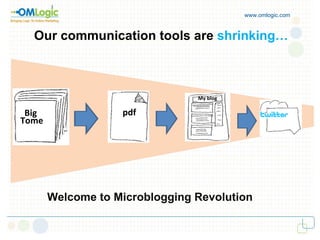
Our communication tools are  shrinking… www.omlogic.com Big  Tome Big   Tome pdf My blog Welcome to Microblogging Revolution
Why do people use  Twitter   ?  www.omlogic.com t keeps you connected with: i keeps you connected with : g  Tome Your community Your industry Your friends Your world
www.omlogic.com How do businesses  use  Twitter ?
www.omlogic.com Twitter   helps businesses: Raise awareness Offer proactive customer service Answer questions Promote events, products, services Network and partner Internal Pipe - Yammer
www.omlogic.com Businesses should NOT: Be sales-oriented robots Be repetitive and dull Follow too many people at once Avoid negative feedbacks.
www.omlogic.com Be conversational Jump in the discussion Pay attention Pace themselves Businesses should:
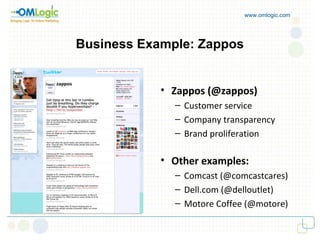
www.omlogic.com Business Example: Zappos Zappos (@zappos) Customer service Company transparency Brand proliferation Other examples: Comcast (@comcastcares) Dell.com (@delloutlet) Motore Coffee (@motore)
www.omlogic.com Twitter   Terminology Jargon: Tweets    = 140-character updates on Twitter Follower  =  A user interested in your updates Symbols: @   = Public conversations #   = Adding a tag to a tweet RT   = Retweeting is sharing tweets with others d   = Direct messages are similar to e-mails
www.omlogic.com TOOLS
www.omlogic.com 1.  Twitterfeed -  Integrates your RSS feeds with your Twitter account. -  Automatically share your tweet on Facebook - New content posted on your Social Media site gets tweeted. 2. Twiddeo -  Update your Twitter via videos instead of words. -  Upload your video and a short description about it.
www.omlogic.com 3. Twit Wall -  Got frustrated with 140 limited characters. -  Login with your existing Twitter account. -  Now you can write Tweets that are over 140 characters.  4. Twhirl -  A Messenger- like software, free to download and install. -  Post Tweets like sending messages using instant  messenger software. -  Also see Tweets from those whom you're following on  Tweeter.
www.omlogic.com 5. Group Tweet -  Allows you to set up a Twitter group, get your friends,  customers etc. -  Broadcast your Tweets visible to your group members  only. 6. Twellow -  A Yellow Pages like service for Twitter. -  A Search engine for Twitter. -  one is able to add other social links like Facebook,  Linkedin, Digg etc, which they belong to.
www.omlogic.com 7. Twitscoop -  Find the hottest topic people are tweeting right now. -  Allows allow you to either enter a keyword or a person's  Twitter name to track a conversation, topic or conference. -  Results refreshes every 20 seconds. 8. Twitterless -  Tells you who stops following  you and graphs your follower  history overtime. -  See all of your followers or friends on one page. Filter them  by keywords in their description. -  See where your followers are in the world on a Google map  and find out where your follower base is strongest.
www.omlogic.com 9.  Mr.Tweet -  Get relevant followers  by recommending you to them. -  Discover great people relevant to your current needs. -  Improve your Twitter usage via useful statistics. 10. Tweet Deck  -  Personal browser for staying in touch with happening  around the world. -  Update Facebook and follow your Facebook friends. -  Columns to create personal dashboard.
Victor Keegan,  The Guardian www.omlogic.com “ Those who criticise use of Twitter at work haven't seen the tectonic plates moving… … social networks such as these are the way businesses will be run in the future…”
www.omlogic.com How often do you tweet….? Join me at:

Twitter And Its Tools By Robin

  • 1.
    Robin Goel May1st, 2009 www.omlogic.com
  • 2.
    What is Twitter ? www.omlogic.com Twitter is a social networking and micro-blogging service that allows you answer the question, "What are you doing?" by sending short text messages 140 characters in length, called "tweets", to your friends, or "followers." "tweets", to your friends, or "followers."
  • 3.
    Our communication toolsare shrinking… www.omlogic.com Big Tome Big Tome pdf My blog Welcome to Microblogging Revolution
  • 4.
    Why do peopleuse Twitter ? www.omlogic.com t keeps you connected with: i keeps you connected with : g Tome Your community Your industry Your friends Your world
  • 5.
    www.omlogic.com How dobusinesses use Twitter ?
  • 6.
    www.omlogic.com Twitter helps businesses: Raise awareness Offer proactive customer service Answer questions Promote events, products, services Network and partner Internal Pipe - Yammer
  • 7.
    www.omlogic.com Businesses shouldNOT: Be sales-oriented robots Be repetitive and dull Follow too many people at once Avoid negative feedbacks.
  • 8.
    www.omlogic.com Be conversationalJump in the discussion Pay attention Pace themselves Businesses should:
  • 9.
    www.omlogic.com Business Example:Zappos Zappos (@zappos) Customer service Company transparency Brand proliferation Other examples: Comcast (@comcastcares) Dell.com (@delloutlet) Motore Coffee (@motore)
  • 10.
    www.omlogic.com Twitter Terminology Jargon: Tweets = 140-character updates on Twitter Follower = A user interested in your updates Symbols: @ = Public conversations # = Adding a tag to a tweet RT = Retweeting is sharing tweets with others d = Direct messages are similar to e-mails
  • 11.
  • 12.
    www.omlogic.com 1. Twitterfeed - Integrates your RSS feeds with your Twitter account. - Automatically share your tweet on Facebook - New content posted on your Social Media site gets tweeted. 2. Twiddeo - Update your Twitter via videos instead of words. - Upload your video and a short description about it.
  • 13.
    www.omlogic.com 3. TwitWall - Got frustrated with 140 limited characters. - Login with your existing Twitter account. - Now you can write Tweets that are over 140 characters. 4. Twhirl - A Messenger- like software, free to download and install. - Post Tweets like sending messages using instant messenger software. - Also see Tweets from those whom you're following on Tweeter.
  • 14.
    www.omlogic.com 5. GroupTweet - Allows you to set up a Twitter group, get your friends, customers etc. - Broadcast your Tweets visible to your group members only. 6. Twellow - A Yellow Pages like service for Twitter. - A Search engine for Twitter. - one is able to add other social links like Facebook, Linkedin, Digg etc, which they belong to.
  • 15.
    www.omlogic.com 7. Twitscoop- Find the hottest topic people are tweeting right now. - Allows allow you to either enter a keyword or a person's Twitter name to track a conversation, topic or conference. - Results refreshes every 20 seconds. 8. Twitterless - Tells you who stops following you and graphs your follower history overtime. - See all of your followers or friends on one page. Filter them by keywords in their description. - See where your followers are in the world on a Google map and find out where your follower base is strongest.
  • 16.
    www.omlogic.com 9. Mr.Tweet - Get relevant followers by recommending you to them. - Discover great people relevant to your current needs. - Improve your Twitter usage via useful statistics. 10. Tweet Deck - Personal browser for staying in touch with happening around the world. - Update Facebook and follow your Facebook friends. - Columns to create personal dashboard.
  • 17.
    Victor Keegan, The Guardian www.omlogic.com “ Those who criticise use of Twitter at work haven't seen the tectonic plates moving… … social networks such as these are the way businesses will be run in the future…”
  • 18.
    www.omlogic.com How oftendo you tweet….? Join me at: