Analyze and tune SQL Query
Why need tune Sql query
 Increase performance
 Save time and money
Measurement Methods
 Benchmarking
 MySQL Enterprise Monitor (MEM), Query Analyzer
 Performance schema, MySQL sys schema
 EXPLAIN
 Optimizer trace
 Slow log
 Status variables (SHOW STATUS LIKE ’Handler%’)
 Profile
Index
 Some type of Index:
B-Tree index
Hash index
R-Tree index
 The use of indexes to find rows faster
 Writes become slower with each added index
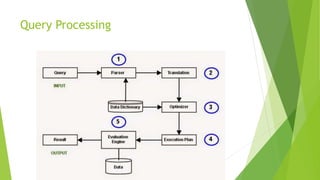
Query Processing
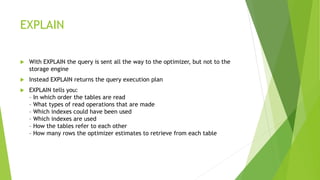
EXPLAIN
 With EXPLAIN the query is sent all the way to the optimizer, but not to the
storage engine
 Instead EXPLAIN returns the query execution plan
 EXPLAIN tells you:
– In which order the tables are read
– What types of read operations that are made
– Which indexes could have been used
– Which indexes are used
– How the tables refer to each other
– How many rows the optimizer estimates to retrieve from each table
Database Designing (Optimizing
Schemas)
Normalization
 Normalization is a key factor in optimizing your database structure
 Good normalization prevents redundant data from being stored in the same
tables
 By moving redundant data to their own table, this reduces storage
requirements and overhead when processing queries
 data warehousing and reporting system a star-schema might be a better
solution
Table Optimizations
 Use columns that are as short as possible;
– INT instead of BIGINT
– VARCHAR(10) instead of VARCHAR(255)
 Pay special attention to columns that are used in joins
 Define columns as NOT NULL if possible
Index Optimizations
 An index on the whole column is not necessary
– Instead index just a prefix of a column
– Prefix indexes take less space and the operations are faster
 Composite indexes can be used for searches on the first column(s) in the
index
 Minimize the size of PRIMARY KEYs that are used as references in other tables
 Using an auto_increment column can be more optimal
 A FULLTEXT index is useful for:word searches in text, searches on several
columns
Click to add text
Click to add text
Optimizing Where Condition
Selecting Access Method
 find the best access method:
– Check if the access method is useful
– Estimate cost of using access method
– Select the cheapest to be used
 Choice of access method is cost based Finding the optimal method to read
data from storage engine
 Main access methods:
- Table scan
- Index scan
- Ref access
- Range scan
- Index merge
- Loose index scan
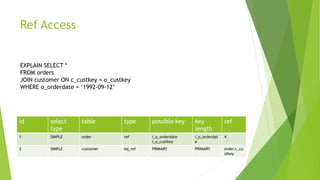
Ref Access
id select
type
table type possible key key
length
ref
1 SIMPLE order ref i_o_orderdate
i_o_custkey
i_o_orderdat
e
4
2 SIMPLE customer eq_ref PRIMARY PRIMARY order.c_cu
stkey
EXPLAIN SELECT *
FROM orders
JOIN customer ON c_custkey = o_custkey
WHERE o_orderdate = ‘1992-09-12’
Change Where Condition
To Use Index
 SELECT *
FROM customer
WHERE SUBSTRING(c_name,1,1) = 'C'
 SELECT *
FROM customer
WHERE c_name >= 'C' and c_name < ‘D’
 SELECT *
FROM customer
WHERE c_name like 'C%'
Change Where Condition
To Use Index
 Change where condition into
F(field) > const
->
filed > G(const)
Force Index - Ignore Index
 Select id From data
where type = 100 and level > 3
order by id;
 Select id From data use index(type)
where type = 100 and level > 3
order by id;
 Select id From data ignore index(type)
where type = 100 and level > 3
order by id;
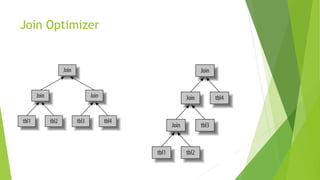
Join Optimizer
Join Optimizer
STRAIGHT_JOIN
 STRAIGHT_JOIN is similar to JOIN, except that the left table is always read
before the right table. This can be used for those (few) cases for which the
join optimizer puts the tables in the wrong order.
Using Filesort
 “Filesort”:
– Store query result in temporary table before sorting
– If data volume is large
 Optimizations:
– index to generate query result in sorted order
– For ”LIMIT n” queries.
Compare Join Vs In
 SELECT requestID, request_title
FROM Request r
WHERE EXISTS
(
SELECT *
FROM User
WHERE userID=r.userID
)
 SELECT requestID, request_title
FROM Request r
JOIN
FROM User
USING(serID)
Join With Federate Table
 CREATE TABLE federated_table (
 id INT(20) NOT NULL AUTO_INCREMENT,
 name VARCHAR(32) NOT NULL DEFAULT '',
 other INT(20) NOT NULL DEFAULT '0',
 PRIMARY KEY (id),
 INDEX name (name),
 INDEX other_key (other)
 )
 ENGINE=FEDERATED
 DEFAULT CHARSET=latin1
 CONNECTION='mysql://fed_user@remote_host:9306/federated/test_table'
;
Question and Answer
Thank you

Tunning sql query

  • 1.
  • 2.
    Why need tuneSql query  Increase performance  Save time and money
  • 3.
    Measurement Methods  Benchmarking MySQL Enterprise Monitor (MEM), Query Analyzer  Performance schema, MySQL sys schema  EXPLAIN  Optimizer trace  Slow log  Status variables (SHOW STATUS LIKE ’Handler%’)  Profile
  • 4.
    Index  Some typeof Index: B-Tree index Hash index R-Tree index  The use of indexes to find rows faster  Writes become slower with each added index
  • 5.
  • 6.
    EXPLAIN  With EXPLAINthe query is sent all the way to the optimizer, but not to the storage engine  Instead EXPLAIN returns the query execution plan  EXPLAIN tells you: – In which order the tables are read – What types of read operations that are made – Which indexes could have been used – Which indexes are used – How the tables refer to each other – How many rows the optimizer estimates to retrieve from each table
  • 7.
  • 8.
    Normalization  Normalization isa key factor in optimizing your database structure  Good normalization prevents redundant data from being stored in the same tables  By moving redundant data to their own table, this reduces storage requirements and overhead when processing queries  data warehousing and reporting system a star-schema might be a better solution
  • 9.
    Table Optimizations  Usecolumns that are as short as possible; – INT instead of BIGINT – VARCHAR(10) instead of VARCHAR(255)  Pay special attention to columns that are used in joins  Define columns as NOT NULL if possible
  • 10.
    Index Optimizations  Anindex on the whole column is not necessary – Instead index just a prefix of a column – Prefix indexes take less space and the operations are faster  Composite indexes can be used for searches on the first column(s) in the index  Minimize the size of PRIMARY KEYs that are used as references in other tables  Using an auto_increment column can be more optimal  A FULLTEXT index is useful for:word searches in text, searches on several columns Click to add text Click to add text
  • 11.
  • 12.
    Selecting Access Method find the best access method: – Check if the access method is useful – Estimate cost of using access method – Select the cheapest to be used  Choice of access method is cost based Finding the optimal method to read data from storage engine  Main access methods: - Table scan - Index scan - Ref access - Range scan - Index merge - Loose index scan
  • 13.
    Ref Access id select type tabletype possible key key length ref 1 SIMPLE order ref i_o_orderdate i_o_custkey i_o_orderdat e 4 2 SIMPLE customer eq_ref PRIMARY PRIMARY order.c_cu stkey EXPLAIN SELECT * FROM orders JOIN customer ON c_custkey = o_custkey WHERE o_orderdate = ‘1992-09-12’
  • 14.
    Change Where Condition ToUse Index  SELECT * FROM customer WHERE SUBSTRING(c_name,1,1) = 'C'  SELECT * FROM customer WHERE c_name >= 'C' and c_name < ‘D’  SELECT * FROM customer WHERE c_name like 'C%'
  • 15.
    Change Where Condition ToUse Index  Change where condition into F(field) > const -> filed > G(const)
  • 16.
    Force Index -Ignore Index  Select id From data where type = 100 and level > 3 order by id;  Select id From data use index(type) where type = 100 and level > 3 order by id;  Select id From data ignore index(type) where type = 100 and level > 3 order by id;
  • 17.
  • 18.
  • 19.
    STRAIGHT_JOIN  STRAIGHT_JOIN issimilar to JOIN, except that the left table is always read before the right table. This can be used for those (few) cases for which the join optimizer puts the tables in the wrong order.
  • 20.
    Using Filesort  “Filesort”: –Store query result in temporary table before sorting – If data volume is large  Optimizations: – index to generate query result in sorted order – For ”LIMIT n” queries.
  • 21.
    Compare Join VsIn  SELECT requestID, request_title FROM Request r WHERE EXISTS ( SELECT * FROM User WHERE userID=r.userID )  SELECT requestID, request_title FROM Request r JOIN FROM User USING(serID)
  • 22.
    Join With FederateTable  CREATE TABLE federated_table (  id INT(20) NOT NULL AUTO_INCREMENT,  name VARCHAR(32) NOT NULL DEFAULT '',  other INT(20) NOT NULL DEFAULT '0',  PRIMARY KEY (id),  INDEX name (name),  INDEX other_key (other)  )  ENGINE=FEDERATED  DEFAULT CHARSET=latin1  CONNECTION='mysql://fed_user@remote_host:9306/federated/test_table' ;
  • 23.
  • 24.