
Oracle Performance
Tuning for Java
Developers
Based on
• Oracle® Database Performance Tuning Guide 11g Release 2 (11.2) E41573-04
• Hibernate
Concepts
 Overview of the Query Optimizer
 Overview of Optimizer Access Paths
 Overview of Joins
 Reading and Understanding Execution Plans
 Controlling Optimizer Behavior
 Database Experiences
 Hibernate Tricks
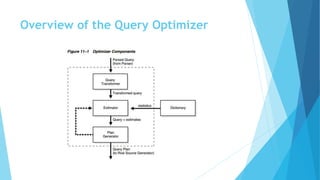
Overview of the Query Optimizer
 The optimizer generates a set of potential plans based on
statistics, available access paths and hints
 The optimizer calculates the cost of access paths and join orders based on the
estimated computer resources (I/O, CPU, memory, network, …) for each Plan
 The optimizer compares the plans and chooses the plan with the lowest cost
Overview of the Query Optimizer
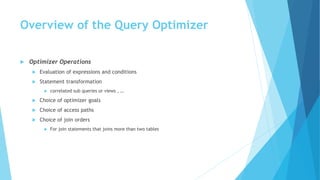
 Optimizer Operations
 Evaluation of expressions and conditions
 Statement transformation
 correlated sub queries or views , …
 Choice of optimizer goals
 Choice of access paths
 Choice of join orders
 For join statements that joins more than two tables
Overview of the Query Optimizer
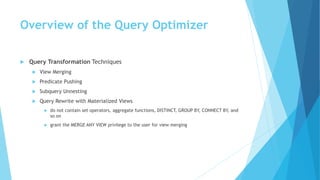
 Query Transformation Techniques
 View Merging
 Predicate Pushing
 Subquery Unnesting
 Query Rewrite with Materialized Views
 do not contain set operators, aggregate functions, DISTINCT, GROUP BY, CONNECT BY, and
so on
 grant the MERGE ANY VIEW privilege to the user for view merging
Overview of the Query Optimizer
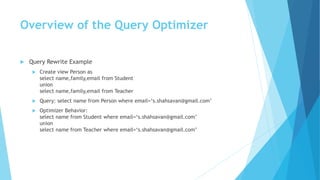
 Query Rewrite Example
 Create view Person as
select name,family,email from Student
union
select name,family,email from Teacher
 Query: select name from Person where email=‘s.shahsavan@gmail.com’
 Optimizer Behavior:
select name from Student where email=‘s.shahsavan@gmail.com’
union
select name from Teacher where email=‘s.shahsavan@gmail.com’
Overview of the Query Optimizer
 Subquery Unnesting
 Transforms Subqueries into Join
 if the resulting join statement is guaranteed to return exactly the same rows
 if subqueries do not contain aggregate functions such as AVG
 If the optimizer cannot transform a complex statement into a join statement, it selects
execution plans for the parent statement and the subquery as though they were separate
statements
Overview of the Query Optimizer
 Query Rewrite with Materialized Views
 The query transformer looks for any materialized views that are compatible with
the user query and selects one or more materialized views to rewrite the user
query
 The use of materialized views to rewrite a query is cost-based
Overview of the Query Optimizer
 Estimation
 Selectivity
This measure represents a fraction of rows from a row set. The selectivity is tied to
a query predicate, such as email=‘s.shahsava@gmail.com', or a combination of
predicates.
 Selectivity ranges from 0.0 to 1.0
 Statistics not available
OPTIMIZER_DYNAMIC_SAMPLING initialization parameter
 Statistics available
the estimator uses them to estimate selectivity
 Cardinality
This measure represents the number of rows in a row set.
Overview of the Query Optimizer
 Estimation
 Cost
 This measure represents units of work or resource used. The query optimizer uses disk I/O, CPU
usage, and memory usage as units of work
 The access path determines the number of units of work required to get data from a
base table
 Table scan or fast full index scan
The Const depends on the number of blocks to be scanned and the multiblock read count value
 Index scan
The cost of an index scan depends on the levels in the B-tree, the number of index leaf blocks to
be scanned, and the number of rows to be fetched using the rowid in the index keys
 The join cost
represents the combination of the individual access costs of the two row sets being joined, plus
the cost of the join operation
Overview of the Query Optimizer
 Plan Generation
 various plans for a query block
 Join Order
 Query Subplans
 The database optimizes query blocks separately from the bottom up
 Cutoff for Plan Selection
Overview of the Query Optimizer
 Bind Variable Peeking
 the optimizer looks at the value in a bind variable when the database performs a
hard parse of a statement
 When choosing a plan, the optimizer only peeks at the bind value during the hard
parse. This plan may not be optimal for all possible values
 Adaptive Cursor Sharing
 enables a single statement that contains bind variables to use multiple execution
plans
 The database monitors data accessed over time for different bind values
 enabled by default
 does not apply to SQL statements containing more than 14 bind variables
 independent of the CURSOR_SHARING initialization parameter
Overview of the Query Optimizer
 Bind-Sensitive Cursors
 A bind-sensitive cursor is a cursor whose optimal plan may depend on the value of
a bind variable
 The criteria used by the optimizer to decide whether a cursor is bind-sensitive
include the following:
 The optimizer has peeked at the bind values to generate selectivity estimates.
 A histogram exists on the column containing the bind value
Overview of the Query Optimizer
 Bind-Aware Cursors
 A bind-aware cursor is a bind-sensitive cursor eligible to use different plans for
different bind value
 If the cursor marked bind-aware, then the next time that the cursor executes, the
database does the following:
 Generates a new plan based on the new bind value.
 Marks the original cursor generated for the statement as not shareable
(V$SQL.IS_SHAREABLE is N). This cursor is no longer usable and will be among the first to
be aged out of the shared SQL area.
 Cursor Merging
Overview of the Query Optimizer
 Viewing Bind-Related Performance Data
 V$SQL shows whether a cursor is bind-sensitive or bind-aware
 V$SQL_CS_HISTOGRAM shows the distribution of the execution count across a
three-bucket execution history histogram
 V$SQL_CS_SELECTIVITY shows the selectivity ranges stored for every predicate
containing a bind variable if the selectivity was used to check cursor sharing
 V$SQL_CS_STATISTICS summarizes the information that the optimizer uses to
determine whether to mark a cursor bind-aware.
Overview of Optimizer Access Paths
 Full Table Scans
 Rowid Scans
 Index Scans
 Cluster Access
 Hash Access
 Sample Table Scans
 How the Query Optimizer Chooses an Access Path
Overview of Optimizer Access Paths
 Full Table Scans
 This type of scan reads all rows from a table and filters out those that do not meet
the selection criteria
 All blocks in the table that are under the high water mark are scanned
 The high water mark indicates the amount of used space, or space that had been
formatted to receive data.
 The database can make I/O calls larger than a single block to speed up the process
 The size of the read calls range from one block to the number of blocks indicated
by the initialization parameter DB_FILE_MULTIBLOCK_READ_COUNT
 Full Table Scan Is Faster for Accessing Large Amounts of Data
Overview of Optimizer Access Paths
 Full Table Scans
 When the Optimizer Uses Full Table Scans
 Lack of Index If the query cannot use existing indexes
 Select Large Amount of Data
 Small Table
 If a table contains less than DB_FILE_MULTIBLOCK_READ_COUNT blocks under the high water
mark
 High Degree of Parallelism
 Examine the DEGREE column in ALL_TABLES for the table to determine the degree of parallelism
 Full Table Scan Hints
Overview of Optimizer Access Paths
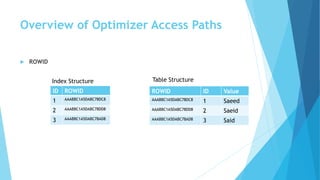
 ROWID
ValueIDROWID
Saeed1AAABBC1A5DABC78DC8
Saeid2AAABBC1A5DABC78DD8
Said3AAABBC1A5DABC78AD8
ROWIDID
AAABBC1A5DABC78DC81
AAABBC1A5DABC78DD82
AAABBC1A5DABC78AD83
Index Structure Table Structure
Overview of Optimizer Access Paths
 Rowid Scans
 The rowid of a row specifies the data file and data block containing the row and
the location of the row in that block.
 fastest way to retrieve a single row, because the exact location of the row in the
database is specified
 When the Optimizer Uses Rowids
 This is generally the second step after retrieving the rowid from an index
Overview of Optimizer Access Paths
 Index Scans
 Assessing I/O for Blocks, not Rows
 Index Unique Scans
 Index Range Scans
 Index Range Scans Descending
 Index Skip Scans
 Full Scans
 Fast Full Index Scans
 Index Joins
 Bitmap Indexes
Overview of Optimizer Access Paths
 Index Scans
 Assessing I/O for Blocks, not Rows
 Oracle Database performs I/O by blocks. Therefore, the optimizer's decision to use full
table scans is influenced by the percentage of blocks accessed, not rows. This is called
the index clustering factor
 Index Unique Scans
 This scan returns, at most, a single rowid.
 Oracle Database performs a unique scan if a statement contains a UNIQUE or a PRIMARY
KEY constraint that guarantees that only a single row is accessed.
Overview of Optimizer Access Paths
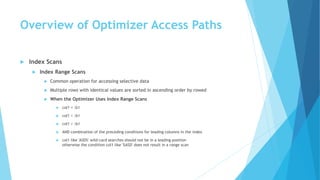
 Index Scans
 Index Range Scans
 Common operation for accessing selective data
 Multiple rows with identical values are sorted in ascending order by rowed
 When the Optimizer Uses Index Range Scans
 col1 = :b1
 col1 < :b1
 col1 > :b1
 AND combination of the preceding conditions for leading columns in the index
 col1 like 'ASD%' wild-card searches should not be in a leading position
otherwise the condition col1 like '%ASD' does not result in a range scan
Overview of Optimizer Access Paths
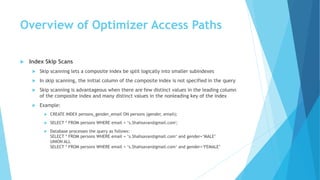
 Index Skip Scans
 Skip scanning lets a composite index be split logically into smaller subindexes
 In skip scanning, the initial column of the composite index is not specified in the query
 Skip scanning is advantageous when there are few distinct values in the leading column
of the composite index and many distinct values in the nonleading key of the index
 Example:
 CREATE INDEX persons_gender_email ON persons (gender, email);
 SELECT * FROM persons WHERE email = ‘s.Shahsavan@gmail.com';
 Database processes the query as follows:
SELECT * FROM persons WHERE email = ‘s.Shahsavan@gmail.com‘ and gender=‘MALE’
UNION ALL
SELECT * FROM persons WHERE email = ‘s.Shahsavan@gmail.com‘ and gender=‘FEMALE’
Overview of Optimizer Access Paths
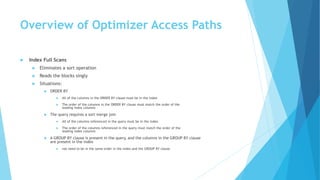
 Index Full Scans
 Eliminates a sort operation
 Reads the blocks singly
 Situations:
 ORDER BY
 All of the columns in the ORDER BY clause must be in the index
 The order of the columns in the ORDER BY clause must match the order of the
leading index columns
 The query requires a sort merge join
 All of the columns referenced in the query must be in the index
 The order of the columns referenced in the query must match the order of the
leading index columns
 A GROUP BY clause is present in the query, and the columns in the GROUP BY clause
are present in the index
 not need to be in the same order in the index and the GROUP BY clause
Overview of Optimizer Access Paths
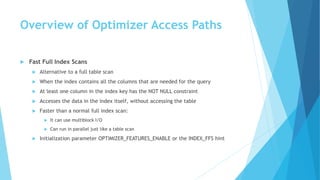
 Fast Full Index Scans
 Alternative to a full table scan
 When the index contains all the columns that are needed for the query
 At least one column in the index key has the NOT NULL constraint
 Accesses the data in the index itself, without accessing the table
 Faster than a normal full index scan:
 It can use multiblock I/O
 Can run in parallel just like a table scan
 Initialization parameter OPTIMIZER_FEATURES_ENABLE or the INDEX_FFS hint
Overview of Optimizer Access Paths
 Index Joins
 Hash join of several indexes that together contain all the table columns referenced
in the query
 Bitmap Indexes
 A bitmap join uses a bitmap for key values and a mapping function that converts
each bit position to a rowid
Overview of Optimizer Access Paths
 Cluster Access
 Retrieve all rows that have the same cluster key value from a table stored in an
indexed cluster
 Database stores all rows with the same cluster key value in the same data block
 Hash Access
 Database uses a hash scan to locate rows in a hash cluster based on a hash value
 In a hash cluster, all rows with the same hash value are stored in the same data
block. To perform a hash scan.
Overview of Optimizer Access Paths
 Sample Table Scans
 A sample table scan retrieves a random sample of data from a simple table or a
complex SELECT statement
 SELECT * FROM persons SAMPLE BLOCK (1);
Overview of Optimizer Access Paths
 How the Query Optimizer Chooses an Access Path
 The available access paths for the statement
 The estimated cost of executing the statement, using each access path or
combination of paths
 Optimizer first determines which access paths are available by examining the
conditions in the statement's WHERE clause and its FROM clause
 Generates a set of possible execution plans using available access paths and
estimates the cost of each plan, using the statistics for the index, columns, and
tables accessible to the statement
 Finally, the optimizer chooses the execution plan with the lowest estimated cost
Overview of Optimizer Access Paths
 How the Query Optimizer Chooses an Access Path
 Query optimizer is influenced by the following:
 Optimizer Hints
 Old Statistics
Overview of Joins
 How the Query Optimizer Executes Join Statements
 How the Query Optimizer Chooses Execution Plans for Joins
 Nested Loop Joins
 Hash Joins
 Sort Merge Joins
 Cartesian Joins
 Outer Joins
Overview of Joins
 How the Query Optimizer Executes Join Statements
 Access Paths
 choose an access path to retrieve data from each table in the join statement
 Join Method
 nested loop, sort merge, cartesian, and hash joins
 Join Order
 To execute a statement that joins more than two tables
 joins two of the tables
 joins the resulting row source to the next table
Overview of Joins
 How the Query Optimizer Chooses Execution Plans for Joins
 Determines whether joining two or more tables definitely results in a row source
containing at most one row
 Recognizes such situations based on UNIQUE and PRIMARY KEY constraints on the
tables
 Then the optimizer places these tables first in the join order
 The table with the outer join operator must come after the other table in the
condition in the join order
Overview of Joins
 How the Query Optimizer Chooses Execution Plans for Joins
 The optimizer estimates the cost of each plan and chooses the one with the lowest
cost in the following ways:
 The cost of a nested loops operation is based on the cost of reading each selected
row of the outer table and each of its matching rows of the inner table into
memory
 The cost of a sort merge join is based largely on the cost of reading all the sources
into memory and sorting them
 The cost of a hash join is based largely on the cost of building a hash table on one of the
input sides to the join and using the rows from the other of the join to probe it
Overview of Joins
 Nested Loop Joins
 Useful when the following conditions are true:
 The database joins small subsets of data.
 The join condition is an efficient method of accessing the second table.
 Involves the following steps:
 The optimizer determines the driving table and designates it as the outer table.
 The other table is designated as the inner table
 For every row in the outer table, Oracle Database accesses all the rows in the inner
table
Overview of Joins
 Hash Joins
 Used to join large data sets
 Optimizer uses the smaller of two tables or data sources to build a hash table on
the join key in memory
 Scans the larger table, probing the hash table to find the joined rows
 When the Optimizer Uses Hash Joins
 A large amount of data must be joined
 A large fraction of a small table must be joined
Overview of Joins
 Sort Merge Joins
 Can join rows from two independent sources
 Hash joins generally perform better than sort merge joins
 Can perform better than hash joins if both of the following conditions exist:
 The row sources are sorted already.
 A sort operation does not have to be done.
 Useful when inequality condition such as <, <=, >, or >=
 Better than nested loop joins for large data sets
 There is no concept of a driving table
 Steps:
 Sort join operation: Both the inputs are sorted on the join key.
 Merge join operation: The sorted lists are merged together
Overview of Joins
 When the Optimizer Uses Sort Merge Joins
 Sort merge join over a hash join for joining large amounts
of data if any of the following conditions are true:
 The join condition between two tables is not an equijoin.
 Because of sorts required by other operations, the optimizer finds it is cheaper to
use a sort merge than a hash join.
Overview of Joins
 Cartesian Joins
 When One or more of the tables does not have any join conditions to any other
tables in the statement
Overview of Joins
 Outer Joins
 Returns all rows that satisfy the join condition and also returns some or all of those
rows from one table for which no rows from the other satisfy the join condition
 Nested Loop Outer Joins
 Hash Join Outer Joins
 Sort Merge Outer Joins
 Full Outer Joins
Reading and Understanding Execution
Plans
 Overview of EXPLAIN PLAN
 The next step is the parent line
 The optimizer may choose different execution plans, depending on database
configurations
 See Example 11–14 in Oracle 11g Performance Tuning (e41573) page 311
Controlling Optimizer Behavior
 Initialization Parameters That Control Optimizer Behavior
 CURSOR_SHARING
 DB_FILE_MULTIBLOCK_READ_COUNT
 OPTIMIZER_INDEX_CACHING
 OPTIMIZER_INDEX_COST_ADJ
 OPTIMIZER_MODE
 PGA_AGGREGATE_TARGET
 STAR_TRANSFORMATION_ENABLED
 Optimizer Version Behavior
 OPTIMIZER_FEATURES_ENABLE
 Optimizer Goal
 Best throughput (default)
 Best response time
Controlling Optimizer Behavior
 Optimizer Behavior Factors
 Setting the OPTIMIZER_MODE Initialization Parameter
 ALL_ROWS
 FIRST_ROWS_n
 FIRST_ROWS
 Using Hints to Change the Optimizer Goal
 Optimizer Statistics in the Data Dictionary
Database Experiences
 Prevent Wild by catching specific exceptions
 Denormal when needed
 Use multi column indexes to prevent table access when needed
Hibernate Tricks
 Don`t write Native Query
 Prevents SQL Injection
 Prevents Unnecessary Parse Phase
 Uses Cursor Sharing
 Try to Don’t Use FetchType.EAGER (Except when really needed)
 Use criteria.setFetchMode(alias, FetchMode.JOIN) When needed
 Use @Index for each relation fields
 Use @Cache to decrease database load for Basic Information Tables
 @DynamicUpdate, @DynamicInsert increases Insert and Update Performance when
query doesn`t contain all columns
 Check hibernate generated Queries Plan In Operational Database

Oracle performance tuning for java developers

  • 1.
    Oracle Performance Tuning forJava Developers Based on • Oracle® Database Performance Tuning Guide 11g Release 2 (11.2) E41573-04 • Hibernate
  • 2.
    Concepts  Overview ofthe Query Optimizer  Overview of Optimizer Access Paths  Overview of Joins  Reading and Understanding Execution Plans  Controlling Optimizer Behavior  Database Experiences  Hibernate Tricks
  • 3.
    Overview of theQuery Optimizer  The optimizer generates a set of potential plans based on statistics, available access paths and hints  The optimizer calculates the cost of access paths and join orders based on the estimated computer resources (I/O, CPU, memory, network, …) for each Plan  The optimizer compares the plans and chooses the plan with the lowest cost
  • 4.
    Overview of theQuery Optimizer  Optimizer Operations  Evaluation of expressions and conditions  Statement transformation  correlated sub queries or views , …  Choice of optimizer goals  Choice of access paths  Choice of join orders  For join statements that joins more than two tables
  • 5.
    Overview of theQuery Optimizer
  • 6.
    Overview of theQuery Optimizer  Query Transformation Techniques  View Merging  Predicate Pushing  Subquery Unnesting  Query Rewrite with Materialized Views  do not contain set operators, aggregate functions, DISTINCT, GROUP BY, CONNECT BY, and so on  grant the MERGE ANY VIEW privilege to the user for view merging
  • 7.
    Overview of theQuery Optimizer  Query Rewrite Example  Create view Person as select name,family,email from Student union select name,family,email from Teacher  Query: select name from Person where email=‘s.shahsavan@gmail.com’  Optimizer Behavior: select name from Student where email=‘s.shahsavan@gmail.com’ union select name from Teacher where email=‘s.shahsavan@gmail.com’
  • 8.
    Overview of theQuery Optimizer  Subquery Unnesting  Transforms Subqueries into Join  if the resulting join statement is guaranteed to return exactly the same rows  if subqueries do not contain aggregate functions such as AVG  If the optimizer cannot transform a complex statement into a join statement, it selects execution plans for the parent statement and the subquery as though they were separate statements
  • 9.
    Overview of theQuery Optimizer  Query Rewrite with Materialized Views  The query transformer looks for any materialized views that are compatible with the user query and selects one or more materialized views to rewrite the user query  The use of materialized views to rewrite a query is cost-based
  • 10.
    Overview of theQuery Optimizer  Estimation  Selectivity This measure represents a fraction of rows from a row set. The selectivity is tied to a query predicate, such as email=‘s.shahsava@gmail.com', or a combination of predicates.  Selectivity ranges from 0.0 to 1.0  Statistics not available OPTIMIZER_DYNAMIC_SAMPLING initialization parameter  Statistics available the estimator uses them to estimate selectivity  Cardinality This measure represents the number of rows in a row set.
  • 11.
    Overview of theQuery Optimizer  Estimation  Cost  This measure represents units of work or resource used. The query optimizer uses disk I/O, CPU usage, and memory usage as units of work  The access path determines the number of units of work required to get data from a base table  Table scan or fast full index scan The Const depends on the number of blocks to be scanned and the multiblock read count value  Index scan The cost of an index scan depends on the levels in the B-tree, the number of index leaf blocks to be scanned, and the number of rows to be fetched using the rowid in the index keys  The join cost represents the combination of the individual access costs of the two row sets being joined, plus the cost of the join operation
  • 12.
    Overview of theQuery Optimizer  Plan Generation  various plans for a query block  Join Order  Query Subplans  The database optimizes query blocks separately from the bottom up  Cutoff for Plan Selection
  • 13.
    Overview of theQuery Optimizer  Bind Variable Peeking  the optimizer looks at the value in a bind variable when the database performs a hard parse of a statement  When choosing a plan, the optimizer only peeks at the bind value during the hard parse. This plan may not be optimal for all possible values  Adaptive Cursor Sharing  enables a single statement that contains bind variables to use multiple execution plans  The database monitors data accessed over time for different bind values  enabled by default  does not apply to SQL statements containing more than 14 bind variables  independent of the CURSOR_SHARING initialization parameter
  • 14.
    Overview of theQuery Optimizer  Bind-Sensitive Cursors  A bind-sensitive cursor is a cursor whose optimal plan may depend on the value of a bind variable  The criteria used by the optimizer to decide whether a cursor is bind-sensitive include the following:  The optimizer has peeked at the bind values to generate selectivity estimates.  A histogram exists on the column containing the bind value
  • 15.
    Overview of theQuery Optimizer  Bind-Aware Cursors  A bind-aware cursor is a bind-sensitive cursor eligible to use different plans for different bind value  If the cursor marked bind-aware, then the next time that the cursor executes, the database does the following:  Generates a new plan based on the new bind value.  Marks the original cursor generated for the statement as not shareable (V$SQL.IS_SHAREABLE is N). This cursor is no longer usable and will be among the first to be aged out of the shared SQL area.  Cursor Merging
  • 16.
    Overview of theQuery Optimizer  Viewing Bind-Related Performance Data  V$SQL shows whether a cursor is bind-sensitive or bind-aware  V$SQL_CS_HISTOGRAM shows the distribution of the execution count across a three-bucket execution history histogram  V$SQL_CS_SELECTIVITY shows the selectivity ranges stored for every predicate containing a bind variable if the selectivity was used to check cursor sharing  V$SQL_CS_STATISTICS summarizes the information that the optimizer uses to determine whether to mark a cursor bind-aware.
  • 17.
    Overview of OptimizerAccess Paths  Full Table Scans  Rowid Scans  Index Scans  Cluster Access  Hash Access  Sample Table Scans  How the Query Optimizer Chooses an Access Path
  • 18.
    Overview of OptimizerAccess Paths  Full Table Scans  This type of scan reads all rows from a table and filters out those that do not meet the selection criteria  All blocks in the table that are under the high water mark are scanned  The high water mark indicates the amount of used space, or space that had been formatted to receive data.  The database can make I/O calls larger than a single block to speed up the process  The size of the read calls range from one block to the number of blocks indicated by the initialization parameter DB_FILE_MULTIBLOCK_READ_COUNT  Full Table Scan Is Faster for Accessing Large Amounts of Data
  • 19.
    Overview of OptimizerAccess Paths  Full Table Scans  When the Optimizer Uses Full Table Scans  Lack of Index If the query cannot use existing indexes  Select Large Amount of Data  Small Table  If a table contains less than DB_FILE_MULTIBLOCK_READ_COUNT blocks under the high water mark  High Degree of Parallelism  Examine the DEGREE column in ALL_TABLES for the table to determine the degree of parallelism  Full Table Scan Hints
  • 20.
    Overview of OptimizerAccess Paths  ROWID ValueIDROWID Saeed1AAABBC1A5DABC78DC8 Saeid2AAABBC1A5DABC78DD8 Said3AAABBC1A5DABC78AD8 ROWIDID AAABBC1A5DABC78DC81 AAABBC1A5DABC78DD82 AAABBC1A5DABC78AD83 Index Structure Table Structure
  • 21.
    Overview of OptimizerAccess Paths  Rowid Scans  The rowid of a row specifies the data file and data block containing the row and the location of the row in that block.  fastest way to retrieve a single row, because the exact location of the row in the database is specified  When the Optimizer Uses Rowids  This is generally the second step after retrieving the rowid from an index
  • 22.
    Overview of OptimizerAccess Paths  Index Scans  Assessing I/O for Blocks, not Rows  Index Unique Scans  Index Range Scans  Index Range Scans Descending  Index Skip Scans  Full Scans  Fast Full Index Scans  Index Joins  Bitmap Indexes
  • 23.
    Overview of OptimizerAccess Paths  Index Scans  Assessing I/O for Blocks, not Rows  Oracle Database performs I/O by blocks. Therefore, the optimizer's decision to use full table scans is influenced by the percentage of blocks accessed, not rows. This is called the index clustering factor  Index Unique Scans  This scan returns, at most, a single rowid.  Oracle Database performs a unique scan if a statement contains a UNIQUE or a PRIMARY KEY constraint that guarantees that only a single row is accessed.
  • 24.
    Overview of OptimizerAccess Paths  Index Scans  Index Range Scans  Common operation for accessing selective data  Multiple rows with identical values are sorted in ascending order by rowed  When the Optimizer Uses Index Range Scans  col1 = :b1  col1 < :b1  col1 > :b1  AND combination of the preceding conditions for leading columns in the index  col1 like 'ASD%' wild-card searches should not be in a leading position otherwise the condition col1 like '%ASD' does not result in a range scan
  • 25.
    Overview of OptimizerAccess Paths  Index Skip Scans  Skip scanning lets a composite index be split logically into smaller subindexes  In skip scanning, the initial column of the composite index is not specified in the query  Skip scanning is advantageous when there are few distinct values in the leading column of the composite index and many distinct values in the nonleading key of the index  Example:  CREATE INDEX persons_gender_email ON persons (gender, email);  SELECT * FROM persons WHERE email = ‘s.Shahsavan@gmail.com';  Database processes the query as follows: SELECT * FROM persons WHERE email = ‘s.Shahsavan@gmail.com‘ and gender=‘MALE’ UNION ALL SELECT * FROM persons WHERE email = ‘s.Shahsavan@gmail.com‘ and gender=‘FEMALE’
  • 26.
    Overview of OptimizerAccess Paths  Index Full Scans  Eliminates a sort operation  Reads the blocks singly  Situations:  ORDER BY  All of the columns in the ORDER BY clause must be in the index  The order of the columns in the ORDER BY clause must match the order of the leading index columns  The query requires a sort merge join  All of the columns referenced in the query must be in the index  The order of the columns referenced in the query must match the order of the leading index columns  A GROUP BY clause is present in the query, and the columns in the GROUP BY clause are present in the index  not need to be in the same order in the index and the GROUP BY clause
  • 27.
    Overview of OptimizerAccess Paths  Fast Full Index Scans  Alternative to a full table scan  When the index contains all the columns that are needed for the query  At least one column in the index key has the NOT NULL constraint  Accesses the data in the index itself, without accessing the table  Faster than a normal full index scan:  It can use multiblock I/O  Can run in parallel just like a table scan  Initialization parameter OPTIMIZER_FEATURES_ENABLE or the INDEX_FFS hint
  • 28.
    Overview of OptimizerAccess Paths  Index Joins  Hash join of several indexes that together contain all the table columns referenced in the query  Bitmap Indexes  A bitmap join uses a bitmap for key values and a mapping function that converts each bit position to a rowid
  • 29.
    Overview of OptimizerAccess Paths  Cluster Access  Retrieve all rows that have the same cluster key value from a table stored in an indexed cluster  Database stores all rows with the same cluster key value in the same data block  Hash Access  Database uses a hash scan to locate rows in a hash cluster based on a hash value  In a hash cluster, all rows with the same hash value are stored in the same data block. To perform a hash scan.
  • 30.
    Overview of OptimizerAccess Paths  Sample Table Scans  A sample table scan retrieves a random sample of data from a simple table or a complex SELECT statement  SELECT * FROM persons SAMPLE BLOCK (1);
  • 31.
    Overview of OptimizerAccess Paths  How the Query Optimizer Chooses an Access Path  The available access paths for the statement  The estimated cost of executing the statement, using each access path or combination of paths  Optimizer first determines which access paths are available by examining the conditions in the statement's WHERE clause and its FROM clause  Generates a set of possible execution plans using available access paths and estimates the cost of each plan, using the statistics for the index, columns, and tables accessible to the statement  Finally, the optimizer chooses the execution plan with the lowest estimated cost
  • 32.
    Overview of OptimizerAccess Paths  How the Query Optimizer Chooses an Access Path  Query optimizer is influenced by the following:  Optimizer Hints  Old Statistics
  • 33.
    Overview of Joins How the Query Optimizer Executes Join Statements  How the Query Optimizer Chooses Execution Plans for Joins  Nested Loop Joins  Hash Joins  Sort Merge Joins  Cartesian Joins  Outer Joins
  • 34.
    Overview of Joins How the Query Optimizer Executes Join Statements  Access Paths  choose an access path to retrieve data from each table in the join statement  Join Method  nested loop, sort merge, cartesian, and hash joins  Join Order  To execute a statement that joins more than two tables  joins two of the tables  joins the resulting row source to the next table
  • 35.
    Overview of Joins How the Query Optimizer Chooses Execution Plans for Joins  Determines whether joining two or more tables definitely results in a row source containing at most one row  Recognizes such situations based on UNIQUE and PRIMARY KEY constraints on the tables  Then the optimizer places these tables first in the join order  The table with the outer join operator must come after the other table in the condition in the join order
  • 36.
    Overview of Joins How the Query Optimizer Chooses Execution Plans for Joins  The optimizer estimates the cost of each plan and chooses the one with the lowest cost in the following ways:  The cost of a nested loops operation is based on the cost of reading each selected row of the outer table and each of its matching rows of the inner table into memory  The cost of a sort merge join is based largely on the cost of reading all the sources into memory and sorting them  The cost of a hash join is based largely on the cost of building a hash table on one of the input sides to the join and using the rows from the other of the join to probe it
  • 37.
    Overview of Joins Nested Loop Joins  Useful when the following conditions are true:  The database joins small subsets of data.  The join condition is an efficient method of accessing the second table.  Involves the following steps:  The optimizer determines the driving table and designates it as the outer table.  The other table is designated as the inner table  For every row in the outer table, Oracle Database accesses all the rows in the inner table
  • 38.
    Overview of Joins Hash Joins  Used to join large data sets  Optimizer uses the smaller of two tables or data sources to build a hash table on the join key in memory  Scans the larger table, probing the hash table to find the joined rows  When the Optimizer Uses Hash Joins  A large amount of data must be joined  A large fraction of a small table must be joined
  • 39.
    Overview of Joins Sort Merge Joins  Can join rows from two independent sources  Hash joins generally perform better than sort merge joins  Can perform better than hash joins if both of the following conditions exist:  The row sources are sorted already.  A sort operation does not have to be done.  Useful when inequality condition such as <, <=, >, or >=  Better than nested loop joins for large data sets  There is no concept of a driving table  Steps:  Sort join operation: Both the inputs are sorted on the join key.  Merge join operation: The sorted lists are merged together
  • 40.
    Overview of Joins When the Optimizer Uses Sort Merge Joins  Sort merge join over a hash join for joining large amounts of data if any of the following conditions are true:  The join condition between two tables is not an equijoin.  Because of sorts required by other operations, the optimizer finds it is cheaper to use a sort merge than a hash join.
  • 41.
    Overview of Joins Cartesian Joins  When One or more of the tables does not have any join conditions to any other tables in the statement
  • 42.
    Overview of Joins Outer Joins  Returns all rows that satisfy the join condition and also returns some or all of those rows from one table for which no rows from the other satisfy the join condition  Nested Loop Outer Joins  Hash Join Outer Joins  Sort Merge Outer Joins  Full Outer Joins
  • 43.
    Reading and UnderstandingExecution Plans  Overview of EXPLAIN PLAN  The next step is the parent line  The optimizer may choose different execution plans, depending on database configurations  See Example 11–14 in Oracle 11g Performance Tuning (e41573) page 311
  • 44.
    Controlling Optimizer Behavior Initialization Parameters That Control Optimizer Behavior  CURSOR_SHARING  DB_FILE_MULTIBLOCK_READ_COUNT  OPTIMIZER_INDEX_CACHING  OPTIMIZER_INDEX_COST_ADJ  OPTIMIZER_MODE  PGA_AGGREGATE_TARGET  STAR_TRANSFORMATION_ENABLED  Optimizer Version Behavior  OPTIMIZER_FEATURES_ENABLE  Optimizer Goal  Best throughput (default)  Best response time
  • 45.
    Controlling Optimizer Behavior Optimizer Behavior Factors  Setting the OPTIMIZER_MODE Initialization Parameter  ALL_ROWS  FIRST_ROWS_n  FIRST_ROWS  Using Hints to Change the Optimizer Goal  Optimizer Statistics in the Data Dictionary
  • 46.
    Database Experiences  PreventWild by catching specific exceptions  Denormal when needed  Use multi column indexes to prevent table access when needed
  • 47.
    Hibernate Tricks  Don`twrite Native Query  Prevents SQL Injection  Prevents Unnecessary Parse Phase  Uses Cursor Sharing  Try to Don’t Use FetchType.EAGER (Except when really needed)  Use criteria.setFetchMode(alias, FetchMode.JOIN) When needed  Use @Index for each relation fields  Use @Cache to decrease database load for Basic Information Tables  @DynamicUpdate, @DynamicInsert increases Insert and Update Performance when query doesn`t contain all columns  Check hibernate generated Queries Plan In Operational Database