Microsoft SQL Server
Performance Query Tuning
AGENDA
• Execution Plan
• Indexes
Execution Plan
Execution Plan
• Also known as “explain plan”
• Details of how RDBMS plans on processing a
particular query
– How index will be used
– How joins will performed
– Estimate of the resource cost
Execution Plan (cont…)
• Execution plans detail choices that SQL
Server makes on:
– Types of operations
– Order of operations
– Choice of indexes
– Rowcount estimates based on available statistics
Common Execution Plan Elements
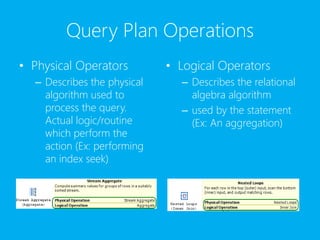
Query Plan Operations
• Physical Operators
– Describes the physical
algorithm used to
process the query.
Actual logic/routine
which perform the
action (Ex: performing
an index seek)
• Logical Operators
– Describes the relational
algebra algorithm
– used by the statement
(Ex: An aggregation)
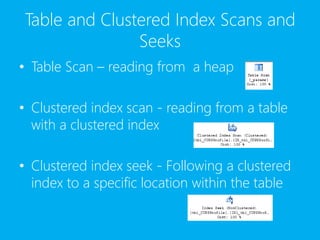
Table and Clustered Index Scans and
Seeks
• Table Scan – reading from a heap
• Clustered index scan - reading from a table
with a clustered index
• Clustered index seek - Following a clustered
index to a specific location within the table
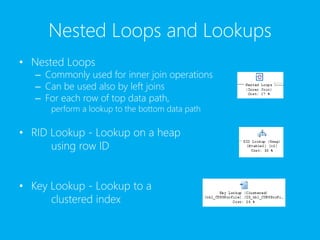
Nested Loops and Lookups
• Nested Loops
– Commonly used for inner join operations
– Can be used also by left joins
– For each row of top data path,
perform a lookup to the bottom data path
• RID Lookup - Lookup on a heap
using row ID
• Key Lookup - Lookup to a
clustered index
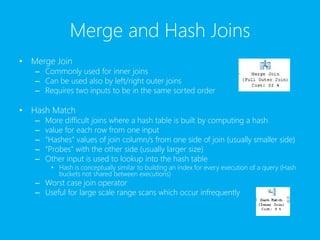
Merge and Hash Joins
• Merge Join
– Commonly used for inner joins
– Can be used also by left/right outer joins
– Requires two inputs to be in the same sorted order
• Hash Match
– More difficult joins where a hash table is built by computing a hash
– value for each row from one input
– “Hashes” values of join column/s from one side of join (usually smaller side)
– “Probes” with the other side (usually larger size)
– Other input is used to lookup into the hash table
• Hash is conceptually similar to building an index for every execution of a query (Hash
buckets not shared between executions)
– Worst case join operator
– Useful for large scale range scans which occur infrequently
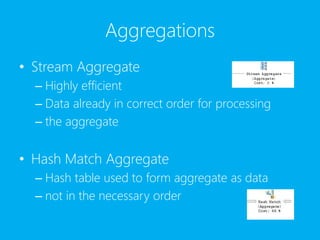
Aggregations
• Stream Aggregate
– Highly efficient
– Data already in correct order for processing
– the aggregate
• Hash Match Aggregate
– Hash table used to form aggregate as data
– not in the necessary order
Data Modification
• INSERT
– Used in INSERT operations
• UPDATE
– Used in UPDATE operations
• DELETE
– Used in DELETE operations
• TSQL MERGE statement can use
combinations of inserts, updates and deletes
Demonstration on Execution Plan
Indexes
Why build Indexes
• Providing an efficient access path between the
user and the data. By providing this access path,
the user can ask for data from the database and
the database will know where to go to retrieve
the data.
• Returning data when needed is actually the
point of indexes; they provide that path that is
necessary to get to the data in the quickest
manner possible.
Clustered Index
• With a clustered index, one or more columns
are selected as the key columns for the index.
These columns are used to sort and store the
data in the table.
• A clustered index stores the records in the table
based on the order of the key columns of the
index.
• SQL Server only supports a single clustered
index per each database table.
When to use Clustered Index?
• Columns that contain a large number of distinct
values.
• Queries that return a range of values using operators
such as =, >, BETWEEN, <, >= and <=.
• Queries that return large result sets.
• Very useful for columns sorted on GROUP BY and
ORDER BY clauses, as well as those filtered by WHERE
clauses.
• OLTP-type applications where very fast single row
lookup is required, typically by means of the primary
key. Create a clustered index on the primary key.
When NOT to use Clustered Index?
• Columns that that undergo frequent changes –
results in the entire row moving (because SQL
Server must keep data values of a row in
physical order. This is an important
consideration in high-volume transaction
processing systems where data tends to be
volatile.
• Wide keys- key values from the clustered index
are used by all nonclustered indexes as lookup
keys and therefore are stored in each
nonclustered index leaf entry.
Nonclustered Index
• In a nonclustered index, columns are selected and
sorted based on their values. These columns contain
a reference to the clustered index or heap location of
the data they are related to.
• Nonclustered indexes do not have the same
restrictions as clustered indexes. There can be many
nonclustered indexes on a table, in fact up to 999
nonclustered indexes. This allows alternative routes to
be created for users to get to the data they need
without having to traverse all records in a table.
When to use Nonclustered Index?
• Columns that contain a large number of
distinct values, such as combination of last
name and first name (if a clustered index is
used for other columns). Useful for retrieving
a single record or a range of records.
• Columns frequently involved in search
conditions of a query (WHERE clause) that
return exact matches.
When to use Nonclustered Index?
• Columns that contain a large number of
distinct values, such as combination of last
name and first name (if a clustered index is
used for other columns). Useful for retrieving
a single record or a range of records.
• Columns frequently involved in search
conditions of a query (WHERE clause) that
return exact matches.
What are some tips on tuning SQL
Indexes for better performance?
• Don’t use too many indexes
• Try not to include columns that are
repeatedly updated in an index
• Creating indexes on foreign key column(s)
can improve performance
• Create indexes for columns that are
repeatedly used in predicates of your SQL
queries
What are some tips on tuning SQL
Indexes for better performance? (cont…)
• Get rid of overlapping indexes
• Consider deleting an index when loading
huge amounts of data into a table
• Ensure that the indexes you create have high
selectivity
Demonstration on Indexes
Additional Tips & Tricks
Sql performance tuning

Sql performance tuning

  • 1.
  • 2.
  • 3.
  • 4.
    Execution Plan • Alsoknown as “explain plan” • Details of how RDBMS plans on processing a particular query – How index will be used – How joins will performed – Estimate of the resource cost
  • 5.
    Execution Plan (cont…) •Execution plans detail choices that SQL Server makes on: – Types of operations – Order of operations – Choice of indexes – Rowcount estimates based on available statistics
  • 6.
  • 7.
    Query Plan Operations •Physical Operators – Describes the physical algorithm used to process the query. Actual logic/routine which perform the action (Ex: performing an index seek) • Logical Operators – Describes the relational algebra algorithm – used by the statement (Ex: An aggregation)
  • 8.
    Table and ClusteredIndex Scans and Seeks • Table Scan – reading from a heap • Clustered index scan - reading from a table with a clustered index • Clustered index seek - Following a clustered index to a specific location within the table
  • 9.
    Nested Loops andLookups • Nested Loops – Commonly used for inner join operations – Can be used also by left joins – For each row of top data path, perform a lookup to the bottom data path • RID Lookup - Lookup on a heap using row ID • Key Lookup - Lookup to a clustered index
  • 10.
    Merge and HashJoins • Merge Join – Commonly used for inner joins – Can be used also by left/right outer joins – Requires two inputs to be in the same sorted order • Hash Match – More difficult joins where a hash table is built by computing a hash – value for each row from one input – “Hashes” values of join column/s from one side of join (usually smaller side) – “Probes” with the other side (usually larger size) – Other input is used to lookup into the hash table • Hash is conceptually similar to building an index for every execution of a query (Hash buckets not shared between executions) – Worst case join operator – Useful for large scale range scans which occur infrequently
  • 11.
    Aggregations • Stream Aggregate –Highly efficient – Data already in correct order for processing – the aggregate • Hash Match Aggregate – Hash table used to form aggregate as data – not in the necessary order
  • 12.
    Data Modification • INSERT –Used in INSERT operations • UPDATE – Used in UPDATE operations • DELETE – Used in DELETE operations • TSQL MERGE statement can use combinations of inserts, updates and deletes
  • 13.
  • 14.
  • 15.
    Why build Indexes •Providing an efficient access path between the user and the data. By providing this access path, the user can ask for data from the database and the database will know where to go to retrieve the data. • Returning data when needed is actually the point of indexes; they provide that path that is necessary to get to the data in the quickest manner possible.
  • 16.
    Clustered Index • Witha clustered index, one or more columns are selected as the key columns for the index. These columns are used to sort and store the data in the table. • A clustered index stores the records in the table based on the order of the key columns of the index. • SQL Server only supports a single clustered index per each database table.
  • 17.
    When to useClustered Index? • Columns that contain a large number of distinct values. • Queries that return a range of values using operators such as =, >, BETWEEN, <, >= and <=. • Queries that return large result sets. • Very useful for columns sorted on GROUP BY and ORDER BY clauses, as well as those filtered by WHERE clauses. • OLTP-type applications where very fast single row lookup is required, typically by means of the primary key. Create a clustered index on the primary key.
  • 18.
    When NOT touse Clustered Index? • Columns that that undergo frequent changes – results in the entire row moving (because SQL Server must keep data values of a row in physical order. This is an important consideration in high-volume transaction processing systems where data tends to be volatile. • Wide keys- key values from the clustered index are used by all nonclustered indexes as lookup keys and therefore are stored in each nonclustered index leaf entry.
  • 19.
    Nonclustered Index • Ina nonclustered index, columns are selected and sorted based on their values. These columns contain a reference to the clustered index or heap location of the data they are related to. • Nonclustered indexes do not have the same restrictions as clustered indexes. There can be many nonclustered indexes on a table, in fact up to 999 nonclustered indexes. This allows alternative routes to be created for users to get to the data they need without having to traverse all records in a table.
  • 20.
    When to useNonclustered Index? • Columns that contain a large number of distinct values, such as combination of last name and first name (if a clustered index is used for other columns). Useful for retrieving a single record or a range of records. • Columns frequently involved in search conditions of a query (WHERE clause) that return exact matches.
  • 21.
    When to useNonclustered Index? • Columns that contain a large number of distinct values, such as combination of last name and first name (if a clustered index is used for other columns). Useful for retrieving a single record or a range of records. • Columns frequently involved in search conditions of a query (WHERE clause) that return exact matches.
  • 22.
    What are sometips on tuning SQL Indexes for better performance? • Don’t use too many indexes • Try not to include columns that are repeatedly updated in an index • Creating indexes on foreign key column(s) can improve performance • Create indexes for columns that are repeatedly used in predicates of your SQL queries
  • 23.
    What are sometips on tuning SQL Indexes for better performance? (cont…) • Get rid of overlapping indexes • Consider deleting an index when loading huge amounts of data into a table • Ensure that the indexes you create have high selectivity
  • 24.
  • 25.