Tumbleweed 
(Axway Secure Transport) 
Lesson 1(Intro) 
Rich Helton 
September 01, 2014
Disclaimer – For Educational Purposes 
• This training PowerPoint is in no means reproducing 
the documents that it may reference. 
• Which also means that the references may change at 
the owner’s will. 
• The purpose of this document’s original intent was 
for training purposes only. 
• I offer no personal support of this document and 
release it “as is” with no commercial intent.
What is Axway’s Tumbleweed? 
• A Managed File Transfer that has a dynamic 
SFTP Server for users to register themselves, 
as well as Events and Actions to schedule the 
movement of files or conditions to execute 
programs. 
• Tumbleweed is the same as Axway's Secure 
Transport
Tumbleweed 
Components
What is Tumbleweed… 
• Tumbleweed is a Web Server that can also be re-directed 
to accept SFTP for uploads and downloads of 
files. 
http://en.wikipedia.org/wiki/Tumbleweed_Communicati 
ons 
• The server also has rules, or triggered workflows, that 
can be triggered for conditions based on values of time, 
conditions if the file’s exist, and other events. 
• Based on these events, the rules can execute actions, 
such as downloading a file, or moving a file. 
• These events can be extended in its Java or 
Linux/CygWin environment.
Feature & Benefits… 
• Industry Governance – Highly used by JPMorgan and 
Bank of America. 
• Host files in secure mailboxes or folders. These files 
can use repository encryption. 
• Ease of use with administration functionality. 
• Utilization of existing identity store, such as Active 
Directory. 
• Supports end-to-end reporting and monitoring.
More Feature & Benefits… 
• Guaranteed Delivery of files. 
• Transferring Scheduling. 
• Database Support. 
• Web admin and configuration.
Example File Tracking
Example Server Log
Example Viewing Certs
Pieces… 
• Tumbleweed uses Tomcat as a front-end 
JSP/Servlet Java Web Server. 
• For database storage, it uses MySQL, or can 
Oracle. 
• For external commands, it will use a 
Linux/CygWin environment. 
• These are very standard Java Enterprise 
components that Tumbleweed was based on.
CygWin
CYGWIN 
CygWin is a Unix-like environment and command-line 
interface for Microsoft Windows. 
http://en.wikipedia.org/wiki/Cygwin 
Tumbleweed uses it to run commands from Tomcat, 
such as a “runas” and to run pearl scripts in its Unix-like 
environment. 
Tumbelweed also uses it’s command environment to run 
Linux commands like “>mysql” for MySQL interaction. 
Cygwin runs Windows applications. These applications 
can be developed in the C/C++ Windows compilers 
provided by CygWin. 
Tumbleweed could easily run in Linux.
Commands 
Tumbleweed uses CygWin external commands to run 
executables and command lines in the CygWin Unix 
environment. 
For executables, it will typically use the “runas” 
command in its actions and events, which can be saved 
in XML form for review. Java will just execute the 
commands from Tomcat:
Events 
Tumbleweed uses Events, based on rules, to run these 
actions. 
Events could be if a file is found, a timer is reached, or 
other conditions are met.
CYGWIN 
Cygwin runs Windows applications, these applications 
can be developed in the C/C++ Windows compilers 
provided by CygWin. 
For .NET Applications in CygWin, Mono is used, which 
is the same compiler for running .NET in Linux. 
See 
http://social.msdn.microsoft.com/Forums/eu/csharpide 
/thread/21c4fddf-fc2e-434b-802c-04d7b2b89700
Programming in CygWin 
For Programming in CygWin, there is Java, C, and C++. 
The GCC and GCC++ compilers are normally included in 
the Cygwin installation, as well as Java. 
For details in programming CygWin, see 
http://www.cygwin.com/cygwin-ug-net/ 
programming.html .
MySQL
What is MySQL 
MySQL is the world’s most used Open Source database 
http://en.wikipedia.org/wiki/MySQL 
There are many command line and GUI tools including 
the MySQL workbench. See same link. 
A set of MySQL books for queries, setups, functions and 
programming can be found at 
http://en.wikibooks.org/wiki/MySQL. 
For Java, the most common ways of connecting to 
MySQL is by using the Java Database Connector (JDBC) 
or the Hibernate framework.
Looking through the schema 
Now that the database is MySQL, you can use the MySQL 
Workbench on the database, http://wb.mysql.com/:
If we install MySQL 
We are going to install MySQL. 
A free Open Source database that can run as a service 
and is more relational for production use is the MySQL 
database. See http://en.wikipedia.org/wiki/MySQL . 
 Install MySQL from 
http://www.mysql.com/downloads/mysql/ 
Here is an example to create the myTestAppDB: 
mysql> create database myTestAppDB character set utf8; 
Here is an example to create user “myUser” password 
“XXXXXXXX” 
mysql> CREATE USER ‘myUser’@’localhost’ IDENTIFIED BY 
‘XXXXXXXX’; 
mysql> GRANT ALL PRIVILEGES ON *.* TO ‘jirauser’@’localhost’ 
WITH GRANT OPTION;
Tomcat
Tomcat 
• Tomcat can be downloaded http://tomcat.apache.org/ , and is 
a Servlet Container that can run Java Objects. 
• This is an Open Source Java Web Server from Apache, others 
include Apache Geronimo, JBoss, Oracle WebLogic and many 
more. 
• Tomcat has a startup.bat or startup shell to start the server. 
• After it starts, it can be accessed using http://127.0.0.1:8080/ 
• Many of the deployments will be deployed in the /WebApps/ 
directory as a WAR (Web Archive) file, similar to a JAR (Java 
Archive) file. See 
http://en.wikipedia.org/wiki/WAR_(Sun_file_format)
Tomcat 
Tomcat is a Servlet and Java Server Pages Container 
developed by Apache, reference 
http://en.wikipedia.org/wiki/Tomcat_(software) and 
http://tomcat.apache.org/ . 
It provides a Java HTTP Server to run Java code. 
Catalina is Tomcat’s servlet container. 
A Servlet container is a Java class that responds to 
HTTP requests. 
A HTTP request is an HTTP page that will call Java code 
and execute an action running on the Tomcat Server. 
The Tomcat server may be started with a startup script 
and use different ports so that many servers may be 
provide different services.
Tomcat Directory
Tomcat Directory 
bin  Directory containing the scripts and Tomcat JAR 
files. 
conf  The properties and XML files that configure the 
server, including ports, Admin ports, database 
connections, etc. 
lib  The supporting JAR files needed to run Tomcat. 
logs  Log files that are written during runtime and 
startup. 
webapps  Any WAR files that contain the web 
applications. WAR files are similar to JAR files except 
they also contain the Web pages, like JSPs and Servlets. 
This is where the Flex applications will be stored.
Tomcat Management Interface 
• Tomcat has a management interface for loading new 
applications,
SFTP Testing
Tumbleweed SFTP Interface 
 Tumbleweed has a built-in SFTP client that can be used to 
download files at certain times. 
 Here’s an example of its use:
A Java SFTP Client 
 We can test the server by ensuring a Java SFTP client 
works, it can be tested from the website http://j-ftp. 
sourceforge.net/ and start J-FTP fro the Java Web Start, 
and login to the local server:
FreeSSHD 
 A Windows free SFTP server and telnet server is FreeSSHD 
found at http://www.freesshd.com/ .
More on Benefits
Repository Encryption
Configuring for Active Directory
Generating PGP Keys
Send with PGP Encryption(Encrypt File As)
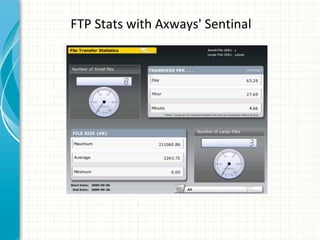
FTP Stats with Axways' Sentinal
FTP Overview with Axways' Sentinal
Conclusion
Tumbleweed 
 Tumbleweed is a Java product based on common Java 
Architecture. 
 It has a rules-engine to handle events. 
 It handles is both a dynamic SFTP server and handles SFTP 
client processes 
 It is rcommended by banks as it supports transferring in 
PGP as well 
 It supports repository encryption

Tumbleweed intro

  • 1.
    Tumbleweed (Axway SecureTransport) Lesson 1(Intro) Rich Helton September 01, 2014
  • 2.
    Disclaimer – ForEducational Purposes • This training PowerPoint is in no means reproducing the documents that it may reference. • Which also means that the references may change at the owner’s will. • The purpose of this document’s original intent was for training purposes only. • I offer no personal support of this document and release it “as is” with no commercial intent.
  • 3.
    What is Axway’sTumbleweed? • A Managed File Transfer that has a dynamic SFTP Server for users to register themselves, as well as Events and Actions to schedule the movement of files or conditions to execute programs. • Tumbleweed is the same as Axway's Secure Transport
  • 4.
  • 5.
    What is Tumbleweed… • Tumbleweed is a Web Server that can also be re-directed to accept SFTP for uploads and downloads of files. http://en.wikipedia.org/wiki/Tumbleweed_Communicati ons • The server also has rules, or triggered workflows, that can be triggered for conditions based on values of time, conditions if the file’s exist, and other events. • Based on these events, the rules can execute actions, such as downloading a file, or moving a file. • These events can be extended in its Java or Linux/CygWin environment.
  • 6.
    Feature & Benefits… • Industry Governance – Highly used by JPMorgan and Bank of America. • Host files in secure mailboxes or folders. These files can use repository encryption. • Ease of use with administration functionality. • Utilization of existing identity store, such as Active Directory. • Supports end-to-end reporting and monitoring.
  • 7.
    More Feature &Benefits… • Guaranteed Delivery of files. • Transferring Scheduling. • Database Support. • Web admin and configuration.
  • 8.
  • 9.
  • 10.
  • 11.
    Pieces… • Tumbleweeduses Tomcat as a front-end JSP/Servlet Java Web Server. • For database storage, it uses MySQL, or can Oracle. • For external commands, it will use a Linux/CygWin environment. • These are very standard Java Enterprise components that Tumbleweed was based on.
  • 12.
  • 13.
    CYGWIN CygWin isa Unix-like environment and command-line interface for Microsoft Windows. http://en.wikipedia.org/wiki/Cygwin Tumbleweed uses it to run commands from Tomcat, such as a “runas” and to run pearl scripts in its Unix-like environment. Tumbelweed also uses it’s command environment to run Linux commands like “>mysql” for MySQL interaction. Cygwin runs Windows applications. These applications can be developed in the C/C++ Windows compilers provided by CygWin. Tumbleweed could easily run in Linux.
  • 14.
    Commands Tumbleweed usesCygWin external commands to run executables and command lines in the CygWin Unix environment. For executables, it will typically use the “runas” command in its actions and events, which can be saved in XML form for review. Java will just execute the commands from Tomcat:
  • 15.
    Events Tumbleweed usesEvents, based on rules, to run these actions. Events could be if a file is found, a timer is reached, or other conditions are met.
  • 16.
    CYGWIN Cygwin runsWindows applications, these applications can be developed in the C/C++ Windows compilers provided by CygWin. For .NET Applications in CygWin, Mono is used, which is the same compiler for running .NET in Linux. See http://social.msdn.microsoft.com/Forums/eu/csharpide /thread/21c4fddf-fc2e-434b-802c-04d7b2b89700
  • 17.
    Programming in CygWin For Programming in CygWin, there is Java, C, and C++. The GCC and GCC++ compilers are normally included in the Cygwin installation, as well as Java. For details in programming CygWin, see http://www.cygwin.com/cygwin-ug-net/ programming.html .
  • 18.
  • 19.
    What is MySQL MySQL is the world’s most used Open Source database http://en.wikipedia.org/wiki/MySQL There are many command line and GUI tools including the MySQL workbench. See same link. A set of MySQL books for queries, setups, functions and programming can be found at http://en.wikibooks.org/wiki/MySQL. For Java, the most common ways of connecting to MySQL is by using the Java Database Connector (JDBC) or the Hibernate framework.
  • 20.
    Looking through theschema Now that the database is MySQL, you can use the MySQL Workbench on the database, http://wb.mysql.com/:
  • 21.
    If we installMySQL We are going to install MySQL. A free Open Source database that can run as a service and is more relational for production use is the MySQL database. See http://en.wikipedia.org/wiki/MySQL .  Install MySQL from http://www.mysql.com/downloads/mysql/ Here is an example to create the myTestAppDB: mysql> create database myTestAppDB character set utf8; Here is an example to create user “myUser” password “XXXXXXXX” mysql> CREATE USER ‘myUser’@’localhost’ IDENTIFIED BY ‘XXXXXXXX’; mysql> GRANT ALL PRIVILEGES ON *.* TO ‘jirauser’@’localhost’ WITH GRANT OPTION;
  • 22.
  • 23.
    Tomcat • Tomcatcan be downloaded http://tomcat.apache.org/ , and is a Servlet Container that can run Java Objects. • This is an Open Source Java Web Server from Apache, others include Apache Geronimo, JBoss, Oracle WebLogic and many more. • Tomcat has a startup.bat or startup shell to start the server. • After it starts, it can be accessed using http://127.0.0.1:8080/ • Many of the deployments will be deployed in the /WebApps/ directory as a WAR (Web Archive) file, similar to a JAR (Java Archive) file. See http://en.wikipedia.org/wiki/WAR_(Sun_file_format)
  • 24.
    Tomcat Tomcat isa Servlet and Java Server Pages Container developed by Apache, reference http://en.wikipedia.org/wiki/Tomcat_(software) and http://tomcat.apache.org/ . It provides a Java HTTP Server to run Java code. Catalina is Tomcat’s servlet container. A Servlet container is a Java class that responds to HTTP requests. A HTTP request is an HTTP page that will call Java code and execute an action running on the Tomcat Server. The Tomcat server may be started with a startup script and use different ports so that many servers may be provide different services.
  • 25.
  • 26.
    Tomcat Directory bin Directory containing the scripts and Tomcat JAR files. conf  The properties and XML files that configure the server, including ports, Admin ports, database connections, etc. lib  The supporting JAR files needed to run Tomcat. logs  Log files that are written during runtime and startup. webapps  Any WAR files that contain the web applications. WAR files are similar to JAR files except they also contain the Web pages, like JSPs and Servlets. This is where the Flex applications will be stored.
  • 27.
    Tomcat Management Interface • Tomcat has a management interface for loading new applications,
  • 28.
  • 29.
    Tumbleweed SFTP Interface  Tumbleweed has a built-in SFTP client that can be used to download files at certain times.  Here’s an example of its use:
  • 30.
    A Java SFTPClient  We can test the server by ensuring a Java SFTP client works, it can be tested from the website http://j-ftp. sourceforge.net/ and start J-FTP fro the Java Web Start, and login to the local server:
  • 31.
    FreeSSHD  AWindows free SFTP server and telnet server is FreeSSHD found at http://www.freesshd.com/ .
  • 32.
  • 33.
  • 34.
  • 35.
  • 36.
    Send with PGPEncryption(Encrypt File As)
  • 37.
    FTP Stats withAxways' Sentinal
  • 38.
    FTP Overview withAxways' Sentinal
  • 39.
  • 40.
    Tumbleweed  Tumbleweedis a Java product based on common Java Architecture.  It has a rules-engine to handle events.  It handles is both a dynamic SFTP server and handles SFTP client processes  It is rcommended by banks as it supports transferring in PGP as well  It supports repository encryption

Editor's Notes

  • #2 This template can be used as a starter file for presenting training materials in a group setting. Sections Right-click on a slide to add sections. Sections can help to organize your slides or facilitate collaboration between multiple authors. Notes Use the Notes section for delivery notes or to provide additional details for the audience. View these notes in Presentation View during your presentation. Keep in mind the font size (important for accessibility, visibility, videotaping, and online production) Coordinated colors Pay particular attention to the graphs, charts, and text boxes. Consider that attendees will print in black and white or grayscale. Run a test print to make sure your colors work when printed in pure black and white and grayscale. Graphics, tables, and graphs Keep it simple: If possible, use consistent, non-distracting styles and colors. Label all graphs and tables.
  • #3 Give a brief overview of the presentation. Describe the major focus of the presentation and why it is important. Introduce each of the major topics. To provide a road map for the audience, you can repeat this Overview slide throughout the presentation, highlighting the particular topic you will discuss next.
  • #4 Give a brief overview of the presentation. Describe the major focus of the presentation and why it is important. Introduce each of the major topics. To provide a road map for the audience, you can repeat this Overview slide throughout the presentation, highlighting the particular topic you will discuss next.
  • #6 Give a brief overview of the presentation. Describe the major focus of the presentation and why it is important. Introduce each of the major topics. To provide a road map for the audience, you can repeat this Overview slide throughout the presentation, highlighting the particular topic you will discuss next.
  • #7 Give a brief overview of the presentation. Describe the major focus of the presentation and why it is important. Introduce each of the major topics. To provide a road map for the audience, you can repeat this Overview slide throughout the presentation, highlighting the particular topic you will discuss next.
  • #8 Give a brief overview of the presentation. Describe the major focus of the presentation and why it is important. Introduce each of the major topics. To provide a road map for the audience, you can repeat this Overview slide throughout the presentation, highlighting the particular topic you will discuss next.
  • #9 Give a brief overview of the presentation. Describe the major focus of the presentation and why it is important. Introduce each of the major topics. To provide a road map for the audience, you can repeat this Overview slide throughout the presentation, highlighting the particular topic you will discuss next.
  • #10 Give a brief overview of the presentation. Describe the major focus of the presentation and why it is important. Introduce each of the major topics. To provide a road map for the audience, you can repeat this Overview slide throughout the presentation, highlighting the particular topic you will discuss next.
  • #11 Give a brief overview of the presentation. Describe the major focus of the presentation and why it is important. Introduce each of the major topics. To provide a road map for the audience, you can repeat this Overview slide throughout the presentation, highlighting the particular topic you will discuss next.
  • #12 Give a brief overview of the presentation. Describe the major focus of the presentation and why it is important. Introduce each of the major topics. To provide a road map for the audience, you can repeat this Overview slide throughout the presentation, highlighting the particular topic you will discuss next.