KONG
An API Gateway
Yohann Ciurlik
Date : October 17th 2017
Version : 1.1
Introduction
3
Introduction
Quick overview
• Open-source cloud-native, fast, scalable, and distributed Microservice
Abstraction Layer
• Backed by the battle-tested NGINX with a focus on high performance, Kong was
made available as an open-source platform in 2015 by Mashape.
• Under active development, Kong is used in production at thousands of
organizations from startups, Global 5000 and Government organizations.
• Licensing model :
– Enterprise Edition (EE)
– Community Edition (CE)
4
Introduction
What is Kong ?
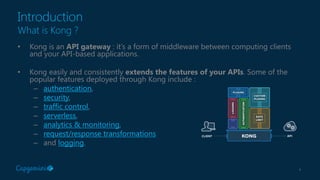
• Kong is an API gateway : it’s a form of middleware between computing clients
and your API-based applications.
• Kong easily and consistently extends the features of your APIs. Some of the
popular features deployed through Kong include :
– authentication,
– security,
– traffic control,
– serverless,
– analytics & monitoring,
– request/response transformations
– and logging.
5
Introduction
Why use Kong ?
• Kong is :
– Radically Extensible
– Blazingly Fast
– Open Source
– Platform Agnostic
– Cloud Native
– RESTful
Community Edition (CE)
7
Community Edition (CE)
Focus on Community Edition (CE)
• Available on Github
– Actual version : 0.11.0
– Apache v2 licensing
– 3500 commits, 12,5 k*, 1400 forks
• No UI & Analytics on CE (!!!)
– OS community UI :
• Konga
• Kongdash,
• Kong Dashboard (desktop)
– Analytics :
• ELK
• Runscope, Datadog, …
8
Community Edition (CE)
A lot of open source plugins
• Authentication
– Basic
– Key
– HMAC
– OAUth 2
– LDAP
– JWT
• Security
– ACL
– CORS
– Dynamics SSL
– IP Restriction
– Bot Detection
• Traffic control
– Rate Limiting
– Response Rate Limiting
– Request Size Limiting
– Request termination
• Analytics & Monitoring
– Galileo
– Datadog
– Runscope
• Transformations
– Request Transformer
– Response Transformer
– Correlation ID
• Serverless
– AWS Lambda
– OpenWhisk
• Logging
– TCP
– UDP
– HTTP
– File
– Syslog
– StatsD
– Loggly
Enterprise Edition (EE)
10
Enterprise Edition (EE)
Benefits
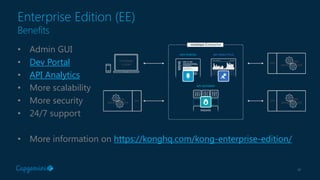
• Admin GUI
• Dev Portal
• API Analytics
• More scalability
• More security
• 24/7 support
• More information on https://konghq.com/kong-enterprise-edition/
11
Enterprise Edition (EE)
Dev portal & admin GUI in EE
https://gelato.io/
Markdown explorer
Automatic API Explorer
Import OpenAPI/Swaggr
Developer Registration
12
Enterprise Edition (EE)
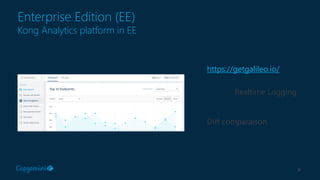
Kong Analytics platform in EE
https://getgalileo.io/
Realtime Logging
Diff comparaison
Architecture overview
14
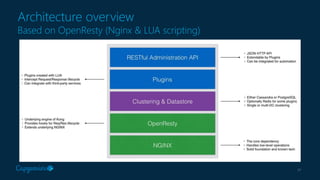
Architecture overview
Based on OpenResty (Nginx & LUA scripting)
15
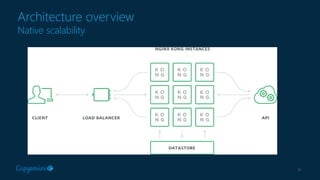
Architecture overview
Native scalability
16
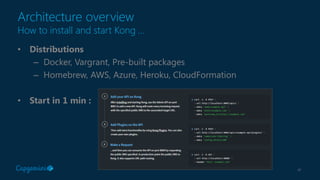
Architecture overview
How to install and start Kong …
• Distributions
– Docker, Vargrant, Pre-built packages
– Homebrew, AWS, Azure, Heroku, CloudFormation
• Start in 1 min :
17
Architecture overview
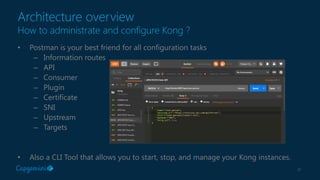
How to administrate and configure Kong ?
• Postman is your best friend for all configuration tasks
– Information routes
– API
– Consumer
– Plugin
– Certificate
– SNI
– Upstream
– Targets
• Also a CLI Tool that allows you to start, stop, and manage your Kong instances.
18
Architecture overview
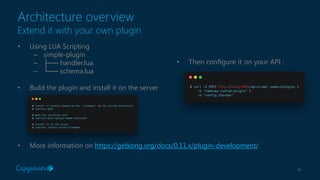
Extend it with your own plugin
• Using LUA Scripting
– simple-plugin
– ├── handler.lua
– └── schema.lua
• Build the plugin and install it on the server
• More information on https://getkong.org/docs/0.11.x/plugin-development/
• Then configure it on your API :
Going further with Kong
20
Going further with Kong
Proof of Concept
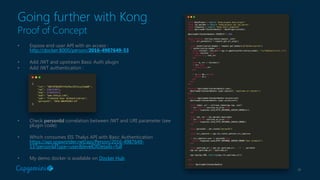
• Expose end-user API with an access :
http://docker:8000/person/2016-4987649-53
• Add JWT and upstream Basic Auth plugin
• Add JWT authentication :
• Check personId correlation between JWT and URI parameter (see
plugin code)
• Which consumes EIS Thalys API with Basic Authentication
https://api.spawnrider.net/api/Person/2016-4987649-
53?personIdType=user&levelOfDetails=full
• My demo docker is available on Docker Hub
21
Going further with Kong
Benefits and concerns
• Benefits
– Easy to install, configure and use
– Based on reliable products (Nginx, Cassandra, …)
– Not an ESB-based technical stack
– Well documented
• Concerns
– No OOTB Administration UI, Developer portal and Analytics platform
– Too technical for “non-tech” end-user / administrator
22
Going further with Kong
Online materials
• Documentation
– https://getkong.org/
– https://getkong.org/plugins/
– https://getkong.org/docs/
• Videos & Webinars :
– Mashap Youtube Channel
– API & Microservices Management with Kong (Webinar)
– Microservices Orchestration with Kong, Galileo & Gelato
(Webinar)
23
Contact
Yohann Ciurlik
Managing Solution Architect
Digital Customer eXperience (DCX)
Capgemini France
yohann.ciurlik@Capgemini.com
Also on Twitter or LinkedIn
Introduction to Kong API Gateway

Introduction to Kong API Gateway

  • 1.
    KONG An API Gateway YohannCiurlik Date : October 17th 2017 Version : 1.1
  • 2.
  • 3.
    3 Introduction Quick overview • Open-sourcecloud-native, fast, scalable, and distributed Microservice Abstraction Layer • Backed by the battle-tested NGINX with a focus on high performance, Kong was made available as an open-source platform in 2015 by Mashape. • Under active development, Kong is used in production at thousands of organizations from startups, Global 5000 and Government organizations. • Licensing model : – Enterprise Edition (EE) – Community Edition (CE)
  • 4.
    4 Introduction What is Kong? • Kong is an API gateway : it’s a form of middleware between computing clients and your API-based applications. • Kong easily and consistently extends the features of your APIs. Some of the popular features deployed through Kong include : – authentication, – security, – traffic control, – serverless, – analytics & monitoring, – request/response transformations – and logging.
  • 5.
    5 Introduction Why use Kong? • Kong is : – Radically Extensible – Blazingly Fast – Open Source – Platform Agnostic – Cloud Native – RESTful
  • 6.
  • 7.
    7 Community Edition (CE) Focuson Community Edition (CE) • Available on Github – Actual version : 0.11.0 – Apache v2 licensing – 3500 commits, 12,5 k*, 1400 forks • No UI & Analytics on CE (!!!) – OS community UI : • Konga • Kongdash, • Kong Dashboard (desktop) – Analytics : • ELK • Runscope, Datadog, …
  • 8.
    8 Community Edition (CE) Alot of open source plugins • Authentication – Basic – Key – HMAC – OAUth 2 – LDAP – JWT • Security – ACL – CORS – Dynamics SSL – IP Restriction – Bot Detection • Traffic control – Rate Limiting – Response Rate Limiting – Request Size Limiting – Request termination • Analytics & Monitoring – Galileo – Datadog – Runscope • Transformations – Request Transformer – Response Transformer – Correlation ID • Serverless – AWS Lambda – OpenWhisk • Logging – TCP – UDP – HTTP – File – Syslog – StatsD – Loggly
  • 9.
  • 10.
    10 Enterprise Edition (EE) Benefits •Admin GUI • Dev Portal • API Analytics • More scalability • More security • 24/7 support • More information on https://konghq.com/kong-enterprise-edition/
  • 11.
    11 Enterprise Edition (EE) Devportal & admin GUI in EE https://gelato.io/ Markdown explorer Automatic API Explorer Import OpenAPI/Swaggr Developer Registration
  • 12.
    12 Enterprise Edition (EE) KongAnalytics platform in EE https://getgalileo.io/ Realtime Logging Diff comparaison
  • 13.
  • 14.
    14 Architecture overview Based onOpenResty (Nginx & LUA scripting)
  • 15.
  • 16.
    16 Architecture overview How toinstall and start Kong … • Distributions – Docker, Vargrant, Pre-built packages – Homebrew, AWS, Azure, Heroku, CloudFormation • Start in 1 min :
  • 17.
    17 Architecture overview How toadministrate and configure Kong ? • Postman is your best friend for all configuration tasks – Information routes – API – Consumer – Plugin – Certificate – SNI – Upstream – Targets • Also a CLI Tool that allows you to start, stop, and manage your Kong instances.
  • 18.
    18 Architecture overview Extend itwith your own plugin • Using LUA Scripting – simple-plugin – ├── handler.lua – └── schema.lua • Build the plugin and install it on the server • More information on https://getkong.org/docs/0.11.x/plugin-development/ • Then configure it on your API :
  • 19.
  • 20.
    20 Going further withKong Proof of Concept • Expose end-user API with an access : http://docker:8000/person/2016-4987649-53 • Add JWT and upstream Basic Auth plugin • Add JWT authentication : • Check personId correlation between JWT and URI parameter (see plugin code) • Which consumes EIS Thalys API with Basic Authentication https://api.spawnrider.net/api/Person/2016-4987649- 53?personIdType=user&levelOfDetails=full • My demo docker is available on Docker Hub
  • 21.
    21 Going further withKong Benefits and concerns • Benefits – Easy to install, configure and use – Based on reliable products (Nginx, Cassandra, …) – Not an ESB-based technical stack – Well documented • Concerns – No OOTB Administration UI, Developer portal and Analytics platform – Too technical for “non-tech” end-user / administrator
  • 22.
    22 Going further withKong Online materials • Documentation – https://getkong.org/ – https://getkong.org/plugins/ – https://getkong.org/docs/ • Videos & Webinars : – Mashap Youtube Channel – API & Microservices Management with Kong (Webinar) – Microservices Orchestration with Kong, Galileo & Gelato (Webinar)
  • 23.
    23 Contact Yohann Ciurlik Managing SolutionArchitect Digital Customer eXperience (DCX) Capgemini France yohann.ciurlik@Capgemini.com Also on Twitter or LinkedIn