TSC-Cybersecurity…
Real World Solutions
Network Paladin (Making complex Cyber & Privacy issues understandable and actionable)
Ernest Staats estaats@networkpaladin.org
Our Reality
Other SDA’s have learned that…
1. We are never as safe or secure as we think we are
2. Nobody’s defenses can protect against a determined
hacker
3. Networks and data systems are inherently insecure
• There are always vulnerabilities that can be
exploited
• 4. Your Response is More important than your security
Software One tends to Freeze without a plan!
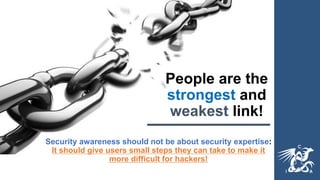
People are the
strongest and
weakest link!
Security awareness should not be about security expertise:
It should give users small steps they can take to make it
more difficult for hackers!
Individuals Enable Hacking
• People make mistakes by:
• Sharing passwords
• Using outdated software
• Losing or improperly discarding files
• Mishandling personal information
• Storing unencrypted personal information on laptops or easily lost mobile
devices
• Circumventing information security controls
o Intentionally for their purposes;
o In the mistaken belief that they can improve efficiency;
o In narrow mindedly thinking that they “just need to get the job done” regardless
of risk
Overlooked Cyber issues
• Data Disclosure: (i.e. Website, Social media, recorded talks,
sharing personal data without agreements or consent)
• Untrusted Resources: (Personal devices and storage +
Downloaded software or apps, opening any and all attachments
by staff or contractors)
• Unstructured Information: (i.e. email, cloud storage with little to
no oversight, security or privacy)
What to Do?
1. Expect a breach & establish a response plan (Link to resources)
2. Purchase cyber insurance (A team to help you) (Link to
resources)
3. Develop, implement, & document policies and
procedures (Now)
4. Consider outsourcing some security aspects (e.g. 24/7
monitoring)
5. Have backups, backups of backups and backups where
people can’t find them (Link to Backup resources)
6. Discover then Restrict access to any system or report that
contains sensitive information (Link to sensitive data resource)
7. Use an out of band communication method (signal, telegram)
What to Do?
• 8. Establish a password manager (Link to
resources)
• 9. Limit local Admin accounts
• 10. Patch systems and applications
• 11. Use Multi-Factor authentication
• 12. Verify all 3rd party vendors (Link to Resources)
• 13. Risk Management is everyone’s responsibility
(Train Engage them)
• 14. Secure your Data Systems (Link to resources)
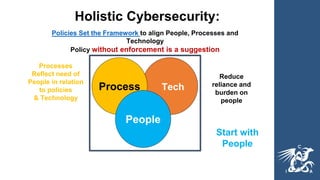
Reduce
reliance and
burden on
people
Start with
People
Policies Set the Framework to align People, Processes and
Technology
Policy without enforcement is a suggestion
Processes
Reflect need of
People in relation
to policies
& Technology
Holistic Cybersecurity:
Tech
Process
People
Demo – HID Card Key Bypass
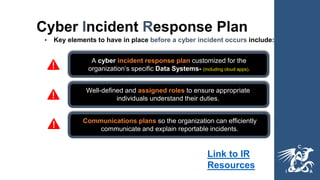
Cyber Incident Response Plan
• Key elements to have in place before a cyber incident occurs include:
A cyber incident response plan customized for the
organization’s specific Data Systems- (including cloud apps).
Well-defined and assigned roles to ensure appropriate
individuals understand their duties.
Communications plans so the organization can efficiently
communicate and explain reportable incidents.
Link to IR
Resources
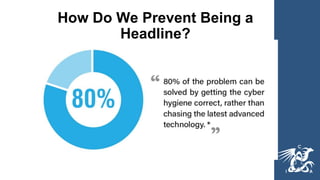
How Do We Prevent Being a
Headline?
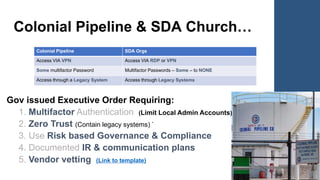
Colonial Pipeline & SDA Church…
Gov issued Executive Order Requiring:
1. Multifactor Authentication (Limit Local Admin Accounts)
2. Zero Trust (Contain legacy systems) `
3. Use Risk based Governance & Compliance
4. Documented IR & communication plans
5. Vendor vetting (Link to template)
Colonial Pipeline SDA Orgs
Access VIA VPN Access VIA RDP or VPN
Some multifactor Password Multifactor Passwords – Some – to NONE
Access through a Legacy System Access through Legacy Systems
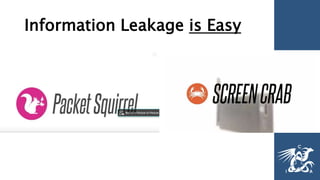
Information Leakage is Easy
Governance Terminology
• Policies: Formal statements produced and
supported by senior management (Approved by your
board)
• Standards: Mandatory courses of action or rules
that give formal policies support and direction
(Approved by leadership team)
• Procedures: Detailed step-by-step technical
instructions to achieve a goal or mandate. (Managed
by tech team)
• •Data Integrity Procedures (Backups, retention, restore (overwrite) authorization, etc.)
(Link to templates)
•
• •Data Governance Procedures (DATA handling, lifecycle, deletion, access control &
authentication, etc.)
•
• •Data Classification Procedures (PII, PCI, PHI, and how the entity stores, accesses and
manages that data)
•
• •Email Retention Policy and Procedures (email is one of our significant internal
liabilities)
•
• •Incident Response Plan (Policies & Procedures) (Link to templates)
•
• •Cyber Security (Policies and Procedures) (Link to templates)
Document Policies and Procedures
Mobile Issues /Demo
Deep Fakes: Spoofed Voice
https://www.zdnet.com/article/forget-email-scammers-use-ceo-voice-
deepfakes-to-con-workers-into-wiring-cash/
USE A Code Word
Identify Caller
Use Code Words
PIN security – 6 digit code no Pattern
Camera and mic can be turned on
without permission
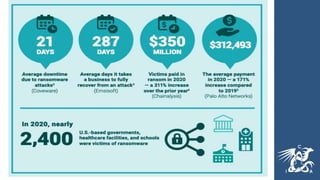
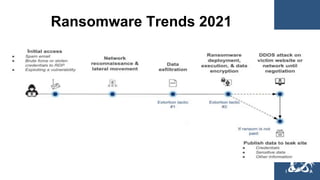
Ransomware Trends 2021
Security Response (i.e. Ransomware)
1. Know if your leadership is willing to pay
2. Start a log of all actions taken by who (Link to template)
3. Determine what is encrypted
4. Contain system pull network cable & disconnect wireless
5. Call Cyber Insurance team ….
6. (Ransomware Check Lists)
7. See if Ransomware has an unlock key www.nomoreransom.org
8. Determine if you need to report a breach
9. Consider contacting local and federal law www.ic3.gov
Monitor your Ministry & Life (Demo)
Google alerts: https://www.google.com/alerts
Hacked Account: https://haveibeenpwned.com/
• Dark Web Scan: https://try.idx.us/cyberscan/
• Public Records:
http://publicrecords.searchsystems.net/
Image Search: https://yandex.com/images/
Metadata Viewer: http://exif.regex.info/exif.cgi
Take Control – Data Detox: https://datadetox.myshadow.org/en/home
Common Pitfalls to Avoid
• Emphasizing highly publicized but rare threats over
basic cyber hygiene
• Treating cybersecurity as a one-off project instead of a
key organizational component
• Not sustaining budget and human resources for cyber
defenses
• Lack of vendor governance and oversight
More Common Pitfalls to Avoid
• Implementing the latest cybersecurity tools and
technology instead of addressing critical security
controls (Link to CIS v7 template)
• Have independent security reports that at not (captain
obvious)
• No written information security program with
supporting policies, processes, and procedures
• Lack of governance and oversight
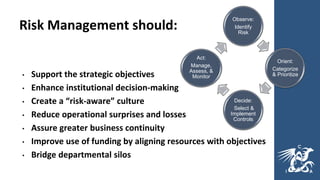
Risk Management should:
• Support the strategic objectives
• Enhance institutional decision-making
• Create a “risk-aware” culture
• Reduce operational surprises and losses
• Assure greater business continuity
• Improve use of funding by aligning resources with objectives
• Bridge departmental silos
Observe:
Identify
Risk
Orient:
Categorize
& Prioritize
Decide:
Select &
Implement
Controls
Act:
Manage,
Assess, &
Monitor
Legal Data Privacy
Resources
Data Protection Laws of the World
https://www.dlapiperdataprotection.com/
US State Breach Notification Law
Interactive Map
https://www.bakerlaw.com/BreachNotificationLawMap
State Laws Related to Internet Privacy
http://www.ncsl.org/research/telecommunications-and-
information-technology/state-laws-related-to-internet-
privacy.aspx
US state comprehensive privacy law
comparison: https://iapp.org/resources/article/us-state-
privacy-legislation-tracker/
https://emtemp.gcom.cloud/ngw/globalassets/en/legal-compliance/documents/trends/gdpr-compliance-audit-checklist.pdf

Tsc2021 cyber-issues

  • 1.
    TSC-Cybersecurity… Real World Solutions NetworkPaladin (Making complex Cyber & Privacy issues understandable and actionable) Ernest Staats estaats@networkpaladin.org
  • 2.
  • 3.
    Other SDA’s havelearned that… 1. We are never as safe or secure as we think we are 2. Nobody’s defenses can protect against a determined hacker 3. Networks and data systems are inherently insecure • There are always vulnerabilities that can be exploited • 4. Your Response is More important than your security Software One tends to Freeze without a plan!
  • 4.
    People are the strongestand weakest link! Security awareness should not be about security expertise: It should give users small steps they can take to make it more difficult for hackers!
  • 5.
    Individuals Enable Hacking •People make mistakes by: • Sharing passwords • Using outdated software • Losing or improperly discarding files • Mishandling personal information • Storing unencrypted personal information on laptops or easily lost mobile devices • Circumventing information security controls o Intentionally for their purposes; o In the mistaken belief that they can improve efficiency; o In narrow mindedly thinking that they “just need to get the job done” regardless of risk
  • 6.
    Overlooked Cyber issues •Data Disclosure: (i.e. Website, Social media, recorded talks, sharing personal data without agreements or consent) • Untrusted Resources: (Personal devices and storage + Downloaded software or apps, opening any and all attachments by staff or contractors) • Unstructured Information: (i.e. email, cloud storage with little to no oversight, security or privacy)
  • 7.
    What to Do? 1.Expect a breach & establish a response plan (Link to resources) 2. Purchase cyber insurance (A team to help you) (Link to resources) 3. Develop, implement, & document policies and procedures (Now) 4. Consider outsourcing some security aspects (e.g. 24/7 monitoring) 5. Have backups, backups of backups and backups where people can’t find them (Link to Backup resources) 6. Discover then Restrict access to any system or report that contains sensitive information (Link to sensitive data resource) 7. Use an out of band communication method (signal, telegram)
  • 8.
    What to Do? •8. Establish a password manager (Link to resources) • 9. Limit local Admin accounts • 10. Patch systems and applications • 11. Use Multi-Factor authentication • 12. Verify all 3rd party vendors (Link to Resources) • 13. Risk Management is everyone’s responsibility (Train Engage them) • 14. Secure your Data Systems (Link to resources)
  • 9.
    Reduce reliance and burden on people Startwith People Policies Set the Framework to align People, Processes and Technology Policy without enforcement is a suggestion Processes Reflect need of People in relation to policies & Technology Holistic Cybersecurity: Tech Process People
  • 10.
    Demo – HIDCard Key Bypass
  • 11.
    Cyber Incident ResponsePlan • Key elements to have in place before a cyber incident occurs include: A cyber incident response plan customized for the organization’s specific Data Systems- (including cloud apps). Well-defined and assigned roles to ensure appropriate individuals understand their duties. Communications plans so the organization can efficiently communicate and explain reportable incidents. Link to IR Resources
  • 12.
    How Do WePrevent Being a Headline?
  • 13.
    Colonial Pipeline &SDA Church… Gov issued Executive Order Requiring: 1. Multifactor Authentication (Limit Local Admin Accounts) 2. Zero Trust (Contain legacy systems) ` 3. Use Risk based Governance & Compliance 4. Documented IR & communication plans 5. Vendor vetting (Link to template) Colonial Pipeline SDA Orgs Access VIA VPN Access VIA RDP or VPN Some multifactor Password Multifactor Passwords – Some – to NONE Access through a Legacy System Access through Legacy Systems
  • 14.
  • 15.
    Governance Terminology • Policies:Formal statements produced and supported by senior management (Approved by your board) • Standards: Mandatory courses of action or rules that give formal policies support and direction (Approved by leadership team) • Procedures: Detailed step-by-step technical instructions to achieve a goal or mandate. (Managed by tech team)
  • 16.
    • •Data IntegrityProcedures (Backups, retention, restore (overwrite) authorization, etc.) (Link to templates) • • •Data Governance Procedures (DATA handling, lifecycle, deletion, access control & authentication, etc.) • • •Data Classification Procedures (PII, PCI, PHI, and how the entity stores, accesses and manages that data) • • •Email Retention Policy and Procedures (email is one of our significant internal liabilities) • • •Incident Response Plan (Policies & Procedures) (Link to templates) • • •Cyber Security (Policies and Procedures) (Link to templates) Document Policies and Procedures
  • 17.
    Mobile Issues /Demo DeepFakes: Spoofed Voice https://www.zdnet.com/article/forget-email-scammers-use-ceo-voice- deepfakes-to-con-workers-into-wiring-cash/ USE A Code Word Identify Caller Use Code Words PIN security – 6 digit code no Pattern Camera and mic can be turned on without permission
  • 18.
  • 19.
    Security Response (i.e.Ransomware) 1. Know if your leadership is willing to pay 2. Start a log of all actions taken by who (Link to template) 3. Determine what is encrypted 4. Contain system pull network cable & disconnect wireless 5. Call Cyber Insurance team …. 6. (Ransomware Check Lists) 7. See if Ransomware has an unlock key www.nomoreransom.org 8. Determine if you need to report a breach 9. Consider contacting local and federal law www.ic3.gov
  • 20.
    Monitor your Ministry& Life (Demo) Google alerts: https://www.google.com/alerts Hacked Account: https://haveibeenpwned.com/ • Dark Web Scan: https://try.idx.us/cyberscan/ • Public Records: http://publicrecords.searchsystems.net/ Image Search: https://yandex.com/images/ Metadata Viewer: http://exif.regex.info/exif.cgi Take Control – Data Detox: https://datadetox.myshadow.org/en/home
  • 21.
    Common Pitfalls toAvoid • Emphasizing highly publicized but rare threats over basic cyber hygiene • Treating cybersecurity as a one-off project instead of a key organizational component • Not sustaining budget and human resources for cyber defenses • Lack of vendor governance and oversight
  • 22.
    More Common Pitfallsto Avoid • Implementing the latest cybersecurity tools and technology instead of addressing critical security controls (Link to CIS v7 template) • Have independent security reports that at not (captain obvious) • No written information security program with supporting policies, processes, and procedures • Lack of governance and oversight
  • 23.
    Risk Management should: •Support the strategic objectives • Enhance institutional decision-making • Create a “risk-aware” culture • Reduce operational surprises and losses • Assure greater business continuity • Improve use of funding by aligning resources with objectives • Bridge departmental silos Observe: Identify Risk Orient: Categorize & Prioritize Decide: Select & Implement Controls Act: Manage, Assess, & Monitor
  • 24.
    Legal Data Privacy Resources DataProtection Laws of the World https://www.dlapiperdataprotection.com/ US State Breach Notification Law Interactive Map https://www.bakerlaw.com/BreachNotificationLawMap State Laws Related to Internet Privacy http://www.ncsl.org/research/telecommunications-and- information-technology/state-laws-related-to-internet- privacy.aspx US state comprehensive privacy law comparison: https://iapp.org/resources/article/us-state- privacy-legislation-tracker/ https://emtemp.gcom.cloud/ngw/globalassets/en/legal-compliance/documents/trends/gdpr-compliance-audit-checklist.pdf