Introduction to Trialforce
•  Trialforce provides a simple way to provision free trials and deploy your
Force.com app from your own website, or any other site
What is Trialforce?
Template
Your Company Website
Customer
Getting Started with Trialforce
•  The Environment Hub helps you
create and manages instances
of Salesforce
•  From the Environment Hub, you
can create Trialforce Source
Orgs, which in turn allow you to
create templates for customer
trial org creation
•  Learn more at p.force.com/hub
Environment Hub
•  Choose which Salesforce organization
you want to use as your hub
organization
•  Submit a case via the Partner
Community (case type - General >
Environment Hub)
•  Once the feature has been enabled,
you can login and begin creating your
Trialforce Source Orgs (TSO)
Getting Access to Environment Hub
Trialforce Source Org (TSO)
•  The TSO is a Salesforce
Organization that is used to create
templates for a trial
•  The TSO is created using
Environment Hub
•  The TSO is where you pre-
configure your prospect’s trial
experience
-  Install and configure your
managed package
-  Create demo data
-  Create custom user profiles for
different roles
What is the Trialforce Source Org (TSO)?
Trialforce
Management
Organization
(TMO)
Environment
Hub
Trialforce
Source
Organization 1
Trialforce
Source
Organization 2
Trialforce
Template 1
Trialforce
Template 2
Free Trial
Organization 1
Free Trial
Organization 3
Free Trial
Organization 2
•  TMO – Brand your Trial;
Create Source Orgs
•  Env. Hub – Create Source
Orgs
•  Install app and sample data
•  Customize and Configure
•  Specify Branding
•  Create Trialforce Template
•  Request HTML Form
•  Setup Trial Registration
•  Provision free trial
organizations
1.  From Environment Hub, generate a
Trialforce Source Org
2.  Once you have access to your new
org, install your packaged
application
3.  Add sample data to your org
4.  Generate a trial template
5.  Create new TSO’s using the steps
above if you want to target specific
types of customers or industries
Creating Trialforce Source Orgs
Branding Your Trial
•  If you wish to use custom
branding for your customer trials,
use the TMO
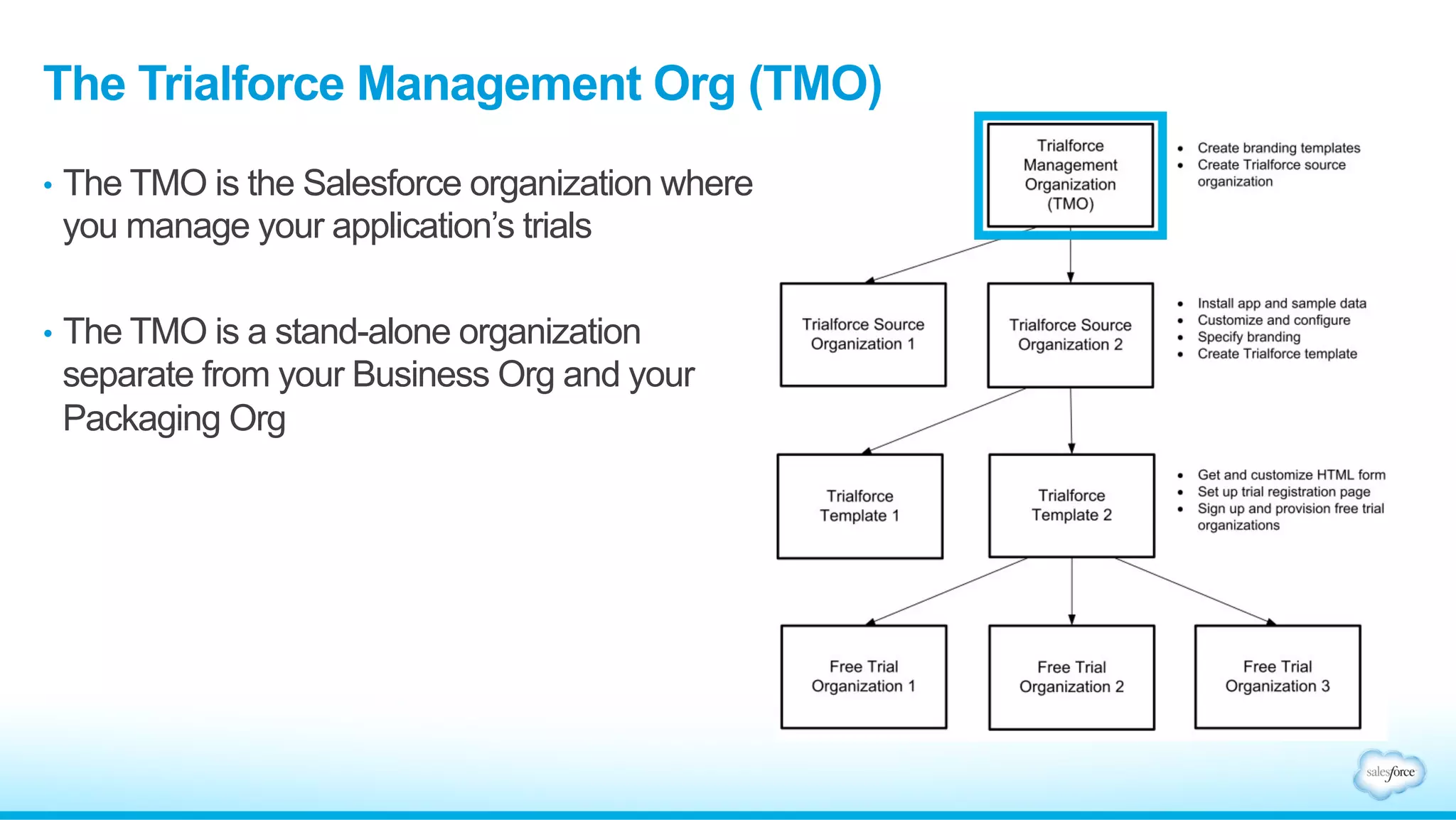
•  The TMO is the Salesforce
organization where you manage
the branding of your trial
experience
•  The TMO is a stand-alone
organization separate from your
Partner Business Org
The Trialforce Management Org (TMO)
Trialforce
Management
Organization
(TMO)
Environment
Hub
Trialforce
Source
Organization 1
Trialforce
Source
Organization 2
Trialforce
Template 1
Trialforce
Template 2
Free Trial
Organization 1
Free Trial
Organization 3
Free Trial
Organization 2
•  TMO – Brand your Trial;
Create Source Orgs
•  Env. Hub – Create Source
Orgs
•  Install app and sample data
•  Customize and Configure
•  Specify Branding
•  Create Trialforce Template
•  Request HTML Form
•  Setup Trial Registration
•  Provision free trial
organizations
Custom Branding for Trialforce
-  Branded Login pages
-  Customize the icons and
color scheme of your trial’s
login page
-  Branded Email Sets
-  Customize the branding and
contents of any automated
emails sent during the trial
TMO: Key Features
Getting Access
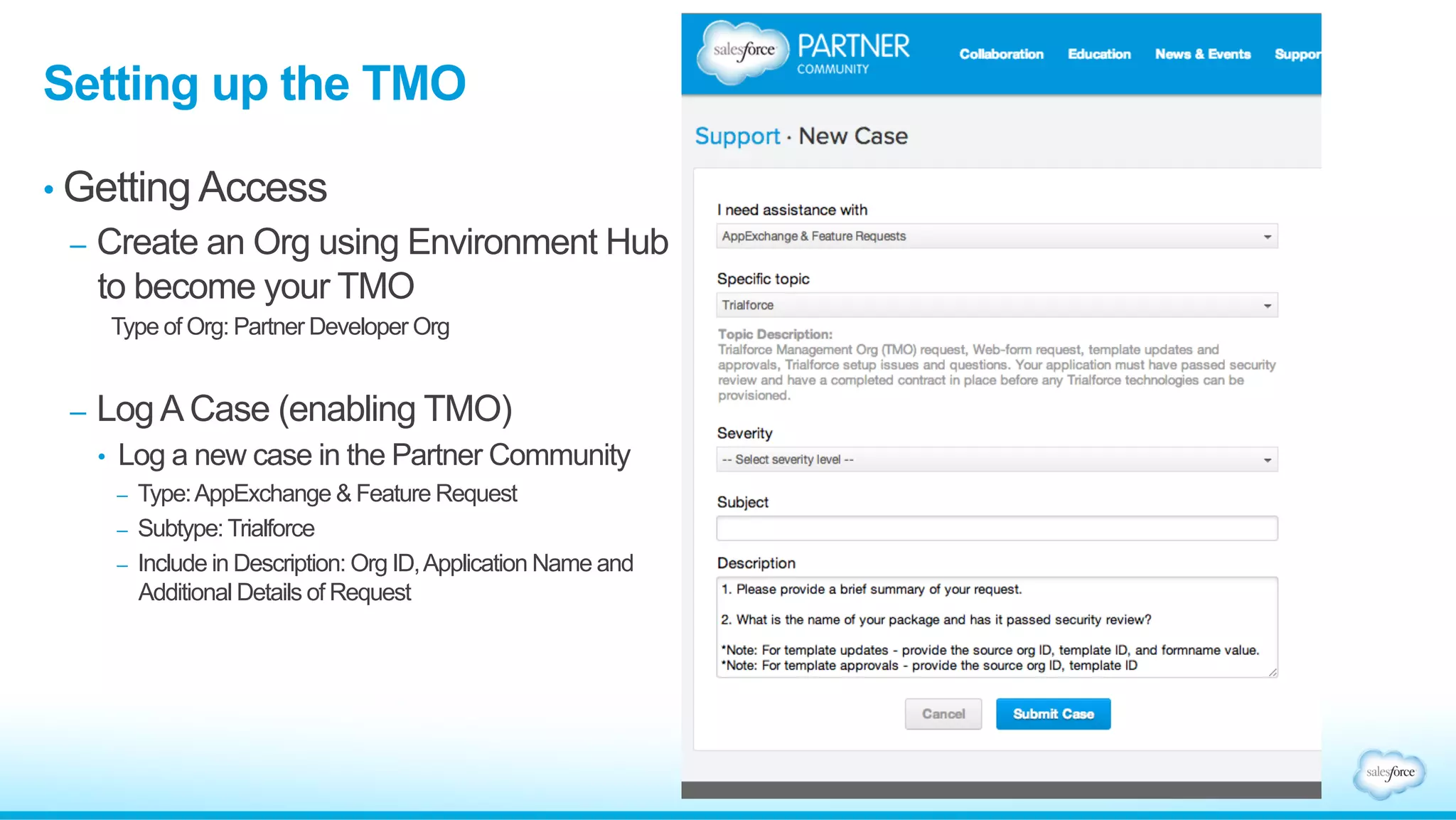
-  Select your TMO org
-  Create a new Partner Developer
Org using Environment Hub
-  Alternatively, you can use your
packaging DE org as your TMO
-  Submit A Case
-  Submit a case via the Partner
Community with your Org Id
(case type - ISV Technology >
Trialforce > Subtopic: Trialforce
Management Org)
Setting up the TMO
•  Providing trials using a Webform
•  Direct your customers to your website to sign up for a trial of your
application
•  Environment Hub
•  Create trials using a template from within Environment Hub
•  The Signup API
•  A Salesforce object that helps with creating trials, capturing leads,
and tracking your current trials
•  AppExchange
•  Provide a trial of your application through your AppExchange listing
Distributing Trials
In order to use your template to spin up customer trials, your template
must be approved. Approval methods vary depending on how you’re
offering the trial experience to your customers.
• Webform
•  Submit a case via the Partner Community to have your template
approved and linked to your webform
(Case type – ISV Technology > Trialforce > Subtopic: Webform)
• Environment Hub / Signup Request API
•  Submit a case via the Partner Community to have your TSO
approved for use with Environment Hub and Signup API
(Case type – ISV Technology > Trialforce > Subtopic: Trialforce Source Org Approval)
Submitting Templates for Review
•  AppExchange
•  If you want to list your trial on the AppExchange, you must submit the template
for Security Review
•  Click on the Publishing tab in the Partner Community
•  Link your TSO to your Publisher
•  On the Publishing Home page, select the “Trial Templates” tab
•  Click “Start Review” for the template you want to submit for approval
Submitting Templates for Review (cont.)
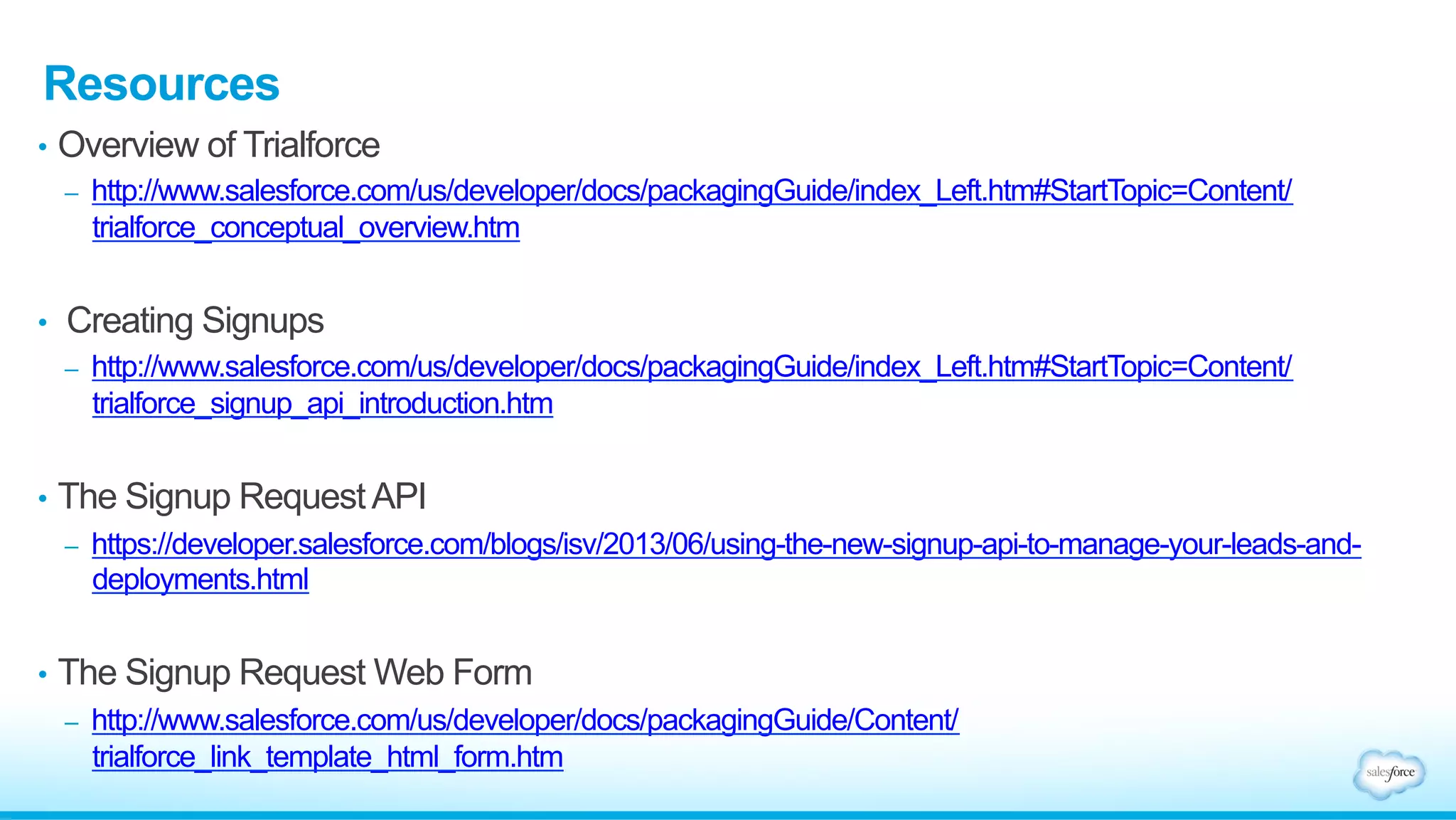
Overview of Trialforce
http://www.salesforce.com/us/developer/docs/packagingGuide/
index_Left.htm#StartTopic=Content/trialforce_conceptual_overview.htm
Creating Signups
http://www.salesforce.com/us/developer/docs/packagingGuide/
index_Left.htm#StartTopic=Content/trialforce_signup_api_introduction.htm
The Signup Request API
https://developer.salesforce.com/blogs/isv/2013/06/using-the-new-signup-api-to-manage-
your-leads-and-deployments.html
The Signup Request Web Form
http://www.salesforce.com/us/developer/docs/packagingGuide/Content/
trialforce_link_template_html_form.htm
Environment Hub
http://p.force.com/hub
Resources
1. Reference the Partner Onboarding Checklist
2. Review all of the Training Modules in the Distribute Phase of the
Partner Community, including:
•  Trialforce Slides
•  ISVforce Guide
Next Steps
Thank you

Trialforce

  • 1.
  • 2.
    •  Trialforce providesa simple way to provision free trials and deploy your Force.com app from your own website, or any other site What is Trialforce? Template Your Company Website Customer
  • 3.
  • 4.
    •  The EnvironmentHub helps you create and manages instances of Salesforce •  From the Environment Hub, you can create Trialforce Source Orgs, which in turn allow you to create templates for customer trial org creation •  Learn more at p.force.com/hub Environment Hub
  • 5.
    •  Choose whichSalesforce organization you want to use as your hub organization •  Submit a case via the Partner Community (case type - General > Environment Hub) •  Once the feature has been enabled, you can login and begin creating your Trialforce Source Orgs (TSO) Getting Access to Environment Hub
  • 6.
  • 7.
    •  The TSOis a Salesforce Organization that is used to create templates for a trial •  The TSO is created using Environment Hub •  The TSO is where you pre- configure your prospect’s trial experience -  Install and configure your managed package -  Create demo data -  Create custom user profiles for different roles What is the Trialforce Source Org (TSO)? Trialforce Management Organization (TMO) Environment Hub Trialforce Source Organization 1 Trialforce Source Organization 2 Trialforce Template 1 Trialforce Template 2 Free Trial Organization 1 Free Trial Organization 3 Free Trial Organization 2 •  TMO – Brand your Trial; Create Source Orgs •  Env. Hub – Create Source Orgs •  Install app and sample data •  Customize and Configure •  Specify Branding •  Create Trialforce Template •  Request HTML Form •  Setup Trial Registration •  Provision free trial organizations
  • 8.
    1.  From EnvironmentHub, generate a Trialforce Source Org 2.  Once you have access to your new org, install your packaged application 3.  Add sample data to your org 4.  Generate a trial template 5.  Create new TSO’s using the steps above if you want to target specific types of customers or industries Creating Trialforce Source Orgs
  • 9.
  • 10.
    •  If youwish to use custom branding for your customer trials, use the TMO •  The TMO is the Salesforce organization where you manage the branding of your trial experience •  The TMO is a stand-alone organization separate from your Partner Business Org The Trialforce Management Org (TMO) Trialforce Management Organization (TMO) Environment Hub Trialforce Source Organization 1 Trialforce Source Organization 2 Trialforce Template 1 Trialforce Template 2 Free Trial Organization 1 Free Trial Organization 3 Free Trial Organization 2 •  TMO – Brand your Trial; Create Source Orgs •  Env. Hub – Create Source Orgs •  Install app and sample data •  Customize and Configure •  Specify Branding •  Create Trialforce Template •  Request HTML Form •  Setup Trial Registration •  Provision free trial organizations
  • 11.
    Custom Branding forTrialforce -  Branded Login pages -  Customize the icons and color scheme of your trial’s login page -  Branded Email Sets -  Customize the branding and contents of any automated emails sent during the trial TMO: Key Features
  • 12.
    Getting Access -  Selectyour TMO org -  Create a new Partner Developer Org using Environment Hub -  Alternatively, you can use your packaging DE org as your TMO -  Submit A Case -  Submit a case via the Partner Community with your Org Id (case type - ISV Technology > Trialforce > Subtopic: Trialforce Management Org) Setting up the TMO
  • 13.
    •  Providing trialsusing a Webform •  Direct your customers to your website to sign up for a trial of your application •  Environment Hub •  Create trials using a template from within Environment Hub •  The Signup API •  A Salesforce object that helps with creating trials, capturing leads, and tracking your current trials •  AppExchange •  Provide a trial of your application through your AppExchange listing Distributing Trials
  • 14.
    In order touse your template to spin up customer trials, your template must be approved. Approval methods vary depending on how you’re offering the trial experience to your customers. • Webform •  Submit a case via the Partner Community to have your template approved and linked to your webform (Case type – ISV Technology > Trialforce > Subtopic: Webform) • Environment Hub / Signup Request API •  Submit a case via the Partner Community to have your TSO approved for use with Environment Hub and Signup API (Case type – ISV Technology > Trialforce > Subtopic: Trialforce Source Org Approval) Submitting Templates for Review
  • 15.
    •  AppExchange •  Ifyou want to list your trial on the AppExchange, you must submit the template for Security Review •  Click on the Publishing tab in the Partner Community •  Link your TSO to your Publisher •  On the Publishing Home page, select the “Trial Templates” tab •  Click “Start Review” for the template you want to submit for approval Submitting Templates for Review (cont.)
  • 16.
    Overview of Trialforce http://www.salesforce.com/us/developer/docs/packagingGuide/ index_Left.htm#StartTopic=Content/trialforce_conceptual_overview.htm CreatingSignups http://www.salesforce.com/us/developer/docs/packagingGuide/ index_Left.htm#StartTopic=Content/trialforce_signup_api_introduction.htm The Signup Request API https://developer.salesforce.com/blogs/isv/2013/06/using-the-new-signup-api-to-manage- your-leads-and-deployments.html The Signup Request Web Form http://www.salesforce.com/us/developer/docs/packagingGuide/Content/ trialforce_link_template_html_form.htm Environment Hub http://p.force.com/hub Resources
  • 17.
    1. Reference thePartner Onboarding Checklist 2. Review all of the Training Modules in the Distribute Phase of the Partner Community, including: •  Trialforce Slides •  ISVforce Guide Next Steps
  • 18.