TinyOS Tutorial

 Chien-Liang Fok
 CS521 Fall 2004
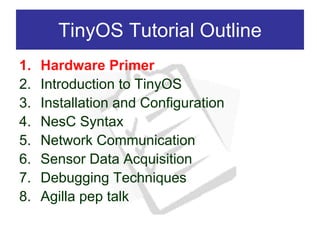
TinyOS Tutorial Outline
1.   Hardware Primer
2.   Introduction to TinyOS
3.   Installation and Configuration
4.   NesC Syntax
5.   Network Communication
6.   Sensor Data Acquisition
7.   Debugging Techniques
8.   Agilla pep talk
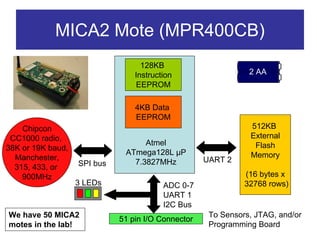
MICA2 Mote (MPR400CB)
                                   128KB
                                 Instruction                   2 AA
                                  EEPROM

                                 4KB Data
                                 EEPROM
    Chipcon                                                    512KB
 CC1000 radio,                                                 External
                                   Atmel                        Flash
38K or 19K baud,
                              ATmega128L µP                    Memory
  Manchester,                                       UART 2
                   SPI bus      7.3827MHz
  315, 433, or
    900MHz                                                    (16 bytes x
                   3 LEDs                ADC 0-7              32768 rows)
                                         UART 1
                                         I2C Bus
We have 50 MICA2                                     To Sensors, JTAG, and/or
                             51 pin I/O Connector
motes in the lab!                                    Programming Board
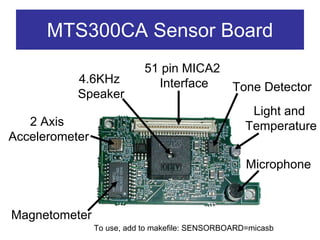
MTS300CA Sensor Board
                            51 pin MICA2
           4.6KHz             Interface          Tone Detector
           Speaker
                                                     Light and
   2 Axis                                           Temperature
Accelerometer

                                                    Microphone


Magnetometer
                To use, add to makefile: SENSORBOARD=micasb
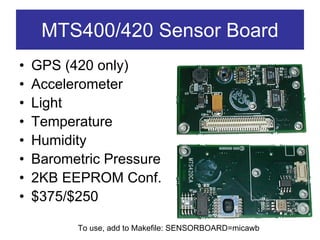
MTS400/420 Sensor Board
•   GPS (420 only)
•   Accelerometer
•   Light
•   Temperature
•   Humidity
•   Barometric Pressure
•   2KB EEPROM Conf.
•   $375/$250

          To use, add to Makefile: SENSORBOARD=micawb
ADC Notes
• The 10-bit ADC channels are ratiometric
  – Don’t need battery voltage to calibrate sensor
  – May not work over full voltage range!
• If you’re getting weird sensor readings,
  CHECK THE BATTERIES!
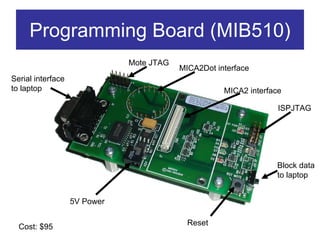
Programming Board (MIB510)
                              Mote JTAG
                                          MICA2Dot interface
Serial interface
to laptop                                            MICA2 interface

                                                                   ISPJTAG


                                                                  Block data
                                                                  to laptop


                   5V Power


  Cost: $95                                 Reset
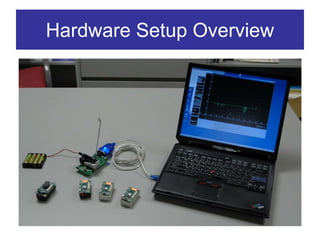
Hardware Setup Overview
TinyOS Tutorial Outline
1.   Hardware Primer
2.   Introduction to TinyOS
3.   Installation and Configuration
4.   NesC Syntax
5.   Network Communication
6.   Sensor Data Acquisition
7.   Debugging Techniques
8.   Agilla pep talk
What is TinyOS?
• An operating system
• An open-source development environment
  – A programming language and model (NesC)
  – A set of services
• Main Ideology
  – HURRY UP AND SLEEP!!
    • Sleep as often as possible to save power
  – High concurrency, interrupt driven (no polling)
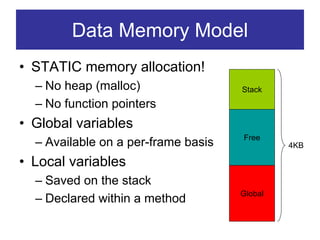
Data Memory Model
• STATIC memory allocation!
  – No heap (malloc)                 Stack
  – No function pointers
• Global variables
                                     Free
  – Available on a per-frame basis            4KB

• Local variables
  – Saved on the stack
                                     Global
  – Declared within a method
Programming Model
• Separation of construction and composition
• Programs are built out of components
• Each component is specified by an interface
  – Provides “hooks” for wiring components
    together
• Components are statically wired together
  based on their interfaces
  – Increases runtime efficiency
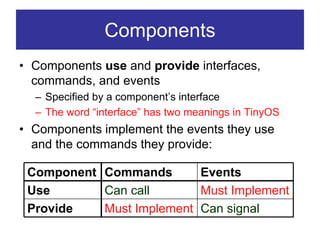
Components
• Components use and provide interfaces,
  commands, and events
  – Specified by a component’s interface
  – The word “interface” has two meanings in TinyOS
• Components implement the events they use
  and the commands they provide:

 Component Commands       Events
 Use       Can call       Must Implement
 Provide   Must Implement Can signal
Types of Components
• There are two types of components:
  – Modules: Implement the application behavior
  – Configurations: Wires components together
• A component does not care if another
  component is a module or configuration
• A component may be composed of other
  components
TinyOS Thread Model
• Tasks:
   –   Time flexible
   –   Longer background processing jobs
   –   Atomic with respect to other tasks (single threaded)
   –   Preempted by events
• Events:
   –   Time critical
   –   Shorter duration (hand off to task if need be)
   –   Interrupts task
   –   Last-in first-out semantics (no priority among events)
• Do not confuse an event from the NesC event
  keyword!!
• TinyOS 1.1 supports up to 7 pending tasks, from 1.1.5
  on you can add -DTOSH_MAX_TASKS_LOG2=n to
  makefile’s PFLAGS line to get 2^n tasks
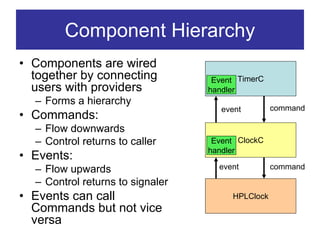
Component Hierarchy
• Components are wired
  together by connecting           Event TimerC
  users with providers            handler
  – Forms a hierarchy
                                     event        command
• Commands:
  – Flow downwards
  – Control returns to caller      Event ClockC
                                  handler
• Events:
  – Flow upwards                    event         command
  – Control returns to signaler
• Events can call                      HPLClock
  Commands but not vice
  versa
TinyOS Tutorial Outline
1.   Hardware Primer
2.   Introduction to TinyOS
3.   Installation and Configuration
4.   NesC Syntax
5.   Network Communication
6.   Sensor Data Acquisition
7.   Sensor Data Acquisition
8.   Debugging Techniques
9.   Agilla pep talk
TinyOS Installation
• Download TinyOS from:
  http://www.tinyos.net/download.html
  – Patch it to 1.1.7 (or whatever is the latest)
  – Version release notes available here:
    http://www.tinyos.net/tinyos-1.x/doc/
• The default install puts TinyOS in
  C:tinyoscygwinopttinyos-1.x
  – Let this be denoted <tos>
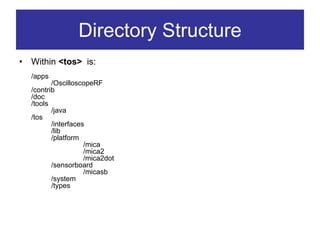
Directory Structure
•   Within <tos> is:
    /apps
           /OscilloscopeRF
    /contrib
    /doc
    /tools
           /java
    /tos
           /interfaces
           /lib
           /platform
                      /mica
                      /mica2
                      /mica2dot
           /sensorboard
                      /micasb
           /system
           /types
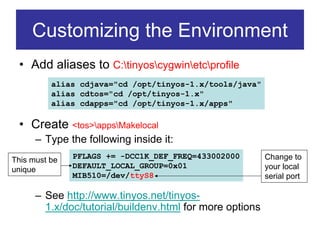
Customizing the Environment
 • Add aliases to C:tinyoscygwinetcprofile
          alias cdjava="cd /opt/tinyos-1.x/tools/java"
          alias cdtos="cd /opt/tinyos-1.x"
          alias cdapps="cd /opt/tinyos-1.x/apps"

 • Create <tos>appsMakelocal
      – Type the following inside it:
This must be   PFLAGS += -DCC1K_DEF_FREQ=433002000        Change to
unique         DEFAULT_LOCAL_GROUP=0x01                   your local
               MIB510=/dev/ttyS8                          serial port

      – See http://www.tinyos.net/tinyos-
        1.x/doc/tutorial/buildenv.html for more options
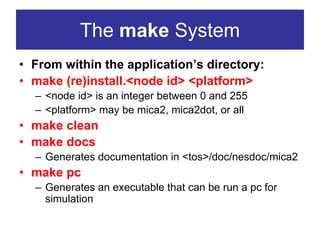
The make System
• From within the application’s directory:
• make (re)install.<node id> <platform>
  – <node id> is an integer between 0 and 255
  – <platform> may be mica2, mica2dot, or all
• make clean
• make docs
  – Generates documentation in <tos>/doc/nesdoc/mica2
• make pc
  – Generates an executable that can be run a pc for
    simulation
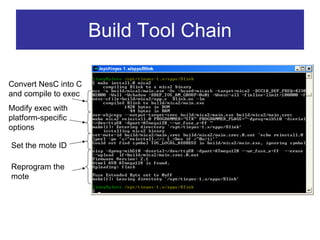
Build Tool Chain

Convert NesC into C
and compile to exec
Modify exec with
platform-specific
options

Set the mote ID

Reprogram the
mote
Demo: Installing an
Application onto a Mote
TinyOS Tutorial Outline
1.   Hardware Primer
2.   Introduction to TinyOS
3.   Installation and Configuration
4.   NesC Syntax
5.   Network Communication
6.   Sensor Data Acquisition
7.   Sensor Data Acquisition
8.   Debugging Techniques
9.   Agilla pep talk
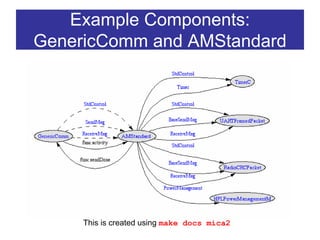
Example Components:
GenericComm and AMStandard


     This is created using make docs mica2
Interface Syntax
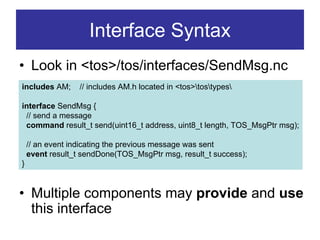
• Look in <tos>/tos/interfaces/SendMsg.nc
includes AM;       // includes AM.h located in <tos>tostypes

interface SendMsg {
 // send a message
 command result_t send(uint16_t address, uint8_t length, TOS_MsgPtr msg);

     // an event indicating the previous message was sent
     event result_t sendDone(TOS_MsgPtr msg, result_t success);
•}

• Multiple components may provide and use
  this interface
Interface StdControl
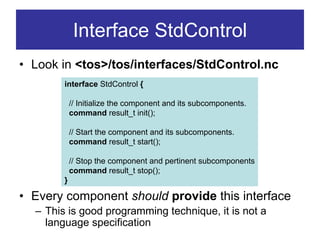
• Look in <tos>/tos/interfaces/StdControl.nc
        interface StdControl {

            // Initialize the component and its subcomponents.
            command result_t init();

            // Start the component and its subcomponents.
            command result_t start();

            // Stop the component and pertinent subcomponents
            command result_t stop();
        }

• Every component should provide this interface
  – This is good programming technique, it is not a
    language specification
Module Syntax: Interface
   • Look in <tos>/tos/system/AMStandard.nc
             module AMStandard {
               provides {
                 interface StdControl as Control;
                 interface SendMsg[uint8_t id];      // parameterized by AM ID
                 command uint16_t activity(); // # of packets sent in past second
                 …
Component
               }
 Interface
               uses {
                 event result_t sendDone();
                 interface StdControl as UARTControl;
                 …
               }
             }
             implementation {
               …// code implementing all provided commands and used events
             }
Module Syntax: Implementation
module AMStandard {
  provides { interface SendMsg[uint8_t id]; … }
  uses {event result_t sendDone(); … }
}
implementation {
  task void sendTask() {
    …
    signal sendDone(); signal SendMsg.SendDone(….);
  }
  command result_t SendMsg.send[uint8_t id](uint16_t addr,
    uint8_t length, TOS_MsgPtr data) {
    …
    post sendTask();
    …
    return SUCCESS;
  }
  default event result_t sendDone() { return SUCCESS; }
}
Async and Atomic
• Anything executed as a direct result of a
  hardware interrupt must be declared async
  – E.g., async command result_t cmdName(…)
  – See <tos>/tos/system/TimerM.nc for cross-boundary example

• Variables shared across sync and async
  boundaries should be protected by atomic{…}
  – Can skip if you put norace in front of variable
    declaration (Use at your own risk!!)
  – There are lots of examples in HPL*.nc components
    found under <tos>/tos/platform (e.g., HPLClock.nc)
Configuration Syntax: Interface
   • Look in <tos>/tos/system/GenericComm.nc
             configuration GenericComm {
               provides {
                 interface StdControl as Control;
Component        interface SendMsg[uint8_t id]; //parameterized by active message id
 Interface       interface ReceiveMsg[uint8_t id];
                 command uint16_t activity();
               }
               uses { event result_t sendDone();}
             }
             implementation {
               components AMStandard, RadioCRCPacket as RadioPacket, TimerC,
Component
                 NoLeds as Leds, UARTFramedPacket as UARTPacket,
 Selection
                 HPLPowerManagementM;
               … // code wiring the components together
             }
Configuration Syntax: Wiring
• Still in <tos>/tos/system/GenericComm.nc
   configuration GenericComm {
     provides {
       interface StdControl as Control;
       interface SendMsg[uint8_t id]; //parameterized by active message id
       command uint16_t activity(); …
     }
     uses {event result_t sendDone(); …}
   }
   implementation {
     components AMStandard, TimerC, …;
     Control = AMStandard.Control;
     SendMsg = AMStandard.SendMsg;
     activity = AMStandard.activity;
     AMStandard.TimerControl -> TimerC.StdControl;
     AMStandard.ActivityTimer -> TimerC.Timer[unique("Timer")]; …
   }
Configuration Wires
• A configuration can bind an interface user to a
  provider using -> or <-
  – User.interface -> Provider.interface
  – Provider.interface <- User.interface
• Bounce responsibilities using =
  – User1.interface = User2.interface
  – Provider1.interface = Provider2.interface
• The interface may be implicit if there is no
  ambiguity
  – e.g., User.interface -> Provider ==
    User.interface -> Provider.interface
Fan-Out and Fan-In
• A user can be mapped to multiple providers (fan-out)
  – Open <tos>appsCntToLedsAndRfmCntToLedsAndRfm.nc
        configuration CntToLedsAndRfm { }
        implementation {
         components Main, Counter, IntToLeds, IntToRfm, TimerC;

            Main.StdControl -> Counter.StdControl;
            Main.StdControl -> IntToLeds.StdControl;
            Main.StdControl -> IntToRfm.StdControl;
            Main.StdControl -> TimerC.StdControl;
            Counter.Timer -> TimerC.Timer[unique("Timer")];
            IntToLeds <- Counter.IntOutput;
            Counter.IntOutput -> IntToRfm;
        }

• A provider can be mapped to multiple users (fan-in)
Potential Fan-Out Bug
• Whenever you fan-out/in an interface,
  ensure the return value has a combination
  function
  – Can do:
      App.Leds -> LedsC;
      App.Leds -> NoLeds;

  – CANNOT do:
      AppOne.ReceiveMsg -> GenericComm.ReceiveMsg[12];
      AppTwo.ReceiveMsg -> GenericComm.ReceiveMsg[12];
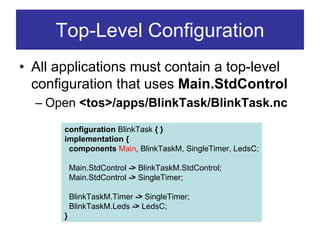
Top-Level Configuration
• All applications must contain a top-level
  configuration that uses Main.StdControl
  – Open <tos>/apps/BlinkTask/BlinkTask.nc

       configuration BlinkTask { }
       implementation {
        components Main, BlinkTaskM, SingleTimer, LedsC;

           Main.StdControl -> BlinkTaskM.StdControl;
           Main.StdControl -> SingleTimer;

           BlinkTaskM.Timer -> SingleTimer;
           BlinkTaskM.Leds -> LedsC;
       }
TinyOS Tutorial Outline
1.   Hardware Primer
2.   Introduction to TinyOS
3.   Installation and Configuration
4.   NesC Syntax
5.   Network Communication
6.   Sensor Data Acquisition
7.   Debugging Techniques
8.   Agilla pep talk
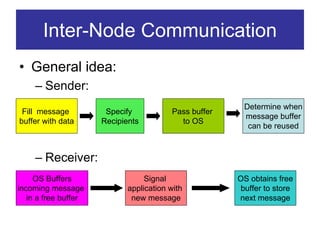
Inter-Node Communication
• General idea:
     – Sender:
                                                         Determine when
 Fill message          Specify            Pass buffer
                                                         message buffer
buffer with data      Recipients            to OS
                                                          can be reused


     – Receiver:
     OS Buffers                   Signal                OS obtains free
incoming message             application with            buffer to store
   in a free buffer           new message               next message
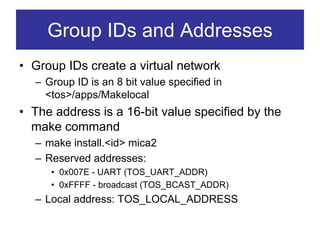
Group IDs and Addresses
• Group IDs create a virtual network
  – Group ID is an 8 bit value specified in
    <tos>/apps/Makelocal
• The address is a 16-bit value specified by the
  make command
  – make install.<id> mica2
  – Reserved addresses:
     • 0x007E - UART (TOS_UART_ADDR)
     • 0xFFFF - broadcast (TOS_BCAST_ADDR)
  – Local address: TOS_LOCAL_ADDRESS
TOS Active Messages
• TOS uses active              typedef struct TOS_Msg {
                                 // the following are transmitted
  messages as defined in         uint16_t addr;
  <tos>/system/types/AM.h        uint8_t type;
• Message is “active”            uint8_t group;
  because it contains the        uint8_t length;
                                 int8_t data[TOSH_DATA_LENGTH];
  destination address,           uint16_t crc;
  group ID, and type           // the following are not transmitted
• TOSH_DATA_LENGTH =             uint16_t strength;
  29 bytes                       uint8_t ack;
                                 uint16_t time;
  – Can change via
                                 uint8_t sendSecurityMode;
    MSG_SIZE=x in Makefile
                                 uint8_t receiveSecurityMode;
  – Max 36                     } TOS_Msg;


        Header (5)      Payload (29)            CRC
Active Messaging (Cont.)
                              AM Handler      AM Handler     AM Handler
  Application                     47              48             49


        Tos_Msg[AM=47]                          signal[48]
                                signal[47]                     signal[49]

GenericComm                                  GenericComm


 AMStandard                                   AMStandard


Radio Stack, TX                              Radio Stack, RX
                         Wireless
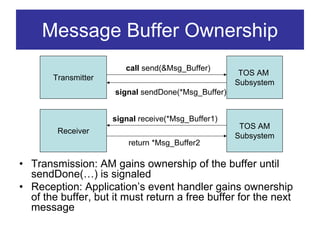
Message Buffer Ownership
                        call send(&Msg_Buffer)
                                                     TOS AM
       Transmitter
                                                    Subsystem
                     signal sendDone(*Msg_Buffer)


                     signal receive(*Msg_Buffer1)
                                                     TOS AM
        Receiver
                                                    Subsystem
                         return *Msg_Buffer2

• Transmission: AM gains ownership of the buffer until
  sendDone(…) is signaled
• Reception: Application’s event handler gains ownership
  of the buffer, but it must return a free buffer for the next
  message
Sending a message (1 of 3)
• First create a .h file with a struct defining
  the message data format, and a unique
  active message number
  – Open <tos>/apps/Oscilloscope/OscopeMsg.h
                                  struct OscopeResetMsg
 struct OscopeMsg
                                  {
 {
                                     /* Empty payload! */
    uint16_t sourceMoteID;
                                  };
    uint16_t lastSampleNumber;
    uint16_t channel;
                                  enum {
    uint16_t data[BUFFER_SIZE];
                                    AM_OSCOPEMSG = 10,
 };
                                    AM_OSCOPERESETMSG = 32
                                  };
Sending a Message (2 of 3)
module OscilloscopeM { …
  uses interface SendMsg as DataMsg; …
}
implementation{
  TOS_Msg msg; …

    task void dataTask() {
      struct OscopeMsg *pack = (struct OscopeMsg *)msg.data;
      … // fill up the message
      call DataMsg.send(TOS_BCAST_ADDR, sizeof(struct OscopeMsg),
                           &msg[currentMsg]);
    }

    event result_t DataMsg.sendDone(TOS_MsgPtr sent, result_t success) {
      return SUCCESS;
    }
}
                Question: How does TOS know the AM number?
Sending a Message (3 of 3)
• The AM number is determined by the
  configuration file
  – Open <tos>/apps/OscilloscopeRF/Oscilloscope.nc

   configuration Oscilloscope { }
   implementation {
     components Main, OscilloscopeM, GenericComm as Comm, …;
     …
     OscilloscopeM.DataMsg -> Comm.SendMsg[AM_OSCOPEMSG];
   }
Receiving a Message
configuration Oscilloscope { }
implementation {
  components Main, OscilloscopeM, UARTComm as Comm, ….;
  …
  OscilloscopeM.ResetCounterMsg ->
   Comm.ReceiveMsg[AM_OSCOPERESETMSG];
}

module OscilloscopeM {
  uses interface ReceiveMsg as ResetCounterMsg; …
}
implementation {
  uint16_t readingNumber;
  event TOS_MsgPtr ResetCounterMsg.receive(TOS_MsgPtr m) {
    atomic { readingNumber = 0; }
    return m;
  }
}
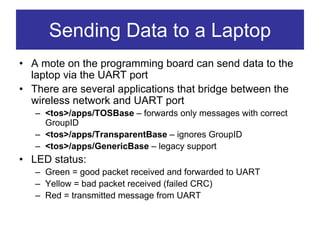
Sending Data to a Laptop
• A mote on the programming board can send data to the
  laptop via the UART port
• There are several applications that bridge between the
  wireless network and UART port
   – <tos>/apps/TOSBase – forwards only messages with correct
     GroupID
   – <tos>/apps/TransparentBase – ignores GroupID
   – <tos>/apps/GenericBase – legacy support
• LED status:
   – Green = good packet received and forwarded to UART
   – Yellow = bad packet received (failed CRC)
   – Red = transmitted message from UART
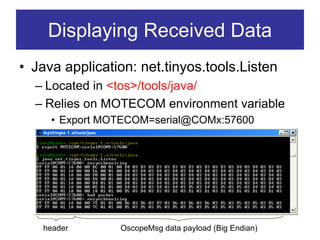
Displaying Received Data
• Java application: net.tinyos.tools.Listen
  – Located in <tos>/tools/java/
  – Relies on MOTECOM environment variable
     • Export MOTECOM=serial@COMx:57600


   header       OscopeMsg data payload (Big Endian)
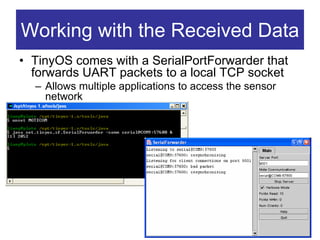
Working with the Received Data
• TinyOS comes with a SerialPortForwarder that
  forwards UART packets to a local TCP socket
  – Allows multiple applications to access the sensor
    network
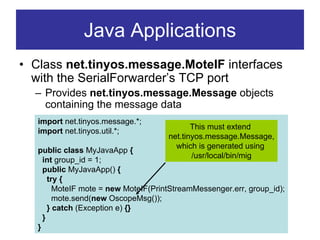
Java Applications
• Class net.tinyos.message.MoteIF interfaces
  with the SerialForwarder’s TCP port
  – Provides net.tinyos.message.Message objects
    containing the message data
   import net.tinyos.message.*;
                                             This must extend
   import net.tinyos.util.*;
                                      net.tinyos.message.Message,
                                        which is generated using
   public class MyJavaApp {
                                             /usr/local/bin/mig
     int group_id = 1;
     public MyJavaApp() {
       try {
         MoteIF mote = new MoteIF(PrintStreamMessenger.err, group_id);
         mote.send(new OscopeMsg());
       } catch (Exception e) {}
     }
   }
MIG
• Message Interface Generator
  – Generates a Java class representing a TOS message
  – Located in /usr/local/bin    This is the generator as defined in
                                 /usr/local/lib/ncc/gen*.pm
  – Usage:
 mig –java-classname=[classname] java [filename.h] [struct name] > outputFile

• Normally, you allow the Makefile to generate the
  Message classes
    OscopeMsg.java:
           $(MIG) -java-classname=$(PACKAGE).OscopeMsg 
             $(APP)/OscopeMsg.h OscopeMsg -o $@
           $(JAVAC) $@
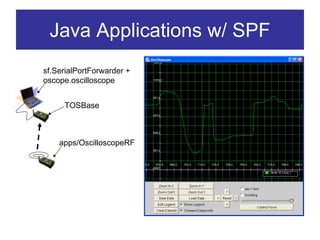
Java Applications w/ SPF
sf.SerialPortForwarder +
oscope.oscilloscope


     TOSBase


    apps/OscilloscopeRF
TinyOS Tutorial Outline
1.   Hardware Primer
2.   Introduction to TinyOS
3.   Installation and Configuration
4.   NesC Syntax
5.   Network Communication
6.   Sensor Data Acquisition
7.   Debugging Techniques
8.   Agilla pep talk
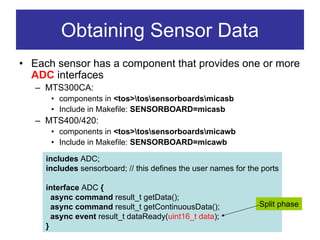
Obtaining Sensor Data
• Each sensor has a component that provides one or more
  ADC interfaces
   – MTS300CA:
      • components in <tos>tossensorboardsmicasb
      • Include in Makefile: SENSORBOARD=micasb
   – MTS400/420:
      • components in <tos>tossensorboardsmicawb
      • Include in Makefile: SENSORBOARD=micawb

     includes ADC;
     includes sensorboard; // this defines the user names for the ports

     interface ADC {
       async command result_t getData();
       async command result_t getContinuousData();               Split phase
       async event result_t dataReady(uint16_t data);
     }
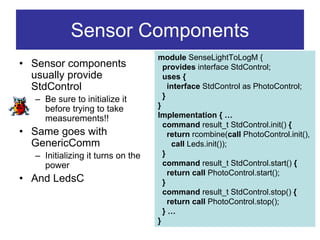
Sensor Components
                                   module SenseLightToLogM {
• Sensor components                  provides interface StdControl;
  usually provide                    uses {
  StdControl                           interface StdControl as PhotoControl;
  – Be sure to initialize it         }
    before trying to take          }
    measurements!!                 Implementation { …
                                     command result_t StdControl.init() {
• Same goes with                       return rcombine(call PhotoControl.init(),
  GenericComm                           call Leds.init());
  – Initializing it turns on the     }
    power                            command result_t StdControl.start() {
                                       return call PhotoControl.start();
• And LedsC                          }
                                     command result_t StdControl.stop() {
                                       return call PhotoControl.stop();
                                     }…
                                   }
TinyOS Tutorial Outline
1.   Hardware Primer
2.   Introduction to TinyOS
3.   Installation and Configuration
4.   NesC Syntax
5.   Network Communication
6.   Sensor Data Acquisition
7.   Debugging Techniques
8.   Agilla pep talk
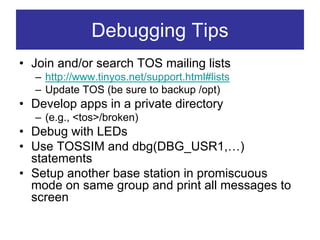
Debugging Tips
• Join and/or search TOS mailing lists
  – http://www.tinyos.net/support.html#lists
  – Update TOS (be sure to backup /opt)
• Develop apps in a private directory
  – (e.g., <tos>/broken)
• Debug with LEDs
• Use TOSSIM and dbg(DBG_USR1,…)
  statements
• Setup another base station in promiscuous
  mode on same group and print all messages to
  screen
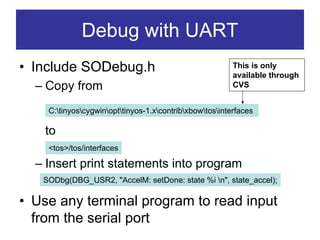
Debug with UART
• Include SODebug.h                                      This is only
                                                         available through
  – Copy from                                            CVS


    C:tinyoscygwinopttinyos-1.xcontribxbowtosinterfaces

    to
    <tos>/tos/interfaces

  – Insert print statements into program
   SODbg(DBG_USR2, "AccelM: setDone: state %i n", state_accel);

• Use any terminal program to read input
  from the serial port
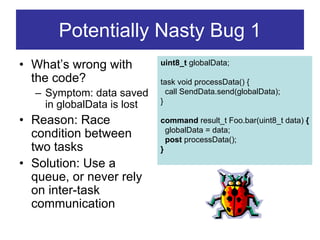
Potentially Nasty Bug 1
• What’s wrong with         uint8_t globalData;

  the code?                 task void processData() {
  – Symptom: data saved       call SendData.send(globalData);
                            }
    in globalData is lost
• Reason: Race              command result_t Foo.bar(uint8_t data) {
                              globalData = data;
  condition between           post processData();
  two tasks                 }
• Solution: Use a
  queue, or never rely
  on inter-task
  communication
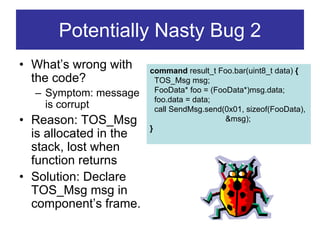
Potentially Nasty Bug 2
• What’s wrong with     command result_t Foo.bar(uint8_t data) {
  the code?               TOS_Msg msg;
  – Symptom: message      FooData* foo = (FooData*)msg.data;
                          foo.data = data;
    is corrupt            call SendMsg.send(0x01, sizeof(FooData),
• Reason: TOS_Msg                            &msg);
                        }
  is allocated in the
  stack, lost when
  function returns
• Solution: Declare
  TOS_Msg msg in
  component’s frame.
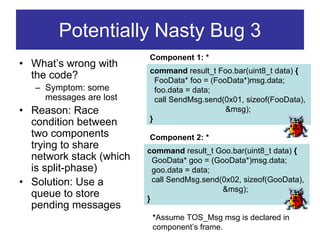
Potentially Nasty Bug 3
                         Component 1: *
• What’s wrong with
                         command result_t Foo.bar(uint8_t data) {
  the code?                FooData* foo = (FooData*)msg.data;
   – Symptom: some         foo.data = data;
     messages are lost     call SendMsg.send(0x01, sizeof(FooData),
• Reason: Race                                &msg);
  condition between      }
  two components         Component 2: *
  trying to share        command result_t Goo.bar(uint8_t data) {
  network stack (which     GooData* goo = (GooData*)msg.data;
  is split-phase)          goo.data = data;
• Solution: Use a          call SendMsg.send(0x02, sizeof(GooData),
                                             &msg);
  queue to store         }
  pending messages
                          *Assume TOS_Msg msg is declared in
                          component’s frame.
Potentially Nasty Bug 4
• Symptom: Some messages are
  consistently corrupt, and TOSBase is
  working. Your app always works in
  TOSSIM.
• Reason: You specified MSG_SIZE=x
  where x > 29 in your application but forgot
  to set it in TOSBase’s makefile
Potentially Nasty Bug 5
• Your app works in TOSSIM, but never
  works on the mote. Compiler indicates
  you are using 3946 bytes of RAM.
• Reason: TinyOS reserves some RAM for
  the Stack. Your program cannot use more
  than 3.9K RAM.
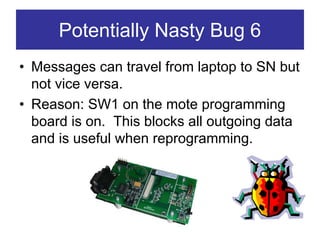
Potentially Nasty Bug 6
• Messages can travel from laptop to SN but
  not vice versa.
• Reason: SW1 on the mote programming
  board is on. This blocks all outgoing data
  and is useful when reprogramming.
Further Reading
• Go through the on-line tutorial:
  http://www.tinyos.net/tinyos-
  1.x/doc/tutorial/index.html
• Search the help archive:
  http://www.tinyos.net/search.html
• Post a question:
  http://www.tinyos.net/support.html#lists
• NesC language reference manual:
  http://www.tinyos.net/tinyos-1.x/doc/nesc/ref.pdf
TinyOS Tutorial Outline
1.   Hardware Primer
2.   Introduction to TinyOS
3.   Installation and Configuration
4.   NesC Syntax
5.   Network Communication
6.   Sensor Data Acquisition
7.   Debugging Techniques
8.   Agilla pep talk
What is Agilla?
• A middleware for Wireless Sensor Networks
• Allows programming to develop in a high-level
  linear programming language
  – No worrying about events, tasks, interfaces,
    configuration, modules, etc.
• Utilizes mobile agents and a shared memory
  architecture
  – Each mobile agent is a virtual machine
  – Linda-like tuple spaces    decoupling
• Location-based addressing
Using Agilla
• It’s easy:
  – Install Agilla on every mote (including the
    base station mote)
  – Deploy the network
  – Run Agilla’s Java application and start
    injecting agents into the network
• Agents spread throughout network using
  high-level move and clone instructions
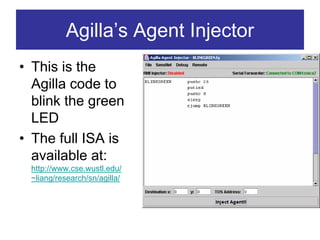
Agilla’s Agent Injector
• This is the
  Agilla code to
  blink the green
  LED
• The full ISA is
  available at:
 http://www.cse.wustl.edu/
 ~liang/research/sn/agilla/
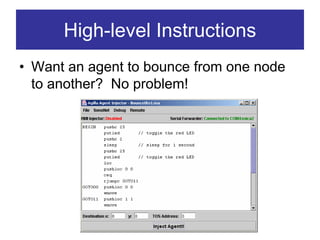
High-level Instructions
• Want an agent to bounce from one node
  to another? No problem!
Benefits of Using Agilla
• High-level programming language
• Greater flexibility
• Better network utilization

• For more info, see:
  – http://www.cse.wustl.edu/~liang/research/sn/agilla/
Questions?

Tos tutorial

  • 1.
    TinyOS Tutorial Chien-LiangFok CS521 Fall 2004
  • 2.
    TinyOS Tutorial Outline 1. Hardware Primer 2. Introduction to TinyOS 3. Installation and Configuration 4. NesC Syntax 5. Network Communication 6. Sensor Data Acquisition 7. Debugging Techniques 8. Agilla pep talk
  • 3.
    MICA2 Mote (MPR400CB) 128KB Instruction 2 AA EEPROM 4KB Data EEPROM Chipcon 512KB CC1000 radio, External Atmel Flash 38K or 19K baud, ATmega128L µP Memory Manchester, UART 2 SPI bus 7.3827MHz 315, 433, or 900MHz (16 bytes x 3 LEDs ADC 0-7 32768 rows) UART 1 I2C Bus We have 50 MICA2 To Sensors, JTAG, and/or 51 pin I/O Connector motes in the lab! Programming Board
  • 4.
    MTS300CA Sensor Board 51 pin MICA2 4.6KHz Interface Tone Detector Speaker Light and 2 Axis Temperature Accelerometer Microphone Magnetometer To use, add to makefile: SENSORBOARD=micasb
  • 5.
    MTS400/420 Sensor Board • GPS (420 only) • Accelerometer • Light • Temperature • Humidity • Barometric Pressure • 2KB EEPROM Conf. • $375/$250 To use, add to Makefile: SENSORBOARD=micawb
  • 6.
    ADC Notes • The10-bit ADC channels are ratiometric – Don’t need battery voltage to calibrate sensor – May not work over full voltage range! • If you’re getting weird sensor readings, CHECK THE BATTERIES!
  • 7.
    Programming Board (MIB510) Mote JTAG MICA2Dot interface Serial interface to laptop MICA2 interface ISPJTAG Block data to laptop 5V Power Cost: $95 Reset
  • 8.
  • 9.
    TinyOS Tutorial Outline 1. Hardware Primer 2. Introduction to TinyOS 3. Installation and Configuration 4. NesC Syntax 5. Network Communication 6. Sensor Data Acquisition 7. Debugging Techniques 8. Agilla pep talk
  • 10.
    What is TinyOS? •An operating system • An open-source development environment – A programming language and model (NesC) – A set of services • Main Ideology – HURRY UP AND SLEEP!! • Sleep as often as possible to save power – High concurrency, interrupt driven (no polling)
  • 11.
    Data Memory Model •STATIC memory allocation! – No heap (malloc) Stack – No function pointers • Global variables Free – Available on a per-frame basis 4KB • Local variables – Saved on the stack Global – Declared within a method
  • 12.
    Programming Model • Separationof construction and composition • Programs are built out of components • Each component is specified by an interface – Provides “hooks” for wiring components together • Components are statically wired together based on their interfaces – Increases runtime efficiency
  • 13.
    Components • Components useand provide interfaces, commands, and events – Specified by a component’s interface – The word “interface” has two meanings in TinyOS • Components implement the events they use and the commands they provide: Component Commands Events Use Can call Must Implement Provide Must Implement Can signal
  • 14.
    Types of Components •There are two types of components: – Modules: Implement the application behavior – Configurations: Wires components together • A component does not care if another component is a module or configuration • A component may be composed of other components
  • 15.
    TinyOS Thread Model •Tasks: – Time flexible – Longer background processing jobs – Atomic with respect to other tasks (single threaded) – Preempted by events • Events: – Time critical – Shorter duration (hand off to task if need be) – Interrupts task – Last-in first-out semantics (no priority among events) • Do not confuse an event from the NesC event keyword!! • TinyOS 1.1 supports up to 7 pending tasks, from 1.1.5 on you can add -DTOSH_MAX_TASKS_LOG2=n to makefile’s PFLAGS line to get 2^n tasks
  • 16.
    Component Hierarchy • Componentsare wired together by connecting Event TimerC users with providers handler – Forms a hierarchy event command • Commands: – Flow downwards – Control returns to caller Event ClockC handler • Events: – Flow upwards event command – Control returns to signaler • Events can call HPLClock Commands but not vice versa
  • 17.
    TinyOS Tutorial Outline 1. Hardware Primer 2. Introduction to TinyOS 3. Installation and Configuration 4. NesC Syntax 5. Network Communication 6. Sensor Data Acquisition 7. Sensor Data Acquisition 8. Debugging Techniques 9. Agilla pep talk
  • 18.
    TinyOS Installation • DownloadTinyOS from: http://www.tinyos.net/download.html – Patch it to 1.1.7 (or whatever is the latest) – Version release notes available here: http://www.tinyos.net/tinyos-1.x/doc/ • The default install puts TinyOS in C:tinyoscygwinopttinyos-1.x – Let this be denoted <tos>
  • 19.
    Directory Structure • Within <tos> is: /apps /OscilloscopeRF /contrib /doc /tools /java /tos /interfaces /lib /platform /mica /mica2 /mica2dot /sensorboard /micasb /system /types
  • 20.
    Customizing the Environment • Add aliases to C:tinyoscygwinetcprofile alias cdjava="cd /opt/tinyos-1.x/tools/java" alias cdtos="cd /opt/tinyos-1.x" alias cdapps="cd /opt/tinyos-1.x/apps" • Create <tos>appsMakelocal – Type the following inside it: This must be PFLAGS += -DCC1K_DEF_FREQ=433002000 Change to unique DEFAULT_LOCAL_GROUP=0x01 your local MIB510=/dev/ttyS8 serial port – See http://www.tinyos.net/tinyos- 1.x/doc/tutorial/buildenv.html for more options
  • 21.
    The make System •From within the application’s directory: • make (re)install.<node id> <platform> – <node id> is an integer between 0 and 255 – <platform> may be mica2, mica2dot, or all • make clean • make docs – Generates documentation in <tos>/doc/nesdoc/mica2 • make pc – Generates an executable that can be run a pc for simulation
  • 22.
    Build Tool Chain ConvertNesC into C and compile to exec Modify exec with platform-specific options Set the mote ID Reprogram the mote
  • 23.
  • 24.
    TinyOS Tutorial Outline 1. Hardware Primer 2. Introduction to TinyOS 3. Installation and Configuration 4. NesC Syntax 5. Network Communication 6. Sensor Data Acquisition 7. Sensor Data Acquisition 8. Debugging Techniques 9. Agilla pep talk
  • 25.
    Example Components: GenericComm andAMStandard This is created using make docs mica2
  • 26.
    Interface Syntax • Lookin <tos>/tos/interfaces/SendMsg.nc includes AM; // includes AM.h located in <tos>tostypes interface SendMsg { // send a message command result_t send(uint16_t address, uint8_t length, TOS_MsgPtr msg); // an event indicating the previous message was sent event result_t sendDone(TOS_MsgPtr msg, result_t success); •} • Multiple components may provide and use this interface
  • 27.
    Interface StdControl • Lookin <tos>/tos/interfaces/StdControl.nc interface StdControl { // Initialize the component and its subcomponents. command result_t init(); // Start the component and its subcomponents. command result_t start(); // Stop the component and pertinent subcomponents command result_t stop(); } • Every component should provide this interface – This is good programming technique, it is not a language specification
  • 28.
    Module Syntax: Interface • Look in <tos>/tos/system/AMStandard.nc module AMStandard { provides { interface StdControl as Control; interface SendMsg[uint8_t id]; // parameterized by AM ID command uint16_t activity(); // # of packets sent in past second … Component } Interface uses { event result_t sendDone(); interface StdControl as UARTControl; … } } implementation { …// code implementing all provided commands and used events }
  • 29.
    Module Syntax: Implementation moduleAMStandard { provides { interface SendMsg[uint8_t id]; … } uses {event result_t sendDone(); … } } implementation { task void sendTask() { … signal sendDone(); signal SendMsg.SendDone(….); } command result_t SendMsg.send[uint8_t id](uint16_t addr, uint8_t length, TOS_MsgPtr data) { … post sendTask(); … return SUCCESS; } default event result_t sendDone() { return SUCCESS; } }
  • 30.
    Async and Atomic •Anything executed as a direct result of a hardware interrupt must be declared async – E.g., async command result_t cmdName(…) – See <tos>/tos/system/TimerM.nc for cross-boundary example • Variables shared across sync and async boundaries should be protected by atomic{…} – Can skip if you put norace in front of variable declaration (Use at your own risk!!) – There are lots of examples in HPL*.nc components found under <tos>/tos/platform (e.g., HPLClock.nc)
  • 31.
    Configuration Syntax: Interface • Look in <tos>/tos/system/GenericComm.nc configuration GenericComm { provides { interface StdControl as Control; Component interface SendMsg[uint8_t id]; //parameterized by active message id Interface interface ReceiveMsg[uint8_t id]; command uint16_t activity(); } uses { event result_t sendDone();} } implementation { components AMStandard, RadioCRCPacket as RadioPacket, TimerC, Component NoLeds as Leds, UARTFramedPacket as UARTPacket, Selection HPLPowerManagementM; … // code wiring the components together }
  • 32.
    Configuration Syntax: Wiring •Still in <tos>/tos/system/GenericComm.nc configuration GenericComm { provides { interface StdControl as Control; interface SendMsg[uint8_t id]; //parameterized by active message id command uint16_t activity(); … } uses {event result_t sendDone(); …} } implementation { components AMStandard, TimerC, …; Control = AMStandard.Control; SendMsg = AMStandard.SendMsg; activity = AMStandard.activity; AMStandard.TimerControl -> TimerC.StdControl; AMStandard.ActivityTimer -> TimerC.Timer[unique("Timer")]; … }
  • 33.
    Configuration Wires • Aconfiguration can bind an interface user to a provider using -> or <- – User.interface -> Provider.interface – Provider.interface <- User.interface • Bounce responsibilities using = – User1.interface = User2.interface – Provider1.interface = Provider2.interface • The interface may be implicit if there is no ambiguity – e.g., User.interface -> Provider == User.interface -> Provider.interface
  • 34.
    Fan-Out and Fan-In •A user can be mapped to multiple providers (fan-out) – Open <tos>appsCntToLedsAndRfmCntToLedsAndRfm.nc configuration CntToLedsAndRfm { } implementation { components Main, Counter, IntToLeds, IntToRfm, TimerC; Main.StdControl -> Counter.StdControl; Main.StdControl -> IntToLeds.StdControl; Main.StdControl -> IntToRfm.StdControl; Main.StdControl -> TimerC.StdControl; Counter.Timer -> TimerC.Timer[unique("Timer")]; IntToLeds <- Counter.IntOutput; Counter.IntOutput -> IntToRfm; } • A provider can be mapped to multiple users (fan-in)
  • 35.
    Potential Fan-Out Bug •Whenever you fan-out/in an interface, ensure the return value has a combination function – Can do: App.Leds -> LedsC; App.Leds -> NoLeds; – CANNOT do: AppOne.ReceiveMsg -> GenericComm.ReceiveMsg[12]; AppTwo.ReceiveMsg -> GenericComm.ReceiveMsg[12];
  • 36.
    Top-Level Configuration • Allapplications must contain a top-level configuration that uses Main.StdControl – Open <tos>/apps/BlinkTask/BlinkTask.nc configuration BlinkTask { } implementation { components Main, BlinkTaskM, SingleTimer, LedsC; Main.StdControl -> BlinkTaskM.StdControl; Main.StdControl -> SingleTimer; BlinkTaskM.Timer -> SingleTimer; BlinkTaskM.Leds -> LedsC; }
  • 37.
    TinyOS Tutorial Outline 1. Hardware Primer 2. Introduction to TinyOS 3. Installation and Configuration 4. NesC Syntax 5. Network Communication 6. Sensor Data Acquisition 7. Debugging Techniques 8. Agilla pep talk
  • 38.
    Inter-Node Communication • Generalidea: – Sender: Determine when Fill message Specify Pass buffer message buffer buffer with data Recipients to OS can be reused – Receiver: OS Buffers Signal OS obtains free incoming message application with buffer to store in a free buffer new message next message
  • 39.
    Group IDs andAddresses • Group IDs create a virtual network – Group ID is an 8 bit value specified in <tos>/apps/Makelocal • The address is a 16-bit value specified by the make command – make install.<id> mica2 – Reserved addresses: • 0x007E - UART (TOS_UART_ADDR) • 0xFFFF - broadcast (TOS_BCAST_ADDR) – Local address: TOS_LOCAL_ADDRESS
  • 40.
    TOS Active Messages •TOS uses active typedef struct TOS_Msg { // the following are transmitted messages as defined in uint16_t addr; <tos>/system/types/AM.h uint8_t type; • Message is “active” uint8_t group; because it contains the uint8_t length; int8_t data[TOSH_DATA_LENGTH]; destination address, uint16_t crc; group ID, and type // the following are not transmitted • TOSH_DATA_LENGTH = uint16_t strength; 29 bytes uint8_t ack; uint16_t time; – Can change via uint8_t sendSecurityMode; MSG_SIZE=x in Makefile uint8_t receiveSecurityMode; – Max 36 } TOS_Msg; Header (5) Payload (29) CRC
  • 41.
    Active Messaging (Cont.) AM Handler AM Handler AM Handler Application 47 48 49 Tos_Msg[AM=47] signal[48] signal[47] signal[49] GenericComm GenericComm AMStandard AMStandard Radio Stack, TX Radio Stack, RX Wireless
  • 42.
    Message Buffer Ownership call send(&Msg_Buffer) TOS AM Transmitter Subsystem signal sendDone(*Msg_Buffer) signal receive(*Msg_Buffer1) TOS AM Receiver Subsystem return *Msg_Buffer2 • Transmission: AM gains ownership of the buffer until sendDone(…) is signaled • Reception: Application’s event handler gains ownership of the buffer, but it must return a free buffer for the next message
  • 43.
    Sending a message(1 of 3) • First create a .h file with a struct defining the message data format, and a unique active message number – Open <tos>/apps/Oscilloscope/OscopeMsg.h struct OscopeResetMsg struct OscopeMsg { { /* Empty payload! */ uint16_t sourceMoteID; }; uint16_t lastSampleNumber; uint16_t channel; enum { uint16_t data[BUFFER_SIZE]; AM_OSCOPEMSG = 10, }; AM_OSCOPERESETMSG = 32 };
  • 44.
    Sending a Message(2 of 3) module OscilloscopeM { … uses interface SendMsg as DataMsg; … } implementation{ TOS_Msg msg; … task void dataTask() { struct OscopeMsg *pack = (struct OscopeMsg *)msg.data; … // fill up the message call DataMsg.send(TOS_BCAST_ADDR, sizeof(struct OscopeMsg), &msg[currentMsg]); } event result_t DataMsg.sendDone(TOS_MsgPtr sent, result_t success) { return SUCCESS; } } Question: How does TOS know the AM number?
  • 45.
    Sending a Message(3 of 3) • The AM number is determined by the configuration file – Open <tos>/apps/OscilloscopeRF/Oscilloscope.nc configuration Oscilloscope { } implementation { components Main, OscilloscopeM, GenericComm as Comm, …; … OscilloscopeM.DataMsg -> Comm.SendMsg[AM_OSCOPEMSG]; }
  • 46.
    Receiving a Message configurationOscilloscope { } implementation { components Main, OscilloscopeM, UARTComm as Comm, ….; … OscilloscopeM.ResetCounterMsg -> Comm.ReceiveMsg[AM_OSCOPERESETMSG]; } module OscilloscopeM { uses interface ReceiveMsg as ResetCounterMsg; … } implementation { uint16_t readingNumber; event TOS_MsgPtr ResetCounterMsg.receive(TOS_MsgPtr m) { atomic { readingNumber = 0; } return m; } }
  • 47.
    Sending Data toa Laptop • A mote on the programming board can send data to the laptop via the UART port • There are several applications that bridge between the wireless network and UART port – <tos>/apps/TOSBase – forwards only messages with correct GroupID – <tos>/apps/TransparentBase – ignores GroupID – <tos>/apps/GenericBase – legacy support • LED status: – Green = good packet received and forwarded to UART – Yellow = bad packet received (failed CRC) – Red = transmitted message from UART
  • 48.
    Displaying Received Data •Java application: net.tinyos.tools.Listen – Located in <tos>/tools/java/ – Relies on MOTECOM environment variable • Export MOTECOM=serial@COMx:57600 header OscopeMsg data payload (Big Endian)
  • 49.
    Working with theReceived Data • TinyOS comes with a SerialPortForwarder that forwards UART packets to a local TCP socket – Allows multiple applications to access the sensor network
  • 50.
    Java Applications • Classnet.tinyos.message.MoteIF interfaces with the SerialForwarder’s TCP port – Provides net.tinyos.message.Message objects containing the message data import net.tinyos.message.*; This must extend import net.tinyos.util.*; net.tinyos.message.Message, which is generated using public class MyJavaApp { /usr/local/bin/mig int group_id = 1; public MyJavaApp() { try { MoteIF mote = new MoteIF(PrintStreamMessenger.err, group_id); mote.send(new OscopeMsg()); } catch (Exception e) {} } }
  • 51.
    MIG • Message InterfaceGenerator – Generates a Java class representing a TOS message – Located in /usr/local/bin This is the generator as defined in /usr/local/lib/ncc/gen*.pm – Usage: mig –java-classname=[classname] java [filename.h] [struct name] > outputFile • Normally, you allow the Makefile to generate the Message classes OscopeMsg.java: $(MIG) -java-classname=$(PACKAGE).OscopeMsg $(APP)/OscopeMsg.h OscopeMsg -o $@ $(JAVAC) $@
  • 52.
    Java Applications w/SPF sf.SerialPortForwarder + oscope.oscilloscope TOSBase apps/OscilloscopeRF
  • 53.
    TinyOS Tutorial Outline 1. Hardware Primer 2. Introduction to TinyOS 3. Installation and Configuration 4. NesC Syntax 5. Network Communication 6. Sensor Data Acquisition 7. Debugging Techniques 8. Agilla pep talk
  • 54.
    Obtaining Sensor Data •Each sensor has a component that provides one or more ADC interfaces – MTS300CA: • components in <tos>tossensorboardsmicasb • Include in Makefile: SENSORBOARD=micasb – MTS400/420: • components in <tos>tossensorboardsmicawb • Include in Makefile: SENSORBOARD=micawb includes ADC; includes sensorboard; // this defines the user names for the ports interface ADC { async command result_t getData(); async command result_t getContinuousData(); Split phase async event result_t dataReady(uint16_t data); }
  • 55.
    Sensor Components module SenseLightToLogM { • Sensor components provides interface StdControl; usually provide uses { StdControl interface StdControl as PhotoControl; – Be sure to initialize it } before trying to take } measurements!! Implementation { … command result_t StdControl.init() { • Same goes with return rcombine(call PhotoControl.init(), GenericComm call Leds.init()); – Initializing it turns on the } power command result_t StdControl.start() { return call PhotoControl.start(); • And LedsC } command result_t StdControl.stop() { return call PhotoControl.stop(); }… }
  • 56.
    TinyOS Tutorial Outline 1. Hardware Primer 2. Introduction to TinyOS 3. Installation and Configuration 4. NesC Syntax 5. Network Communication 6. Sensor Data Acquisition 7. Debugging Techniques 8. Agilla pep talk
  • 57.
    Debugging Tips • Joinand/or search TOS mailing lists – http://www.tinyos.net/support.html#lists – Update TOS (be sure to backup /opt) • Develop apps in a private directory – (e.g., <tos>/broken) • Debug with LEDs • Use TOSSIM and dbg(DBG_USR1,…) statements • Setup another base station in promiscuous mode on same group and print all messages to screen
  • 58.
    Debug with UART •Include SODebug.h This is only available through – Copy from CVS C:tinyoscygwinopttinyos-1.xcontribxbowtosinterfaces to <tos>/tos/interfaces – Insert print statements into program SODbg(DBG_USR2, "AccelM: setDone: state %i n", state_accel); • Use any terminal program to read input from the serial port
  • 59.
    Potentially Nasty Bug1 • What’s wrong with uint8_t globalData; the code? task void processData() { – Symptom: data saved call SendData.send(globalData); } in globalData is lost • Reason: Race command result_t Foo.bar(uint8_t data) { globalData = data; condition between post processData(); two tasks } • Solution: Use a queue, or never rely on inter-task communication
  • 60.
    Potentially Nasty Bug2 • What’s wrong with command result_t Foo.bar(uint8_t data) { the code? TOS_Msg msg; – Symptom: message FooData* foo = (FooData*)msg.data; foo.data = data; is corrupt call SendMsg.send(0x01, sizeof(FooData), • Reason: TOS_Msg &msg); } is allocated in the stack, lost when function returns • Solution: Declare TOS_Msg msg in component’s frame.
  • 61.
    Potentially Nasty Bug3 Component 1: * • What’s wrong with command result_t Foo.bar(uint8_t data) { the code? FooData* foo = (FooData*)msg.data; – Symptom: some foo.data = data; messages are lost call SendMsg.send(0x01, sizeof(FooData), • Reason: Race &msg); condition between } two components Component 2: * trying to share command result_t Goo.bar(uint8_t data) { network stack (which GooData* goo = (GooData*)msg.data; is split-phase) goo.data = data; • Solution: Use a call SendMsg.send(0x02, sizeof(GooData), &msg); queue to store } pending messages *Assume TOS_Msg msg is declared in component’s frame.
  • 62.
    Potentially Nasty Bug4 • Symptom: Some messages are consistently corrupt, and TOSBase is working. Your app always works in TOSSIM. • Reason: You specified MSG_SIZE=x where x > 29 in your application but forgot to set it in TOSBase’s makefile
  • 63.
    Potentially Nasty Bug5 • Your app works in TOSSIM, but never works on the mote. Compiler indicates you are using 3946 bytes of RAM. • Reason: TinyOS reserves some RAM for the Stack. Your program cannot use more than 3.9K RAM.
  • 64.
    Potentially Nasty Bug6 • Messages can travel from laptop to SN but not vice versa. • Reason: SW1 on the mote programming board is on. This blocks all outgoing data and is useful when reprogramming.
  • 65.
    Further Reading • Gothrough the on-line tutorial: http://www.tinyos.net/tinyos- 1.x/doc/tutorial/index.html • Search the help archive: http://www.tinyos.net/search.html • Post a question: http://www.tinyos.net/support.html#lists • NesC language reference manual: http://www.tinyos.net/tinyos-1.x/doc/nesc/ref.pdf
  • 66.
    TinyOS Tutorial Outline 1. Hardware Primer 2. Introduction to TinyOS 3. Installation and Configuration 4. NesC Syntax 5. Network Communication 6. Sensor Data Acquisition 7. Debugging Techniques 8. Agilla pep talk
  • 67.
    What is Agilla? •A middleware for Wireless Sensor Networks • Allows programming to develop in a high-level linear programming language – No worrying about events, tasks, interfaces, configuration, modules, etc. • Utilizes mobile agents and a shared memory architecture – Each mobile agent is a virtual machine – Linda-like tuple spaces decoupling • Location-based addressing
  • 68.
    Using Agilla • It’seasy: – Install Agilla on every mote (including the base station mote) – Deploy the network – Run Agilla’s Java application and start injecting agents into the network • Agents spread throughout network using high-level move and clone instructions
  • 69.
    Agilla’s Agent Injector •This is the Agilla code to blink the green LED • The full ISA is available at: http://www.cse.wustl.edu/ ~liang/research/sn/agilla/
  • 70.
    High-level Instructions • Wantan agent to bounce from one node to another? No problem!
  • 71.
    Benefits of UsingAgilla • High-level programming language • Greater flexibility • Better network utilization • For more info, see: – http://www.cse.wustl.edu/~liang/research/sn/agilla/
  • 72.