Microsoft BPOSArchitectural ConsiderationsAndrew D JonesMicrosoft Practice Solution Directorajones201@csc.com
AgendaBPOS OverviewWhat is BPOSFlavours of BPOSFeature ComparisonReal life Experience (Gain from 9 Engagements)Indentify ManagementService CustomisationMigration and BandwidthApproach and Value Add
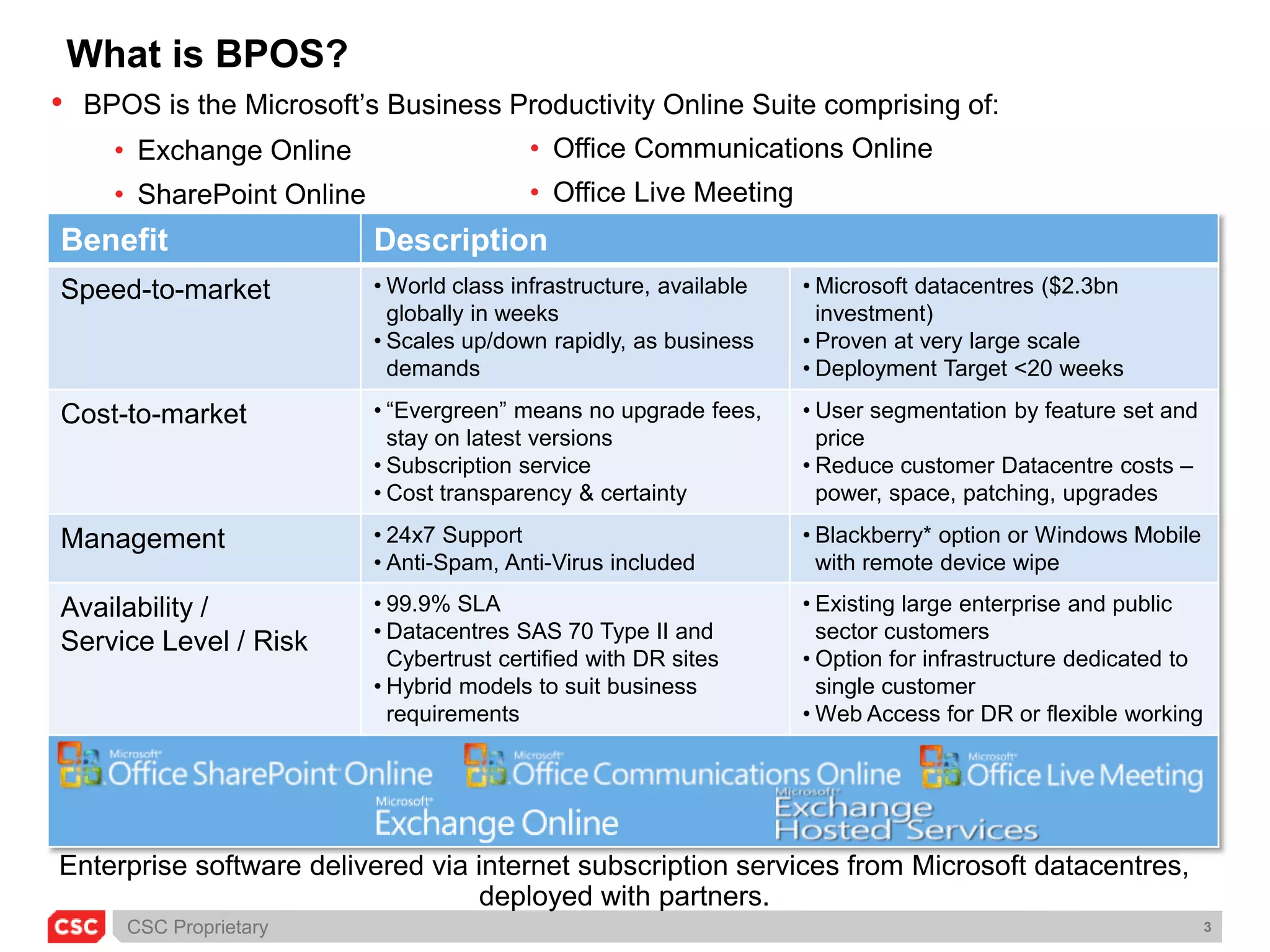
What is BPOS?BPOS is the Microsoft’s Business Productivity Online Suite comprising of:
Exchange Online
SharePoint Online
Office Communications Online
Office Live MeetingEnterprise software delivered via internet subscription services from Microsoft datacentres, deployed with partners.
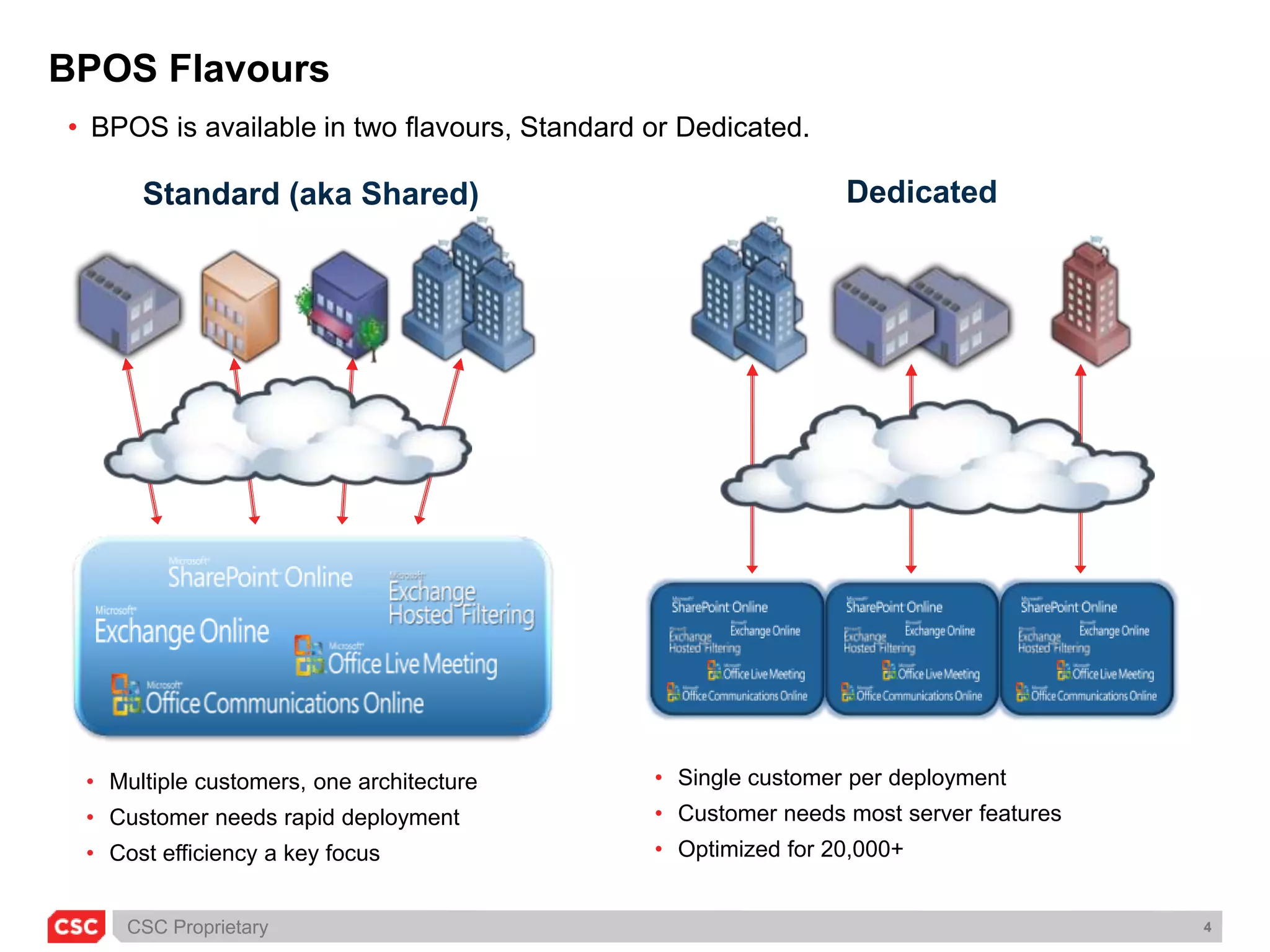
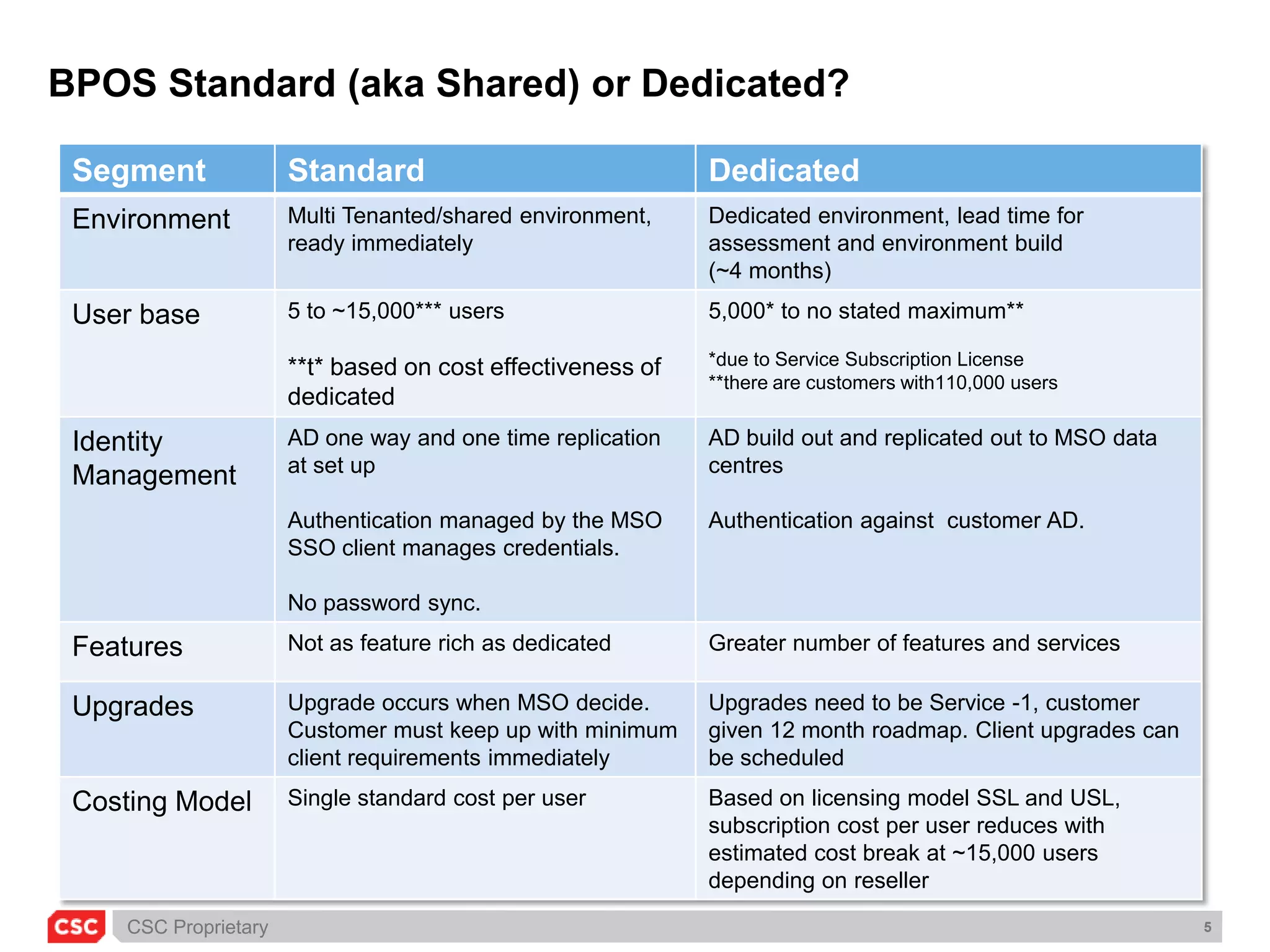
BPOS FlavoursBPOS is available in two flavours, Standard or Dedicated.DedicatedStandard (aka Shared)Single customer per deployment
Customer needs most server features
Optimized for 20,000+
Multiple customers, one architecture
Customer needs rapid deployment
Cost efficiency a key focus BPOS Standard (aka Shared) or Dedicated?
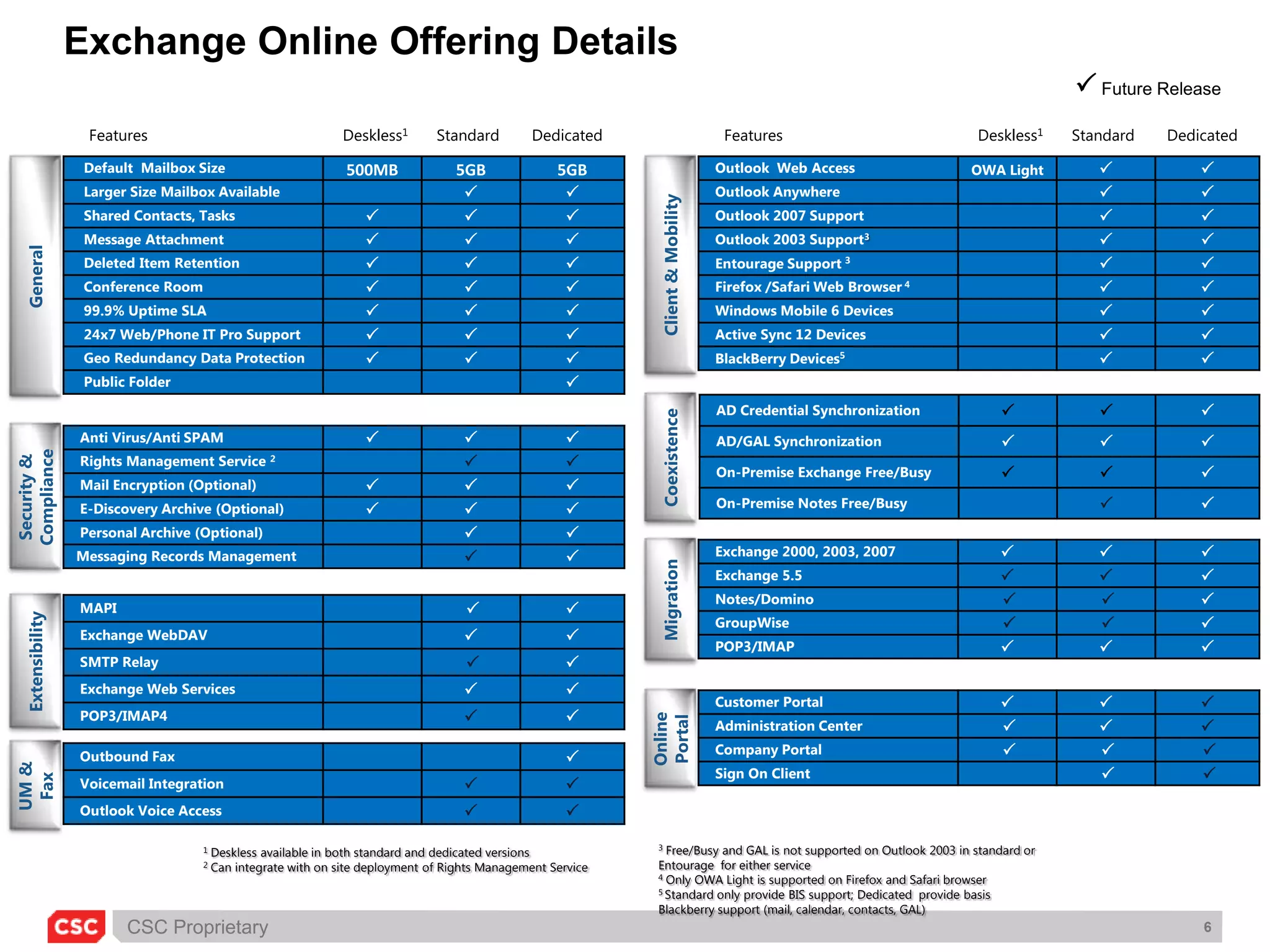
Exchange Online Offering Details Current FeatureFuture ReleaseFeaturesDeskless1StandardDedicatedFeaturesDeskless1StandardDedicatedClient & MobilityGeneralCoexistenceSecurity & ComplianceMigrationExtensibilityOnline PortalUM & Fax3 Free/Busy and GAL is not supported on Outlook 2003 in standard or Entourage  for either service4 Only OWA Light is supported on Firefox and Safari browser5 Standard only provide BIS support; Dedicated  provide basis Blackberry support (mail, calendar, contacts, GAL)1 Deskless available in both standard and dedicated versions2 Can integrate with on site deployment of Rights Management Service
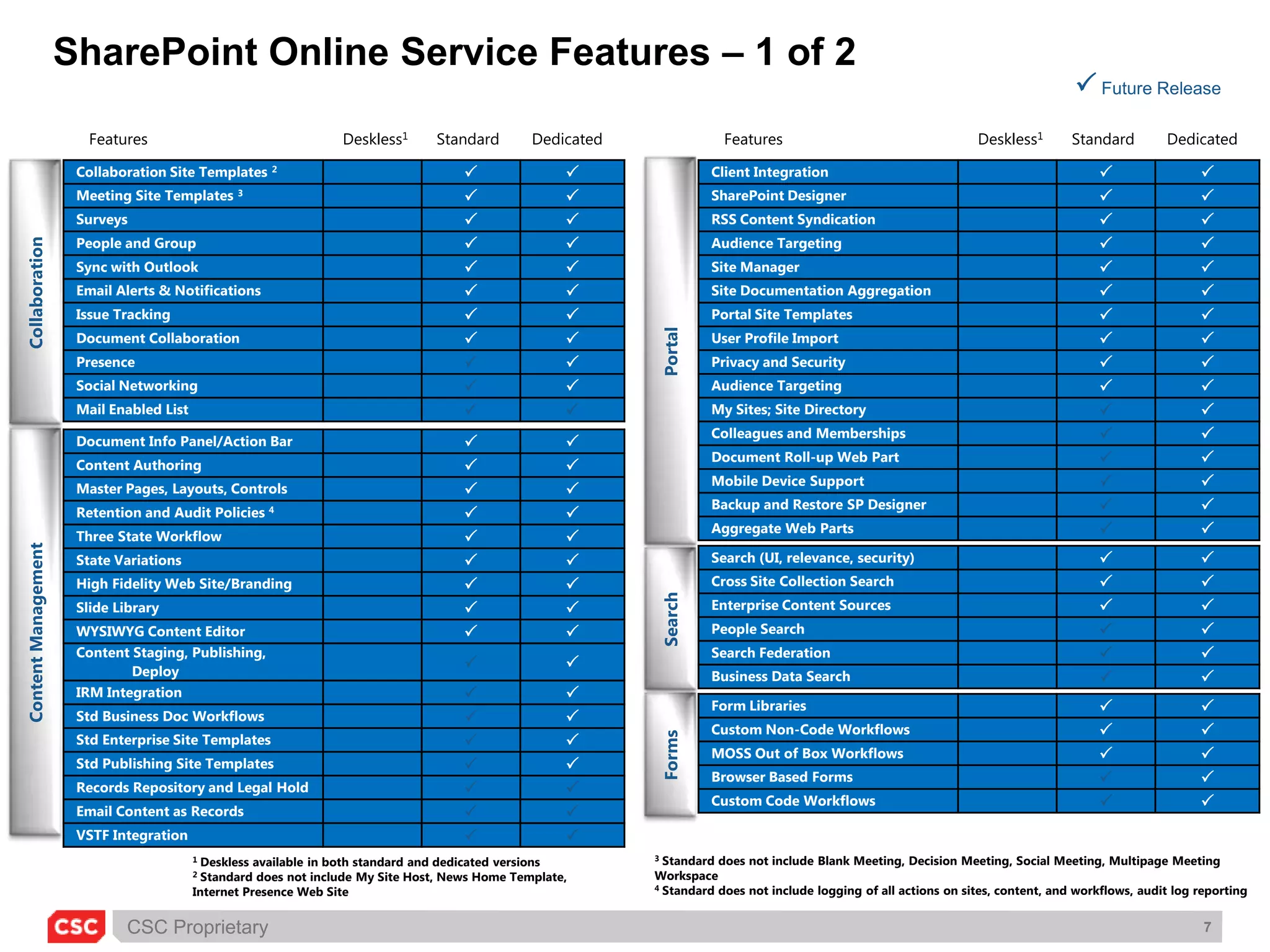
SharePoint Online Service Features – 1 of 2 Current FeatureFuture ReleaseFeaturesDeskless1StandardDedicatedFeaturesDeskless1StandardDedicatedCollaborationPortalSearchContent Management Forms3 Standard does not include Blank Meeting, Decision Meeting, Social Meeting, Multipage Meeting Workspace4 Standard does not include logging of all actions on sites, content, and workflows, audit log reporting1 Deskless available in both standard and dedicated versions2 Standard does not include My Site Host, News Home Template, Internet Presence Web Site
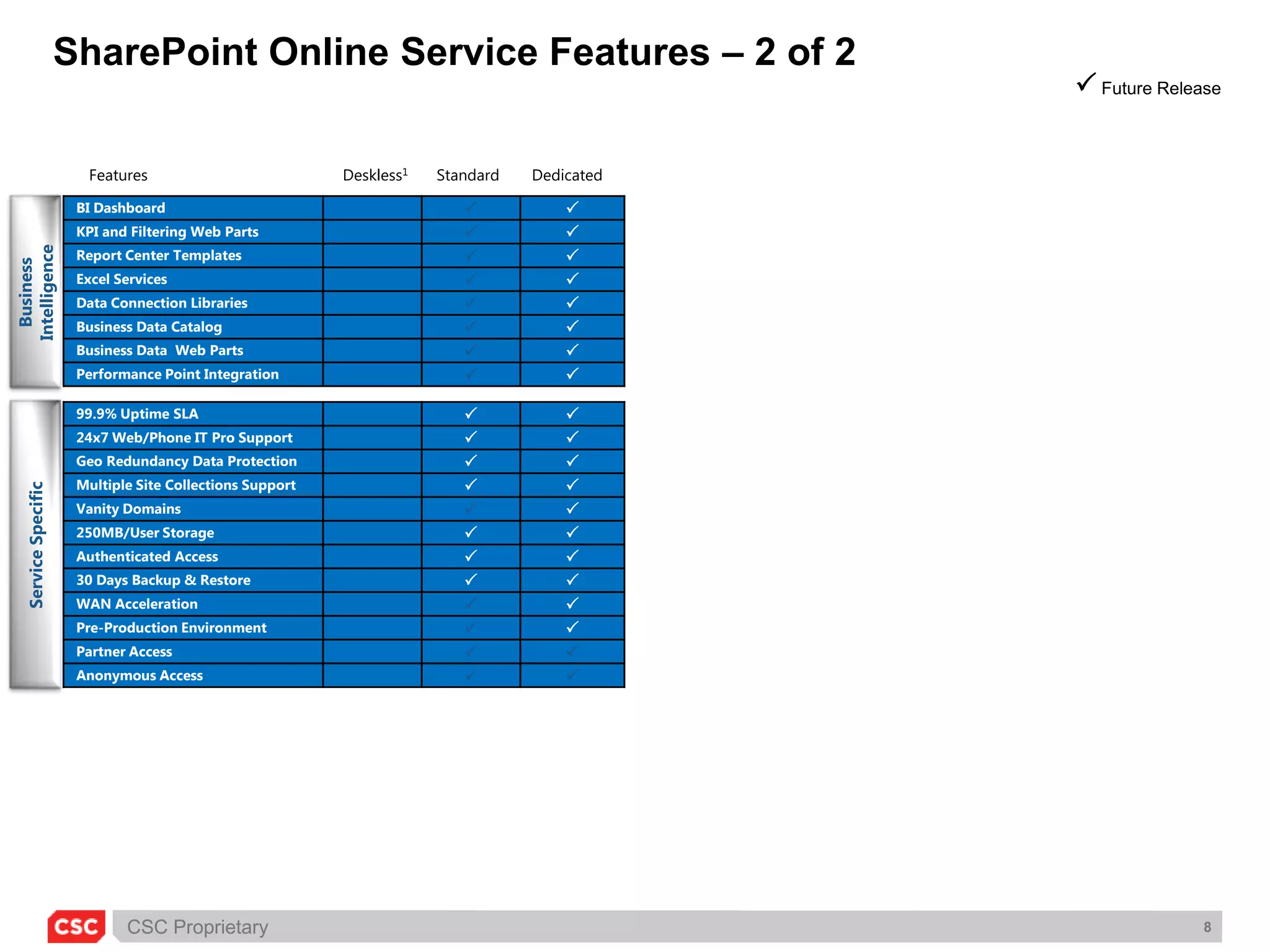
SharePoint Online Service Features – 2 of 2 Current FeatureFuture ReleaseFeaturesDeskless1StandardDedicatedBusiness IntelligenceService Specific
Identity Management
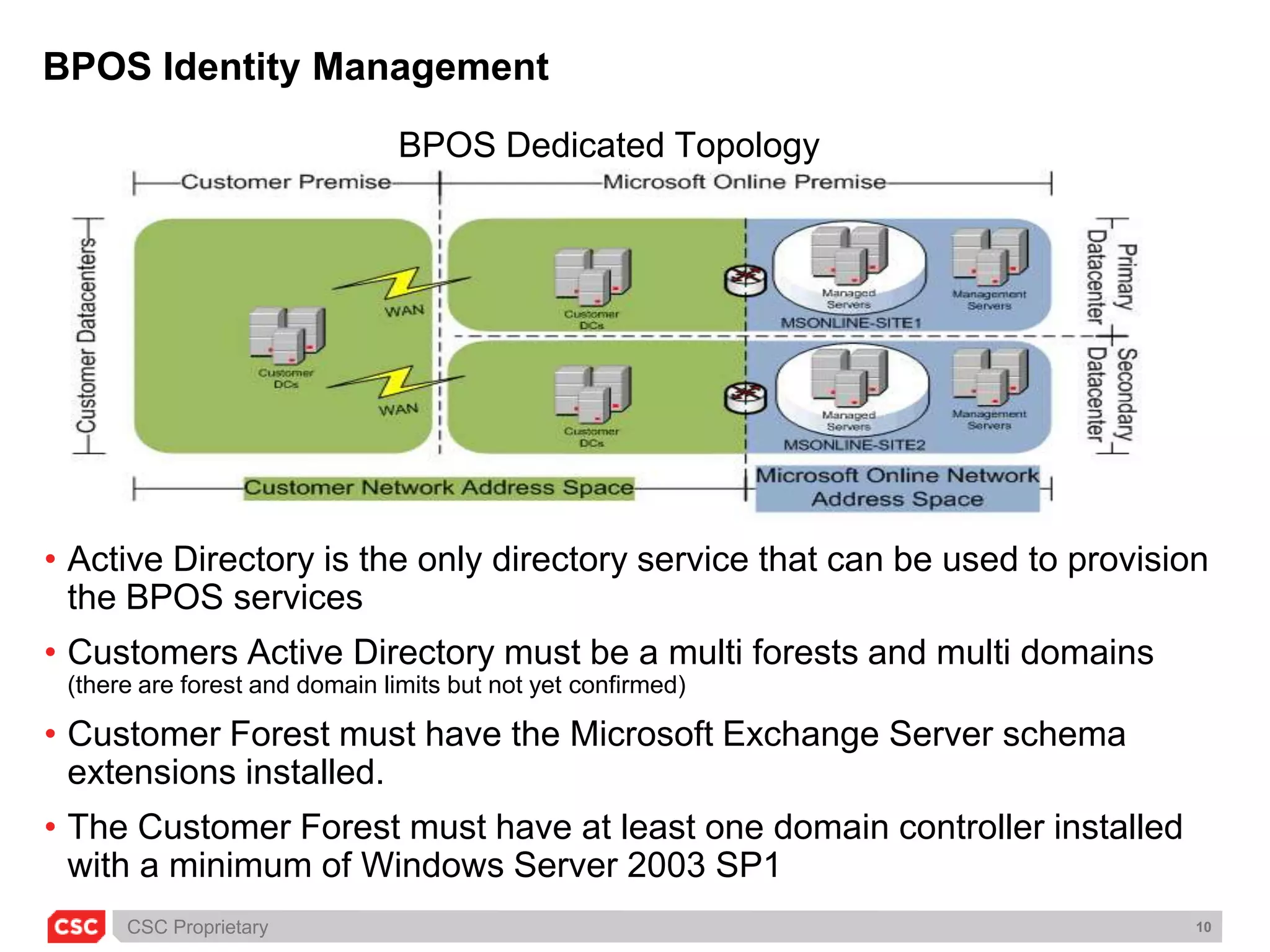
BPOS Identity Management BPOS Dedicated TopologyActive Directory is the only directory service that can be used to provision the BPOS servicesCustomers Active Directory must be a multi forests and multi domains (there are forest and domain limits but not yet confirmed)Customer Forest must have the Microsoft Exchange Server schema extensions installed.The Customer Forest must have at least one domain controller installed with a minimum of Windows Server 2003 SP1
Identity remediation, integration and managementCustomers may have multiple directory sources. There is a need to make Active Directory the single point of truth.Remediation of Active Directory may be needed to help IT charge back the services provisioned to the business units Active Directory needs the Microsoft Exchange Server schema extensions need to be installed.Need for Identity Management as provisioning of services. Microsoft Identity Lifecycle Management provides an integrated, comprehensive product that offers identity synchronisation, certificate management, and user provisioning in one solution that works across the Windows Platform.Migration from another email platform, Lotus Notes for example, would need to make sure there is a common identifier between the Lotus Notes Directory and Active Directory to allow for the automation of mail migration.
Service customisation
SharePoint CustomisationsThere are different types of customisations available to you as a SharePoint Online customer:Customisations that are performed through a Web-based mechanism (for example, style sheets and Web Part pages)Customisations that are performed using HTML editors such as Microsoft Office SharePoint Designer (for example, master page changes and data view Web Parts)Customisations that require the development of .NET-based code and dependent files that must be deployed by the Microsoft Online operations teamThird-party solutions and products are available from both developers and vendors for installation in the Microsoft Online environment. Microsoft has evaluated only a limited number of third-party solutions at this time
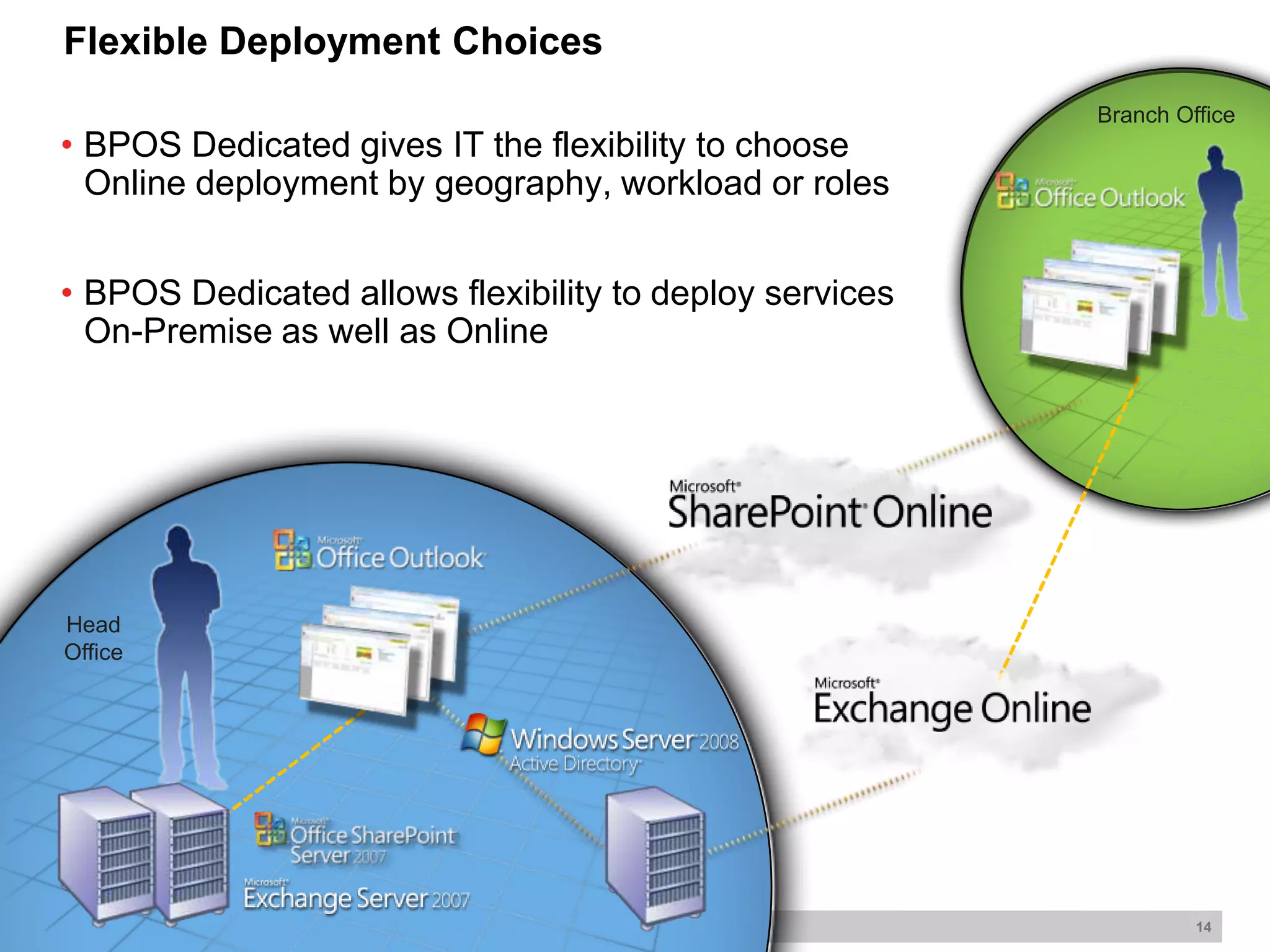
Branch OfficeBPOS Dedicated gives IT the flexibility to choose Online deployment by geography, workload or roles
BPOS Dedicated allows flexibility to deploy services On-Premise as well as Online HeadOfficeFlexible Deployment Choices
Migration and bandwidth

Bpos Architectural Consideration Architectural Forum

  • 1.
    Microsoft BPOSArchitectural ConsiderationsAndrewD JonesMicrosoft Practice Solution Directorajones201@csc.com
  • 2.
    AgendaBPOS OverviewWhat isBPOSFlavours of BPOSFeature ComparisonReal life Experience (Gain from 9 Engagements)Indentify ManagementService CustomisationMigration and BandwidthApproach and Value Add
  • 3.
    What is BPOS?BPOSis the Microsoft’s Business Productivity Online Suite comprising of:
  • 4.
  • 5.
  • 6.
  • 7.
    Office Live MeetingEnterprisesoftware delivered via internet subscription services from Microsoft datacentres, deployed with partners.
  • 8.
    BPOS FlavoursBPOS isavailable in two flavours, Standard or Dedicated.DedicatedStandard (aka Shared)Single customer per deployment
  • 9.
    Customer needs mostserver features
  • 10.
  • 11.
  • 12.
  • 13.
    Cost efficiency akey focus BPOS Standard (aka Shared) or Dedicated?
  • 14.
    Exchange Online OfferingDetails Current FeatureFuture ReleaseFeaturesDeskless1StandardDedicatedFeaturesDeskless1StandardDedicatedClient & MobilityGeneralCoexistenceSecurity & ComplianceMigrationExtensibilityOnline PortalUM & Fax3 Free/Busy and GAL is not supported on Outlook 2003 in standard or Entourage for either service4 Only OWA Light is supported on Firefox and Safari browser5 Standard only provide BIS support; Dedicated provide basis Blackberry support (mail, calendar, contacts, GAL)1 Deskless available in both standard and dedicated versions2 Can integrate with on site deployment of Rights Management Service
  • 15.
    SharePoint Online ServiceFeatures – 1 of 2 Current FeatureFuture ReleaseFeaturesDeskless1StandardDedicatedFeaturesDeskless1StandardDedicatedCollaborationPortalSearchContent Management Forms3 Standard does not include Blank Meeting, Decision Meeting, Social Meeting, Multipage Meeting Workspace4 Standard does not include logging of all actions on sites, content, and workflows, audit log reporting1 Deskless available in both standard and dedicated versions2 Standard does not include My Site Host, News Home Template, Internet Presence Web Site
  • 16.
    SharePoint Online ServiceFeatures – 2 of 2 Current FeatureFuture ReleaseFeaturesDeskless1StandardDedicatedBusiness IntelligenceService Specific
  • 17.
  • 18.
    BPOS Identity ManagementBPOS Dedicated TopologyActive Directory is the only directory service that can be used to provision the BPOS servicesCustomers Active Directory must be a multi forests and multi domains (there are forest and domain limits but not yet confirmed)Customer Forest must have the Microsoft Exchange Server schema extensions installed.The Customer Forest must have at least one domain controller installed with a minimum of Windows Server 2003 SP1
  • 19.
    Identity remediation, integrationand managementCustomers may have multiple directory sources. There is a need to make Active Directory the single point of truth.Remediation of Active Directory may be needed to help IT charge back the services provisioned to the business units Active Directory needs the Microsoft Exchange Server schema extensions need to be installed.Need for Identity Management as provisioning of services. Microsoft Identity Lifecycle Management provides an integrated, comprehensive product that offers identity synchronisation, certificate management, and user provisioning in one solution that works across the Windows Platform.Migration from another email platform, Lotus Notes for example, would need to make sure there is a common identifier between the Lotus Notes Directory and Active Directory to allow for the automation of mail migration.
  • 20.
  • 21.
    SharePoint CustomisationsThere aredifferent types of customisations available to you as a SharePoint Online customer:Customisations that are performed through a Web-based mechanism (for example, style sheets and Web Part pages)Customisations that are performed using HTML editors such as Microsoft Office SharePoint Designer (for example, master page changes and data view Web Parts)Customisations that require the development of .NET-based code and dependent files that must be deployed by the Microsoft Online operations teamThird-party solutions and products are available from both developers and vendors for installation in the Microsoft Online environment. Microsoft has evaluated only a limited number of third-party solutions at this time
  • 22.
    Branch OfficeBPOS Dedicatedgives IT the flexibility to choose Online deployment by geography, workload or roles
  • 23.
    BPOS Dedicated allowsflexibility to deploy services On-Premise as well as Online HeadOfficeFlexible Deployment Choices
  • 24.
  • 25.
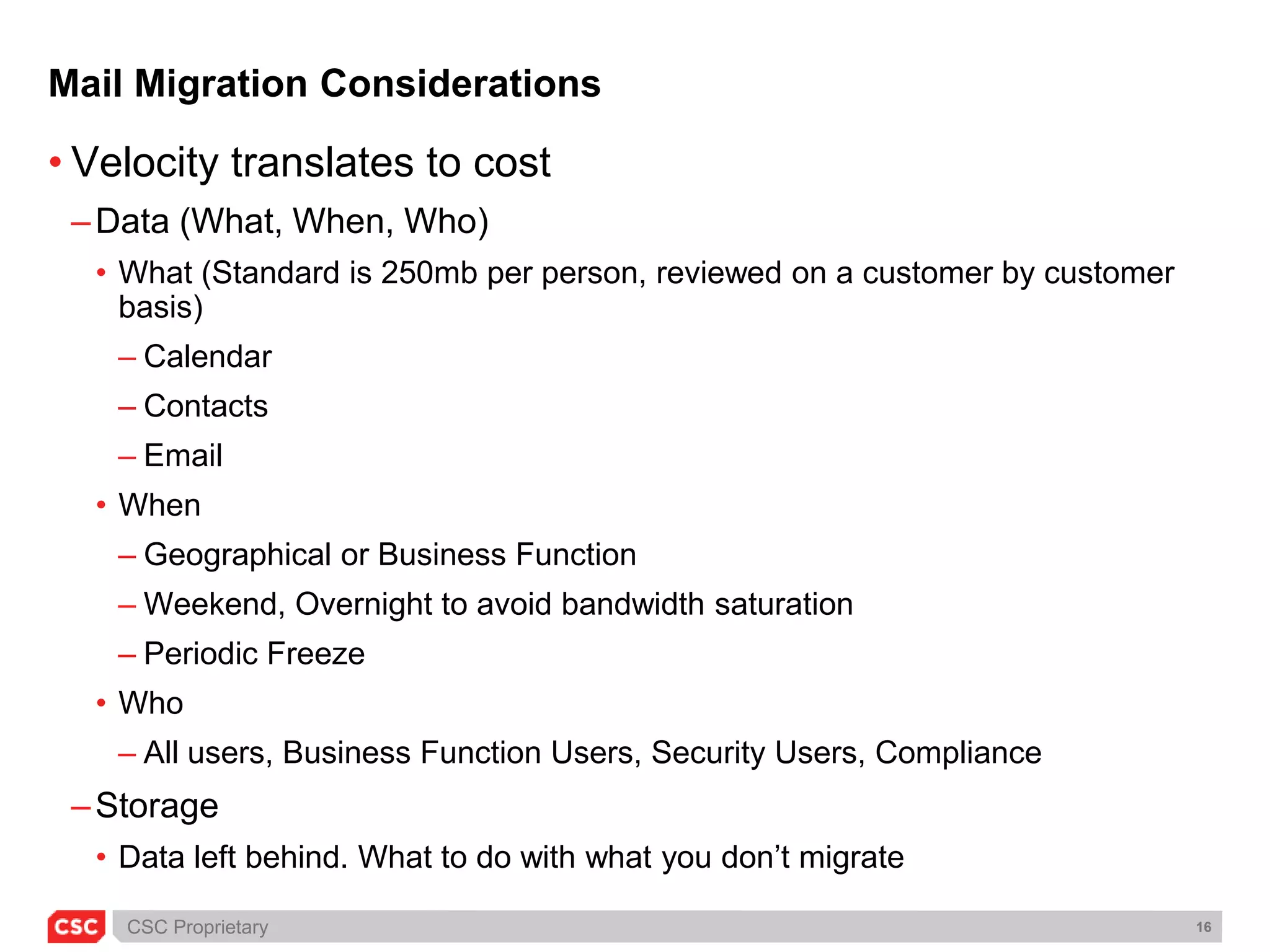
    Mail Migration ConsiderationsVelocitytranslates to costData (What, When, Who)What (Standard is 250mb per person, reviewed on a customer by customer basis)Calendar ContactsEmailWhenGeographical or Business FunctionWeekend, Overnight to avoid bandwidth saturationPeriodic FreezeWhoAll users, Business Function Users, Security Users, ComplianceStorageData left behind. What to do with what you don’t migrate
  • 26.
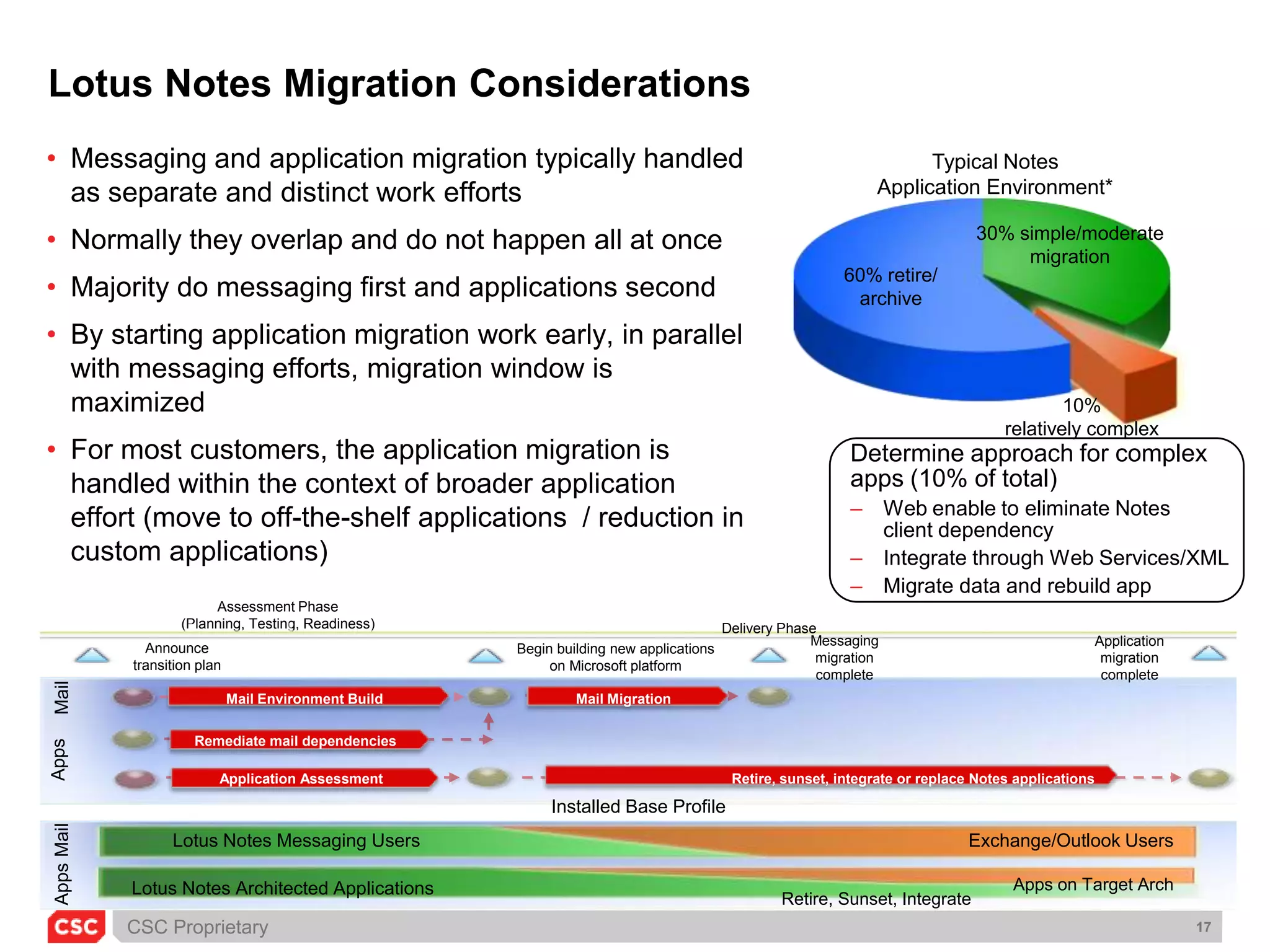
    Messaging migration completeApplicationmigration completeAnnounce transition planBegin building new applications on Microsoft platformLotus Notes Migration ConsiderationsMessaging and application migration typically handled as separate and distinct work efforts
  • 27.
    Normally they overlapand do not happen all at once
  • 28.
    Majority do messagingfirst and applications second
  • 29.
    By starting applicationmigration work early, in parallel with messaging efforts, migration window is maximized
  • 30.
    For most customers,the application migration is handled within the context of broader application effort (move to off-the-shelf applications / reduction in custom applications)Typical Notes Application Environment*30% simple/moderate migrationDelivery Phase60% retire/archive10%relatively complexMail Environment BuildMail MigrationMail Determine approach for complex apps (10% of total)Web enable to eliminate Notes client dependency
  • 31.
  • 32.
    Migrate data andrebuild appRemediate mail dependenciesAppsRetire, sunset, integrate or replace Notes applicationsApplication AssessmentAssessment Phase(Planning, Testing, Readiness)Installed Base ProfileLotus Notes Messaging UsersExchange/Outlook UsersMailApps on Target ArchLotus Notes Architected ApplicationsAppsRetire, Sunset, Integrate
  • 33.
    SharePoint Migration ConsiderationsCurrentlythe only way to migrate SharePoint content to the online service is by transferring one or more SharePoint content databases to the SharePoint Online hosted environment. To provide your SharePoint Online base environment as quickly as possible, customers’ pre-existing (on-premises) content will be migrated only after Service Acceptance is declared and relevant customisations are approved by SharePoint Online. SharePoint Online must receive the request 11 business days prior to the change window in which the migration is expected to occur. Data must be received 3 business days prior to the scheduled deployment.100 GB total data per migration event Regular site collections should be limited to 5GB. This limit will allow for growth up to the 10GB quota limit.No single site collection over 80GB (reminder that we have a limit of 10 site collections on the farm with 100GB quota, to be isolated into its own content DB. 80GB limit allows for further site growth)Maximum of 1 content DB under 20 GB per migration event. Multiple content DBs of a smaller size should be consolidated into a single DB using the mergecontentdbs commandMigrating content must be in:Same MOSS 2007 build as SharePoint Online (specific version list available upon request).Any build of SQL 2005 (plus service packs) or earlier.
  • 34.
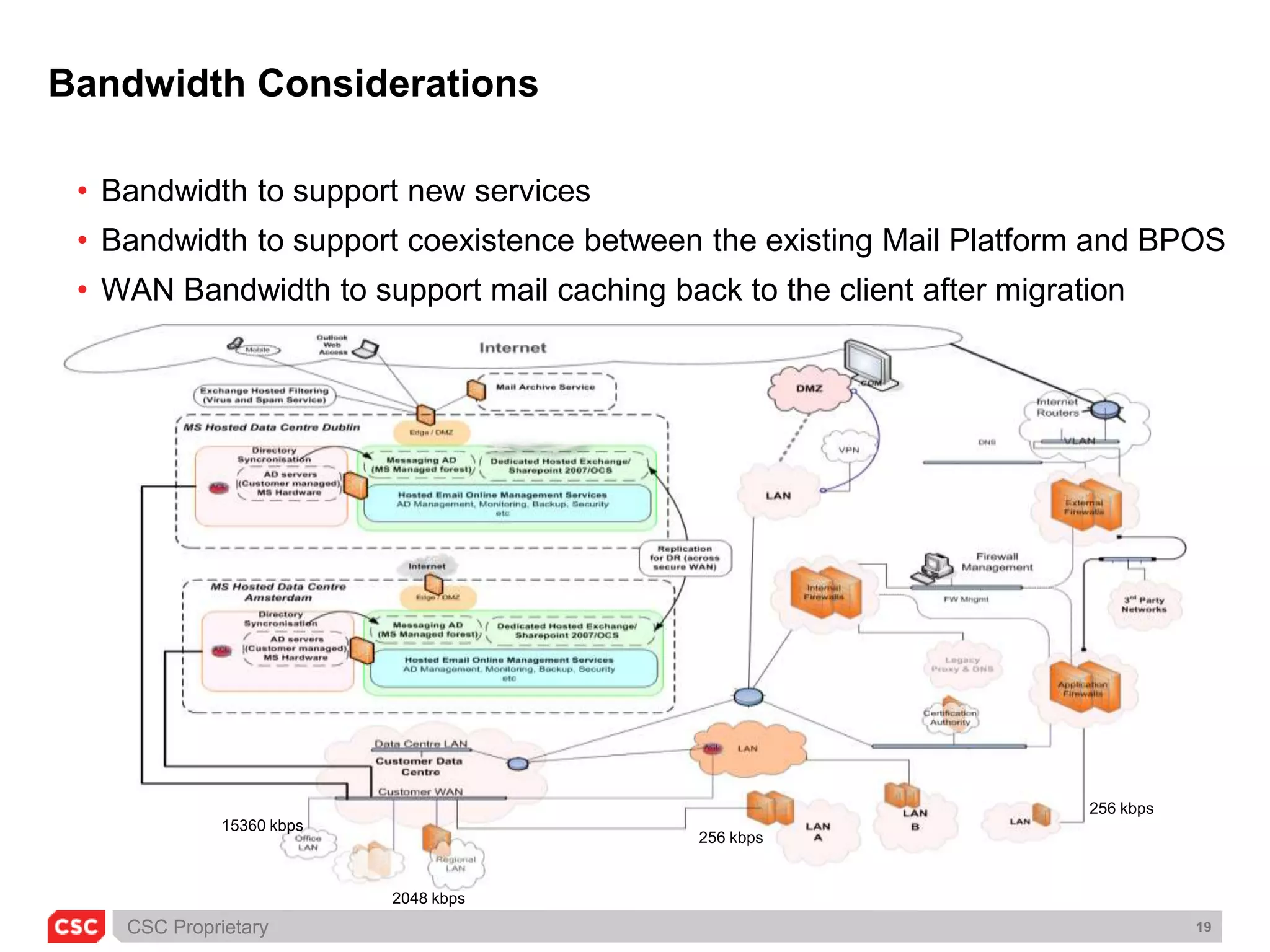
    Bandwidth Considerations Bandwidthto support new services
  • 35.
    Bandwidth to supportcoexistence between the existing Mail Platform and BPOS
  • 36.
    WAN Bandwidth tosupport mail caching back to the client after migration 256 kbps15360 kbps256 kbps2048 kbps
  • 37.
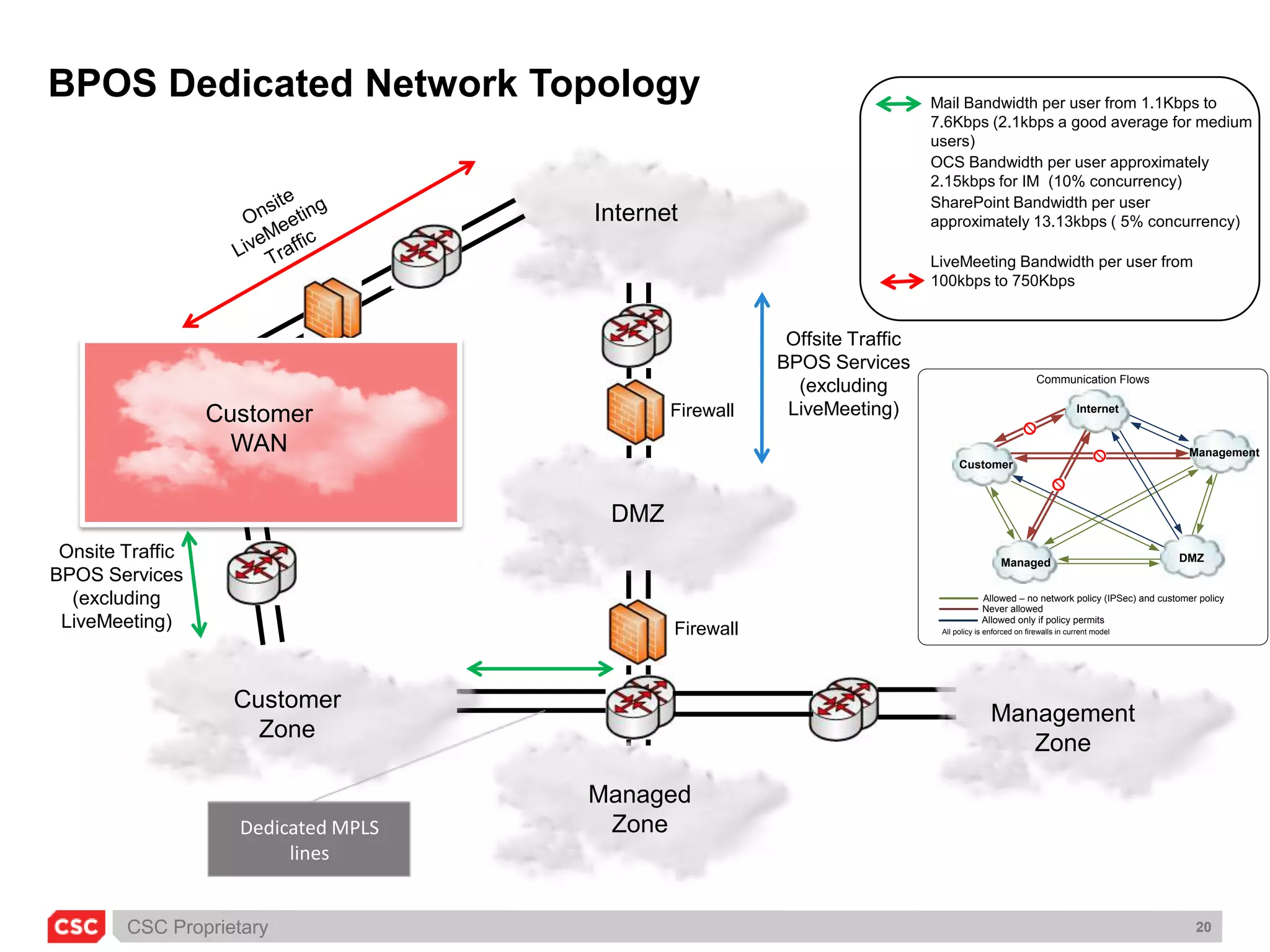
    BPOS Dedicated NetworkTopologyMail Bandwidth per user from 1.1Kbps to 7.6Kbps (2.1kbps a good average for medium users)OCS Bandwidth per user approximately 2.15kbps for IM (10% concurrency) SharePoint Bandwidth per user approximately 13.13kbps ( 5% concurrency) LiveMeeting Bandwidth per user from 100kbps to 750KbpsOnsite LiveMeeting TrafficOffsite Traffic BPOS Services(excluding LiveMeeting)CustomerWANFirewallOnsite Traffic BPOS Services(excluding LiveMeeting)InternetManagedZoneCustomerZoneManagementZoneDMZFirewallDedicated MPLS lines
  • 38.
  • 39.
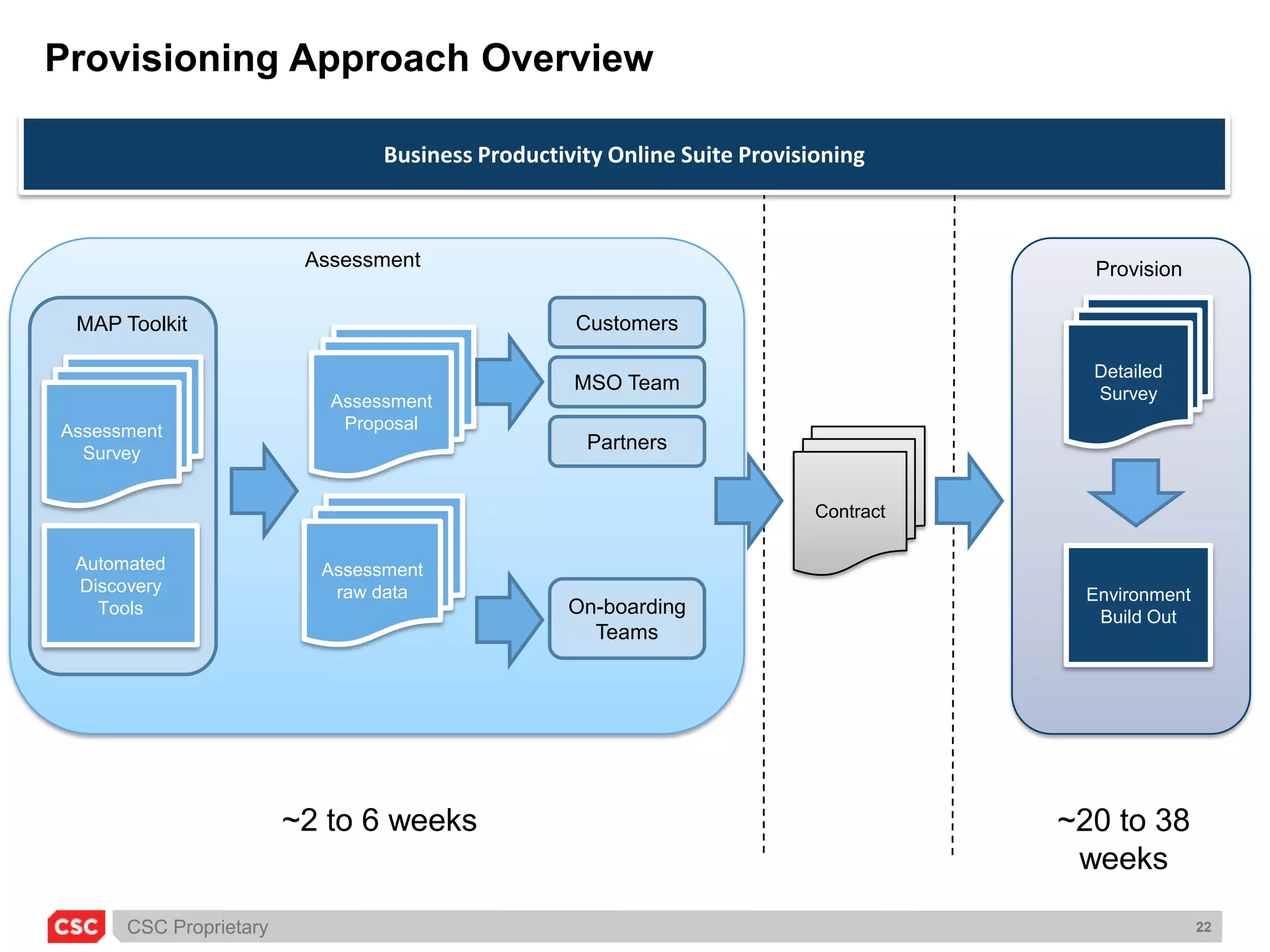
    Provisioning Approach OverviewBusinessProductivity Online Suite ProvisioningAssessment ProvisionCustomersDetailedSurveyMAP ToolkitAssessment ProposalAssessment SurveyMSO TeamPartnersContractAssessment raw dataAutomated DiscoveryToolsEnvironment Build OutOn-boarding Teams~2 to 6 weeks~20 to 38 weeks
  • 40.
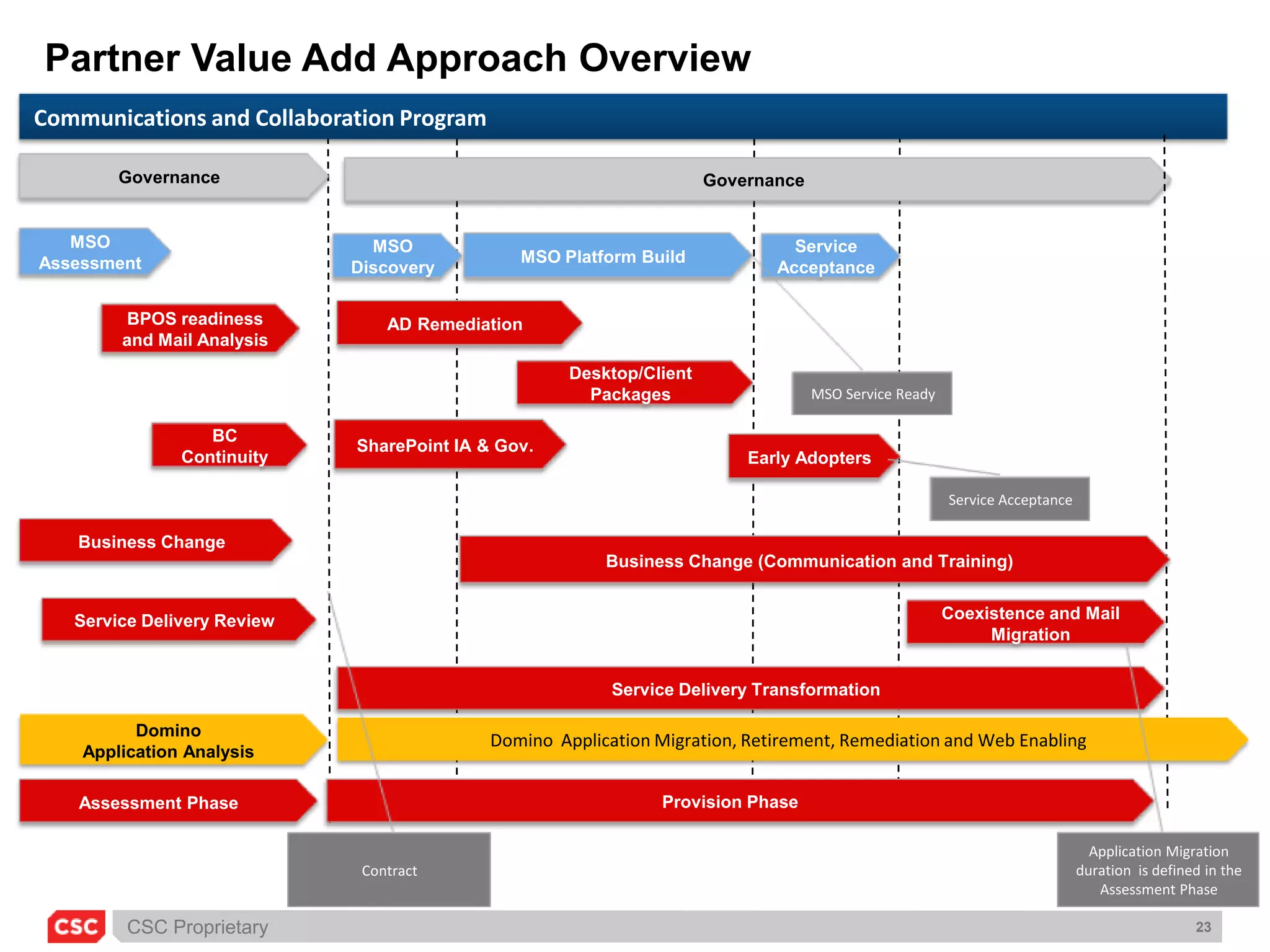
    Partner Value AddApproach OverviewCommunications and Collaboration ProgramGovernanceGovernanceMSO AssessmentMSO Platform BuildService AcceptanceMSO DiscoveryAD RemediationBPOS readiness and Mail AnalysisDesktop/Client PackagesMSO Service ReadySharePoint IA & Gov.BC ContinuityEarly AdoptersService AcceptanceBusiness ChangeBusiness Change (Communication and Training)Service Delivery ReviewCoexistence and Mail MigrationService Delivery TransformationDomino Application Analysis Domino Application Migration, Retirement, Remediation and Web EnablingAssessment PhaseProvision PhaseApplication Migration duration is defined in the Assessment PhaseContract
  • 41.

Editor's Notes

  • #23 Customer diagramsADExchangeNetworkDNSAssessment questionnairesIdentity Assessment and Detailed DiscoveryNetwork Traffic Estimation SpreadsheetMessaging Assessment and Detailed DiscoveryOffice Communications AssessmentLive Meeting AssessmentSharePoint AssessmentDiscovery ToolsMAPS (Messaging beta only)Active Directory MAPExchange MAPDNSLINTExchange RAPActive Directory RAP