Tools for Online
Assessment
Craig Brown
Sarah Honeychurch
John Maguire
Moodle Quiz
Craig Brown
Why use Quizzes
• Immediate feedback
• Help student focus
• Give students time to act on feedback
• Not public to peers
• Multiple attempts
• Spot gaps in knowledge
• Save class time
• More individually focused
• Quickly gage progress
Tips for using quizzes
• Takes time so plan
• Make questions valid to the course
• Question banks
• Weight your questions
• Feedback for answers
• Review options
• Randomise
• Media and images
• Import question and reuse/repurpose
Quiz for formative assessment
• Test quiz
• One question per page
• Asynchronous
• Timing
• Attempts
• Security
Short-Answer
Pros
•Automatic marking
•Quick to write
Cons
•No real understanding required to answer
Essay question
Pros
•Gives opportunity to demonstrate deep knowledge
•Can help develop writing skills
Cons
•Time to mark
•Can result in poor quality writing if not properly timed
Drag and Drop
Pros
•Automatic marking
•Engaging
Cons
•Time
•Accessibility
Multiple choice questions (MCQ)
Pros
•Automatically marked
•Can cover a wide range of topics
Cons
•Time
•Can confuse students
•Students can ‘Guess’
Discussion
● When is it good to use a quiz?
● Do you think the quiz tool is a useful form of assessment?
● How successful do you think MCQ questions are?
Moodle Assignment
John Maguire
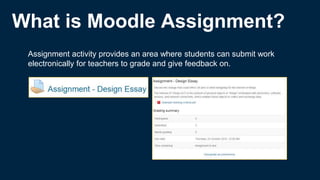
What is Moodle Assignment?
Assignment activity provides an area where students can submit work
electronically for teachers to grade and give feedback on.
Guides to assignment
Moodle.gla.ac.uk
Assignment
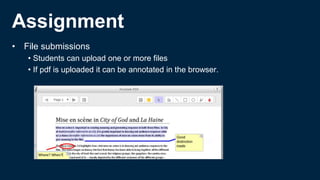
• File submissions
• Students can upload one or more files
• If pdf is uploaded it can be annotated in the browser.
Assignment
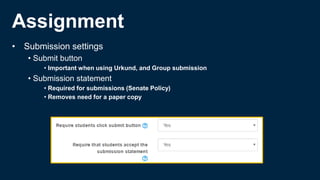
• Submission settings
• Submit button
• Important when using Urkund, and Group submission
• Submission statement
• Required for submissions (Senate Policy)
• Removes need for a paper copy
Assignment
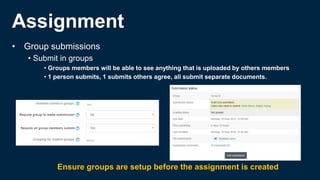
• Group submissions
• Submit in groups
• Groups members will be able to see anything that is uploaded by others members
• 1 person submits, 1 submits others agree, all submit separate documents.
Ensure groups are setup before the assignment is created
Assignment
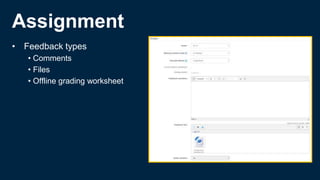
• Feedback types
• Comments
• Files
• Offline grading worksheet
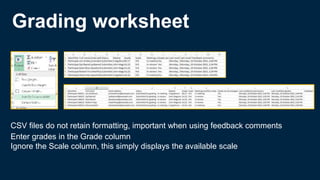
Grading worksheet
CSV files do not retain formatting, important when using feedback comments
Enter grades in the Grade column
Ignore the Scale column, this simply displays the available scale
Assignment
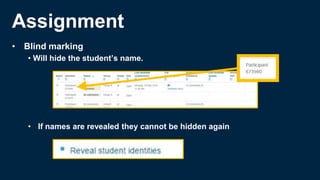
• Blind marking
• Will hide the student’s name.
• If names are revealed they cannot be hidden again
Assignment
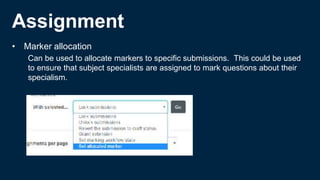
• Marker allocation
Can be used to allocate markers to specific submissions. This could be used
to ensure that subject specialists are assigned to mark questions about their
specialism.
Assignment
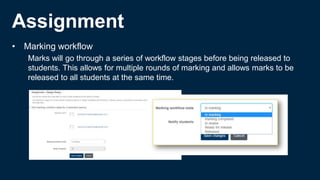
• Marking workflow
Marks will go through a series of workflow stages before being released to
students. This allows for multiple rounds of marking and allows marks to be
released to all students at the same time.
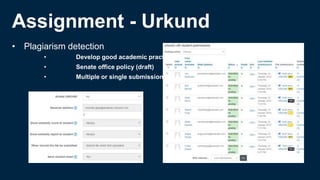
Assignment - Urkund
• Plagiarism detection
• Develop good academic practice
• Senate office policy (draft)
• Multiple or single submissions
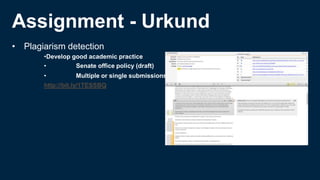
Assignment - Urkund
• Plagiarism detection
•Develop good academic practice
• Senate office policy (draft)
• Multiple or single submissions
http://bit.ly/1TESSBQ
Discussion
What is an acceptable percentage when considering plagiarism reports?
Plagiarism or similarity checker?
http://www.gla.ac.uk/services/senateoffice/studentcodes/staff/plagiarism/plagiarismstatement/
Discussion
What is plagiarism?
A.Writing or copying a short piece from a source verbatim without stating who the original author is.
B.In collusion with your tutor/teacher, work further on a text that you have yourself written earlier.
C.Translate another author’s text into a different language and use the result without citing the source.
D.Make use of an existing text without stating who the original author is, but make small adjustments that alter the word sequence
and sentence structure, replace words with synonyms, remove or add individual words, and so on.
E.Reading several texts and reworking the contents of these into a new text that isn’t like any of the original sources other than a few
words or a sentence being the same, without citing any of the sources.
F.Transcribe a maximum 3-4 sentence-long text verbatim and state who the original author is in relation to the text.
G.Translate a text you have originated yourself into another language and make use of the result.
H.Build further on a text that has previously been graded without indicating which parts are old.
Online Peer Assessment & Peer Review
Sarah Honeychurch
Why use Peer Assessment/Review?
"..if we want students to develop critical thinking, judgement
and autonomy in assignment production they should be
provided with high-level evaluative experiences similar to
those of experts. Peer review, students evaluating and
commenting on each other's work, is one way to achieve
this.”
http://www.reap.ac.uk/PEER.aspx
Peer assessment or peer review?
• Definitions
– Assessment – gives grade
– Review – gives feedback but no grade
– Two aspects:
• Writing reviews of others’ work
• Receiving reviews on own work from peers
“… many students dislike being asked to mark other students work and receiving marks from other
students. There are many reasons for this, including a belief by students that their peers do not have the
expertise to mark reliably. In contrast, students are usually very positive about the benefits of peer
review processes where marking is not involved.”
http://www.reap.ac.uk/PEER/Research.aspx
Peer assessment?
• Benefits:
– Students (say that they) want more feedback
– Students (say that they) want prompt feedback
– Does not take (much) extra staff time
• Problems:
– Concerns about the reliability of student marking (quantity over
quality?)
– Students don’t like grading peers
Peer Review
• Benefits of receiving peer review
– Accessible language of peers
– Variety of feedback
– Conflict of feedback mirrors professional life (must process and decide what to accept/reject)
• Benefits of giving peer review
– Constructing feedback requires cognitive engagement
• Knowledge construction
• Engagement with assessment criteria
• Developing discipline specific writing skills
– Variety of approaches can stimulate self-reflection
• Issues
– Summative assessment?
Online Tools for peer
assessment/review
• Moodle Workshop
• New LTI tool: ACJ (Adaptive Comparative Judgement)
• Other options
– Moodle Wiki
– Moodle Forums
Moodle Workshop
• Similar to Moodle Assignment
• Options for self, peer and tutor review
• Options for review or assessment
• Option to assign tutor mark for submission and for review
Adaptive Comparative Judgement
• Thurstone (psychophysics); Pollitt
• Students are presented with (random) pairs of submissions and
judge better/worse
• Software uses iterative and adaptive algorithm to sort
submissions
• Staff can “seed” submissions to provide grade boundaries
Pollitt, A (2012) The method of Adaptive Comparative Judgement.
Assessment in Education: Principles, Policy & Practice. 19: 3, 1-
20. DOI:10.1080/0969594X.2012.665354
Adaptive Comparative Judgement
• Benefits
– Timely feedback
– Easier than peer assessment
– Little staff time
– Has inter and intra rater reliability
• Issues
– Trust in new system
– Complex criteria
– Rich feedback
http://www.cambridgeassessment.org.uk/Images/232694-investigating-the-
reliability-of-adaptive-comparative-judgment.pdf
Discussion
• Do you trust students to peer review responsibly?
– Why/not?
• Do you think peer assessment or review are preferable?
• What about ACJ
– Would you be interested in participating in a pilot next academic
session?
Feedback

Tools for online assessment in Moodle

  • 1.
    Tools for Online Assessment CraigBrown Sarah Honeychurch John Maguire
  • 2.
  • 3.
    Why use Quizzes •Immediate feedback • Help student focus • Give students time to act on feedback • Not public to peers • Multiple attempts • Spot gaps in knowledge • Save class time • More individually focused • Quickly gage progress
  • 4.
    Tips for usingquizzes • Takes time so plan • Make questions valid to the course • Question banks • Weight your questions • Feedback for answers • Review options • Randomise • Media and images • Import question and reuse/repurpose
  • 5.
    Quiz for formativeassessment • Test quiz • One question per page • Asynchronous • Timing • Attempts • Security
  • 6.
    Short-Answer Pros •Automatic marking •Quick towrite Cons •No real understanding required to answer
  • 7.
    Essay question Pros •Gives opportunityto demonstrate deep knowledge •Can help develop writing skills Cons •Time to mark •Can result in poor quality writing if not properly timed
  • 8.
    Drag and Drop Pros •Automaticmarking •Engaging Cons •Time •Accessibility
  • 9.
    Multiple choice questions(MCQ) Pros •Automatically marked •Can cover a wide range of topics Cons •Time •Can confuse students •Students can ‘Guess’
  • 10.
    Discussion ● When isit good to use a quiz? ● Do you think the quiz tool is a useful form of assessment? ● How successful do you think MCQ questions are?
  • 11.
  • 12.
    What is MoodleAssignment? Assignment activity provides an area where students can submit work electronically for teachers to grade and give feedback on.
  • 13.
  • 14.
    Assignment • File submissions •Students can upload one or more files • If pdf is uploaded it can be annotated in the browser.
  • 15.
    Assignment • Submission settings •Submit button • Important when using Urkund, and Group submission • Submission statement • Required for submissions (Senate Policy) • Removes need for a paper copy
  • 16.
    Assignment • Group submissions •Submit in groups • Groups members will be able to see anything that is uploaded by others members • 1 person submits, 1 submits others agree, all submit separate documents. Ensure groups are setup before the assignment is created
  • 17.
    Assignment • Feedback types •Comments • Files • Offline grading worksheet
  • 18.
    Grading worksheet CSV filesdo not retain formatting, important when using feedback comments Enter grades in the Grade column Ignore the Scale column, this simply displays the available scale
  • 19.
    Assignment • Blind marking •Will hide the student’s name. • If names are revealed they cannot be hidden again
  • 20.
    Assignment • Marker allocation Canbe used to allocate markers to specific submissions. This could be used to ensure that subject specialists are assigned to mark questions about their specialism.
  • 21.
    Assignment • Marking workflow Markswill go through a series of workflow stages before being released to students. This allows for multiple rounds of marking and allows marks to be released to all students at the same time.
  • 22.
    Assignment - Urkund •Plagiarism detection • Develop good academic practice • Senate office policy (draft) • Multiple or single submissions
  • 23.
    Assignment - Urkund •Plagiarism detection •Develop good academic practice • Senate office policy (draft) • Multiple or single submissions http://bit.ly/1TESSBQ
  • 24.
    Discussion What is anacceptable percentage when considering plagiarism reports? Plagiarism or similarity checker? http://www.gla.ac.uk/services/senateoffice/studentcodes/staff/plagiarism/plagiarismstatement/
  • 25.
    Discussion What is plagiarism? A.Writingor copying a short piece from a source verbatim without stating who the original author is. B.In collusion with your tutor/teacher, work further on a text that you have yourself written earlier. C.Translate another author’s text into a different language and use the result without citing the source. D.Make use of an existing text without stating who the original author is, but make small adjustments that alter the word sequence and sentence structure, replace words with synonyms, remove or add individual words, and so on. E.Reading several texts and reworking the contents of these into a new text that isn’t like any of the original sources other than a few words or a sentence being the same, without citing any of the sources. F.Transcribe a maximum 3-4 sentence-long text verbatim and state who the original author is in relation to the text. G.Translate a text you have originated yourself into another language and make use of the result. H.Build further on a text that has previously been graded without indicating which parts are old.
  • 26.
    Online Peer Assessment& Peer Review Sarah Honeychurch
  • 27.
    Why use PeerAssessment/Review? "..if we want students to develop critical thinking, judgement and autonomy in assignment production they should be provided with high-level evaluative experiences similar to those of experts. Peer review, students evaluating and commenting on each other's work, is one way to achieve this.” http://www.reap.ac.uk/PEER.aspx
  • 28.
    Peer assessment orpeer review? • Definitions – Assessment – gives grade – Review – gives feedback but no grade – Two aspects: • Writing reviews of others’ work • Receiving reviews on own work from peers “… many students dislike being asked to mark other students work and receiving marks from other students. There are many reasons for this, including a belief by students that their peers do not have the expertise to mark reliably. In contrast, students are usually very positive about the benefits of peer review processes where marking is not involved.” http://www.reap.ac.uk/PEER/Research.aspx
  • 29.
    Peer assessment? • Benefits: –Students (say that they) want more feedback – Students (say that they) want prompt feedback – Does not take (much) extra staff time • Problems: – Concerns about the reliability of student marking (quantity over quality?) – Students don’t like grading peers
  • 30.
    Peer Review • Benefitsof receiving peer review – Accessible language of peers – Variety of feedback – Conflict of feedback mirrors professional life (must process and decide what to accept/reject) • Benefits of giving peer review – Constructing feedback requires cognitive engagement • Knowledge construction • Engagement with assessment criteria • Developing discipline specific writing skills – Variety of approaches can stimulate self-reflection • Issues – Summative assessment?
  • 31.
    Online Tools forpeer assessment/review • Moodle Workshop • New LTI tool: ACJ (Adaptive Comparative Judgement) • Other options – Moodle Wiki – Moodle Forums
  • 32.
    Moodle Workshop • Similarto Moodle Assignment • Options for self, peer and tutor review • Options for review or assessment • Option to assign tutor mark for submission and for review
  • 33.
    Adaptive Comparative Judgement •Thurstone (psychophysics); Pollitt • Students are presented with (random) pairs of submissions and judge better/worse • Software uses iterative and adaptive algorithm to sort submissions • Staff can “seed” submissions to provide grade boundaries Pollitt, A (2012) The method of Adaptive Comparative Judgement. Assessment in Education: Principles, Policy & Practice. 19: 3, 1- 20. DOI:10.1080/0969594X.2012.665354
  • 34.
    Adaptive Comparative Judgement •Benefits – Timely feedback – Easier than peer assessment – Little staff time – Has inter and intra rater reliability • Issues – Trust in new system – Complex criteria – Rich feedback http://www.cambridgeassessment.org.uk/Images/232694-investigating-the- reliability-of-adaptive-comparative-judgment.pdf
  • 35.
    Discussion • Do youtrust students to peer review responsibly? – Why/not? • Do you think peer assessment or review are preferable? • What about ACJ – Would you be interested in participating in a pilot next academic session?
  • 36.