Game Development with


     By Gabriel Grill
LibGDX is ...
 open source
 cross-platform
   Desktop
   Web
   Smartphone
 performant
   JNI Wrapper
   optimised for Davlik VM
 well documented
   Wiki, Forum, Blog, JavaDoc, Demos, Videos, ..
LibGDX has ...
 great tooling
   Particle-, Body-, Fonteditor
   TMX and TWL support
   Texture packer
 backends for
   Jogl, LWJGL, Angle
   SoundTouch, KissFFT
   Mpg123, Tremor
 nightly builds and regular releases
Getting Started - Desktop
1. create Project
2. download and move libGDX to libs/
3. Java Build Path
        gdx.jar, gdx-backend-jogl.jar
        and the corresponding “-natives.jar“

 public class HelloWorldDesktop {
    public static void main(String[] argv) {
       new JoglApplication(new App(), "Title",
          width, height, false/*Gl 2.0*/);
     }
 }
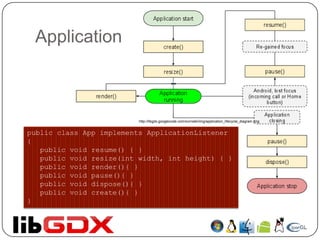
Application


                          http://libgdx.googlecode.com/svn/wiki/img/application_lifecycle_diagram.png


public class App implements ApplicationListener
{
   public void resume() { }
   public void resize(int width, int height) { }
   public void render(){ }
   public void pause(){ }
   public void dispose(){ }
   public void create(){ }
}
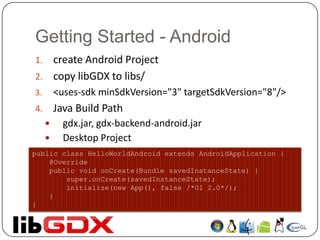
Getting Started - Android
1. create Android Project
2. copy libGDX to libs/
3.       <uses-sdk minSdkVersion="3" targetSdkVersion="8"/>
4.       Java Build Path
          gdx.jar, gdx-backend-android.jar
          Desktop Project
public class HelloWorldAndroid extends AndroidApplication {
    @Override
    public void onCreate(Bundle savedInstanceState) {
        super.onCreate(savedInstanceState);
        initialize(new App(), false /*Gl 2.0*/);
    }
}
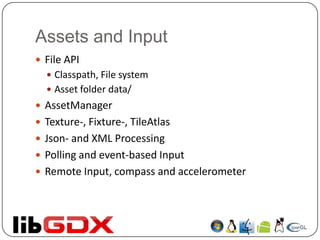
Assets and Input
 File API
   Classpath, File system
   Asset folder data/
 AssetManager
 Texture-, Fixture-, TileAtlas
 Json- and XML Processing
 Polling and event-based Input
 Remote Input, compass and accelerometer
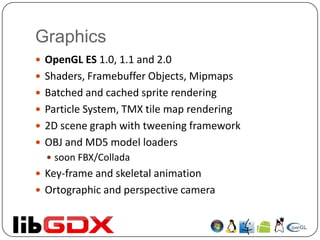
Graphics
 OpenGL ES 1.0, 1.1 and 2.0
 Shaders, Framebuffer Objects, Mipmaps
 Batched and cached sprite rendering
 Particle System, TMX tile map rendering
 2D scene graph with tweening framework
 OBJ and MD5 model loaders
   soon FBX/Collada
 Key-frame and skeletal animation
 Ortographic and perspective camera
Miscellaneous
 Custom Collections, Sorting
 Preferences
 Vector, Matrix and Quaternion classes
 JNI wrapper of box2d
 Shapes, intersection and overlap testing
 Vibrator support
 WAV, MP3 and OGG support
 Playback and recording
 AdWhirl, Admob
 GDX-JNIGEN
Performance
   renders a scene of 32 32 pixel sprites in a grid - 336 sprites
   AndEngine:
     Hero: ~17fps
     Nexus One: ~41fps
   Libgdx:
       Hero: ~51fps
       Nexus One: ~51fps
   Android 1.5 - Hero:
     FloatBuffer.put( float value ): 40.774 secs
     FloatBuffer.put(int index, float value): 42.710 secs
     FloatBuffer.put( float[] values ): 41.109 sec
     IntBuffer.put( int[] values): 12.59 secs
     JNI -> BufferUtils.copy(): 0.14 secs
   Android 2.2 - Nexus One:
       FloatBuffer.put( float value ): 6.876 secs
       FloatBuffer.put(int index, float value): 7.006 secs
       FloatBuffer.put( float[] values ): 6.800 sec
       IntBuffer.put( int[] values): 1.479 secs
       JNI -> BufferUtils.copy(): 0.067 secs
Demos
Now let‘s see some Code
Sources
 http://code.google.com/p/libgdx/wiki/
 http://code.google.com/p/libgdx-users/wiki/
 http://libgdx.badlogicgames.com/nightlies/docs/api/
 http://www.badlogicgames.com/wordpress/
 http://www.badlogicgames.com/wordpress/?p=816
 http://www.badlogicgames.com/wordpress/?p=904

Game development with_lib_gdx

  • 1.
    Game Development with By Gabriel Grill
  • 2.
    LibGDX is ... open source  cross-platform  Desktop  Web  Smartphone  performant  JNI Wrapper  optimised for Davlik VM  well documented  Wiki, Forum, Blog, JavaDoc, Demos, Videos, ..
  • 3.
    LibGDX has ... great tooling  Particle-, Body-, Fonteditor  TMX and TWL support  Texture packer  backends for  Jogl, LWJGL, Angle  SoundTouch, KissFFT  Mpg123, Tremor  nightly builds and regular releases
  • 4.
    Getting Started -Desktop 1. create Project 2. download and move libGDX to libs/ 3. Java Build Path  gdx.jar, gdx-backend-jogl.jar  and the corresponding “-natives.jar“ public class HelloWorldDesktop { public static void main(String[] argv) { new JoglApplication(new App(), "Title", width, height, false/*Gl 2.0*/); } }
  • 5.
    Application http://libgdx.googlecode.com/svn/wiki/img/application_lifecycle_diagram.png public class App implements ApplicationListener { public void resume() { } public void resize(int width, int height) { } public void render(){ } public void pause(){ } public void dispose(){ } public void create(){ } }
  • 6.
    Getting Started -Android 1. create Android Project 2. copy libGDX to libs/ 3. <uses-sdk minSdkVersion="3" targetSdkVersion="8"/> 4. Java Build Path  gdx.jar, gdx-backend-android.jar  Desktop Project public class HelloWorldAndroid extends AndroidApplication { @Override public void onCreate(Bundle savedInstanceState) { super.onCreate(savedInstanceState); initialize(new App(), false /*Gl 2.0*/); } }
  • 7.
    Assets and Input File API  Classpath, File system  Asset folder data/  AssetManager  Texture-, Fixture-, TileAtlas  Json- and XML Processing  Polling and event-based Input  Remote Input, compass and accelerometer
  • 8.
    Graphics  OpenGL ES1.0, 1.1 and 2.0  Shaders, Framebuffer Objects, Mipmaps  Batched and cached sprite rendering  Particle System, TMX tile map rendering  2D scene graph with tweening framework  OBJ and MD5 model loaders  soon FBX/Collada  Key-frame and skeletal animation  Ortographic and perspective camera
  • 9.
    Miscellaneous  Custom Collections,Sorting  Preferences  Vector, Matrix and Quaternion classes  JNI wrapper of box2d  Shapes, intersection and overlap testing  Vibrator support  WAV, MP3 and OGG support  Playback and recording  AdWhirl, Admob  GDX-JNIGEN
  • 10.
    Performance  renders a scene of 32 32 pixel sprites in a grid - 336 sprites  AndEngine:  Hero: ~17fps  Nexus One: ~41fps  Libgdx:  Hero: ~51fps  Nexus One: ~51fps  Android 1.5 - Hero:  FloatBuffer.put( float value ): 40.774 secs  FloatBuffer.put(int index, float value): 42.710 secs  FloatBuffer.put( float[] values ): 41.109 sec  IntBuffer.put( int[] values): 12.59 secs  JNI -> BufferUtils.copy(): 0.14 secs  Android 2.2 - Nexus One:  FloatBuffer.put( float value ): 6.876 secs  FloatBuffer.put(int index, float value): 7.006 secs  FloatBuffer.put( float[] values ): 6.800 sec  IntBuffer.put( int[] values): 1.479 secs  JNI -> BufferUtils.copy(): 0.067 secs
  • 11.
  • 12.
    Sources  http://code.google.com/p/libgdx/wiki/  http://code.google.com/p/libgdx-users/wiki/ http://libgdx.badlogicgames.com/nightlies/docs/api/  http://www.badlogicgames.com/wordpress/  http://www.badlogicgames.com/wordpress/?p=816  http://www.badlogicgames.com/wordpress/?p=904