Using Datawindow as
Tile Menu UI Component
zulmach@pbdev.id
pbdev.id coexist
Friday, 31 Januari 2020 | Maxx Cofee Cideng, Jakarta Barat
Tile Menu as one of UI Component
• Basic Idea
• Why Datawindow
• How to Create
• How to Implement it
• Other Possibilities
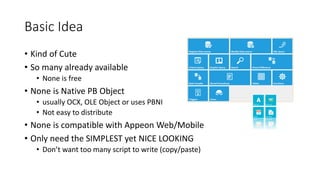
Basic Idea
• Kind of Cute
• So many already available
• None is free
• None is Native PB Object
• usually OCX, OLE Object or uses PBNI
• Not easy to distribute
• None is compatible with Appeon Web/Mobile
• Only need the SIMPLEST yet NICE LOOKING
• Don’t want too many script to write (copy/paste)
Why Datawindow
• Data centric : rows & columns
• Can put controls as Window
• Powerful DW Expression
• Support expression for many properties
• Controls Behaviour can be based on data
How to Create
Step by step
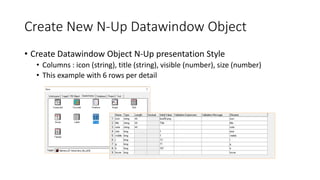
Create New N-Up Datawindow Object
• Create Datawindow Object N-Up presentation Style
• Columns : icon (string), title (string), visible (number), size (number)
• This example with 6 rows per detail
Clean Up
• Clean up datawindow from columns and text,
select all and delete from the layout
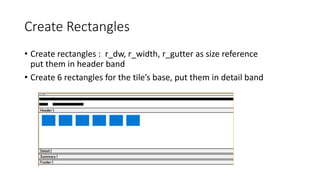
Create Rectangles
• Create rectangles : r_dw, r_width, r_gutter as size reference
put them in header band
• Create 6 rectangles for the tile’s base, put them in detail band
Set r_1 to r_6 properties using expression
Control Visible Height Width
r_1 visible[0] long(describe
("r_width.width"))-40
size[0] * (long(describe("r_width.width"))) +
(size[0] -1) * (long(describe("r_gutter.width")))
r_2 visible[1] long(describe
("r_width.width"))-40
size[1] * (long(describe("r_width.width"))) +
(size[1] -1) * (long(describe("r_gutter.width")))
r_3 visible[2] long(describe
("r_width.width"))-40
size[2] * (long(describe("r_width.width"))) +
(size[2] -1) * (long(describe("r_gutter.width")))
r_4 visible[3] long(describe
("r_width.width"))-40
size[3] * (long(describe("r_width.width"))) +
(size[3] -1) * (long(describe("r_gutter.width")))
r_5 visible[4] long(describe
("r_width.width"))-40
size[4] * (long(describe("r_width.width"))) +
(size[4] -1) * (long(describe("r_gutter.width")))
r_6 visible[5] long(describe
("r_width.width"))-40
size[5] * (long(describe("r_width.width"))) +
(size[5] -1) * (long(describe("r_gutter.width")))
Set r_1 to r_6 properties using expression
Control y x
r_1 long(describe("r_gutt
er.width"))
long(describe("r_gutter.width"))
r_2 long(describe("r_gutt
er.width"))
long(describe("r_gutter.width")) * 2 +
size[0] * (long(describe("r_width.width"))) +
(size[0] -1) * (long(describe("r_gutter.width")))
r_3 long(describe("r_gutt
er.width"))
long(describe("r_gutter.width")) * 3+
size[0] * (long(describe("r_width.width"))) +
(size[0] -1) * (long(describe("r_gutter.width"))) +
size[1] * (long(describe("r_width.width"))) +
(size[1] -1) * (long(describe("r_gutter.width")))
r_4 long(describe("r_gutt
er.width"))
long(describe("r_gutter.width")) * 4+
size[0] * (long(describe("r_width.width"))) +
(size[0] -1) * (long(describe("r_gutter.width"))) +
size[1] * (long(describe("r_width.width"))) +
(size[1] -1) * (long(describe("r_gutter.width"))) +
size[2] * (long(describe("r_width.width"))) +
(size[2] -1) * (long(describe("r_gutter.width")))
Set r_1 to r_6 properties using expression
Control y x
r_5 long(describe("r_gutter
.width"))
long(describe("r_gutter.width")) * 5+
size[0] * (long(describe("r_width.width"))) +
(size[0] -1) * (long(describe("r_gutter.width"))) +
size[1] * (long(describe("r_width.width"))) +
(size[1] -1) * (long(describe("r_gutter.width"))) +
size[2] * (long(describe("r_width.width"))) +
(size[2] -1) * (long(describe("r_gutter.width"))) +
size[3] * (long(describe("r_width.width"))) +
(size[3] -1) * (long(describe("r_gutter.width")))
r_6 long(describe("r_gutter
.width"))
long(describe("r_gutter.width")) * 6+
size[0] * (long(describe("r_width.width"))) +
(size[0] -1) * (long(describe("r_gutter.width"))) +
size[1] * (long(describe("r_width.width"))) +
(size[1] -1) * (long(describe("r_gutter.width"))) +
size[2] * (long(describe("r_width.width"))) +
(size[2] -1) * (long(describe("r_gutter.width"))) +
size[3] * (long(describe("r_width.width"))) +
(size[3] -1) * (long(describe("r_gutter.width"))) +
size[4] * (long(describe("r_width.width"))) +
(size[4] -1) * (long(describe("r_gutter.width")))
Create 6 Computed Field for icon placeholder
Control Expression
c_1 bitmap ( icon[0] )
c_2 bitmap ( icon[1] )
c_3 bitmap ( icon[2] )
c_4 bitmap ( icon[3] )
c_5 bitmap ( icon[4] )
c_6 bitmap ( icon[5] )
Do the same thing
• Copy and modified all the dwexpression for x,y,width,and height
properties from the r_1 to r_6 for :
• Icon
• title
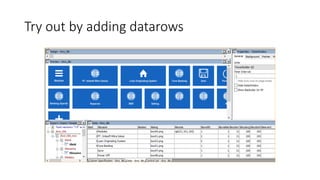
Try out by adding datarows
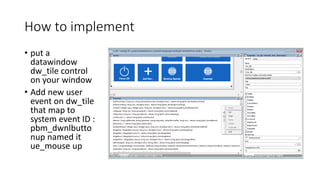
How to implement
• put a
datawindow
dw_tile control
on your window
• Add new user
event on dw_tile
that map to
system event ID :
pbm_dwnlbutto
nup named it
ue_mouse up
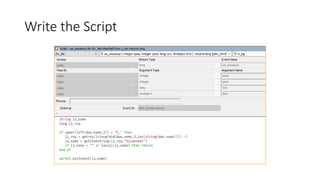
Write the Script
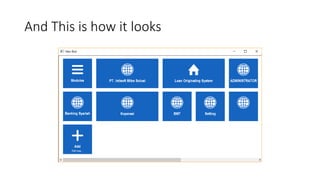
And This is how it looks
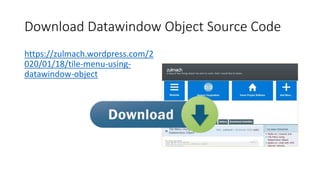
Download Datawindow Object Source Code
https://zulmach.wordpress.com/2
020/01/18/tile-menu-using-
datawindow-object
• Thank You
• Question and Answer
• Email : zulmach@pbdev.id
• Linkedin : www.linkedin.com/in/zulmach
• Youtube : www.youtube.com/c/pemulapb
• Whatsap : +628155555368
Q&A

Tile Menu Using Datawindow Object

  • 1.
    Using Datawindow as TileMenu UI Component zulmach@pbdev.id pbdev.id coexist Friday, 31 Januari 2020 | Maxx Cofee Cideng, Jakarta Barat
  • 2.
    Tile Menu asone of UI Component • Basic Idea • Why Datawindow • How to Create • How to Implement it • Other Possibilities
  • 3.
    Basic Idea • Kindof Cute • So many already available • None is free • None is Native PB Object • usually OCX, OLE Object or uses PBNI • Not easy to distribute • None is compatible with Appeon Web/Mobile • Only need the SIMPLEST yet NICE LOOKING • Don’t want too many script to write (copy/paste)
  • 4.
    Why Datawindow • Datacentric : rows & columns • Can put controls as Window • Powerful DW Expression • Support expression for many properties • Controls Behaviour can be based on data
  • 5.
  • 6.
    Create New N-UpDatawindow Object • Create Datawindow Object N-Up presentation Style • Columns : icon (string), title (string), visible (number), size (number) • This example with 6 rows per detail
  • 7.
    Clean Up • Cleanup datawindow from columns and text, select all and delete from the layout
  • 8.
    Create Rectangles • Createrectangles : r_dw, r_width, r_gutter as size reference put them in header band • Create 6 rectangles for the tile’s base, put them in detail band
  • 9.
    Set r_1 tor_6 properties using expression Control Visible Height Width r_1 visible[0] long(describe ("r_width.width"))-40 size[0] * (long(describe("r_width.width"))) + (size[0] -1) * (long(describe("r_gutter.width"))) r_2 visible[1] long(describe ("r_width.width"))-40 size[1] * (long(describe("r_width.width"))) + (size[1] -1) * (long(describe("r_gutter.width"))) r_3 visible[2] long(describe ("r_width.width"))-40 size[2] * (long(describe("r_width.width"))) + (size[2] -1) * (long(describe("r_gutter.width"))) r_4 visible[3] long(describe ("r_width.width"))-40 size[3] * (long(describe("r_width.width"))) + (size[3] -1) * (long(describe("r_gutter.width"))) r_5 visible[4] long(describe ("r_width.width"))-40 size[4] * (long(describe("r_width.width"))) + (size[4] -1) * (long(describe("r_gutter.width"))) r_6 visible[5] long(describe ("r_width.width"))-40 size[5] * (long(describe("r_width.width"))) + (size[5] -1) * (long(describe("r_gutter.width")))
  • 10.
    Set r_1 tor_6 properties using expression Control y x r_1 long(describe("r_gutt er.width")) long(describe("r_gutter.width")) r_2 long(describe("r_gutt er.width")) long(describe("r_gutter.width")) * 2 + size[0] * (long(describe("r_width.width"))) + (size[0] -1) * (long(describe("r_gutter.width"))) r_3 long(describe("r_gutt er.width")) long(describe("r_gutter.width")) * 3+ size[0] * (long(describe("r_width.width"))) + (size[0] -1) * (long(describe("r_gutter.width"))) + size[1] * (long(describe("r_width.width"))) + (size[1] -1) * (long(describe("r_gutter.width"))) r_4 long(describe("r_gutt er.width")) long(describe("r_gutter.width")) * 4+ size[0] * (long(describe("r_width.width"))) + (size[0] -1) * (long(describe("r_gutter.width"))) + size[1] * (long(describe("r_width.width"))) + (size[1] -1) * (long(describe("r_gutter.width"))) + size[2] * (long(describe("r_width.width"))) + (size[2] -1) * (long(describe("r_gutter.width")))
  • 11.
    Set r_1 tor_6 properties using expression Control y x r_5 long(describe("r_gutter .width")) long(describe("r_gutter.width")) * 5+ size[0] * (long(describe("r_width.width"))) + (size[0] -1) * (long(describe("r_gutter.width"))) + size[1] * (long(describe("r_width.width"))) + (size[1] -1) * (long(describe("r_gutter.width"))) + size[2] * (long(describe("r_width.width"))) + (size[2] -1) * (long(describe("r_gutter.width"))) + size[3] * (long(describe("r_width.width"))) + (size[3] -1) * (long(describe("r_gutter.width"))) r_6 long(describe("r_gutter .width")) long(describe("r_gutter.width")) * 6+ size[0] * (long(describe("r_width.width"))) + (size[0] -1) * (long(describe("r_gutter.width"))) + size[1] * (long(describe("r_width.width"))) + (size[1] -1) * (long(describe("r_gutter.width"))) + size[2] * (long(describe("r_width.width"))) + (size[2] -1) * (long(describe("r_gutter.width"))) + size[3] * (long(describe("r_width.width"))) + (size[3] -1) * (long(describe("r_gutter.width"))) + size[4] * (long(describe("r_width.width"))) + (size[4] -1) * (long(describe("r_gutter.width")))
  • 12.
    Create 6 ComputedField for icon placeholder Control Expression c_1 bitmap ( icon[0] ) c_2 bitmap ( icon[1] ) c_3 bitmap ( icon[2] ) c_4 bitmap ( icon[3] ) c_5 bitmap ( icon[4] ) c_6 bitmap ( icon[5] )
  • 13.
    Do the samething • Copy and modified all the dwexpression for x,y,width,and height properties from the r_1 to r_6 for : • Icon • title
  • 14.
    Try out byadding datarows
  • 15.
    How to implement •put a datawindow dw_tile control on your window • Add new user event on dw_tile that map to system event ID : pbm_dwnlbutto nup named it ue_mouse up
  • 16.
  • 17.
    And This ishow it looks
  • 18.
    Download Datawindow ObjectSource Code https://zulmach.wordpress.com/2 020/01/18/tile-menu-using- datawindow-object
  • 19.
    • Thank You •Question and Answer • Email : zulmach@pbdev.id • Linkedin : www.linkedin.com/in/zulmach • Youtube : www.youtube.com/c/pemulapb • Whatsap : +628155555368 Q&A