©2019 Appeon Limited and its subsidiaries. All rights reserved.
Zulmach
October 30th, 2019
Creating Modern UI Framework
Using Native Powerbuilder Objects
DISCLAIMER
This presentation was authored by volunteer(s) in the Appeon community. This is not a work
for hire by Appeon. The views and opinions expressed in this presentation are those of the
author(s).
Its contents are protected by US copyright law and may not be reproduced, distributed,
transmitted, displayed, published or broadcast without the prior written permission of
Appeon. All rights belong to their respective owners.
Any reference to third-party materials, including but not limited to Websites, content,
services, or software, has not been reviewed or endorsed by Appeon. YOUR USE OF THIRD-
PARTY MATERIALS SHALL BE AT YOUR OWN RISK.
Appeon makes no warranty of any kind, either express or implied, including but not limited
to, the implied warranties of merchantability, fitness for a particular purpose, or non-
infringement. Appeon assumes no responsibility for errors or omissions.
page
3https://elevate.appeon.com
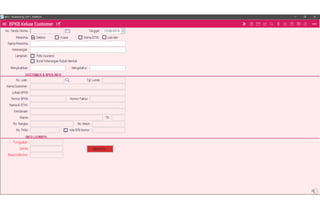
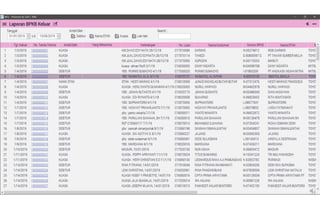
• Typical (Common) Powerbuilder Application UI
• The search for great UI
• Business Application UI/UX Design Pattern
• Demo
• Creating the Framework
• Other Possibilities
Session
Agenda
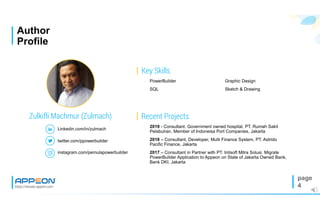
Key Skills
Recent Projects
https://elevate.appeon.com
Linkedin.com/in/zulmach
Zulkifli Machmur (Zulmach)
• 2019 - Consultant. Government owned hospital, PT. Rumah Sakit
Pelabuhan, Member of Indoneisa Port Companies, Jakarta
• 2018 – Consultant, Developer, Multi Finance System, PT. Astrido
Pacific Finance, Jakarta
• 2017 – Consultant in Partner with PT. Intisoft Mitra Solusi. Migrate
PowerBuilder Application to Appeon on State of Jakarta Owned Bank,
Bank DKI, Jakarta
• Graphic Design
• Sketch & Drawing
• PowerBuilder
• SQL
Author
Profile
page
4
twitter.com/ppowerbuilder
instagram.com/pemulapowerbuilder
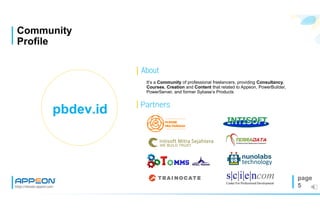
About
https://elevate.appeon.com
It’s a Community of professional freelancers, providing Consultancy,
Courses, Creation and Content that related to Appeon, PowerBuilder,
PowerServer, and former Sybase’s Products
Community
Profile
page
5
pbdev.id Partners
page
6https://elevate.appeon.com
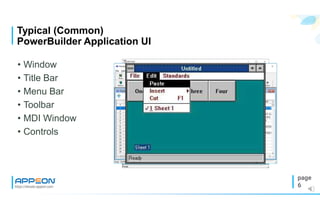
• Window
• Title Bar
• Menu Bar
• Toolbar
• MDI Window
• Controls
Typical (Common)
PowerBuilder Application UI
page
7https://elevate.appeon.com
• OCX Controls
• PBX Canvas
• Custom Controls
• Other 3rd Party
• Native Method
The Search for
Great UI/UX
page
8https://elevate.appeon.com
• Simple
• Clean
• Touchscreen
• Web
• Mobile
• Theme
• Animation
• and more …
Modern Application
UI/UX
page
9https://elevate.appeon.com
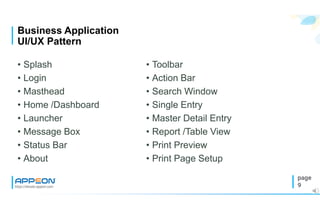
• Splash
• Login
• Masthead
• Home /Dashboard
• Launcher
• Message Box
• Status Bar
• About
Business Application
UI/UX Pattern
• Toolbar
• Action Bar
• Search Window
• Single Entry
• Master Detail Entry
• Report /Table View
• Print Preview
• Print Page Setup
Demo
Demo
Demo
Demo
Demo
Demo
Demo
Demo
Live Demo
Mobile Demo
End of Demo
page
21https://elevate.appeon.com
• Resources
• Tools
• Design Pattern
• MDI
• Window Object
• Datawindow Object
• Expression
• Script
Creating the UI/UX
Framework
https://elevate.appeon.com
Framework
Resources
page
22
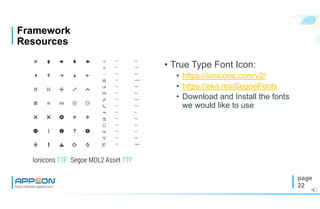
• True Type Font Icon:
• https://ionicons.com/v2/
• https://aka.ms/SegoeFonts
• Download and Install the fonts
we would like to use
Ionicons TTF Segoe MDL2 Asset TTF
https://elevate.appeon.com
Framework
Resources
page
23
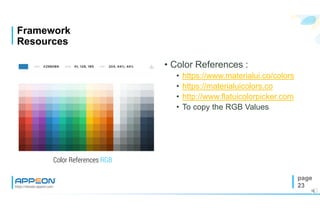
• Color References :
• https://www.materialui.co/colors
• https://materialuicolors.co
• http://www.flatuicolorpicker.com
• To copy the RGB Values
Color References RGB
https://elevate.appeon.com
Framework
Resources
page
24
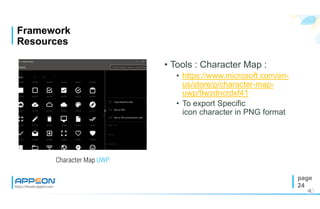
• Tools : Character Map :
• https://www.microsoft.com/en-
us/store/p/character-map-
uwp/9wzdncrdxf41
• To export Specific
icon character in PNG format
Character Map UWP
https://elevate.appeon.com
Framework
Resources
page
25
• Images as Needed :
• Backgrounds
• Gradients
• Buttons
• Icons
• https://www.materialui.co/icons
• Animated GIF
• Other Images
Needed Images
page
26https://elevate.appeon.com
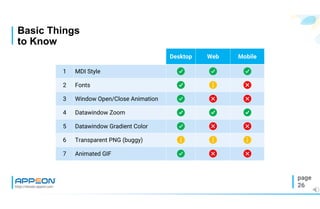
Basic Things
to Know
Desktop Web Mobile
1 MDI Style   
2 Fonts   
3 Window Open/Close Animation   
4 Datawindow Zoom   
5 Datawindow Gradient Color   
6 Transparent PNG (buggy)   
7 Animated GIF   
page
27https://elevate.appeon.com
• Framework for all : Desktop, Web and Mobile
• MDI Style Desktop only took one Taskbar Button
• MDI Frame will sits inside Browser Window (Appeon Web)
• MDI Frame will take full screen size (Appeon Mobile, with menu
items hidden)
• Possible to hide MDI Sheet Titlebar
• Menu Object Can be used to Capture Shortcut Key while its
hidden (Desktop and Web)
Why MDI
Style?
https://elevate.appeon.com
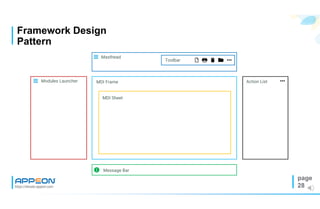
Framework Design
Pattern
page
28
MDI Frame
MDI Sheet
 Modules Launcher
 Masthead
 Message Bar
Action List
    Toolbar
https://elevate.appeon.com
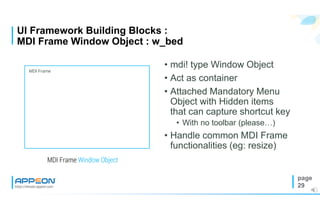
UI Framework Building Blocks :
MDI Frame Window Object : w_bed
page
29
• mdi! type Window Object
• Act as container
• Attached Mandatory Menu
Object with Hidden items
that can capture shortcut key
• With no toolbar (please…)
• Handle common MDI Frame
functionalities (eg: resize)
MDI Frame Window Object
MDI Frame
https://elevate.appeon.com
UI Framework Building Blocks :
MDI Sheet Window : w_sheet
page
30
• popup! Type Window Object
• Might have Menu Object with
Hidden items that can
capture shortcut key
• Custom Sliding open and
close animation (default
animation properties only
work on desktop)
MDI Sheet Window
MDI Sheet
https://elevate.appeon.com
UI Framework Building Blocks :
Splash Window : w_splash
page
31
• Inherited from w_sheet
• Put Datawindow Control
• Create Datawindow Object
• GIF Animation only works on
desktop
• Use Image Sequence and
Timing to Simulate the
animation
Splash Window
MDI Sheet
https://elevate.appeon.com
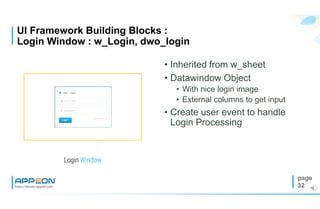
UI Framework Building Blocks :
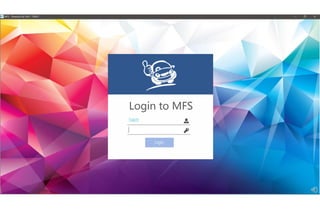
Login Window : w_Login, dwo_login
page
32
• Inherited from w_sheet
• Datawindow Object
• With nice login image
• External columns to get input
• Create user event to handle
Login Processing
Login Window
https://elevate.appeon.com
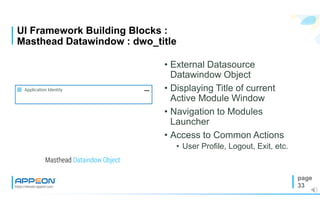
UI Framework Building Blocks :
Masthead Datawindow : dwo_title
page
33
• External Datasource
Datawindow Object
• Displaying Title of current
Active Module Window
• Navigation to Modules
Launcher
• Access to Common Actions
• User Profile, Logout, Exit, etc.
Masthead Dataindow Object
 Application Identity 
https://elevate.appeon.com
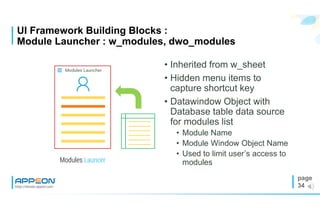
UI Framework Building Blocks :
Module Launcher : w_modules, dwo_modules
page
34
• Inherited from w_sheet
• Hidden menu items to
capture shortcut key
• Datawindow Object with
Database table data source
for modules list
• Module Name
• Module Window Object Name
• Used to limit user’s access to
modulesModules Launcer
 Modules Launcher

https://elevate.appeon.com
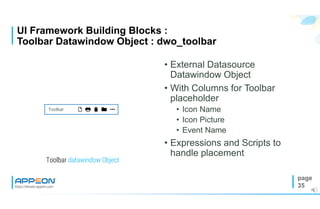
UI Framework Building Blocks :
Toolbar Datawindow Object : dwo_toolbar
page
35
• External Datasource
Datawindow Object
• With Columns for Toolbar
placeholder
• Icon Name
• Icon Picture
• Event Name
• Expressions and Scripts to
handle placement
Toolbar datawindow Object
    Toolbar
https://elevate.appeon.com
UI Framework Building Blocks :
Action List Window : w_action, dwo_action
page
36
• Inherited from w_sheet
• External Datasource
Datawindow Object
• With Columns like Toolbar
placeholder
• Icon Name
• Icon Picture
• Event Name
Action List Window
Action List
https://elevate.appeon.com
UI Framework Building Blocks :
Message Bar Window : w_msgbar, dwo_msgbar
page
37
• Inherited from w_sheet
• External Datasource
Datawindow Object
• With Columns
• Icon Picture
• messagetext
Message Bar Window
 Message Bar
https://elevate.appeon.com
UI Framework Building Blocks :
Welcome (Home) Window : w_home, dwo_home
page
38
• Inherited from w_sheet
• Put Datawindow Control
• Create Datawindow Object
• Displaying User Info
• Other info :
• Reminder
• Notification
Home Window
 Module Name
https://elevate.appeon.com
UI Framework Building Blocks :
Master Sheet Window : w_mst, dwo_mst
page
39
• Inherited from w_sheet
• Masthead Datawindow
• Toolbar Datawindow
• Datawindow for Input Master
Data
Master Sheet Window
Master Sheet
 Module Name     Toolbar
Master Datawindow Object
https://elevate.appeon.com
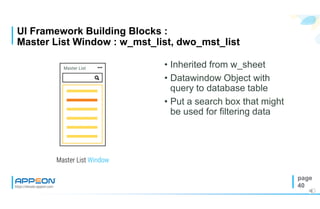
UI Framework Building Blocks :
Master List Window : w_mst_list, dwo_mst_list
page
40
• Inherited from w_sheet
• Datawindow Object with
query to database table
• Put a search box that might
be used for filtering data
Master List Window
Master List

https://elevate.appeon.com
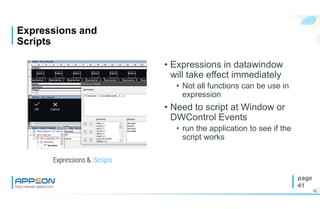
Expressions and
Scripts
page
41
• Expressions in datawindow
will take effect immediately
• Not all functions can be use in
expression
• Need to script at Window or
DWControl Events
• run the application to see if the
script works
Expressions & Scripts
How to
https://elevate.appeon.com
Other
Possibilities
page
43
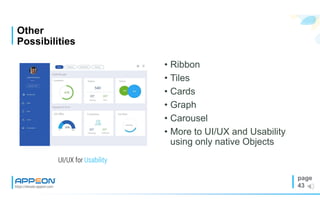
• Ribbon
• Tiles
• Cards
• Graph
• Carousel
• More to UI/UX and Usability
using only native Objects
UI/UX for Usability
https://elevate.appeon.com
Design Limitation :
(Disk) Space is the Final Frontier
page
44
• Creativity is without limit
• There will always more
storage spaces
• Limited by PB Features?
There will be workaround or
it became features that
Eventually will be released on
next version (ex: Theme,
RibbonBar, etc)
Space is the Final Frontier
https://elevate.appeon.com
Notes from UI/UX
Experts
page
45
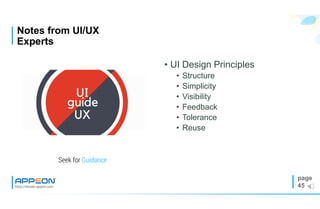
• UI Design Principles
• Structure
• Simplicity
• Visibility
• Feedback
• Tolerance
• Reuse
Seek for Guidance
https://elevate.appeon.com
Souvenir for attending :
Framework Source Code
page
46
• Download from :
• http://pbdev.id/elevate2019
• Youtube channel :
• https://www.youtube.com/channel/UCbn3
GqvzKeneDQuy8JvoSIQ?sub_confirmati
on=1
• Instagram :
• instagram.com/pemulapowerbuilder/
• Twitter :
• twitter.com/ppowerbuilderThis Framework is for Giveaway
https://elevate.appeon.com
Using Local
Fonts
page
47
function long AddFontResourceExW( readonly string as_FontFile, ulong aul_FontCharacteristics, ulong
aul_Reserved ) library "GDI32.dll" alias for "AddFontResourceExW“
function boolean RemoveFontResourceExW( readonly string as_FonfFile, ulong aul_FontCharacteristics,
ulong aul_Reserved ) library "GDI32.dll" alias for "RemoveFontResourceExW"
constant long FR_PRIVATE = 16
constant long FR_NOT_ENUM = 32
AddFontResourceExW("pathtofontsyourfont.ttf",FR_PRIVATE + FR_NOT_ENUM,0)
https://elevate.appeon.com
Q&A
Time
page
48
Connect with the
Appeon Community
Follow Appeon and community members to
get the latest tech news.
twitter.com/AppeonPB
Encourage us with a “like”, see cool pics, and
get notified of upcoming events.
facebook.com/AppeonPB
Share important Appeon videos with others;
no account registration required.
youtube.com/c/AppeonHQ
linkedin.com
Build up your career profile, and stay in
contact with other professionals.
Discussions, tech articles and videos, free
online training, and more.
community.appeon.com
https://elevate.appeon.com
page
49
Thank You
zulmach@pbdev.id
+628155555368

Creating Modern UI PowerBuilder Framework using native objects

  • 1.
    ©2019 Appeon Limitedand its subsidiaries. All rights reserved. Zulmach October 30th, 2019 Creating Modern UI Framework Using Native Powerbuilder Objects
  • 2.
    DISCLAIMER This presentation wasauthored by volunteer(s) in the Appeon community. This is not a work for hire by Appeon. The views and opinions expressed in this presentation are those of the author(s). Its contents are protected by US copyright law and may not be reproduced, distributed, transmitted, displayed, published or broadcast without the prior written permission of Appeon. All rights belong to their respective owners. Any reference to third-party materials, including but not limited to Websites, content, services, or software, has not been reviewed or endorsed by Appeon. YOUR USE OF THIRD- PARTY MATERIALS SHALL BE AT YOUR OWN RISK. Appeon makes no warranty of any kind, either express or implied, including but not limited to, the implied warranties of merchantability, fitness for a particular purpose, or non- infringement. Appeon assumes no responsibility for errors or omissions.
  • 3.
    page 3https://elevate.appeon.com • Typical (Common)Powerbuilder Application UI • The search for great UI • Business Application UI/UX Design Pattern • Demo • Creating the Framework • Other Possibilities Session Agenda
  • 4.
    Key Skills Recent Projects https://elevate.appeon.com Linkedin.com/in/zulmach ZulkifliMachmur (Zulmach) • 2019 - Consultant. Government owned hospital, PT. Rumah Sakit Pelabuhan, Member of Indoneisa Port Companies, Jakarta • 2018 – Consultant, Developer, Multi Finance System, PT. Astrido Pacific Finance, Jakarta • 2017 – Consultant in Partner with PT. Intisoft Mitra Solusi. Migrate PowerBuilder Application to Appeon on State of Jakarta Owned Bank, Bank DKI, Jakarta • Graphic Design • Sketch & Drawing • PowerBuilder • SQL Author Profile page 4 twitter.com/ppowerbuilder instagram.com/pemulapowerbuilder
  • 5.
    About https://elevate.appeon.com It’s a Communityof professional freelancers, providing Consultancy, Courses, Creation and Content that related to Appeon, PowerBuilder, PowerServer, and former Sybase’s Products Community Profile page 5 pbdev.id Partners
  • 6.
    page 6https://elevate.appeon.com • Window • TitleBar • Menu Bar • Toolbar • MDI Window • Controls Typical (Common) PowerBuilder Application UI
  • 7.
    page 7https://elevate.appeon.com • OCX Controls •PBX Canvas • Custom Controls • Other 3rd Party • Native Method The Search for Great UI/UX
  • 8.
    page 8https://elevate.appeon.com • Simple • Clean •Touchscreen • Web • Mobile • Theme • Animation • and more … Modern Application UI/UX
  • 9.
    page 9https://elevate.appeon.com • Splash • Login •Masthead • Home /Dashboard • Launcher • Message Box • Status Bar • About Business Application UI/UX Pattern • Toolbar • Action Bar • Search Window • Single Entry • Master Detail Entry • Report /Table View • Print Preview • Print Page Setup
  • 10.
  • 11.
  • 12.
  • 13.
  • 14.
  • 15.
  • 16.
  • 17.
  • 18.
  • 19.
  • 20.
  • 21.
    page 21https://elevate.appeon.com • Resources • Tools •Design Pattern • MDI • Window Object • Datawindow Object • Expression • Script Creating the UI/UX Framework
  • 22.
    https://elevate.appeon.com Framework Resources page 22 • True TypeFont Icon: • https://ionicons.com/v2/ • https://aka.ms/SegoeFonts • Download and Install the fonts we would like to use Ionicons TTF Segoe MDL2 Asset TTF
  • 23.
    https://elevate.appeon.com Framework Resources page 23 • Color References: • https://www.materialui.co/colors • https://materialuicolors.co • http://www.flatuicolorpicker.com • To copy the RGB Values Color References RGB
  • 24.
    https://elevate.appeon.com Framework Resources page 24 • Tools :Character Map : • https://www.microsoft.com/en- us/store/p/character-map- uwp/9wzdncrdxf41 • To export Specific icon character in PNG format Character Map UWP
  • 25.
    https://elevate.appeon.com Framework Resources page 25 • Images asNeeded : • Backgrounds • Gradients • Buttons • Icons • https://www.materialui.co/icons • Animated GIF • Other Images Needed Images
  • 26.
    page 26https://elevate.appeon.com Basic Things to Know DesktopWeb Mobile 1 MDI Style    2 Fonts    3 Window Open/Close Animation    4 Datawindow Zoom    5 Datawindow Gradient Color    6 Transparent PNG (buggy)    7 Animated GIF   
  • 27.
    page 27https://elevate.appeon.com • Framework forall : Desktop, Web and Mobile • MDI Style Desktop only took one Taskbar Button • MDI Frame will sits inside Browser Window (Appeon Web) • MDI Frame will take full screen size (Appeon Mobile, with menu items hidden) • Possible to hide MDI Sheet Titlebar • Menu Object Can be used to Capture Shortcut Key while its hidden (Desktop and Web) Why MDI Style?
  • 28.
    https://elevate.appeon.com Framework Design Pattern page 28 MDI Frame MDISheet  Modules Launcher  Masthead  Message Bar Action List     Toolbar
  • 29.
    https://elevate.appeon.com UI Framework BuildingBlocks : MDI Frame Window Object : w_bed page 29 • mdi! type Window Object • Act as container • Attached Mandatory Menu Object with Hidden items that can capture shortcut key • With no toolbar (please…) • Handle common MDI Frame functionalities (eg: resize) MDI Frame Window Object MDI Frame
  • 30.
    https://elevate.appeon.com UI Framework BuildingBlocks : MDI Sheet Window : w_sheet page 30 • popup! Type Window Object • Might have Menu Object with Hidden items that can capture shortcut key • Custom Sliding open and close animation (default animation properties only work on desktop) MDI Sheet Window MDI Sheet
  • 31.
    https://elevate.appeon.com UI Framework BuildingBlocks : Splash Window : w_splash page 31 • Inherited from w_sheet • Put Datawindow Control • Create Datawindow Object • GIF Animation only works on desktop • Use Image Sequence and Timing to Simulate the animation Splash Window MDI Sheet
  • 32.
    https://elevate.appeon.com UI Framework BuildingBlocks : Login Window : w_Login, dwo_login page 32 • Inherited from w_sheet • Datawindow Object • With nice login image • External columns to get input • Create user event to handle Login Processing Login Window
  • 33.
    https://elevate.appeon.com UI Framework BuildingBlocks : Masthead Datawindow : dwo_title page 33 • External Datasource Datawindow Object • Displaying Title of current Active Module Window • Navigation to Modules Launcher • Access to Common Actions • User Profile, Logout, Exit, etc. Masthead Dataindow Object  Application Identity 
  • 34.
    https://elevate.appeon.com UI Framework BuildingBlocks : Module Launcher : w_modules, dwo_modules page 34 • Inherited from w_sheet • Hidden menu items to capture shortcut key • Datawindow Object with Database table data source for modules list • Module Name • Module Window Object Name • Used to limit user’s access to modulesModules Launcer  Modules Launcher 
  • 35.
    https://elevate.appeon.com UI Framework BuildingBlocks : Toolbar Datawindow Object : dwo_toolbar page 35 • External Datasource Datawindow Object • With Columns for Toolbar placeholder • Icon Name • Icon Picture • Event Name • Expressions and Scripts to handle placement Toolbar datawindow Object     Toolbar
  • 36.
    https://elevate.appeon.com UI Framework BuildingBlocks : Action List Window : w_action, dwo_action page 36 • Inherited from w_sheet • External Datasource Datawindow Object • With Columns like Toolbar placeholder • Icon Name • Icon Picture • Event Name Action List Window Action List
  • 37.
    https://elevate.appeon.com UI Framework BuildingBlocks : Message Bar Window : w_msgbar, dwo_msgbar page 37 • Inherited from w_sheet • External Datasource Datawindow Object • With Columns • Icon Picture • messagetext Message Bar Window  Message Bar
  • 38.
    https://elevate.appeon.com UI Framework BuildingBlocks : Welcome (Home) Window : w_home, dwo_home page 38 • Inherited from w_sheet • Put Datawindow Control • Create Datawindow Object • Displaying User Info • Other info : • Reminder • Notification Home Window  Module Name
  • 39.
    https://elevate.appeon.com UI Framework BuildingBlocks : Master Sheet Window : w_mst, dwo_mst page 39 • Inherited from w_sheet • Masthead Datawindow • Toolbar Datawindow • Datawindow for Input Master Data Master Sheet Window Master Sheet  Module Name     Toolbar Master Datawindow Object
  • 40.
    https://elevate.appeon.com UI Framework BuildingBlocks : Master List Window : w_mst_list, dwo_mst_list page 40 • Inherited from w_sheet • Datawindow Object with query to database table • Put a search box that might be used for filtering data Master List Window Master List 
  • 41.
    https://elevate.appeon.com Expressions and Scripts page 41 • Expressionsin datawindow will take effect immediately • Not all functions can be use in expression • Need to script at Window or DWControl Events • run the application to see if the script works Expressions & Scripts
  • 42.
  • 43.
    https://elevate.appeon.com Other Possibilities page 43 • Ribbon • Tiles •Cards • Graph • Carousel • More to UI/UX and Usability using only native Objects UI/UX for Usability
  • 44.
    https://elevate.appeon.com Design Limitation : (Disk)Space is the Final Frontier page 44 • Creativity is without limit • There will always more storage spaces • Limited by PB Features? There will be workaround or it became features that Eventually will be released on next version (ex: Theme, RibbonBar, etc) Space is the Final Frontier
  • 45.
    https://elevate.appeon.com Notes from UI/UX Experts page 45 •UI Design Principles • Structure • Simplicity • Visibility • Feedback • Tolerance • Reuse Seek for Guidance
  • 46.
    https://elevate.appeon.com Souvenir for attending: Framework Source Code page 46 • Download from : • http://pbdev.id/elevate2019 • Youtube channel : • https://www.youtube.com/channel/UCbn3 GqvzKeneDQuy8JvoSIQ?sub_confirmati on=1 • Instagram : • instagram.com/pemulapowerbuilder/ • Twitter : • twitter.com/ppowerbuilderThis Framework is for Giveaway
  • 47.
    https://elevate.appeon.com Using Local Fonts page 47 function longAddFontResourceExW( readonly string as_FontFile, ulong aul_FontCharacteristics, ulong aul_Reserved ) library "GDI32.dll" alias for "AddFontResourceExW“ function boolean RemoveFontResourceExW( readonly string as_FonfFile, ulong aul_FontCharacteristics, ulong aul_Reserved ) library "GDI32.dll" alias for "RemoveFontResourceExW" constant long FR_PRIVATE = 16 constant long FR_NOT_ENUM = 32 AddFontResourceExW("pathtofontsyourfont.ttf",FR_PRIVATE + FR_NOT_ENUM,0)
  • 48.
  • 49.
    Connect with the AppeonCommunity Follow Appeon and community members to get the latest tech news. twitter.com/AppeonPB Encourage us with a “like”, see cool pics, and get notified of upcoming events. facebook.com/AppeonPB Share important Appeon videos with others; no account registration required. youtube.com/c/AppeonHQ linkedin.com Build up your career profile, and stay in contact with other professionals. Discussions, tech articles and videos, free online training, and more. community.appeon.com https://elevate.appeon.com page 49
  • 50.