HP JetAdvantage
Print Security
Ron Chestang CISM, GCIAH, CEH,
AMS Print Security Advisor
©2016 HP, Inc. All rights reserved. | The information contained herein is subject to change without notice. | HP Confidential1
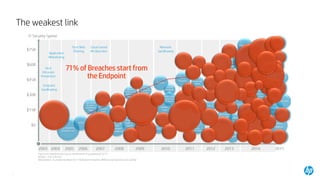
The weakest link
2
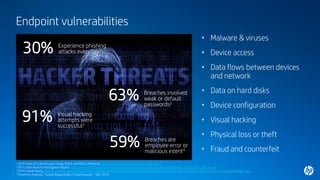
Endpoint vulnerabilities
3
• Malware & viruses
• Device access
• Data flows between devices
and network
• Data on hard disks
• Device configuration
• Visual hacking
• Physical loss or theft
• Fraud and counterfeit
59%
30% Experience phishing
attacks everyday1
Breaches are
employee error or
malicious intent4
1 2016 State of Cybersecurity Study, ISACA and RSA Conference, www.isaca.org/state-of-cybersecurity-2016
2 2015 Data Breach Investigative Report, http://www.verizonenterprise.com/resources/reports/rp_data-breach-investigation-report_2015_en_xg.pdf
3 2016 Global Study, http://investors.3m.com/news/press-release-details/2016/New-Global-Study-Reveals-Majority-of-Visual-Hacking-Attempts-Are-Successful/default.aspx
4 Ponemon Institute, “Global Megatrends in Cybersecurity ,” Feb. 2015
63% Breaches involved
weak or default
passwords2
91% Visual hacking
attempts were
successful3
4
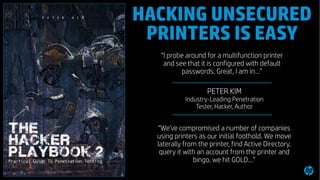
“I probe around for a multifunction printer
and see that it is configured with default
passwords. Great, I am in…”
“We've compromised a number of companies
using printers as our initial foothold. We move
laterally from the printer, find Active Directory,
query it with an account from the printer and
bingo, we hit GOLD…”
- PETER KIM
Industry-Leading Penetration
Tester, Hacker, Author
HACKING UNSECURED
PRINTERS IS EASY
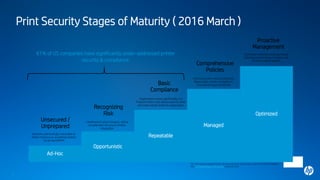
Print Security Stages of Maturity ( 2016 March )
5
Ad-Hoc
Opportunistic
Repeatable
Managed
Unsecured /
Unprepared
Recognizing
Risk
Basic
Compliance
Comprehensive
Policies
Proactive
Management
Business unknowingly vulnerable to
Either malicious or accidental attacks
via printers/MFPs
Likelihood of attack lessens, still at
considerable risk due to limited
integration
Organization invest significantly in a
Program that is very device specific, does
not meet robust needs of organization
Continuous print security practices
Reasonably certain, exception is
Unexpected types of attacks
Continued readiness using optimized
Solutions and strategy mitigates risk
Of print-related attacks
Optimized
1IDC, “IDC MaturityScape Benchmark: Print Security in the United States,” March 2016 IDC#US41048016
2IDC, “IDC MaturityScape: Print Security”, December 2015
61% of US companies have significantly under-addressed printer
security & compliance1
6
IoT
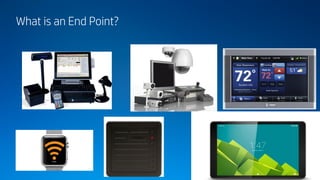
What is an End Point?
SEAHawk
9
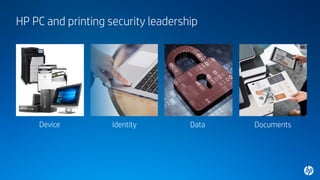
HP PC and printing security leadership
Device Identity Data Documents
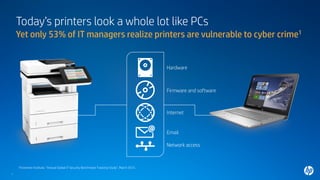
Today’s printers look a whole lot like PCs
11
Yet only 53% of IT managers realize printers are vulnerable to cyber crime1
Firmware and software
Hardware
Network access
Email
Internet
1Ponemon Institute, “Annual Global IT Security Benchmark Tracking Study”, March 2015.
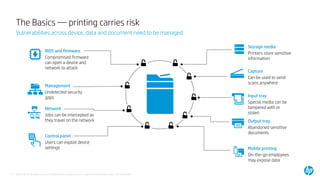
The Basics — printing carries risk
12
Vulnerabilities across device, data and document need to be managed
Mobile printing
On-the-go employees
may expose data
Input tray
Special media can be
tampered with or
stolen
Storage media
Printers store sensitive
information
Capture
Can be used to send
scans anywhere
Management
Undetected security
gaps
Output tray
Abandoned sensitive
documents
Network
Jobs can be intercepted as
they travel on the network
BIOS and firmware
Compromised firmware
can open a device and
network to attack
Control panel
Users can exploit device
settings
©2016 HP, Inc. All rights reserved. | The information contained herein is subject to change without notice. | HP Confidential
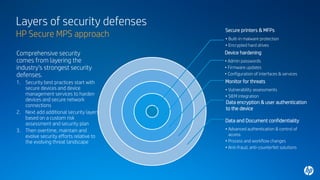
Layers of security defenses
HP Secure MPS approach
Secure printers & MFPs
• Built-in malware protection
• Encrypted hard drives
Device hardening
• Admin passwords
• Firmware updates
• Configuration of interfaces & services
Data encryption & user authentication
to the device
Monitor for threats
• Vulnerability assessments
• SIEM integration
Data and Document confidentiality
• Advanced authentication & control of
access
• Process and workflow changes
• Anti-fraud, anti-counterfeit solutions
Comprehensive security
comes from layering the
industry’s strongest security
defenses.
1. Security best practices start with
secure devices and device
management services to harden
devices and secure network
connections
2. Next add additional security layers
based on a custom risk
assessment and security plan
3. Then overtime, maintain and
evolve security efforts relative to
the evolving threat landscape
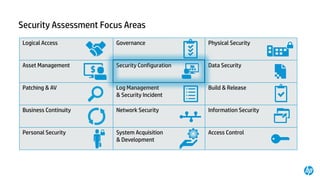
Security Assessment Focus Areas
Logical Access Governance Physical Security
Asset Management Security Configuration Data Security
Patching & AV Log Management
& Security Incident
Build & Release
Business Continuity Network Security Information Security
Personal Security System Acquisition
& Development
Access Control
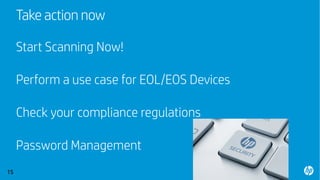
Take action now
Start Scanning Now!
Perform a use case for EOL/EOS Devices
Check your compliance regulations
Password Management
15
© 2015 Hewlett-Packard Development Company, L.P. The information contained herein is subject to change without notice.16
HP Confidential
Thank You

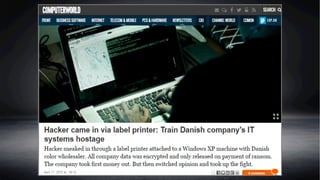
Think Your Network Is Safe? Check Your Printers

  • 1.
    HP JetAdvantage Print Security RonChestang CISM, GCIAH, CEH, AMS Print Security Advisor ©2016 HP, Inc. All rights reserved. | The information contained herein is subject to change without notice. | HP Confidential1
  • 2.
  • 3.
    Endpoint vulnerabilities 3 • Malware& viruses • Device access • Data flows between devices and network • Data on hard disks • Device configuration • Visual hacking • Physical loss or theft • Fraud and counterfeit 59% 30% Experience phishing attacks everyday1 Breaches are employee error or malicious intent4 1 2016 State of Cybersecurity Study, ISACA and RSA Conference, www.isaca.org/state-of-cybersecurity-2016 2 2015 Data Breach Investigative Report, http://www.verizonenterprise.com/resources/reports/rp_data-breach-investigation-report_2015_en_xg.pdf 3 2016 Global Study, http://investors.3m.com/news/press-release-details/2016/New-Global-Study-Reveals-Majority-of-Visual-Hacking-Attempts-Are-Successful/default.aspx 4 Ponemon Institute, “Global Megatrends in Cybersecurity ,” Feb. 2015 63% Breaches involved weak or default passwords2 91% Visual hacking attempts were successful3
  • 4.
    4 “I probe aroundfor a multifunction printer and see that it is configured with default passwords. Great, I am in…” “We've compromised a number of companies using printers as our initial foothold. We move laterally from the printer, find Active Directory, query it with an account from the printer and bingo, we hit GOLD…” - PETER KIM Industry-Leading Penetration Tester, Hacker, Author HACKING UNSECURED PRINTERS IS EASY
  • 5.
    Print Security Stagesof Maturity ( 2016 March ) 5 Ad-Hoc Opportunistic Repeatable Managed Unsecured / Unprepared Recognizing Risk Basic Compliance Comprehensive Policies Proactive Management Business unknowingly vulnerable to Either malicious or accidental attacks via printers/MFPs Likelihood of attack lessens, still at considerable risk due to limited integration Organization invest significantly in a Program that is very device specific, does not meet robust needs of organization Continuous print security practices Reasonably certain, exception is Unexpected types of attacks Continued readiness using optimized Solutions and strategy mitigates risk Of print-related attacks Optimized 1IDC, “IDC MaturityScape Benchmark: Print Security in the United States,” March 2016 IDC#US41048016 2IDC, “IDC MaturityScape: Print Security”, December 2015 61% of US companies have significantly under-addressed printer security & compliance1
  • 6.
  • 7.
    What is anEnd Point? SEAHawk
  • 9.
  • 10.
    HP PC andprinting security leadership Device Identity Data Documents
  • 11.
    Today’s printers looka whole lot like PCs 11 Yet only 53% of IT managers realize printers are vulnerable to cyber crime1 Firmware and software Hardware Network access Email Internet 1Ponemon Institute, “Annual Global IT Security Benchmark Tracking Study”, March 2015.
  • 12.
    The Basics —printing carries risk 12 Vulnerabilities across device, data and document need to be managed Mobile printing On-the-go employees may expose data Input tray Special media can be tampered with or stolen Storage media Printers store sensitive information Capture Can be used to send scans anywhere Management Undetected security gaps Output tray Abandoned sensitive documents Network Jobs can be intercepted as they travel on the network BIOS and firmware Compromised firmware can open a device and network to attack Control panel Users can exploit device settings ©2016 HP, Inc. All rights reserved. | The information contained herein is subject to change without notice. | HP Confidential
  • 13.
    Layers of securitydefenses HP Secure MPS approach Secure printers & MFPs • Built-in malware protection • Encrypted hard drives Device hardening • Admin passwords • Firmware updates • Configuration of interfaces & services Data encryption & user authentication to the device Monitor for threats • Vulnerability assessments • SIEM integration Data and Document confidentiality • Advanced authentication & control of access • Process and workflow changes • Anti-fraud, anti-counterfeit solutions Comprehensive security comes from layering the industry’s strongest security defenses. 1. Security best practices start with secure devices and device management services to harden devices and secure network connections 2. Next add additional security layers based on a custom risk assessment and security plan 3. Then overtime, maintain and evolve security efforts relative to the evolving threat landscape
  • 14.
    Security Assessment FocusAreas Logical Access Governance Physical Security Asset Management Security Configuration Data Security Patching & AV Log Management & Security Incident Build & Release Business Continuity Network Security Information Security Personal Security System Acquisition & Development Access Control
  • 15.
    Take action now StartScanning Now! Perform a use case for EOL/EOS Devices Check your compliance regulations Password Management 15
  • 16.
    © 2015 Hewlett-PackardDevelopment Company, L.P. The information contained herein is subject to change without notice.16 HP Confidential Thank You