The Economics of Tiers in Virtual Storage Pools
There are numerous companies that help cloud-enable apps, servers
and networks. You’ve likely spent a fair amount of time strategizing
with a few of them. Yet, it’s been our experience that storage
considerations are often left for last; which inevitably leads to a mad
scramble wrestling the many difficult, disk-related matters that no one
had anticipated. We’d even go on to say that it is not at all uncommon
for these seemingly peripheral issues to be overlooked altogether
until they become a serious stumbling block in your rollout.
Fortunately, whether you’re in a panic, or early in your planning,
you’ll find the guidance below timely and actionable. You see,
DataCore, in partnership with our network of authorized solution
advisors, offers consultation in the specialized domain of storage
virtualization software – the state-of-the-art technology for tackling
storage-related matters in IT organizations large or small.
We’ve accumulated strong credentials across 20,000+
installations spread across the globe. An increasing percentage
of these aspire to host private clouds like you.
Cloud Reference Models
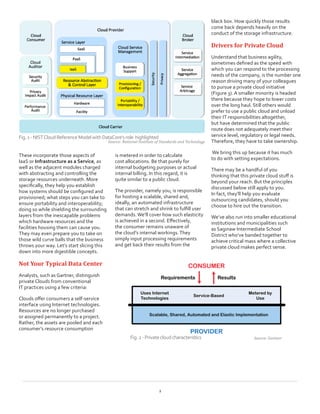
First, don’t be shocked at seeing the elaborate diagram (Figure 1)
conceived by the National Institute of Standards and Technology (NIST).
Think of it as the Reference Architecture for making a well-designed Cloud.
None of us pretend to be experts on these many service layers, but we
do have a real good handle on the modules in the center of the diagram.
The Storage Side of Private Clouds
Keeping it Light and Inexpensive
WHITE PAPER
Abstract
In the past 2 to 3 years, the storage
side of private clouds has been
weighed down by heavy iron, big
spending and a lot of complexity.
Throughout this white paper
you’ll get acquainted with recent
software developments and
practices which reshape storage
into a far more appealing and
inexpensive component of your
next generation IT environment.
Pressing Topics
•	 Contrast from typical data center
•	 Customer examples
•	 Where to get started
•	 Measuring success
•	 Transition Guidelines
•	 Resource Sharing & Provisioning
•	 Service Levels
•	 Automation
•	 Resiliency
•	 Change Management
•	 Portability
2
These incorporate those aspects of
IaaS or Infrastructure as a Service, as
well as the adjacent modules charged
with abstracting and controlling the
storage resources underneath. More
specifically, they help you establish
how systems should be configured and
provisioned; what steps you can take to
ensure portability and interoperability;
doing so while shielding the surrounding
layers from the inescapable problems
which hardware resources and the
facilities housing them can cause you.
They may even prepare you to take on
those wild curve balls that the business
throws your way. Let’s start slicing this
down into more digestible concepts.
Not Your Typical Data Center
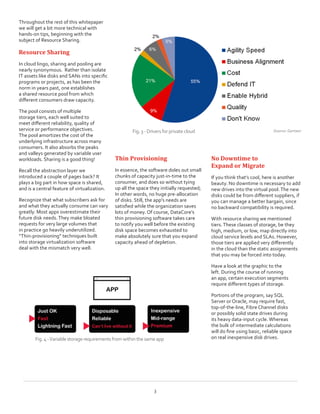
Analysts, such as Gartner, distinguish
private Clouds from conventional
IT practices using a few criteria:
Clouds offer consumers a self-service
interface using Internet technologies.
Resources are no longer purchased
or assigned permanently to a project.
Rather, the assets are pooled and each
consumer’s resource consumption
is metered in order to calculate
cost allocations. Be that purely for
internal budgeting purposes or actual
internal billing. In this regard, it is
quite similar to a public cloud.
The provider, namely you, is responsible
for hosting a scalable, shared and,
ideally, an automated infrastructure
that can stretch and shrink to fulfill user
demands. We’ll cover how such elasticity
is achieved in a second. Effectively,
the consumer remains unaware of
the cloud’s internal workings.They
simply input processing requirements
and get back their results from the
black box. How quickly those results
come back depends heavily on the
conduct of the storage infrastructure.
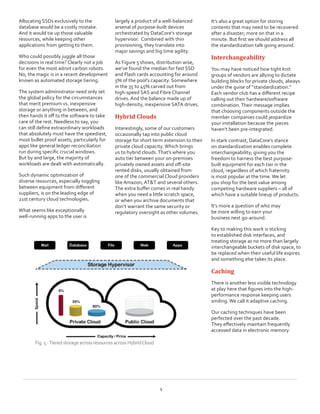
Drivers for Private Cloud
Understand that business agility,
sometimes defined as the speed with
which you can respond to the processing
needs of the company, is the number one
reason driving many of your colleagues
to pursue a private cloud initiative
(Figure 3). A smaller minority is headed
there because they hope to lower costs
over the long haul. Still others would
prefer to use a public cloud and unload
their IT responsibilities altogether,
but have determined that the public
route does not adequately meet their
service level, regulatory or legal needs.
Therefore, they have to take ownership.
We bring this up because it has much
to do with setting expectations.
There may be a handful of you
thinking that this private cloud stuff is
beyond your reach. But the principles
discussed below still apply to you.
In fact, they’ll help you evaluate
outsourcing candidates, should you
choose to hire out the transition.
We’ve also run into smaller educational
institutions and municipalities such
as Saginaw Intermediate School
District who’ve banded together to
achieve critical mass where a collective
private cloud makes perfect sense.
Fig.1-NISTCloudReferenceModelwithDataCore’srole  highlighted
Source: National Institute of Standards and Technology
Source: GartnerFig.2-Privatecloudcharacteristics
Throughout the rest of this whitepaper
we will get a bit more technical with
hands-on tips, beginning with the
subject of Resource Sharing.
Resource Sharing
In cloud lingo, sharing and pooling are
nearly synonymous.  Rather than isolate
IT assets like disks and SANs into specific
programs or projects, as has been the
norm in years past, one establishes
a shared resource pool from which
different consumers draw capacity.
The pool consists of multiple
storage tiers, each well suited to
meet different reliability, quality of
service or performance objectives.
The pool amortizes the cost of the
underlying infrastructure across many
consumers. It also absorbs the peaks
and valleys generated by variable user
workloads. Sharing is a good thing!
Recall the abstraction layer we
introduced a couple of pages back? It
plays a big part in how space is shared,
and is a central feature of virtualization.
Recognize that what subscribers ask for
and what they actually consume can vary
greatly. Most apps overestimate their
future disk needs.They make bloated
requests for very large volumes that  
in practice go heavily underutilized.
“Thin-provisioning” techniques built
into storage virtualization software
deal with the mismatch very well.
Thin Provisioning
In essence, the software doles out small
chunks of capacity just-in-time to the
consumer, and does so without tying
up all the space they initially requested;
In other words, no huge pre-allocation
of disks. Still, the app‘s needs are
satisfied while the organization saves
lots of money. Of course, DataCore’s
thin provisioning software takes care
to notify you well before the existing
disk space becomes exhausted to
make absolutely sure that you expand
capacity ahead of depletion.
No Downtime to
Expand or Migrate
If you think that’s cool, here is another
beauty. No downtime is necessary to add
new drives into the virtual pool.The new
disks could be from different suppliers, if
you can manage a better bargain, since
no backward compatibility is required.
With resource sharing we mentioned
tiers.These classes of storage, be they
high, medium, or low, map directly into
cloud service levels and SLAs. However,
those tiers are applied very differently
in the cloud than the static assignments
that you may be forced into today.
Have a look at the graphic to the
left. During the course of running
an app, certain execution segments
require different types of storage.
Portions of the program, say SQL
Server or Oracle, may require fast,
top-of-the-line, Fibre Channel disks
or possibly solid state drives during
its heavy data-input cycle. Whereas
the bulk of intermediate calculations
will do fine using basic, reliable space
on real inexpensive disk drives.
Source: GartnerFig.3- Driversforprivatecloud
3
Fig.4-Variablestoragerequirementsfromwithinthe sameapp
Allocating SSDs exclusively to the
database would be a costly mistake.
And it would tie up those valuable
resources, while keeping other
applications from getting to them.
Who could possibly juggle all those
decisions in real time? Clearly not a job
for even the most adroit carbon robots.
No, the magic is in a recent development
known as automated storage tiering.
The system administrator need only set
the global policy for the circumstances
that merit premium vs. inexpensive
storage or anything in between, and
then hands it off to the software to take
care of the rest. Needless to say, you
can still define extraordinary workloads
that absolutely must have the speediest,
most bullet proof assets; particularly for
apps like general ledger reconciliation
run during specific crucial windows.
But by and large, the majority of
workloads are dealt with automatically.
Such dynamic optimization of
diverse resources, especially toggling
between equipment from different
suppliers, is on the leading edge of
21st century cloud technologies.
What seems like exceptionally
well-running apps to the user is
largely a product of a well-balanced
arsenal of purpose-built devices
orchestrated by DataCore’s storage
hypervisor.  Combined with thin
provisioning, they translate into
major savings and big time agility.  
As Figure 5 shows, distribution wise,
we’ve found the median for fast SSD
and Flash cards accounting for around
5% of the pool’s capacity. Somewhere
in the 35 to 45% carved out from
high-speed SAS and Fibre Channel
drives. And the balance made up of
high-density, inexpensive SATA drives.
Hybrid Clouds
Interestingly, some of our customers
occasionally tap into public cloud
storage for short term extension to their
private cloud capacity. Which brings
us to hybrid clouds.That’s where you
auto tier between your on-premises
privately owned assets and off-site
rented disks, usually obtained from
one of the commercial Cloud providers
like Amazon, AT&T and several others.
The extra buffer comes in real handy
when you need a little scratch space,
or when you archive documents that
don’t warrant the same security or
regulatory oversight as other volumes.
It’s also a great option for storing
contents that may need to be recovered
after a disaster; more on that in a
minute. But first we should address all
the standardization talk going around.
Interchangeability
You may have noticed how tight knit
groups of vendors are allying to dictate
building blocks for private clouds, always
under the guise of “standardization.”
Each vendor club has a different recipe
calling out their hardware/software
combination.Their message implies
that choosing components outside the
member companies could jeopardize
your installation because the pieces
haven’t been pre-integrated.
In stark contrast, DataCore’s stance
on standardization enables complete
interchangeability; giving you the
freedom to harness the best purpose-
built equipment for each tier in the
cloud, regardless of which fraternity
is most popular at the time. We let
you shop for the best value among
competing hardware suppliers – all of
which have a suitable lineup of products.
It’s more a question of who may
be more willing to earn your
business next go-around.
Key to making this work is sticking
to established disk interfaces, and
treating storage as no more than largely
interchangeable buckets of disk space, to
be replaced when their useful life expires
and something else takes its place.
Caching
There is another less visible technology
at play here that figures into the high-
performance response keeping users
smiling. We call it adaptive caching.
Our caching techniques have been
perfected over the past decade.
They effectively maintain frequently
accessed data in electronic memory
4
Fig.5-TieredstorageacrossresourcesacrossHybridCloud
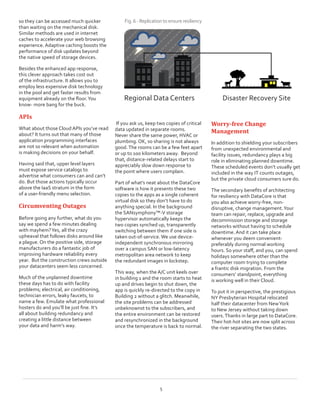
so they can be accessed much quicker
than waiting on the mechanical disk.
Similar methods are used in internet
caches to accelerate your web browsing
experience. Adaptive caching boosts the
performance of disk updates beyond
the native speed of storage devices.
Besides the enhanced app response,
this clever approach takes cost out
of the infrastructure. It allows you to
employ less expensive disk technology
in the pool and get faster results from
equipment already on the floor.You
know- more bang for the buck.
APIs
What about those Cloud APIs you’ve read
about? It turns out that many of those
application programming interfaces
are not so relevant when automation
is making decisions on your behalf.
Having said that, upper level layers
must expose service catalogs to
advertise what consumers can and can’t
do. But those actions typically occur
above the IaaS stratum in the form
of a user-friendly menu selection.
Circumventing Outages
Before going any further, what do you
say we spend a few minutes dealing
with mayhem?Yes, all the crazy
upheaval that follows disks around like
a plague. On the positive side, storage
manufacturers do a fantastic job of
improving hardware reliability every
year.  But the construction crews outside
your datacenters seem less concerned.
Much of the unplanned downtime
these days has to do with facility
problems; electrical, air conditioning,
technician errors, leaky faucets, to
name a few. Emulate what professional
hosters do and you’ll be just fine. It’s
all about building redundancy and
creating a little distance between
your data and harm’s way.
If you ask us, keep two copies of critical
data updated in separate rooms.
Never share the same power, HVAC or
plumbing. OK, so sharing is not always
good.The rooms can be a few feet apart
or up to 100 kilometers away.  Beyond
that, distance-related delays start to
appreciably slow down response to
the point where users complain.
Part of what’s neat about the DataCore
software is how it presents these two
copies to the apps as a single coherent
virtual disk so they don’t have to do
anything special. In the background
the SANsymphony™-V storage
hypervisor automatically keeps the
two copies synched up, transparently
switching between them if one side is
taken out-of-service. We use device-
independent synchronous mirroring
over a campus SAN or low-latency
metropolitan area network to keep
the redundant images in lockstep.
This way, when the A/C unit keels over
in building 1 and the room starts to heat
up and drives begin to shut down, the
app is quickly re-directed to the copy in
Building 2 without a glitch. Meanwhile,
the site problems can be addressed
unbeknownst to the subscribers, and
the entire environment can be restored
and resynchronized in the background
once the temperature is back to normal.
Worry-free Change
Management
In addition to shielding your subscribers
from unexpected environmental and
facility issues, redundancy plays a big
role in eliminating planned downtime.
These scheduled events don’t usually get
included in the way IT counts outages,
but the private cloud consumers sure do.
The secondary benefits of architecting
for resiliency with DataCore is that
you also achieve worry-free, non-
disruptive, change management.Your
team can repair, replace, upgrade and
decommission storage and storage
networks without having to schedule
downtime. And it can take place
whenever you deem convenient-
preferably during normal working
hours. So your staff, and you, can spend
holidays somewhere other than the
computer room trying to complete
a frantic disk migration. From the
consumers’ standpoint, everything
is working well in their Cloud.
To put it in perspective, the prestigious
NY Presbyterian Hospital relocated
half their datacenter from NewYork
to New Jersey without taking down
users.Thanks in large part to DataCore.
Their hot-hot sites are now split across
the river separating the two states.
5
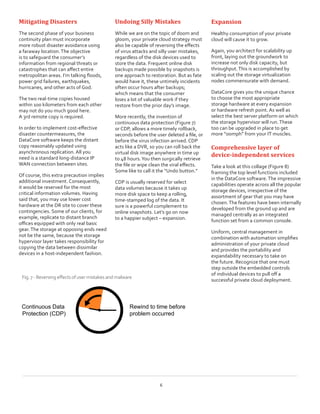
Regional Data Centers                  Disaster Recovery Site
Fig.6- Replicationtoensure resiliency
Mitigating Disasters
The second phase of your business
continuity plan must incorporate
more robust disaster avoidance using
a faraway location.The objective
is to safeguard the consumer’s
information from regional threats or
catastrophes that can affect entire
metropolitan areas. I’m talking floods,
power grid failures, earthquakes,
hurricanes, and other acts of God.
The two real-time copies housed
within 100 kilometers from each other
may not do you much good here.
A 3rd remote copy is required.
In order to implement cost-effective
disaster countermeasures, the
DataCore software keeps the distant
copy reasonably updated using
asynchronous replication. All you
need is a standard long-distance IP
WAN connection between sites.
Of course, this extra precaution implies
additional investment. Consequently,
it would be reserved for the most
critical information volumes. Having
said that, you may use lower cost
hardware at the DR site to cover these
contingencies. Some of our clients, for
example, replicate to distant branch
offices equipped with only real basic
gear.The storage at opposing ends need
not be the same, because the storage
hypervisor layer takes responsibility for
copying the data between dissimilar
devices in a host-independent fashion.
Undoing Silly Mistakes
While we are on the topic of doom and
gloom, your private cloud strategy must
also be capable of reversing the effects
of virus attacks and silly user mistakes,
regardless of the disk devices used to
store the data. Frequent online disk
backups made possible by snapshots is
one approach to restoration. But as fate
would have it, these untimely incidents
often occur hours after backups;
which means that the consumer
loses a lot of valuable work if they
restore from the prior day’s image.
More recently, the invention of
continuous data protection (Figure 7)
or CDP, allows a more timely rollback,
seconds before the user deleted a file, or
before the virus infection arrived. CDP
acts like a DVR, so you can roll back the
virtual disk image anywhere in time up
to 48 hours.You then surgically retrieve
the file or wipe clean the viral effects.
Some like to call it the “Undo button.”
CDP is usually reserved for select
data volumes because it takes up
more disk space to keep a rolling,
time-stamped log of the data. It
sure is a powerful complement to
online snapshots. Let’s go on now
to a happier subject – expansion.
Expansion
Healthy consumption of your private
cloud will cause it to grow.
Again, you architect for scalability up
front, laying out the groundwork to
increase not only disk capacity, but
throughput.This is accomplished by
scaling out the storage virtualization
nodes commensurate with demand.
DataCore gives you the unique chance
to choose the most appropriate
storage hardware at every expansion
or hardware refresh point. As well as
select the best server platform on which
the storage hypervisor will run.These
too can be upgraded in place to get
more “oomph” from your IT muscles.
Comprehensive layer of
device-independent services
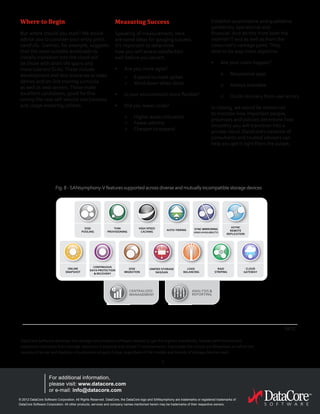
Take a look at this collage (Figure 8)
framing the top level functions included
in the DataCore software.The impressive
capabilities operate across all the popular
storage devices, irrespective of the
assortment of gear that you may have
chosen.The features have been internally
developed from the ground up and are
managed centrally as an integrated
function set from a common console.
Uniform, central management in
combination with automation simplifies
administration of your private cloud
and provides the portability and
expandability necessary to take on
the future. Recognize that one must
step outside the embedded controls
of individual devices to pull off a
successful private cloud deployment.
6
Continuous Data
Protection (CDP)
Rewind to time before
problem occurred
Fig.7-Reversingeffectsofusermistakesandmalware
Where to Begin
But where should you start? We would
advise you to consider your entry point
carefully.  Gartner, for example, suggests
that the most suitable workloads to
initially transition into the cloud will
be those with short life spans and
more tolerant SLAs.These include
development and test scenarios or sales
demos and on-line training curricula
as well as web servers.These make
excellent candidates, good for fine
tuning the new self-service mechanisms
and usage metering utilities.
Measuring Success
Speaking of measurement, here
are some ideas for gauging success.
It’s important to determine
how you will assess satisfaction
well before you launch.
•	 Are you more agile?
	 >	 Expand to meet spikes	
>	 Wind down when done
•	 Is your environment more flexible?
•	 Did you lower costs?
	 >	 Higher asset utilization
>	 Fewer admins
>	 Cheaper to expand
About DataCore Software
DataCore Software develops the storage virtualization software needed to get the highest availability, fastest performance and
maximum utilization from storage resources in physical and virtual IT environments. It provides the critical 3rd dimension on which the
success of server and desktop virtualization projects hinge, regardless of the models and brands of storage devices used.
© 2012 DataCore Software Corporation. All Rights Reserved. DataCore, the DataCore logo and SANsymphony are trademarks or registered trademarks of
DataCore Software Corporation. All other products, services and company names mentioned herein may be trademarks of their respective owners.
For additional information,
please visit: www.datacore.com
or e-mail: info@datacore.com
0412
7
Establish quantitative and qualitative
yardsticks, operational and
financial. And do this from both the
internal IT end as well as from the
consumer’s vantage point.They
tend to be way more objective.
•	 Are your users happier?
	 o	 Responsive apps
	 o	 Always available
	 o	 Quick recovery from user errors
In closing, we would be remiss not
to mention how important people,
processes and policies determine how
smoothly you will transition into a
private cloud. DataCore’s network of
consultants and trusted advisors can
help you get it right from the outset.
Fig.8-SANsymphony-Vfeaturessupportedacrossdiverse andmutuallyincompatiblestoragedevices
ANALYSIS &
REPORTING
CENTRALIZED
MANAGEMENT
ASYNC
REMOTE
REPLICATION
THIN
PROVISIONING
DISK
POOLING
AUTO-TIERING
HIGH SPEED
CACHING
SYNC MIRRORING
(HIGH-AVAILABILITY)
UNIFIED STORAGE
NAS/SAN
ONLINE
SNAPSHOT
CONTINUOUS
DATA PROTECTION
& RECOVERY
DISK
MIGRATION
LOAD
BALANCING
RAID
STRIPING
CLOUD
GATEWAY

The Storage Side of Private Clouds

  • 1.
    The Economics ofTiers in Virtual Storage Pools There are numerous companies that help cloud-enable apps, servers and networks. You’ve likely spent a fair amount of time strategizing with a few of them. Yet, it’s been our experience that storage considerations are often left for last; which inevitably leads to a mad scramble wrestling the many difficult, disk-related matters that no one had anticipated. We’d even go on to say that it is not at all uncommon for these seemingly peripheral issues to be overlooked altogether until they become a serious stumbling block in your rollout. Fortunately, whether you’re in a panic, or early in your planning, you’ll find the guidance below timely and actionable. You see, DataCore, in partnership with our network of authorized solution advisors, offers consultation in the specialized domain of storage virtualization software – the state-of-the-art technology for tackling storage-related matters in IT organizations large or small. We’ve accumulated strong credentials across 20,000+ installations spread across the globe. An increasing percentage of these aspire to host private clouds like you. Cloud Reference Models First, don’t be shocked at seeing the elaborate diagram (Figure 1) conceived by the National Institute of Standards and Technology (NIST). Think of it as the Reference Architecture for making a well-designed Cloud. None of us pretend to be experts on these many service layers, but we do have a real good handle on the modules in the center of the diagram. The Storage Side of Private Clouds Keeping it Light and Inexpensive WHITE PAPER Abstract In the past 2 to 3 years, the storage side of private clouds has been weighed down by heavy iron, big spending and a lot of complexity. Throughout this white paper you’ll get acquainted with recent software developments and practices which reshape storage into a far more appealing and inexpensive component of your next generation IT environment. Pressing Topics • Contrast from typical data center • Customer examples • Where to get started • Measuring success • Transition Guidelines • Resource Sharing & Provisioning • Service Levels • Automation • Resiliency • Change Management • Portability
  • 2.
    2 These incorporate thoseaspects of IaaS or Infrastructure as a Service, as well as the adjacent modules charged with abstracting and controlling the storage resources underneath. More specifically, they help you establish how systems should be configured and provisioned; what steps you can take to ensure portability and interoperability; doing so while shielding the surrounding layers from the inescapable problems which hardware resources and the facilities housing them can cause you. They may even prepare you to take on those wild curve balls that the business throws your way. Let’s start slicing this down into more digestible concepts. Not Your Typical Data Center Analysts, such as Gartner, distinguish private Clouds from conventional IT practices using a few criteria: Clouds offer consumers a self-service interface using Internet technologies. Resources are no longer purchased or assigned permanently to a project. Rather, the assets are pooled and each consumer’s resource consumption is metered in order to calculate cost allocations. Be that purely for internal budgeting purposes or actual internal billing. In this regard, it is quite similar to a public cloud. The provider, namely you, is responsible for hosting a scalable, shared and, ideally, an automated infrastructure that can stretch and shrink to fulfill user demands. We’ll cover how such elasticity is achieved in a second. Effectively, the consumer remains unaware of the cloud’s internal workings.They simply input processing requirements and get back their results from the black box. How quickly those results come back depends heavily on the conduct of the storage infrastructure. Drivers for Private Cloud Understand that business agility, sometimes defined as the speed with which you can respond to the processing needs of the company, is the number one reason driving many of your colleagues to pursue a private cloud initiative (Figure 3). A smaller minority is headed there because they hope to lower costs over the long haul. Still others would prefer to use a public cloud and unload their IT responsibilities altogether, but have determined that the public route does not adequately meet their service level, regulatory or legal needs. Therefore, they have to take ownership. We bring this up because it has much to do with setting expectations. There may be a handful of you thinking that this private cloud stuff is beyond your reach. But the principles discussed below still apply to you. In fact, they’ll help you evaluate outsourcing candidates, should you choose to hire out the transition. We’ve also run into smaller educational institutions and municipalities such as Saginaw Intermediate School District who’ve banded together to achieve critical mass where a collective private cloud makes perfect sense. Fig.1-NISTCloudReferenceModelwithDataCore’srole highlighted Source: National Institute of Standards and Technology Source: GartnerFig.2-Privatecloudcharacteristics
  • 3.
    Throughout the restof this whitepaper we will get a bit more technical with hands-on tips, beginning with the subject of Resource Sharing. Resource Sharing In cloud lingo, sharing and pooling are nearly synonymous. Rather than isolate IT assets like disks and SANs into specific programs or projects, as has been the norm in years past, one establishes a shared resource pool from which different consumers draw capacity. The pool consists of multiple storage tiers, each well suited to meet different reliability, quality of service or performance objectives. The pool amortizes the cost of the underlying infrastructure across many consumers. It also absorbs the peaks and valleys generated by variable user workloads. Sharing is a good thing! Recall the abstraction layer we introduced a couple of pages back? It plays a big part in how space is shared, and is a central feature of virtualization. Recognize that what subscribers ask for and what they actually consume can vary greatly. Most apps overestimate their future disk needs.They make bloated requests for very large volumes that in practice go heavily underutilized. “Thin-provisioning” techniques built into storage virtualization software deal with the mismatch very well. Thin Provisioning In essence, the software doles out small chunks of capacity just-in-time to the consumer, and does so without tying up all the space they initially requested; In other words, no huge pre-allocation of disks. Still, the app‘s needs are satisfied while the organization saves lots of money. Of course, DataCore’s thin provisioning software takes care to notify you well before the existing disk space becomes exhausted to make absolutely sure that you expand capacity ahead of depletion. No Downtime to Expand or Migrate If you think that’s cool, here is another beauty. No downtime is necessary to add new drives into the virtual pool.The new disks could be from different suppliers, if you can manage a better bargain, since no backward compatibility is required. With resource sharing we mentioned tiers.These classes of storage, be they high, medium, or low, map directly into cloud service levels and SLAs. However, those tiers are applied very differently in the cloud than the static assignments that you may be forced into today. Have a look at the graphic to the left. During the course of running an app, certain execution segments require different types of storage. Portions of the program, say SQL Server or Oracle, may require fast, top-of-the-line, Fibre Channel disks or possibly solid state drives during its heavy data-input cycle. Whereas the bulk of intermediate calculations will do fine using basic, reliable space on real inexpensive disk drives. Source: GartnerFig.3- Driversforprivatecloud 3 Fig.4-Variablestoragerequirementsfromwithinthe sameapp
  • 4.
    Allocating SSDs exclusivelyto the database would be a costly mistake. And it would tie up those valuable resources, while keeping other applications from getting to them. Who could possibly juggle all those decisions in real time? Clearly not a job for even the most adroit carbon robots. No, the magic is in a recent development known as automated storage tiering. The system administrator need only set the global policy for the circumstances that merit premium vs. inexpensive storage or anything in between, and then hands it off to the software to take care of the rest. Needless to say, you can still define extraordinary workloads that absolutely must have the speediest, most bullet proof assets; particularly for apps like general ledger reconciliation run during specific crucial windows. But by and large, the majority of workloads are dealt with automatically. Such dynamic optimization of diverse resources, especially toggling between equipment from different suppliers, is on the leading edge of 21st century cloud technologies. What seems like exceptionally well-running apps to the user is largely a product of a well-balanced arsenal of purpose-built devices orchestrated by DataCore’s storage hypervisor. Combined with thin provisioning, they translate into major savings and big time agility. As Figure 5 shows, distribution wise, we’ve found the median for fast SSD and Flash cards accounting for around 5% of the pool’s capacity. Somewhere in the 35 to 45% carved out from high-speed SAS and Fibre Channel drives. And the balance made up of high-density, inexpensive SATA drives. Hybrid Clouds Interestingly, some of our customers occasionally tap into public cloud storage for short term extension to their private cloud capacity. Which brings us to hybrid clouds.That’s where you auto tier between your on-premises privately owned assets and off-site rented disks, usually obtained from one of the commercial Cloud providers like Amazon, AT&T and several others. The extra buffer comes in real handy when you need a little scratch space, or when you archive documents that don’t warrant the same security or regulatory oversight as other volumes. It’s also a great option for storing contents that may need to be recovered after a disaster; more on that in a minute. But first we should address all the standardization talk going around. Interchangeability You may have noticed how tight knit groups of vendors are allying to dictate building blocks for private clouds, always under the guise of “standardization.” Each vendor club has a different recipe calling out their hardware/software combination.Their message implies that choosing components outside the member companies could jeopardize your installation because the pieces haven’t been pre-integrated. In stark contrast, DataCore’s stance on standardization enables complete interchangeability; giving you the freedom to harness the best purpose- built equipment for each tier in the cloud, regardless of which fraternity is most popular at the time. We let you shop for the best value among competing hardware suppliers – all of which have a suitable lineup of products. It’s more a question of who may be more willing to earn your business next go-around. Key to making this work is sticking to established disk interfaces, and treating storage as no more than largely interchangeable buckets of disk space, to be replaced when their useful life expires and something else takes its place. Caching There is another less visible technology at play here that figures into the high- performance response keeping users smiling. We call it adaptive caching. Our caching techniques have been perfected over the past decade. They effectively maintain frequently accessed data in electronic memory 4 Fig.5-TieredstorageacrossresourcesacrossHybridCloud
  • 5.
    so they canbe accessed much quicker than waiting on the mechanical disk. Similar methods are used in internet caches to accelerate your web browsing experience. Adaptive caching boosts the performance of disk updates beyond the native speed of storage devices. Besides the enhanced app response, this clever approach takes cost out of the infrastructure. It allows you to employ less expensive disk technology in the pool and get faster results from equipment already on the floor.You know- more bang for the buck. APIs What about those Cloud APIs you’ve read about? It turns out that many of those application programming interfaces are not so relevant when automation is making decisions on your behalf. Having said that, upper level layers must expose service catalogs to advertise what consumers can and can’t do. But those actions typically occur above the IaaS stratum in the form of a user-friendly menu selection. Circumventing Outages Before going any further, what do you say we spend a few minutes dealing with mayhem?Yes, all the crazy upheaval that follows disks around like a plague. On the positive side, storage manufacturers do a fantastic job of improving hardware reliability every year. But the construction crews outside your datacenters seem less concerned. Much of the unplanned downtime these days has to do with facility problems; electrical, air conditioning, technician errors, leaky faucets, to name a few. Emulate what professional hosters do and you’ll be just fine. It’s all about building redundancy and creating a little distance between your data and harm’s way. If you ask us, keep two copies of critical data updated in separate rooms. Never share the same power, HVAC or plumbing. OK, so sharing is not always good.The rooms can be a few feet apart or up to 100 kilometers away. Beyond that, distance-related delays start to appreciably slow down response to the point where users complain. Part of what’s neat about the DataCore software is how it presents these two copies to the apps as a single coherent virtual disk so they don’t have to do anything special. In the background the SANsymphony™-V storage hypervisor automatically keeps the two copies synched up, transparently switching between them if one side is taken out-of-service. We use device- independent synchronous mirroring over a campus SAN or low-latency metropolitan area network to keep the redundant images in lockstep. This way, when the A/C unit keels over in building 1 and the room starts to heat up and drives begin to shut down, the app is quickly re-directed to the copy in Building 2 without a glitch. Meanwhile, the site problems can be addressed unbeknownst to the subscribers, and the entire environment can be restored and resynchronized in the background once the temperature is back to normal. Worry-free Change Management In addition to shielding your subscribers from unexpected environmental and facility issues, redundancy plays a big role in eliminating planned downtime. These scheduled events don’t usually get included in the way IT counts outages, but the private cloud consumers sure do. The secondary benefits of architecting for resiliency with DataCore is that you also achieve worry-free, non- disruptive, change management.Your team can repair, replace, upgrade and decommission storage and storage networks without having to schedule downtime. And it can take place whenever you deem convenient- preferably during normal working hours. So your staff, and you, can spend holidays somewhere other than the computer room trying to complete a frantic disk migration. From the consumers’ standpoint, everything is working well in their Cloud. To put it in perspective, the prestigious NY Presbyterian Hospital relocated half their datacenter from NewYork to New Jersey without taking down users.Thanks in large part to DataCore. Their hot-hot sites are now split across the river separating the two states. 5 Regional Data Centers Disaster Recovery Site Fig.6- Replicationtoensure resiliency
  • 6.
    Mitigating Disasters The secondphase of your business continuity plan must incorporate more robust disaster avoidance using a faraway location.The objective is to safeguard the consumer’s information from regional threats or catastrophes that can affect entire metropolitan areas. I’m talking floods, power grid failures, earthquakes, hurricanes, and other acts of God. The two real-time copies housed within 100 kilometers from each other may not do you much good here. A 3rd remote copy is required. In order to implement cost-effective disaster countermeasures, the DataCore software keeps the distant copy reasonably updated using asynchronous replication. All you need is a standard long-distance IP WAN connection between sites. Of course, this extra precaution implies additional investment. Consequently, it would be reserved for the most critical information volumes. Having said that, you may use lower cost hardware at the DR site to cover these contingencies. Some of our clients, for example, replicate to distant branch offices equipped with only real basic gear.The storage at opposing ends need not be the same, because the storage hypervisor layer takes responsibility for copying the data between dissimilar devices in a host-independent fashion. Undoing Silly Mistakes While we are on the topic of doom and gloom, your private cloud strategy must also be capable of reversing the effects of virus attacks and silly user mistakes, regardless of the disk devices used to store the data. Frequent online disk backups made possible by snapshots is one approach to restoration. But as fate would have it, these untimely incidents often occur hours after backups; which means that the consumer loses a lot of valuable work if they restore from the prior day’s image. More recently, the invention of continuous data protection (Figure 7) or CDP, allows a more timely rollback, seconds before the user deleted a file, or before the virus infection arrived. CDP acts like a DVR, so you can roll back the virtual disk image anywhere in time up to 48 hours.You then surgically retrieve the file or wipe clean the viral effects. Some like to call it the “Undo button.” CDP is usually reserved for select data volumes because it takes up more disk space to keep a rolling, time-stamped log of the data. It sure is a powerful complement to online snapshots. Let’s go on now to a happier subject – expansion. Expansion Healthy consumption of your private cloud will cause it to grow. Again, you architect for scalability up front, laying out the groundwork to increase not only disk capacity, but throughput.This is accomplished by scaling out the storage virtualization nodes commensurate with demand. DataCore gives you the unique chance to choose the most appropriate storage hardware at every expansion or hardware refresh point. As well as select the best server platform on which the storage hypervisor will run.These too can be upgraded in place to get more “oomph” from your IT muscles. Comprehensive layer of device-independent services Take a look at this collage (Figure 8) framing the top level functions included in the DataCore software.The impressive capabilities operate across all the popular storage devices, irrespective of the assortment of gear that you may have chosen.The features have been internally developed from the ground up and are managed centrally as an integrated function set from a common console. Uniform, central management in combination with automation simplifies administration of your private cloud and provides the portability and expandability necessary to take on the future. Recognize that one must step outside the embedded controls of individual devices to pull off a successful private cloud deployment. 6 Continuous Data Protection (CDP) Rewind to time before problem occurred Fig.7-Reversingeffectsofusermistakesandmalware
  • 7.
    Where to Begin Butwhere should you start? We would advise you to consider your entry point carefully. Gartner, for example, suggests that the most suitable workloads to initially transition into the cloud will be those with short life spans and more tolerant SLAs.These include development and test scenarios or sales demos and on-line training curricula as well as web servers.These make excellent candidates, good for fine tuning the new self-service mechanisms and usage metering utilities. Measuring Success Speaking of measurement, here are some ideas for gauging success. It’s important to determine how you will assess satisfaction well before you launch. • Are you more agile? > Expand to meet spikes > Wind down when done • Is your environment more flexible? • Did you lower costs? > Higher asset utilization > Fewer admins > Cheaper to expand About DataCore Software DataCore Software develops the storage virtualization software needed to get the highest availability, fastest performance and maximum utilization from storage resources in physical and virtual IT environments. It provides the critical 3rd dimension on which the success of server and desktop virtualization projects hinge, regardless of the models and brands of storage devices used. © 2012 DataCore Software Corporation. All Rights Reserved. DataCore, the DataCore logo and SANsymphony are trademarks or registered trademarks of DataCore Software Corporation. All other products, services and company names mentioned herein may be trademarks of their respective owners. For additional information, please visit: www.datacore.com or e-mail: info@datacore.com 0412 7 Establish quantitative and qualitative yardsticks, operational and financial. And do this from both the internal IT end as well as from the consumer’s vantage point.They tend to be way more objective. • Are your users happier? o Responsive apps o Always available o Quick recovery from user errors In closing, we would be remiss not to mention how important people, processes and policies determine how smoothly you will transition into a private cloud. DataCore’s network of consultants and trusted advisors can help you get it right from the outset. Fig.8-SANsymphony-Vfeaturessupportedacrossdiverse andmutuallyincompatiblestoragedevices ANALYSIS & REPORTING CENTRALIZED MANAGEMENT ASYNC REMOTE REPLICATION THIN PROVISIONING DISK POOLING AUTO-TIERING HIGH SPEED CACHING SYNC MIRRORING (HIGH-AVAILABILITY) UNIFIED STORAGE NAS/SAN ONLINE SNAPSHOT CONTINUOUS DATA PROTECTION & RECOVERY DISK MIGRATION LOAD BALANCING RAID STRIPING CLOUD GATEWAY