Unit_4_VB_Net class notes ppt for college studentsUnit_4_VB_Net class notes ppt for college studentsUnit_4_VB_Net class notes ppt for college studentsUnit_4_VB_Net class notes ppt for college students
Cloud Storage: Modern
Solutionsfor Data
Management
A comprehensive exploration of cloud storage technologies, benefits,
and considerations for personal and business applications
2.
INTRODUCTION
Understanding Cloud Storage
Cloudstorage represents a fundamental shift in how we manage digital
data. It's a model where digital information is stored in logical pools
across multiple physical servers, often spanning different geographic
locations. The physical infrastructure is typically owned and managed by
specialized hosting companies, allowing users to access their data from
anywhere with an internet connection.
This distributed approach to data storage has revolutionized both
personal and enterprise computing, offering unprecedented flexibility,
scalability, and reliability compared to traditional local storage solutions.
3.
CORE CONCEPTS
What isCloud Storage?
A Revolutionary Service Model
Cloud storage is a service model in which data is maintained, managed, and
backed up remotely, then made available to users over a network—typically
the Internet. Rather than storing files on local hard drives or physical servers,
your data lives in secure data centers managed by cloud service providers.
This model eliminates the need for extensive on-premises infrastructure while
providing enhanced accessibility, automatic backups, and sophisticated
security measures that would be challenging for individual users or small
businesses to implement independently.
4.
TECHNICAL OVERVIEW
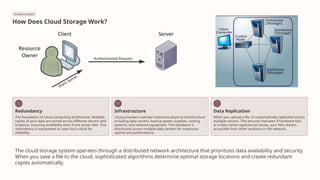
How DoesCloud Storage Work?
Redundancy
The foundation of cloud computing architecture. Multiple
copies of your data are stored across different servers and
locations, ensuring availability even if one server fails. This
redundancy is transparent to users but critical for
reliability.
Infrastructure
Cloud providers maintain extensive physical infrastructure
including data servers, backup power supplies, cooling
systems, and network equipment. This hardware is
distributed across multiple data centers for maximum
uptime and performance.
Data Replication
When you upload a file, it's automatically replicated across
multiple servers. This ensures that even if hardware fails
or a data center experiences issues, your files remain
accessible from other locations in the network.
The cloud storage system operates through a distributed network architecture that prioritizes data availability and security.
When you save a file to the cloud, sophisticated algorithms determine optimal storage locations and create redundant
copies automatically.
5.
PERSONAL USE CASE
CloudStorage for Personal Use: iCloud Example
Apple's iCloud Service
iCloud exemplifies consumer-focused cloud storage, seamlessly integrating with Apple's
ecosystem. The service provides 5GB of free storage space, with paid tiers available for
additional capacity. Once configured, iCloud automatically syncs your data across all your
Apple devices—iPhone, iPad, Mac, and even Windows PCs.
Seamless Synchronization
Access files, music, photos, calendar events, and email across all devices instantly
Automatic Backup
Device backups happen automatically when connected to Wi-Fi and charging
Platform Integration
Built into iOS 5 and later, with native support across Apple's operating systems
Family Sharing
Share storage plans and purchases with up to six family members
iCloud represents the consumer cloud storage model: easy to use, deeply
integrated, and designed for non-technical users.
6.
BUSINESS APPLICATIONS
Cloud Storage:Transforming Business Operations
Eliminate Physical Infrastructure
With cloud storage, there's no need for CDs, external hard drives,
or localized servers. This reduces hardware costs and simplifies IT
management significantly.
Real-Time Data Synchronization
Data is quickly and automatically updated in the cloud and
available for retrieval whenever you need it, from any authorized
device or location.
Disaster Recovery Protection
Should your office become the victim of burglary, fire, or natural
disaster, your data remains safe and secure in the cloud, even if
physical assets are destroyed.
Scalable Solutions
One of the greatest benefits is the ability to grow with your
business. Add storage capacity on-demand without purchasing
new hardware or expanding physical infrastructure.
Reduced Operational Costs
With no need for physical, on-site storage space, you can maintain
a smaller workspace, purchase less equipment, and employ fewer
IT staff for data management.
Strategic IT Focus
IT staff can spend less time on storage maintenance and more
time focusing on strategic initiatives that directly contribute to
business growth and innovation.
7.
COST CONSIDERATIONS
What DoesCloud Storage Cost Users?
Selecting the right cloud storage solution requires careful evaluation of multiple factors beyond just the monthly subscription price. Organizations and
individuals must balance their needs with available options.
01
Storage Capacity & Budget
Determine what your company or you personally
need from the service. Assess current storage
requirements and anticipate future growth.
Balance features with available budget
constraints.
02
Performance Metrics
Evaluate typical transfer rates (generally 2-3
Mb/sec for standard services). Consider network
speed, latency, and how quickly you need to
access large files. Premium tiers often offer faster
performance.
03
Technical Support Quality
Assess the level of technical support provided.
Does the service offer 24/7 support? Are there
dedicated account managers for enterprise plans?
How responsive is their support team?
04
Data Protection Features
Examine disaster recovery capabilities and comprehensive backup options.
Look for version history, file recovery tools, and geographic redundancy.
Understand the provider's backup schedules and retention policies.
05
Security Measures
Investigate encryption standards (both in transit and at rest), compliance
certifications (HIPAA, SOC 2, GDPR), two-factor authentication options, and
access control features. Security should never be compromised for cost
savings.
8.
SERVICE CATEGORIES
Types ofCloud Storage
Personal Cloud Storage
Designed for individual consumers, offering file synchronization
across personal devices. Services like iCloud, Google Drive, and
Dropbox fall into this category. Typically features include automatic
photo backup, document sharing, and mobile app integration.
Pricing is consumer-friendly with free tiers available.
Public Cloud Storage
Multi-tenant environments where storage infrastructure is shared
among multiple organizations. Providers like Amazon S3, Microsoft
Azure, and Google Cloud Platform offer scalable, pay-as-you-go
storage. Ideal for businesses seeking flexibility without capital
investment in hardware. Resources are virtualized and accessed
over the internet.
Private Cloud Storage
Dedicated infrastructure for a single organization, either on-
premises or hosted by a third party. Offers greater control,
customization, and security for sensitive data. Common in
regulated industries like healthcare and finance. More expensive
but provides enhanced data governance and compliance
capabilities.
Hybrid Cloud Storage
Combines public and private cloud elements, allowing data and
applications to move between them. Organizations keep sensitive
data in private clouds while using public clouds for less critical
workloads. Provides flexibility, cost optimization, and the ability to
scale resources dynamically based on demand.
9.
BENEFITS
Advantages of CloudStorage
Cost Efficiency
Purchasing physical storage infrastructure can be expensive, requiring significant
capital investment. Without the need for hardware, cloud storage is exceptionally
cheaper per GB than using external drives. Organizations avoid costs associated
with server maintenance, power consumption, cooling, and physical space. The
pay-as-you-go model means you only pay for what you use.
Universal Accessibility
Using the cloud for storage gives you access to your files from anywhere that has
an internet connection. Work from home, the office, or while traveling—your data
follows you. Multiple users can collaborate on the same files simultaneously,
improving productivity and eliminating version control issues common with local
storage.
Disaster Recovery
In the event of a hard drive failure or other hardware malfunction, you can access
your files on the cloud. It acts as a comprehensive backup solution for your local
storage on physical drives. Natural disasters, theft, or equipment failure won't
result in permanent data loss. Most providers maintain multiple redundant
copies across geographically distributed data centers.
Enhanced Security
Cloud storage providers add additional layers of security to their services that
would be difficult for individuals or small businesses to implement. This includes
enterprise-grade encryption, regular security audits, intrusion detection systems,
and compliance with industry standards. Professional security teams monitor
infrastructure 24/7 to protect against threats.
10.
LIMITATIONS
Disadvantages of CloudStorage
While cloud storage offers numerous benefits, it's important to understand potential drawbacks and limitations before fully committing to a cloud-based strategy.
Internet Dependency
Hardware Requirements
Limited Support
Support for cloud storage isn't always the best, especially if
you're using a free version of a cloud provider. Many providers
refer you to a knowledge base or FAQs rather than offering
direct assistance. Response times can be slow, and getting help
with complex issues may require expensive premium support
plans. This can be frustrating during critical situations.
Cloud storage is supposed to eliminate our dependency on hard
drives, right? Surprisingly, some business cloud storage providers
still require physical hard drives as well for hybrid solutions or
local caching. This can reduce the cost advantages and simplicity
that cloud storage promises. Understanding these requirements
upfront is essential for accurate budgeting.
Cloud-based storage is fundamentally dependent on having a
reliable internet connection. If you're on a slow network or in an
area with limited connectivity, you may experience significant
issues accessing your storage. Bandwidth limitations can make
uploading or downloading large files time-consuming. Offline
access is limited or unavailable with most services, potentially
disrupting workflows.
11.
Conclusion
Cloud storage representsa significant evolution in how we manage digital information. While the advantages—cost
savings, accessibility, disaster recovery, and security—make it an attractive option for most users and organizations, the
disadvantages shouldn't be overlooked. Success with cloud storage requires careful provider selection, understanding
your specific needs, and having contingency plans for potential connectivity issues. For most applications, the benefits far
outweigh the limitations, making cloud storage an essential component of modern computing infrastructure.