The Science Behind Good 
UXs and UIs 
By : Abdelrahman Othman Helal & Peter Osama
FACT ! 
95% of Websites Fail at UX despite of the 
Good UI !
Quote ! 
“Usability really just means making sure that 
something works well: that a person of 
average (or even below average) ability and 
experience can use the thing – whether it’s a 
web site, remote control, or revolving door – 
for its intended purpose without getting 
hopelessly frustrated.” – Steve Krug
Road Map 
 1- Definitions 
 2- User Centered Designs (UCD) 
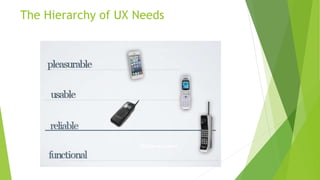
 3- Hierarchy of UX Needs 
 4- Design Principles 
 5- Why you should Care ? 
 6- Some Tips About Creating Good UIs and UXs 
 7- Coding Phase : How to draw your UI Design , How to 
Implement it (Web Design Examples)
1-Definitions 
 What is a UX ? 
 User Experience (UX) involves a person's behaviors, attitudes, and emotions about 
using a particular product, system or service. User Experience includes the 
practical, experiential, affective, meaningful and valuable aspects of human– 
computer interaction and product ownership (Wikipedia) 
 What is a UI ? 
 The user interface, in the industrial design field of human–machine interaction, is 
the space where interactions between humans and machines occur. The goal of this 
interaction is effective operation and control of the machine on the user's end, and 
feedback from the machine, which aids the operator in making operational 
decisions (Wikipedia)
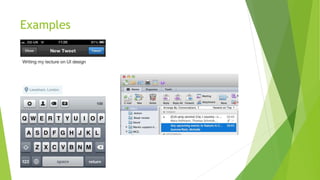
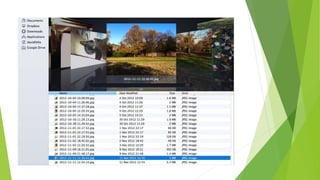
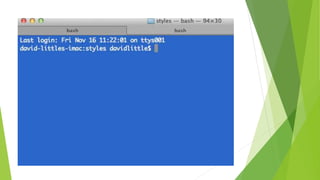
Examples
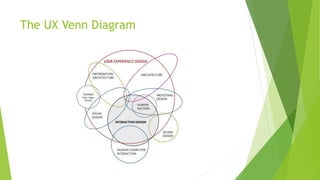
The UX Venn Diagram
Where The UI Fits ? 
 Back-end infrastructure: servers, databases and programming. 
 Content (i.e. words and pictures). 
 Information architecture: how the content is organized and navigated. 
 User interface: where the user interacts with the above.
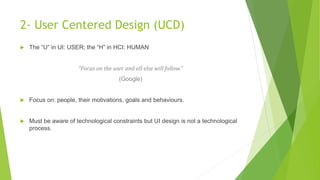
2- User Centered Design (UCD) 
 The “U” in UI: USER; the “H” in HCI: HUMAN 
“Focus on the user and all else will follow.” 
(Google) 
 Focus on: people, their motivations, goals and behaviours. 
 Must be aware of technological constraints but UI design is not a technological 
process.
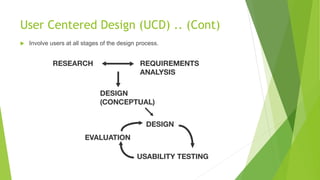
User Centered Design (UCD) .. (Cont) 
 Involve users at all stages of the design process.
User Requirements 
 Who are the users? 
 How many different types of user are there? 
 What do they want to be able to do? 
 How do they currently do it? 
 Where do they currently do it? 
 Where might they want to be able to do it? 
 How might they want to be able to do it?
USER GOALS, STRATEGIC GOALS AND 
CONSTRAINTS 
 What are the strategic goals (“business goals”) of the product you are creating; 
what were you funded to do? 
 Tensions between strategic goals and user goals: how will this be managed? 
 What constraints do you have: 
 Financial 
 Time 
 Technology 
 People
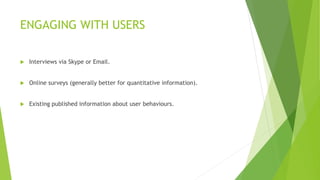
ENGAGING WITH USERS 
 Interviews via Skype or Email. 
 Online surveys (generally better for quantitative information). 
 Existing published information about user behaviours.
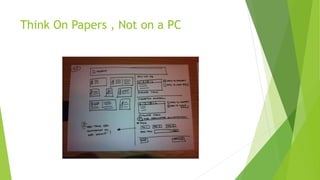
Think On Papers , Not on a PC
Design Principals 
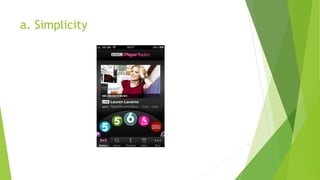
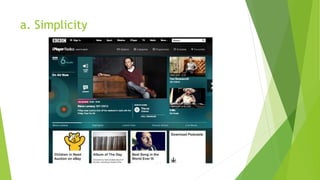
 Simplicity 
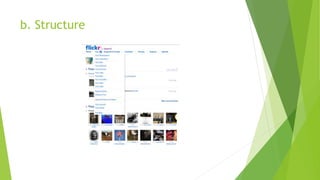
 Structure 
 Visibility 
 Consistency 
 Tolerance 
 Feedback
a. Simplicity
a. Simplicity
b. Structure
b. Structure
The Hierarchy of UX Needs
Why you should care ? 
 Finance 
 Impact 
 Ethics
Some Tips about creating a good UI 
 Plan plan plan plan plan plan plan plan plan plan 
 Know the end goal 
 Smart, but not too smart 
 Reveal the bigger picture 
 Back to basics 
 Solve problems 
 Act Like a user
Some Tips about creating a good UX 
 Get into the user itself , know him . 
 Sketch Ideas out 
 Collaborate 
 Make it fun 
 Make every piece useful 
 Make it Understandable 
 Make it Valid
Coding Phase
Coding Phase
Coding Phase
Any Questions ?

The Science behind Good UIs and UXs

  • 1.
    The Science BehindGood UXs and UIs By : Abdelrahman Othman Helal & Peter Osama
  • 2.
    FACT ! 95%of Websites Fail at UX despite of the Good UI !
  • 3.
    Quote ! “Usabilityreally just means making sure that something works well: that a person of average (or even below average) ability and experience can use the thing – whether it’s a web site, remote control, or revolving door – for its intended purpose without getting hopelessly frustrated.” – Steve Krug
  • 4.
    Road Map 1- Definitions  2- User Centered Designs (UCD)  3- Hierarchy of UX Needs  4- Design Principles  5- Why you should Care ?  6- Some Tips About Creating Good UIs and UXs  7- Coding Phase : How to draw your UI Design , How to Implement it (Web Design Examples)
  • 5.
    1-Definitions  Whatis a UX ?  User Experience (UX) involves a person's behaviors, attitudes, and emotions about using a particular product, system or service. User Experience includes the practical, experiential, affective, meaningful and valuable aspects of human– computer interaction and product ownership (Wikipedia)  What is a UI ?  The user interface, in the industrial design field of human–machine interaction, is the space where interactions between humans and machines occur. The goal of this interaction is effective operation and control of the machine on the user's end, and feedback from the machine, which aids the operator in making operational decisions (Wikipedia)
  • 6.
  • 11.
    The UX VennDiagram
  • 12.
    Where The UIFits ?  Back-end infrastructure: servers, databases and programming.  Content (i.e. words and pictures).  Information architecture: how the content is organized and navigated.  User interface: where the user interacts with the above.
  • 13.
    2- User CenteredDesign (UCD)  The “U” in UI: USER; the “H” in HCI: HUMAN “Focus on the user and all else will follow.” (Google)  Focus on: people, their motivations, goals and behaviours.  Must be aware of technological constraints but UI design is not a technological process.
  • 14.
    User Centered Design(UCD) .. (Cont)  Involve users at all stages of the design process.
  • 15.
    User Requirements Who are the users?  How many different types of user are there?  What do they want to be able to do?  How do they currently do it?  Where do they currently do it?  Where might they want to be able to do it?  How might they want to be able to do it?
  • 16.
    USER GOALS, STRATEGICGOALS AND CONSTRAINTS  What are the strategic goals (“business goals”) of the product you are creating; what were you funded to do?  Tensions between strategic goals and user goals: how will this be managed?  What constraints do you have:  Financial  Time  Technology  People
  • 17.
    ENGAGING WITH USERS  Interviews via Skype or Email.  Online surveys (generally better for quantitative information).  Existing published information about user behaviours.
  • 18.
    Think On Papers, Not on a PC
  • 19.
    Design Principals Simplicity  Structure  Visibility  Consistency  Tolerance  Feedback
  • 20.
  • 21.
  • 22.
  • 23.
  • 24.
  • 25.
    Why you shouldcare ?  Finance  Impact  Ethics
  • 26.
    Some Tips aboutcreating a good UI  Plan plan plan plan plan plan plan plan plan plan  Know the end goal  Smart, but not too smart  Reveal the bigger picture  Back to basics  Solve problems  Act Like a user
  • 27.
    Some Tips aboutcreating a good UX  Get into the user itself , know him .  Sketch Ideas out  Collaborate  Make it fun  Make every piece useful  Make it Understandable  Make it Valid
  • 28.
  • 29.
  • 30.
  • 31.