


Test parallelization using Jenkins
Scott Mills - Rogue Wave Software
What am I going to cover in this session?
1. About me
2. About Rogue Wave
3. The problem
4. The challenge
5. The solution
6. Jenkins plugins
7. What’s next
8. Closing thoughts
What are you going to take away from this session?
1. Easy to get started with Jenkins
2. Monitor job health, process results
3. Parallelize your test suites
4. Plugins are your friends
About me
About Me
Dallas, TX
Ottawa, ON
My technical background
• Over 15 years designing, developing, maintaining and supporting
Automation systems
• Application Performance Testing
• Application Security testing (OWASP Top 10)
• Automated Web testing (Selenium, Silk Test, TestPartner)
• Test Automation framework development, maintenance and
evolution in Java, Python, Jenkins
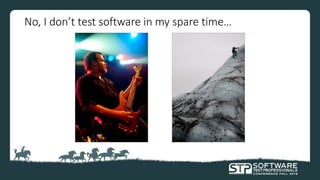
No, I don’t test software in my spare time…
About Rogue Wave Software
“Making it easier to write, test and deploy complex code”
• Largest independent provider of cross-platform software
development tools and embedded components in the world
• Founded in 1989
• Global company, headquartered in Louisville, CO.
• Customers: Over 3,000 companies in 57 countries
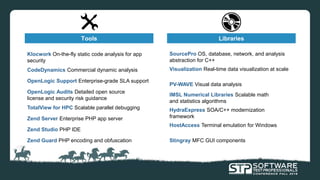
Tools Libraries
SourcePro OS, database, network, and analysis
abstraction for C++
Visualization Real-time data visualization at scale
IMSL Numerical Libraries Scalable math
and statistics algorithms
PV-WAVE Visual data analysis
HydraExpress SOA/C++ modernization
framework
HostAccess Terminal emulation for Windows
Stingray MFC GUI components
OpenLogic Audits Detailed open source
license and security risk guidance
OpenLogic Support Enterprise-grade SLA support
Klocwork On-the-fly static code analysis for app
security
TotalView for HPC Scalable parallel debugging
CodeDynamics Commercial dynamic analysis
Zend Server Enterprise PHP app server
Zend Studio PHP IDE
Zend Guard PHP encoding and obfuscation
Rogue Wave customers
Klocwork
• Continuous Static Code Analysis
• Find defects early!
• Web-based portal for reporting and analyzing results
• Ability to be built into your Continuous Integration process
• Very popular with mission critical industries
• Allows customers to meet industry standards
• Try it!!
The problem
Enforcing quality means ensuring quality
• If Klocwork enforces code quality, Rogue Wave needs to be extremely
diligent about delivering high quality software
• New features and fixes need to be tested
• Regression testing extremely important – reducing false positives may
accidentally hide real code defects
?
Testing
• 6000+ test cases run against our nightly build
• Total execution time: 18+ hours
• Too long of a delay to get results (especially in an Agile environment!)
to determine the health of the build and identify potential regression
defects
• Problem goes downstream: QA waits for test results, developers wait
for QA to report bugs, bugs get fixed and issue repeats.
The challenge
The challenge
• Execute tests against the continuous integration build
• Drastically reduce the execution time of the test suites
• Reuse the existing automation framework as much as possible
• Report on results as they come in
• Make it scalable
• Use open source solutions
The solution
The solution
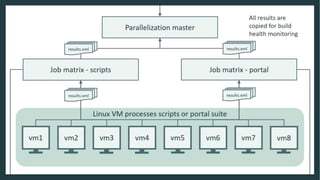
• Parallel execution of our tests suites across multiple VMs
• Controlled by Jenkins, open source continuous integration tool
• Already used to generate our nightly and CI builds
• Test runs are kicked off as soon as a new CI build is available
The solution
• Results imported into TestLink, open source test management system
• Scalable: Add more VMs to the pool to further reduce execution time
• Utilizes the bulk of the existing automation framework
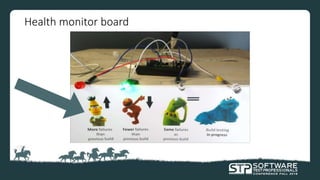
• High level results also sent to “Build health monitor board”
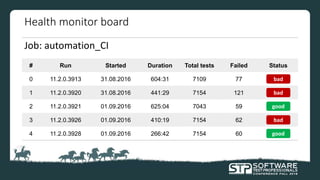
Health monitor board
Job: automation_CI
# Run Started Duration Total tests Failed Status
0 11.2.0.3913 31.08.2016 604:31 7109 77
1 11.2.0.3920 31.08.2016 441:29 7154 121
2 11.2.0.3921 01.09.2016 625:04 7043 59
3 11.2.0.3926 01.09.2016 410:19 7154 62
4 11.2.0.3928 01.09.2016 266:42 7154 60
bad
bad
good
bad
good
Health monitor board
Continuous integration
• Integrating code from many developers into a baseline multiple times
a day
• In best practices, paired with the execution of automated testing
upon submission
Jenkins
• Open source continuous integration tool
• Triggers a new build every time source code changes are submitted
• Can be used for much more than just builds!
• jenkins.io
Jenkins basics – demonstration
• Jobs
• Options
• Build steps
• Post-build actions
• Slaves & labels
• Execution
• Output
• Artifacts
• Downstream jobs
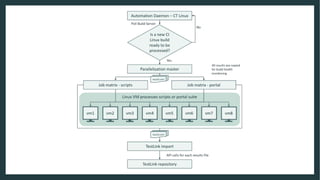
Solution workflow
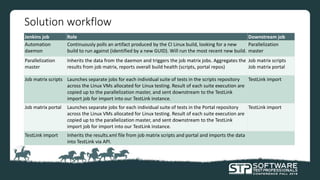
Jenkins job Role Downstream job
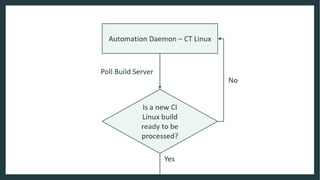
Automation
daemon
Continuously polls an artifact produced by the CI Linux build, looking for a new
build to run against (identified by a new GUID). Will run the most recent new build.
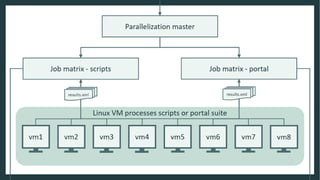
Parallelization
master
Parallelization
master
Inherits the data from the daemon and triggers the job matrix jobs. Aggregates the
results from job matrix, reports overall build health (scripts, portal repos)
Job matrix scripts
Job matrix portal
Job matrix scripts Launches separate jobs for each individual suite of tests in the scripts repository
across the Linux VMs allocated for Linux testing. Result of each suite execution are
copied up to the parallelization master, and sent downstream to the TestLink
import job for import into our TestLink instance.
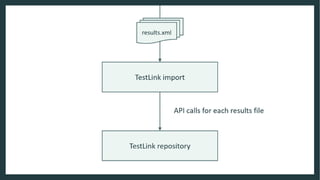
TestLink import
Job matrix portal Launches separate jobs for each individual suite of tests in the Portal repository
across the Linux VMs allocated for Linux testing. Result of each suite execution are
copied up to the parallelization master, and sent downstream to the TestLink
import job for import into our TestLink instance.
TestLink import
TestLink import Inherits the results.xml file from job matrix scripts and portal and imports the data
into TestLink via API.
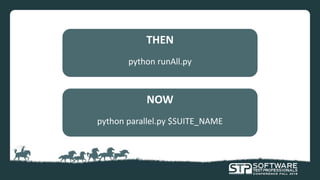
THEN
python runAll.py
NOW
python parallel.py $SUITE_NAME
The queue
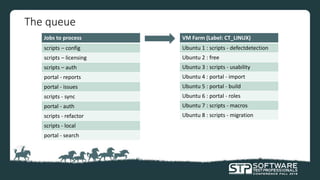
Jobs to process
scripts – config
scripts – licensing
scripts – auth
portal - reports
portal - issues
scripts - sync
portal - auth
scripts - refactor
scripts - local
portal - search
VM Farm (Label: CT_LINUX)
Ubuntu 1 : scripts - defectdetection
Ubuntu 2 : free
Ubuntu 3 : scripts - usability
Ubuntu 4 : portal - import
Ubuntu 5 : portal - build
Ubuntu 6 : portal - roles
Ubuntu 7 : scripts - macros
Ubuntu 8 : scripts - migration
Jenkins plugins
Jenkins plugins
• Many plugins available
• Written by the community
• Easy to install to your Jenkins instance
• “I wonder if there’s a plugin for that?”
Problems solved by plugins - 1
Problem:
“How can we distribute the execution of our test suites across multiple
machines?”
Problems solved by plugins - 1
Solution:
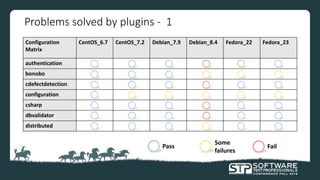
Matrix project plugin
• The Configuration Matrix allows you to specify what steps to duplicate, and
create a multiple-axis graph of the type of build to create
• User-defined axis
• Slave axis
Configuration
Matrix
CentOS_6.7 CentOS_7.2 Debian_7.9 Debian_8.4 Fedora_22 Fedora_23
authentication
bonobo
cdefectdetection
configuration
csharp
dbvalidator
distributed
Problems solved by plugins - 1
Pass
Some
failures
Fail
Problems solved by plugins - 2
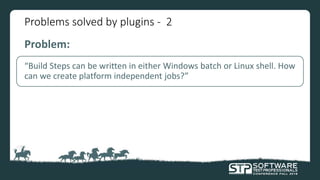
Problem:
“Build Steps can be written in either Windows batch or Linux shell. How
can we create platform independent jobs?”
Problems solved by plugins - 2
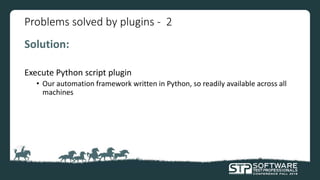
Solution:
Execute Python script plugin
• Our automation framework written in Python, so readily available across all
machines
Problems solved by plugins - 3
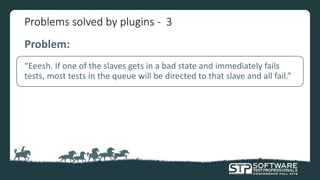
Problem:
“Eeesh. If one of the slaves gets in a bad state and immediately fails
tests, most tests in the queue will be directed to that slave and all fail.”
Problems solved by plugins - 3
Solution:
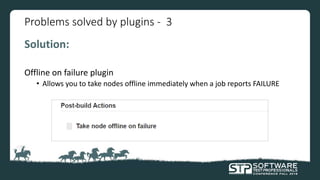
Offline on failure plugin
• Allows you to take nodes offline immediately when a job reports FAILURE
Problems solved by plugins - 4
Problem:
“A job seems to be hung, it’s been running for 4 hours with no update.
We’re going to have to kill it manually to free up its machine.”
Problems solved by plugins - 4
Solution:
Build-timeout plugin
• Abort build based on:
• Fixed time-out limit
• Specific deadline time
• Average duration of last n executions
• No activity in log
Problems solved by plugins - 5
Problem:
“Can rename the build numbers to something more applicable?”
Problems solved by plugins - 5
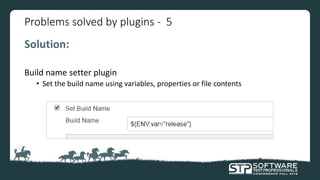
Solution:
Build name setter plugin
• Set the build name using variables, properties or file contents
Problems solved by plugins - 6
Problem:
“Can we view the test results in Jenkins?”
Problems solved by plugins - 6
Solution (part 1):
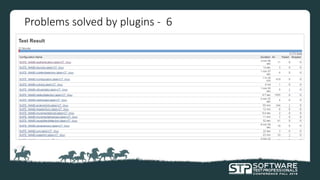
Junit plugin
• Publish Junit test result report:
• Drill down into test suites to find individual test failures
• View stack traces
Problems solved by plugins - 6
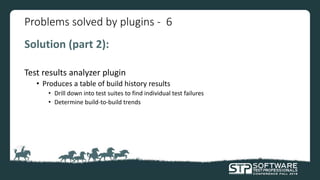
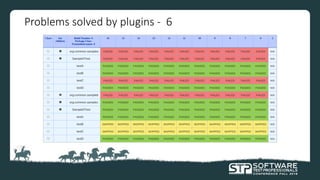
Solution (part 2):
Test results analyzer plugin
• Produces a table of build history results
• Drill down into test suites to find individual test failures
• Determine build-to-build trends
Problems solved by plugins - 6
What’s next?
Folks, we’re almost done…
I hope you are able to take away the following points:
1. Easy to get started with Jenkins
2. Monitor job health, process results
3. Parallelize your test suites
4. Plugins are your friends
In closing…
• Invest in your framework
• Look for opportunities to evolve
• Open source is great, but…
• Reusing your legacy framework is great, but…
Anything else that you want to ask me?
Contact Scott Mills

Test parallelization using Jenkins

  • 1.
    Test parallelization usingJenkins Scott Mills - Rogue Wave Software
  • 2.
    What am Igoing to cover in this session? 1. About me 2. About Rogue Wave 3. The problem 4. The challenge 5. The solution 6. Jenkins plugins 7. What’s next 8. Closing thoughts
  • 3.
    What are yougoing to take away from this session? 1. Easy to get started with Jenkins 2. Monitor job health, process results 3. Parallelize your test suites 4. Plugins are your friends
  • 4.
  • 5.
  • 6.
    My technical background •Over 15 years designing, developing, maintaining and supporting Automation systems • Application Performance Testing • Application Security testing (OWASP Top 10) • Automated Web testing (Selenium, Silk Test, TestPartner) • Test Automation framework development, maintenance and evolution in Java, Python, Jenkins
  • 7.
    No, I don’ttest software in my spare time…
  • 8.
  • 9.
    “Making it easierto write, test and deploy complex code” • Largest independent provider of cross-platform software development tools and embedded components in the world • Founded in 1989 • Global company, headquartered in Louisville, CO. • Customers: Over 3,000 companies in 57 countries
  • 10.
    Tools Libraries SourcePro OS,database, network, and analysis abstraction for C++ Visualization Real-time data visualization at scale IMSL Numerical Libraries Scalable math and statistics algorithms PV-WAVE Visual data analysis HydraExpress SOA/C++ modernization framework HostAccess Terminal emulation for Windows Stingray MFC GUI components OpenLogic Audits Detailed open source license and security risk guidance OpenLogic Support Enterprise-grade SLA support Klocwork On-the-fly static code analysis for app security TotalView for HPC Scalable parallel debugging CodeDynamics Commercial dynamic analysis Zend Server Enterprise PHP app server Zend Studio PHP IDE Zend Guard PHP encoding and obfuscation
  • 11.
  • 12.
    Klocwork • Continuous StaticCode Analysis • Find defects early! • Web-based portal for reporting and analyzing results • Ability to be built into your Continuous Integration process • Very popular with mission critical industries • Allows customers to meet industry standards • Try it!!
  • 13.
  • 14.
    Enforcing quality meansensuring quality • If Klocwork enforces code quality, Rogue Wave needs to be extremely diligent about delivering high quality software • New features and fixes need to be tested • Regression testing extremely important – reducing false positives may accidentally hide real code defects ?
  • 15.
    Testing • 6000+ testcases run against our nightly build • Total execution time: 18+ hours • Too long of a delay to get results (especially in an Agile environment!) to determine the health of the build and identify potential regression defects • Problem goes downstream: QA waits for test results, developers wait for QA to report bugs, bugs get fixed and issue repeats.
  • 16.
  • 17.
    The challenge • Executetests against the continuous integration build • Drastically reduce the execution time of the test suites • Reuse the existing automation framework as much as possible • Report on results as they come in • Make it scalable • Use open source solutions
  • 18.
  • 19.
    The solution • Parallelexecution of our tests suites across multiple VMs • Controlled by Jenkins, open source continuous integration tool • Already used to generate our nightly and CI builds • Test runs are kicked off as soon as a new CI build is available
  • 20.
    The solution • Resultsimported into TestLink, open source test management system • Scalable: Add more VMs to the pool to further reduce execution time • Utilizes the bulk of the existing automation framework • High level results also sent to “Build health monitor board”
  • 21.
    Health monitor board Job:automation_CI # Run Started Duration Total tests Failed Status 0 11.2.0.3913 31.08.2016 604:31 7109 77 1 11.2.0.3920 31.08.2016 441:29 7154 121 2 11.2.0.3921 01.09.2016 625:04 7043 59 3 11.2.0.3926 01.09.2016 410:19 7154 62 4 11.2.0.3928 01.09.2016 266:42 7154 60 bad bad good bad good
  • 22.
  • 23.
    Continuous integration • Integratingcode from many developers into a baseline multiple times a day • In best practices, paired with the execution of automated testing upon submission
  • 24.
    Jenkins • Open sourcecontinuous integration tool • Triggers a new build every time source code changes are submitted • Can be used for much more than just builds! • jenkins.io
  • 25.
    Jenkins basics –demonstration • Jobs • Options • Build steps • Post-build actions • Slaves & labels • Execution • Output • Artifacts • Downstream jobs
  • 31.
    Solution workflow Jenkins jobRole Downstream job Automation daemon Continuously polls an artifact produced by the CI Linux build, looking for a new build to run against (identified by a new GUID). Will run the most recent new build. Parallelization master Parallelization master Inherits the data from the daemon and triggers the job matrix jobs. Aggregates the results from job matrix, reports overall build health (scripts, portal repos) Job matrix scripts Job matrix portal Job matrix scripts Launches separate jobs for each individual suite of tests in the scripts repository across the Linux VMs allocated for Linux testing. Result of each suite execution are copied up to the parallelization master, and sent downstream to the TestLink import job for import into our TestLink instance. TestLink import Job matrix portal Launches separate jobs for each individual suite of tests in the Portal repository across the Linux VMs allocated for Linux testing. Result of each suite execution are copied up to the parallelization master, and sent downstream to the TestLink import job for import into our TestLink instance. TestLink import TestLink import Inherits the results.xml file from job matrix scripts and portal and imports the data into TestLink via API.
  • 32.
  • 33.
    The queue Jobs toprocess scripts – config scripts – licensing scripts – auth portal - reports portal - issues scripts - sync portal - auth scripts - refactor scripts - local portal - search VM Farm (Label: CT_LINUX) Ubuntu 1 : scripts - defectdetection Ubuntu 2 : free Ubuntu 3 : scripts - usability Ubuntu 4 : portal - import Ubuntu 5 : portal - build Ubuntu 6 : portal - roles Ubuntu 7 : scripts - macros Ubuntu 8 : scripts - migration
  • 34.
  • 35.
    Jenkins plugins • Manyplugins available • Written by the community • Easy to install to your Jenkins instance • “I wonder if there’s a plugin for that?”
  • 36.
    Problems solved byplugins - 1 Problem: “How can we distribute the execution of our test suites across multiple machines?”
  • 37.
    Problems solved byplugins - 1 Solution: Matrix project plugin • The Configuration Matrix allows you to specify what steps to duplicate, and create a multiple-axis graph of the type of build to create • User-defined axis • Slave axis
  • 38.
    Configuration Matrix CentOS_6.7 CentOS_7.2 Debian_7.9Debian_8.4 Fedora_22 Fedora_23 authentication bonobo cdefectdetection configuration csharp dbvalidator distributed Problems solved by plugins - 1 Pass Some failures Fail
  • 39.
    Problems solved byplugins - 2 Problem: “Build Steps can be written in either Windows batch or Linux shell. How can we create platform independent jobs?”
  • 40.
    Problems solved byplugins - 2 Solution: Execute Python script plugin • Our automation framework written in Python, so readily available across all machines
  • 41.
    Problems solved byplugins - 3 Problem: “Eeesh. If one of the slaves gets in a bad state and immediately fails tests, most tests in the queue will be directed to that slave and all fail.”
  • 42.
    Problems solved byplugins - 3 Solution: Offline on failure plugin • Allows you to take nodes offline immediately when a job reports FAILURE
  • 43.
    Problems solved byplugins - 4 Problem: “A job seems to be hung, it’s been running for 4 hours with no update. We’re going to have to kill it manually to free up its machine.”
  • 44.
    Problems solved byplugins - 4 Solution: Build-timeout plugin • Abort build based on: • Fixed time-out limit • Specific deadline time • Average duration of last n executions • No activity in log
  • 45.
    Problems solved byplugins - 5 Problem: “Can rename the build numbers to something more applicable?”
  • 46.
    Problems solved byplugins - 5 Solution: Build name setter plugin • Set the build name using variables, properties or file contents
  • 47.
    Problems solved byplugins - 6 Problem: “Can we view the test results in Jenkins?”
  • 48.
    Problems solved byplugins - 6 Solution (part 1): Junit plugin • Publish Junit test result report: • Drill down into test suites to find individual test failures • View stack traces
  • 49.
    Problems solved byplugins - 6
  • 50.
    Problems solved byplugins - 6 Solution (part 2): Test results analyzer plugin • Produces a table of build history results • Drill down into test suites to find individual test failures • Determine build-to-build trends
  • 51.
    Problems solved byplugins - 6
  • 52.
  • 54.
  • 55.
    I hope youare able to take away the following points: 1. Easy to get started with Jenkins 2. Monitor job health, process results 3. Parallelize your test suites 4. Plugins are your friends
  • 56.
    In closing… • Investin your framework • Look for opportunities to evolve • Open source is great, but… • Reusing your legacy framework is great, but…
  • 57.
    Anything else thatyou want to ask me?
  • 58.