WSO2 IOTS
D E V I C E M A N U FA C T U R E R G U I D E
W S O 2 I OT S E RV E R 3 . 0 . 0
PLANETBUCKS
• The customers are in a hurry to grab a coffee and rush back to
work/home.
• Planetbucks can get a competitive advantage in the market if they are
able to take the coffee to the customer's work place/home, without
them having to come to the store.
CONNECTED CUP
• Display the level of coffee and temperature on the cup.
• Allow customers to order coffee by clicking a button on the cup.
• Allow customers to remotely monitor the cup and see the status of
the coffee.
• Allow Planetbucks to study the customer drinking patterns and the
coffee consumption.
DEVICE AGENT
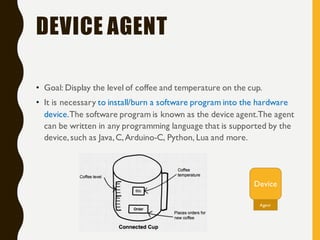
• Goal: Display the level of coffee and temperature on the cup.
• It is necessary to install/burn a software program into the hardware
device.The software program is known as the device agent.The agent
can be written in any programming language that is supported by the
device,such as Java,C,Arduino-C, Python, Lua and more.
Device
Agent
DEVICE API
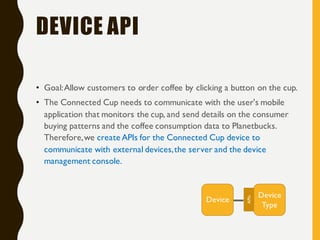
• Goal:Allow customers to order coffee by clicking a button on the cup.
• The Connected Cup needs to communicate with the user's mobile
application that monitors the cup, and send details on the consumer
buying patterns and the coffee consumption data to Planetbucks.
Therefore,we create APIs for the Connected Cup device to
communicate with external devices,the server and the device
management console.
Device
Type
Device
APIs
UI EXTENSIONS
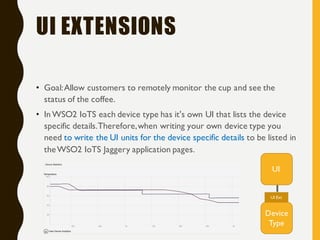
• Goal:Allow customers to remotely monitor the cup and see the
status of the coffee.
• InWSO2 IoTS each device type has it's own UI that lists the device
specific details.Therefore,when writing your own device type you
need to write the UI units for the device specific details to be listed in
theWSO2 IoTS Jaggery application pages.
Device
Type
UI
UI Ext
ANALYTICS
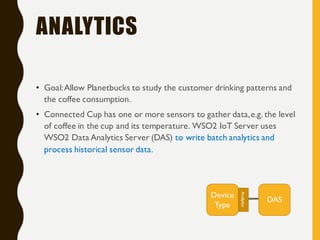
• Goal:Allow Planetbucks to study the customer drinking patterns and
the coffee consumption.
• Connected Cup has one or more sensors to gather data,e.g. the level
of coffee in the cup and its temperature. WSO2 IoT Server uses
WSO2 Data Analytics Server (DAS) to write batch analytics and
process historical sensor data.
Device
Type
DAS
Analytics
DEVICE PLUGINS
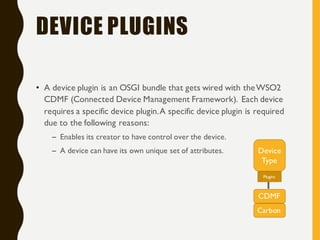
• A device plugin is an OSGI bundle that gets wired with theWSO2
CDMF (Connected Device Management Framework). Each device
requires a specific device plugin.A specific device plugin is required
due to the following reasons:
– Enables its creator to have control over the device.
– A device can have its own unique set of attributes. Device
Type
CDMF
Plugins
Carbon
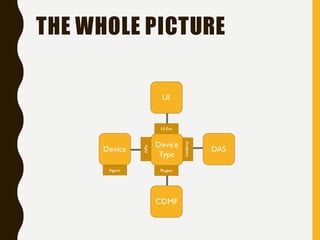
THE WHOLE PICTURE
Device
Type
DAS
CDMF
Device
UI
UI Ext
Analytics
Plugins
APIs
Agent
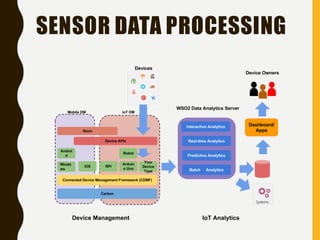
SENSOR DATA PROCESSING
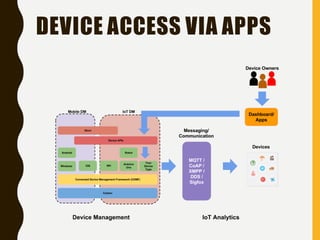
DEVICE ACCESS VIA APPS
SAMPLE CODE
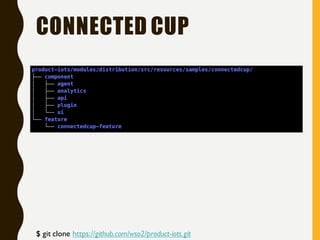
CONNECTED CUP
$ git clone https://github.com/wso2/product-iots.git
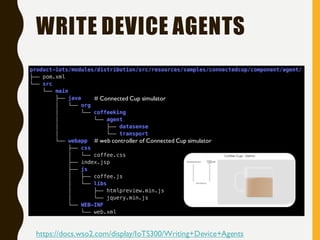
WRITE DEVICE AGENTS
https://docs.wso2.com/display/IoTS300/Writing+Device+Agents
# web controller of Connected Cup simulator
# Connected Cup simulator
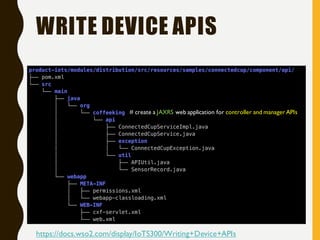
WRITE DEVICE APIS
# create a JAXRS web application for controller and manager APIs
https://docs.wso2.com/display/IoTS300/Writing+Device+APIs
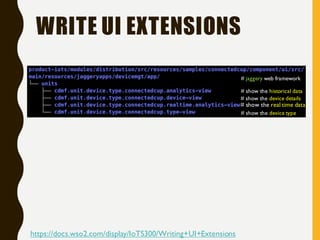
WRITE UI EXTENSIONS
https://docs.wso2.com/display/IoTS300/Writing+UI+Extensions
# show the historical data
# show the device type
# show the device details
# show the real time data
# jaggery web framework
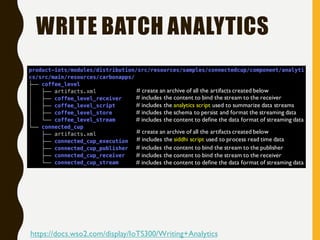
WRITE BATCH ANALYTICS
# includes the content to bind the stream to the receiver
# includes the analytics script used to summarize data streams
# includes the schema to persist and format the streaming data
# includes the content to define the data format of streaming data
# create an archive of all the artifacts created below
# includes the content to define the data format of streaming data
# includes the content to bind the stream to the receiver
# includes the content to bind the stream to the publisher
# includes the siddhi script used to process read time data
# create an archive of all the artifacts created below
https://docs.wso2.com/display/IoTS300/Writing+Analytics
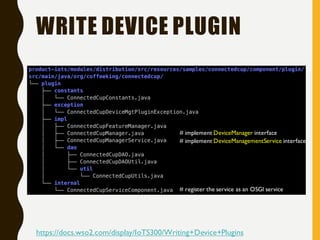
WRITE DEVICE PLUGIN
# implement DeviceManagementService interface
# implement DeviceManager interface
# register the service as an OSGI service
https://docs.wso2.com/display/IoTS300/Writing+Device+Plugins
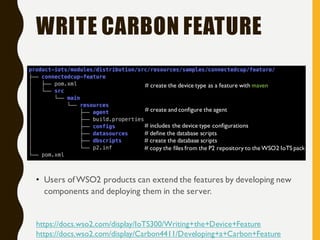
WRITE CARBON FEATURE
• Users ofWSO2 products can extend the features by developing new
components and deploying them in the server.
# create the database scripts
# define the database scripts
# includes the device type configurations
# create and configure the agent
# copy the files from the P2 repository to the WSO2 IoTS pack
# create the device type as a feature with maven
https://docs.wso2.com/display/IoTS300/Writing+the+Device+Feature
https://docs.wso2.com/display/Carbon4411/Developing+a+Carbon+Feature
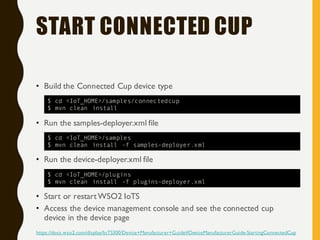
START CONNECTED CUP
• Build the Connected Cup device type
• Run the samples-deployer.xml file
• Run the device-deployer.xml file
• Start or restartWSO2 IoTS
• Access the device management console and see the connected cup
device in the device page
https://docs.wso2.com/display/IoTS300/Device+Manufacturer+Guide#DeviceManufacturerGuide-StartingConnectedCup
$ cd <IoT_HOME>/samples/connectedcup
$ mvn clean install
$ cd <IoT_HOME>/samples
$ mvn clean install -f samples-deployer.xml
$ cd <IoT_HOME>/plugins
$ mvn clean install -f plugins-deployer.xml
TROUBLESHOOTING
• <M2_HOME>/conf/settings.xml
<proxies><proxy>...</proxy></proxies>
• <IoT_HOME>/samples/connectedcup/component/plugin/pom.xml
<Import-Package>org.wso2.carbon.base.*</Import-Package>
• Configuring WSO2 IoT Server with the IP instead of localhost
– https://docs.wso2.com/display/IoTS310/Configuring+WSO2+IoT+Server
+with+the+IP
CARBON DEVICE
MGT PLUGINS
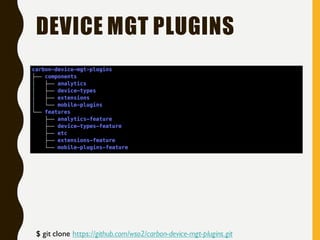
DEVICE MGT PLUGINS
$ git clone https://github.com/wso2/carbon-device-mgt-plugins.git
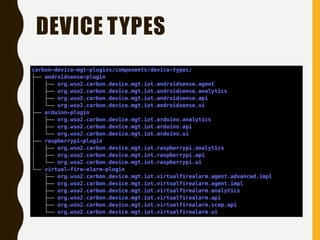
DEVICE TYPES
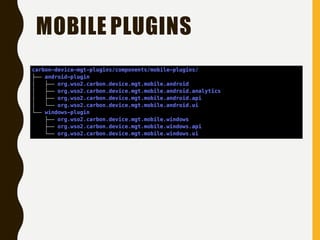
MOBILE PLUGINS
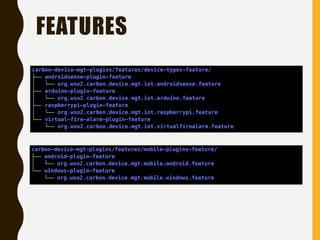
FEATURES
Q & A

WSO2 IoTS Device Manufacturer Guide

  • 1.
    WSO2 IOTS D EV I C E M A N U FA C T U R E R G U I D E W S O 2 I OT S E RV E R 3 . 0 . 0
  • 2.
    PLANETBUCKS • The customersare in a hurry to grab a coffee and rush back to work/home. • Planetbucks can get a competitive advantage in the market if they are able to take the coffee to the customer's work place/home, without them having to come to the store.
  • 3.
    CONNECTED CUP • Displaythe level of coffee and temperature on the cup. • Allow customers to order coffee by clicking a button on the cup. • Allow customers to remotely monitor the cup and see the status of the coffee. • Allow Planetbucks to study the customer drinking patterns and the coffee consumption.
  • 4.
    DEVICE AGENT • Goal:Display the level of coffee and temperature on the cup. • It is necessary to install/burn a software program into the hardware device.The software program is known as the device agent.The agent can be written in any programming language that is supported by the device,such as Java,C,Arduino-C, Python, Lua and more. Device Agent
  • 5.
    DEVICE API • Goal:Allowcustomers to order coffee by clicking a button on the cup. • The Connected Cup needs to communicate with the user's mobile application that monitors the cup, and send details on the consumer buying patterns and the coffee consumption data to Planetbucks. Therefore,we create APIs for the Connected Cup device to communicate with external devices,the server and the device management console. Device Type Device APIs
  • 6.
    UI EXTENSIONS • Goal:Allowcustomers to remotely monitor the cup and see the status of the coffee. • InWSO2 IoTS each device type has it's own UI that lists the device specific details.Therefore,when writing your own device type you need to write the UI units for the device specific details to be listed in theWSO2 IoTS Jaggery application pages. Device Type UI UI Ext
  • 7.
    ANALYTICS • Goal:Allow Planetbucksto study the customer drinking patterns and the coffee consumption. • Connected Cup has one or more sensors to gather data,e.g. the level of coffee in the cup and its temperature. WSO2 IoT Server uses WSO2 Data Analytics Server (DAS) to write batch analytics and process historical sensor data. Device Type DAS Analytics
  • 8.
    DEVICE PLUGINS • Adevice plugin is an OSGI bundle that gets wired with theWSO2 CDMF (Connected Device Management Framework). Each device requires a specific device plugin.A specific device plugin is required due to the following reasons: – Enables its creator to have control over the device. – A device can have its own unique set of attributes. Device Type CDMF Plugins Carbon
  • 9.
  • 10.
  • 11.
  • 12.
  • 13.
    CONNECTED CUP $ gitclone https://github.com/wso2/product-iots.git
  • 14.
    WRITE DEVICE AGENTS https://docs.wso2.com/display/IoTS300/Writing+Device+Agents #web controller of Connected Cup simulator # Connected Cup simulator
  • 15.
    WRITE DEVICE APIS #create a JAXRS web application for controller and manager APIs https://docs.wso2.com/display/IoTS300/Writing+Device+APIs
  • 16.
    WRITE UI EXTENSIONS https://docs.wso2.com/display/IoTS300/Writing+UI+Extensions #show the historical data # show the device type # show the device details # show the real time data # jaggery web framework
  • 17.
    WRITE BATCH ANALYTICS #includes the content to bind the stream to the receiver # includes the analytics script used to summarize data streams # includes the schema to persist and format the streaming data # includes the content to define the data format of streaming data # create an archive of all the artifacts created below # includes the content to define the data format of streaming data # includes the content to bind the stream to the receiver # includes the content to bind the stream to the publisher # includes the siddhi script used to process read time data # create an archive of all the artifacts created below https://docs.wso2.com/display/IoTS300/Writing+Analytics
  • 18.
    WRITE DEVICE PLUGIN #implement DeviceManagementService interface # implement DeviceManager interface # register the service as an OSGI service https://docs.wso2.com/display/IoTS300/Writing+Device+Plugins
  • 19.
    WRITE CARBON FEATURE •Users ofWSO2 products can extend the features by developing new components and deploying them in the server. # create the database scripts # define the database scripts # includes the device type configurations # create and configure the agent # copy the files from the P2 repository to the WSO2 IoTS pack # create the device type as a feature with maven https://docs.wso2.com/display/IoTS300/Writing+the+Device+Feature https://docs.wso2.com/display/Carbon4411/Developing+a+Carbon+Feature
  • 20.
    START CONNECTED CUP •Build the Connected Cup device type • Run the samples-deployer.xml file • Run the device-deployer.xml file • Start or restartWSO2 IoTS • Access the device management console and see the connected cup device in the device page https://docs.wso2.com/display/IoTS300/Device+Manufacturer+Guide#DeviceManufacturerGuide-StartingConnectedCup $ cd <IoT_HOME>/samples/connectedcup $ mvn clean install $ cd <IoT_HOME>/samples $ mvn clean install -f samples-deployer.xml $ cd <IoT_HOME>/plugins $ mvn clean install -f plugins-deployer.xml
  • 21.
    TROUBLESHOOTING • <M2_HOME>/conf/settings.xml <proxies><proxy>...</proxy></proxies> • <IoT_HOME>/samples/connectedcup/component/plugin/pom.xml <Import-Package>org.wso2.carbon.base.*</Import-Package> •Configuring WSO2 IoT Server with the IP instead of localhost – https://docs.wso2.com/display/IoTS310/Configuring+WSO2+IoT+Server +with+the+IP
  • 22.
  • 23.
    DEVICE MGT PLUGINS $git clone https://github.com/wso2/carbon-device-mgt-plugins.git
  • 24.
  • 25.
  • 26.
  • 27.