Continuous Delivery 
Never SEND a human to do a 
machine’s job 
Presenter: Steve Povilaitis
Steve Povilaitis 
Enterprise Agile Coach 
•steve@leadingagile.com 
•386.690.3118 
•www.leadingagile.com 
•twitter.com/stevepov 
•facebook.com/leadingagile 
•linkedin.com/in/stevepov
Working hypothesis 
Agile transformation begins by defining a rational 
system of delivery for the enterprise. 
Corollary: Until your code is in production delivering the 
value you intended, you are merely building castles in a 
technological sandbox.
Overview 
Introduction to Continuous Deployment 
CD workflow and practices 
Tools 
Example Continuous Deployment architecture 
Transformation Roadmap
How long would it take your organization to deploy a change [to 
production] that involves just one single line of code? 
Do you do this on a repeatable, reliable basis? 
- Mary and Tom Poppendieck, Implementing Lean Software Development
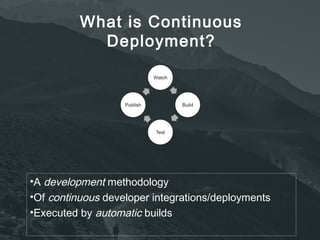
What is Continuous 
Deployment? 
•A development methodology 
•Of continuous developer integrations/deployments 
•Executed by automatic builds
“Never send a human to do a machine’s job”
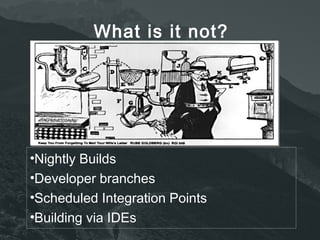
What is it not? 
•Nightly Builds 
•Developer branches 
•Scheduled Integration Points 
•Building via IDEs
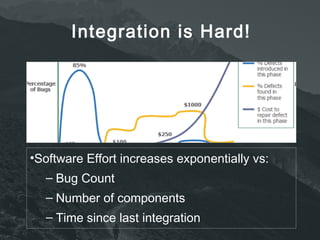
Integration is Hard! 
•Software Effort increases exponentially vs: 
– Bug Count 
– Number of components 
– Time since last integration
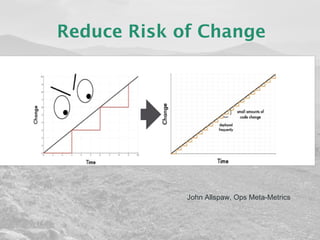
Reduce Risk of Change 
John Allspaw, Ops Meta-Metrics
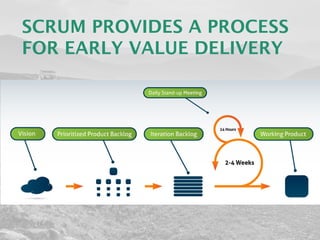
SCRUM PROVIDES A PROCESS 
FOR EARLY VALUE DELIVERY
Traditional Process Risks 
•Lack of Team Cohesion 
– “Your changes to Foobar are incompatible with mine. 
How do we merge now?” 
– “I thought you fixed that XX days/weeks/months ago!” 
•Poor quality code base 
– “Why cant I just include Foo and not require all of the 
other libs?” 
•Lack of project visibility 
– “What do you mean the tests are failing?” 
– “What’s in version 1.2.3. of the build?” 
– “What’s our code coverage right now?” 
•Lack of deployable software 
– “It works on my machine!” 
– “The customer is coming, we need to demo today”
Use CD to Reduce Risk and 
Improve Quality 
•Better 
– Test early and often with self-testing builds 
– Developers concentrate on coding, repetitive and boring tasks 
like testing are automated 
•Faster 
– Replace big and long integration phases with small and frequent 
ones 
– Build, Test, Deploy in parallel, not at the end 
– No integration points mean builds and deployments become a 
non-event! 
•Cheaper 
– Identify defects earlier 
– Fix when least costly 
– Easily repeatable build, test, and deploy process
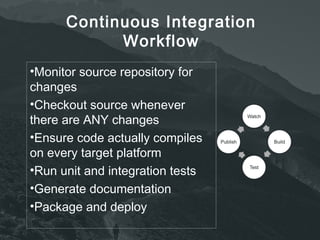
Continuous Integration 
Workflow 
•Monitor source repository for 
changes 
•Checkout source whenever 
there are ANY changes 
•Ensure code actually compiles 
on every target platform 
•Run unit and integration tests 
•Generate documentation 
•Package and deploy
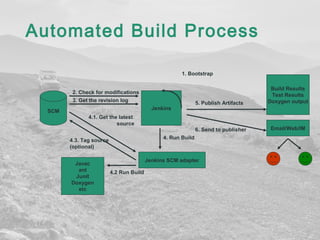
Automated Build Process 
SCM 
Build Results 
Test Results 
Doxygen output 
Email/Web/IM 
1. Bootstrap 
2. Check for modifications 
3. Get the revision log 
Jenkins 
Javac 
ant 
Junit 
Doxygen 
etc 
4.2 Run Build 
5. Publish Artifacts 
6. Send to publisher 
4.1. Get the latest 
source 
4.3. Tag source 
(optional) 
4. Run Build 
Jenkins SCM adapter
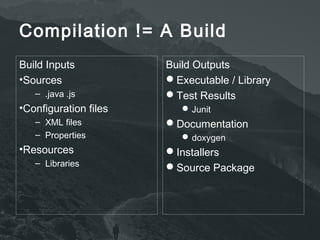
Compilation != A Build 
Build Inputs 
•Sources 
– .java .js 
•Configuration files 
– XML files 
– Properties 
•Resources 
– Libraries 
Build Outputs 
Executable / Library 
Test Results 
Junit 
Documentation 
doxygen 
Installers 
Source Package
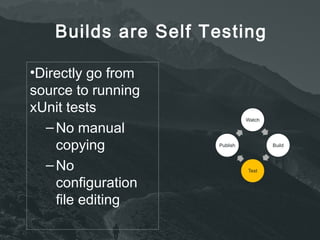
Builds are Self Testing 
•Directly go from 
source to running 
xUnit tests 
–No manual 
copying 
–No 
configuration 
file editing
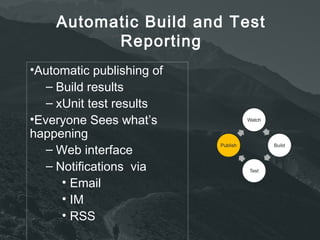
Automatic Build and Test 
Reporting 
•Automatic publishing of 
– Build results 
– xUnit test results 
•Everyone Sees what’s 
happening 
– Web interface 
– Notifications via 
• Email 
• IM 
• RSS
CD roadmap 
Implement Version control - using a next generation 
tool such SVN,Perforce, TFS, Git. 
Not Clearcase or VSS, or CVS or some other POS. 
Goal - Implement a versioning system that allows 
developers to work in a distributed manner in a non-file 
locked environment
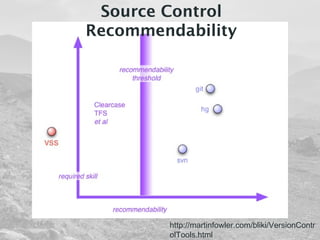
Source Control 
Recommendability 
http://martinfowler.com/bliki/VersionContr 
olTools.html
Automate BOTH compilation and packaging - using 
tools such as Make, eMake, Ant, Nant, Maven, NuGet 
Goal -ability to go from version controlled source to a 
deployment ready 
artifact with one command or script
Automatic Builds –Continuously build and test the 
codebase each time a change is made to the code. 
Setup a CI server - Jenkins, TFS, Electric 
Commander, integrated with version control system. 
Goal - Implement a CI process that continually outputs 
a set of potentially deployable artifacts
Requirements traceability - integrate with an ALM tool 
such as V1, Rally, TFS, Trac. 
Goal - automatically provide a thorough audit trail of 
what has been implemented in code to satify user 
requirements. Link code changes to individual user 
stories and/or defects.
Automated Testing: Automate as much of the following as 
possible. 
Unit tests 
Integration Tests 
Load Tests 
Performance Tests 
Simulation tests 
Smoke tests 
Quality Tests 
Goal - automate as much testing as possible and provide 
sufficient test coverage at multiple levels
Automated Deployment - provide the ability to deploy 
an arbitrary release candidate into an arbitrary 
environment for testing 
Goal - Ability to deploy a software version based on a 
single change set to an arbitrary environment with a 
single command
Automated environment provisioning - ability to 
instantiate virtualized 
environments as needed 
Goal - ability to quickly create virtualized environments 
as needed
Infrastructure as code - ability to version control 
infrastructure and 
platforms an build them in a consistent and repeatable 
manner, using tools 
like puppet and chef 
Goal - implement configuration managed 
environments with consistency and 
reliability
Implement monitoring (metrics) - implement metrics to 
monitor the 
build health of the codebase, and the health of the 
deployed solution 
Goal - provide real-time health monitoring via a visual 
dashboard
Jenkins CI Server + Trac 
•Jenkins: Open Source, 
written in Java 
•Trac: Open Source, 
written in Python 
•No install required 
– Runs within a web 
container 
•Web based configuration 
•Support for 
– Subversion 
– NAnt 
– NUnit 
– FXCop
Martin Fowler’s 10 Practices for 
CI 
Maintain a Single Source Repository. 
Automate the Build 
Make Your Build Self-Testing 
Everyone Commits Every Day 
Every Commit Should Build the Mainline on an Integration Machine 
Keep the Build Fast 
Test in a Clone of the Production Environment 
Make it Easy for Anyone to Get the Latest Executable 
Everyone can see what's happening 
Automate Deployment
Steve Povilaitis 
Enterprise Agile Coach 
•steve@leadingagile.com 
•386.690.3118 
•www.leadingagile.com 
•twitter.com/stevepov 
•facebook.com/leadingagile 
•linkedin.com/in/stevepov

Continuous deployment steve povilaitis

  • 1.
    Continuous Delivery NeverSEND a human to do a machine’s job Presenter: Steve Povilaitis
  • 2.
    Steve Povilaitis EnterpriseAgile Coach •steve@leadingagile.com •386.690.3118 •www.leadingagile.com •twitter.com/stevepov •facebook.com/leadingagile •linkedin.com/in/stevepov
  • 3.
    Working hypothesis Agiletransformation begins by defining a rational system of delivery for the enterprise. Corollary: Until your code is in production delivering the value you intended, you are merely building castles in a technological sandbox.
  • 4.
    Overview Introduction toContinuous Deployment CD workflow and practices Tools Example Continuous Deployment architecture Transformation Roadmap
  • 5.
    How long wouldit take your organization to deploy a change [to production] that involves just one single line of code? Do you do this on a repeatable, reliable basis? - Mary and Tom Poppendieck, Implementing Lean Software Development
  • 6.
    What is Continuous Deployment? •A development methodology •Of continuous developer integrations/deployments •Executed by automatic builds
  • 7.
    “Never send ahuman to do a machine’s job”
  • 8.
    What is itnot? •Nightly Builds •Developer branches •Scheduled Integration Points •Building via IDEs
  • 9.
    Integration is Hard! •Software Effort increases exponentially vs: – Bug Count – Number of components – Time since last integration
  • 10.
    Reduce Risk ofChange John Allspaw, Ops Meta-Metrics
  • 11.
    SCRUM PROVIDES APROCESS FOR EARLY VALUE DELIVERY
  • 12.
    Traditional Process Risks •Lack of Team Cohesion – “Your changes to Foobar are incompatible with mine. How do we merge now?” – “I thought you fixed that XX days/weeks/months ago!” •Poor quality code base – “Why cant I just include Foo and not require all of the other libs?” •Lack of project visibility – “What do you mean the tests are failing?” – “What’s in version 1.2.3. of the build?” – “What’s our code coverage right now?” •Lack of deployable software – “It works on my machine!” – “The customer is coming, we need to demo today”
  • 13.
    Use CD toReduce Risk and Improve Quality •Better – Test early and often with self-testing builds – Developers concentrate on coding, repetitive and boring tasks like testing are automated •Faster – Replace big and long integration phases with small and frequent ones – Build, Test, Deploy in parallel, not at the end – No integration points mean builds and deployments become a non-event! •Cheaper – Identify defects earlier – Fix when least costly – Easily repeatable build, test, and deploy process
  • 14.
    Continuous Integration Workflow •Monitor source repository for changes •Checkout source whenever there are ANY changes •Ensure code actually compiles on every target platform •Run unit and integration tests •Generate documentation •Package and deploy
  • 15.
    Automated Build Process SCM Build Results Test Results Doxygen output Email/Web/IM 1. Bootstrap 2. Check for modifications 3. Get the revision log Jenkins Javac ant Junit Doxygen etc 4.2 Run Build 5. Publish Artifacts 6. Send to publisher 4.1. Get the latest source 4.3. Tag source (optional) 4. Run Build Jenkins SCM adapter
  • 16.
    Compilation != ABuild Build Inputs •Sources – .java .js •Configuration files – XML files – Properties •Resources – Libraries Build Outputs Executable / Library Test Results Junit Documentation doxygen Installers Source Package
  • 17.
    Builds are SelfTesting •Directly go from source to running xUnit tests –No manual copying –No configuration file editing
  • 18.
    Automatic Build andTest Reporting •Automatic publishing of – Build results – xUnit test results •Everyone Sees what’s happening – Web interface – Notifications via • Email • IM • RSS
  • 19.
    CD roadmap ImplementVersion control - using a next generation tool such SVN,Perforce, TFS, Git. Not Clearcase or VSS, or CVS or some other POS. Goal - Implement a versioning system that allows developers to work in a distributed manner in a non-file locked environment
  • 20.
    Source Control Recommendability http://martinfowler.com/bliki/VersionContr olTools.html
  • 21.
    Automate BOTH compilationand packaging - using tools such as Make, eMake, Ant, Nant, Maven, NuGet Goal -ability to go from version controlled source to a deployment ready artifact with one command or script
  • 22.
    Automatic Builds –Continuouslybuild and test the codebase each time a change is made to the code. Setup a CI server - Jenkins, TFS, Electric Commander, integrated with version control system. Goal - Implement a CI process that continually outputs a set of potentially deployable artifacts
  • 23.
    Requirements traceability -integrate with an ALM tool such as V1, Rally, TFS, Trac. Goal - automatically provide a thorough audit trail of what has been implemented in code to satify user requirements. Link code changes to individual user stories and/or defects.
  • 24.
    Automated Testing: Automateas much of the following as possible. Unit tests Integration Tests Load Tests Performance Tests Simulation tests Smoke tests Quality Tests Goal - automate as much testing as possible and provide sufficient test coverage at multiple levels
  • 25.
    Automated Deployment -provide the ability to deploy an arbitrary release candidate into an arbitrary environment for testing Goal - Ability to deploy a software version based on a single change set to an arbitrary environment with a single command
  • 26.
    Automated environment provisioning- ability to instantiate virtualized environments as needed Goal - ability to quickly create virtualized environments as needed
  • 27.
    Infrastructure as code- ability to version control infrastructure and platforms an build them in a consistent and repeatable manner, using tools like puppet and chef Goal - implement configuration managed environments with consistency and reliability
  • 28.
    Implement monitoring (metrics)- implement metrics to monitor the build health of the codebase, and the health of the deployed solution Goal - provide real-time health monitoring via a visual dashboard
  • 29.
    Jenkins CI Server+ Trac •Jenkins: Open Source, written in Java •Trac: Open Source, written in Python •No install required – Runs within a web container •Web based configuration •Support for – Subversion – NAnt – NUnit – FXCop
  • 34.
    Martin Fowler’s 10Practices for CI Maintain a Single Source Repository. Automate the Build Make Your Build Self-Testing Everyone Commits Every Day Every Commit Should Build the Mainline on an Integration Machine Keep the Build Fast Test in a Clone of the Production Environment Make it Easy for Anyone to Get the Latest Executable Everyone can see what's happening Automate Deployment
  • 35.
    Steve Povilaitis EnterpriseAgile Coach •steve@leadingagile.com •386.690.3118 •www.leadingagile.com •twitter.com/stevepov •facebook.com/leadingagile •linkedin.com/in/stevepov

Editor's Notes

  • #12 This represents all we’re going to focus on during our engagement. Scrum and XP really are represented by the right side. We’re going to start on the left side next.
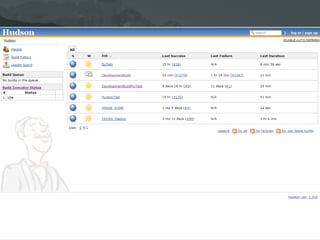
  • #31 The main Hudson dashboard shows the real time status of all the projects under CI
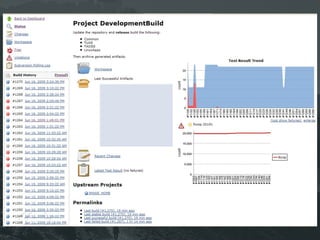
  • #32 The dashboard for a specific project shows the build history, a link to download products of the build, and the test and code check history. Note the link to Trac on the upper left
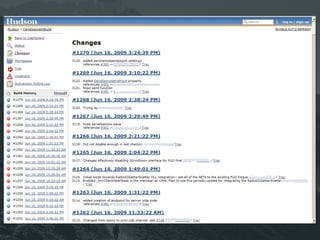
  • #33 The change history of the project, correlated to each build is viewable. Notice that someone ‘broke’ build #1265 with subversion changeset 3117. We can click on the Trac link to that change to see what the changes were that broke the build.
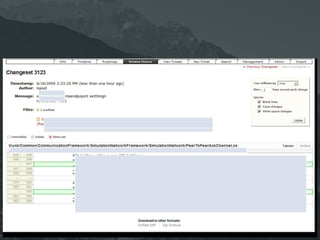
  • #34 For example, these are the changes for changeset 3123, and notice that the developer states references #381 in his commit message, which provides an auto-link to the task or bug report this commit is related to.