Jorge D. Ortiz Fuentes


Mobile Developer Advocate, MongoDB
WELCOME
Implementing Feature Flags
Tell Me Quando
Agenda
What are Feature Flags? Why using Feature
Flags?


Implementing Feature Flags


Three Common Scenarios


Recap
What are Feature
Flags? Why using
them?
A set of constants
that hide or expose
functionality while
it is on development
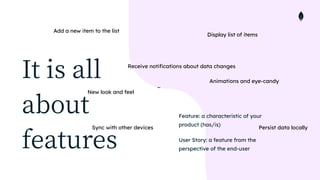
It is all
about
features
Feature: a characteristic of your
product (has/is)


User Story: a feature from the
perspective of the end-user
Display list of items
Receive notifications about data changes
Add a new item to the list
Persist data locally
New look and feel
Sync with other devices
Animations and eye-candy
…
New Feature
Let s Code Then!
git branch
No!
🙅
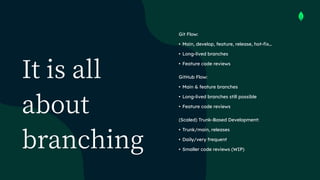
It is all
about
branching
Git Flow:


• Main, develop, feature, release, hot-fix…


• Long-lived branches


• Feature code reviews


GitHub Flow:


• Main & feature branches


• Long-lived branches still possible


• Feature code reviews


(Scaled) Trunk-Based Development:


• Trunk/main, releases


• Daily/very frequent


• Smaller code reviews (WIP)
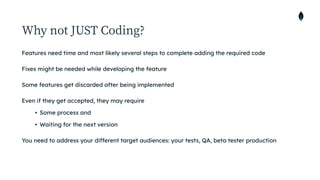
Why not JUST Coding?
Features need time and most likely several steps to complete adding the required code


Fixes might be needed while developing the feature


Some features get discarded after being implemented


Even if they get accepted, they may require


• Some process and


• Waiting for the next version


You need to address your different target audiences: your tests, QA, beta tester production
One Codebase to Rule them all
Implementing
Feature Flags
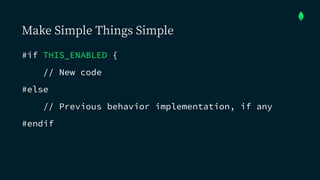
Make Simple Things Simple
#if THIS_ENABLED {


// New code


#else


// Previous behavior implementation, if any


#endif
Put the
logic in the
code
Different configuration ≠ Feature flags


Use booleans instead of configuration
But where do I set
those flags?
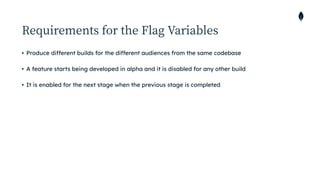
Requirements for the Flag Variables
• Produce different builds for the different audiences from the same codebase


• A feature starts being developed in alpha and it is disabled for any other build


• It is enabled for the next stage when the previous stage is completed
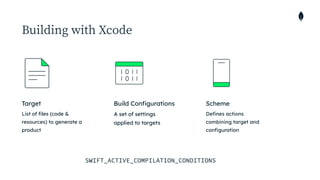
Building with Xcode
List of files (code &
resources) to generate a
product
Target
A set of settings
applied to targets
Build Configurations
Defines actions
combining target and
configuration
Scheme
SWIFT_ACTIVE_COMPILATION_CONDITIONS
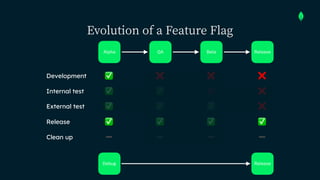
Evolution of a Feature Flag
Release
Beta
QA
Alpha
Release
Debug
❌
✅ ❌ ❌
Development
Clean up ➖
Internal test ✅ ❌ ❌
✅
External test ✅ ❌
✅ ✅
Release ✅ ✅ ✅ ✅
➖ ➖ ➖
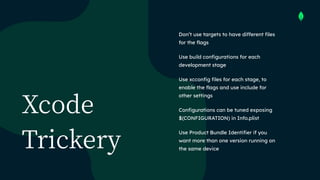
Xcode
Trickery
Don’t use targets to have different files
for the flags


Use build configurations for each
development stage


Use xcconfig files for each stage, to
enable the flags and use include for
other settings


Configurations can be tuned exposing


$(CONFIGURATION) in Info.plist


Use Product Bundle Identifier if you
want more than one version running on
the same device
Build Configurations
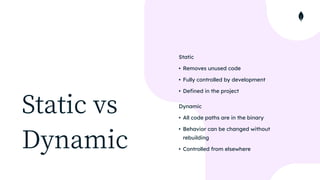
Static vs


Dynamic
Static


• Removes unused code


• Fully controlled by development


• Defined in the project


Dynamic


• All code paths are in the binary


• Behavior can be changed without
rebuilding


• Controlled from elsewhere
Three Common
Scenarios
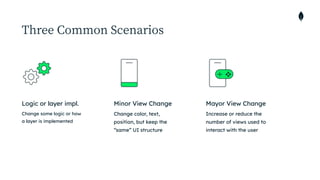
Three Common Scenarios
Change some logic or how
a layer is implemented


Logic or layer impl.
Change color, text,
position, but keep the
“same” UI structure
Minor View Change
Increase or reduce the
number of views used to
interact with the user
Mayor View Change
Let s Code
Together
CODE REPOSITORY AVAILABLE LATER
https://bit.ly/


sh
2
2
-realm
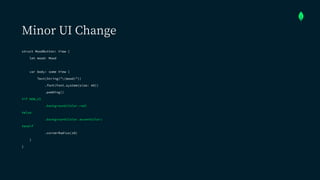
Minor UI Change
struct MoodButton: View {


let mood: Mood


var body: some View {


Text(String("(mood)"))


.font(Font.system(size: 40))


.padding()


#if NEW_UI


.background(Color.red)


#else


.background(Color.accentColor)


#endif


.cornerRadius(10)


}


}
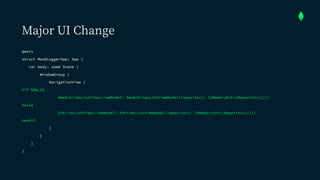
Major UI Change
@main


struct MoodLoggerApp: App {


var body: some Scene {


WindowGroup {


NavigationView {


#if NEW_UI


NewEntriesListView(viewModel: NewEntriesListViewModel(repository: InMemoryEntryRepository()))


#else


EntriesListView(viewModel: EntriesListViewModel(repository: InMemoryEntryRepository()))


#endif


}


}


}


}
Do I Need to have
Tests in Place?
No! You don’t
need to
But it does help a
lot
Love your future
self and your team
HINT
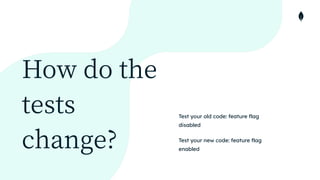
How do the
tests
change?
Test your old code: feature flag
disabled


Test your new code: feature flag
enabled
Recap
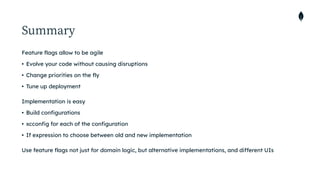
Summary
Feature flags allow to be agile


• Evolve your code without causing disruptions


• Change priorities on the fly


• Tune up deployment


Implementation is easy


• Build configurations


• xcconfig for each of the configuration


• If expression to choose between old and new implementation


Use feature flags not just for domain logic, but alternative implementations, and different UIs
Thank you!
Q&A
Resources
Developer Hub:


https://developer.mongodb.com


YouTube Channel:


https://www.youtube.com/mongodb


Podcast:


https://www.mongodb.com/podcast


https://linktr.ee/unicodeu00d1


Twitter [Me]:


https://www.twitter.com/jdortiz

Tell Me Quando - Implementing Feature Flags

  • 1.
    Jorge D. OrtizFuentes Mobile Developer Advocate, MongoDB WELCOME Implementing Feature Flags Tell Me Quando
  • 2.
    Agenda What are FeatureFlags? Why using Feature Flags? Implementing Feature Flags Three Common Scenarios Recap
  • 3.
    What are Feature Flags?Why using them?
  • 4.
    A set ofconstants that hide or expose functionality while it is on development
  • 5.
    It is all about features Feature:a characteristic of your product (has/is) User Story: a feature from the perspective of the end-user Display list of items Receive notifications about data changes Add a new item to the list Persist data locally New look and feel Sync with other devices Animations and eye-candy …
  • 6.
  • 7.
    Let s CodeThen! git branch
  • 8.
  • 9.
    It is all about branching GitFlow: • Main, develop, feature, release, hot-fix… • Long-lived branches • Feature code reviews GitHub Flow: • Main & feature branches • Long-lived branches still possible • Feature code reviews (Scaled) Trunk-Based Development: • Trunk/main, releases • Daily/very frequent • Smaller code reviews (WIP)
  • 10.
    Why not JUSTCoding? Features need time and most likely several steps to complete adding the required code Fixes might be needed while developing the feature Some features get discarded after being implemented Even if they get accepted, they may require • Some process and • Waiting for the next version You need to address your different target audiences: your tests, QA, beta tester production
  • 11.
    One Codebase toRule them all
  • 12.
  • 13.
    Make Simple ThingsSimple #if THIS_ENABLED { // New code #else // Previous behavior implementation, if any #endif
  • 14.
    Put the logic inthe code Different configuration ≠ Feature flags Use booleans instead of configuration
  • 15.
    But where doI set those flags?
  • 16.
    Requirements for theFlag Variables • Produce different builds for the different audiences from the same codebase • A feature starts being developed in alpha and it is disabled for any other build • It is enabled for the next stage when the previous stage is completed
  • 17.
    Building with Xcode Listof files (code & resources) to generate a product Target A set of settings applied to targets Build Configurations Defines actions combining target and configuration Scheme SWIFT_ACTIVE_COMPILATION_CONDITIONS
  • 18.
    Evolution of aFeature Flag Release Beta QA Alpha Release Debug ❌ ✅ ❌ ❌ Development Clean up ➖ Internal test ✅ ❌ ❌ ✅ External test ✅ ❌ ✅ ✅ Release ✅ ✅ ✅ ✅ ➖ ➖ ➖
  • 19.
    Xcode Trickery Don’t use targetsto have different files for the flags Use build configurations for each development stage Use xcconfig files for each stage, to enable the flags and use include for other settings Configurations can be tuned exposing 
 $(CONFIGURATION) in Info.plist Use Product Bundle Identifier if you want more than one version running on the same device
  • 20.
  • 21.
    Static vs Dynamic Static • Removesunused code • Fully controlled by development • Defined in the project Dynamic • All code paths are in the binary • Behavior can be changed without rebuilding • Controlled from elsewhere
  • 22.
  • 23.
    Three Common Scenarios Changesome logic or how a layer is implemented Logic or layer impl. Change color, text, position, but keep the “same” UI structure Minor View Change Increase or reduce the number of views used to interact with the user Mayor View Change
  • 24.
    Let s Code Together CODEREPOSITORY AVAILABLE LATER
  • 25.
  • 26.
    Minor UI Change structMoodButton: View { let mood: Mood var body: some View { Text(String("(mood)")) .font(Font.system(size: 40)) .padding() #if NEW_UI .background(Color.red) #else .background(Color.accentColor) #endif .cornerRadius(10) } }
  • 27.
    Major UI Change @main structMoodLoggerApp: App { var body: some Scene { WindowGroup { NavigationView { #if NEW_UI NewEntriesListView(viewModel: NewEntriesListViewModel(repository: InMemoryEntryRepository())) #else EntriesListView(viewModel: EntriesListViewModel(repository: InMemoryEntryRepository())) #endif } } } }
  • 28.
    Do I Needto have Tests in Place? No! You don’t need to But it does help a lot Love your future self and your team HINT
  • 29.
    How do the tests change? Testyour old code: feature flag disabled Test your new code: feature flag enabled
  • 30.
  • 31.
    Summary Feature flags allowto be agile • Evolve your code without causing disruptions • Change priorities on the fly • Tune up deployment Implementation is easy • Build configurations • xcconfig for each of the configuration • If expression to choose between old and new implementation Use feature flags not just for domain logic, but alternative implementations, and different UIs
  • 32.
  • 33.
  • 34.