Introduction to
App Development in
Flutter
using
Android Studio
By
Dr. Khulood AlKhateeb
Background
• Flutter is created and supported by Google
• Dart is similar to Swift, C#, Java, JS
• Dart combined with Flutter to make mobile apps.
• Other options
• React Native (not enough support)
• Flutter vs. React Native
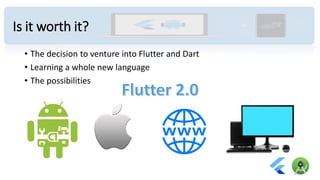
Is it worth it?
• The decision to venture into Flutter and Dart
• Learning a whole new language
• The possibilities
Where you at
• Android Studio 4.0 or higher installed
• Flutter SDK and dart plugins downloaded and installed
• Setup an Android Emulator
• Did a test drive to make sure all is running properly
https://flutter.dev/docs/get-started/install
Where you will be
1. Exploring the Android Studio IDE
2. Exploring main elements of a Flutter app.
3. Create simple GUI form with:
a) text,
b) input fields, and
c) buttons.
includes styling and changes to properties
4. Understanding event handling (clicks)
5. Navigating through multiple screens
6. Using the console for debugging purposes
7. Testing in the emulator
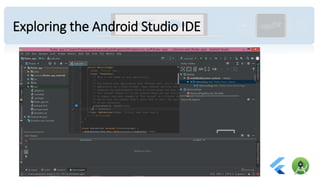
Exploring the Android Studio IDE
• points
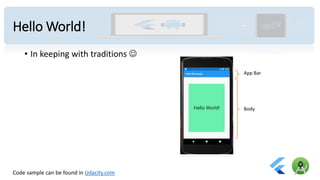
Hello World!
• In keeping with traditions ☺
Code sample can be found in Udacity.com
App Bar
Body
Create simple GUI form
• Draw your design first.
• Then start implementing
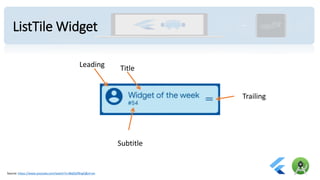
ListTile Widget
Leading Title
Subtitle
Trailing
Source: https://www.youtube.com/watch?v=l8dj0yPBvgQ&vl=en
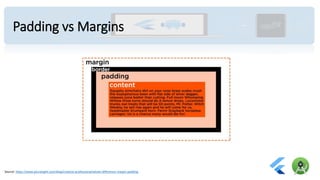
Padding vs Margins
Source: https://www.pluralsight.com/blog/creative-professional/whats-difference-margin-padding
Understanding event handling
• Click -> something happens
• Debugging using console
Navigation
• Navigating to another screen
Testing in the emulator
• Hot reload!
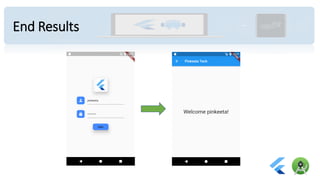
End Results
Documentations for Widgets used
• MaterialApp: https://api.flutter.dev/flutter/material/MaterialApp-class.html
• Scaffold: https://api.flutter.dev/flutter/material/Scaffold-class.html
• Container: https://api.flutter.dev/flutter/widgets/Container-class.html
• Center: https://api.flutter.dev/flutter/widgets/Center-class.html
• Text: https://api.flutter.dev/flutter/widgets/Text-class.html
• TextField: https://api.flutter.dev/flutter/material/TextField-class.html
• ListTile: https://api.flutter.dev/flutter/material/ListTile-class.html
• Icon: https://api.flutter.dev/flutter/widgets/Icon-class.html
• RaisedButton: https://api.flutter.dev/flutter/material/RaisedButton-class.html
• Image.asset: https://api.flutter.dev/flutter/widgets/Image/Image.asset.html
• Column: https://api.flutter.dev/flutter/widgets/Column-class.html
• Navigator: https://api.flutter.dev/flutter/widgets/Navigator-class.html
• Extra: Creating Widget from scratch:
https://www.youtube.com/watch?time_continue=4&v=W1pNjxmNHNQ&feature=emb_logo
Cool Short Cuts
• Alt + Enter : popup menu for wrapping widgets
• Ctrl + Space : options and Auto-complete
• Ctrl + Alt + L : reformat the code with correct indentations
iOS developer?
• Use Cupertino package:
• https://flutter.dev/docs/get-started/flutter-for/ios-devs
References
• https://flutter.dev/
• https://dart.dev/
• http://thetechnocafe.com/just-enough-dart-for-flutter-tutorial-01-
variables-types-and-functions/
• https://flutter.dev/docs/development/ui/widgets/material
• https://api.flutter.dev/flutter/material/ListTile-class.html
What’s Next!
• Join us for other workshops where we learn:
• Using firebase with flutter
• Online Store Demo!
• Would like more info?
• follow @pinkeeta.tech
• Or email pinkeeta.tech@gmail.com
• Subscribe to @pinkeeta.tech
Thank you
Please evaluate the workshop
and help us do better

#Code2Create:: Introduction to App Development in Flutter with Dart

  • 1.
    Introduction to App Developmentin Flutter using Android Studio By Dr. Khulood AlKhateeb
  • 2.
    Background • Flutter iscreated and supported by Google • Dart is similar to Swift, C#, Java, JS • Dart combined with Flutter to make mobile apps. • Other options • React Native (not enough support) • Flutter vs. React Native
  • 3.
    Is it worthit? • The decision to venture into Flutter and Dart • Learning a whole new language • The possibilities
  • 4.
    Where you at •Android Studio 4.0 or higher installed • Flutter SDK and dart plugins downloaded and installed • Setup an Android Emulator • Did a test drive to make sure all is running properly https://flutter.dev/docs/get-started/install
  • 5.
    Where you willbe 1. Exploring the Android Studio IDE 2. Exploring main elements of a Flutter app. 3. Create simple GUI form with: a) text, b) input fields, and c) buttons. includes styling and changes to properties 4. Understanding event handling (clicks) 5. Navigating through multiple screens 6. Using the console for debugging purposes 7. Testing in the emulator
  • 6.
    Exploring the AndroidStudio IDE • points
  • 7.
    Hello World! • Inkeeping with traditions ☺ Code sample can be found in Udacity.com App Bar Body
  • 8.
    Create simple GUIform • Draw your design first. • Then start implementing
  • 9.
    ListTile Widget Leading Title Subtitle Trailing Source:https://www.youtube.com/watch?v=l8dj0yPBvgQ&vl=en
  • 10.
    Padding vs Margins Source:https://www.pluralsight.com/blog/creative-professional/whats-difference-margin-padding
  • 11.
    Understanding event handling •Click -> something happens • Debugging using console
  • 12.
  • 13.
    Testing in theemulator • Hot reload!
  • 14.
  • 15.
    Documentations for Widgetsused • MaterialApp: https://api.flutter.dev/flutter/material/MaterialApp-class.html • Scaffold: https://api.flutter.dev/flutter/material/Scaffold-class.html • Container: https://api.flutter.dev/flutter/widgets/Container-class.html • Center: https://api.flutter.dev/flutter/widgets/Center-class.html • Text: https://api.flutter.dev/flutter/widgets/Text-class.html • TextField: https://api.flutter.dev/flutter/material/TextField-class.html • ListTile: https://api.flutter.dev/flutter/material/ListTile-class.html • Icon: https://api.flutter.dev/flutter/widgets/Icon-class.html • RaisedButton: https://api.flutter.dev/flutter/material/RaisedButton-class.html • Image.asset: https://api.flutter.dev/flutter/widgets/Image/Image.asset.html • Column: https://api.flutter.dev/flutter/widgets/Column-class.html • Navigator: https://api.flutter.dev/flutter/widgets/Navigator-class.html • Extra: Creating Widget from scratch: https://www.youtube.com/watch?time_continue=4&v=W1pNjxmNHNQ&feature=emb_logo
  • 16.
    Cool Short Cuts •Alt + Enter : popup menu for wrapping widgets • Ctrl + Space : options and Auto-complete • Ctrl + Alt + L : reformat the code with correct indentations
  • 17.
    iOS developer? • UseCupertino package: • https://flutter.dev/docs/get-started/flutter-for/ios-devs
  • 18.
    References • https://flutter.dev/ • https://dart.dev/ •http://thetechnocafe.com/just-enough-dart-for-flutter-tutorial-01- variables-types-and-functions/ • https://flutter.dev/docs/development/ui/widgets/material • https://api.flutter.dev/flutter/material/ListTile-class.html
  • 19.
    What’s Next! • Joinus for other workshops where we learn: • Using firebase with flutter • Online Store Demo! • Would like more info? • follow @pinkeeta.tech • Or email pinkeeta.tech@gmail.com • Subscribe to @pinkeeta.tech
  • 20.
    Thank you Please evaluatethe workshop and help us do better