6. WHAT HAVE YOU LEARNT ABOUT
TECHNOLOGIES FROM THE PROCESS OF
CONSTRUCTING THIS PRODUCT?
TECHNOLOGIES
 PC- I used a PC to make my front cover, my
  contents page and my double page spread.
 I also used the PC to save my work in files
 I used a PC to upload pictures of the
  photographs I had taken and focus group videos
 I also used the PC to keep up to date on my
  work my using blogger uploading my work
 I also used the PC to write up my article and
  questionnaires.
INTERNET
 I used the internet to update my blog
 I used Google to research on other
  magazines to help with my magazine and get
  ideas
 The internet helped me with my magazine as
  It allowed me to access multiple websites
  that helped with my research and tasks
 It gave me the opportunities to compare
  magazines with mine and lay it out
  professionally
PRINTER/SCANNER

 The printer allowed me to print out my
  questionnaires
 The scanner helped me to upload my drafts
  on to the computer and on to my blog
 The printer also helped me to print out my
  media product to use for a tangible product
  for my focus group.
CAMERA

 I used a digital camera, to take pictures for
  my front cover and contents page and double
  page spread, I then uploaded it on to the
  computer using a USB portal to transfer them
  and selected the pictures I wanted to use.
 I also used the camera to video my focus
  group which I then uploaded onto the
  computer and blog.
ROLES I ASSUMED
   Photographer- I had to take photos for my magazine.
   Journalist- I had to write up an interview I had with an
    artist
   Editor- I had to edit the chosen pictures for my
    magazine, as well as the cover page and the layouts
    for the contents page and double page spread
   Proof reader- I had to proof read my article in order it
    to look professional
   Graphic designer- I was a graphic designer as I had
    to design the whole magazine by using different
    software's for different pages.
EASIEST AND HARDEST ROLE
 Easiest role was being a photographer, it
  was much simpler than the other roles
  although I had to keep in mind all the rules,
  but it was definitely the most fun job to do.
 Hardest job for me was probably being a
  graphic designer, you need a lot of time on
  your hands because its quite time consuming
  as you have to be detailed and focused on
  making it look professional.
PHOTOSHOP
 I used Photoshop to edit my chosen photos
  and I used it to construct my front cover
 This helped me a lot because it made my
  pictures look flawless and professional, as
  well as my front cover, it gave my a variety of
  choices on how to edit my front page.
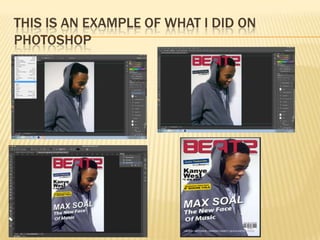
 For example it allowed me to add cover lines
  and images such as the bar code- letting me
  resize and place it anywhere I like on top of
  the main image – making it look professional
THIS IS AN EXAMPLE OF WHAT I DID ON
PHOTOSHOP
INDESIGN

 InDesign helped me to construct my contents
  page and double page spread
 It helped me to use the layouts and boxes
  accurately and precisely, making it look more
  professional
 It helped me to aligned all the pictures and text
  on my contents page
 And It also helped me with the layout in the
  double page spread, where to place the image
  and text.
BLOGGER

 I used blogger to upload my work as I went
  along
 It allowed me to meet all my deadlines and keep
  up to date
 Blogger allowed my to upload pictures, videos,
  and work
 However they had to be transformed into
  something else before I uploaded it which then I
  had to go on other websites to transform it in,
  such as YouTube, slide share and Prezi.
WEBSITES/PROGRAMMES
 I have used a range of websites in order to get
  my work done
 Google
 Slide share
 Prezi
 Blogger
 Youtube
 Photoshop
 Indesign
 Scribed

Technology pp task 6

  • 1.
    6. WHAT HAVEYOU LEARNT ABOUT TECHNOLOGIES FROM THE PROCESS OF CONSTRUCTING THIS PRODUCT?
  • 2.
    TECHNOLOGIES  PC- Iused a PC to make my front cover, my contents page and my double page spread.  I also used the PC to save my work in files  I used a PC to upload pictures of the photographs I had taken and focus group videos  I also used the PC to keep up to date on my work my using blogger uploading my work  I also used the PC to write up my article and questionnaires.
  • 3.
    INTERNET  I usedthe internet to update my blog  I used Google to research on other magazines to help with my magazine and get ideas  The internet helped me with my magazine as It allowed me to access multiple websites that helped with my research and tasks  It gave me the opportunities to compare magazines with mine and lay it out professionally
  • 4.
    PRINTER/SCANNER  The printerallowed me to print out my questionnaires  The scanner helped me to upload my drafts on to the computer and on to my blog  The printer also helped me to print out my media product to use for a tangible product for my focus group.
  • 5.
    CAMERA  I useda digital camera, to take pictures for my front cover and contents page and double page spread, I then uploaded it on to the computer using a USB portal to transfer them and selected the pictures I wanted to use.  I also used the camera to video my focus group which I then uploaded onto the computer and blog.
  • 6.
    ROLES I ASSUMED  Photographer- I had to take photos for my magazine.  Journalist- I had to write up an interview I had with an artist  Editor- I had to edit the chosen pictures for my magazine, as well as the cover page and the layouts for the contents page and double page spread  Proof reader- I had to proof read my article in order it to look professional  Graphic designer- I was a graphic designer as I had to design the whole magazine by using different software's for different pages.
  • 7.
    EASIEST AND HARDESTROLE  Easiest role was being a photographer, it was much simpler than the other roles although I had to keep in mind all the rules, but it was definitely the most fun job to do.  Hardest job for me was probably being a graphic designer, you need a lot of time on your hands because its quite time consuming as you have to be detailed and focused on making it look professional.
  • 8.
    PHOTOSHOP  I usedPhotoshop to edit my chosen photos and I used it to construct my front cover  This helped me a lot because it made my pictures look flawless and professional, as well as my front cover, it gave my a variety of choices on how to edit my front page.  For example it allowed me to add cover lines and images such as the bar code- letting me resize and place it anywhere I like on top of the main image – making it look professional
  • 9.
    THIS IS ANEXAMPLE OF WHAT I DID ON PHOTOSHOP
  • 10.
    INDESIGN  InDesign helpedme to construct my contents page and double page spread  It helped me to use the layouts and boxes accurately and precisely, making it look more professional  It helped me to aligned all the pictures and text on my contents page  And It also helped me with the layout in the double page spread, where to place the image and text.
  • 11.
    BLOGGER  I usedblogger to upload my work as I went along  It allowed me to meet all my deadlines and keep up to date  Blogger allowed my to upload pictures, videos, and work  However they had to be transformed into something else before I uploaded it which then I had to go on other websites to transform it in, such as YouTube, slide share and Prezi.
  • 12.
    WEBSITES/PROGRAMMES  I haveused a range of websites in order to get my work done  Google  Slide share  Prezi  Blogger  Youtube  Photoshop  Indesign  Scribed