6. What have you learnt about technologies
from the process of constructing this
product?
DSLR/Bridge Cameras
 For my front cover, I took photographs with one of
the colleges cameras. I have little experience
using more advanced DSLR and Bridge cameras.
I learnt quickly how to adjust white balance,
exposure and how to adjust settings based on my
surroundings. I ended up with decent results.
 To improve, I could have taken more experimental
shots, and perhaps logged my progress.
Photoshop
 I edited my chosen photographs on Photoshop, to
improve any exposure/saturation/contrast on
them. I very subtly edited the hue on the photo for
my double page spread. This was so the
background fitted in with the foreground more.
 My front cover image also needed subtle
improvements to ensure it looks more like a
magazine’s main image rather than an amateur
photo.
Photoshop
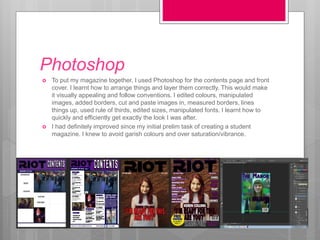
 To put my magazine together, I used Photoshop for the contents page and front
cover. I learnt how to arrange things and layer them correctly. This would make
it visually appealing and follow conventions. I edited colours, manipulated
images, added borders, cut and paste images in, measured borders, lines
things up, used rule of thirds, edited sizes, manipulated fonts. I learnt how to
quickly and efficiently get exactly the look I was after.
 I had definitely improved since my initial prelim task of creating a student
magazine. I knew to avoid garish colours and over saturation/vibrance.
Word
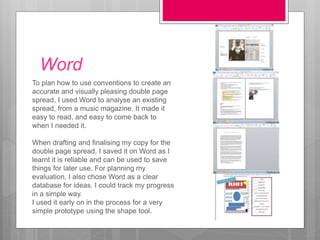
To plan how to use conventions to create an
accurate and visually pleasing double page
spread, I used Word to analyse an existing
spread, from a music magazine. It made it
easy to read, and easy to come back to
when I needed it.
When drafting and finalising my copy for the
double page spread, I saved it on Word as I
learnt it is reliable and can be used to save
things for later use. For planning my
evaluation, I also chose Word as a clear
database for ideas. I could track my progress
in a simple way.
I used it early on in the process for a very
simple prototype using the shape tool.
InDesign
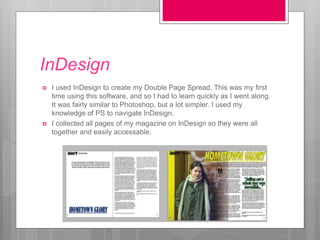
 I used InDesign to create my Double Page Spread. This was my first
time using this software, and so I had to learn quickly as I went along.
It was fairly similar to Photoshop, but a lot simpler. I used my
knowledge of PS to navigate InDesign.
 I collected all pages of my magazine on InDesign so they were all
together and easily accessable.
Prezi/emaze/powtoon
 I used these softwares to do research about
Target Audience, Publishing Institutes and
conventions of magazines. They all have
similarities when it comes to inserting text and
images, and embedding. I learnt how to embed
videos/photos/sound, and the impact this would
have. I improved time management while working
using these to create questions as I learnt quickly
and the similarities made it simpler.
Notes/phone camera/gmail
 I used the notes app on my phone to record a list
of things I need to do at home, and things to bear
in mind when I was photographing people.
 I learnt how best to utilise my camera’s settings
for strong, bold photos. I then emailed these to
myself, so I could use them on the computer.
 I emailed myself presentations and work so I
could access it at home or in lesson without the
need for a memory stick. This is a different way to
use email than usual.
7. Looking back at your preliminary task,
what do you feel you have learnt in the
progression from it to the full product?
PhotoShop
 One of the main things I learnt was how to use Photoshop to
my advantage, and how to apply it to conventions.
 Editing colour and lighting meant I could enhance my
photographs and cater them to what I wanted for my target
audience.
 In my preliminary task, my magazine was overpowered with
saturation and so i learnt that I could make it subtle for a
better finished result.
 Learning how best to insert pictures, shapes and text and
then manipulate them made it easier, and using Photoshop
for the first time on my prelim task had been an obstacle.
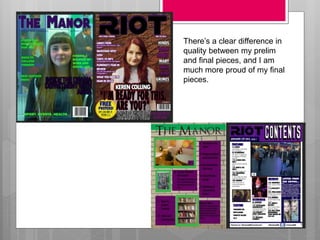
There’s a clear difference in
quality between my prelim
and final pieces, and I am
much more proud of my final
pieces.
DaFont
 I learnt how to search more specifically for a
font that was relevant to my magazine. The
font of a masthead says a lot about the
magazine itself, and has an impression on the
audience. It has to be chunky and not cheesy,
and I used Photoshop to add strokes to make
it stand out off the page.
Lighting
 By use of artificial lighting, I created photos
which were of a definite higher quality than
those in my preliminary magazine. I used the
plain background to my advantage, as I could
experiment with a variety of different angles
without lighting or background interfering.
 My abilities to use software and hardware due
to the practise from the prelim task increased
notably.
 It was much less time-consuming to use
Photoshop when I knew how to do what I
wanted.
 It was less stressful, and I got better results.

What have i learnt about technologies

  • 1.
    6. What haveyou learnt about technologies from the process of constructing this product?
  • 2.
    DSLR/Bridge Cameras  Formy front cover, I took photographs with one of the colleges cameras. I have little experience using more advanced DSLR and Bridge cameras. I learnt quickly how to adjust white balance, exposure and how to adjust settings based on my surroundings. I ended up with decent results.  To improve, I could have taken more experimental shots, and perhaps logged my progress.
  • 3.
    Photoshop  I editedmy chosen photographs on Photoshop, to improve any exposure/saturation/contrast on them. I very subtly edited the hue on the photo for my double page spread. This was so the background fitted in with the foreground more.  My front cover image also needed subtle improvements to ensure it looks more like a magazine’s main image rather than an amateur photo.
  • 4.
    Photoshop  To putmy magazine together, I used Photoshop for the contents page and front cover. I learnt how to arrange things and layer them correctly. This would make it visually appealing and follow conventions. I edited colours, manipulated images, added borders, cut and paste images in, measured borders, lines things up, used rule of thirds, edited sizes, manipulated fonts. I learnt how to quickly and efficiently get exactly the look I was after.  I had definitely improved since my initial prelim task of creating a student magazine. I knew to avoid garish colours and over saturation/vibrance.
  • 5.
    Word To plan howto use conventions to create an accurate and visually pleasing double page spread, I used Word to analyse an existing spread, from a music magazine. It made it easy to read, and easy to come back to when I needed it. When drafting and finalising my copy for the double page spread, I saved it on Word as I learnt it is reliable and can be used to save things for later use. For planning my evaluation, I also chose Word as a clear database for ideas. I could track my progress in a simple way. I used it early on in the process for a very simple prototype using the shape tool.
  • 6.
    InDesign  I usedInDesign to create my Double Page Spread. This was my first time using this software, and so I had to learn quickly as I went along. It was fairly similar to Photoshop, but a lot simpler. I used my knowledge of PS to navigate InDesign.  I collected all pages of my magazine on InDesign so they were all together and easily accessable.
  • 7.
    Prezi/emaze/powtoon  I usedthese softwares to do research about Target Audience, Publishing Institutes and conventions of magazines. They all have similarities when it comes to inserting text and images, and embedding. I learnt how to embed videos/photos/sound, and the impact this would have. I improved time management while working using these to create questions as I learnt quickly and the similarities made it simpler.
  • 8.
    Notes/phone camera/gmail  Iused the notes app on my phone to record a list of things I need to do at home, and things to bear in mind when I was photographing people.  I learnt how best to utilise my camera’s settings for strong, bold photos. I then emailed these to myself, so I could use them on the computer.  I emailed myself presentations and work so I could access it at home or in lesson without the need for a memory stick. This is a different way to use email than usual.
  • 9.
    7. Looking backat your preliminary task, what do you feel you have learnt in the progression from it to the full product?
  • 10.
    PhotoShop  One ofthe main things I learnt was how to use Photoshop to my advantage, and how to apply it to conventions.  Editing colour and lighting meant I could enhance my photographs and cater them to what I wanted for my target audience.  In my preliminary task, my magazine was overpowered with saturation and so i learnt that I could make it subtle for a better finished result.  Learning how best to insert pictures, shapes and text and then manipulate them made it easier, and using Photoshop for the first time on my prelim task had been an obstacle.
  • 11.
    There’s a cleardifference in quality between my prelim and final pieces, and I am much more proud of my final pieces.
  • 12.
    DaFont  I learnthow to search more specifically for a font that was relevant to my magazine. The font of a masthead says a lot about the magazine itself, and has an impression on the audience. It has to be chunky and not cheesy, and I used Photoshop to add strokes to make it stand out off the page.
  • 13.
    Lighting  By useof artificial lighting, I created photos which were of a definite higher quality than those in my preliminary magazine. I used the plain background to my advantage, as I could experiment with a variety of different angles without lighting or background interfering.
  • 14.
     My abilitiesto use software and hardware due to the practise from the prelim task increased notably.  It was much less time-consuming to use Photoshop when I knew how to do what I wanted.  It was less stressful, and I got better results.