Social Media:  Basics & Beyond Jennifer Hrusch, Jennifer Hess, Ellen Armstrong and Julie Theado
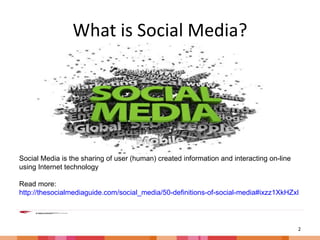
What is Social Media? Social Media is the sharing of user (human) created information and interacting on-line using Internet technology  Read more:  http://thesocialmediaguide.com/social_media/50-definitions-of-social-media#ixzz1XkHZxBob
What is Twitter? 140 Characters Tweet Follow Be Followed Direct Message @ Reply Retweet
Who is Tweeting? 200 million people!* Individuals Businesses News Outlets Celebrities Libraries Librarians and other Professionals *As of September, 2011. http://mashable.com/2011/09/08/twitter-has-100-million-active-users/
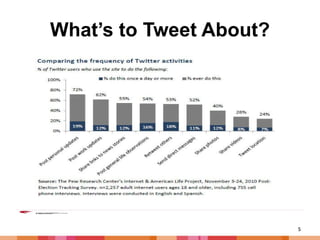
What’s to Tweet About?
Why Twitter? Shared content “Twitter provides the hub, the means of connecting all of one’s online activity to create a real-time, people-run and directed broadcasting network.”* Power of the crowd: people pick the news Multiple streams: No one kind of content rules It’s personal: Connecting to people, not just content It’s interactive: Responding, not just consuming Access to the global mind ” How Twitter is changing the Face of Media,” Soren Gordhamer, Nov 2009, http://mashable.com/2009/11/11/twitter-media-landscape/
Getting Started New to Twitter? Join today! Choose a Username Public or Private? Find people to follow Let people follow you and follow them back Make use of Twitter tools to manage and measure
Choosing a Username Don’t be afraid to use your real name Include profession or interest Be creative Distinguish yourself Keep it short (It’s part of your 140 characters!)
Public or Private? Show your real name and location Bio: Provide information about yourself Web: Add a link to your other content Let others find you by email Add a location to your tweets Protect your tweets Use HTTPS
As long as you follow… Who to Follow (suggestions, interests, find friends) Lists Similar to You Follow back
Tips, Tools and Tricks Tweetdeck and Hootsuite Notifications Scheduling Tweets Impact: Tweetstats, Twitterholic and Klout Hashtags: Tweetchat
What is Facebook? A portal for social networking Profile is the center of Facebook Find and add friends Share Photos and/or videos Organize a Community, Shared Interest or Event Email or chatting or message
Who’s on Facebook? More than 750 million active users!* Individuals Businesses News Outlets Celebrities Libraries Librarians and other Professionals *As of September, 2011. http://www.facebook.com/press/info.php?statistics
Why Facebook? Keep in touch with friends and family Share photos and videos Stay informed on community events Join networks Join Groups Select your own level of privacy Ability to reject friend requests
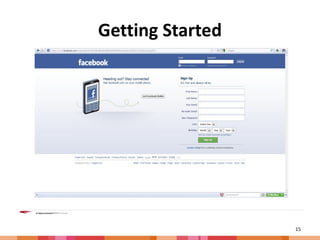
Getting Started
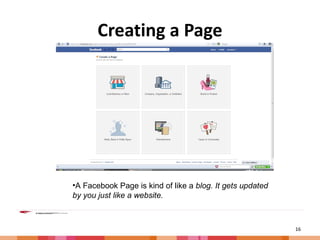
Creating a Page A Facebook Page is kind of like a  blog. It gets updated by you just like a website.
Public or Private? Control privacy settings when you post Control your default privacy Control how you connect with people you know Control what happens when friends tag you or your content. Control what gets shared with apps, games and websites. Limit the audience for posts you shared with more than friends. Manage your lists of blocked people and apps. * Privacy setting often change so be aware and update as necessary .
Finding Friends Search using email address Search for friends by name Find friends using The People You May Know tool Select friends and send a friend request Wait for friends confirmation
Tips, Tools & Tricks Load and tag pictures and video Add links Filter who is in your timeline Create your URL Block applications
Questions

Tech weekpresentation 2011

  • 1.
    Social Media: Basics & Beyond Jennifer Hrusch, Jennifer Hess, Ellen Armstrong and Julie Theado
  • 2.
    What is SocialMedia? Social Media is the sharing of user (human) created information and interacting on-line using Internet technology Read more: http://thesocialmediaguide.com/social_media/50-definitions-of-social-media#ixzz1XkHZxBob
  • 3.
    What is Twitter?140 Characters Tweet Follow Be Followed Direct Message @ Reply Retweet
  • 4.
    Who is Tweeting?200 million people!* Individuals Businesses News Outlets Celebrities Libraries Librarians and other Professionals *As of September, 2011. http://mashable.com/2011/09/08/twitter-has-100-million-active-users/
  • 5.
  • 6.
    Why Twitter? Sharedcontent “Twitter provides the hub, the means of connecting all of one’s online activity to create a real-time, people-run and directed broadcasting network.”* Power of the crowd: people pick the news Multiple streams: No one kind of content rules It’s personal: Connecting to people, not just content It’s interactive: Responding, not just consuming Access to the global mind ” How Twitter is changing the Face of Media,” Soren Gordhamer, Nov 2009, http://mashable.com/2009/11/11/twitter-media-landscape/
  • 7.
    Getting Started Newto Twitter? Join today! Choose a Username Public or Private? Find people to follow Let people follow you and follow them back Make use of Twitter tools to manage and measure
  • 8.
    Choosing a UsernameDon’t be afraid to use your real name Include profession or interest Be creative Distinguish yourself Keep it short (It’s part of your 140 characters!)
  • 9.
    Public or Private?Show your real name and location Bio: Provide information about yourself Web: Add a link to your other content Let others find you by email Add a location to your tweets Protect your tweets Use HTTPS
  • 10.
    As long asyou follow… Who to Follow (suggestions, interests, find friends) Lists Similar to You Follow back
  • 11.
    Tips, Tools andTricks Tweetdeck and Hootsuite Notifications Scheduling Tweets Impact: Tweetstats, Twitterholic and Klout Hashtags: Tweetchat
  • 12.
    What is Facebook?A portal for social networking Profile is the center of Facebook Find and add friends Share Photos and/or videos Organize a Community, Shared Interest or Event Email or chatting or message
  • 13.
    Who’s on Facebook?More than 750 million active users!* Individuals Businesses News Outlets Celebrities Libraries Librarians and other Professionals *As of September, 2011. http://www.facebook.com/press/info.php?statistics
  • 14.
    Why Facebook? Keepin touch with friends and family Share photos and videos Stay informed on community events Join networks Join Groups Select your own level of privacy Ability to reject friend requests
  • 15.
  • 16.
    Creating a PageA Facebook Page is kind of like a blog. It gets updated by you just like a website.
  • 17.
    Public or Private?Control privacy settings when you post Control your default privacy Control how you connect with people you know Control what happens when friends tag you or your content. Control what gets shared with apps, games and websites. Limit the audience for posts you shared with more than friends. Manage your lists of blocked people and apps. * Privacy setting often change so be aware and update as necessary .
  • 18.
    Finding Friends Searchusing email address Search for friends by name Find friends using The People You May Know tool Select friends and send a friend request Wait for friends confirmation
  • 19.
    Tips, Tools &Tricks Load and tag pictures and video Add links Filter who is in your timeline Create your URL Block applications
  • 20.

Editor's Notes

  • #11 Who to Follow: suggestions, interests, find friends Lists: Lists by you, Lists you follow, lists following you