

Teaching via Videoconferencing:
                            Instructional Strategies

                              Berks County IU, August 2011


Monday, August 8, 2011
supporting inter@ctive learning
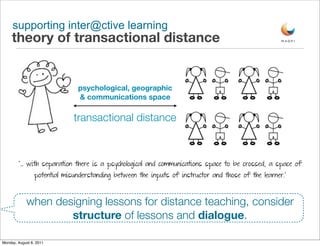
     theory of transactional distance


                                psychological, geographic
                                & communications space

                              transactional distance


        “... with separation there is a psychological and communications space to be crossed, a space of
                 potential misunderstanding between the inputs of instructor and those of the learner.”


            when designing lessons for distance teaching, consider
                    structure of lessons and dialogue.

Monday, August 8, 2011
supporting inter@ctive learning
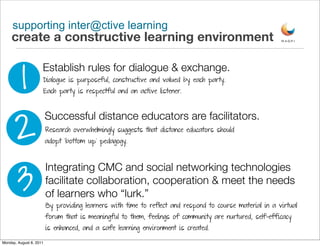
     create a constructive learning environment


          1
                     Establish rules for dialogue & exchange.
                     Dialogue is purposeful, constructive and valued by each party.
                     Each party is respectful and an active listener.


     2
                         Successful distance educators are facilitators.
                         Research overwhelmingly suggests that distance educators should
                         adopt ‘bottom up’ pedagogy.


       3
                         Integrating CMC and social networking technologies
                         facilitate collaboration, cooperation & meet the needs
                         of learners who “lurk.”
                         By providing learners with time to reflect and respond to course material in a virtual
                         forum that is meaningful to them, feelings of community are nurtured, self-efficacy
                         is enhanced, and a safe learning environment is created.

Monday, August 8, 2011
supporting inter@ctive learning
     create a constructive learning environment


        4
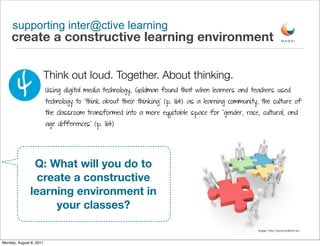
                         Think out loud. Together. About thinking.
                         Using digital media technology, Goldman found that when learners and teachers used
                         technology to “think about their thinking” (p. 164) as a learning community, the culture of
                         the classroom transformed into a more equitable space for “gender, race, cultural, and
                         age differences” (p. 164)


                Q: What will you do to
                 create a constructive
               learning environment in
                    your classes?

                                                                                                    image: http://www.ezdtech.eu/


Monday, August 8, 2011
supporting inter@ctive learning
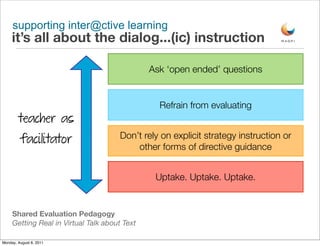
     it’s all about the dialog...(ic) instruction

                                               Ask ‘open ended’ questions


                                                 Refrain from evaluating
        teacher as
                                       Don’t rely on explicit strategy instruction or
         facilitator
                                           other forms of directive guidance


                                                Uptake. Uptake. Uptake.


     Shared Evaluation Pedagogy
     Getting Real in Virtual Talk about Text

Monday, August 8, 2011
supporting inter@ctive learning
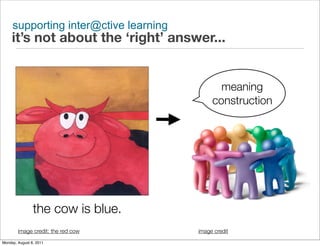
     it’s not about the ‘right’ answer...


                                              meaning
                                            construction


                the cow is blue.
        image credit: the red cow      image credit
Monday, August 8, 2011
supporting inter@ctive learning
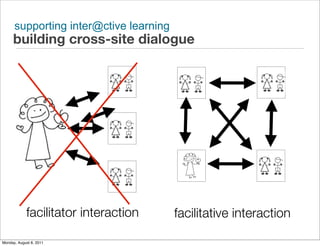
     building cross-site dialogue


            facilitator interaction     facilitative interaction

Monday, August 8, 2011
supporting inter@ctive learning
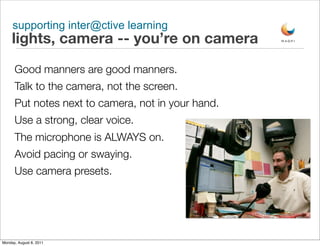
     lights, camera -- you’re on camera
      Good manners are good manners.
      Talk to the camera, not the screen.
      Put notes next to camera, not in your hand.
      Use a strong, clear voice.
      The microphone is ALWAYS on.
      Avoid pacing or swaying.
      Use camera presets.


Monday, August 8, 2011
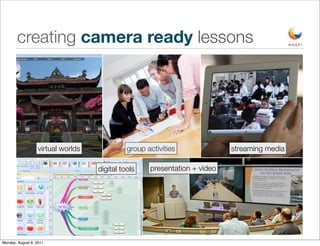
creating camera ready lessons


                   virtual worlds             group activities              streaming media

                                    digital tools    presentation + video


Monday, August 8, 2011
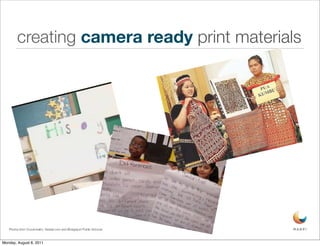
creating camera ready print materials


   Photos from Vcoutonalim, thestar.com and Bridgeport Public Schools


Monday, August 8, 2011
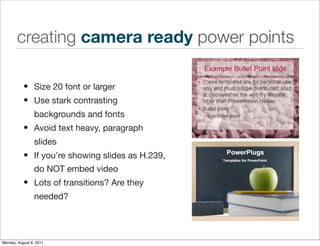
creating camera ready power points

           • Size 20 font or larger
           • Use stark contrasting
                 backgrounds and fonts
           • Avoid text heavy, paragraph
                 slides
           • If you’re showing slides as H.239,
                 do NOT embed video
           • Lots of transitions? Are they
                 needed?


Monday, August 8, 2011
supporting inter@ctive learning
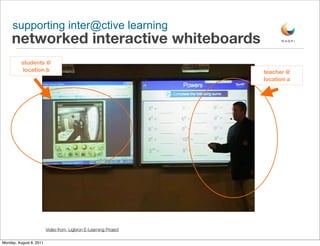
     networked interactive whiteboards
          students @
           location b                                            teacher @
                                                                 location a


                         Video from Ligbron E-Learning Project

Monday, August 8, 2011
supporting inter@ctive learning
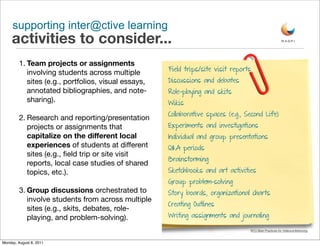
     activities to consider...
         1. Team projects or assignments
                                                      Field trips/site visit reports
            involving students across multiple
            sites (e.g., portfolios, visual essays,   Discussions and debates
            annotated bibliographies, and note-       Role-playing and skits
            sharing).                                 Wikis
                                                      Collaborative spaces (e.g., Second Life)
         2. Research and reporting/presentation
            projects or assignments that              Experiments and investigations
            capitalize on the different local         Individual and group presentations
            experiences of students at different      Q&A periods
            sites (e.g., field trip or site visit
                                                      Brainstorming
            reports, local case studies of shared
            topics, etc.).                            Sketchbooks and art activities
                                                      Group problem-solving
         3. Group discussions orchestrated to         Story boards, organizational charts
            involve students from across multiple
                                                      Creating Outlines
            sites (e.g., skits, debates, role-
            playing, and problem-solving).            Writing assignments and journaling

                                                                                   NYU Best Practices for Videoconferencing


Monday, August 8, 2011
works cited
       Goldman, R. (2004). Video perceptivity meets wild and crazy teens: design ethnography. Cambridge Journal of Education, 34, 157-178.
       Retrieved May 5, 2008, from Wilson Web database.

       Moore, M. G. (1993). Theory of transactional distance. In D. Keegan (Ed.) Theoretical Principles of Distance Education. New York: Routledge

       NYU Best Practices for Videoconferencing. Online. http://www.nyu.edu/its/videoconferencing/practices/

       Williamson, L., Miller, G. & Stokes PhD, D. (2009). Best Practices for Teaching via Interactive Video Conferencing Technology: A Review of the
       Literature. In I. Gibson et al. (Eds.), Proceedings of Society for Information Technology & Teacher Education International Conference 2009 (pp.
       3028-3034). Chesapeake, VA: AACE.


Monday, August 8, 2011
Heather Weisse Walsh                 
         MAGPI Manager of Educational Services
         hweisse@magpi.net
         215-573-6417
         twitter: magpik20 or hlw2
         skype: hweisse
         facebook: www.facebook.com/magpik20
         blog: http://k20interactions.blogspot.com
         http://www.magpi.net


Monday, August 8, 2011

Teaching Via Videoconferencing: Instructional Strategies

  • 1.
    Teaching via Videoconferencing: Instructional Strategies Berks County IU, August 2011 Monday, August 8, 2011
  • 2.
    supporting inter@ctive learning theory of transactional distance psychological, geographic & communications space transactional distance “... with separation there is a psychological and communications space to be crossed, a space of potential misunderstanding between the inputs of instructor and those of the learner.” when designing lessons for distance teaching, consider structure of lessons and dialogue. Monday, August 8, 2011
  • 3.
    supporting inter@ctive learning create a constructive learning environment 1 Establish rules for dialogue & exchange. Dialogue is purposeful, constructive and valued by each party. Each party is respectful and an active listener. 2 Successful distance educators are facilitators. Research overwhelmingly suggests that distance educators should adopt ‘bottom up’ pedagogy. 3 Integrating CMC and social networking technologies facilitate collaboration, cooperation & meet the needs of learners who “lurk.” By providing learners with time to reflect and respond to course material in a virtual forum that is meaningful to them, feelings of community are nurtured, self-efficacy is enhanced, and a safe learning environment is created. Monday, August 8, 2011
  • 4.
    supporting inter@ctive learning create a constructive learning environment 4 Think out loud. Together. About thinking. Using digital media technology, Goldman found that when learners and teachers used technology to “think about their thinking” (p. 164) as a learning community, the culture of the classroom transformed into a more equitable space for “gender, race, cultural, and age differences” (p. 164) Q: What will you do to create a constructive learning environment in your classes? image: http://www.ezdtech.eu/ Monday, August 8, 2011
  • 5.
    supporting inter@ctive learning it’s all about the dialog...(ic) instruction Ask ‘open ended’ questions Refrain from evaluating teacher as Don’t rely on explicit strategy instruction or facilitator other forms of directive guidance Uptake. Uptake. Uptake. Shared Evaluation Pedagogy Getting Real in Virtual Talk about Text Monday, August 8, 2011
  • 6.
    supporting inter@ctive learning it’s not about the ‘right’ answer... meaning construction the cow is blue. image credit: the red cow image credit Monday, August 8, 2011
  • 7.
    supporting inter@ctive learning building cross-site dialogue facilitator interaction facilitative interaction Monday, August 8, 2011
  • 8.
    supporting inter@ctive learning lights, camera -- you’re on camera Good manners are good manners. Talk to the camera, not the screen. Put notes next to camera, not in your hand. Use a strong, clear voice. The microphone is ALWAYS on. Avoid pacing or swaying. Use camera presets. Monday, August 8, 2011
  • 9.
    creating camera readylessons virtual worlds group activities streaming media digital tools presentation + video Monday, August 8, 2011
  • 10.
    creating camera readyprint materials Photos from Vcoutonalim, thestar.com and Bridgeport Public Schools Monday, August 8, 2011
  • 11.
    creating camera readypower points • Size 20 font or larger • Use stark contrasting backgrounds and fonts • Avoid text heavy, paragraph slides • If you’re showing slides as H.239, do NOT embed video • Lots of transitions? Are they needed? Monday, August 8, 2011
  • 12.
    supporting inter@ctive learning networked interactive whiteboards students @ location b teacher @ location a Video from Ligbron E-Learning Project Monday, August 8, 2011
  • 13.
    supporting inter@ctive learning activities to consider... 1. Team projects or assignments Field trips/site visit reports involving students across multiple sites (e.g., portfolios, visual essays, Discussions and debates annotated bibliographies, and note- Role-playing and skits sharing). Wikis Collaborative spaces (e.g., Second Life) 2. Research and reporting/presentation projects or assignments that Experiments and investigations capitalize on the different local Individual and group presentations experiences of students at different Q&A periods sites (e.g., field trip or site visit Brainstorming reports, local case studies of shared topics, etc.). Sketchbooks and art activities Group problem-solving 3. Group discussions orchestrated to Story boards, organizational charts involve students from across multiple Creating Outlines sites (e.g., skits, debates, role- playing, and problem-solving). Writing assignments and journaling NYU Best Practices for Videoconferencing Monday, August 8, 2011
  • 14.
    works cited Goldman, R. (2004). Video perceptivity meets wild and crazy teens: design ethnography. Cambridge Journal of Education, 34, 157-178. Retrieved May 5, 2008, from Wilson Web database. Moore, M. G. (1993). Theory of transactional distance. In D. Keegan (Ed.) Theoretical Principles of Distance Education. New York: Routledge NYU Best Practices for Videoconferencing. Online. http://www.nyu.edu/its/videoconferencing/practices/ Williamson, L., Miller, G. & Stokes PhD, D. (2009). Best Practices for Teaching via Interactive Video Conferencing Technology: A Review of the Literature. In I. Gibson et al. (Eds.), Proceedings of Society for Information Technology & Teacher Education International Conference 2009 (pp. 3028-3034). Chesapeake, VA: AACE. Monday, August 8, 2011
  • 15.
    Heather Weisse Walsh MAGPI Manager of Educational Services hweisse@magpi.net 215-573-6417 twitter: magpik20 or hlw2 skype: hweisse facebook: www.facebook.com/magpik20 blog: http://k20interactions.blogspot.com http://www.magpi.net Monday, August 8, 2011