Tools for Teachers
Web Tools for Learning and Teaching: 
Experiences in a real-world teaching
Ravindra Dastikop
SDMCET, Dharwad
http://wtlt.blogspot.com
ravindra.dastikop@gmail.com
Purpose
●Share our experience in using web as an
effective Teaching resource
●We have been exploring and using web
resources since 2000
○when only hotmail was avaialble
○and few knew GOOGLE and Gmail was
introduced 5 years later.
Web is a New Learning Habitat
●Teacher Home-
●Course home
●Class Room
●Reference
●Library- Wikipedia
●Blackboard
●Homework
●Notice Board
●Attendance Register
●Community
●Peer review
●Web is a
○newfound land for
humanity (1/14)
○New playground for
business and also
○new college for
teachers and learners.
●Like in traditional
physical world, all
teaching activities can
happen on the web
Web is a New Informer
You can keep yourself updated without much efforts.
Use Alert Service
Example
Nagindas Khandwala College, Mumbai
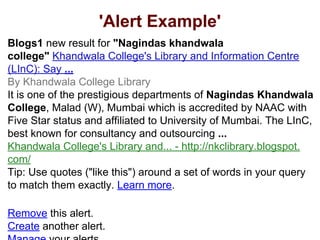
'Alert Example'
Blogs1 new result for "Nagindas khandwala
college" Khandwala College's Library and Information Centre
(LInC): Say ...
By Khandwala College Library
It is one of the prestigious departments of Nagindas Khandwala
College, Malad (W), Mumbai which is accredited by NAAC with
Five Star status and affiliated to University of Mumbai. The LInC,
best known for consultancy and outsourcing ...
Khandwala College's Library and... - http://nkclibrary.blogspot.
com/
Tip: Use quotes ("like this") around a set of words in your query
to match them exactly. Learn more.
Remove this alert.
Create another alert.
Agenda-
Creating Awareness in Web
Opportunities
●Web as new learning space
○ A seventh grader uses it as her study
●Web as a source of growing learning and
Teaching resources
●Applications Galore
Fundamentals
What is changing or has already
changed?
New Times for Our Children
'Do not confine your children to your own learning for
they were born in another time.' Hebrew Proverb
Network Times- Facebook,
Information Times - Google
Online Times
New Reality
●Web has unleashed a new Learning world
order – an editable sharable information
space where everything is linked to
everything else
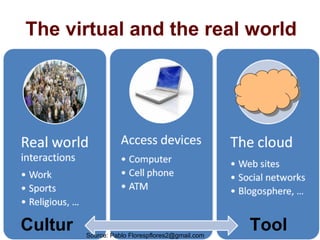
The virtual and the real world
Cultur ToolSource: Pablo Florespflores2@gmail.com
The Task
●Equipping ourselves to participate in this
new information order and
●Empowering our students to live there
successfully
This Seminar cum Workshop will show u
how to go about this
Traditional Meaning of education
●Education is a process of transmitting
knowledge, experience and values from
one generation to next
○ Valid when knowledge creation and generation was sparse
and slow
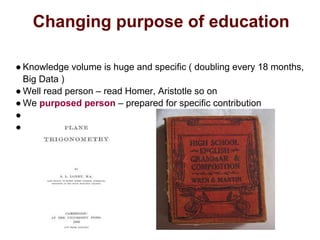
○ Knowledge to be transmitted limited – Botany book of Dutta,
Wren and Martin , Loney trigonometry
○ 98 % all scientists are leaving today – 15000 books were
printed in 15000 (verify)
General Purpose of Education
●Modern universities were established
since 15th
century to Liberate people from
parochial and traditional thinking (hence
called Liberal Education)
○ Darwin- "we didn’t descended from heaven- we evolved here"
○ Galelio- heliocentric- Sun does not revolve around us
○ Pasture – diseases don’t happen because we are condemned
but microbes bring them
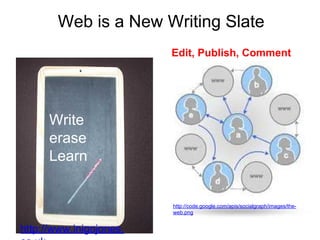
Web is a New Writing Slate
Write
erase
Learn
Edit, Publish, Comment
http://www.inigojones.
http://code.google.com/apis/socialgraph/images/the-
web.png
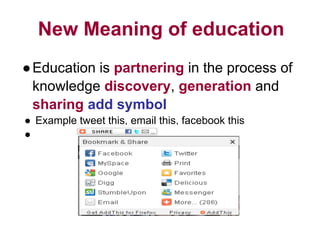
New Meaning of education
●Education is partnering in the process of
knowledge discovery, generation and
sharing add symbol
● Example tweet this, email this, facebook this
●
Changing purpose of education
● Knowledge volume is huge and specific ( doubling every 18 months,
Big Data )
● Well read person – read Homer, Aristotle so on
● We purposed person – prepared for specific contribution
●
●
New Purpose of education
●The purpose of education is to make each
citizen FUNCTIONAL and
CONTRIBUTING
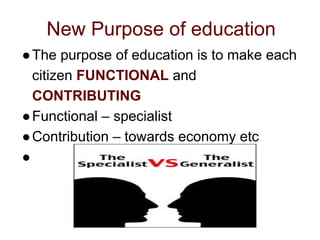
●Functional – specialist
●Contribution – towards economy etc
●
Teaching Imperatives
●Prepare and enable student to be
successful in new learning order
●Participate (email)
●Consume, (search, use)
●and contribute (publish 1 and 2 )
Agenda-
Action
●Why Web
○ Be in Tune with Times-
■ Google is a Teenager Now and so are our students
○ Teacher’s perspective- web is a shot in the arm
○ Learner’s perspective- they are already living there
○ College perspective- current and more prospective students
reach us through web (temples, politicians)
●What does web offer-
○ Resources- Tools and information and more
●How to use them (Workshop)
Pause
Understanding the Web
Power of the web
The nature of the web (info space etc)
Web from teaching perspective
Web from the learner perspective
*What Web can do for us?
When printing press was invented - it made possible to
produce books in large numbers- that created opportunity
for all
●Publishers
●Authors
●Columnists
●Universities
When camera was invented - it made possible to capture
picture permanently and led to
●Photography
●Cinema etc
Web has similar potential to unleash new way of
web makes us creators
Web has enabled us to participate in the creation of
information
we can
●start a blog
●upload and share photos
●.
●.
●build encyclopedia
Web: Student Perspective
●Web is becoming a new platform for
launching new career and even to make
preparations towards that
○Learning about the we
○Using and mastering tools is a beginning of a
career
Web: from teacher’s perspective
●Web is replacing traditional systems of
learning
●Web is a new source of all learning
resources
●U r students are already found home
there- emails, blogs, social networks etc-
digital natives (google is 12 years old now)
Web: from college perspective
●Most students (even prospective- add
enquire form) for most part of time – know
about u r college and interact with u
through and via web
●If u r not the web, u r not on their scanner
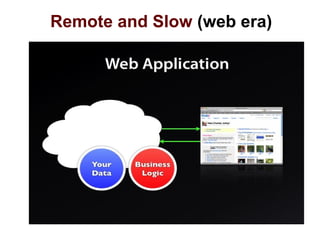
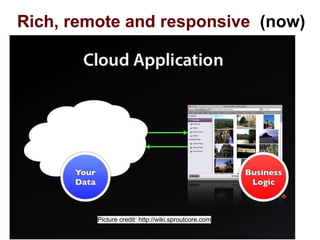
Cloud ~ Web
Technology Fundamentals
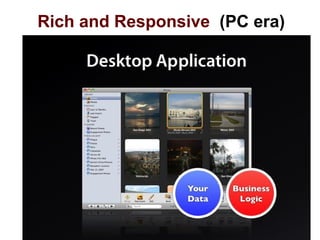
Rich and Responsive (PC era)
Remote and Slow (web era)
Rich, remote and responsive (now)
Picture credit: http://wiki.sproutcore.com
Teaching Uses of The Web
Variety is the use
Not all teacher need the same
Thing
For each teacher her Way
●Cloud for Blended Education
●Cloud for 10 points of teaching
●Cloud for Instructional design principles
●Cloud for Blooms Taxonomy
Teaching Programming using
the web
Teaching Discrete
Mathematical Structure using
the web
Teaching Mathematics using
Web
Teaching Social science using
the web
Practice
Teaching using the Cloud 1
●Theory
○ Cloud is a General learning
and Teaching Resource
○ Global, always accessible
●Resources
○ Lecture hall
○ Library
○ Curriculum Search
●Application
●Cloud can be used for
empowering learners
and teachers.
●Cloud can be a
meeting point of
teachers and
learners- journey
●Cloud can be
extended class room
Teaching using the Cloud-2
●Theory
●Cloud is an information
space where everything
is linked to everything
else
●All Learning or teaching is
sharing information,
experience and values
●Cloud is a preferred
platform for sharing
●Application
●Cloud may used as a
leading starting point for
all learning Tasks.
○ Class website
●From there links can be
established back and
forth
○ Link to class wiki
●It can be extended PLE
Web is a real-time resource-3
●Theory
●The web enhance access
to experts and real-time
data and enables multiple
forms of communication
among collaborative
teams of learners
●Resources
●Search Engines
●Wikipedia
●Yahoo Answers
●Groups
●Application
●Students studying a computer
simulation of global warming share
ideas about factors influencing
global temperatures. They vary the
amount of greenhouse gases
emitted by vehicles and factories or
manipulate the quantity of green
plants in the simulation. They
observe that reducing industrial
emissions or adding trees to the
environment makes global warming
Developing and Discovering
Knowledge- 4
●Theory
●Knowledge developed
during the course does
not pre-exist the course.
●Hence teaching is
process of knowledge
discovery
●Resources
●Groups
●Wikis
●Application
●Blog can be used to
discover and procure
knowledge,
experience
●Alumni share
authentic Project
planning experience
Teaching is mentioning of
challenges 5
●Theory
●Web makes learning
resources and
opportunities infinite (No
restricted class hours,
library closed on holidays
●Result:
●Teaching is not Listing
Curriculum but mention
essential problems
students will address
●Research associated with
●Application
(Management
Course)
○ How do I get my projects
assigned in a company
○ Who decides the deadlines
○ What skills do I need to
understand the process of
running a company
capture and store student
evidence of learning-6
●Theory
●Evaluation of student
evidence of learning
replaces traditional
Testing
●Easy capture and store
●Levels of learning
●Resources
●Web sites, blogs, online
documents,
●Application
●Ask students
○ Post Mark My attendance
○ Student Response
○ Post on their blogs
○ Comments on classmate
blogs
Create Enduring Learning
Spaces-7
●Theory
●Build learning spaces for
learners
●They must have access
to the net while they are
in the learning space
●Resources
●WiFi
●Application
●Making online
resource access and
participation easy by
campus-wide
networks.
●Notes
●Syllabus
●Lessons
Student’s Technology
Management Tools of their own 8
●Theory
●Let student manage their
learning resources
●Let them capture and
store evidences of
learning and share with
faculty
●Resources
●Application
○ Emails
○ Web sites
○ Blogs
○ Docs
Tools for Faculty Professional
development-9
●Theory
○ Tools to support annual
review, promotion request
○ Learn new breed of tools
●Resources
○ Twitter
●Application
●Google Profile
●CV
●Seek students input
Students have digital depository-
10
●Theory
○ Web presence is essentail
■ Email, blog, wiki web
page
■ A place to store and
manage the evidence
of their active learning
●Resources
●Application
○ Blog
○ Sms
Mutual interpretation of collected
evidence 11
●Theory
●Require students to
interpret their collected
online evidence at regular
intervals
●Resources
●Application
○ Comments on blogs posts
○ Certify selected topic
○ Add mtech seminar
presentation indicating
Make the collection of evidence the
primary work of the course-12
●Theory
○ students are to be graded
largely or entirely on their
final portfolio for the course
○ In learning-centered course,
the portfolio is the sine qua
non
●Resources
●Application
○ Remove
Visual Sharing resources online
It’s a place where you can create a visual list of online sites and
resources. I love it because I no longer have to search or keep
a list of reminder notes. I can simply go here or share all of the
links with my students.
Online Resources Visual
http://www.symbaloo.com/
Resources
http://wtlt.blogspot.com
Google Docs
For students and teachers, the Google Docs collection
provides a streamlined, collaborative solution to
●writing papers,
●organizing presentations and
●putting together spreadsheets and reports.
(source)

http://wtlt.blogspot.com
Sharing a draft copy
Some time you have create a documents and let others to
edit-
Sharing a document with project members
Preparing reco with your faculty
You also email it
You can edit with u r class mate
http://wtlt.blogspot.com
Online Sharing
●Today creating and sharing Bio-data or CV is a regular
activity- frequent updates- sharing with new people
or organization very necessary.
Publishing CV ( biodata )
UPDATE YOUR STATUS- (Varun H M Goes to
Argentina)
http://wtlt.blogspot.com
Writing a Conference paper
●An assignment or similar document can be created
using Google doc
●Example:
●Creating and editing a draft
http://wtlt.blogspot.com
Online Docs
Collaborate globally
Google Docs, our word processing application, doesn't just give
you access to the same document, it actually allow students to
work on the same document at the same time from anywhere in
the world.
"Collaborative projects really make for an excellent education
experience not only because students bounce ideas off each
other and improve each other's writing skills, but also because
the process itself teaches them how to work well with others - a
valuable skill for everyone." - Richard Teacher,
Columbia Secondary School.
Mastering the Web
Mastering the web
●Discover, consume, produce and share
●Editing tools- editor publisher – publish or
perish
○Create
○Share
○publish
●Linking Tools
○Search engines
○URLs
Information Tools
Recovering and Discovering
*Web 2.o TOOLS
●Discover Information
○search engine
○custom search engines
●Publish and Dessimate Information
○web sites- getting online
○blogs-share your story
●Network and Build Community
○email
○chats
●Online documents
○Google docs
Discovering Information
* Get only what you want
Custom search engine
helps u do a focused search within a specified set of web
sites
curriculum search
India education search
* Know Events as they happen
Alert Services allow you to follow the trends in areas of
your interest
http://google.com/alert
You can set alert for keyword "web 2.0" and keep
your self updated as and when something happens
in web 2.0 world
Example " Nagindas Khandawal College
*RSS - update me with your
changes
●Really Simple Syndication — is a great technology for
staying on top of news and announcements that are
important to your organization and its mission.
●you can leverage other sites' RSS feeds,
●you can create your own feeds in order to deliver new
and important information to your community
RSS
Example
Publishing and
Disseminating
* Using Blog as Black Board
Using blog as class room extends the reach of
class room happening and resources beyond
four walls and working hours of college
Entrepreneurship, Management and IP
Replace with PPTs of ip
* Using Google Docs to conduct online
quiz
Using form to conduct online quiz helps students to take
test from wherever they are and also SAVE Paper
Online Quiz Using Cloud resources
* Blogs: Express Your Self
●is a platform for people to share their personal stories,
●a can also be used to tell the story of an organization.
●a blog can be a powerful — and influential —
communication and public-relations tool for your
organization.
SDMWORLD
Winning With Web
*Online Publishing
Documents can be published and shared online
http://docs.google.com
http://blist.com
ETM Resources
**Publish Your Self
Web sites allow you to publish your content to the world
http://edusense.googlepages.com
* Student projects using Cloud
Resource
X-social
Alumni Maps
All project members got jobs based on skills acquired
during the project development
Networking and Building
Community
Community
A class on the Cloud
*Creating Communities
Web has tools that help a professional to create groups-
invite people and conduct discussions.
Management and Entrepreneurship
Management, Entrepreneurship and Protection of IP (
add url)
*Network and Build Community
●Social networking platforms like Flickr, Friendster, and
MySpace, orkut give you a forum for meeting like-
minded people,organizations and potential supporters,
and provide a medium for spreading their messages
beyond the immediate community.
●Facebook
●Professional networks
●Sdmcet network on facebook
* 24/7 learning Support
Groups can be used to support collaboration and
interactivity among students
Cloud Computing Group
* Literature Survery
What is happening elsewhere?
Details
Web tools for Blended
Learning
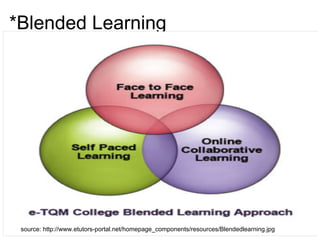
*Blended Learning
source: http://www.etutors-portal.net/homepage_components/resources/Blendedlearning.jpg
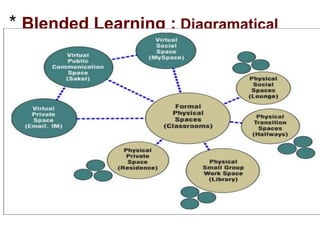
* Blended Learning : Diagramatical
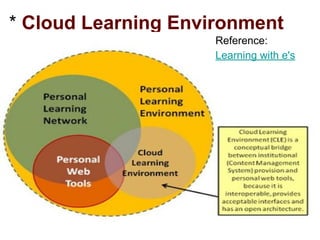
* Cloud Learning Environment
(CLE)
Reference:
Learning with e's
* Deliver pre-work online
Actual course commencement can be preceded by a
pre-work such as announcement of course requirement
or completion of survey to collect attendee profiles
use my examples
use IUCEE example
*maximize email and messaging
●use email distribution list before, during and after
learning events.
●sending attachments
●pointing students to additional resources
●suggesting advanced classes
●reminding learner of Information ( re-certfied)
*Why web Tools
Most educational experts agree that technology should
be integrated, not as a separate subject or as a once-in-
a-while project, but as a tool to promote and extend
student learning on a daily basis” (Starr, 2009).
* “Five years ago, we thought of the Web as a new
medium, not a new economy.”
Clement Mok quotes
The Internet may fairly be regarded as a never-
ending worldwide conversation.[1] : Tim Berner
Lee
Use e-mails to accept seminar topic
Using e-mail
seminar topic submission using email
* Survey of web technologies
chat: allows people to communicate online and real-time
Advanatges:
●Business can use it to communicate with consumers
○Times of India uses chat to help customers book
adspace
○Stat counter uses chat for technical help
○Business can use chat to discuss and book orders
○students can use it to communicate with
expert to solve acadmic or related challenges
■eg: TGMC
Faculty can use to seek help/offer help
* Flavors of Seach
●structured data (database)
●text ( general search engine)
●video
●image,
●sound
●musical scores
●DNA sequence
●What can be searched ?
*Collaborate with Others
Wikis — collaborative Web sites that allow users to
change the content of pages easily — can help your
organization share information.
Wiki
* Working Wonders
Mashups
Mashups allow them to combine online data from
multiple sources to create customized, interactive Web
applications
http://nearhop.com
http://housingmaps.com
Student Projects add alumni maps
* How Tools Join Together
Netexplore- online explore and experience
web 2.0 tools
web 2.0 in class room
Management & Entrepreneurship Course
Information Tools ( PULL)
Knowledge is of two kinds: we know a
subject ourselves, or we know where
we can fin information upon it.
Samuel Johnson quotes
Wikipedia
Information Common Wealth
Search Space
The world is searchable
Search Engines
Google
Bing
Gateway to the Web
Searching at Home
Our desktop must be the first stop- when we want to
search for something
Google Desktop
Utility that indexes files on desktop PC and displays
results in a Google search page, with some relevance
ranking based on modified dates
* Custom Search Engines
Give what I need not all that u
have
*Custom Search Engines
An often-overlooked option is
creating a custom search
engine that hones in on the
sites and searches that you are
most interested in.
Course related sites-SOA
Discipline reated sites :
Google Custom
search engine
example
Royallo
CSE Links
Workshop
*Web Tools for Teaching and Learning
Web Tool Details
Tool: Google Search
Type: Web search Engine
Category: Information
Tool
Alternatives: Bing
Use: Search web for
useful resources and
information
Teaching and Learning Uses
●Discovering teaching
resources
●verify facts and figures
Lessons
Basic Search
Google Search Techniques
Advanced searching
examples
Ravindra Dastikop ravindra.dastikop@gmail.com
Searching with Google
Using Google effectively
Effective Search
Tips for get good results of u r
search
Mastering Boolean Operator
Using boolean operators- "and" and " OR" and "NOT"
selectively improves search output. Here is a game that
teaches you the appropriate use of these operators
Mastering Boolean Operators
Understanding Boolean Operator
Understanding Boolean Operators
Search Complete
Basic Search Tips
Choosing Links
Google Search for Educators
Test Your Searching Skills
Workshop Exercise
Additional Search Tips
Search Never Ends
Workshop item
* http://www.feeltiptop.com/
Searching: Different Approach
Web search strategies - Video
Web Search Strategies
SDM Search
Search within SDMCET Website
Multimedia
Not mere text, Pictures, Video
also
Education
Gates are always open
* Web For Learning
Twitter for learning
* Google Docs
For students and teachers, the Google Docs collection
provides a streamlined, collaborative solution to
●writing papers,
●organizing presentations and
●putting together spreadsheets and reports.
(source)
Web Tools for Teaching and Learning
Web Tool Details
Tool: Blog
Type:
Category:
Alternatives:
Use:
Teaching and Learning
Uses
http://googleforstudents.
blogspot.com/
Ravindra Dastikop ravindra.dastikop@gmail.com
* Writing Papers
●Today creating and sharing Bio-data or CV is a regular
activity- frequent updates- sharing with new people
or organization very necessary.
Publishing CV ( biodata )
UPDATE YOUR STATUS- (Varun H M Goes to
Argentina)
* Sharing documents for
comments
Corrections Please
* CTS needs a Recommendation
Letter
Recently a group of SDMITES joined CTS and needed a
reco. We used GOOGLE DOCS to create a documents
and asked student to enter their name and otther details
CTS RECO LETTER
* Translating a documents
A document created in a language can be translated into
another
use tools menu
Organizing Presentation
Google docs can used to create presentation and share
with others.
Presentation Rules
Paper presentation
Seminar presentation
Tutorials
Live Teaching
END
* Specialists
Meeting special needs
http;//biomedicalcentral.com
http://intute.ac.uk
Articles
Articles Galore
http://findarticles.com
Information Tools (Push)
Alerts
Update me all the time
* Alerts
Helps user to pull information of relevance from Google
search index.
Updates are received as they happen
Uses
●Collecting information about a seminar Topic- set alert
for phrase " agile networks"
●find popularity of something - "Rajasthan Royals"
●Monitor a company of your interest – Accenture
●“ Nagindas Khandwala College “
*RSS
Short for Really Simple Syndication or Rich Site
Summary, this handy service is revolutionizing the way
we search for content.
●In addition, us web searchers don't necessarily have to
keep checking back to any particular site to see if it's
been updated - all we need to do is subscribe to the
RSS feed, much like you would subscribe to a
newspaper, and then read the updates from the site,
delivered via RSS feeds, in what's called a "feed
reader." (We'll get to feed readers in just a minute!)
More on RSS
**
How can u Use of RSS
Communication Tools
* Online Groups
Placement Pratice-
Cloud Computing
Service oriented Architecture
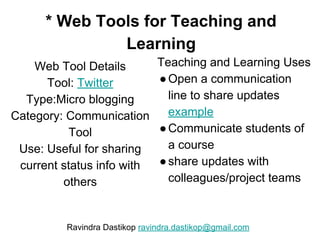
* Web Tools for Teaching and
Learning
Web Tool Details
Tool: Twitter
Type:Micro blogging
Category: Communication
Tool
Use: Useful for sharing
current status info with
others
Teaching and Learning Uses
●Open a communication
line to share updates
example
●Communicate students of
a course
●share updates with
colleagues/project teams
Ravindra Dastikop ravindra.dastikop@gmail.com
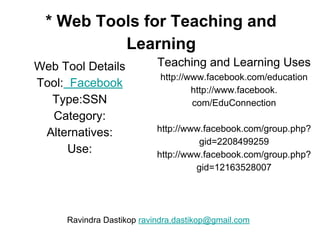
* Web Tools for Teaching and
Learning
Web Tool Details
Tool: Facebook
Type:SSN
Category:
Alternatives:
Use:
Teaching and Learning Uses
http://www.facebook.com/education
http://www.facebook.
com/EduConnection
http://www.facebook.com/group.php?
gid=2208499259
http://www.facebook.com/group.php?
gid=12163528007
Ravindra Dastikop ravindra.dastikop@gmail.com
*Web Tools for Teaching and Learning
Web Tool Details
Tool: Facebook
Type:
Category:
Alternatives:
Use:
Teaching and Learning Uses
http://developers.facebook.com/
http://developers.facebook.com/tools.php
http://wiki.developers.facebook.
com/index.php/Main_Page
examples
Ravindra Dastikop ravindra.dastikop@gmail.com
* Web Tools for Teaching and
Learning
Web Tool Details
Tool: Blog
Type:
Category:
Alternatives:
Use:
Teaching and Learning Uses
http://googleforstudents.
blogspot.com/
Ravindra Dastikop ravindra.dastikop@gmail.com
* Web Tools for Teaching and
Learning
Web Tool Details
Tool: Education
Type:
Category:
Alternatives:
Use:
Teaching and Learning Uses
http://code.google.com/edu/
Ravindra Dastikop ravindra.dastikop@gmail.com
A Workshop on
Web Tools for Teaching
Ravindra Dastikop
Assistant Professor,
SDMCET, Dharwad
Email: ravindra.dastikop@gmail.com
* Workshop Course Description
●This course discusses how to use web tools in various
stages of teaching-
○curriculum design-class room teaching-evaluation
●At the end of this faculty will know
○what web-based tools are available,
○how to access these tools,
○and how best to use these tools in a course.
○Topics include e-mail, web sites, blogs, online docs
and other tools
Presentation Outline
●Web realities-
○The Importance of Web
●Why use web for Teaching
●Harnessing web for Teaching Productivity
○Resources, tools available for teachers
* Web Realities: 1
Value of the web
●Pivotal platform-
○establish presence- come, stay, grow, flourish
○Example: email, web site
●Channel-
○communicate, create and become part of
community
●Mother of all resources-
○Source of information, resources, tools
* Web Realities 2:
Enabling effect of Web
●Web enables us to over come THREE fundamental
barriers
○Distance- death of distance example
○Time- 24/7 access example
○Language – translating your way to the world
example
○ We all have become omnipresent now
○ We cant be everywhere, therefore we created web
* The Result
●Web has become
●Pivotal platform for all human endeavor
○Professional, business,
○educational,
○government,
○temples,
○political parties,
○politicians
●mother of all resources
○Information, tools, resources etc
Why use web for teaching?
* Why use the Web in Teaching?
●Conceptual reasons
○how web is reshaping teaching process
■web is a lecture hall
●Practical reasons
○how web tools help enhance teaching porcess
■course home
How am I using it ?
* Why Use the Web?- Practical Us
●Distribution of Course Materials example
●Improved Communication- example
●Going Beyond Paper – example-seminar
●Better Access-
* Using Web For Teaching
Conceptual Reasons●Web a new TEXT BOOK
●Web is a New REFERENCE LIBRARY
●web is a new platform for communication
●Web is a new
* Why Use the Web?
Distribution of Course Materials
●Distribute lecture notes on a web site.
●Provide additional study resources.
●Provide pointers to other useful web sites.
●Some textbook companies provide supplemental
web-based information to augment their textbooks
and keep them current.
* Why Use the Web?
Improved Communication
●E-mail to the entire class can be used to send
announcements to students. example
●Students can use e-mail to ask questions of the
instructor, set up appointments, etc.
●Groups and Chat can facilitate class participation
and discussion.
●WARNING: Instructor must monitor and participate
for this to be successful
* Why Use the web?
Going Beyond Paper
●Movie and Sound clips can enhance the class.
example
●Picture and Diagrams can add value to your class
room delivery
* Why Use the web?
Better Access
●Better access to course materials
●Better access to support from the instructor
●Web sites, e-mail, and web-based programs can
be used from home instead of labs.
* Why Use the Web?
Not Just for Distance Education
●Support students with disabilities who have trouble
taking notes in class. Example
●Brings out shy students who may participate more
in online discussions than in-person class
discussions.
●Online course notes assist students who miss
courses due to illness or other reasons
Learning Goals
Learn how to
●Design and develop online resources to support
class room teaching
●Create class group and mailing list
●Understand how to post email to a group
●Show how students can submit assignments for
grading through the web.
●Learn how to set up web pages and other web
interfaces
The Agend
Harnessing Web for
teaching Productivity
Using web resource for
enhancing aspects of teaching
process
Collaboration Tools
Entrepreneurial Tools
* Tools for Promoting Small
Business
Maximizing your web presence is key to building your
small business
* Web Tools for Teaching and
Learning
Web Tool Details
Tool: Resource
Type:
Category:
Alternatives:
Use:
Teaching and Learning Uses
web 2 projects
http://www.terry-freedman.org.
uk/web2_2010/Amazing%20Web%
202%20Projects.pdf
Ravindra Dastikop ravindra.dastikop@gmail.com
*Web Tools for Teaching and Learning
Web Tool Details
Tool: web 2
Type:
Category:
Alternatives:
Use:
Teaching and Learning Uses
http://www.shambles.
net/pages/learning/ict/web2e
du/
Ravindra Dastikop ravindra.dastikop@gmail.com
* Open source resources- Google
Code
Online resources can be used to develop
systems, products and utilties
An online exam tool as a part of an internship
thing. It was named
Webtests
More about the Projects
A Cloud Teaching Systems
*The AlumniMaps
Using API to connect two web service and create
ALUMNI MAPS
ALUMNI MAPS
*API's
Examples
Tweetmeme
●Using API – entrepreneuers in
action add newyork times story
cloudcomputing
Using content from Guardian RSS feeds - Guardian API
Talk | Google ...
My plan is to drag in full reviews from Guardian using
API (at this >
point, this is going to be pretty easy to do) and work out
the best ...
<http://groups.google.com/group/guardian-api-
talk/msg/0f810ecb1eb18949>
* Forums
●Forums where the interaction
●phpbb is one such form which is open source and free
to use
*Web Infrastructure
new home for entrepreneurs
Develop your applications
Add that social science uses of
web- the article that I have
*Action
Google APP Engine
● Google App Engine was first released as a beta version in April 2008.
It is a platform for developing and hosting web applications in Google-
managed data centers.
● Google’s App Engine opens Google’s production to any person in the
world at nocharge. Much like Google gives us all free email with an amazing
amount of long term storage, we now have the ability to run the software that
we write in Google’s data centers.
● Google App Engine is cloud computing technology. Google App
Engine is
software that facilitates the user to run his web applications on Google
infrastructure. It is more reliable because failure of any server will not affect
either the performance of the end user or the service of the Google.
It virtualizes applications across multiple servers and data centers. Other cloud-
based platforms include offerings such as Amazon Web
Publishing Tools
Blogging
* Blogging
Blogger
Wordpress Example Blog
Typepad
* Wikies- information space
Wikis are web sites that can be edited online. Wiki
software allows the creators of a website to allow viewers
to edit all or part of their site.
The most well known Wiki is Wikipedia an online
encyclopedia.
Users can create their own Wikis with free or
commercially available software. One popular free
product is PB Wiki which claims one can "make a free
wiki as easily as making a peanut butter sandwich."
Wikipedia has a comparison chart of wiki software
available on their wiki.
* Content Aggregation and Tagging
Content Aggregators are web sites on which users can
organize sources of information. Intelligent and
programmable agents can help users find new sources
of information to add to their site. In fact these agents
can help users keep the information on their sites
current.
Two popular Content Aggregators is Delicious and Furl.
In addition, companies and special interest groups do
content aggregation as a service. Sometimes this service
is for sale.
* RSS
RSS (Real Simple Syndication) is one example of a
content aggregator. Syndication is a means of sharing
information across the Internet. Users subscribe to
syndication’s feeds which route content directly to email
or website. Many Web sites provide RSS feeds to which
users can subscribe.
Visit the MDDE663 RSS Portal for more information.
* Learning Objects
Another emerging trend in the development of content is
that of Learning Objects.
A learning object is a piece of digital content that can be
used as a stand-alone unit of instruction. The purpose of
developing learning objects is to simplify the reuse and
re-purposing of courseware. The idea is not new.
Instructors and professors have for years reused pieces
of instruction in new courses, in papers, and in
presentations. What is new is the idea of creating objects
in a standards compliant format.
An Example
* Immersive Learning
Example
Immersive environments combine the power of
information and communication on the Web in creating
virtual worlds. Users in these worlds can create
characters who walk around and participate in a virtual
community. Second Life is an example of one of these
virtual communities.
Active Worlds is another. Companies and schools can
create their own instances of a virtual community to
achieve specific educational goals.
Immersive environments are an example of
*
21st Century Learning Skills
Workshop item
Google Quiz
Question Times
http://wtlt.blogspot.com
Contact Information
For more information on what teaching
tools to use, when to use them and how to
use them you may visit my blog at
Web Tools for Teaching and Learning
or contact me at
Ravindra Dastikop
Assistant Professor, Computer science and
Engineering
Web Tools for Learning and
Teaching

Teaching using the cloud

  • 1.
    Tools for Teachers WebTools for Learning and Teaching:  Experiences in a real-world teaching Ravindra Dastikop SDMCET, Dharwad http://wtlt.blogspot.com ravindra.dastikop@gmail.com
  • 2.
    Purpose ●Share our experiencein using web as an effective Teaching resource ●We have been exploring and using web resources since 2000 ○when only hotmail was avaialble ○and few knew GOOGLE and Gmail was introduced 5 years later.
  • 3.
    Web is aNew Learning Habitat ●Teacher Home- ●Course home ●Class Room ●Reference ●Library- Wikipedia ●Blackboard ●Homework ●Notice Board ●Attendance Register ●Community ●Peer review ●Web is a ○newfound land for humanity (1/14) ○New playground for business and also ○new college for teachers and learners. ●Like in traditional physical world, all teaching activities can happen on the web
  • 4.
    Web is aNew Informer You can keep yourself updated without much efforts. Use Alert Service Example Nagindas Khandwala College, Mumbai
  • 5.
    'Alert Example' Blogs1 newresult for "Nagindas khandwala college" Khandwala College's Library and Information Centre (LInC): Say ... By Khandwala College Library It is one of the prestigious departments of Nagindas Khandwala College, Malad (W), Mumbai which is accredited by NAAC with Five Star status and affiliated to University of Mumbai. The LInC, best known for consultancy and outsourcing ... Khandwala College's Library and... - http://nkclibrary.blogspot. com/ Tip: Use quotes ("like this") around a set of words in your query to match them exactly. Learn more. Remove this alert. Create another alert.
  • 6.
    Agenda- Creating Awareness inWeb Opportunities ●Web as new learning space ○ A seventh grader uses it as her study ●Web as a source of growing learning and Teaching resources ●Applications Galore
  • 7.
    Fundamentals What is changingor has already changed?
  • 8.
    New Times forOur Children 'Do not confine your children to your own learning for they were born in another time.' Hebrew Proverb Network Times- Facebook, Information Times - Google Online Times
  • 9.
    New Reality ●Web hasunleashed a new Learning world order – an editable sharable information space where everything is linked to everything else
  • 10.
    The virtual andthe real world Cultur ToolSource: Pablo Florespflores2@gmail.com
  • 11.
    The Task ●Equipping ourselvesto participate in this new information order and ●Empowering our students to live there successfully This Seminar cum Workshop will show u how to go about this
  • 12.
    Traditional Meaning ofeducation ●Education is a process of transmitting knowledge, experience and values from one generation to next ○ Valid when knowledge creation and generation was sparse and slow ○ Knowledge to be transmitted limited – Botany book of Dutta, Wren and Martin , Loney trigonometry ○ 98 % all scientists are leaving today – 15000 books were printed in 15000 (verify)
  • 13.
    General Purpose ofEducation ●Modern universities were established since 15th century to Liberate people from parochial and traditional thinking (hence called Liberal Education) ○ Darwin- "we didn’t descended from heaven- we evolved here" ○ Galelio- heliocentric- Sun does not revolve around us ○ Pasture – diseases don’t happen because we are condemned but microbes bring them
  • 14.
    Web is aNew Writing Slate Write erase Learn Edit, Publish, Comment http://www.inigojones. http://code.google.com/apis/socialgraph/images/the- web.png
  • 15.
    New Meaning ofeducation ●Education is partnering in the process of knowledge discovery, generation and sharing add symbol ● Example tweet this, email this, facebook this ●
  • 16.
    Changing purpose ofeducation ● Knowledge volume is huge and specific ( doubling every 18 months, Big Data ) ● Well read person – read Homer, Aristotle so on ● We purposed person – prepared for specific contribution ● ●
  • 17.
    New Purpose ofeducation ●The purpose of education is to make each citizen FUNCTIONAL and CONTRIBUTING ●Functional – specialist ●Contribution – towards economy etc ●
  • 18.
    Teaching Imperatives ●Prepare andenable student to be successful in new learning order ●Participate (email) ●Consume, (search, use) ●and contribute (publish 1 and 2 )
  • 19.
    Agenda- Action ●Why Web ○ Bein Tune with Times- ■ Google is a Teenager Now and so are our students ○ Teacher’s perspective- web is a shot in the arm ○ Learner’s perspective- they are already living there ○ College perspective- current and more prospective students reach us through web (temples, politicians) ●What does web offer- ○ Resources- Tools and information and more ●How to use them (Workshop)
  • 20.
  • 21.
    Understanding the Web Powerof the web The nature of the web (info space etc) Web from teaching perspective Web from the learner perspective
  • 22.
    *What Web cando for us? When printing press was invented - it made possible to produce books in large numbers- that created opportunity for all ●Publishers ●Authors ●Columnists ●Universities When camera was invented - it made possible to capture picture permanently and led to ●Photography ●Cinema etc Web has similar potential to unleash new way of
  • 23.
    web makes uscreators Web has enabled us to participate in the creation of information we can ●start a blog ●upload and share photos ●. ●. ●build encyclopedia
  • 24.
    Web: Student Perspective ●Webis becoming a new platform for launching new career and even to make preparations towards that ○Learning about the we ○Using and mastering tools is a beginning of a career
  • 25.
    Web: from teacher’sperspective ●Web is replacing traditional systems of learning ●Web is a new source of all learning resources ●U r students are already found home there- emails, blogs, social networks etc- digital natives (google is 12 years old now)
  • 26.
    Web: from collegeperspective ●Most students (even prospective- add enquire form) for most part of time – know about u r college and interact with u through and via web ●If u r not the web, u r not on their scanner
  • 27.
  • 28.
  • 29.
    Remote and Slow(web era)
  • 30.
    Rich, remote andresponsive (now) Picture credit: http://wiki.sproutcore.com
  • 31.
  • 32.
    Variety is theuse Not all teacher need the same Thing
  • 33.
    For each teacherher Way ●Cloud for Blended Education ●Cloud for 10 points of teaching ●Cloud for Instructional design principles ●Cloud for Blooms Taxonomy
  • 34.
  • 35.
  • 36.
  • 37.
  • 38.
  • 39.
    Teaching using theCloud 1 ●Theory ○ Cloud is a General learning and Teaching Resource ○ Global, always accessible ●Resources ○ Lecture hall ○ Library ○ Curriculum Search ●Application ●Cloud can be used for empowering learners and teachers. ●Cloud can be a meeting point of teachers and learners- journey ●Cloud can be extended class room
  • 40.
    Teaching using theCloud-2 ●Theory ●Cloud is an information space where everything is linked to everything else ●All Learning or teaching is sharing information, experience and values ●Cloud is a preferred platform for sharing ●Application ●Cloud may used as a leading starting point for all learning Tasks. ○ Class website ●From there links can be established back and forth ○ Link to class wiki ●It can be extended PLE
  • 41.
    Web is areal-time resource-3 ●Theory ●The web enhance access to experts and real-time data and enables multiple forms of communication among collaborative teams of learners ●Resources ●Search Engines ●Wikipedia ●Yahoo Answers ●Groups ●Application ●Students studying a computer simulation of global warming share ideas about factors influencing global temperatures. They vary the amount of greenhouse gases emitted by vehicles and factories or manipulate the quantity of green plants in the simulation. They observe that reducing industrial emissions or adding trees to the environment makes global warming
  • 42.
    Developing and Discovering Knowledge-4 ●Theory ●Knowledge developed during the course does not pre-exist the course. ●Hence teaching is process of knowledge discovery ●Resources ●Groups ●Wikis ●Application ●Blog can be used to discover and procure knowledge, experience ●Alumni share authentic Project planning experience
  • 43.
    Teaching is mentioningof challenges 5 ●Theory ●Web makes learning resources and opportunities infinite (No restricted class hours, library closed on holidays ●Result: ●Teaching is not Listing Curriculum but mention essential problems students will address ●Research associated with ●Application (Management Course) ○ How do I get my projects assigned in a company ○ Who decides the deadlines ○ What skills do I need to understand the process of running a company
  • 44.
    capture and storestudent evidence of learning-6 ●Theory ●Evaluation of student evidence of learning replaces traditional Testing ●Easy capture and store ●Levels of learning ●Resources ●Web sites, blogs, online documents, ●Application ●Ask students ○ Post Mark My attendance ○ Student Response ○ Post on their blogs ○ Comments on classmate blogs
  • 45.
    Create Enduring Learning Spaces-7 ●Theory ●Buildlearning spaces for learners ●They must have access to the net while they are in the learning space ●Resources ●WiFi ●Application ●Making online resource access and participation easy by campus-wide networks. ●Notes ●Syllabus ●Lessons
  • 46.
    Student’s Technology Management Toolsof their own 8 ●Theory ●Let student manage their learning resources ●Let them capture and store evidences of learning and share with faculty ●Resources ●Application ○ Emails ○ Web sites ○ Blogs ○ Docs
  • 47.
    Tools for FacultyProfessional development-9 ●Theory ○ Tools to support annual review, promotion request ○ Learn new breed of tools ●Resources ○ Twitter ●Application ●Google Profile ●CV ●Seek students input
  • 48.
    Students have digitaldepository- 10 ●Theory ○ Web presence is essentail ■ Email, blog, wiki web page ■ A place to store and manage the evidence of their active learning ●Resources ●Application ○ Blog ○ Sms
  • 49.
    Mutual interpretation ofcollected evidence 11 ●Theory ●Require students to interpret their collected online evidence at regular intervals ●Resources ●Application ○ Comments on blogs posts ○ Certify selected topic ○ Add mtech seminar presentation indicating
  • 50.
    Make the collectionof evidence the primary work of the course-12 ●Theory ○ students are to be graded largely or entirely on their final portfolio for the course ○ In learning-centered course, the portfolio is the sine qua non ●Resources ●Application ○ Remove
  • 51.
    Visual Sharing resourcesonline It’s a place where you can create a visual list of online sites and resources. I love it because I no longer have to search or keep a list of reminder notes. I can simply go here or share all of the links with my students. Online Resources Visual http://www.symbaloo.com/
  • 52.
  • 53.
    http://wtlt.blogspot.com Google Docs For studentsand teachers, the Google Docs collection provides a streamlined, collaborative solution to ●writing papers, ●organizing presentations and ●putting together spreadsheets and reports. (source)
  • 54.
    http://wtlt.blogspot.com Sharing a draftcopy Some time you have create a documents and let others to edit- Sharing a document with project members Preparing reco with your faculty You also email it You can edit with u r class mate
  • 55.
    http://wtlt.blogspot.com Online Sharing ●Today creatingand sharing Bio-data or CV is a regular activity- frequent updates- sharing with new people or organization very necessary. Publishing CV ( biodata ) UPDATE YOUR STATUS- (Varun H M Goes to Argentina)
  • 56.
    http://wtlt.blogspot.com Writing a Conferencepaper ●An assignment or similar document can be created using Google doc ●Example: ●Creating and editing a draft
  • 57.
    http://wtlt.blogspot.com Online Docs Collaborate globally GoogleDocs, our word processing application, doesn't just give you access to the same document, it actually allow students to work on the same document at the same time from anywhere in the world. "Collaborative projects really make for an excellent education experience not only because students bounce ideas off each other and improve each other's writing skills, but also because the process itself teaches them how to work well with others - a valuable skill for everyone." - Richard Teacher, Columbia Secondary School.
  • 58.
  • 59.
    Mastering the web ●Discover,consume, produce and share ●Editing tools- editor publisher – publish or perish ○Create ○Share ○publish ●Linking Tools ○Search engines ○URLs
  • 60.
  • 61.
    *Web 2.o TOOLS ●DiscoverInformation ○search engine ○custom search engines ●Publish and Dessimate Information ○web sites- getting online ○blogs-share your story ●Network and Build Community ○email ○chats ●Online documents ○Google docs
  • 62.
  • 63.
    * Get onlywhat you want Custom search engine helps u do a focused search within a specified set of web sites curriculum search India education search
  • 64.
    * Know Eventsas they happen Alert Services allow you to follow the trends in areas of your interest http://google.com/alert You can set alert for keyword "web 2.0" and keep your self updated as and when something happens in web 2.0 world Example " Nagindas Khandawal College
  • 65.
    *RSS - updateme with your changes ●Really Simple Syndication — is a great technology for staying on top of news and announcements that are important to your organization and its mission. ●you can leverage other sites' RSS feeds, ●you can create your own feeds in order to deliver new and important information to your community RSS Example
  • 66.
  • 67.
    * Using Blogas Black Board Using blog as class room extends the reach of class room happening and resources beyond four walls and working hours of college Entrepreneurship, Management and IP Replace with PPTs of ip
  • 68.
    * Using GoogleDocs to conduct online quiz Using form to conduct online quiz helps students to take test from wherever they are and also SAVE Paper Online Quiz Using Cloud resources
  • 69.
    * Blogs: ExpressYour Self ●is a platform for people to share their personal stories, ●a can also be used to tell the story of an organization. ●a blog can be a powerful — and influential — communication and public-relations tool for your organization. SDMWORLD Winning With Web
  • 70.
    *Online Publishing Documents canbe published and shared online http://docs.google.com http://blist.com ETM Resources
  • 71.
    **Publish Your Self Websites allow you to publish your content to the world http://edusense.googlepages.com
  • 72.
    * Student projectsusing Cloud Resource X-social Alumni Maps All project members got jobs based on skills acquired during the project development
  • 73.
  • 74.
  • 75.
    *Creating Communities Web hastools that help a professional to create groups- invite people and conduct discussions. Management and Entrepreneurship Management, Entrepreneurship and Protection of IP ( add url)
  • 76.
    *Network and BuildCommunity ●Social networking platforms like Flickr, Friendster, and MySpace, orkut give you a forum for meeting like- minded people,organizations and potential supporters, and provide a medium for spreading their messages beyond the immediate community. ●Facebook ●Professional networks ●Sdmcet network on facebook
  • 77.
    * 24/7 learningSupport Groups can be used to support collaboration and interactivity among students Cloud Computing Group
  • 78.
    * Literature Survery Whatis happening elsewhere?
  • 79.
  • 80.
    Web tools forBlended Learning
  • 81.
  • 82.
    * Blended Learning: Diagramatical
  • 83.
    * Cloud LearningEnvironment (CLE) Reference: Learning with e's
  • 84.
    * Deliver pre-workonline Actual course commencement can be preceded by a pre-work such as announcement of course requirement or completion of survey to collect attendee profiles use my examples use IUCEE example
  • 85.
    *maximize email andmessaging ●use email distribution list before, during and after learning events. ●sending attachments ●pointing students to additional resources ●suggesting advanced classes ●reminding learner of Information ( re-certfied)
  • 86.
    *Why web Tools Mosteducational experts agree that technology should be integrated, not as a separate subject or as a once-in- a-while project, but as a tool to promote and extend student learning on a daily basis” (Starr, 2009).
  • 87.
    * “Five yearsago, we thought of the Web as a new medium, not a new economy.” Clement Mok quotes The Internet may fairly be regarded as a never- ending worldwide conversation.[1] : Tim Berner Lee
  • 88.
    Use e-mails toaccept seminar topic Using e-mail seminar topic submission using email
  • 89.
    * Survey ofweb technologies chat: allows people to communicate online and real-time Advanatges: ●Business can use it to communicate with consumers ○Times of India uses chat to help customers book adspace ○Stat counter uses chat for technical help ○Business can use chat to discuss and book orders ○students can use it to communicate with expert to solve acadmic or related challenges ■eg: TGMC Faculty can use to seek help/offer help
  • 90.
    * Flavors ofSeach ●structured data (database) ●text ( general search engine) ●video ●image, ●sound ●musical scores ●DNA sequence ●What can be searched ?
  • 91.
    *Collaborate with Others Wikis— collaborative Web sites that allow users to change the content of pages easily — can help your organization share information. Wiki
  • 92.
    * Working Wonders Mashups Mashupsallow them to combine online data from multiple sources to create customized, interactive Web applications http://nearhop.com http://housingmaps.com Student Projects add alumni maps
  • 93.
    * How ToolsJoin Together Netexplore- online explore and experience web 2.0 tools web 2.0 in class room Management & Entrepreneurship Course
  • 94.
    Information Tools (PULL) Knowledge is of two kinds: we know a subject ourselves, or we know where we can fin information upon it. Samuel Johnson quotes
  • 95.
  • 96.
  • 97.
  • 98.
    Searching at Home Ourdesktop must be the first stop- when we want to search for something Google Desktop Utility that indexes files on desktop PC and displays results in a Google search page, with some relevance ranking based on modified dates
  • 99.
    * Custom SearchEngines Give what I need not all that u have
  • 100.
    *Custom Search Engines Anoften-overlooked option is creating a custom search engine that hones in on the sites and searches that you are most interested in. Course related sites-SOA Discipline reated sites : Google Custom search engine example Royallo CSE Links
  • 102.
  • 103.
    *Web Tools forTeaching and Learning Web Tool Details Tool: Google Search Type: Web search Engine Category: Information Tool Alternatives: Bing Use: Search web for useful resources and information Teaching and Learning Uses ●Discovering teaching resources ●verify facts and figures Lessons Basic Search Google Search Techniques Advanced searching examples Ravindra Dastikop ravindra.dastikop@gmail.com
  • 104.
    Searching with Google UsingGoogle effectively
  • 105.
    Effective Search Tips forget good results of u r search
  • 106.
    Mastering Boolean Operator Usingboolean operators- "and" and " OR" and "NOT" selectively improves search output. Here is a game that teaches you the appropriate use of these operators Mastering Boolean Operators
  • 107.
  • 108.
    Search Complete Basic SearchTips Choosing Links Google Search for Educators
  • 109.
    Test Your SearchingSkills Workshop Exercise
  • 110.
    Additional Search Tips SearchNever Ends Workshop item
  • 111.
  • 112.
    Web search strategies- Video Web Search Strategies
  • 113.
  • 114.
    Multimedia Not mere text,Pictures, Video also
  • 115.
  • 116.
    * Web ForLearning Twitter for learning
  • 117.
    * Google Docs Forstudents and teachers, the Google Docs collection provides a streamlined, collaborative solution to ●writing papers, ●organizing presentations and ●putting together spreadsheets and reports. (source)
  • 118.
    Web Tools forTeaching and Learning Web Tool Details Tool: Blog Type: Category: Alternatives: Use: Teaching and Learning Uses http://googleforstudents. blogspot.com/ Ravindra Dastikop ravindra.dastikop@gmail.com
  • 119.
    * Writing Papers ●Todaycreating and sharing Bio-data or CV is a regular activity- frequent updates- sharing with new people or organization very necessary. Publishing CV ( biodata ) UPDATE YOUR STATUS- (Varun H M Goes to Argentina)
  • 120.
    * Sharing documentsfor comments Corrections Please
  • 121.
    * CTS needsa Recommendation Letter Recently a group of SDMITES joined CTS and needed a reco. We used GOOGLE DOCS to create a documents and asked student to enter their name and otther details CTS RECO LETTER
  • 122.
    * Translating adocuments A document created in a language can be translated into another use tools menu
  • 123.
    Organizing Presentation Google docscan used to create presentation and share with others. Presentation Rules Paper presentation Seminar presentation
  • 124.
  • 126.
  • 127.
    * Specialists Meeting specialneeds http;//biomedicalcentral.com http://intute.ac.uk
  • 128.
  • 129.
  • 130.
  • 131.
    * Alerts Helps userto pull information of relevance from Google search index. Updates are received as they happen Uses ●Collecting information about a seminar Topic- set alert for phrase " agile networks" ●find popularity of something - "Rajasthan Royals" ●Monitor a company of your interest – Accenture ●“ Nagindas Khandwala College “
  • 132.
    *RSS Short for ReallySimple Syndication or Rich Site Summary, this handy service is revolutionizing the way we search for content. ●In addition, us web searchers don't necessarily have to keep checking back to any particular site to see if it's been updated - all we need to do is subscribe to the RSS feed, much like you would subscribe to a newspaper, and then read the updates from the site, delivered via RSS feeds, in what's called a "feed reader." (We'll get to feed readers in just a minute!) More on RSS
  • 133.
    ** How can uUse of RSS
  • 134.
  • 135.
    * Online Groups PlacementPratice- Cloud Computing Service oriented Architecture
  • 136.
    * Web Toolsfor Teaching and Learning Web Tool Details Tool: Twitter Type:Micro blogging Category: Communication Tool Use: Useful for sharing current status info with others Teaching and Learning Uses ●Open a communication line to share updates example ●Communicate students of a course ●share updates with colleagues/project teams Ravindra Dastikop ravindra.dastikop@gmail.com
  • 137.
    * Web Toolsfor Teaching and Learning Web Tool Details Tool: Facebook Type:SSN Category: Alternatives: Use: Teaching and Learning Uses http://www.facebook.com/education http://www.facebook. com/EduConnection http://www.facebook.com/group.php? gid=2208499259 http://www.facebook.com/group.php? gid=12163528007 Ravindra Dastikop ravindra.dastikop@gmail.com
  • 138.
    *Web Tools forTeaching and Learning Web Tool Details Tool: Facebook Type: Category: Alternatives: Use: Teaching and Learning Uses http://developers.facebook.com/ http://developers.facebook.com/tools.php http://wiki.developers.facebook. com/index.php/Main_Page examples Ravindra Dastikop ravindra.dastikop@gmail.com
  • 139.
    * Web Toolsfor Teaching and Learning Web Tool Details Tool: Blog Type: Category: Alternatives: Use: Teaching and Learning Uses http://googleforstudents. blogspot.com/ Ravindra Dastikop ravindra.dastikop@gmail.com
  • 140.
    * Web Toolsfor Teaching and Learning Web Tool Details Tool: Education Type: Category: Alternatives: Use: Teaching and Learning Uses http://code.google.com/edu/ Ravindra Dastikop ravindra.dastikop@gmail.com
  • 141.
    A Workshop on WebTools for Teaching Ravindra Dastikop Assistant Professor, SDMCET, Dharwad Email: ravindra.dastikop@gmail.com
  • 142.
    * Workshop CourseDescription ●This course discusses how to use web tools in various stages of teaching- ○curriculum design-class room teaching-evaluation ●At the end of this faculty will know ○what web-based tools are available, ○how to access these tools, ○and how best to use these tools in a course. ○Topics include e-mail, web sites, blogs, online docs and other tools
  • 143.
    Presentation Outline ●Web realities- ○TheImportance of Web ●Why use web for Teaching ●Harnessing web for Teaching Productivity ○Resources, tools available for teachers
  • 144.
    * Web Realities:1 Value of the web ●Pivotal platform- ○establish presence- come, stay, grow, flourish ○Example: email, web site ●Channel- ○communicate, create and become part of community ●Mother of all resources- ○Source of information, resources, tools
  • 145.
    * Web Realities2: Enabling effect of Web ●Web enables us to over come THREE fundamental barriers ○Distance- death of distance example ○Time- 24/7 access example ○Language – translating your way to the world example ○ We all have become omnipresent now ○ We cant be everywhere, therefore we created web
  • 146.
    * The Result ●Webhas become ●Pivotal platform for all human endeavor ○Professional, business, ○educational, ○government, ○temples, ○political parties, ○politicians ●mother of all resources ○Information, tools, resources etc
  • 147.
    Why use webfor teaching?
  • 148.
    * Why usethe Web in Teaching? ●Conceptual reasons ○how web is reshaping teaching process ■web is a lecture hall ●Practical reasons ○how web tools help enhance teaching porcess ■course home How am I using it ?
  • 149.
    * Why Usethe Web?- Practical Us ●Distribution of Course Materials example ●Improved Communication- example ●Going Beyond Paper – example-seminar ●Better Access-
  • 150.
    * Using WebFor Teaching Conceptual Reasons●Web a new TEXT BOOK ●Web is a New REFERENCE LIBRARY ●web is a new platform for communication ●Web is a new
  • 151.
    * Why Usethe Web? Distribution of Course Materials ●Distribute lecture notes on a web site. ●Provide additional study resources. ●Provide pointers to other useful web sites. ●Some textbook companies provide supplemental web-based information to augment their textbooks and keep them current.
  • 152.
    * Why Usethe Web? Improved Communication ●E-mail to the entire class can be used to send announcements to students. example ●Students can use e-mail to ask questions of the instructor, set up appointments, etc. ●Groups and Chat can facilitate class participation and discussion. ●WARNING: Instructor must monitor and participate for this to be successful
  • 153.
    * Why Usethe web? Going Beyond Paper ●Movie and Sound clips can enhance the class. example ●Picture and Diagrams can add value to your class room delivery
  • 154.
    * Why Usethe web? Better Access ●Better access to course materials ●Better access to support from the instructor ●Web sites, e-mail, and web-based programs can be used from home instead of labs.
  • 155.
    * Why Usethe Web? Not Just for Distance Education ●Support students with disabilities who have trouble taking notes in class. Example ●Brings out shy students who may participate more in online discussions than in-person class discussions. ●Online course notes assist students who miss courses due to illness or other reasons
  • 156.
    Learning Goals Learn howto ●Design and develop online resources to support class room teaching ●Create class group and mailing list ●Understand how to post email to a group ●Show how students can submit assignments for grading through the web. ●Learn how to set up web pages and other web interfaces
  • 157.
  • 158.
    Harnessing Web for teachingProductivity Using web resource for enhancing aspects of teaching process
  • 159.
  • 160.
  • 161.
    * Tools forPromoting Small Business Maximizing your web presence is key to building your small business
  • 162.
    * Web Toolsfor Teaching and Learning Web Tool Details Tool: Resource Type: Category: Alternatives: Use: Teaching and Learning Uses web 2 projects http://www.terry-freedman.org. uk/web2_2010/Amazing%20Web% 202%20Projects.pdf Ravindra Dastikop ravindra.dastikop@gmail.com
  • 163.
    *Web Tools forTeaching and Learning Web Tool Details Tool: web 2 Type: Category: Alternatives: Use: Teaching and Learning Uses http://www.shambles. net/pages/learning/ict/web2e du/ Ravindra Dastikop ravindra.dastikop@gmail.com
  • 164.
    * Open sourceresources- Google Code Online resources can be used to develop systems, products and utilties An online exam tool as a part of an internship thing. It was named Webtests More about the Projects
  • 165.
  • 166.
    *The AlumniMaps Using APIto connect two web service and create ALUMNI MAPS ALUMNI MAPS
  • 167.
  • 168.
    ●Using API –entrepreneuers in action add newyork times story cloudcomputing Using content from Guardian RSS feeds - Guardian API Talk | Google ... My plan is to drag in full reviews from Guardian using API (at this > point, this is going to be pretty easy to do) and work out the best ... <http://groups.google.com/group/guardian-api- talk/msg/0f810ecb1eb18949>
  • 169.
    * Forums ●Forums wherethe interaction ●phpbb is one such form which is open source and free to use
  • 170.
    *Web Infrastructure new homefor entrepreneurs Develop your applications Add that social science uses of web- the article that I have
  • 171.
    *Action Google APP Engine ●Google App Engine was first released as a beta version in April 2008. It is a platform for developing and hosting web applications in Google- managed data centers. ● Google’s App Engine opens Google’s production to any person in the world at nocharge. Much like Google gives us all free email with an amazing amount of long term storage, we now have the ability to run the software that we write in Google’s data centers. ● Google App Engine is cloud computing technology. Google App Engine is software that facilitates the user to run his web applications on Google infrastructure. It is more reliable because failure of any server will not affect either the performance of the end user or the service of the Google. It virtualizes applications across multiple servers and data centers. Other cloud- based platforms include offerings such as Amazon Web
  • 172.
  • 173.
  • 174.
  • 175.
    * Wikies- informationspace Wikis are web sites that can be edited online. Wiki software allows the creators of a website to allow viewers to edit all or part of their site. The most well known Wiki is Wikipedia an online encyclopedia. Users can create their own Wikis with free or commercially available software. One popular free product is PB Wiki which claims one can "make a free wiki as easily as making a peanut butter sandwich." Wikipedia has a comparison chart of wiki software available on their wiki.
  • 176.
    * Content Aggregationand Tagging Content Aggregators are web sites on which users can organize sources of information. Intelligent and programmable agents can help users find new sources of information to add to their site. In fact these agents can help users keep the information on their sites current. Two popular Content Aggregators is Delicious and Furl. In addition, companies and special interest groups do content aggregation as a service. Sometimes this service is for sale.
  • 177.
    * RSS RSS (RealSimple Syndication) is one example of a content aggregator. Syndication is a means of sharing information across the Internet. Users subscribe to syndication’s feeds which route content directly to email or website. Many Web sites provide RSS feeds to which users can subscribe. Visit the MDDE663 RSS Portal for more information.
  • 178.
    * Learning Objects Anotheremerging trend in the development of content is that of Learning Objects. A learning object is a piece of digital content that can be used as a stand-alone unit of instruction. The purpose of developing learning objects is to simplify the reuse and re-purposing of courseware. The idea is not new. Instructors and professors have for years reused pieces of instruction in new courses, in papers, and in presentations. What is new is the idea of creating objects in a standards compliant format. An Example
  • 179.
    * Immersive Learning Example Immersiveenvironments combine the power of information and communication on the Web in creating virtual worlds. Users in these worlds can create characters who walk around and participate in a virtual community. Second Life is an example of one of these virtual communities. Active Worlds is another. Companies and schools can create their own instances of a virtual community to achieve specific educational goals. Immersive environments are an example of
  • 180.
  • 181.
  • 182.
  • 183.
    http://wtlt.blogspot.com Contact Information For moreinformation on what teaching tools to use, when to use them and how to use them you may visit my blog at Web Tools for Teaching and Learning or contact me at Ravindra Dastikop Assistant Professor, Computer science and Engineering
  • 184.
    Web Tools forLearning and Teaching