Hokling Cheung & Anthony Wong January 7, 2010
Using ePortfolios and Reflective Thinking to Scaffold Student Learning   November 3, 2009 Developing Reflective Practice for Professional Advancement   December 1, 2009 Teaching ePortfolio Workshop   TODAY! Technical Conceptual
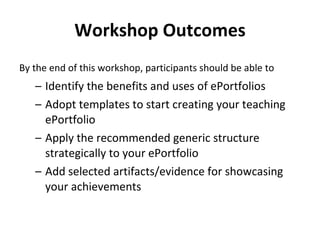
Workshop Outcomes By the end of this workshop, participants should be able to   Identify the benefits and uses of ePortfolios  Adopt templates to start creating your teaching ePortfolio  Apply the recommended generic structure strategically to your ePortfolio  Add selected artifacts/evidence for showcasing your achievements 
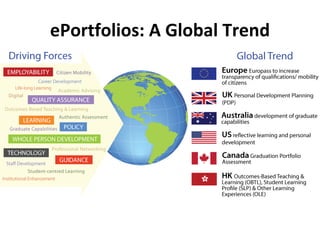
ePortfolios: A Global Trend
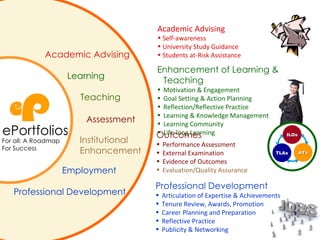
Enhancement of Learning & Teaching Motivation & Engagement Goal Setting & Action Planning Reflection/Reflective Practice Learning & Knowledge Management Learning Community Life-long Learning Academic Advising Self-awareness University Study Guidance Students at-Risk Assistance Professional Development Articulation of Expertise & Achievements Tenure Review, Awards, Promotion Career Planning and Preparation  Reflective Practice Publicity & Networking Outcomes Performance Assessment External Examination Evidence of Outcomes Evaluation/Quality Assurance Teaching Institutional  Enhancement Employment Assessment Learning Academic Advising Professional Development ePortfolios For all: A Roadmap For Success ILOs TLAs ATs
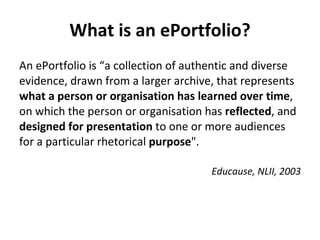
What is an ePortfolio? An ePortfolio is “a collection of authentic and diverse evidence, drawn from a larger archive, that represents  what a person or organisation has learned over time , on which the person or organisation has  reflected , and  designed for presentation  to one or more audiences for a particular rhetorical  purpose ".  Educause, NLII, 2003
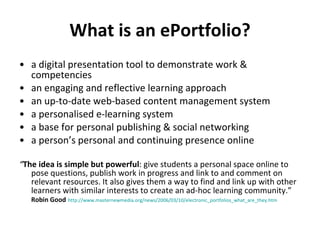
What is an ePortfolio? a digital presentation tool to demonstrate work & competencies an engaging and reflective learning approach an up-to-date web-based content management system a personalised e-learning system a base for personal publishing & social networking a person’s personal and continuing presence online “ The idea is simple but powerful : give students a personal space online to pose questions, publish work in progress and link to and comment on relevant resources. It also gives them a way to find and link up with other learners with similar interests to create an ad-hoc learning community.”  Robin Good   http://www.masternewmedia.org/news/2006/03/10/electronic_portfolios_what_are_they.htm
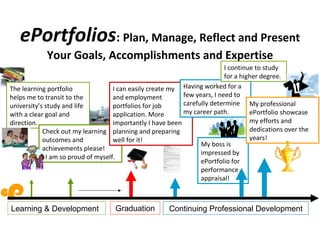
ePortfolios :  Plan, Manage, Reflect and Present Your Goals, Accomplishments and Expertise The learning portfolio helps me to transit to the university’s study and life with a clear goal and direction. Check out my learning outcomes and achievements please! I am so proud of myself. I can easily create my  CV and employment portfolios for job application. More importantly I have been planning and preparing well for it! Having worked for a few years, I need to carefully determine my career path. My boss is impressed by ePortfolio for performance appraisal!  I continue to study for a higher degree. My professional ePortfolio showcase my efforts and dedications over the years! exchange internship course work workshops group projects community services final year project courses  community services professional membership awards part-time jobs Student unions study trip event organisation publications Learning & Development Graduation Continuing Professional Development
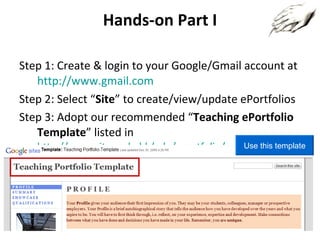
Hands-on Part I Step 1: Create & login to your Google/Gmail account at  http://www.gmail.com Step 2: Select “ Site ” to create/view/update ePortfolios Step 3: Adopt our recommended “ Teaching ePortfolio Template ” listed in  http://www.cityu.edu.hk/edo/eportfolio/gallery/ Click the button “Use this template” Use this template
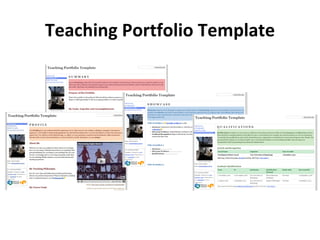
Teaching Portfolio Template
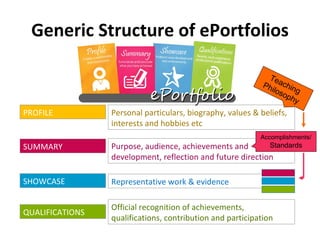
Generic Structure of ePortfolios Teaching Philosophy Accomplishments/ Standards Personal particulars, biography, values & beliefs, interests and hobbies etc Purpose, audience, achievements and development, reflection and future direction Representative work & evidence Official recognition of achievements, qualifications, contribution and participation PROFILE SUMMARY SHOWCASE QUALIFICATIONS
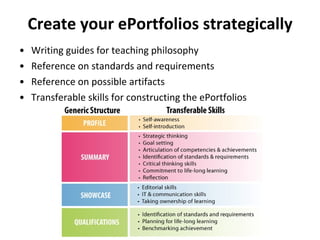
Create your ePortfolios strategically Writing guides for teaching philosophy Reference on standards and requirements Reference on possible artifacts Transferable skills for constructing the ePortfolios
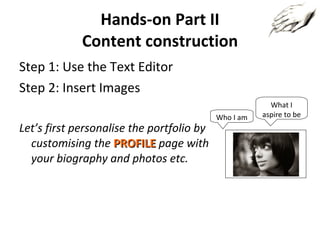
Hands-on Part II Content construction Step 1: Use the Text Editor Step 2: Insert Images Let’s first personalise the portfolio by customising the  PROFILE   page with your biography and photos etc. Who I am What I aspire to be
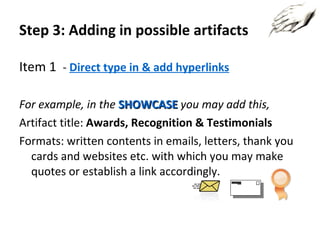
Step 3: Adding in possible artifacts Item  1   -  Direct type in & add hyperlinks For example, in the  SHOWCASE   you may add this, Artifact title:  Awards,   Recognition & Testimonials Formats: written contents in emails, letters, thank you cards and websites etc. with which you may make quotes or establish a link accordingly.
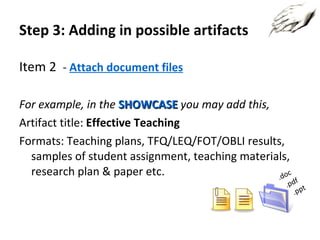
Step 3: Adding in possible artifacts Item  2   -  Attach document files For example, in the  SHOWCASE   you may add this, Artifact title:  Effective Teaching  Formats: Teaching plans, TFQ/LEQ/FOT/OBLI results, samples of student assignment, teaching materials, research plan & paper etc. .doc .pdf .ppt
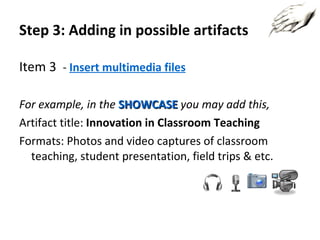
Step 3: Adding in possible artifacts Item  3   -  Insert multimedia files For example, in the  SHOWCASE   you may add this, Artifact title:  Innovation in Classroom Teaching Formats: Photos and video captures of classroom teaching, student presentation, field trips & etc.
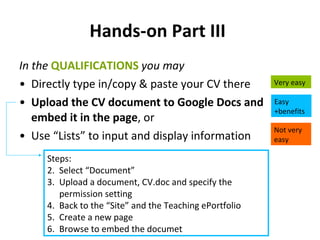
Hands-on Part III   In the  QUALIFICATIONS   you may Directly type in/copy & paste your CV there Upload the CV document to Google Docs and embed it in the page , or Use “Lists” to input and display information  Very easy Easy +benefits Not very easy Steps: Select “Document” Upload a document, CV.doc and specify the permission setting Back to the “Site” and the Teaching ePortfolio Create a new page Browse to embed the documet
 
 
Hands-on Part VI  Personalisation & Sharing Part 1: Edit Side bar Change the title of the site Change the photo Part 2: Change theme Part 3: Share your ePortfolio to [email_address]  (as a viewer)
Hands-on Part VII Advanced Features Step 1: Using Google Form to collect Comment for the Teaching Portfolio Template Step 2: Show the result in analyzed view Step 3: Use & modify their own comment form
 
 
Q & A Feedback Evaluation Form http://www.cityu.edu.hk/edo/eportfolio/feedback/ Enquiry [email_address]

Teaching ePortfolio Workshop (07 Jan, 2010)

  • 1.
    Hokling Cheung &Anthony Wong January 7, 2010
  • 2.
    Using ePortfolios andReflective Thinking to Scaffold Student Learning November 3, 2009 Developing Reflective Practice for Professional Advancement December 1, 2009 Teaching ePortfolio Workshop TODAY! Technical Conceptual
  • 3.
    Workshop Outcomes Bythe end of this workshop, participants should be able to Identify the benefits and uses of ePortfolios  Adopt templates to start creating your teaching ePortfolio  Apply the recommended generic structure strategically to your ePortfolio  Add selected artifacts/evidence for showcasing your achievements 
  • 4.
  • 5.
    Enhancement of Learning& Teaching Motivation & Engagement Goal Setting & Action Planning Reflection/Reflective Practice Learning & Knowledge Management Learning Community Life-long Learning Academic Advising Self-awareness University Study Guidance Students at-Risk Assistance Professional Development Articulation of Expertise & Achievements Tenure Review, Awards, Promotion Career Planning and Preparation Reflective Practice Publicity & Networking Outcomes Performance Assessment External Examination Evidence of Outcomes Evaluation/Quality Assurance Teaching Institutional Enhancement Employment Assessment Learning Academic Advising Professional Development ePortfolios For all: A Roadmap For Success ILOs TLAs ATs
  • 6.
    What is anePortfolio? An ePortfolio is “a collection of authentic and diverse evidence, drawn from a larger archive, that represents what a person or organisation has learned over time , on which the person or organisation has reflected , and designed for presentation to one or more audiences for a particular rhetorical purpose ". Educause, NLII, 2003
  • 7.
    What is anePortfolio? a digital presentation tool to demonstrate work & competencies an engaging and reflective learning approach an up-to-date web-based content management system a personalised e-learning system a base for personal publishing & social networking a person’s personal and continuing presence online “ The idea is simple but powerful : give students a personal space online to pose questions, publish work in progress and link to and comment on relevant resources. It also gives them a way to find and link up with other learners with similar interests to create an ad-hoc learning community.” Robin Good http://www.masternewmedia.org/news/2006/03/10/electronic_portfolios_what_are_they.htm
  • 8.
    ePortfolios : Plan, Manage, Reflect and Present Your Goals, Accomplishments and Expertise The learning portfolio helps me to transit to the university’s study and life with a clear goal and direction. Check out my learning outcomes and achievements please! I am so proud of myself. I can easily create my CV and employment portfolios for job application. More importantly I have been planning and preparing well for it! Having worked for a few years, I need to carefully determine my career path. My boss is impressed by ePortfolio for performance appraisal! I continue to study for a higher degree. My professional ePortfolio showcase my efforts and dedications over the years! exchange internship course work workshops group projects community services final year project courses community services professional membership awards part-time jobs Student unions study trip event organisation publications Learning & Development Graduation Continuing Professional Development
  • 9.
    Hands-on Part IStep 1: Create & login to your Google/Gmail account at http://www.gmail.com Step 2: Select “ Site ” to create/view/update ePortfolios Step 3: Adopt our recommended “ Teaching ePortfolio Template ” listed in http://www.cityu.edu.hk/edo/eportfolio/gallery/ Click the button “Use this template” Use this template
  • 10.
  • 11.
    Generic Structure ofePortfolios Teaching Philosophy Accomplishments/ Standards Personal particulars, biography, values & beliefs, interests and hobbies etc Purpose, audience, achievements and development, reflection and future direction Representative work & evidence Official recognition of achievements, qualifications, contribution and participation PROFILE SUMMARY SHOWCASE QUALIFICATIONS
  • 12.
    Create your ePortfoliosstrategically Writing guides for teaching philosophy Reference on standards and requirements Reference on possible artifacts Transferable skills for constructing the ePortfolios
  • 13.
    Hands-on Part IIContent construction Step 1: Use the Text Editor Step 2: Insert Images Let’s first personalise the portfolio by customising the PROFILE page with your biography and photos etc. Who I am What I aspire to be
  • 14.
    Step 3: Addingin possible artifacts Item 1 - Direct type in & add hyperlinks For example, in the SHOWCASE you may add this, Artifact title: Awards, Recognition & Testimonials Formats: written contents in emails, letters, thank you cards and websites etc. with which you may make quotes or establish a link accordingly.
  • 15.
    Step 3: Addingin possible artifacts Item 2 - Attach document files For example, in the SHOWCASE you may add this, Artifact title: Effective Teaching Formats: Teaching plans, TFQ/LEQ/FOT/OBLI results, samples of student assignment, teaching materials, research plan & paper etc. .doc .pdf .ppt
  • 16.
    Step 3: Addingin possible artifacts Item 3 - Insert multimedia files For example, in the SHOWCASE you may add this, Artifact title: Innovation in Classroom Teaching Formats: Photos and video captures of classroom teaching, student presentation, field trips & etc.
  • 17.
    Hands-on Part III In the QUALIFICATIONS you may Directly type in/copy & paste your CV there Upload the CV document to Google Docs and embed it in the page , or Use “Lists” to input and display information Very easy Easy +benefits Not very easy Steps: Select “Document” Upload a document, CV.doc and specify the permission setting Back to the “Site” and the Teaching ePortfolio Create a new page Browse to embed the documet
  • 18.
  • 19.
  • 20.
    Hands-on Part VI Personalisation & Sharing Part 1: Edit Side bar Change the title of the site Change the photo Part 2: Change theme Part 3: Share your ePortfolio to [email_address] (as a viewer)
  • 21.
    Hands-on Part VIIAdvanced Features Step 1: Using Google Form to collect Comment for the Teaching Portfolio Template Step 2: Show the result in analyzed view Step 3: Use & modify their own comment form
  • 22.
  • 23.
  • 24.
    Q & AFeedback Evaluation Form http://www.cityu.edu.hk/edo/eportfolio/feedback/ Enquiry [email_address]