Teacher/Coordinator
Survey Evaluation Results
         2011-2012
Summary
  • Number of survey participants: 12

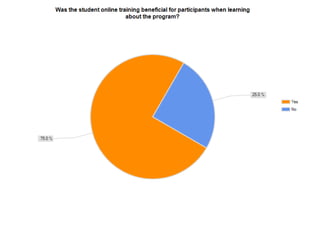
 • “It is a good program for students to meet mentors.”
 • “In theory, this is a great program that could benefit
                      a lot of students.”
• “The program was beneficial to the students that took
                         it seriously.”
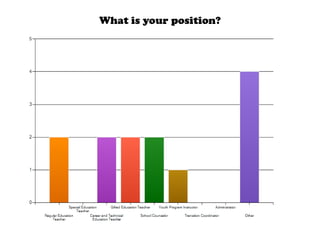
What is your position?
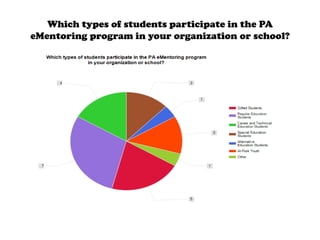
Which types of students participate in the PA
eMentoring program in your organization or school?
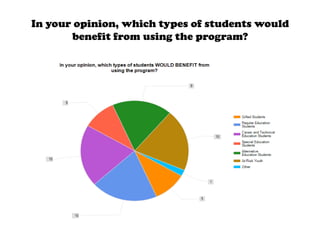
In your opinion, which types of students would
       benefit from using the program?
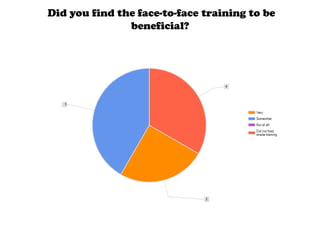
Did you find the face-to-face training to be
               beneficial?
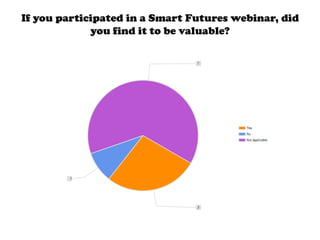
If you participated in a Smart Futures webinar, did
             you find it to be valuable?
Where and how did you implement the program into your
                 curriculum or activities?

   •   We set up accounts with the students at their respective schools and they completed the
        activities on their own. We monitored their progress and checked in with them weekly.
   • Used program as part of Career Exploration group for juniors during alternating weekly
                                                periods.
 • Students used this program as an element of a PSSA remediation course. Students were given
    time every day to work on their different activities. It aligned with our school's goal this year
      of implementing a mentor program for students who are struggling in regard to the PSSA.
                        • At school, as part of the gifted services we offer
• In software applications class. I took one class period every week to go over the info and have
                                 the students work through the activities
  • This was implemented in the second half of they year as an activity for resume and portfolio
                                                building.
                                  • Computer Room for 10 weeks
• Implemented eMentoring with our ServiceCorps students every Friday throughout our 8-week
                                     program on our Resource Days.
Please provide feedback regarding the process around
    activating student accounts for Smart Futures' programs.

    •     In trying to find mentor matches for our students, we faced challenges. Despite thinking
          outside the box and trying to find a mentor related to any of their career interests, some
         students could not find mentors that matched any of their interests. The mentor pool is not
                           large enough for the number of mentees being recruited.
                                    • This was very quick and easy.
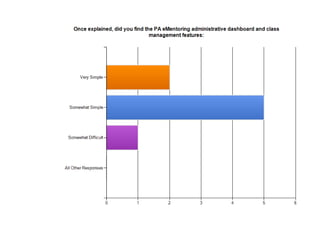
•       Activating the accounts was very easy. Students did not have any difficulty and I did not have
                                     any difficulty in creating the course.
                          • Easy to do. Lack of matching mentors was an issue.
        • It went smoothly. The students were able to activate their accounts without problems.
                         • There were no issues activating the student accounts
                                              • It was easy.
                             • Activating student accounts was not difficult.
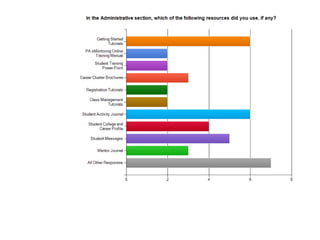
Which Administrative RESOURCE was the most
              beneficial to you? Why?

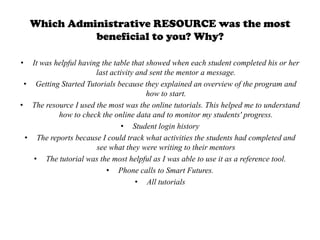
•  It was helpful having the table that showed when each student completed his or her
                       last activity and sent the mentor a message.
 • Getting Started Tutorials because they explained an overview of the program and
                                        how to start.
• The resource I used the most was the online tutorials. This helped me to understand
           how to check the online data and to monitor my students' progress.
                                • Student login history
 • The reports because I could track what activities the students had completed and
                       see what they were writing to their mentors
   • The tutorial was the most helpful as I was able to use it as a reference tool.
                           • Phone calls to Smart Futures.
                                     • All tutorials
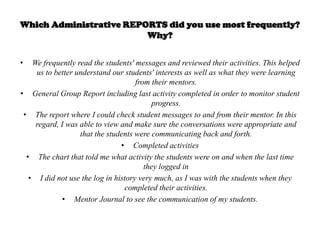
Which Administrative REPORTS did you use most frequently?
                         Why?


•   We frequently read the students' messages and reviewed their activities. This helped
     us to better understand our students' interests as well as what they were learning
                                     from their mentors.
• General Group Report including last activity completed in order to monitor student
                                          progress.
 • The report where I could check student messages to and from their mentor. In this
     regard, I was able to view and make sure the conversations were appropriate and
                   that the students were communicating back and forth.
                                • Completed activities
  • The chart that told me what activity the students were on and when the last time
                                        they logged in
   • I did not use the log in history very much, as I was with the students when they
                                 completed their activities.
              • Mentor Journal to see the communication of my students.
What challenges, if any, did you face regarding getting
               students to complete the program.

•     Since our students attend six different schools, we expected them to complete the activities and messages on
       their own. We regularly monitored their progress and checked in with them, but it was difficult to get them
        to do it. It was difficult to motivate them to complete the program if they felt like they weren't benefitting
                                                       from their mentor.
•     It was extremely difficult for students to miss class in order to attend group. It was also difficult to get them
                              to complete activities on their own due to academic committments.
   •     Some of the students mentors did not reply at all. It was not until about a month into using the program
         when a new mentor was finally assigned. At this point, my one student had almost completed the entire
                program and it was basically irrelevant for her to try to connect to a mentor at this point.
                                   •   keeping them on task and finishing their entries
•     I had some 9th graders complete the activities and they did not take it seriously and did not see the value of
                                                      the program at first.
 •     The onmly challenge that I faced was the frustration the students had when it tool their mentors a while to
                                                        get back to them.
                                               •    Some students were lazy.
    •     Some students were faster at completing the curriculum than others. Also, the students were receiving
                     automated responses from their mentors which did not prove helpful nor beneficial.
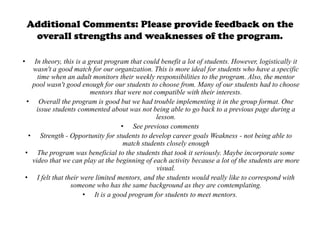
Additional Comments: Please provide feedback on the
     overall strengths and weaknesses of the program.

•   In theory, this is a great program that could benefit a lot of students. However, logistically it
   wasn't a good match for our organization. This is more ideal for students who have a specific
     time when an adult monitors their weekly responsibilities to the program. Also, the mentor
   pool wasn't good enough for our students to choose from. Many of our students had to choose
                          mentors that were not compatible with their interests.
 • Overall the program is good but we had trouble implementing it in the group format. One
     issue students commented about was not being able to go back to a previous page during a
                                                 lesson.
                                    • See previous comments
  • Strength - Opportunity for students to develop career goals Weakness - not being able to
                                     match students closely enough
• The program was beneficial to the students that took it seriously. Maybe incorporate some
   video that we can play at the beginning of each activity because a lot of the students are more
                                                 visual.
• I felt that their were limited mentors, and the students would really like to correspond with
                  someone who has the same background as they are comtemplating.
                       • It is a good program for students to meet mentors.

Teacher coordinator summary final

  • 1.
  • 2.
    Summary •Number of survey participants: 12 • “It is a good program for students to meet mentors.” • “In theory, this is a great program that could benefit a lot of students.” • “The program was beneficial to the students that took it seriously.”
  • 3.
    What is yourposition?
  • 4.
    Which types ofstudents participate in the PA eMentoring program in your organization or school?
  • 5.
    In your opinion,which types of students would benefit from using the program?
  • 7.
    Did you findthe face-to-face training to be beneficial?
  • 8.
    If you participatedin a Smart Futures webinar, did you find it to be valuable?
  • 9.
    Where and howdid you implement the program into your curriculum or activities? • We set up accounts with the students at their respective schools and they completed the activities on their own. We monitored their progress and checked in with them weekly. • Used program as part of Career Exploration group for juniors during alternating weekly periods. • Students used this program as an element of a PSSA remediation course. Students were given time every day to work on their different activities. It aligned with our school's goal this year of implementing a mentor program for students who are struggling in regard to the PSSA. • At school, as part of the gifted services we offer • In software applications class. I took one class period every week to go over the info and have the students work through the activities • This was implemented in the second half of they year as an activity for resume and portfolio building. • Computer Room for 10 weeks • Implemented eMentoring with our ServiceCorps students every Friday throughout our 8-week program on our Resource Days.
  • 10.
    Please provide feedbackregarding the process around activating student accounts for Smart Futures' programs. • In trying to find mentor matches for our students, we faced challenges. Despite thinking outside the box and trying to find a mentor related to any of their career interests, some students could not find mentors that matched any of their interests. The mentor pool is not large enough for the number of mentees being recruited. • This was very quick and easy. • Activating the accounts was very easy. Students did not have any difficulty and I did not have any difficulty in creating the course. • Easy to do. Lack of matching mentors was an issue. • It went smoothly. The students were able to activate their accounts without problems. • There were no issues activating the student accounts • It was easy. • Activating student accounts was not difficult.
  • 12.
    Which Administrative RESOURCEwas the most beneficial to you? Why? • It was helpful having the table that showed when each student completed his or her last activity and sent the mentor a message. • Getting Started Tutorials because they explained an overview of the program and how to start. • The resource I used the most was the online tutorials. This helped me to understand how to check the online data and to monitor my students' progress. • Student login history • The reports because I could track what activities the students had completed and see what they were writing to their mentors • The tutorial was the most helpful as I was able to use it as a reference tool. • Phone calls to Smart Futures. • All tutorials
  • 13.
    Which Administrative REPORTSdid you use most frequently? Why? • We frequently read the students' messages and reviewed their activities. This helped us to better understand our students' interests as well as what they were learning from their mentors. • General Group Report including last activity completed in order to monitor student progress. • The report where I could check student messages to and from their mentor. In this regard, I was able to view and make sure the conversations were appropriate and that the students were communicating back and forth. • Completed activities • The chart that told me what activity the students were on and when the last time they logged in • I did not use the log in history very much, as I was with the students when they completed their activities. • Mentor Journal to see the communication of my students.
  • 17.
    What challenges, ifany, did you face regarding getting students to complete the program. • Since our students attend six different schools, we expected them to complete the activities and messages on their own. We regularly monitored their progress and checked in with them, but it was difficult to get them to do it. It was difficult to motivate them to complete the program if they felt like they weren't benefitting from their mentor. • It was extremely difficult for students to miss class in order to attend group. It was also difficult to get them to complete activities on their own due to academic committments. • Some of the students mentors did not reply at all. It was not until about a month into using the program when a new mentor was finally assigned. At this point, my one student had almost completed the entire program and it was basically irrelevant for her to try to connect to a mentor at this point. • keeping them on task and finishing their entries • I had some 9th graders complete the activities and they did not take it seriously and did not see the value of the program at first. • The onmly challenge that I faced was the frustration the students had when it tool their mentors a while to get back to them. • Some students were lazy. • Some students were faster at completing the curriculum than others. Also, the students were receiving automated responses from their mentors which did not prove helpful nor beneficial.
  • 20.
    Additional Comments: Pleaseprovide feedback on the overall strengths and weaknesses of the program. • In theory, this is a great program that could benefit a lot of students. However, logistically it wasn't a good match for our organization. This is more ideal for students who have a specific time when an adult monitors their weekly responsibilities to the program. Also, the mentor pool wasn't good enough for our students to choose from. Many of our students had to choose mentors that were not compatible with their interests. • Overall the program is good but we had trouble implementing it in the group format. One issue students commented about was not being able to go back to a previous page during a lesson. • See previous comments • Strength - Opportunity for students to develop career goals Weakness - not being able to match students closely enough • The program was beneficial to the students that took it seriously. Maybe incorporate some video that we can play at the beginning of each activity because a lot of the students are more visual. • I felt that their were limited mentors, and the students would really like to correspond with someone who has the same background as they are comtemplating. • It is a good program for students to meet mentors.