Any use of this material without the permission of Talavant is prohibited
PROCESSING BIG DATA
with Azure Data Lake Analytics
Sean Forgatch
Business Intelligence Consultant
Sean.Forgatch@talavant.com
About Me
Sean Forgatch
• Milwaukee, WI
• Business Intelligence Consultant
• Healthcare, Insurance, SaaS
• Integration and Analytics
• Microsoft Big Data Certified
• PASS
• Industry Speaker
• FoxPASS President
• Running, Craft Beers, Reading
About Talavant
There is a better way to make data work for companies. Better resources, strategy, sustainability, inclusion of the
organization as a whole, understanding of client needs, tools, outcomes, better ROI.
• Accelerated planning, implementation and results
• Sustainable solutions
• Increased company-wide buy-in & usage
VALUE WE PROVIDE
By providing a holistic approach inclusive of a
client’s people, processes and technologies -
built on investment in our own employees and
company growth.
HOW WE DO IT
STRATEGY
ARCHITECTURE
IMPLEMENTATION
1. Big Data Overview
2. Data Lake Concepts
3. Azure Data Lake Store
4. Azure Data Lake Analytics
5. U-SQL
GDELT Analysis in PowerBI
Big Data Primer
THREE V s of Big
Data
VOLUME
VELOCITY
VARIETY
Big Data Primer: Azure Tools
THREE V s of Big
Data
VOLUME
VELOCITY Veracity
VARIETY
Azure Data
Warehouse
Azure Data
Lake
• Increasing Amount of Data and
Sources
• Increase of Data Asset
Acquisitions
• Streaming Data
• Real Time Analytics
• Increase in Demand
• Reliability of Trustworthy Data
• Timeliness of Data Operations
• New Data Formats Being Used
• Images, JSON, Free Text
• Avro, Parquet, ORC
Azure Data
Lake
Analytics
Event Hubs
IoT Hubs
Stream
Analytics
HDInsight
A Big Data Trends
“Variety, not volume or velocity, drives big-data investments”
A Big Data Trends
“Variety, not volume or velocity, drives big-data investments”
“Big data grows up: Hadoop adds to enterprise standards”
A Big Data Trends
“Variety, not volume or velocity, drives big-data investments”
“Big data grows up: Hadoop adds to enterprise standards”
“Rise of metadata catalogs helps people find analysis-worthy
big data.”
-TDWI: Top Ten Big Data Trends for 2017
1. Big Data Overview
2. Data Lake Concepts
3. Azure Data Lake Store
4. Azure Data Lake Analytics
5. U-SQL
Data Lake Concepts
Data Lake Operations
RAW STAGE CURATED
Azure Data Lake
Store
RAW STAGE CURATED
EXPLORATORY
• Operational
• Value has been
identified
• Explorational
• Value is being
discovered
Azure Data Lake
Store
2
1
Data Lake Operations
RAW STAGE CURATED
EXPLORATORY
ERP
IoT
Devices
RDBS
• Operational
• Value has been
identified
• Explorational
• Value is being
discovered
Azure Data Lake
Store
2
1
Data Lake Operations
RAW STAGE CURATED
EXPLORATORY
ERP
IoT
Devices
RDBS
• Operational
• Value has been
identified
• Explorational
• Value is being
discovered
Azure Data Lake
Store
2
1
RAW STAGE CURATED
EXPLORATORY
ERP
IoT
Devices
RDBS
• Operational
• Value has been
identified
• Explorational
• Value is being
discovered
Azure Data Lake
Store
2
1
• Tag /
Explore
• Discover
Data Lake Operations
Data Lake Organization
SUBJECT
DATA SOURCE
DATA SET
DATE
FILE
DATASET
DATE
FILE
?
DESTINATION
DATA SET
FILE
Data Lake Security
RAW (1) STAGE (2) CURATED (3) EXPLORATION (0)
Data Experts/Engineers Data
Experts/Engineers
ETL and BI Engineers /
SME’s / Analysts
Data Scientist / Analysts
TOOLS
Data Lake Tagging
RAW (1) STAGE (2) CURATED (3) EXPLORATION (0)
Data Experts/Engineers Data
Experts/Engineers
ETL and BI Engineers /
SME’s / Analysts
Data Scientist / Analysts
AUTOMATED SME N/A
TOOLS
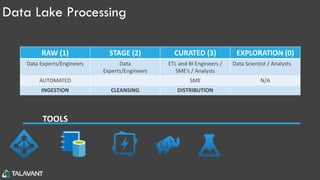
Data Lake Processing
RAW (1) STAGE (2) CURATED (3) EXPLORATION (0)
Data Experts/Engineers Data
Experts/Engineers
ETL and BI Engineers /
SME’s / Analysts
Data Scientist / Analysts
AUTOMATED SME N/A
INGESTION CLEANSING DISTRIBUTION
TOOLS
Conceptual Architecture
I
ADF and
PolyBase
Files Tables
• Reference Data
• Data Warehouse
Data
• Archive Data
• Land quickly, no
transformations
• Includes Transient
Data Operations
• Original Format
• Stored by Date
Ingested
• Tag and Catalog Data
• Possibly Compressed
Data Lake Bypass - BATCH
• IoT
• Medical Devices
• Social Media
• Imaging
• Events
• Video
• Application Data
• Electronic
Medical Records
Systems
• Customer
Relationship
Management
• Financial
Systems
• Data
Marketplace
• Data Lake
Standard
• U-SQL/Hive
Tables
• General Staging
• Can bypass
Curated
• Decompress
• Conform
• Delta
Preparation
Data Lake Bypass - STREAM
R
• Exploratory
Analytics
• Sandbox Area
Data Lake Questions
?
1. Big Data Overview
2. Data Lake Concepts
3. Azure Data Lake Store
4. Azure Data Lake Analytics
5. U-SQL
Azure Data Lake Store
• HDFS Data Store for housing data in it’s Native Raw Format
• Built on Apache YARN
• Process and store Petabyte size files
• Enterprise Security through Azure Active Directory
• No storage limit
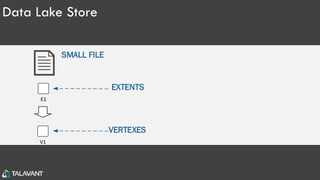
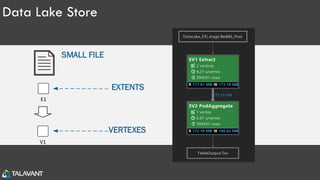
Data Lake Store
VERTEXES
EXTENTS
SMALL FILE
V1
E1
Data Lake Store
VERTEXES
EXTENTS
SMALL FILE
V1
E1
V1 V2 V3 V4
E1 E2 E3 E4
BIG FILE
Data Lake Store
VERTEXES
EXTENTS
SMALL FILE
V1
E1
Data Lake Ingestion
• Visual Studio
• Azure Portal (Limit)
• SSIS Data Lake Destination and SSIS Data Lake Task
• Azure Data Factory
• Powershell
• ADLCopy
• Sqoop (HDInsight)
• Other Apache tools
1. Big Data Overview
2. Data Lake Concepts
3. Azure Data Lake Store
4. Azure Data Lake Analytics
5. U-SQL
Azure Data Lake Analytics
• Big Data Queries as a Service
• Analytics Federation
• Develop in U-SQL, .NET, R, and Python
• Cognitive Services
• Scale Instantly
• Pay Per Job
1. Big Data Overview
2. Data Lake Concepts
3. Azure Data Lake Store
4. Azure Data Lake Analytics
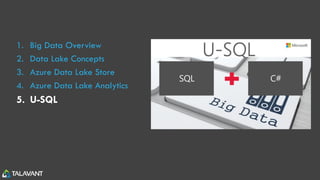
5. U-SQL
Intro to U-SQL
KEY FEATURES
• Combines SQL and C#
• Patterned File Processing – Thousands of Files
• Extensions: Python, R, Cognitive
• Query Data where it Lives (Federated Querying)
• Partition and Distribution of Data for Massive Parallelism
• Manage Structure and Shared Programming through U-SQL Catalog
• U-SQL Procedures
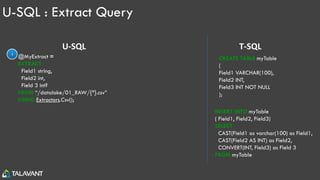
U-SQL : Extract Query
@MyExtract =
EXTRACT
Field1 string,
Field2 int,
Field 3 int?
FROM “/datalake/01_RAW/{*}.csv”
USING Extractors.Csv();
U-SQL T-SQL
INSERT INTO myTable
( Field1, Field2, Field3)
SELECT
CAST(Field1 as varchar(100) as Field1,
CAST(Field2 AS INT) as Field2,
CONVERT(INT, Field3) as Field 3
FROM myTable
CREATE TABLE myTable
(
Field1 VARCHAR(100),
Field2 INT,
Field3 INT NOT NULL
);
1
U-SQL : Extract Query
@MyExtract =
EXTRACT
Field1 string,
Field2 int,
Field 3 int?
FROM “/datalake/01_RAW/{*}.csv”
USING Extractors.Csv();
@MyAgg =
SELECT
Field1,
MAX(Field2) AS Field2
FROM @MyExtract
GROUP BY Field1;
U-SQL
1
2
T-SQL
CREATE TABLE myTable
(
Field1 VARCHAR(100),
Field2 INT,
Field3 INT NOT NULL
);
INSERT INTO myTable
( Field1, Field2, Field3)
SELECT
CAST(Field1 as varchar(100) as Field1,
CAST(Field2 AS INT) as Field2,
CONVERT(INT, Field3) as Field 3
FROM myTable
U-SQL : Extract Query
@MyExtract =
EXTRACT
Field1 string,
Field2 int,
Field 3 int?
FROM “/datalake/01_RAW/{*}.csv”
USING Extractors.Csv();
@MyAgg =
SELECT
Field1,
MAX(Field2) AS Field2
FROM @MyExtract
GROUP BY Field1;
OUTPUT @MyAgg
TO “/datalake/02_STAGE/MyOutput.csv”
USING Outputters.Csv();
1
2
3
U-SQL T-SQL
CREATE TABLE myTable
(
Field1 VARCHAR(100),
Field2 INT,
Field3 INT NOT NULL
);
INSERT INTO myTable
( Field1, Field2, Field3)
SELECT
CAST(Field1 as varchar(100) as Field1,
CAST(Field2 AS INT) as Field2,
CONVERT(INT, Field3) as Field 3
FROM myTable
U-SQL : Extractors and Outputters
CURRENT EXTRACTORS
• Csv()
• Tsv()
• Txt()
CURRENT OUTPUTTERS
• Csv()
• Tsv()
• Txt()
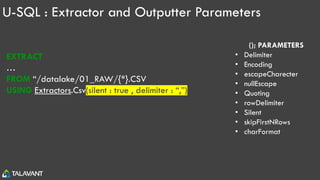
U-SQL : Extractor and Outputter Parameters
EXTRACT
…
FROM “/datalake/01_RAW/{*}.CSV
USING Extractors.Csv(silent : true , delimiter : “,”);
CSV(); PARAMETERS
• Delimiter
• Encoding
• escapeCharecter
• nullEscape
• Quoting
• rowDelimiter
• Silent
• skipFirstNRows
• charFormat
U-SQL : Extractors and Outputters
CURRENT EXTRACTORS
• Csv()
• Tsv()
• Txt()
CURRENT OUTPUTTERS
• Csv()
• Tsv()
• Txt()
CUSTOM EXTRACTORS and OUTPUTTERS
• FlexExtractor()
• XML()
• JSON()
• Avro()
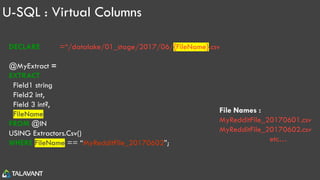
U-SQL : Virtual Columns
DECLARE @IN =“/datalake/01_stage/2017/06/{FileName}.csv”;
@MyExtract =
EXTRACT
Field1 string,
Field2 int,
Field 3 int?,
FileName string //My Virtual Column
FROM @IN
USING Extractors.Csv()
WHERE FileName == “MyRedditFile_20170602”;
File Names :
MyRedditFile_20170601.csv
MyRedditFile_20170602.csv
etc…
U-SQL: Job Execution
U-SQL : Tables
GUIDELINES
1. Must Have Clustered Index
2. Utilize When Improving Performance with
Distribution/Partitioning
3. You have Multiple Large Files
4. Don’t Use when:
• No Filtering, Joining, Grouping
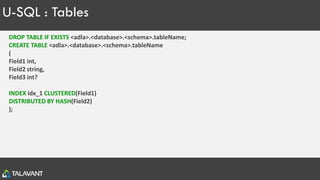
U-SQL : Tables
DROP TABLE IF EXISTS <adla>.<database>.<schema>.tableName;
CREATE TABLE <adla>.<database>.<schema>.tableName
(
Field1 int,
Field2 string,
Field3 int?
INDEX idx_1 CLUSTERED(Field1)
DISTRIBUTED BY HASH(Field2)
);
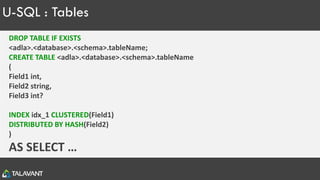
U-SQL : Tables
DROP TABLE IF EXISTS
<adla>.<database>.<schema>.tableName;
CREATE TABLE <adla>.<database>.<schema>.tableName
(
Field1 int,
Field2 string,
Field3 int?
INDEX idx_1 CLUSTERED(Field1)
DISTRIBUTED BY HASH(Field2)
)
AS SELECT …
U-SQL : Tables
DROP TABLE IF EXISTS
<adla>.<database>.<schema>.tableName;
CREATE TABLE <adla>.<database>.<schema>.tableName
(
Field1 int,
Field2 string,
Field3 int?
INDEX idx_1 CLUSTERED(Field1)
DISTRIBUTED BY HASH(Field2)
)
AS EXTRACT …
U-SQL : Tables
DROP TABLE IF EXISTS
<adla>.<database>.<schema>.tableName;
CREATE TABLE <adla>.<database>.<schema>.tableName
(
Field1 int,
Field2 string,
Field3 int?
INDEX idx_1 CLUSTERED(Field1)
DISTRIBUTED BY HASH(Field2)
)
AS TVF …
U-SQL : Tables
MANAGED
• Own Their Data
• No Heaps
• INSERT only
USQL
METADATA and DATA
U-SQL : Tables
EXTERNAL
• Stored Metadata
• Use VIEW or TVF over EXTRACT
• Data Lives on Source
• Azure SQL DB
• Azure SQL DW
• Azure SQL VM
USQL
METADATA DATA
U-SQL : Data Federation
CURRENT STATE
EXTRACTORS
U-SQL : Operators
COMPARISON OPERATORS LOGICAL OPERATORS
IS NULL AND
== BETWEEN
> IN, NOT IN
>= LIKE, NOT LIKE
!= NOT
OR
U-SQL : Functions
REPORTING FUNCTIONS
• COUNT
• SUM
• MIN
• MAX
• AVG
• STDEV
• VAR
RANKING FUNCTIONS
• RANK
• DENSE_RANK
• NTILE
• ROW_NUMBER
ANALYTIC FUNCTIONS
• CUME_DIST
• PERCENT_RANK
• PERCENTILE_CONT
• PERCENTILE_DISC
U-SQL : C# Functions
STRING METHODS
• Compare
• Concat
• Contains
• Equals
• Replace
• Split
• ToUpper
• Trim
• ..plus many more!
MATH METHODS
• Abs
• BigMul
• Floor
• Max/Min
• Round
• Sqrt
• ..plus many more!
Copyright Talavant, Inc. 2017 54
Advice
• Identify Value of Data Lake
Approach
• Data Lake: Invest Time and Strategy
into Data Lake Design
• U-SQL: Utilize U-SQL Constructs
before C#
• U-SQL: Understand and Control Data
through Partitioning
*as of 2017/07/25
Learn U-SQL !
•Michael Rys – LinkedIn Slide Share’s
•GitHub – U-SQL Repository
•SQL Server Central – Stairway to U-SQL
•Azure – Built in Example
Let’s Connect!
• https://www.linkedin.com/in/seanforgatch/
• Sean.Forgatch@Talavant.com
• @4gatchSQL

Talavant Data Lake Analytics

  • 1.
    Any use ofthis material without the permission of Talavant is prohibited PROCESSING BIG DATA with Azure Data Lake Analytics Sean Forgatch Business Intelligence Consultant Sean.Forgatch@talavant.com
  • 2.
    About Me Sean Forgatch •Milwaukee, WI • Business Intelligence Consultant • Healthcare, Insurance, SaaS • Integration and Analytics • Microsoft Big Data Certified • PASS • Industry Speaker • FoxPASS President • Running, Craft Beers, Reading
  • 3.
    About Talavant There isa better way to make data work for companies. Better resources, strategy, sustainability, inclusion of the organization as a whole, understanding of client needs, tools, outcomes, better ROI. • Accelerated planning, implementation and results • Sustainable solutions • Increased company-wide buy-in & usage VALUE WE PROVIDE By providing a holistic approach inclusive of a client’s people, processes and technologies - built on investment in our own employees and company growth. HOW WE DO IT STRATEGY ARCHITECTURE IMPLEMENTATION
  • 4.
    1. Big DataOverview 2. Data Lake Concepts 3. Azure Data Lake Store 4. Azure Data Lake Analytics 5. U-SQL
  • 5.
  • 6.
    Big Data Primer THREEV s of Big Data VOLUME VELOCITY VARIETY
  • 7.
    Big Data Primer:Azure Tools THREE V s of Big Data VOLUME VELOCITY Veracity VARIETY Azure Data Warehouse Azure Data Lake • Increasing Amount of Data and Sources • Increase of Data Asset Acquisitions • Streaming Data • Real Time Analytics • Increase in Demand • Reliability of Trustworthy Data • Timeliness of Data Operations • New Data Formats Being Used • Images, JSON, Free Text • Avro, Parquet, ORC Azure Data Lake Analytics Event Hubs IoT Hubs Stream Analytics HDInsight
  • 8.
    A Big DataTrends “Variety, not volume or velocity, drives big-data investments”
  • 9.
    A Big DataTrends “Variety, not volume or velocity, drives big-data investments” “Big data grows up: Hadoop adds to enterprise standards”
  • 10.
    A Big DataTrends “Variety, not volume or velocity, drives big-data investments” “Big data grows up: Hadoop adds to enterprise standards” “Rise of metadata catalogs helps people find analysis-worthy big data.” -TDWI: Top Ten Big Data Trends for 2017
  • 11.
    1. Big DataOverview 2. Data Lake Concepts 3. Azure Data Lake Store 4. Azure Data Lake Analytics 5. U-SQL
  • 12.
  • 13.
    Data Lake Operations RAWSTAGE CURATED Azure Data Lake Store
  • 14.
    RAW STAGE CURATED EXPLORATORY •Operational • Value has been identified • Explorational • Value is being discovered Azure Data Lake Store 2 1 Data Lake Operations
  • 15.
    RAW STAGE CURATED EXPLORATORY ERP IoT Devices RDBS •Operational • Value has been identified • Explorational • Value is being discovered Azure Data Lake Store 2 1 Data Lake Operations
  • 16.
    Data Lake Operations RAWSTAGE CURATED EXPLORATORY ERP IoT Devices RDBS • Operational • Value has been identified • Explorational • Value is being discovered Azure Data Lake Store 2 1
  • 17.
    RAW STAGE CURATED EXPLORATORY ERP IoT Devices RDBS •Operational • Value has been identified • Explorational • Value is being discovered Azure Data Lake Store 2 1 • Tag / Explore • Discover Data Lake Operations
  • 18.
    Data Lake Organization SUBJECT DATASOURCE DATA SET DATE FILE DATASET DATE FILE ? DESTINATION DATA SET FILE
  • 19.
    Data Lake Security RAW(1) STAGE (2) CURATED (3) EXPLORATION (0) Data Experts/Engineers Data Experts/Engineers ETL and BI Engineers / SME’s / Analysts Data Scientist / Analysts TOOLS
  • 20.
    Data Lake Tagging RAW(1) STAGE (2) CURATED (3) EXPLORATION (0) Data Experts/Engineers Data Experts/Engineers ETL and BI Engineers / SME’s / Analysts Data Scientist / Analysts AUTOMATED SME N/A TOOLS
  • 21.
    Data Lake Processing RAW(1) STAGE (2) CURATED (3) EXPLORATION (0) Data Experts/Engineers Data Experts/Engineers ETL and BI Engineers / SME’s / Analysts Data Scientist / Analysts AUTOMATED SME N/A INGESTION CLEANSING DISTRIBUTION TOOLS
  • 22.
    Conceptual Architecture I ADF and PolyBase FilesTables • Reference Data • Data Warehouse Data • Archive Data • Land quickly, no transformations • Includes Transient Data Operations • Original Format • Stored by Date Ingested • Tag and Catalog Data • Possibly Compressed Data Lake Bypass - BATCH • IoT • Medical Devices • Social Media • Imaging • Events • Video • Application Data • Electronic Medical Records Systems • Customer Relationship Management • Financial Systems • Data Marketplace • Data Lake Standard • U-SQL/Hive Tables • General Staging • Can bypass Curated • Decompress • Conform • Delta Preparation Data Lake Bypass - STREAM R • Exploratory Analytics • Sandbox Area
  • 23.
  • 24.
    1. Big DataOverview 2. Data Lake Concepts 3. Azure Data Lake Store 4. Azure Data Lake Analytics 5. U-SQL
  • 25.
    Azure Data LakeStore • HDFS Data Store for housing data in it’s Native Raw Format • Built on Apache YARN • Process and store Petabyte size files • Enterprise Security through Azure Active Directory • No storage limit
  • 26.
  • 27.
    Data Lake Store VERTEXES EXTENTS SMALLFILE V1 E1 V1 V2 V3 V4 E1 E2 E3 E4 BIG FILE
  • 28.
  • 29.
    Data Lake Ingestion •Visual Studio • Azure Portal (Limit) • SSIS Data Lake Destination and SSIS Data Lake Task • Azure Data Factory • Powershell • ADLCopy • Sqoop (HDInsight) • Other Apache tools
  • 30.
    1. Big DataOverview 2. Data Lake Concepts 3. Azure Data Lake Store 4. Azure Data Lake Analytics 5. U-SQL
  • 31.
    Azure Data LakeAnalytics • Big Data Queries as a Service • Analytics Federation • Develop in U-SQL, .NET, R, and Python • Cognitive Services • Scale Instantly • Pay Per Job
  • 32.
    1. Big DataOverview 2. Data Lake Concepts 3. Azure Data Lake Store 4. Azure Data Lake Analytics 5. U-SQL
  • 33.
    Intro to U-SQL KEYFEATURES • Combines SQL and C# • Patterned File Processing – Thousands of Files • Extensions: Python, R, Cognitive • Query Data where it Lives (Federated Querying) • Partition and Distribution of Data for Massive Parallelism • Manage Structure and Shared Programming through U-SQL Catalog • U-SQL Procedures
  • 34.
    U-SQL : ExtractQuery @MyExtract = EXTRACT Field1 string, Field2 int, Field 3 int? FROM “/datalake/01_RAW/{*}.csv” USING Extractors.Csv(); U-SQL T-SQL INSERT INTO myTable ( Field1, Field2, Field3) SELECT CAST(Field1 as varchar(100) as Field1, CAST(Field2 AS INT) as Field2, CONVERT(INT, Field3) as Field 3 FROM myTable CREATE TABLE myTable ( Field1 VARCHAR(100), Field2 INT, Field3 INT NOT NULL ); 1
  • 35.
    U-SQL : ExtractQuery @MyExtract = EXTRACT Field1 string, Field2 int, Field 3 int? FROM “/datalake/01_RAW/{*}.csv” USING Extractors.Csv(); @MyAgg = SELECT Field1, MAX(Field2) AS Field2 FROM @MyExtract GROUP BY Field1; U-SQL 1 2 T-SQL CREATE TABLE myTable ( Field1 VARCHAR(100), Field2 INT, Field3 INT NOT NULL ); INSERT INTO myTable ( Field1, Field2, Field3) SELECT CAST(Field1 as varchar(100) as Field1, CAST(Field2 AS INT) as Field2, CONVERT(INT, Field3) as Field 3 FROM myTable
  • 36.
    U-SQL : ExtractQuery @MyExtract = EXTRACT Field1 string, Field2 int, Field 3 int? FROM “/datalake/01_RAW/{*}.csv” USING Extractors.Csv(); @MyAgg = SELECT Field1, MAX(Field2) AS Field2 FROM @MyExtract GROUP BY Field1; OUTPUT @MyAgg TO “/datalake/02_STAGE/MyOutput.csv” USING Outputters.Csv(); 1 2 3 U-SQL T-SQL CREATE TABLE myTable ( Field1 VARCHAR(100), Field2 INT, Field3 INT NOT NULL ); INSERT INTO myTable ( Field1, Field2, Field3) SELECT CAST(Field1 as varchar(100) as Field1, CAST(Field2 AS INT) as Field2, CONVERT(INT, Field3) as Field 3 FROM myTable
  • 37.
    U-SQL : Extractorsand Outputters CURRENT EXTRACTORS • Csv() • Tsv() • Txt() CURRENT OUTPUTTERS • Csv() • Tsv() • Txt()
  • 38.
    U-SQL : Extractorand Outputter Parameters EXTRACT … FROM “/datalake/01_RAW/{*}.CSV USING Extractors.Csv(silent : true , delimiter : “,”); CSV(); PARAMETERS • Delimiter • Encoding • escapeCharecter • nullEscape • Quoting • rowDelimiter • Silent • skipFirstNRows • charFormat
  • 39.
    U-SQL : Extractorsand Outputters CURRENT EXTRACTORS • Csv() • Tsv() • Txt() CURRENT OUTPUTTERS • Csv() • Tsv() • Txt() CUSTOM EXTRACTORS and OUTPUTTERS • FlexExtractor() • XML() • JSON() • Avro()
  • 40.
    U-SQL : VirtualColumns DECLARE @IN =“/datalake/01_stage/2017/06/{FileName}.csv”; @MyExtract = EXTRACT Field1 string, Field2 int, Field 3 int?, FileName string //My Virtual Column FROM @IN USING Extractors.Csv() WHERE FileName == “MyRedditFile_20170602”; File Names : MyRedditFile_20170601.csv MyRedditFile_20170602.csv etc…
  • 41.
  • 42.
  • 43.
    U-SQL : Tables GUIDELINES 1.Must Have Clustered Index 2. Utilize When Improving Performance with Distribution/Partitioning 3. You have Multiple Large Files 4. Don’t Use when: • No Filtering, Joining, Grouping
  • 44.
    U-SQL : Tables DROPTABLE IF EXISTS <adla>.<database>.<schema>.tableName; CREATE TABLE <adla>.<database>.<schema>.tableName ( Field1 int, Field2 string, Field3 int? INDEX idx_1 CLUSTERED(Field1) DISTRIBUTED BY HASH(Field2) );
  • 45.
    U-SQL : Tables DROPTABLE IF EXISTS <adla>.<database>.<schema>.tableName; CREATE TABLE <adla>.<database>.<schema>.tableName ( Field1 int, Field2 string, Field3 int? INDEX idx_1 CLUSTERED(Field1) DISTRIBUTED BY HASH(Field2) ) AS SELECT …
  • 46.
    U-SQL : Tables DROPTABLE IF EXISTS <adla>.<database>.<schema>.tableName; CREATE TABLE <adla>.<database>.<schema>.tableName ( Field1 int, Field2 string, Field3 int? INDEX idx_1 CLUSTERED(Field1) DISTRIBUTED BY HASH(Field2) ) AS EXTRACT …
  • 47.
    U-SQL : Tables DROPTABLE IF EXISTS <adla>.<database>.<schema>.tableName; CREATE TABLE <adla>.<database>.<schema>.tableName ( Field1 int, Field2 string, Field3 int? INDEX idx_1 CLUSTERED(Field1) DISTRIBUTED BY HASH(Field2) ) AS TVF …
  • 48.
    U-SQL : Tables MANAGED •Own Their Data • No Heaps • INSERT only USQL METADATA and DATA
  • 49.
    U-SQL : Tables EXTERNAL •Stored Metadata • Use VIEW or TVF over EXTRACT • Data Lives on Source • Azure SQL DB • Azure SQL DW • Azure SQL VM USQL METADATA DATA
  • 50.
    U-SQL : DataFederation CURRENT STATE EXTRACTORS
  • 51.
    U-SQL : Operators COMPARISONOPERATORS LOGICAL OPERATORS IS NULL AND == BETWEEN > IN, NOT IN >= LIKE, NOT LIKE != NOT OR
  • 52.
    U-SQL : Functions REPORTINGFUNCTIONS • COUNT • SUM • MIN • MAX • AVG • STDEV • VAR RANKING FUNCTIONS • RANK • DENSE_RANK • NTILE • ROW_NUMBER ANALYTIC FUNCTIONS • CUME_DIST • PERCENT_RANK • PERCENTILE_CONT • PERCENTILE_DISC
  • 53.
    U-SQL : C#Functions STRING METHODS • Compare • Concat • Contains • Equals • Replace • Split • ToUpper • Trim • ..plus many more! MATH METHODS • Abs • BigMul • Floor • Max/Min • Round • Sqrt • ..plus many more!
  • 54.
    Copyright Talavant, Inc.2017 54 Advice • Identify Value of Data Lake Approach • Data Lake: Invest Time and Strategy into Data Lake Design • U-SQL: Utilize U-SQL Constructs before C# • U-SQL: Understand and Control Data through Partitioning
  • 55.
  • 56.
    Learn U-SQL ! •MichaelRys – LinkedIn Slide Share’s •GitHub – U-SQL Repository •SQL Server Central – Stairway to U-SQL •Azure – Built in Example
  • 57.