
enable
people
We build
technology
solutions that
and verticals
www.confiz.com
Introduction to
Azure Data Lake Analytics
Presenter: Waqas Idrees
Principal Software Engineer
https://www.linkedin.com/in/mdwaqas/
Agenda
1. What is Big Data?
2. Azure Data Lake History / Origin
3. Azure Data Lake Overview
o Azure Data Lake Store
o Azure Data Lake Analytics
4. Azure Data Factory
5. Azure Data Lake Analytics (U-SQL)
6. Q & A
There’s data, and then there’s Big data.
So, what’s the difference?
Presenter: Waqas Idrees
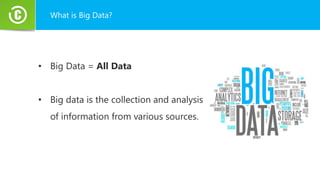
What is Big Data?
• Big Data = All Data
• Big data is the collection and analysis
of information from various sources.
What is Big Data?
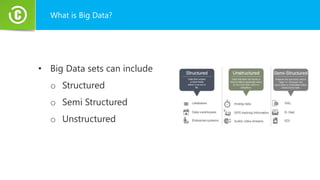
• Big Data sets can include
o Structured
o Semi Structured
o Unstructured
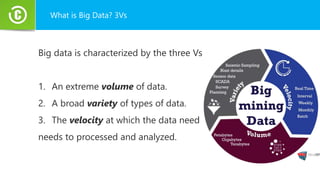
What is Big Data? 3Vs
Big data is characterized by the three Vs
1. An extreme volume of data.
2. A broad variety of types of data.
3. The velocity at which the data need
needs to processed and analyzed.
Who Uses Big Data?
Companies considering big data as an integral part of their
strategy because
• It gives businesses the power to pinpoint the cause of their
problems.
• Customers’ buying habits.
Who Uses Big Data?
• They can optimize offerings
• They can reduce cost and time
It helps them to make sound decisions
Azure Data Lake
Presenter: Waqas Idrees
Azure Data Lake Origin
Bing needed to . . .
Understand user behaviors
And do it . . .
At massive scale
With agility and speed
So they built
Cosmos
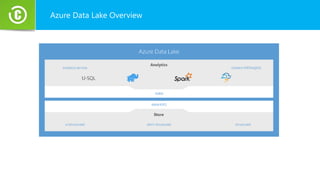
Azure Data Lake Overview
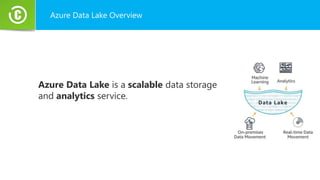
Azure Data Lake is a scalable data storage
and analytics service.
Azure Data Lake Overview
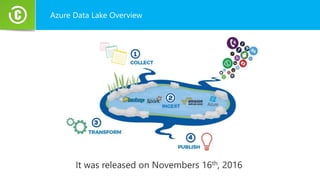
It was released on Novembers 16th, 2016
Azure Data Lake Overview
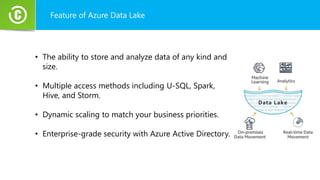
Feature of Azure Data Lake
• The ability to store and analyze data of any kind and
size.
• Multiple access methods including U-SQL, Spark,
Hive, and Storm.
• Dynamic scaling to match your business priorities.
• Enterprise-grade security with Azure Active Directory.
Azure Data Lake Store
Presenter: Waqas Idrees
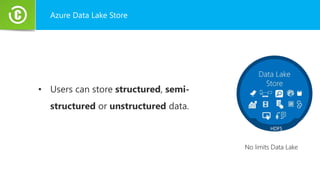
Azure Data Lake Store
• Users can store structured, semi-
structured or unstructured data.
Azure Data Lake Store
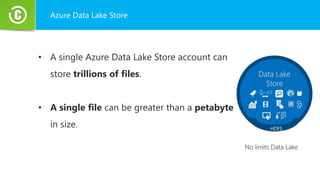
• A single Azure Data Lake Store account can
store trillions of files.
• A single file can be greater than a petabyte
in size.
Populating the Data Lake
Azure Data Factory
Presenter: Waqas Idrees
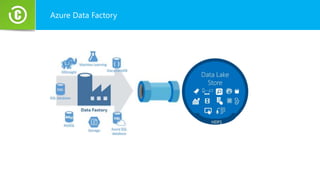
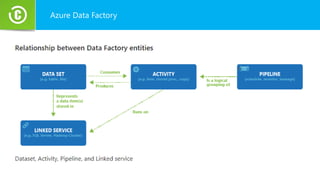
Azure Data Factory
Azure Data Factory
Azure Data Lake Analytics
Presenter: Waqas Idrees
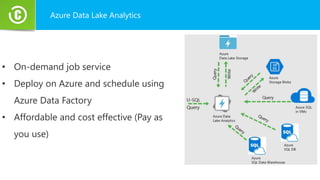
Azure Data Lake Analytics
• On-demand job service
• Deploy on Azure and schedule using
Azure Data Factory
• Affordable and cost effective (Pay as
you use)
U-SQL
• Familiar syntax to millions of SQL and .Net
Developers
• Unifies declarative nature of SQL with the
imperative power of C#
• Unifies structured, semi structured and
unstructured data.
• Distributed Query Support over all data.
U-SQL
A new language for Big Data
U-SQL Language Overview
U-SQL Fundamentals
• All the familiar SQL Clauses
SELECT | FROM | WHERE | GROUP BY | OVER
• Operate on Structure and Unstructured Data
.NET Integration and Extensibility
• U-SQL Expressions are full C# expressions
• Reuse .NET code in other assemblies
• Use C# to define your own
Types | Functions | Aggregations | IO
ADLA Executions
U-SQL Cloud Execution
• The data read or written by the script will also be in Azure -
typically in an Azure Data Lake Store account
• You pay for any compute and storage used by the script.
ADLA Executions
U-SQL Local Execution
• The data read and written by this script will be on you own
machine.
• There is no additional cost
System Requirements
• x64 CPU
• Minimum of 16 GB RAM
• Windows 10 is recommended
• Visual Studio 2015 or +
• Azure Data Lake Tools for Visual Studio
First U-SQL Script
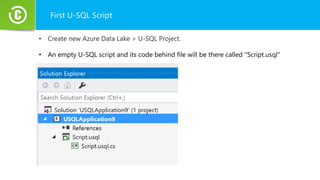
• Create new Azure Data Lake > U-SQL Project.
• An empty U-SQL script and its code behind file will be there called "Script.usql"
First U-SQL Script
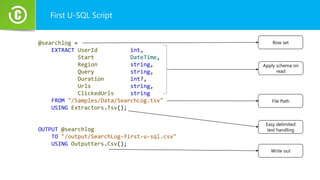
@searchlog =
EXTRACT UserId int,
Start DateTime,
Region string,
Query string,
Duration int?,
Urls string,
ClickedUrls string
FROM "/Samples/Data/SearchLog.tsv"
USING Extractors.Tsv();
OUTPUT @searchlog
TO "/output/SearchLog-first-u-sql.csv"
USING Outputters.Csv();
Row set
Apply schema on
read
File Path
Write out
Easy delimited
text handling
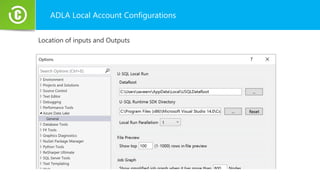
ADLA Local Account Configurations
Location of inputs and Outputs
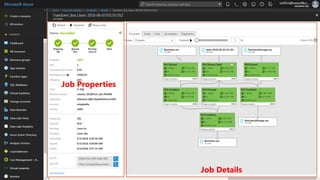
Job Details
Job Properties
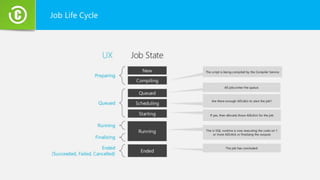
Job Life Cycle
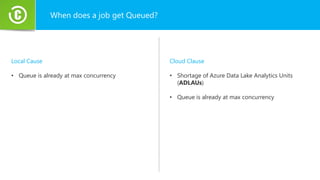
When does a job get Queued?
Local Cause
• Queue is already at max concurrency
Cloud Clause
• Shortage of Azure Data Lake Analytics Units
(ADLAUs)
• Queue is already at max concurrency
Azure Data Lake
Account Configurations
Presenter: Waqas Idrees
ADLA Cloud Account Configurations
• Maximum number of ADLA accounts per subscription per region: 5
• Maximum number of concurrent U-SQL jobs per account: 20
• Maximum number of Analytics Units (AUs) per account: 32
• Maximum number of Analytics Units (AUs) per job: 32
What is an Azure Data Lake Analytics Unit?
An Azure Data Lake Analytics Unit (AU) is a unit of compute resources with
Azure Data Lake.
AU is the equivalent of 2 CPU cores and 6 GB of RAM
How AUs are used during U-SQL Query Execution?
When we submit a U-SQL job, e specify three things
1. U-SQL Script
2. Input and Output Files
3. Reserved AUs
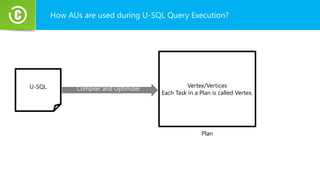
How AUs are used during U-SQL Query Execution?
U-SQL Compiler and Optimizer Vertex/Vertices
Each Task in a Plan is called Vertex.
Plan
How AUs are used during U-SQL Query Execution?
• We need an AU to run a Vertex.
• When the vertex is finished the AU will be assigned to another
vertex.
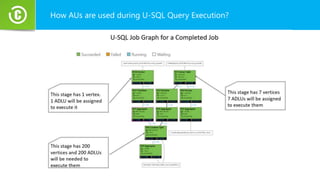
How AUs are used during U-SQL Query Execution?
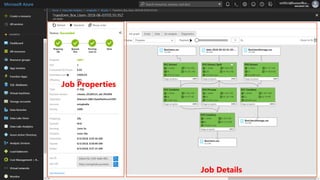
Job Details
Job Properties
What is an AU Second?
An AU Second is the unit used to measure the compute
resources used for a job.
What is an AU Second?
• 1 AU for a job that executes for 1 second = 1 AU Second.
• 1 AU for a job that executes for 1 minute (60 seconds) = 60 AU Seconds.
• 2 AUs for a job that executes for 100 seconds = 200 AU Seconds.
• 10s AUs for a job that executes for 5 minutes (300 seconds) = 3000 AU
Seconds.
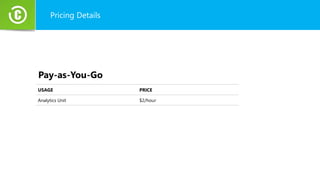
Pricing Details
USAGE PRICE
Analytics Unit $2/hour
Pay-as-You-Go
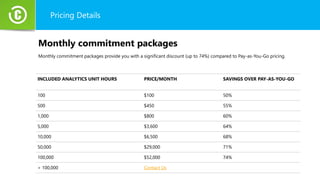
Pricing Details
INCLUDED ANALYTICS UNIT HOURS PRICE/MONTH SAVINGS OVER PAY-AS-YOU-GO
100 $100 50%
500 $450 55%
1,000 $800 60%
5,000 $3,600 64%
10,000 $6,500 68%
50,000 $29,000 71%
100,000 $52,000 74%
> 100,000 Contact Us
Monthly commitment packages
Monthly commitment packages provide you with a significant discount (up to 74%) compared to Pay-as-You-Go pricing.
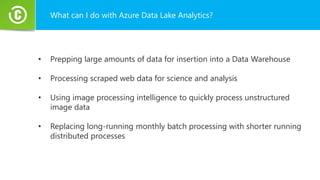
What can I do with Azure Data Lake Analytics?
• Prepping large amounts of data for insertion into a Data Warehouse
• Processing scraped web data for science and analysis
• Using image processing intelligence to quickly process unstructured
image data
• Replacing long-running monthly batch processing with shorter running
distributed processes
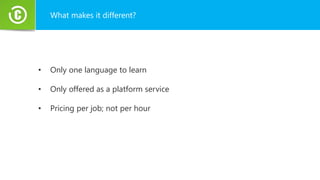
What makes it different?
• Only one language to learn
• Only offered as a platform service
• Pricing per job; not per hour
ADLA on Azure Portal
Presenter: Waqas Idrees
Refrences
Big Data
https://www.infoworld.com/article/3220044/big-data/what-is-big-data-everything-you-need-to-know.html
https://dzone.com/articles/a-beginners-guide-to-big-data
Data Lake
https://dzone.com/articles/introduction-to-azure-data-lake
Data Lake Analytics
https://blogs.msdn.microsoft.com/azuredatalake/2016/10/12/understanding-adl-analytics-unit/
https://docs.microsoft.com/en-us/azure/data-lake-analytics/data-lake-analytics-quota-limits
https://social.msdn.microsoft.com/Forums/azure/en-US/ec10b28d-b824-4aa8-b2dc-5b7d9de3056f/azure-batch-vs-hdinsightdata-
vs-lake-analytics?forum=azurebatch
https://www.blue-granite.com/blog/azure-data-lake-analytics-holds-a-unique-spot-in-the-modern-data-architecture
Question and Answer
Presenter: Waqas Idrees

Azure Data Lake and Azure Data Lake Analytics

  • 1.
  • 2.
    Introduction to Azure DataLake Analytics Presenter: Waqas Idrees Principal Software Engineer https://www.linkedin.com/in/mdwaqas/
  • 3.
    Agenda 1. What isBig Data? 2. Azure Data Lake History / Origin 3. Azure Data Lake Overview o Azure Data Lake Store o Azure Data Lake Analytics 4. Azure Data Factory 5. Azure Data Lake Analytics (U-SQL) 6. Q & A
  • 4.
    There’s data, andthen there’s Big data. So, what’s the difference? Presenter: Waqas Idrees
  • 5.
    What is BigData? • Big Data = All Data • Big data is the collection and analysis of information from various sources.
  • 6.
    What is BigData? • Big Data sets can include o Structured o Semi Structured o Unstructured
  • 7.
    What is BigData? 3Vs Big data is characterized by the three Vs 1. An extreme volume of data. 2. A broad variety of types of data. 3. The velocity at which the data need needs to processed and analyzed.
  • 8.
    Who Uses BigData? Companies considering big data as an integral part of their strategy because • It gives businesses the power to pinpoint the cause of their problems. • Customers’ buying habits.
  • 9.
    Who Uses BigData? • They can optimize offerings • They can reduce cost and time It helps them to make sound decisions
  • 10.
  • 11.
    Azure Data LakeOrigin Bing needed to . . . Understand user behaviors And do it . . . At massive scale With agility and speed So they built Cosmos
  • 12.
    Azure Data LakeOverview Azure Data Lake is a scalable data storage and analytics service.
  • 13.
    Azure Data LakeOverview It was released on Novembers 16th, 2016
  • 14.
  • 15.
    Feature of AzureData Lake • The ability to store and analyze data of any kind and size. • Multiple access methods including U-SQL, Spark, Hive, and Storm. • Dynamic scaling to match your business priorities. • Enterprise-grade security with Azure Active Directory.
  • 16.
    Azure Data LakeStore Presenter: Waqas Idrees
  • 17.
    Azure Data LakeStore • Users can store structured, semi- structured or unstructured data.
  • 18.
    Azure Data LakeStore • A single Azure Data Lake Store account can store trillions of files. • A single file can be greater than a petabyte in size.
  • 19.
    Populating the DataLake Azure Data Factory Presenter: Waqas Idrees
  • 20.
  • 21.
  • 23.
    Azure Data LakeAnalytics Presenter: Waqas Idrees
  • 24.
    Azure Data LakeAnalytics • On-demand job service • Deploy on Azure and schedule using Azure Data Factory • Affordable and cost effective (Pay as you use)
  • 25.
    U-SQL • Familiar syntaxto millions of SQL and .Net Developers • Unifies declarative nature of SQL with the imperative power of C# • Unifies structured, semi structured and unstructured data. • Distributed Query Support over all data. U-SQL A new language for Big Data
  • 26.
    U-SQL Language Overview U-SQLFundamentals • All the familiar SQL Clauses SELECT | FROM | WHERE | GROUP BY | OVER • Operate on Structure and Unstructured Data .NET Integration and Extensibility • U-SQL Expressions are full C# expressions • Reuse .NET code in other assemblies • Use C# to define your own Types | Functions | Aggregations | IO
  • 27.
    ADLA Executions U-SQL CloudExecution • The data read or written by the script will also be in Azure - typically in an Azure Data Lake Store account • You pay for any compute and storage used by the script.
  • 28.
    ADLA Executions U-SQL LocalExecution • The data read and written by this script will be on you own machine. • There is no additional cost
  • 29.
    System Requirements • x64CPU • Minimum of 16 GB RAM • Windows 10 is recommended • Visual Studio 2015 or + • Azure Data Lake Tools for Visual Studio
  • 30.
    First U-SQL Script •Create new Azure Data Lake > U-SQL Project. • An empty U-SQL script and its code behind file will be there called "Script.usql"
  • 31.
    First U-SQL Script @searchlog= EXTRACT UserId int, Start DateTime, Region string, Query string, Duration int?, Urls string, ClickedUrls string FROM "/Samples/Data/SearchLog.tsv" USING Extractors.Tsv(); OUTPUT @searchlog TO "/output/SearchLog-first-u-sql.csv" USING Outputters.Csv(); Row set Apply schema on read File Path Write out Easy delimited text handling
  • 32.
    ADLA Local AccountConfigurations Location of inputs and Outputs
  • 34.
  • 35.
  • 36.
    When does ajob get Queued? Local Cause • Queue is already at max concurrency Cloud Clause • Shortage of Azure Data Lake Analytics Units (ADLAUs) • Queue is already at max concurrency
  • 37.
    Azure Data Lake AccountConfigurations Presenter: Waqas Idrees
  • 38.
    ADLA Cloud AccountConfigurations • Maximum number of ADLA accounts per subscription per region: 5 • Maximum number of concurrent U-SQL jobs per account: 20 • Maximum number of Analytics Units (AUs) per account: 32 • Maximum number of Analytics Units (AUs) per job: 32
  • 39.
    What is anAzure Data Lake Analytics Unit? An Azure Data Lake Analytics Unit (AU) is a unit of compute resources with Azure Data Lake. AU is the equivalent of 2 CPU cores and 6 GB of RAM
  • 40.
    How AUs areused during U-SQL Query Execution? When we submit a U-SQL job, e specify three things 1. U-SQL Script 2. Input and Output Files 3. Reserved AUs
  • 41.
    How AUs areused during U-SQL Query Execution? U-SQL Compiler and Optimizer Vertex/Vertices Each Task in a Plan is called Vertex. Plan
  • 42.
    How AUs areused during U-SQL Query Execution? • We need an AU to run a Vertex. • When the vertex is finished the AU will be assigned to another vertex.
  • 43.
    How AUs areused during U-SQL Query Execution?
  • 44.
  • 45.
    What is anAU Second? An AU Second is the unit used to measure the compute resources used for a job.
  • 46.
    What is anAU Second? • 1 AU for a job that executes for 1 second = 1 AU Second. • 1 AU for a job that executes for 1 minute (60 seconds) = 60 AU Seconds. • 2 AUs for a job that executes for 100 seconds = 200 AU Seconds. • 10s AUs for a job that executes for 5 minutes (300 seconds) = 3000 AU Seconds.
  • 47.
    Pricing Details USAGE PRICE AnalyticsUnit $2/hour Pay-as-You-Go
  • 48.
    Pricing Details INCLUDED ANALYTICSUNIT HOURS PRICE/MONTH SAVINGS OVER PAY-AS-YOU-GO 100 $100 50% 500 $450 55% 1,000 $800 60% 5,000 $3,600 64% 10,000 $6,500 68% 50,000 $29,000 71% 100,000 $52,000 74% > 100,000 Contact Us Monthly commitment packages Monthly commitment packages provide you with a significant discount (up to 74%) compared to Pay-as-You-Go pricing.
  • 49.
    What can Ido with Azure Data Lake Analytics? • Prepping large amounts of data for insertion into a Data Warehouse • Processing scraped web data for science and analysis • Using image processing intelligence to quickly process unstructured image data • Replacing long-running monthly batch processing with shorter running distributed processes
  • 50.
    What makes itdifferent? • Only one language to learn • Only offered as a platform service • Pricing per job; not per hour
  • 51.
    ADLA on AzurePortal Presenter: Waqas Idrees
  • 52.
    Refrences Big Data https://www.infoworld.com/article/3220044/big-data/what-is-big-data-everything-you-need-to-know.html https://dzone.com/articles/a-beginners-guide-to-big-data Data Lake https://dzone.com/articles/introduction-to-azure-data-lake DataLake Analytics https://blogs.msdn.microsoft.com/azuredatalake/2016/10/12/understanding-adl-analytics-unit/ https://docs.microsoft.com/en-us/azure/data-lake-analytics/data-lake-analytics-quota-limits https://social.msdn.microsoft.com/Forums/azure/en-US/ec10b28d-b824-4aa8-b2dc-5b7d9de3056f/azure-batch-vs-hdinsightdata- vs-lake-analytics?forum=azurebatch https://www.blue-granite.com/blog/azure-data-lake-analytics-holds-a-unique-spot-in-the-modern-data-architecture
  • 53.

Editor's Notes

  • #4 - Multiple definitions of Big Data are available on internet. - In general Big Data refers to set of data that are so large in volume and so complex that current data processing products are not capable of managing, capturing or processing of that data within a reasonable amount of time.
  • #6 - Big Data is all data which can be mined for insights. - Big Data is collection and analysis of data from various sources such as websites, social media, mobile apps, sensors internet of things or data collected from the scientific experiment.
  • #9 Companies find big data as an integral part of their strategy because it can reduce cost and time, develop new products, optimize offerings, and help you make sound decisions.
  • #10 It gives businesses the power to pinpoint the cause of their problems and other behaviors such as customers’ buying habits and risk portfolios. I'll represent more advance topics on this.
  • #13 1- Azure Data Lake was built on the learning and technologies of cosmos. 2- Cosmos is Microsoft's internal BigData analysis platform. 2.1 There's not a lot of public information available about cosmons. 3- Cosmos is used within Microsoft extensively, across a huge number of servers.
  • #14 4- It is used to store and process data for applications such as Azure, AdCenter, Bing, MSN, Skype and Windows Live. 5- They are collecting information on our every click, visual search for improving their services, adds expreiences after performing analysis on that data.
  • #15 Yarn allows different data processing engines like graph processing, interactive processing, stream processing as well as batch processing to run and process data stored in HDFS
  • #51 Hadoop comes in many different flavors, some running on-premises, others running in the cloud. Some are managed BY you, others are managed FOR you Most Big Data cloud offerings that are available are priced per hour based on how long you keep your cluster up and running. ADLA takes a different approach to pricing.