Identity Security
Azure AD
Identity Protection
Hello!
I am Eng Teong Cheah
Microsoft MVP
2
Azure AD
Identity Protection
3
Identity Protection
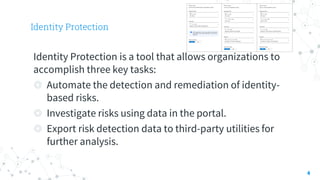
Identity Protection is a tool that allows organizations to
accomplish three key tasks:
◎ Automate the detection and remediation of identity-
based risks.
◎ Investigate risks using data in the portal.
◎ Export risk detection data to third-party utilities for
further analysis.
4
Risk detection and remediation
5
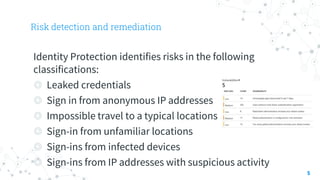
Identity Protection identifies risks in the following
classifications:
◎ Leaked credentials
◎ Sign in from anonymous IP addresses
◎ Impossible travel to a typical locations
◎ Sign-in from unfamiliar locations
◎ Sign-ins from infected devices
◎ Sign-ins from IP addresses with suspicious activity
User Risk Policy
6
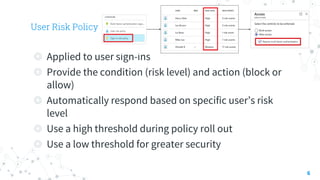
◎ Applied to user sign-ins
◎ Provide the condition (risk level) and action (block or
allow)
◎ Automatically respond based on specific user’s risk
level
◎ Use a high threshold during policy roll out
◎ Use a low threshold for greater security
Sign-in Risk Policy
7
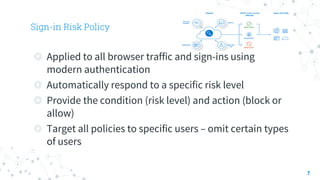
◎ Applied to all browser traffic and sign-ins using
modern authentication
◎ Automatically respond to a specific risk level
◎ Provide the condition (risk level) and action (block or
allow)
◎ Target all policies to specific users – omit certain types
of users
Conditions
8
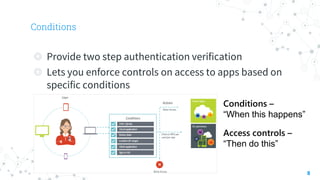
◎ Provide two step authentication verification
◎ Lets you enforce controls on access to apps based on
specific conditions
Conditions –
“When this happens”
Access controls –
“Then do this”
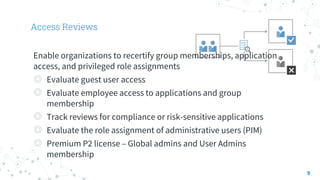
Access Reviews
9
Enable organizations to recertify group memberships, application
access, and privileged role assignments
◎ Evaluate guest user access
◎ Evaluate employee access to applications and group
membership
◎ Track reviews for compliance or risk-sensitive applications
◎ Evaluate the role assignment of administrative users (PIM)
◎ Premium P2 license – Global admins and User Admins
membership
Demostrations
Azure Policy
10
Thanks!
Any questions?
You can find me at:
@walkercet
11
References
◎ https://docs.microsoft.com/en-us/
12

Identity Security - Azure Identity Protection

  • 1.
  • 2.
    Hello! I am EngTeong Cheah Microsoft MVP 2
  • 3.
  • 4.
    Identity Protection Identity Protectionis a tool that allows organizations to accomplish three key tasks: ◎ Automate the detection and remediation of identity- based risks. ◎ Investigate risks using data in the portal. ◎ Export risk detection data to third-party utilities for further analysis. 4
  • 5.
    Risk detection andremediation 5 Identity Protection identifies risks in the following classifications: ◎ Leaked credentials ◎ Sign in from anonymous IP addresses ◎ Impossible travel to a typical locations ◎ Sign-in from unfamiliar locations ◎ Sign-ins from infected devices ◎ Sign-ins from IP addresses with suspicious activity
  • 6.
    User Risk Policy 6 ◎Applied to user sign-ins ◎ Provide the condition (risk level) and action (block or allow) ◎ Automatically respond based on specific user’s risk level ◎ Use a high threshold during policy roll out ◎ Use a low threshold for greater security
  • 7.
    Sign-in Risk Policy 7 ◎Applied to all browser traffic and sign-ins using modern authentication ◎ Automatically respond to a specific risk level ◎ Provide the condition (risk level) and action (block or allow) ◎ Target all policies to specific users – omit certain types of users
  • 8.
    Conditions 8 ◎ Provide twostep authentication verification ◎ Lets you enforce controls on access to apps based on specific conditions Conditions – “When this happens” Access controls – “Then do this”
  • 9.
    Access Reviews 9 Enable organizationsto recertify group memberships, application access, and privileged role assignments ◎ Evaluate guest user access ◎ Evaluate employee access to applications and group membership ◎ Track reviews for compliance or risk-sensitive applications ◎ Evaluate the role assignment of administrative users (PIM) ◎ Premium P2 license – Global admins and User Admins membership
  • 10.
  • 11.
    Thanks! Any questions? You canfind me at: @walkercet 11
  • 12.