US0096.90877B1
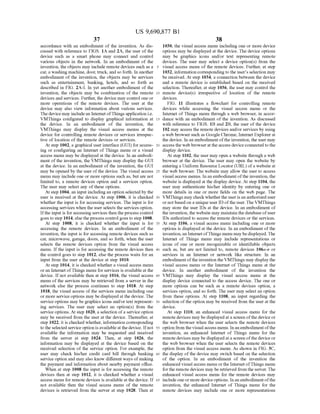
(12) United States Patent (10) Patent No.: US 9,690,877 B1
Lavian et al. (45) Date of Patent: Jun. 27, 2017
(54) SYSTEMS AND METHODS FOR 6,711,249 B2 * 3/2004 Weissman et al. ...... 379,221.06
ELECTRONIC COMMUNICATIONS 7,009,594 B2 * 3/2006 Wang et al. .................. 345,156
7,127,305 B1 * 10/2006 Palmon ...... TOO,83
7,318,112 B2 * 1/2008 Park ...................... ... 710,36
(75) Inventors: Tal Lavian, Sunnyvale, CA (US); Zvi 7,636,922 B2* 12/2009 Odins-Lucas et al. ....... 719/328
Or-Bach, San Jose, CA (US) 7,703,073 B2 * 4/2010 Illowsky et al....... 717, 121
8,250,614 B1* 8/2012 Ellis et al. ... 725/87
(73) Assignees: Tal Lavian, Sunnyvale, CA (US); Zvi 2002/0077114 A1* 6,2002 Isham ........ 455.454
Or-Bach, San Jose, CA (US) 2002fOO87498 A1* 7,2002 Yoshida ......... TO6/45
s s 2003. O132963 A1* 7, 2003 Barker et al. .. 345,762
2003/01495.57 A1* 8,2003 Cox et al. ......................... TO4/2
(*) Notice: Subjectto any disclaimer, the term ofthis 2003,0227568 A1* 12/2003 Stahl et al. .... 348,552
patent is extended or adjusted under 35 2004/0263.475 A1* 12,2004 Wecker et al. 345,157
U.S.C. 154(b) by 19 days. 2005, OO33707 A1* 2,2005 Ehlers et al. ..... 705/412
2006/0190112 A1* 8/2006 Buesgen et al. .. 7OO/97
2007/0077665 A1* 4/2007 Bump et al. ... ... 438/14
(21) Appl. No.: 13/310,696 2007/0276691 A1* 11/2007 Grant ................................ 705/1
2008/0209348 A1* 8,2008 Grechanik et al. ... 715,762
(22) Filed: Dec. 2, 2011 2008/0319952 A1* 12/2008 Carpenter et al. ................ 707/3
Related U.S. Application Data 588S.5A, 38 Si-O 767 R.
(63) Continuation-in-part of application No. 13/245,804, (Continued)
filed on Sep. 26, 2011, now abandoned, and a
continuation-in-part of application No. 13/272.212, Primary Examiner — Tyler Torgrimson
filed on Oct. 12, 2011, now abandoned, and a
continuation-in-part of application No. 13/273,187, (57) ABSTRACT
filed on Oct. 13, 2011, now abandoned. Embodiments ofthe invention provide a system forenhanc
ing user interaction with the Internet ofThings. The system
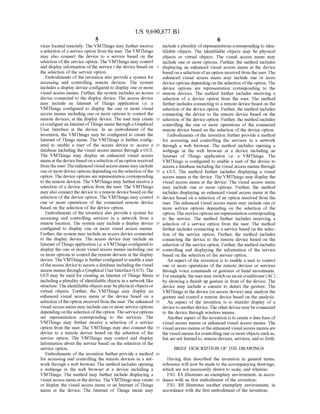
(51) Int. Cl. includes a processor, and a memory coupled to the proces
G06F 7/30 (2006.01) sor. The memory includes a database having one or more
(52) U.S. Cl. options corresponding to each ofthe Internet ofThings. The
CPC. G06F 17/30997 (2013.01); G06F 17/30943 memory further includes instructions executable by the
(2013.01) processor to share at least one of the one or more options
(58) Field of Classification Search with oneormoreusers ofthethings. Further, the instructions
None receive information correspondingto selection oftheat least
See application file for complete search history. one option by the one or more users. Additionally, the
instructions updatethe databasebasedon theselectionofthe
(56) References Cited at least one option by the one or more users. Further, a
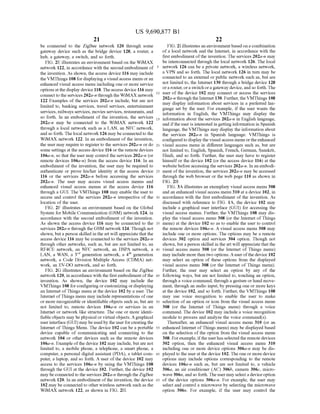
U.S. PATENT DOCUMENTS device for enhancing interaction with the things is also
disclosed.
5,307.456 A * 4/1994 MacKay ....................... 71.5/782
5,410,326 A * 4, 1995 Goldstein ..................... 348,734 12 Claims, 50 Drawing Sheets
C Stat -
832 - Acca 80C88s 83
80. Displaya visua: access menu atthe device
806 yi Displayan enhanced visual access menu
based oia selection ofan option by a user
8.8 Y Receive a selection ofa device apia from a
Sei
--
Cinec:f 3 site efisessed or
sesction ofthe cevicse aption
3) -.
p-N-
82 - Control one of more operations ofthe remote
deviceased or selection of the device
oo:
US 9,690,877 B1
Page 2
(56) References Cited
U.S. PATENT DOCUMENTS
2009/0300120 A1* 12/2009 Schmidt ........................ TO9,206
2010/0274563 A1* 10,2010 Malo et al. 704/270.1
2011/007 1895 A1 3f2011 Masri ...................... 7.0571427
2011/0083.167 A1* 4/2011 Carpenter et al. ................ T26/4
2011/O136516 A1* 6,2011 Ellis ....................... 455,458
2011/0167452 A1* 7/2011 Baumgartner et al. ......... T25/44
2011/0238508 A1* 9/2011 Koningstein .......... 705/14.73
2011/025 1992 A1* 10/2011 Bethlehem et al. 707?.610
2011/0271332 A1* 11/2011 Jones et al. ........ 726/7
2012/0084643 A1* 4/2012 Govindan et al. 71.5/255
2012/0110490 A1* 5, 2012 Keller et al. . 71.5/771
2012/0233002 A1* 9/2012 Abujbara ........................ 70.5/15
* cited by examiner
US 9,690,877 B1U.S. Patent
US 9,690,877 B1Sheet 2 of 50Jun. 27, 2017U.S. Patent
//$70$
[g]]jäsn()
US 9,690,877 B1
|cae
{290},
U.S. Patent
US 9,690,877 B1U.S. Patent
US 9,690,877 B1
{}{}{};
U.S. Patent
US 9,690,877 B1
{}{}{};
U.S. Patent
US 9,690,877 B1U.S. Patent
US 9,690,877 B1
|?||
U.S. Patent
US 9,690,877 B1Sheet 9 Of 50Jun. 27, 2017U.S. Patent
US 9,690,877 B1U.S. Patent
US 9,690,877 B1Sheet 12 of 50Jun. 27, 2017U.S. Patent
3202
|~||
£20€
U.S. Patent
Lae|
eZQZ
U.S. Patent
US 9,690,877 B1
93%A495
Sheet 16 of 50Jun. 27, 2017U.S. Patent
US 9,690,877 B1U.S. Patent
US 9,690,877 B1Sheet 19 Of 50Jun. 27, 2017U.S. Patent
US 9,690,877 B1
90%A90
U.S. Patent
US 9,690,877 B1U.S. Patent
US 9,690,877 B1Sheet 22 of 50Jun. 27, 2017
30??.
U.S. Patent
US 9,690,877 B1U.S. Patent
US 9,690,877 B1Sheet 25 Of 50Jun. 27, 2017U.S. Patent
|}}}}}}}}}}}}}}}
US 9,690,877 B1Sheet 26 of 50Jun. 27, 2017U.S. Patent
Mae'rÁgotua88%)}}
göSS320,3
U.S. Patent Jun. 27, 2017 Sheet 27 Of 50 US 9,690,877 B1
8O2  ACCeSS a database of visual acCeSS eruS
through a G at a device
3O4. l Displaya visual access menu at the device
808 Display an enhanced visual access men.
based on a selection ofan option by a user
808 Receive a selection ofa device option from a
S3
8O Cornect to a remote device based or
selection of the device option
82 Control one or more operations of the remote
device based Or selection of the device
option
Stop
FG. 8
U.S. Patent Jun. 27, 2017 Sheet 28 Of 50 US 9,690,877 B1
9.  ACCeSS a database of visual acCeSS menuS
through a G at a device
904. N Displaya visual access menu atthe device
908 Display an enhanced visual access menu
based of a selection ofan option by a user
S{8 Receive a selection of a service option from
a S8
9. Correct to a Service based or a Seiection of
the service option
9. Control and display information about the
Sewice based Of Selection. Of the Service
option
Stop
F.G. 9
U.S. Patent Jun. 27, 2017 Sheet 29 Of 50 US 9,690,877 B1
O2 Display a G for accessing visual access
refus at the device
O4.
Receive an input from a user of the device
OO 1 OO6
is input is for
accessing
Services
Wait for a
input at the
(device
Yes (a)
is input is for
accessing
erote
devices?
Yes
is a visual
CC83S e.
for refote
devices
awaiiabie?
Yes (B)
FG. A
U.S. Patent Jun. 27, 2017 Sheet 30 Of 50 US 9,690,877 B1
(a)
O 6
104.
Retrieve
visual acceSS
her fron a
is a visual
CC3SS 8
fo Services
availabie?
18 Yes
Display the visual access menu including
service options at the device
1020 N.
Receive a selection of a service option from
the use
(22
O24.
is informatic Receive
for the infotation
Selected for the
service option SW8.
awaiiabie?
O28 Yes
Display the information based on the received
Selection
FG. O.3
U.S. Patent Jun. 27, 2017 Sheet 31 Of 50 US 9,690,877 B1
(c)
1 O28
Retrieve the visual access reu for the
renote devices for the Server
1 O3.O
Display the visual access reru including
device options at the device
O32
Receive a selection ofa device option from
the user
O34. Correct to a ferote device based On the
received selection
O38 Contro the remote device based of the ore
or more use inputs
F.G. OC
U.S. Patent Jun. 27, 2017 Sheet 32 Of 50 US 9,690,877 B1
11 O2 Open a website through a web browser at the
device
114 Authenticate a user's identity at the website
116 x
Display a visual access reru at the device
8 Receive an input from the user of the device
O Display an enhanced visual access menu
when the input is for accessing remote
devices
12 Receive a selection ofa device option from
the user
4. COrfect to a remote device based or a
selection of the device option
18 Contro one or more operations of the remote
device based or the Selection of the device
option
Stop
FG 11
U.S. Patent Jun. 27, 2017 Sheet 33 Of 50 US 9,690,877 B1
2O2 Open a website through a web browser at the
device
2O4. Authenticate user's identity at the website
208
Display a visual access menu at the device
2C8
Receive an input from the user ofthe device
12 O  Display an enhanced visual access menu
when the input is for accessing services
22 Receive a selection ofa service option from
the use
24 Correct to a Service based of a selection of
the service option
28 Control and display information about the
Service based of Selection of the Service
option
Stop
FG,12
U.S. Patent Jun. 27, 2017 Sheet 34 of 50 US 9,690,877 B1
1302 N. Open a website through a web browserat the
device
v
1304 - Authenticate user's identity at the website
Display a visual access menu at the device
Receive an input from the user of the device
3.14.
Wait for an
input at the
evice
is input is for
accessing
Services?
is input is for
accessing
efoe
devices?
F.G. 3A
U.S. Patent Jun. 27, 2017 Sheet 35 of 50 US 9,690,877 B1
36
is a visual
CCSS
for Services
availabie?
Reirieve visa
3CCSS 8
for a serve
Display the visual access meru including
service options at the device
32.
Receive a selection of a service option from
the laser
32
1326 N.
is irforation
for the
Selected
service option
awaiiate
No. Receive
inforation
for the
Sey
323 Yes
Display the information at the device based
C. the received Selection
G38
U.S. Patent Jun. 27, 2017 Sheet 36 of 50 US 9,690,877 B1
is a visual
CCESS et
for erote
devices
awaiiae at the
device
332
Retrieve the visual
aCCeSS refu f(f
the sever
Yes
Display the visual access menu including
device options at the device
Receive a selection ofa device option from
the usef
Correct to a fernote device based on the
received Selection
Cotro the fernote device based on the one
or more usef inputs
1334.
1338
338
34.
G. 3C
U.S. Patent Jun. 27, 2017 Sheet 37 Of 50 US 9,690,877 B1
40 Open a website through a web browser at the
device
44
Display a visual access enu at the device
46 N Receive an input from the user of the device
Display an enhanced visual access reru148
N when the input is for accessing remote
devices
1410 N. Receive aselection ofadeviceoption fromthe use
a 2 Correct to a refrote device based or a
selection of the device option
1414 Contro one or more operations of the remote
device based on the Selection of the device
option
Stop
FG.4
U.S. Patent Jun. 27, 2017 Sheet 38 of 50 US 9,690,877 B1
1502- ACCeSS a database of visual acCeSS menuS
through a GU at at access device
1504. N Display a visual access renu at a display
device
1508 Display, at the display device, an enhanced
visual access her ased or a Selection of
an option by a user
1508 Receive a selection ofa device option from a
Se:
151 O COrrect to a renote device based Or
selection ofthe device option
52 Control one of more operations of the erote
(device based Of Selection. Of the device
option
Stop
FG. 5
U.S. Patent Jun. 27, 2017 Sheet 39 Of 50 US 9,690,877 B1
1602- ACCeSS a database of visual access neuS
through a G at an access device
1604- Display a visual access menu at a display
device
88 Display, at the display device, an enhanced
visual acCeSS ?eri based of a Selection of
an option by a user
1608 Receive a selection ofa service option for
3 SE
8 O Correct to a service based Of a Selection. Of
the service option
82 Display information, at the display device,
about the Service based of the Selection of
the service option
Stop
F.G. 6
U.S. Patent Jun. 27, 2017 Sheet 40 of 50 US 9,690,877 B1
1702 Display a GUI for accessing visual access
menus at a display device Connected to an
acCeSS device
1704.
Receive an input from a user of the device
17 O.
is input is for
accessing
Services
Wait for a
input from the
See
Yes (a)
is input is for
aCCessing
fede
devices
Yes
72
is a visual
CC83S
for recte
devices
availabie?
NO
Yes (B)
F.G. 7A
U.S. Patent Jun. 27, 2017 Sheet 41 of 50 US 9,690,877 B1
17.
Retrieve
visual access
ner for a
r A.
is a visual
for Services
available?
1718
Display the visual access menu including
service options at the device
1720
Receive a selection of a service option from
the user
72
724
Receiveis foratio
for the inflation
Selected for the
service option Seyfe
availabie?
1726 Yes
Display the information based on the received
Selection
(D) Stop
FG, 7B
U.S. Patent Jun. 27, 2017 Sheet 42 of 50 US 9,690,877 B1
7 8
Retrieve the visual acceSS red for the
?erote devices from the server
730
Display the visual access menu including
device options at the display device
732 Receive a selection of a device option from
the user
1734. Connect to a renote device based or the
received Selection
1736 Control the reroie device based of the One
or more user inputs
F.G. 17C
U.S. Patent Jun. 27, 2017 Sheet 43 of 50 US 9,690,877 B1
N
C
c
wer
S
US 9,690,877 B1Sheet 44 of 50Jun. 27, 2017U.S. Patent
US 9,690,877 B1U.S. Patent
802(5)}+
US 9,690,877 B1U.S. Patent
U.S. Patent Jun. 27, 2017 Sheet 48 of 50 US 9,690,877 B1
Start
O2 Access a G for configuring a cockpit by a
first use at a fifS device
214  Configure the cockpit based or preferences
of the first user
28 Share the cockpit with one or more second
Se’s Of the Second devices
28 Translate the cockpit based on preference of
the Ole Or Oie Secord Sei's
2O Display the translated cockpit at the one or
noe Second devices
Stop
G. 2
U.S. Patent Jun. 27, 2017 Sheet 49 of 50 US 9,690,877 B1
Start
82O2 ACCess a GUI for Configuring a Cockpit at a
first device by a first user
224  Configure the cockpit based or preferences
of the first ser
2O6 Share the cockpit with one or more second
SeS
28 Translate the cockpit based on preference of
the Ore Of Ore Second users
2O Display the translated cockpit at one or more
SeCord devices of the One of Ore Second
S8S
2.
interact with the cockpit at the second device
F.G. 22A
U.S. Patent Jun. 27, 2017 Sheet 50 of 50 US 9,690,877 B1
24 Store interactions of the Second users with
the cockpit at a proxy server in a network
Ask for a permission from the first user in
l case ofa change in the Cockpitby the one or
noe Second use
2.218
2.218 Update the cockpit based of the permission
for the first set
G. 223
US 9,690,877 B1
1.
SYSTEMIS AND METHODS FOR
ELECTRONIC COMMUNICATIONS
CROSS REFERENCE TO RELATED
APPLICATIONS
This application is a Continuation-In-Part (CIP) of U.S.
Non-Provisional application Ser. No. 13/245,804 entitled
Systems and Methods for Electronic Communications filed
on Sep. 26, 2011 now abandoned, Ser. No. 13/272.212
entitled Systems and Methods for Electronic Communica
tions filed on Oct. 12, 2011 now abandoned, and Ser. No.
13/273,187 entitled ‘Systems and Methods for Electronic
Communications filed on Oct. 13, 2011 now abandoned.
FIELD OF THE INVENTION
The present invention is related to electronic communi
cations in a network and more specifically to systems and
method for accessing and controlling one or more objects
(physical or virtual) such as remote devices and services
from a remote location by a user.
BACKGROUND OF THE INVENTION
Electronic devices are frequently used in day to day life.
The electronic devices may include television, refrigerator,
air conditioners, fans, tube lights, cameras or other elec
tronic equipments such as transmitters, antennas etc. All the
electronic devices consume power regularly or at frequent
intervals of time. For efficient power consumption, the
electronic devices must be controlled or switched ON/OFF.
Appliances such as fans, tube lights or microwave may be
controlled by regulating the electrical parameters associated
with the appliances. For example, a user may control speed
of fan, regulate operating power of the microwave as per
requirement. However, it requires physical presence of the
user to regulate or switch ON/OFF the appliances. A tech
nique for controlling the appliances by a remote control
device is well known. The remote control device may
transmit signals for controllingthe appliances. Forexample,
the remote control device may simultaneously control air
conditioners, fans or cameras as per the requirement. How
ever, the technique is limited by location of the user.
Moreover, the technique is incapable of updating the real
time status of the appliances to the user.
Another available technique discloses a Smart device for
controlling the appliances. The Smart device is configured
with internet and connected with the appliances. A user
connected with the Smart device via the internet may control
the appliances from a remote location. Moreover, the user
may control the appliances by connecting with processing
device via communication channel. The processing device
may be located nearby to the smart device and may further
receive signals from the user to control the appliances.
However, the technique requires installation of a Smart
device and/or processing device for controlling the appli
ances from a remote location.
Another available technique discloses real-time position
monitoring of vehicles. The user may monitor real time
coordinates of the vehicles based on the information
received from a transmitter located in the vehicle. The user
receives the position coordinates from the transmitter via a
GPS server 114. However, the user is unable to control or
update the positional coordinates of the vehicle as per
choice.
10
15
25
30
35
40
45
50
55
60
65
2
In light ofthe above discussion, systems and methods are
desired for providing real-time control of the electronic
devices and services from a remote location.
SUMMARY
Embodiments of the invention provide a system for
enhancing interaction ofa user with objects connected to a
network. The system includes a processor, a display screen,
and a memory coupled to the processor. The memory
comprises a database including a list oftwo or more objects
and instructions executable by the processor to display a
menu on the display Screen. The menu is associated with at
least two independent objects. Further, the two independent
objects are produced by at least two independent vendors.
Embodiments of the invention further provide a system
forenhancing interaction ofa user with objects connected to
a network. The system includes a processor, a display Screen
and a memory coupled to the processor. The memory
includes a database comprising a list ofone or more objects
and instructions executable by the processor to display the
objects to the user through the display Screen. The menu
includes icon which may indicate one object made by a
vendor. Further, the icon is substantially different than the
one provided by said vendor.
Herein, the objects may include at least one of one or
more services and one or more remote devices that may be
controlled by the user. Further, a service provider ("vendor)
mayprovideoneor more servicesthatmay beutilizedby the
user by managing the corresponding objects.
Further, embodiments ofthe invention provide a system
for enhancing interaction with the Internet ofThings. The
system includes a processor and a memory coupled to the
processor. The memory includes a database including one or
more options corresponding to each of the Internet of
Things. Further, the memory includes instructions to shareat
least one ofthe one or more options with one or more users
ofthethings. Furthermore,the memory includes instructions
to receive information corresponding to selection of the at
least one option by the one or more users. Additionally, the
memory includes instructions to update the database based
on the selection ofthe at least oneoption by the oneor more
users. The instructions are executable by the processor.
Here, the one or more users may be referred to users of
one or more second devices. In an embodiment, a user ofa
first device (hereinafter may be referred to as first user)
may share the one or more options, corresponding to the
Internet of things, with the users of the second devices
(hereinafter may be referred to as the second users). The
one or more options may be shared by defining rights forthe
second users for enabling them to control the Internet of
Things. Further, the oneor more options may be shared with
the second users to enable them to personalize the one or
more options according to their preferences. According to
the rights defined by the first user, the second users may
perform one or more operations, for controlling the Internet
ofThings, by selecting at least one option from the one or
more options.
Additionally, the one or more options may be shared for
a specific time and on the occurrence ofa specific event that
may be defined by the first user. The second users may
modify the shared one or more options as per their prefer
ences. Further, the first user may be enabled to discard such
modifications.
Furthermore, embodiments of the invention provide a
system for enhancing interaction with the Internet ofThings.
The system includes a processor and a memory coupled to
US 9,690,877 B1
3
the processor. The memory includes a database having a
visual menu corresponding to the things. Further, the
memory includes instructions executableby the processorto
share the visual menu with one or more second users ofthe
things. The one or more second users correspond to one or
more second devices. Furthermore, the memory includes
instructions executable by the processor to translate the
visual menu based on one or more preferences ofthe one or
more second users. Additionally, the memory includes
Instructions executable by the processor to display the
translated visual menu to the second users at the correspond
ing second devices.
Herein, the visual menu is shared with the one or more
second users by definingrights forenablingthe secondusers
to perform one or more operations corresponding to the
things. The one or more operations being performed by
selecting one or more icons present in the visual menu.
Furthermore, embodiments of the invention provide a
device forenhancing interaction with the Internet ofThings.
The device includes a processor and a memory coupled to
the processor. The memory includes a database and instruc
tions executableby theprocessor. The database includes one
or more options corresponding to the things. Further, the
instructions share at least one of the one or more options
with one or more users ofthe things. Furthermore, instruc
tions receiveinformation correspondingto selection oftheat
least one option by the one or more users. Additionally,
instructions updatethe database basedon the selection ofthe
at least one option by the one or more users.
Herein, the one or more users may be referred to users of
one or more second devices. In this embodiment, a user of
a first device (hereinafter may be referred to as “first user)
may share the one or more options, corresponding to the
Internet of things, with the users of the second devices
(hereinafter may be referred to as the second users). The
one or more options may be shared by defining rights forthe
second users for enabling them to control the Internet of
Things. Further, the oneor more options may be shared with
the second users to enable them to personalize the one or
more options according to their preferences. Additionally,
the memory further includes instructions to receive permis
sion request from the one or more users. The request is
received for enabling the one or more users to personalize
the at least one option.
Embodiments of the invention provide a method for
accessing and controlling remote devices in a network. The
method includes accessing a database of visual access
menus through a graphical user interface (GUI) at a device.
Further, the method includes displaying a visual access
menuatthe device. The visual access menu may include one
or more options. The device may include an Internet of
Things application Such as a VMThings for displaying the
visual access menu at the device. The VMThings also
enables a user of the device to control the remote devices.
The VMThings may be configured to create an Internet of
Things menu including representations of recognizable
objects. The objects may be physical objects or virtual
objects. The Internet of Things menu may be a menu of
identifiableobjects (physical or virtual objects) connected in
an Internet like structure. The user may control the remote
devices irrespective of the location of the remote devices
through the visual access menu. The user may select an
option from the visual access menu. The method further
includes displaying an enhanced visual access menu based
on a selection of an option received from the user. The
enhanced visual access menu may include one or more
device options depending on the selection ofthe option. The
5
10
15
25
30
35
40
45
50
55
60
65
4
device options are representation corresponding to the
remote devices. The method further includes receiving a
selection of a device option from the user. The method
further includes connecting to a remote device based on the
selection ofthe device option. Further, the method includes
controlling the one or more operations of the connected
remote device based on the selection of the device option.
Embodiments of the invention provide a method for
accessing and controlling services from a remote location.
The method includes accessing, by a user of a device, a
database of visual access menus through a graphical user
interface (GUI) at the device. Further, the method includes
displaying a visual access menu at the device. The visual
access menu may include one or more options. The device
may include an Internet of Things application i.e. a
VMThings for displaying the visual access menu at the
device. Further, the VMThings may create an Internet of
Things menu including one or more identifiable objects
connected to each other in an Internet like structure. The
VMThings may display visual access menu at the device to
enable the user to control the remote services. The method
further includes displaying an enhanced visual access menu
based on a selection ofan option received from the user. The
enhanced visual access menu may include one or more
service options depending on theselection ofthe option. The
service options are representation corresponding to the Ser
vices. The method further includes receiving a selection of
a service option from the user. The method further includes
connecting to a service based on the selection ofthe service
option. Further, the method includes connecting the device
to the service. Furthermore, the method includes controlling
and displaying information about the service at the device
based on the selection ofthe service option.
Embodiments ofthe invention also provide a device for
accessing and controlling remote devices in a network. The
device may include an Internet of Things application i.e. a
VMThings configured to enable a user of the device to
access a database including visual access menus through a
GUI. Further, the VMThings is configured to create an
Internet ofThings menu including one or more identifiable
objects connected in an Internet like structure. The
VMThings may display a visual access menu including one
or more options at the device. Further, the VMThings may
display an enhanced visual access menu at the device based
on a selection of an option received from the user. The
enhanced visual access menu may include one or more
device options depending on the selection ofthe option. The
device options are representation corresponding to the
remote devices. The VMThings may further receive a selec
tion ofa device option from the user. The VMThings may
also connect the device to a remote device based on the
selection of the device option. The VMThings may control
one or more operations of the connected remote device
based on the selection ofthe device option.
Embodiments ofthe invention also provide a device for
accessing and controlling services in a network from a
remote location. The device may include an Internet of
Things application Such as aVMThings configuredto enable
a user of the device to access a database including visual
access menus through a GUI. The VMThings is also con
figured to display a visual access menu including one or
more options at the device. Further, the VMThings may
display an enhanced visual access menu at the device based
on a selection of an option received from the user. The
enhanced visual access menu may include one or more
service options depending on theselection ofthe option. The
service options are representation corresponding to the Ser
US 9,690,877 B1
5
vices located remotely. The VMThings may further receive
a selection ofa serviceoption from the user. The VMThings
may also connect the device to a service based on the
selection ofthe service option. The VMThings may control
and display information ofthe service t the device based on
the selection of the service option.
Embodiments of the invention also provide a system for
accessing and controlling remote devices. The system
includes a display device configured to display one or more
visual access menus. Further, the system includes an access
device connected to the display device. The access device
may include an Internet of Things application i.e. a
VMThings configured to display the one or more visual
access menus including one or more options to control the
remote devices, at the display device. The user may create
orconfigurean Internet ofThings menu through aGraphical
User Interface at the device. In an embodiment of the
invention, the VMThings may be configured to create the
Internet ofThings menu. The VMThings is further config
ured to enable a user of the access device to access a
database including the visual access menus through a GUI.
The VMThings may display an enhanced visual access
menuatthe devicebased on a selection ofan option received
fromtheuser.Theenhanced visualaccess menu may include
oneormore device options depending on theselection ofthe
option. The device options are representation corresponding
to the remote devices. The VMThings may further receive a
selection ofa device option from the user. The VMThings
may also connectthe deviceto a remote devicebased on the
selection ofthe device option. The VMThings may control
one or more operations of the connected remote device
based on the selection ofthe device option.
Embodiments of the invention also provide a system for
accessing and controlling services in a network from a
remote location. The system may include a display device
configured to display one or more visual access menus.
Further, the system may include an access device connected
to the display device. The access device may include an
Internet ofThings application i.e. a VMThings configured to
display the one or more visual access menus including one
or more options to control the remote devices at the display
device. The VMThings is furtherconfigured to enable a user
oftheaccess device to access a database includingthe visual
access menus througha Graphical UserInterface(GUI). The
GUI may be used for creating an Internet ofThings Menu
including a plurality ofidentifiable objects in a network like
structure. The identifiableobjects may bephysical objects or
virtual objects. Further, the VMThings may display an
enhanced visual access menu at the device based on a
selection oftheoption received from the user.Theenhanced
visual access menu may include one or more service options
depending on the selection oftheoption.Theservice options
are representation corresponding to the services. The
VMThings may further receive a selection of a service
option from the user. The VMThings may also connect the
device to a remote device based on the selection of the
service option. The VMThings may control and display
information about the service based on the selection of the
service option.
Embodiments of the invention further provide a method
for accessing and controlling the remote devices in a net
work through a web browser. The method includes opening
a webpage in the web browser at a device including a
VMThings. The method may further include displaying a
visual access menu atthe device. The VMThings may create
or display the visual access menu or an Internet ofThings
menu at the device. The Internet of Things menu may
10
15
25
30
35
40
45
50
55
60
65
6
include a plurality ofrepresentations corresponding to iden
tifiable objects. The identifiable objects may be physical
objects or virtual objects. The visual access menu may
include one or more options. Further, the method includes
displaying an enhanced visual access menu at the device
based on a selection ofan option received from the user. The
enhanced visual access menu may include one or more
device options depending on the selection ofthe option. The
device options are representation corresponding to the
remote devices. The method further includes receiving a
selection of a device option from the user. The method
further includes connecting to a remote device based on the
selection ofthe device option. Further, the method includes
connecting the device to the remote device based on the
selection ofthe device option. Further, the method includes
controlling the one or more operations of the connected
remote device based on the selection of the device option.
Embodiments ofthe invention further provide a method
for accessing and controlling the services in a network
through a web browser. The method includes opening a
webpage in the web browser at a device including an
Internet of Things application i.e. a VMThings. The
VMThings is configured to enable a user of the device to
access a database including the visual access menus through
a GUI. The method further includes displaying a visual
access menu at the device. The VMThings may display the
visual access menu at the device. The visual access menu
may include one or more options. Further, the method
includes displaying an enhanced visual access menu at the
device based on a selection ofan option received from the
user. The enhanced visual access menu may include one or
more service options depending on the selection of the
option. The serviceoptions are representation corresponding
to the service. The method further includes receiving a
selection of a service option from the user. The method
further includes connecting to a service based on the selec
tion of the service option. Further, the method includes
connecting the device to the remote device based on the
selection ofthe service option. Further, the method includes
controlling and displaying the information of the service
based on the selection ofthe service option.
An aspect of the invention is to enable a user to control
one or more operations of the remote devices or services
through voice commands or gestures or hand movements.
Forexample, the user may switch on an airconditioner(AC)
by showing a thumb up gesture in front ofthe device. The
device may include a camera to detect the gesture. The
VMThings at the device (oraccess device) may analyze the
gesture and control a remote device based on the analysis.
An aspect of the invention is to transfer display of a
deviceto anotherdevice. The otherdevice may beconnected
to the device through wireless means.
Anotheraspect ofthe invention is to create a database of
visual access menus or enhanced visual access menus. The
visual access menus orthe enhanced visual access menus are
the visual menus forcontrolling one or more objects such as,
but are not limitedto, remote devices, services, and so forth.
BRIEF DESCRIPTION OF THE DRAWINGS
Having thus described the invention in general terms,
reference will now be made to the accompanying drawings,
which are not necessarily drawn to scale, and wherein:
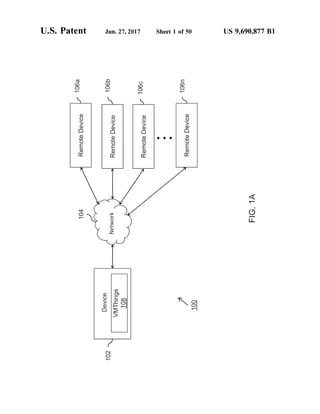
FIG. 1A illustrates an exemplary environment, in accor
dance with an first embodiment of the invention;
FIG. 1B illustrates another exemplary environment, in
accordance with the first embodiment of the invention;
US 9,690,877 B1
7
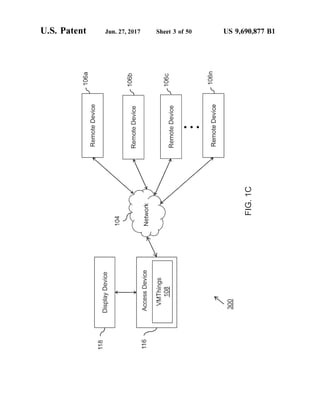
FIG. 1C illustrates yetanotherexemplary environment, in
accordance with the first embodiment of the invention;
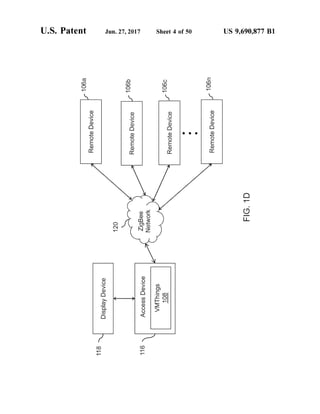
FIG. 1D illustrates an environment based on a ZigBee
network, in accordance with the first embodiment of the
invention;
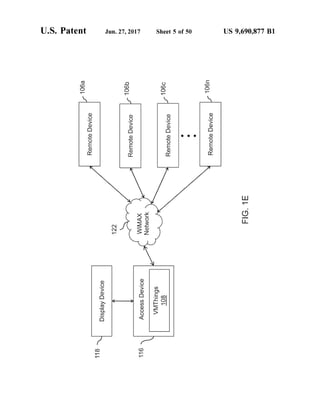
FIG. 1E illustrates an environment based on a WiMAX
network, in accordance with the first embodiment of the
invention;
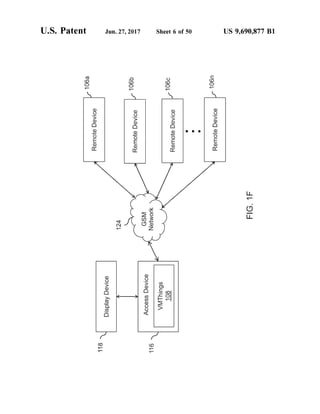
FIG. 1F illustrates an environment based on a Global
System for Mobile Communication (GSM) network, in
accordance with the first embodiment of the invention;
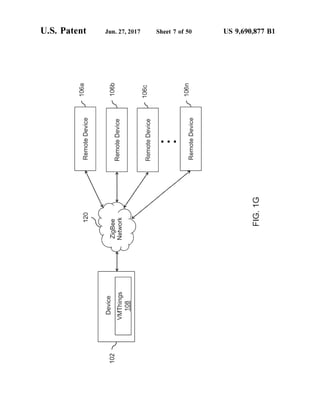
FIG. 1G illustrates an environment based on a ZigBee
network, in accordance with the first embodiment of the
invention;
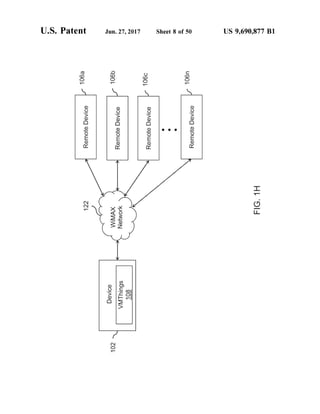
FIG. 1H illustrates an environment based on a WiMAX
network, in accordance with the first embodiment of the
invention;
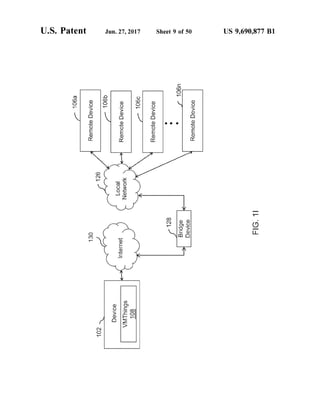
FIG. 1I illustrates an environmentbased on a combination
ofa local network and the Internet, in accordance with the
first embodiment of the invention;
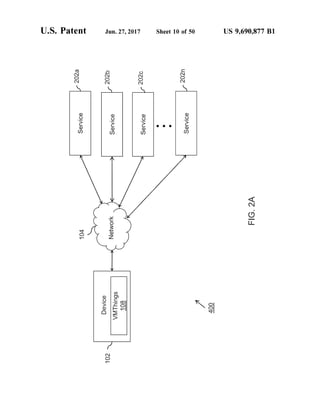
FIG. 2A illustrates an exemplary environment, in accor
dance with a second embodiment of the invention;
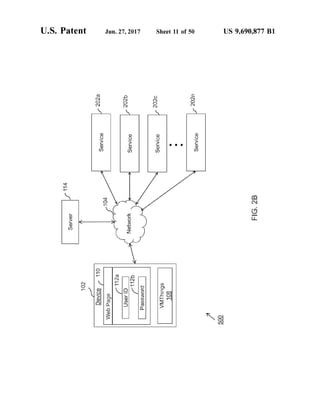
FIG. 2B illustrates another exemplary environment, in
accordance with the second embodiment of the invention;
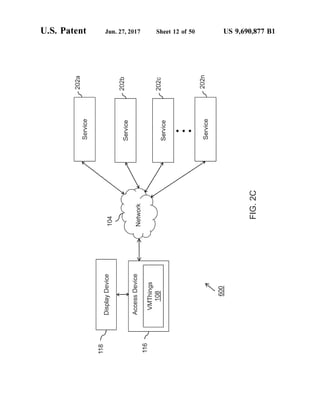
FIG. 2C illustrates yetanotherexemplary environment, in
accordance with the second embodiment of the invention;
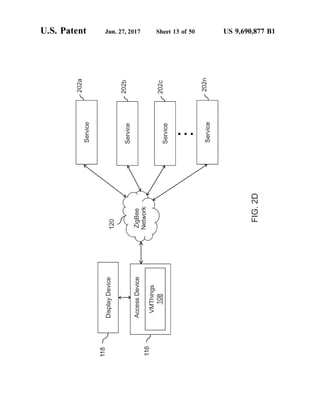
FIG. 2D illustrates an environment based on a ZigBee
network, in accordance with the second embodiment ofthe
invention;
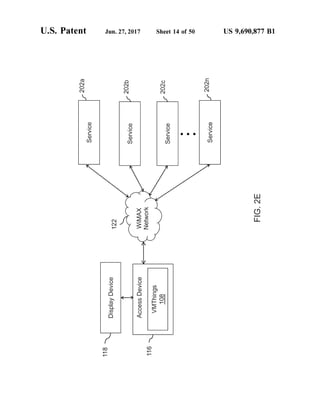
FIG. 2E illustrates an environment based on a WiMAX
network, in accordance with the second embodiment ofthe
invention;
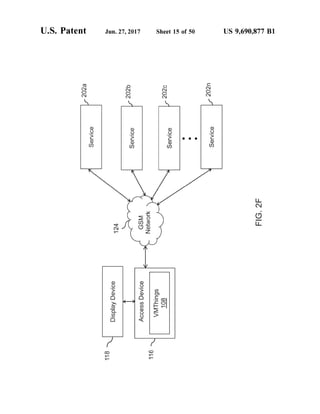
FIG. 2F illustrates an environment based on a GSM
network, in accordance with the second embodiment ofthe
invention;
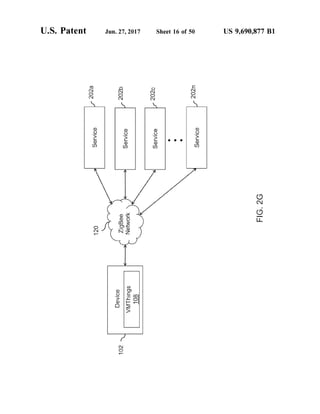
FIG. 2G illustrates an environment based on a ZigBee
network, in accordance with the second embodiment ofthe
invention;
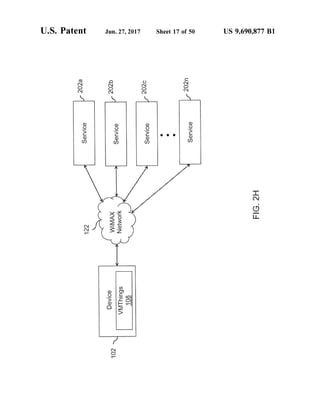
FIG. 2H illustrates an environment based on a WiMAX
network, in accordance with the second embodiment ofthe
invention;
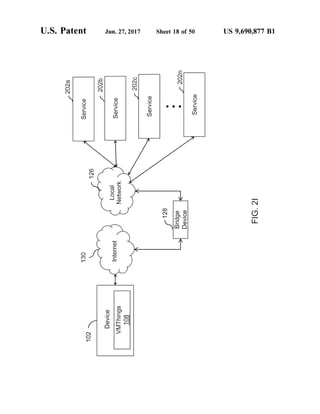
FIG.2I illustrates an environmentbased on a combination
ofa local network and the Internet, in accordance with the
second embodiment of the invention;
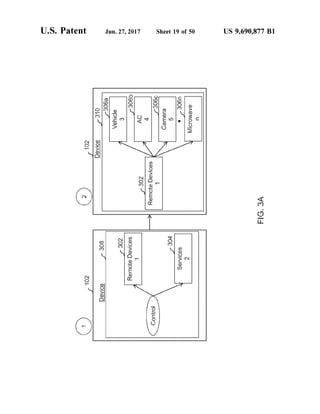
FIG. 3A illustrates an exemplary visual access menu and
enhanced visual access menu at a device, in accordance with
the first embodiment of the invention;
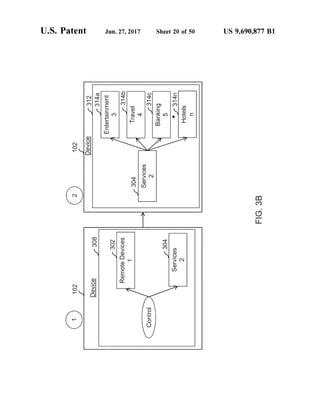
FIG. 3B illustrates an exemplary visual access menu and
enhanced visual access menu at the device, in accordance
with second embodiment of the invention;
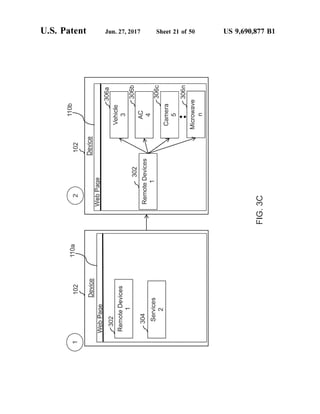
FIG. 3C illustrates anotherexemplary visual access menu
and enhanced visual access menu at the device, in accor
dance with first embodiment of the invention;
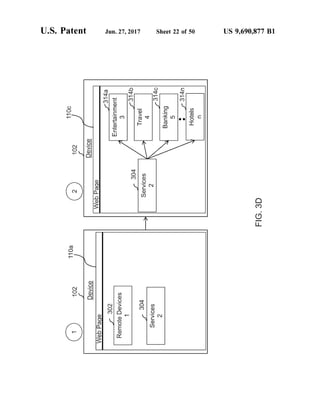
FIG. 3D illustrates anotherexemplary visual access menu
and enhanced visual access menu at the device, in accor
dance with second embodiment of the invention;
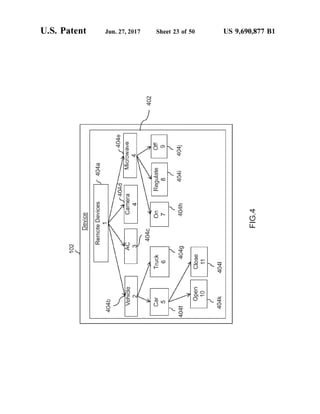
FIG. 4 illustrates an exemplary enhanced visual access
menu including one or more device options, in accordance
with an embodiment of the invention.
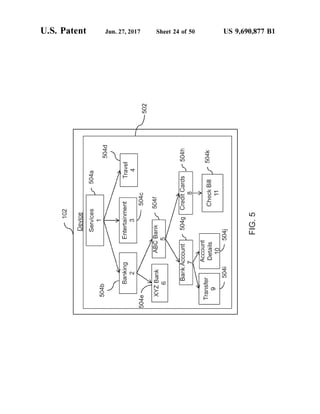
FIG. 5 illustrates an exemplary enhanced visual access
menu including one or more service options, in accordance
with an embodiment of the invention.
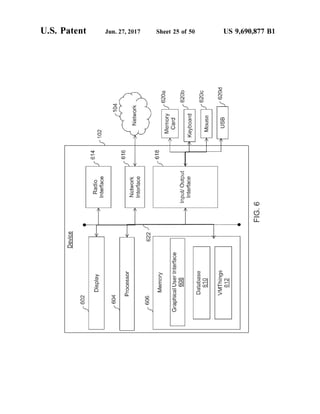
FIG. 6 illustrates exemplary components ofa device, in
accordance with an embodiment ofthe invention;
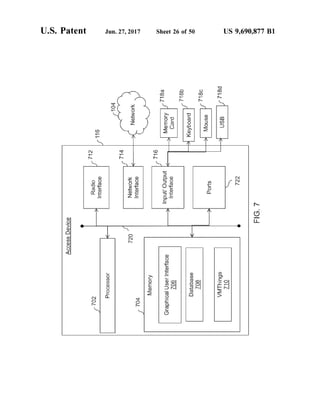
FIG. 7 illustrates exemplary components of an access
device, in accordance with an embodiment ofthe invention;
10
15
25
30
35
40
45
50
55
60
65
8
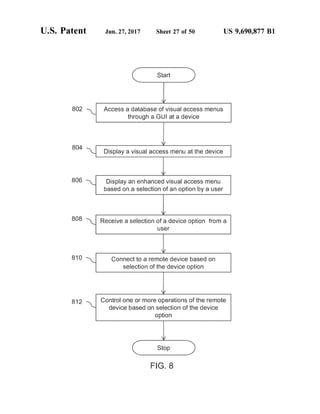
FIG. 8 illustrates a flow diagram for controlling remote
devices, in accordance withanembodiment ofthe invention;
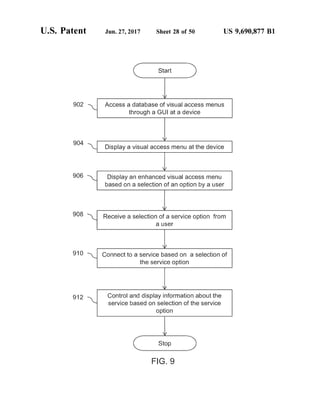
FIG. 9 illustrates a flow diagram for controlling remote
services, in accordance with an embodiment of the inven
tion;
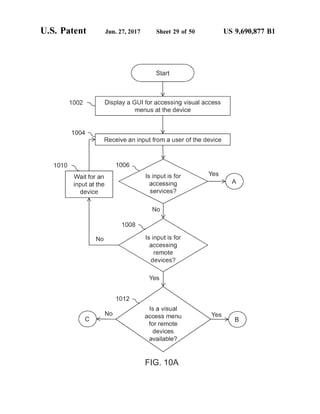
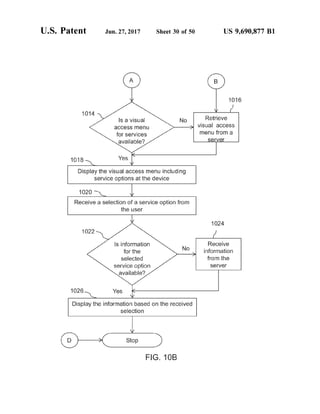
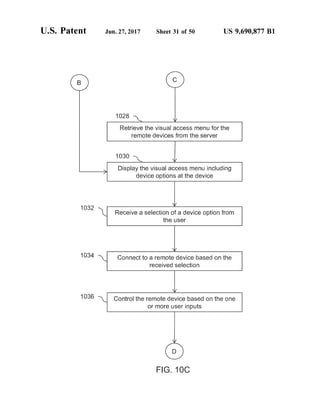
FIGS. 10A, 10B, and 10C illustrate a flow diagram for
controlling objects by using a device in a network, in
accordance with an embodiment ofthe invention;
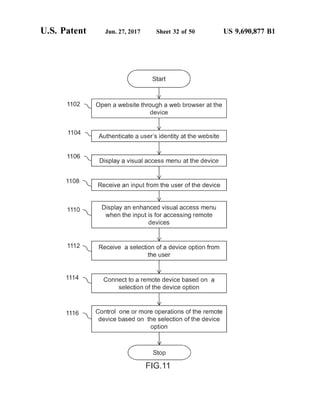
FIG. 11 illustrates a flow diagram for controlling remote
devices by using a web browser at a device, in accordance
with an embodiment of the invention;
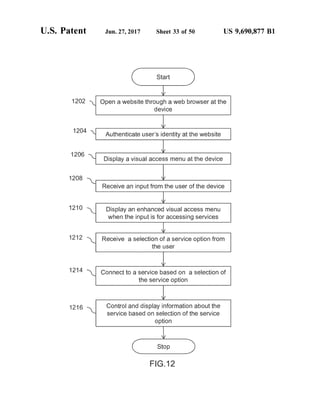
FIG. 12 illustrates a flow diagram for controlling remote
services by using a web browser at a device, in accordance
with an embodiment of the invention;
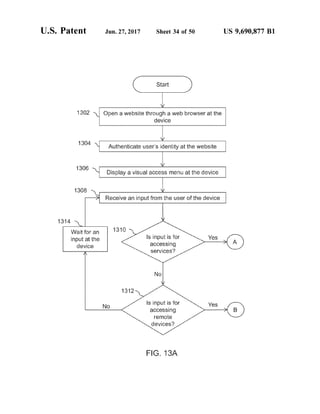
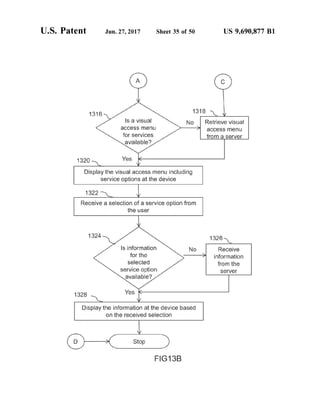
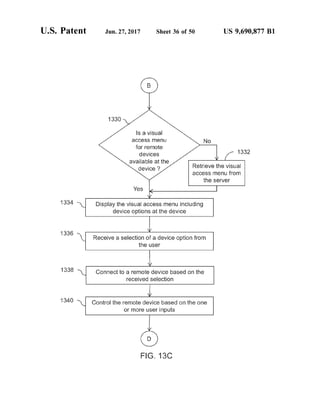
FIGS. 13A, 13B, and 13C illustrate a flow diagram for
controlling objects in a network through a web browser at a
device, in accordance with an embodiment ofthe invention;
and
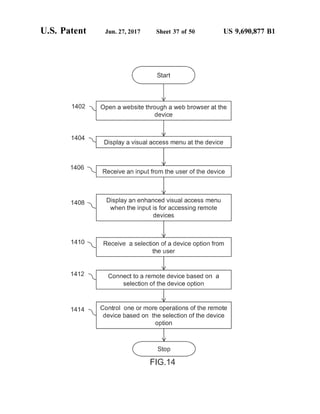
FIG. 14 illustrates a flow diagram for controlling remote
devices through a website, in accordance with another
embodiment of the invention;
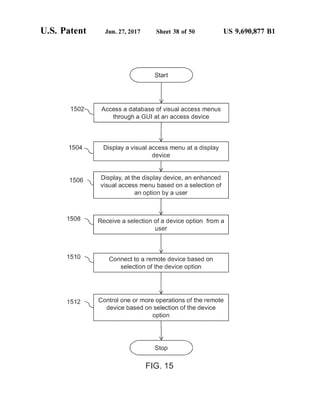
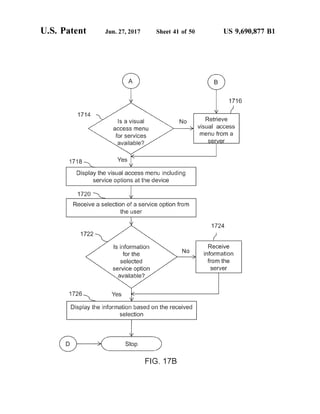
FIG. 15 illustrates a flow diagram for controlling remote
devices by using an access device in a network, in accor
dance with an embodiment of the invention;
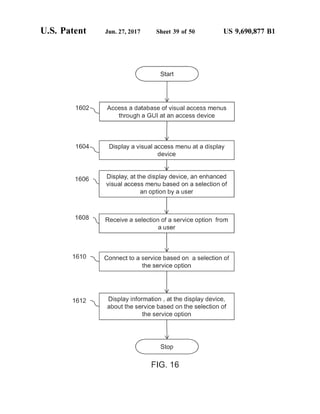
FIG. 16 illustrates a flow diagram for controlling remote
services by using an access device in a network, in accor
dance with an embodiment of the invention;
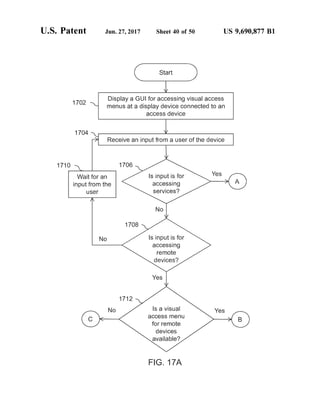
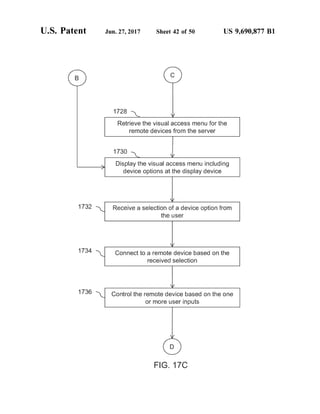
FIGS. 17A, 17B, and 17C illustrate a flow diagram for
controlling objects in a network devices through an access
device, in accordance with an embodiment ofthe invention;
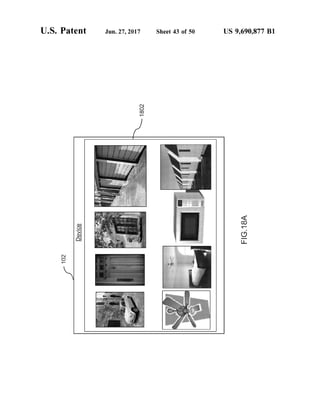
FIG. 18A illustrates an exemplary display of images of
remote devices, in an embodiment of the invention;
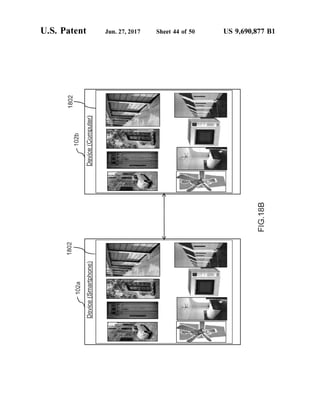
FIG. 18B illustrates transfer ofan exemplary display of
images from a device to another device, in an embodiment
of the invention;
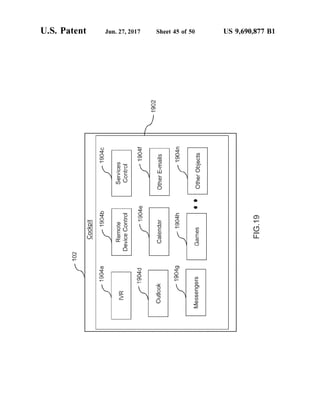
FIG. 19 illustratesan exemplary displayofa cockpitat the
device, in accordance with an embodiment ofthe invention;
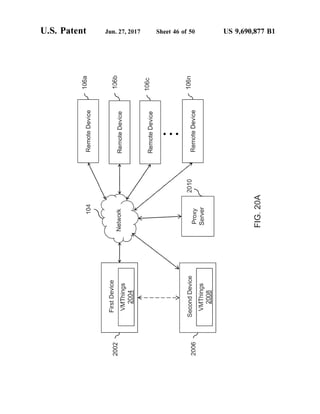
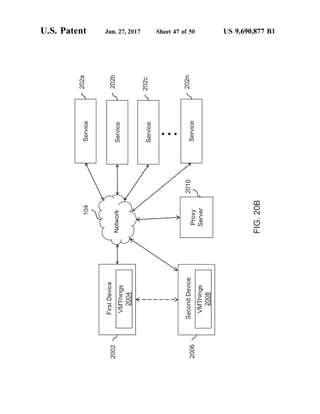
FIGS. 20A-20B illustrates exemplary environments for
providing access ofthe cockpit ofa user to other users, in
accordance with an embodiment ofthe invention;
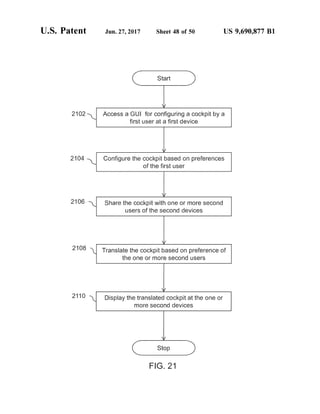
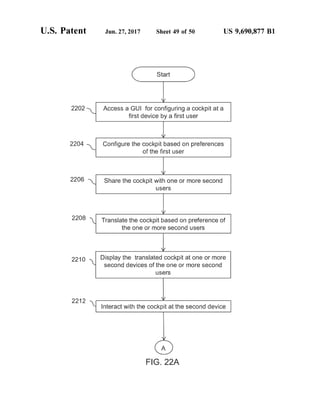
FIG. 21 illustrates a flow diagram for providing access
control of the cockpit to one or more second users, in
accordance with an embodiment ofthe invention; and
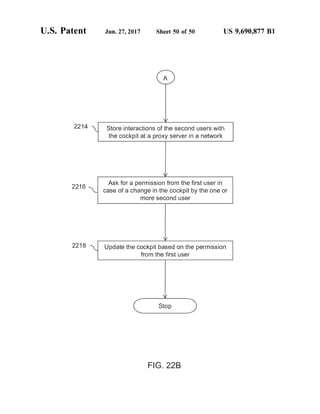
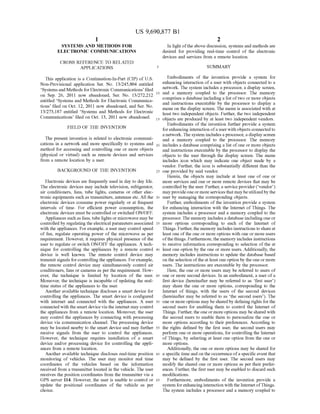
FIGS. 22A and 22B illustrate a flow diagram for provid
ing access control of the cockpit to one or more second
users, in accordance with anotherembodiment ofthe inven
tion.
DETAILED DESCRIPTION OF THE
INVENTION
Illustrative embodiments of the invention now will be
described more fully hereinafter with reference to the
accompanying drawings, in which some,but notall embodi
ments ofthe invention are shown. Indeed, the invention may
be embodied in many different forms and should not be
construed as limited to the embodiments set forth herein;
rather, these embodiments are provided so that this disclo
Sure will satisfy applicable legal requirements. Like num
bers refer to like elements throughout.
FIG. 1A illustrates an exemplary environment 100, in
accordance with a first embodiment of the invention. The
first embodiment describes functionality of an Internet of
Things application i.e. a VMThings 108 for controlling a
plurality of remote devices 106a-n. A user may create or
configure an Internet ofThings menu or cockpit for access
ing or controlling the plurality of remote devices 106a-n at
US 9,690,877 B1
9
a device 102. In an embodiment of the invention, the
VMThings 108 may configure or create the Internet of
Things menu or the cockpit. The Internet ofThings menu
may include representations ofone or more recognizable or
identifiable objects such as, but are not limited to, remote
devices 106a-n or services in an Internet or network like
structure. The one or more identifiable objects may be
physical or virtual objects. In an embodiment ofthe inven
tion, a graphical user interface (GUI) may be used by the
user for creating the Internet ofThings Menu. The objects
may bethe remote devices 106a-n orservices. The user may
use the device 102 for connecting to a plurality of remote
devices 106a-n through a network 104 through the Internet
ofThings menu. The device 102 may be used by the user to
control a plurality of objects in the network 104. The
VMThings 108 may control one or more operations ofthe
plurality ofobjects. In an embodiment ofthe invention, the
objects may include remote devices 106a-n. In another
embodiment ofthe invention, theobjects may be services as
described in FIG. 2A-I. In yet another embodiment of the
invention, the objects may be combination of the remote
devices 106a-n and services. In an embodiment of the
invention, the device 102 can be a portable device capable
of communicating and connecting to other devices such as
the remote devices 106a-n. The device 102 may have a
display screen. In an embodiment of the invention, the
device 102 may have a limited display or may not have a
display at all. Example of the device 102 may include a
mobile phone, a Smartphone, a computer, a personal digital
assistant (PDA), a tablet computer, a laptop, and so forth.
The network 104 can be a wired network or a wireless
network or a combination of these. The wireless network
may use wireless technologies to provide connectivity
among various devices. Examples ofthe wireless technolo
gies include, but are not limited to, Wi-Fi, WiMAX, fixed
wireless data, ZigBee, Radio Frequency 4 for Consumer
Electronics network (RF4CE), Home RF, IEEE 802.11, 4G
or Long Term Evolution (LTE), Bluetooth, Infrared, spread
spectrum, Near Field Communication (NFC), Global Sys
tems for Mobile communication(GSM), Digital-Advanced
Mobile Phone Service (D-AMPS). The device 102 is con
nected to theplurality ofremote devices 106a-n through the
network 104. Examples of the wired network include, but
are notlimited to, LocalArea Network(LAN), Metropolitan
Area Network (MAN), Wide Area Network (WAN), and so
forth. In an embodiment of the invention, the network 104
is the Internet.
The plurality ofremote devices 106a-n can be electronic
equipments such as, but are not limited to, household
devices including electric lights, water pump, generator,
fans, television (TV), cameras, microwave, doors, windows,
computer, orgarage locks, security systems,air-conditioners
(AC), and so forth. In an embodiment ofthe invention, the
plurality ofthe remote devices 106a-n can be vehicles such
as cars, trucks, vans, and so forth. In an embodiment ofthe
invention, the VMThings 108 may present a standard menu
(ora standard visual access menu) for controlling all remote
devices 106a-n to the user. The user may be provided with
different visual access menus based on the location of the
remote devices 106a-n. For example, the user may be
displayed with different visual access menus for remote
devices present in office, home, factory, and so forth. In
another embodiment of the invention, the VMThings 108
may display a customized menu at the device 102 based on
user preferences and/oraccess pattern. In an embodiment of
the invention, the user may configure the VMThings 108 to
control remote devices 106a-n present in more than one
5
10
15
25
30
35
40
45
50
55
60
65
10
building. Thebuildings may bepresentat differentlocations.
Similarly, the user may control the one or more remote
devices 106a-n located in his/her office from the home. For
example, the user may control door ofhis/her office cabin,
may switch on or switch offhis/her office computer/laptop,
AC, and so forth. In an embodiment of the invention, the
user may control operations ofone or more remote devices
106a-n present in a factory from the home. Further, the user
may access the plurality of remote devices 106a-n from a
remote location by using the device 102. Further, the user
may use the same device 102 for controlling the remote
devices located at different locations such as office, factory,
home, etc. The user doesn’t have to carry different or
multiple devices for controlling different remote devices
106a-n. The device 102 may include a database including a
list of one or more objects. In an embodiment of the
invention, the device 102 may include audio or visual menus
ofthe one or more objects i.e. ofthe remote devices 106a-n.
The device 102 may include visual access menus and/or
enhanced visual access menus corresponding to various
objects. The visual access menu may providean interface to
the user to control the one or more objects such as remote
devices 106a-n. The visual access menu may include one or
more options such as, butare notlimited to a remote devices
option, services option, and so forth. In an embodiment of
the invention, the visualaccess menusatthedevice 102 may
beupdated regularly atpredefinedtime interval such as after
every two days, oroncea week. The enhanced visual access
menus may include one or more device options. In an
embodiment ofthe invention, the device 102 may include a
touch sensitive display. In such a scenario, the user may
access the one or more options or the device options by
touching the options directly. In an embodiment of the
invention, the user may connect to the one or more objects
Such as the remote devices 106a-in through applications such
as, but are not limited to, Skype, Google Talk, Yahoo
Messenger, Magic Jack, and so forth.
Further, the device 102 may include the VMThings 108
which is configured to enable the user to access the visual
access menus through a Graphical User Interface (GUI) at
the device 102. The VMThings 108 may enable the user to
control the remote devices 106a-n irrespective of their
location through the network 104. The VMThings 108 may
display the one or more visual access menus at the device
102. Further, the device 102 may include visual access
menus associated with at least two independent objects. In
an embodiment of the invention, the two at least two
independent objects may be produced by two independent
vendors. In an embodiment ofthe invention, the device may
include vendor specific visual access menus or enhanced
visual access menus for the remote devices 106a-in. Further,
the device 102 may also include standard menu(s) for
accessing the objects. The VMThings 108 may display the
visual access menu depending on the independent vendor(s)
of the one or more objects. In another embodiment of the
invention, the VMThings 108 may display a visual access
menu which is not provided by either of the at least two
independent vendors oftheat least two independent objects.
In an embodiment ofthe invention, the user may access and
control one or more of the remote devices 106a-n from the
remote location by using the device 102. For example, the
user may use his Smart phone to access and operate a
microwave at his/her home from his/her office. Further, the
user can use the device 102 at one location to monitor and
regulate one or more operations of the remote devices
106a-n present at another location. The one or more opera
US 9,690,877 B1
11
tions may be, such as, but are not limited to, Switch on,
Switch off, regulate, and so forth.
Further, the visual access menus may include at least one
icon indicating one or more objects such as the remote
devices 106a-n. Further, the icon is substantially different
than the icons provided in the visual access menu provided
by the vendor. Further, the remote devices 106a-n may be
grouped into various categories such as, but are not limited
to, electronics appliances, home devices, buildings, doors,
room appliances, Switches, floor wise, and so forth. Further,
the remote devices 106a-n may be grouped according to
location ofthe remote devices, such as home devices, office
devices, garages devices, factory devices, farm house
devices, and so forth. The VMThings 108 ofthe device 102
may store visual access menus and enhanced visual access
menus corresponding to the remote devices 106a-n based on
the various categories ofthe remote devices 106a-n. Each of
the remotedevices 106a-n may havea unique remotedevice
identity (ID). In an embodiment of the invention, the user
may require to register the remote devices 106a-n with the
device 102 so that the remote devices 106a-n may be
controlledby usingthe VMThings 108. In anembodiment of
the invention, the user may be required to authenticate or
provehis/heridentityat device 102 orforthe remotedevices
106a-n before controlling one or more operations of the
remote devices 106a-n.
Further, the VMThings 108 may display an enhanced
visual access menu corresponding to the remote devices
106a-n. The enhanced visual access menu may include one
or more device options. The device options may be dis
played as graphics oricons and/ortext representations ofthe
remote devices 106a-n. Forexample,acar may be displayed
for representing the car option. The user may control the
remote devices 106a-n by selecting a deviceoption from the
device options at the device 102. Further, the enhanced
visual access menu may display the grouping or categories
ofthe remote devices 106a-n. The VMThings 108 may also
translate the visual access menu or the enhanced visual
access menu from a first language to a second language.
Examples ofthe first language andthe second language may
include, but are not limited to, Spanish, French, English,
Sanskrit, Hindi, Urdu,Arabic, and so forth. Forexample, the
VMThings may translate an English visual access menu into
a French visual access menu and thereafter, it may be
displayedatthe device 102. TheVMThings 108 may display
the visual access menu or the enhanced visual access menu
at the device 102 based on the user's preferred language.
The user may select an option from the visual access
menu or an enhanced visual access menu. Further, the user
may select an option (or device options) by using a combi
nation of keys on a keypad of the device 102. In an
embodiment ofthe invention, the user may select an option
by clickingthe option orthe device option by using a mouse
device. In an embodiment of the invention, the user may
select an option by touching the screen of the device 102.
Forexample, ifthe userwants to Switch on an airconditioner
(AC) on way towards home, the user can select or enter an
appropriatekey combination on thedevice 102 or may touch
(in case of touch sensitive display at the device 102) an
option ofthe visual access menu corresponding to the AC.
In one embodiment, the user can give a Voice command
to the device 102. Based on the input received by the device
102, the air conditioner may be switched on automatically.
Further, the usercan also regulatethe cooling ofthe room by
changing temperature settings of the air conditioner. After
connecting the device 102 to one or more of the remote
devices 106a-n, the user can control the one or more
10
15
25
30
35
40
45
50
55
60
65
12
operations such as, but are not limited to, Switch on, Switch
off reduce temperature, and so forth from a distant location
without being physically present at the location. In one
embodiment, the remote devices 106a-n can be security
cameras oralarm station installed at the home location ofthe
USC.
In an embodiment ofthe invention, the user may select an
option by makinggestures orhand movements atthe device.
For example, the user may do a thumb up gesture to Switch
on an appliance at home or may do a thumb down gesture
to switch off the same. Similarly, the user may do other
gestures Such as, but are not limited to, waving a hand,
nodding head, Smiling, blinking an eye, and so forth. In an
embodiment of the invention, the device may include a
camera for detecting the gestures or hand movements. In an
embodiment of the invention, the VMThings 108 may be
configured to analyze and interpret the gestures and hand
movements. Further, the VMThings 108 may include stored
gestures defined by the user atdevice 102and may compare
or match the real time gestures with the stored gestures. The
device may include a software or hardware such as micro
phone for detecting the Voice commands or audio inputs.
In another embodiment of the invention, the VMThings
108 may be configured to analyze the Voice commands and
audio inputs received from the user through Voice recogni
tion. Further, the user may select theoption from an Internet
ofThings menu through Voice command(s) for controlling
the remote devices 106a-n. The device 102 may include a
list ofvoicecommands andaction tobe taken corresponding
to each command. The VMThings 108 may compare and
match the received voice command with the stored list and
thereafter maytake an action based onthe comparison. In an
exemplary scenario, the userat office may switch on theAC
present at home by accessing the visual access menu and
saying “switch off the AC on the device 102 (or a smart
phone). In an embodiment of the invention, speech/voice
recognition may be used to analyze the Voice instructions or
commands received from the user to control the remote
devices 106a-in. In an embodiment of the invention, the
device 102 may receive a call from the one or more objects
such as a remote device. In such a case, the VMThings 108
may display a visual access menu ofthe calling object.
In an embodiment of the invention, the VMThings 108
may determine location of the device or the plurality of
objects such as the remote devices 106a-n. In an embodi
ment of the invention, the selection of the option may be
automatic based on one or more predefined instructions of
the user of the device 102. For example, the predefined
instruction may be like switch on theACat 6 PM, switch off
theTV at2 PM, and closethedoorofthe garage.The remote
devices 106a-n may be controlled according to these pre
definedinstructions irrespective ofthe location ofthe useror
the device 102.
In an embodiment of the invention, one or more signals
may be generated and transmitted by the device 102 based
on the selection ofthe option or an input received from the
user. The signals may be transmitted to the remote devices
106a-n through the network 104. The remotedevices 106a-n
may be controlled based on the signals received from the
device 102. In an embodiment of the invention, the device
102 may receive an alert message(s) regarding the opera
tional condition ofthe remote devices 106a-n. Forexample,
an alert message like Car doorleftopened may be received
by the user at his/her mobile phone for a car standing in a
parking area. In an embodiment of the invention, the alert
message may be receivedthrough at least one ofan SMS, an
MMS, an instant message, an e-mail, a phone call, turn on
US 9,690,877 B1
13
of display ofdevice when its off, and so forth. In another
embodiment of the invention, the user may further receive
alert message as pop messages at the device 102, at a GPA
system, at a multi function display ofa car ofthe user, at a
TV, at a picture frame, and so forth. Thereafter, the user may
control or operate the car door through his/her Smartphone
and from the office itself. There is no need for him to rush
to the parking area for closing the door. In an embodiment
of the invention, the user may receive alert messages at a
predefined time period. For example, the user may receive
the alert messages regarding the connected remote devices
106a-n after every 1 hour, 2 hour, 30 minutes, and so forth.
Further, the displayed Internet of Things menu or the
visual access menu may extend or change based on the user
selection of the option from the visual access menu. In
another embodiment of the invention, the device 102 may
receive images, videos, audios, related to the remote devices
106a-n at thepredefined time period. Further, the device 102
may receive real-time information, such as, but is notlimited
to, images, video etc. ofthe plurality ofthe remote devices
106a-in. In an exemplary scenario, the user can monitor and
control real-time operation of the remote devices 106a-n
Such as one or more vehicles based on the information
received through the network 104. Forexample, the usercan
receive images or videos ofthe one or more vehicles on the
device 102. Further, the VMThings 108 may display these
images of remote devices 106a-n to the user. The user can
send instructions or Voice response to the one or more
vehicles through the network 104. Forexample, the usercan
track position ofthe one or more vehicles in real-time from
the device 102 at another location.
In an embodiment ofthe invention, the enhanced visual
access menus corresponding to the remote devices 106a-n
may be stored at a server 114 in the network 104. As
discussed with reference to FIG. 1B, the user ofthe device
102 may access the visual access menus corresponding to
the remote devices 106a-n through a web browser in an
exemplary environment 200. The environment 200 may
include the device 102 such as a smart phone capable of
connecting to the network 104 (or the Internet) via the web
browser. In an embodiment of the invention, the remote
devices 106a-n may be controlled via a local wireless
communication or local network. In an embodiment of the
invention, the remote devices 106a-n may be connected to
a bridgedevicethat may furtherbe connectedto the Internet.
The web browser may be used to connect to the Internetand
in turn to the local network. Examples of the web browser
include, but are not limited to, Internet Explorer, Google
Chrome, Mozilla Firefox, Netscape Navigator, and so forth.
The user can entera Uniform Resource Locator (URL) such
as, www..ABC.com in the web browser to access a website
including a database. The database at the website may store
aplurality ofvisualaccess menus or Internet ofThings menu
or cockpit or enhanced visual access menus associated with
the remote devices 106a-n. The enhanced visual access
menus are visual access menus corresponding to the remote
devices 106a-in. Each of the enhanced visual access menus
may include one or more device options. In an embodiment
ofthe invention, the database may be present in the network
104.
A webpage 110 may be displayed at the device 102
corresponding to the URLentered by the user. The user may
be required or asked to authenticate his/her identity before
accessing the visual access menus. The displayed webpage
110 may include one or more data request fields 112a-b
where the user may enter his/her details. In an embodiment
ofthe invention, the user may access various visual access
10
15
25
30
35
40
45
50
55
60
65
14
menus by authenticating at the website by entering his/her
login details such as, but are not limited to, password, used
ID, e-mail ID, date ofbirth, and so forth, in the one or more
data request fields 112a-b. Though not shown, but a person
skilled in the art will appreciate, that the webpage 110 may
include more than two data request fields 112a-b.Theone or
more ofoptions ofthe visual access menus or the enhanced
visual access menus may be displayed to the user at his/her
device 102.
In an embodiment ofthe invention, the user may create
personalized visual access menus for controlling his/her
personal devices of the remote devices 106a-n. In an
embodiment of the invention, the user may configure or
create an Internet of things menu for controlling remote
devices. The InternetofThings menu may includeaplurality
ofrepresentations corresponding to identifiable objects Such
as the remote devices 106a-n. Further, the user may cus
tomize the Internet ofThings menu based on his/her pref
erences Such as, but not limited to, language preference,
theme preference, color preference, font size preference,
device preference, service preference, and so forth. The
VMThings 108 may display customized or personalized
visual access menu at the device 102. In an embodiment of
the invention, the VMThings 108 may display visual access
menu at a second display connected to the device 102. The
user may select an option from the multiple options of the
visual access menu. The enhanced visual access menu (or
the Internet ofThings menu) may be displayed at the device
based on the selection ofan option by the user at the device
102. In an embodiment ofthe invention, a connection may
be established between the user device 102 and the remote
devices 106a-n based on the selection of the option by the
user. Thereafter, the user can access and control the remote
devices 106a-n irrespective of a location of the user. The
user may not have to be in front ofor close to the remote
device 106a-n for controlling the operations of the remote
devices 106a-n.
FIG. 1C illustrates another exemplary environment 300,
in accordance with the first embodiment ofthe invention. An
access device 116 may beconnected to a display device 118.
The access device 116 may access and control the plurality
of remote devices 106a-n connected through the network
104. The access device 116 may be any device capable of
data and/or voice communications through the network 104
orthe remote devices 106a-n. Examples ofthe access device
116 include, but are not limited to, a router, a telephone, a
set top box, a hub, a gateway, a printer, a music system, a
mobile phone, a PDA, a Smart phone, a picture frame, and
So forth. In an embodiment of the invention, the access
device 116 may not have a display or may have limited
display capability. The access device 116 may include a
plurality ofports for connecting to the network 104, and/or
the display device 118. The plurality ofports can be such as,
but are not limited to, parallel ports, serial ports, DB-2
connector, IEEE 1284, IEEE 1394 ports, 8P8C ports, PS/2
ports, RS-232 ports, Registered Jack (RJ) 45 ports, RJ 48
ports, VGA port, Small Computer System Interface (SCSI)
ports, USB ports, DB-25 ports, and so forth.
Examples ofthe display device 118 may include, but are
not limited to, a television, a Liquid Crystal Diode (LCD)
display, a Light Emitting Diode (LED) display, a projector
screen, a computer, a laptop, a tablet computer, a picture
frame,a tabletcomputer, and so forth.Theaccess device 116
may provide a network interface to the display device 118.
Theuser may usetheaccess device 116 forconnectingtothe
network 104. Moreover, the user can access the remote
devices 106a-n connected to the network 104 by using the
US 9,690,877 B1
15
access device 116. In this embodiment ofthe invention, once
connected with the remote devices 106a-n the visual access
menus or the Internet ofThings menus may be displayed to
the user at the display device 118. In an embodiment ofthe
invention, the user may have to authenticate and/or one or
more login details before viewing the visual access menus.
The user may authenticateorenterhis/herpersonal detailsat
the access device 116. In an embodiment of the invention,
the user may authenticate or enter the personal details at the
display Screen.
In an embodiment ofthe invention, the access device 116
may be a home controller device. The user may access the
VMThings 108 by logging into this home controller and
may view the visual access menus at his device 102 or a
display device 116. After logging into the home controller
the user may control the objects i.e. remote devices or
services associated with the home controller. Therefore, the
user may control the one or more objects by using a
combination of devices such as the home controller, Smart
phone, another display device, and so forth.
The access device 116 may include an Internet ofThings
application i.e. VMThings 108 application for accessing the
visual access menus and the enhanced visual access menus.
The VMThings 108 may display the visual access menus at
the display device 120. The user may connect to the remote
devices 106a-n by selecting one or more options of the
visual access menus. Further, the remote devices 106a-n
may be grouped into various categories such as, but are not
limited to, electronics appliances, home devices, buildings,
doors, room appliances, electric Switches, cars, windows,
and so forth. Further, the remote devices 106a-n may be
grouped according to location, such as home devices, office
devices, garages devices, and so forth. The of the access
device 116 may store visual access menus and enhanced
visual access menus according to the various categories of
the remote devices 106a-n at the access device 116. Further,
the user may control any remote device from the remote
devices 106a-n by selecting one or more options from the
visual access menu or the Internet of Things menu. In an
exemplary scenario, the user can connectto the network 104
by using a telephone and may view the visual access menu
on a screen ofthe television. Thereafter, the user may access
and control the remotedevices 106a-nfrom the telephoneby
pressing appropriate keys/buttons ofthe telephone.
In an embodiment ofthe invention, the user may register
the remote devices 106a-n or do some settings at the access
device 116 or the remote devices 106a-n, so that the user
may control the remote devices 106a-n from the VMThings
108. In an embodiment of the invention, the user may be
required to authenticate or prove his/her identity at the
access device 116 or for the remote devices 106a-n before
controlling one or more operations of the remote devices
106a-n.
FIG. 1D illustrates an environment based on a ZigBee
network 120, in accordance with the first embodiment ofthe
invention. As shown, the access device 116 may include the
VMThings 108 for displaying a visual access menu or an
enhanced visual access menu or an Internet ofThings menu
at the display device 118. The access device 116 may
connect to the remote device 106a-n through the ZigBee
network 120. In an embodiment ofthe invention, the remote
devices 106a-n may be connected to the ZigBee network
120 through a local network such as a LAN, a NFC network,
a Bluetooth network, andso forth. The local network may be
connected to theZigBee network 120 through somegateway
device Such as bridge, router, hub, gateway device, Switch,
and so forth.
10
15
25
30
35
40
45
50
55
60
65
16
FIG. 1E illustrates an environment based on a WiMAX
network 122, in accordance with the first embodiment ofthe
invention. As shown, the access device 116 may include the
VMThings 108 for displaying the Internet ofThings menu
or the visual access menu or the enhanced visual access
menus at the display device 118. The access device 116 may
connect to the remote devices 106a-n through the WiMAX
network 122. In an embodiment ofthe invention, the remote
devices 106a-n may be connected to the WiMAX network
122 through a local network such as a LAN, NFC network
and so forth. In an embodiment of the invention, the user
may require to register the remote devices 106a-n or do
Some settings at the access device 116 orthe remote devices
106a-n, so that the user may control the remote devices
106a-n from the VMThings 108. In an embodiment ofthe
invention, the user may be required to authenticate or prove
his/her identity at the access device 116 or for the remote
devices 106a-n beforecontrollingoneor more operations of
the remote devices 106a-n. The user may access the visual
access menus and enhanced visual access menus at the
access device 116 through a GUI. The VMThings 108 may
enable the user to control the remote devices 106a-n irre
spective of the location of the remote devices 106a-n. For
example, the user may control operations of the air condi
tioner located in his/her factory by being at home itself. The
user may not have to be physically present at the factory or
near the air conditioner for controlling the operations ofthe
air conditioner. The user may do the same through the
VMThings 108 ofthe access device 116 (or the device 102).
FIG. 1F illustrates an environment based on a Global
System for Mobile Communication (GSM) network 124, in
accordance with the first embodiment of the invention. As
shown, the access device 116 may be connected to the
remote devices 106a-n through the GSM network 124.
Though not shown, but a person skilled in the art will
appreciate that the access device 116 may be connected to
the remote devices 106a-n through other networks, such as,
but are not limited to, an RF4CE network, an NFC network,
an HSPAnetwork,a LAN,aWAN,a3"generationnetwork,
a 4" generation network, a CDMA network, an EV-DO
network, and so forth.
FIG. 1G illustrates an environment based on the ZigBee
network 120, in accordance with the first embodiment ofthe
invention. As shown, the device 102 may include the
VMThings 108. A user may configure an Internet ofThings
menu by using the VMThings at the device 102. The user of
the device 102 may connect to the remote devices 106a-n by
using the VMThings 108 through theGUI at the device 102.
Further, the device 102 may be connected to the remote
devices 106a-n through the ZigBee network 120. In an
embodiment of the invention, the device 102 may be con
nected to other wireless network such as the WiMAX
network 122, as shown in FIG. 1H.
FIG. 1I illustrates an environment based on a combination
ofa local network 126 and the Internet 130, in accordance
with the first embodiment of the invention. The remote
devices 106 a-n may be connected to a local network 126.
The local network 126 can be a private network, a wireless
network, and so forth. The local network 126 in turn may be
connected to an external or public network Such as, but are
not limited to, the Internet 130 through a bridge device 128.
The device 102 may connect to the remote devices 106a-n
through the Internet 130. The local network 126 and the
Internet 130 may be connected to each other through other
devices such as, but are not limited to, a router, a hub, a
Switch, a gateway, and so forth.
US 9,690,877 B1
17
In an embodiment of the invention, the VMThings 108
may display an advertisement or multiple advertisements
along with the visual access menu at the device 102. In an
embodiment of the invention, the VMThings may display
the advertisement or multiple advertisements along with an
InternetofThings menuatthedevice 102. Inan embodiment
of the invention, the advertisement(s) are selected and
displayedbased on the content ofthedisplayed visual access
menu or the Internet of Things menu. For example, if the
visual access menu is for controlling the home appliances,
then theadvertisements may be about home appliances Such
as AC, fans, etc. In an embodiment of the invention, the
visual access menu and/oradvertisements may be displayed
at a second display or a display device Such as a picture
frame, LCD, television, and so forth connected to the device
102. Further, the visualaccess menus and the advertisements
may be displayed atthe display device orthe second display
through wireless means such as Wi-Fi, Bluetooth, ZigBee,
and so forth.
FIG. 2A illustrates an exemplary environment 400, in
accordance with a second embodiment ofthe invention. The
user 102 may use the device 102 to connect to a plurality of
services 202a-n through the network 104. The user can
access the information about the services 202a-n at the
device 102. As discussed with reference to FIG. 1A, the
device 102 can be a portable or hand-held device capable of
communicating and connecting to the network 104 or other
devices such as the remote devices 106a-n. Example ofthe
device 102 may include a mobile phone, a Smart phone, a
computer, a personal digital assistant (PDA), a tablet com
puter, a laptop etc. The network 104 can be a wired network
such as a Local Area Network (LAN) or a Wide Area
Network (WAN) or a wireless network such as a WiMAX
networkora combination ofthese. Examples ofthe services
202a-n include, but are not limited to, banking services,
travel services, entertainment services, railways services,
movies services, restaurants, and so forth. Further, the
banking services may be categorized as insurance services,
retail banking services, internet banking services, loans
service, NRI banking, and so forth. The entertainment
services may be accessed by the user to get information
about music, movies, theatre, news, cartoons, or sports. For
examples, the user may access movies services to know the
new releases in movies. The information about services may
be displayed inform ofanenhanced visual access menu. The
user may interact with the enhanced visual access menu
accordingly.
In an embodiment of the invention, the VMThings 108
may display an Internet ofThings menu at the device 102.
The Internet ofthings menu may include representations of
one or more recognizable oridentifiable objects such as, but
are not limited to, remote devices 106a-n or services in an
Internet or network like structure. The one or more identi
fiable objects may be physical or virtual objects. Agraphical
userinterface (GUI) may be usedby the userforcreating the
InternetofThings Menu. In anembodiment ofthe invention,
the objects may be the services 202a-n.
Further, the VMThings 108 may highlight a frequently
accessed service option or preferred service option in the
enhanced visual access menu for the services 202a-n or the
Internet ofThings menu based on the user's previous access
patterns. In an embodiment ofthe invention, the VMThings
108 may highlight one or more frequently accessed device
options or preferred device options in the enhanced visual
access menu for the remote devices 106a-n. Further, the
VMThings 108 may store the user access pattern at the
device 102. In an embodiment of the invention, the
10
15
25
30
35
40
45
50
55
60
65
18
VMThings 108 may present a standard menu (ora standard
visual access menu) for controlling all services 202a-n to the
user. In anotherembodimentofthe invention, the VMThings
108 may display a customized menu ofservices 202a-n at
the device 102 based on user preferences and/or access
pattern.
The device 102 may include a Graphical User Interface
(GUI) to enable the user to access the services 202a-n. In an
embodiment of the invention, the device 102 may include
audio or visual menus of the services 202a-n. The device
102 may include visual access menus and/or enhanced
visual access menus corresponding to the services 202a-n.
The enhanced visual access menu may include one or more
service options. The service options may be displayed as
graphics or icons or text representing the services 202a-n.
The user may control and get more information about the
services 202a-n by selecting a service option from the
service options at the device 102. In an embodiment ofthe
invention, the user may select a service option by touching
the screen ofthe device 102. For example, ifthe user wants
more information about the travelling service, the user may
select the travel serviceoption. In one embodiment, the user
can give a voice command to the device 102 for selecting a
service option from the enhanced visual access menu. Fur
ther, the user may select an option by using a combination
ofkeys on a keypad ofthe device 102. Further, the user may
select a service option by using a mouse device. In an
embodiment of the invention, the selection of the service
option may be automatic based on the one or more pre
defined instructions of the user of the device 102. In an
embodiment ofthe invention, the user may have to register
him/her or the device 102 to access the services 202a-n. In
an embodiment the user may have to authenticate his
identity prior to accessing the services 202a-in. In an
embodiment of the invention, the user may receive alert
messages related to the services 202a-in. For example, the
user may receive reminders about making a payment for
his/her credit card bill. In another embodiment ofthe inven
tion, the user may receive the alert messages regarding the
connected services 202a-n at a predefined time period such
as, but are not limited to, after every 1 hour, 2 hour, 30
minutes, and so forth. In an embodiment ofthe invention,
the VMThings 108 may alert the userthrough at leastone of
by turning on the display ofthe device 102 from an offstate
and present a menu (Visual access menu or Internet of
Things menu or cockpit), presenting a menu in a pop up
window, sending Short Messaging Service (SMS) message,
sending a Multimedia Messaging Service (MMS) message,
initiatingatelephone call,andso forth. Further,the usermay
receive alert message as a pop up message at his/herGlobal
Positioning System (GPS) deviceora multifunction display
ofhis/hercaroratscreen ofa television orata mobile phone
of the user, and so forth.
In another embodiment of the invention, the device 102
may receive images, videos, audios, related to the services
202a-n at the predefined time period. In an embodiment of
the invention, the user may access or control the services
202a-n by giving voice commands or voice inputs. In an
embodiment of the invention, the user may connect to the
services 202a-n through applications such as, but are not
limited to, Skype, Google Talk, Yahoo Messenger, Magic
Jack, and so forth.
Further, the device 102 may include visual access menus
associated with at least two independent objects or services.
In an embodiment ofthe invention, at least two independent
objects/services may be produced by at least two indepen
dent vendors. In an embodiment ofthe invention, the device
US 9,690,877 B1
19
102 may include vendorspecific InternetofThings menus or
visual access menus orenhanced visual access menus for the
services 202a-n. Further, the device 102 may also include
standard menu(s) for accessing the objects. The VMThings
108 may display the visual access menu depending on the 5
independent vendor(s) ofthe one or moreobjects. In another
embodiment of the invention, the VMThings 108 may
display a visual access menu which is not providedby either
of the at least two independent vendors of the at least two
independent objects. Further, the visual access menus may 10
include at least one icon indicating the one or more services
202a-n. Further, the icon is substantially different than the
icons provided in the visual access menu or the Internet of
Things menu provided by the vendor. The VMThings 108
may display customized orpersonalized visual access menu 15
or the Internet of Things menu at the device 102. In an
embodiment of the invention, the VMThings 108 may
display visual access menu or the Internet ofThings menu
at a second display connected to the device 102.
In an embodiment ofthe invention, speech/voice recog- 20
nition may be used to analyze the voice instructions or
commands received from the user to access the services
202a-in. In an embodiment ofthe invention, the device 102
may receive a call from the services 202a-in. In Such a case,
the VMThings 108 may display a visual access menu and/or 25
an Internet ofThings menu ofthe calling service. Further,
the Internet of Things menu may include one or more
options for interacting with the service from which call is
received.
FIG. 2B illustrates another exemplary environment 500, 30
in accordance with the second embodiment ofthe invention.
In an embodiment ofthe invention, the visual access menus
orthe Internet ofThings menu corresponding to the services
202a-n may be stored at the server 114 in the network 104.
The user at the device 102 may access an enhanced visual 35
access menu corresponding to the services 202a-n by using
a web browser. The device 102 maybeconfiguredtoconnect
to the network 104 (or the Internet) by entering a URL or a
website address in the web browser. Examples of the web
browserinclude, butare notlimitedto,Apple Safari, Internet 40
Explorer, Google Chrome, Mozilla Firefox, Netscape Navi
gator, and so forth. The user can enter a URL or a website
address in the web browserto access a database including a
plurality ofenhanced visual access menus corresponding to
the services 202a-n. In an embodiment ofthe invention, the 45
database may be present in the network 104.
A webpage 110 including the one or more data request
fields 112a-b may be displayed at the device 102 based on
the entered URL. The user may enter his/her details in the
data request fields 112a-b forgetting access to the database. 50
Thereafter, at least one enhanced visual access menus to
access the services 202a-n may be displayed to the user at
the device 102. The user may access information about the
one or more services 202a-n by interacting with the dis
played enhanced visual access menus. In an embodiment of 55
the invention, the webpage 110 may include at least one of
images, audio/video files, text, hyperlinks, and so forth
In an embodiment of the invention, a new visual access
menu or a new Internet of things menu may be displayed
when the user is directed to a new web site based on the 60
users input or selection. The new visual access menu may
be an IVR menu or an Internet ofThings menu associated
with the new web site. Further, the new visual access menu
may include options associated with the new web site.
FIG. 2C illustrates yet another exemplary environment 65
600, in accordance with the second embodiment of the
invention. As discussed with reference to FIG. 1C, the user
20
may use the access device 116 to access or control services
202a-n. The access device 116 may beany devicecapable of
data and/or voice communications through the network 104.
In an embodiment of the invention, the access device 116
may not have a display or may have limited display capa
bilities. The access device 116 can be such as, but are not
limited to, a router, a telephone, a set top box, a hub, a
gateway, a printer, a mobile phone, a Smart phone, a PDA,
a tablet computer, a walkie-talkie, and so forth. Further, the
access device 116 may include a plurality of ports for
connecting to the network 104orthe display device 118 such
as a television or an LCD display. Examples ofthe plurality
ofports include, but are not limited to, parallel ports, serial
ports, DB-2 connector, IEEE 1284, IEEE 1394 ports, 8P8C
ports, PS/2 ports, RS-232 ports, Registered Jack (RJ) 45
ports, RJ 48 ports, VGA port, Small Computer System
Interface (SCSI) ports, USB ports, DB-25 ports, and so
forth.
The access device 116 may providea network interface to
the display device 118. The user may use the access device
116 for accessing the one or more of the services 202a-n
through the network 104. An enhanced visual access menu
oran Internet ofThings menu corresponding to the services
202a-n may be displayed to the user. Thereafter, the user
may access the information about the services 202a-n
accordingly. In an embodiment of the invention, the user
may have to enter one or more login details for authenti
cating himself/herself to gain access to the one or more
visual access menus. In an exemplary scenario, the user can
connect to the network 104 by using a telephone and may
view the visual access menu on a television screen. There
after, the user may access and control the services 202a-n
from the telephone by selecting or dialing orpressing one or
more combination ofkeys at the telephone.
In an embodiment of the invention, the VMThings 108
may display an advertisement or multiple advertisements
along with the visual access menu at the display device 118.
In an embodiment ofthe invention, the advertisement(s)are
selected and displayed basedon the content ofthe displayed
visual access menu. For example, ifthe visual access menu
is for controlling the banking services, then the advertise
ments may be about insurance and opening accounts. In an
embodiment ofthe invention, the visual access menu and/or
advertisements may be displayed at a second display or the
display device 118 such as a picture frame, LCD, television,
and so forth connected to the access device 116. Further, the
visual access menus and the advertisements may be dis
played at the display device 118 or the second display
through wireless means such as Wi-Fi, Bluetooth, ZigBee,
and so forth.
FIG. 2D illustrates an environment based on the ZigBee
network 120, in accordance with the second embodiment of
the invention. As shown, the access device 116 may include
theVMThings 108 for displaying a visual access menu oran
enhanced visual access menu including one or more service
optionsat the display device 118.Theaccess device 116 may
access and/or connect to the services 202a-in through the
ZigBee network 120. Examples of the services 202a-n
include, but are not limited to, banking services, travel
services, entertainment services, railways services, movies
services, restaurants, hotels, and so forth. In an embodiment
of the invention, the services 202a-n may be accessed
through the ZigBee network 120 and the local network 126
such as a LAN, an NFC network, a Bluetooth network,
virtual private network (VPN), and so forth. The local
network may be privately monitored network with no or
limited access to outside users. The local network 126 may
US 9,690,877 B1
21
be connected to the ZigBee network 120 through some
gateway device Such as the bridge device 128, a router, a
hub, a gateway, a Switch, and so forth.
FIG. 2E illustrates an environment based on the WiMAX
network 122, in accordance with the second embodiment of 5
the invention. As shown, the access device 116 may include
theVMThings 108 for displaying a visual access menu oran
enhanced visual access menu including one or more service
optionsatthe display device 118. Theaccess device 116 may
connect to theservices 202a-n through the WiMAX network
122 Examples of the services 202a-n include, but are not
limited to, banking services, travel services, entertainment
services, railways services, movies services, restaurants, and
so forth. In an embodiment of the invention, the services
202a-n may be connected to the WiMAX network 122
through a local network such as a LAN, an NFC network,
and so forth. The local network 126 may be connected to the
WiMAX network 122. In an embodiment of the invention,
the user may require to registerto the services 202a-n or do
Some settings at the access device 116 orthe remote devices
106a-n, so that the user may control the services 202a-n (or
remote devices 106a-n) from the access device 116. In an
embodiment of the invention, the user may be required to
authenticate or prove his/her identity at the access device
116 or the services 202a-n before accessing the services
202a-n. The user may access visual access menus and
enhanced visual access menus at the access device 116
through a GUI. The VMThings 108 may enable the user to
access and control the services 202a-n irrespective of the
location of the user.
FIG. 2F illustrates an environment based on the Global
System for Mobile Communication (GSM) network 124, in
accordance with the second embodiment of the invention.
As shown the access device 116 may be connected to the
services 202a-n through the GSM network 124. Though not
shown, but a person skilled in the art will appreciatethat the
access device 116 may be connected to the services 202a-n
through other networks, such as, but are not limited to, an
RF4CE network, an NFC network, an HSPA network, a
LAN, a WAN, a 3" generation network, a 4" generation
network, a Code Division Multiple Access (CDMA) net
work, an EV-DO network, and so forth.
FIG. 2G illustrates an environment based on the ZigBee
network 120, in accordance with the first embodiment ofthe
invention. As shown, the device 102 may include the
VMThings 108 forconfiguring orcustomizing ordisplaying
an Internet ofThings menu at the device 102 by a user. The
Internet ofThings menu may include representations ofone
or more recognizable or identifiable objects such as, but are
not limited to, remote devices 106a-n or services in an
Internet or network like structure. The one or more identi
fiable objects may be physical or virtual objects. Agraphical
userinterface (GUI) may be usedby the userforcreating the
Internet ofThings Menu. The device 102 can be a portable
device capable of communicating and connecting to the
network 104 or other devices such as the remote devices
106a-n. Example ofthe device 102 may include, butare not
limited to, a mobile phone, a telephone, a Smart phone, a
computer, a personal digital assistant (PDA), a tablet com
puter, a laptop, and so forth. A user ofthe device 102 may
access to the services 106a-n by using the VMThings 108
through the GUI at the device 102. Further, the device 102
may be connected to the services 202a-n through the ZigBee
network 120. In an embodiment ofthe invention, the device
102 may be connected to other wireless network such as the
WiMAX network 122, as shown in FIG. 2H.
10
15
25
30
35
40
45
50
55
60
65
22
FIG.2I illustrates an environment based on a combination
ofa local network and the Internet, in accordance with the
first embodiment ofthe invention. The services 202a-n may
be interconnected through the local network 126. The local
network 126 can be a private network, a wireless network,
a VPN and so forth. The local network 126 in turn may be
connected to an external or public network Such as, but are
not limited to, the Internet 130 through a bridge device 128
orarouter, ora Switch oragateway device,and so forth. The
user of the device 102 may connect or access the services
202a-n through the Internet 130. Further, theVMThings 108
may display information about services in a preferred lan
guage set by the user. For example, if the user wants the
information in English, the VMThings may display the
information about the services 202a-n in English language,
and ifthe user is interested in getting information in Spanish
language, the VMThings may display the information about
the services 202a-n in Spanish language. VMThings is
configured to displaythe visualaccess menu orthe enhanced
visual access menu in different languages such as, but are
not limited to, English, Spanish, French, German, Sanskrit,
Hindi, and so forth. Further, the user may have to register
himselfor the device 102 (or the access device 116) at the
website before accessing the services 202a-n. In an embodi
ment ofthe invention, the services 202a-n may be accessed
through the web browser or the web page 110 as shown in
FIG. 2B
FIG. 3A illustrates an exemplary visual access menu 3.08
and an enhanced visual access menu 310 at a device 102, in
accordance with the first embodiment of the invention. As
discussed with reference to FIG. 1A, the device 102 may
include a graphical user interface (GUI) for accessing the
visual access menus. Further, the VMThings 108 may dis
play the visual access menu 308 (or the Internet ofThings
menu) at the device 102 so as to enable the user to control
the remote devices 106a-n. A visual access menu 3.08 may
include one or more options. The options may be a remote
devices 302 option and services 304 option. Though not
shown, but a person skilled in the art will appreciatethatthe
visual access menu 308 (or the Internet of Things menu)
may include more than two options. Auserofthedevice 102
may select an option of these options from the displayed
visual access menu 308 (or the Internet ofThings menu).
Further, the user may select an option by any of the
following ways, but are not limited to, touching an option,
through a voice command, through a gesture or hand move
ment, through an audio input, by pressing one or more keys
at the device 102, and so forth. Further, the VMThings 108
may use voice recognition to enable the user to make
selection ofan option or icon from the visual access menu
308 (or the Internet of Things menu) through a voice
command. The device 102 may include a Voice recognition
module to process and analyze the voice command(s).
Thereafter, an enhanced visual access menu 310 (or an
enhanced Internet ofThings menu) may be displayed based
on the selection ofthe option from the visual access menu
308. For example, ifthe userhas selected the remotedevices
302 option, then the enhanced visual access menu 310
including one or more device options 306a-n may be dis
played to the userat the device 102. The oneor more device
options may include options corresponding to the remote
devices 106a-n such as, but are not limited to, a vehicle
306a, an air conditioner (AC) 306b, camera 306c, micro
wave306n, and so forth. Theusermay selecta deviceoption
of the device options 306a-n. For example, the user may
select and control a microwave by selecting the microwave
option 306n. For example, if the user may control the
US 9,690,877 B1
23
operations such as Switch off, Switch on, regulate, and so
forth through the enhanced visual access menu. Further, the
remote devices 106a-n may include some predefined set
tings So that the user may access and control the remote
devices 106a-n from a remote location. In an embodiment of
the invention, the predefined settings may be done by the
user. The VMThings 108 may store these pre-defined set
tings at the access device 116 (or the device 102). In an
embodiment of the invention, the device 102 may be con
nected to the services based on the local communication
protocol based on nearby communication and proximity
such as NFC, the Bluetooth, and so forth. Further, the user
may have to authenticate his/her identity before accessing
the remote devices 106a-n. The device 102 may connect to
the remote devices basedon the predefined settings. Further,
in an embodiment of the invention, each remote device of
the remotedevices 106a-n may havea unique remotedevice
identity (ID) to distinguish from other remote devices.
Further, the user may be allowed to access the remote
devices 106a-n based on registration and/or authentication.
In an embodiment ofthe invention, the user may person
alize or customize the visual access menus or the Internet of
Things menu displayed to him/her according to his/her
preferences. For example, the user may select remote
devices such as car, garage, home doors, fans, and lights of
his/her house. Now the user may be displayed with a visual
access menu corresponding to his/her preferred remote
devices of the remote devices 106a-n. Through this visual
access menu or the Internet ofThings menu the user may
access and control one or more operations of the personal
remote devices. Similarly, the user may define his/her pref
erences for accessing the remote devices present at his/her
office or factory, and so forth. Therefore, multiple visual
access menus may be stored at the devices based on the
preferences ofthe user. In an embodiment ofthe invention,
more than one user may use the device 102 for accessing
remote devices 106a-in. Forexample, in a home, 4 users may
be using same Smart phone for controlling the multiple
devices ofhome. The VMThings 108 allows different users
to access remotedevices (orservices)accordingto theirown
preferences at the device 102 (orthe access device 116). The
VMThings 108 may also store the different preferences
corresponding to the different users. The VMThings 108
may identify different users based on their unique user ID or
details. Further, the VMThings 108 may highlight few
frequently selected or previously selected options of the
visual access menu. Further, the VMThings may display a
menu forcommunicating with the one or more objects made
by a vendor. In an embodiment of the invention, the menu
is not provided by the vendor. Further, the one or more
objects may comprise at least two objects produced by two
independent vendors.
Further, the user may provide a language preference or a
display preference. For example, the VMThings 108 may
display the visual access menu (or the Internet of Things
menu) in Spanish language based on the user's Spanish
languagepreference. In an embodiment ofthe invention, the
visual access menu (orthe Internet ofThings menu) may be
displayed by the VMThings 108 on a bigger display screen
in vicinity ofthe device 102, such as, but are not limited to
a projector screen, an LCD display, an LED display, a
television, and so forth based on the user's display prefer
ence. Further, the VMThings 108 may store the usage or
access pattern for the users based on his/her selections of
options from the visual access menus orthe enhanced visual
access menus (orthe Internet ofThings menus) atthe device
5
10
15
25
30
35
40
45
50
55
60
65
24
102. In an embodiment ofthe invention, the device 102 may
storeusagepatterns for morethan one useratthedevice 102.
In an embodiment ofthe invention, the user may select an
option from the oneormoreoptions atthedevice 102 (orthe
access device 116) through voice inputs. For example, the
user may switch on a microwave present at home by saying
“Switch. On the Microwave' orjust by saying “Switch On'.
In another embodiment of the invention, the user may
provide inputs at the device 102 by using different gestures
orhand movements. Forexample the user may switch on an
air conditioner by showing a gesture of a thumb up at the
device 102. In an embodiment of the invention, the device
102 may include a camera. Further, the user may provide
inputs regarding controlling remote devices (or services) at
the device 102 by clicking an image. In an embodiment of
the invention, the VMThings 108 may store a list of voice
commands or gestures or hand movements for selecting
options from the visual access menus orthe enhanced visual
access menus (or the Internet of Things menus). The
VMThings 108 may store the actions to be taken corre
sponding to these commands or gestures or hand move
mentS.
FIG. 3B illustrates an exemplary visual access menu 3.08
and an enhanced visual access menu 312 ofservices 202a-n
at the device, in accordance with second embodiment ofthe
invention. The user may access information about one or
more services by selecting the services 304 option from the
visual access menu 308 (or the Internet ofThings menu for
services 202a-n). An enhanced visual access menu 312 oran
enhanced Internet of Things menu corresponding to the
services 202a-n may be displayed to the user by the
VMThings 108. The enhanced visual access menu 312 may
include one or more service options 314a-n for different
types of services such as, but are not limited to, entertain
ment 314a, travel 314b, banking 314c, hotels 314n, movies,
airlines, and so forth.
In an embodiment of the invention, the user can further
expand the visual access menu for any of the services by
selecting a service option from the service options 314a-n.
For example, the user may access more information about
banking services by selecting a banking option 314c. In an
embodiment of the invention, the user may customize the
visual access menu displayed to him by providing his/her
preferences about the services (or remote devices) he/she
would like to access or control. For example, the user may
selectpreferredservices such as entertainment, banking, and
hotels. Therefore, now the user will be displayed an
extended visual access menu including options for these
three preferred services only. In an embodiment of the
invention, the device 102 may be connected to the services
based on the local communication protocol based on nearby
communication and proximity such as NFC, Bluetooth, and
so forth. Further, the user may have to authenticate his/her
identity before accessing the services 202a-n. Further, in an
embodiment of the invention, each service of the services
202a-n may have a unique service identity (ID) to distin
guish from other services. Similarly, every user may have a
unique user ID. In an embodiment ofthe invention, the user
may beauthenticated based on the user ID. Further, the user
may be allowed to access the services 202a-n based on
registration and/or authentication.
In an embodiment ofthe invention, the user may access
the remote devices 106a-n and services 202a-n through a
web browser as shown in FIG. 2B. FIG. 3C illustrates
another exemplary visual access menu and an enhanced
visual access menu at the device 102 when a web browser
is used to access the visual access menus for controlling the
US 9,690,877 B1
25
remote devices 106a-n. The visual access menus may be
stored at the server 114 in the network 104. In an embodi
ment of the invention, the VMThings may update the
database at the device 102 (or the access device 116) at a
regular interval. Further, the database may store a category
attribute for each ofthe one or more objects i.e. the remote
devices 106a-n and a standard menu according to each
category attribute. Similarly, the database may store other
attributes or properties such as, but not limited to, location,
device name, and so forth, associated with the plurality of
objects. In an embodiment of the invention, the user can
access the visual access menu including the various device
options306a-n through the web browser. Theuser may enter
a URL in the web browser. A web page 110a including a
visual access menu may be displayed at the device based on
the entered URL. The visual access menu at the web page
110 may include options such as, but are not limited to,
remote devices option 302, and services option 304 In an
embodiment ofthe invention, the user may beasked to enter
his/her personal details for authentication prior to getting
access to the visual access menu(s). The user may select an
option from the remote devices option 302 and the services
option 304.
The display of the device 102 may switch from the
webpage 110a to webpage 110b when the user selects the
remote devices option 302. The webpage 110b may include
an enhanced visual access menu including the device
options 306a-n. The device options 306a-n may be graphics
or icon and/or text options representing the remote devices
106a-n such as, but are not limited to, a vehicle, an air
conditioner (AC), a camera, a door, a microwave, a window,
and so forth. Examples ofthe device options 306a-n include,
but are not limited to, a vehicle 306a, an AC 306b, a camera
306c, a microwave 306n, and so forth. In an embodiment of
the invention, when the user selects the services option 304
from the webpage 110a, the display ofthe device 102 may
change from the webpage 110a to a webpage 110C as shown
in FIG. 3D. The webpage 110c may include an enhanced
visual access menu including the service options 314a-n.
The services options 314a-n may include options foraccess
ing the services such as, but are not limitedto, entertainment
314a, travel 314b, banking 314c, hotels 314n, food, and so
forth.The information may be displayed to the userbasedon
his/her selection accordingly. Further, the information may
be displayed to the user in a language based on the user's
language preference.
FIG. 4 illustrates an exemplary enhanced visual access
menu 402 (orthe InternetofThings menu for remotedevices
106a-n) including one or more device options 404a-1, in
accordance with an embodiment of the invention. A visual
access menu 402 may include the one or more device
options 404a-1. The device options 404a-1 may be such as,
but are not limited to, a vehicle 404b, an AC 404d, a camera
404e, a microwave 404f a car 404g, a truck 404h, and so
forth. In an embodiment of the invention, the user of the
device 102 may select a device option such as a vehicle
option 404b from the device options 404a-1 by touching the
vehicle option 404b. In another embodiment of the inven
tion, the user may enter a voice command or play an audio
at the device 102 or at some other device nearby to select a
device option of the device options 404a-1 from the
enhanced visual access menu. 402 (or an enhanced Internet
ofThings menu for the remote devices 106a-n). In another
embodiment of the invention, the user may select device
options 404a-l through gestures orhand movements such as
a thumb up, a thumb down, a waving hand, a head nod, and
so forth. The enhanced visual access menu 402 includes
5
10
15
25
30
35
40
45
50
55
60
65
26
deviceoptions 404a-l. Theuser may closethe doorofthecar
by selecting the Close option 4041. Similarly, the user may
regulate the temperature ofthe microwave by selecting the
regulate option 404i. Though not shown, a person ordinarily
skilled in the art will appreciate that the enhanced visual
access menu. 402 may include different device options and
more than device options 404a-l. Further, the deviceoptions
404a-l may differ based on the user's preferences such as
language, remote devices, and so forth.
FIG. 5 illustrates an exemplary visual access menu 502
(or the Internet of Things menu) including one or more
service options 504a-k, in accordance with an embodiment
ofthe invention. The enhanced visual access menu 502 may
include a plurality of service options 504a-k. Though not
shown but a person skilled in art will appreciate that the
enhanced visual access menu 502 may include more service
optionsthan shown. Theserviceoptions 504a-k may include
services such as, but are not limited to, banking 504b,
entertainment 504c, travel 504d. and so forth. Further, the
service options 504a-k may differ based on the user's
preferences such as language, services of interest, and so
forth.
Theuser may selecta service option ofthe service options
504a-k. In an embodiment ofthe invention, the user ofthe
device 102 may select the banking 504b option from the
serviceoptions 504a-k by touching the banking504b option.
In an embodiment ofthe invention, the user may select the
banking504b option by usinga combination ofkeys Such as
12. The user can enter the key combination by using an
input device such as a keyboard connected to the device 102
orthrough keypad ofthe device 102. In anotherembodiment
of the invention, the user may enter a voice command or
music through a microphone of the device 102 to select a
service option from the service options 504a-k ofthe visual
access menu 502. In yet another embodiment ofthe inven
tion, the user may select or control a service through
gestures or hand movements. The user may get information
about credit cards by selecting the credit cards 504h option.
Similarly, the user may retrieve more information about
his/hercreditcardbillby selectingthecheckbill504koption
from the visual access menu 502.
In an embodiment ofthe invention, the user may access
the local services available in nearby area or are in vicinity
with respect to the device 102 through the VMThings 108.
For example, if the user is nearby Some services, and have
the device 102 orthe access device 116, then the VMThings
108 may enable the user to communicate and connect to the
local service. Further, the VMThings 108 may provide some
Suggestion(s) regarding the local services and offerings. For
example, the device 102 or the user may communicate with
the nearby Bank, Coffee shop, or train station.
Further, the user may have to authenticate his/her identity
beforeaccessing orusingthe services. Forexample, the user
may be asked to enterhis personal details forauthentication
prior to connecting or accessing the services. The authenti
cation process prevents unauthorized users from accessing
the services. Further, each service may be identified through
its unique service ID.
FIG. 6 illustrates exemplary components of the device
102, in accordance with an embodiment of the invention.
The device 102 may include a system bus 622 to connectthe
various components. Examples of the system bus 622
include several types ofbus structures including a memory
bus, a peripheral bus, or a local bus using any ofa variety
ofbusarchitectures. As discussed with reference to FIG. 1A,
the device 102 can be a communication device capable of
connecting to other devices such as the remote devices
US 9,690,877 B1
27
106a-n through the network 104. Example ofthe device 102
may include a mobile phone, a Smart phone, a computer, a
personal digital assistant (PDA), a tablet computer, a laptop
etc. The remote devices 106a-n can be devices such as, but
are not limited to, home appliances, vehicles, doors, lights,
security systems, garage locks, andso forth. Further,theuser
may access the remote devices 106a-n from a remote
location by using the device 102. In an embodiment ofthe
invention, the remote devices 106a-n may be devices pres
ent at home location. In another embodiment of the inven
tion, the remotedevices 106a-n may be devices presentatan
office location. In yet another embodiment ofthe invention,
the remote devices 106a-n may be present at a factory
location.
The device 102 can connect to the network 104 through
a network interface 616. An Input/Output (10) interface 618
of the device 102 may be configured to connect to external
or peripheral devices such as a memory card 620a, a
keyboard 620b, a mouse 620c, and a Universal Serial Bus
(USB) device 620d. Although not shown, various other
devices can be connected through the 10 interface 618 to the
device 102. In an embodiment of the invention, the device
102 may be connected to a hub that provides various
services such as voice communication, network access,
television services and so forth. For example, the hub may
be a Home Gateway device that acts as a hub between the
device 102 and the network 104.
The device 102 may include a display 602 to output
graphical information or the visual access menus or the
Internet ofThings menus to the user ofthe device 102. In an
embodiment ofthe invention, the display 202 may include
a touch sensitive screen. Therefore, the user can provide
inputs to the device 102 by touching the display 602 or by
point and click using the mouse 620c. The user can interact
with the visualaccess menu (orthe Internet ofThings menu)
by pressing a desired button from the keyboard 620b. For
example, the user can press a 3 key from the keyboard
620b to select a node 3 in the visual access menu. Further,
the user can directly select the node 3 of the visual access
menu from the display 602, in case of a touch sensitive
SCC.
A memory 606 of the device 102 may store various
programs, data and/or instructions that can be executed by a
processor 604 ofthe device 102. Examples of the memory
606 include, but are not limited to, a Random Access
Memory (RAM), a Read Only Memory (ROM), a hard disk,
and so forth. A person skilled in the art will appreciate that
othertypes ofcomputer-readable media which can storedata
that is accessible by a computer. Such as magnetic cassettes,
flash memory cards, digital video disks, and the like, may
also be used by the device 102. The memory 606 may
include a graphical user interface (GUI) 608 for accessing
the enhanced visual access menus (or the enhanced Internet
of Things menu) for the remote devices 106a-n and/or
services 202a-n. The memory 606 may include a database
610 for storing the enhanced visual access menus corre
sponding to the remote devices 106a-n and/or the plurality
ofservices 202a-n. Further, the database 610 may store user
preferences related to the enhanced visual access menus of
the remote devices 106a-n and the plurality of services
202a-n. Further, the database 610 may include a category
attribute foreach oftheobjects i.e. the services 202a-n orthe
remote devices 106a-n and a standard menu according to
each category attribute. Further, the database 610 may store
the alert and reminder messages. In an embodiment of the
invention, the database 610 may store information about
various services 202a-n and remote devices 106a-n. Further,
10
15
25
30
35
40
45
50
55
60
65
28
the database 610 may be updated at a predefined time
interval. Forexample, thedatabase 610 maybe updatedafter
every 2 days, once in a week, monthly, and so forth. In an
embodiment ofthe invention, the updates may be received
from the server 114 as shown in FIG. 1B. In another
embodiment of the invention, the updates about the visual
access menus may be received from the network 104.
In an embodiment of the invention, the VMThings 612
may update the database 610 based on crowd sourcing. It
means the database 610 may be updated based on feedback
or reviews or thoughts of other users. For example, if 10
users out of 15 users visiting a website and accessing the
visual access menus says that there is some error in the
system ofcontrolling a particular object, then based on the
ratings provided by these users, the record or the menu for
the particular object in the database 610 may be updated.
The VMThings 612 may also learn the problem associated
with the visual access menus or the device or the objects
from many other sources and may find a solution based on
many other users. Examples ofthe othersources include,but
are not limited to, other network devices, remote devices
106a-n, services 202a-n, users, server, and so forth.
In an embodiment ofthe invention, the database 610 may
be created based on the information of a yellow pages
directory. The plurality ofobjects may be categorized based
on the category mentioned in the yellow pages. Further, the
visual access menus in the database may be createdbased on
the categories ofthe objects according to the yellow pages.
In an embodiment ofthe invention, the database 610 may be
created by a human operator or an automatic application.
Further, the memory 606 may store an Internet ofThings
application such as a VMThings 612 for displaying visual
access menus corresponding to the objects Such as remote
devices 106a-n or the services 202a-n at the device 102.
Further, the VMThings 612 may be configured to connect
the device 102 to the one or more of the remote devices
106a-n. In an embodiment ofthe invention, the VMThings
612 may be used to connect to the services 202a-n remotely.
The VMThings 612 may be configured to display a visual
representation in form of enhanced visual access menus of
the remote devices 106a-n or the services 202a-n at the
display 602. The device 102 may further include a radio
interface 614 configured for wireless communications with
other devices in the network 104. The visual access menus
may include multiple device options or service options. The
user can select one or more options from the visual access
menu. Further, the VMThings 612 may connect the user to
the remote devices 106a-n or services based on the selection
of the options. Further, the VMThings 612 may be config
ured to enable the device 102 to receive images, videos, and
so forth ofthe connected remote devices 106a-n and service
202a-n irrespective of their location. In an embodiment of
the invention, the images are real-time images. In an
embodiment of the invention, the VMThings 612 may be
implemented as software or firmware or hardware or a
combination of these at the device 102.
In an embodiment of the invention, the user VMThings
612 may store one or more selection ofoptions made by the
user(s) in thedatabase 610. Further, theVMThings 612 may
bookmark the options based on the past history ofthe user
activity with the visual access menu. The database 610 may
store personalized visual access menus or enhanced visual
access menu for different users. The database 610 may be
updated based on user instructions. The user instructions
may beprovided by the userthrough commands such as, but
are not limited to, Voice commands, gestures, selection of
keys, and so forth. In an embodiment ofthe invention, the
US 9,690,877 B1
29
VMThings 612 is also configured to analyze and process the
Voice commands based on the context of the Voice com
mand.
Further, the database 610 may store visual access menu of
the one or more objects based on category ofthe objects. In
another embodiment of the invention, the database may
store the visual access menus based on the vendors of the
one or more objects. In an embodiment ofthe invention, the
visual access menus may be stored based on one or more
properties ofthe objects such as, but not limited to, location,
type, distance and so forth. The database 610 may also store
advertisements related to the one or more objects. In an
embodiment of the invention, the VMThings 612 may
display at least one advertisement along with the visual
access menu at the device or display device. The advertise
ments may be related to the content of the visual access
menu. In an embodiment of the invention, the advertise
ments may be related to the one or more objects, remote
devices 106a-n, services 202a-n, and so forth. In another
embodiment of the invention, the advertisements may be
related to a location ofthe device 102 or ofthe one or more
objects. In an embodiment of the invention, the advertise
ments may be displayed to the user based on one or more
preference ofthe user. For example, the user may prefer to
view advertisements of electronic devices like computers,
etc. Further, the VMThings 108 may highlight the one or
more options in the visual access menu. In an embodiment
oftheinvention,theone or more options may behighlighted
based on the users’ previous selection of options. Further,
the VMThings 612 may keep a record ofuseractivity on the
device 102. The VMThings 612 may store the user profile
and access patterns of the user for accessing the visual
access menu or interacting with the device 102.
In an embodiment ofthe invention, the database 610 may
be updated based on addition or deletion ofthe one or more
objects. Forexample, ifa new remote device is added to the
list of devices to be controlled then the visual access menu
will be updated accordingly. Further, the VMThings 612
may detect errors which may occur during the user interac
tion with the visual access menu. The VMThings 612 may
also report to the user about these errors. In an embodiment
of the invention, the errors may occur due to some other
reasons such as technical reasons, network failure, and so
forth.
In an embodiment ofthe invention, the user may receive
a call from the controlled oneor more objects. Also, the user
may bepresented with a visual access menu associated with
the object from which the call is received. The VMThings
612 may display the visual access menu associated with the
object from which call is received at the device 102.
Dependingonthe complexity ornumberofdeviceoptions
and/or service options in the visual access menu the size of
the visual access menu may differ. Moreover, size of the
display 602 may be limited or small. As a result, all the
options of the visual access menu may not be displayed
together on the display 602. In such a case, the VMThings
612 may allow the userto navigate by Scrollinghorizontally
and/or vertically to view options on the visual access menu.
Further, the VMThings 612 may detect the capability ofthe
device 102 before displaying the visual access menu. For
example, in case the device 102 is abasic mobilephone with
limited functionality of the display screen. Therefore, the
application may display the visual access menu in form ofa
simple list. Similarly,a list may be displayed in case offixed
line or wired telephones. Moreover, in case the device 102
includes ahigh capability Screen, Such as, butare notlimited
5
10
15
25
30
35
40
45
50
55
60
65
30
to as ofan iPad,atelevision then the visual access menu may
be displayed in form ofgraphics.
Further, the memory 606 may include other applications
that enable the user to communicate/interact with the remote
devices 106a-n through the network 104. Examples ofother
applications include, but are not limited to, Skype, Google
Talk, Magic Jack, and so forth. Other applications may be
stored as software or firmware on the device 102. Further,
the memory 606 may includean Operating System (OS) (not
shown) for the device 102 to function properly.
Though not shown, the device 102 may include a camera,
a microphone, a speaker, and so forth. The user may provide
Voice commands by using the microphone. Further, the user
may provide the input or select the option by clicking an
image by using the camera. The user may control one or
more operations of the remote devices 106a-n by making
gestures or hand movements in front of the camera of the
device 102. The speaker may be used to output music and
voice responses to the user. Further, the VMThings 612 may
record voice commands received from the user. These
recorded commands then may be stored at the device 102.
The user may input one or more key or key combinations
using the keyboard 620b. The keyboard 620b may be a
physicalkeyboardora virtual keyboard displayed on atouch
screen display 602 ofthe device 102. In an embodiment, the
keyboard 620b is a keypad on the device 102. Subsequently,
after some processing by the application, the enhanced
visual access menu corresponding to the remote devices
106a-n and/or the services 202a-n based on the user inputs
or selection is searched and displayed on the display 602.
In an embodiment of the invention, the visual access
menu or the enhanced visual access menu may be provided
in real-time to the user. In another embodiment of the
invention, the visual access menus (orthe Internet ofThings
menus) may be downloadedandstored at thedevice 102 and
may be accessed by the user later. In an embodiment ofthe
invention, the visual access menu may be provided by a
messaging service such as a Short Messaging Service
(SMS). In an embodiment of the invention, customized
visual access menus may be displayed to the user based on
one ormorepreferencesofthe user. In anembodimentofthe
invention, the visual access menu may be customized based
on theprofile oftheuser. In an embodimentoftheinvention,
the profile may be generated based on access pattern ofuser
or the data capture by a hub connected to the device 102.
Further, in an embodiment of the invention, the VMThings
108 may convert the format of the message including the
visual access menu into another format based on the user
preference related to the format. For example, the
VMThings 108 may convert the format ofthe visual access
menu received in an SMS format to an e-mail format based
on user preference.
In an embodiment, the memory 606 may include a web
browser to access and display web pages from the network
104 and/or other computer networks. The user may use the
web browser to open a website for accessing the visual
access menu (orthe Internet ofThings menu). In an embodi
ment, the user may store the login details for the website(s)
at the device 102. Therefore, the user can connect to the
remote devices 106a-n or services 202a-n from the web
browser automatically and may not have to enter his/her
login details every timeto login to the website. The user may
navigate through the web site and may select a hyperlink
embedded in the webpage of the website. Based on the
selection ofthehyperlinkby the user,he/she may be directed
to another webpage. In such a scenario, the VMThings 612
may display a new Internet ofThings menu associated with
US 9,690,877 B1
31
the new web site. In an embodiment of the invention, the
VMThings 612 may display a new visual access menu
associated with the new web page.
FIG. 7 illustrates exemplary components of the access
device 116, in accordance with an embodiment of the
invention. The access device 116 may include a system bus
720 to connect the various components. Examples ofsystem
bus 720 include several types of bus structures including a
memory bus, a peripheral bus, or a local bus using any ofa
variety ofbus architectures. As discussed with reference to
FIGS. 1C and 2C, the access device 116 may be any device
capable of data and/or voice communications through the
network 104 or the remote devices 106a-n. Examples ofthe
access device 116 include, but are not limited to, a router, a
printer, a music system, a telephone, a set top box, a hub, a
gateway, a mobile phone, and so forth. In an embodiment of
the invention, the access device 116 may not have or may
have limited display capability. The access device 116 may
includea plurality ofports 722 forconnectingto the network
104, and/or the display device 118. Examples of the ports
722 may include, but are not limited to, parallel ports, serial
ports, DB-2 connector, IEEE 1284, IEEE 1394 ports, 8P8C
ports, PS/2 ports, RS-232 ports, Registered Jack (RJ) 45
ports, RJ 48 ports, VGA port, Small Computer System
Interface (SCSI) ports, USB ports, DB-25 ports, and so
forth. The access device 116 may be connected to a display
device 118. Further, the access device 116 may connect to
the remote devices 106a-n through the network 104. The
access device 116 may accessandcontrolthe remote devices
106a-n and service 202a-n. In an embodiment ofthe inven
tion, the access device 116 may have a unique access device
identity (ID). The access device 116 may be authorized
based on this unique access device ID.
The access device 116 can connect to the network 104
through a network interface 714. An Input/Output (10)
interface 716ofthe device 102 maybeconfiguredtoconnect
external or peripheral devices such as a memory card 718a,
a keyboard 718b, a mouse 718c, and a Universal Serial Bus
(USB) device 718d. Although not shown, various other
devices can be connected through the 10 interface 716 to the
access device 116. In an embodiment of the invention, the
access device 116 may be connected to a hub or gateway
device that provides various services such as Voice commu
nication, network access, television services and so forth.
For example, the hub may be a Home Gateway device that
acts as a hub between the access device and the network 104.
The access device 116 may use the screen of the display
device 118 to output graphical information to the userofthe
access device 116. Further, the access device 116 may
includea memory 704 to store various programs, data and/or
instructions that can be executed by a processor 702.
Examples ofthe memory 704 include, butare notlimited to,
a Random Access Memory (RAM), a Read Only Memory
(ROM), a hard disk, and so forth. Aperson skilled in the art
will appreciate that other types ofcomputer-readable media
which can store data that is accessible by a computer, Such
as magnetic cassettes, flash memory cards, digital video
disks, and the like, may also be used by the access device
116. The memory 704 may store a graphical user interface
(GUI) 706 for accessing the visual access menus of the
remote devices 106a-n and/or services 202a-n. The GUI
may provide an interface to the user(s) to access the visual
access menus or enhanced visual access menus. In an
embodiment of the invention, the GUI may be used to
configure or create the Internet of Things menus. The
Internet ofThings menu may include representations ofone
or more recognizable or identifiable objects such as, but are
10
15
25
30
35
40
45
50
55
60
65
32
not limited to, remote devices 106a-n or services in an
Internet or network like structure. The one or more identi
fiable objects may be physical or virtual objects.
The memory 704 may include a database 708 to store the
visual access menus or the Internet ofThings menus corre
sponding to the remote devices 106a-n and/or the services
202a-n. Further, the database708 may store userpreferences
related to the remote devices 106a-n and the services
202a-n. Further, the database 708 may store the alert and
reminder messages. In an embodiment ofthe invention, the
database 708 may store information about the services
202a-n. Further, the database 708 may be updated at a
predefinedtime interval. Forexample, the database 708 may
be updated afterevery 4 days, once in a week, monthly, and
so forth. In an embodiment of the invention, the updates
related to the visual access menus and remote devices
106a-n or services 202a-n may be received from the server
114 as shown in FIG. 2B. In an embodiments of the
invention, the updates may be received from the network
104
Further, the memory 704 may store an application such as
a VMThings 710 to connect to the remote devices 106a-n
and the services 202a-n remotely. Further, the VMThings
710 may connect the access device 116 to the display device
118. TheVMThings 710 may display a visual representation
in form of visual access menus or the Internet of Things
menus of the remote devices 106a-n or services 202a-n at
the display device 118. The display device 118 may further
include a radio interface 712 configured for wireless com
munications with other devices. The user can select one or
more option from the visual access menu or the Internet of
Things menu to connect to a particular service. Further, the
VMThings 710 may connect the user to the remote devices
106a-n or the services 202a-n based on the selection ofthe
options. Further, the VMThings 710 may be configured to
enable the device 102 to receive images, videos, and so forth
related to the remote devices 106a-n or services 202a-n
irrespective of their location. In an embodiment of the
invention, the VMThings 710 may be implemented as
software or firmware or hardware or a combination ofthese
at the access device 116.
In an embodiment ofthe invention, the display device 118
may include atouch sensitivescreen. Therefore,the usercan
provide inputs or may selectan option from the visual access
menu orthe Internet ofThings menu by touching the Screen
of the display device 118 or by point and click using the
mouse 718c. The user can interact with the visual access
menu or the Internet ofThings menu by pressing a desired
key or combination or keys from the keyboard 718b. For
example, the user can press a 3 key from the keyboard
620b to select a node 3 in the visual access menu or the
Internet ofThings menu. Further, the user can directly select
the node 3 of the visual access menu or the Internet of
Things menu, in case of a touch sensitive screen.
Further, the size ofthe visual access menu or the Internet
of Things menu may differ depending on the number of
service options. As a result, all the service options of the
visual access menu or the Internet ofThings menu may not
be displayed together on the screen of the display device
118. In such a case, the VMThings 710 may allow the user
to navigate by Scrolling horizontally and/or vertically to
view various service options in the visual access menu orthe
Internet of Things menu. Further, the VMThings 710 may
detect the capability ofthe screen ofthe display device 118
before displaying the visual access menu or the Internet of
Things menu. Forexample, in case the display device 118 is
a basic mobile phone with limited functionality of the
US 9,690,877 B1
33
display screen, various device options orthe service options
oftheenhanced visual access menu orthe InternetofThings
menu may be displayed as a list including one or more
options.
In an embodiment ofthe invention, the database 708 may
be updated based on the feedback ofthe one or more users
or based on error report received from the other sources. In
an embodiment of the invention, the VMThings 710 may
update the database 708 based on crowd sourcing. It means
the database 708 may be updated based on feedback or
reviews or thoughts ofother users. For example, if80 users
out of 100 users visiting a website and accessing the visual
access menus says that there is some error in the system of
controlling a particular object, then based on the ratings
provided by these users, the record or the menu for the
particular object in the database 708 may be updated. The
VMThings 710 may also learn the problem associated with
the visual access menus or the device or the objects from
many other sources and may find a solution based on many
other users. Examples ofthe other sources include, but are
not limited to, other network devices, remote devices 106a
in, services 202a-n, users, server, and so forth.
Further, the memory 704 may include other applications
that enable the user to communicate/interact with the ser
vices 202a-n through the network 104. Examples ofother
applications include, but are not limited to, Skype, Google
Talk, Magic Jack, and so forth. Other applications may be
stored as software or firmware on the display device 118.
Further, the memory 704 may include an Operating System
(OS) (not shown) for the access device 116 to function.
Though not shown, the access device 116 may include a
camera, a microphone, a speaker, and so forth. In an
embodiment of the invention, the display device 118 may
includethe camera orthe speaker orthe microphone, and so
forth. The user may provide voice commands by using the
microphone. Further, the user may provide the input or
selectthe option by clickingan imagethrough a camera. The
user may control one or more operations of the remote
devices 106a-n by making gestures or hand movements in
front ofthe camera ofthe device 102. The speaker may also
be used to output music and Voice responses to the user. The
user may input one or more key or key combinations using
the keyboard 718b. The keyboard 718b may be a physical
keyboard or a virtual keyboard displayed on a touch screen
display of the display device 118. In an embodiment, the
keyboard 718b may be a keypad on the access device 116 or
the display device 118. Subsequently, after Some processing
by the VMThings 710, an enhanced visual access menu
corresponding to the services 202a-n based on the user
inputs or selection is searched and displayed on the screen
of the display device 118.
In an embodiment of the invention, the VMThings 710
may be configured to recognize the context of the voice
inputs received from the users or other sources. The
VMThings 710 may take an action based on the context of
the Voice inputs.
Further, the user may forward or move the display ofthe
device to another device by providing a selection or input.
In an embodiment ofthe invention, the VMThings 710 may
forward or transfer the display from a device to another
device based on the user inputs. For example, the user may
transferthe visual menu displayed on his/her Smartphone to
another Smart phone by tapping at the display of the Smart
phone. The input for doing so may be a voice command, a
selection ofone or more keys, touching the display, gesture,
and so forth. In an embodiment of the invention, the user
may transfer the display from a device to a wall.
10
15
25
30
35
40
45
50
55
60
65
34
In an embodiment, the memory 704 may include a web
browser to display web pages from the network 104 and/or
other computernetworks.The user may use theweb browser
to open a website foraccessingthe visual access menu(s). In
an embodiment, the user may store the login details for the
website(s) at the device. Therefore, the user can connect to
the services 202a-n from the web browserautomatically and
may not be required to enter his/her login details every time
to login to the website.
In an embodiment ofthe invention, the database 708 may
be updated based on addition or deletion ofthe one or more
objects. For example, if a new remote device or service is
added to the list ofdevices or services to be controlled then
the visual access menu in the database may be updated
accordingly. Further, the VMThings 710 may detect errors
which may occur during the user interaction with the visual
access menu. The VMThings 710 may also reportto the user
about these errors. In an embodiment of the invention, the
errors may occurdueto someotherreasons suchas technical
reasons, network failure, and so forth. In an embodiment of
the invention, the errors may be reported in form ofSuch as,
but not limited to, text report, images, an MMS, a SMS, an
E-mail, Voice messages, and so forth. In another embodi
ment ofthe invention, the VMThings 710 may maintain and
store a log of errors reported and actions taken to correct
them in the database 708.
In an embodiment ofthe invention, the database 708 may
be created by a human operator oran automatic application.
The human operator may listen to various options of the
audio menus of the one or more objects and may create a
visual access menu or visual Internet of Things menus
accordingly. In an embodiment of the invention, the data
base 708 may be created based on one or more instructions
of the users by the human operator.
In an embodiment ofthe invention, the database 708 may
be created based on the information of a yellow pages
directory. The plurality ofobjects may be categorized based
on the category mentioned in the yellow pages. Further, the
visual access menus or the Internet ofThings menus in the
database may be created based on the categories of the
objects according to the yellow pages.
FIG. 8 illustrates a flowchart for controlling remote
devices when the visual access menus or the Internet of
Things menus are accessed through an access device, in
accordance with an embodiment of the invention. As dis
cussed with reference to FIGS. 1A and 2A, the user ofthe
device such as a Smartphone may connect to a plurality of
objects in the network Such as remote devices and services.
In an embodiment of the invention, the objects may be a
combination ofthe remote devices and services. Further, the
device may control one or more operations of the remote
devices. The device may include an Internet of Things
application Such as a VMThings configured to display
graphical information to the user. The VMThings may
display visual access menus (or enhanced visual access
menus) or the Internet of Things menus at the device for
controlling remote devices or services irrespective of the
location ofthe remote devices or services. In an embodiment
of the invention, the Internet ofThings menu may include
representations of one or more recognizable or identifiable
objects such as, but are not limited to, remote devices or
services in an Internet or network like structure. The one or
more identifiable objects may be physical or virtual objects.
In an embodiment ofthe invention,agraphical userinterface
(GUI) may be used by the user for creating the Internet of
Things menu. The objects may be the remote devices or
services. In an embodiment ofthe invention, the device may
US 9,690,877 B1
35
be connected to a display device Such as an LCD screen, a
TV, an LED screen, a projector Screen and so forth. In an
embodiment of the invention, the device or remote devices
may beconnectedtoeach otherthrough alocal networkSuch
as a wireless network like Bluetooth, RF4CE network, and
so forth orthrough a wired network like Local Area Network
(LAN).
At step 802, a database including visual access menus
may beaccessed through a graphical userinterface (GUI) at
the device. In an embodiment ofthe invention, the GUI may
be accessed at the device by the user. At step 804, a visual
access menu or the Internet of Things menu may be dis
played at the device. In an embodiment ofthe invention, the
VMThings may display the visual access menus and the
Internet of Things menu at the device. The visual access
menu may include one or more options such as, but are not
limited to, a remote devices option, a services option, and so
forth. The user may selectan option from these options. The
VMThings may receive an input from the user. The input
may be a selection ofoption by the user. In an embodiment
of the invention, the device may include a touch sensitive
screen. In an embodiment of the invention, the user may
select an option by touching the screen of the device. In
anotherembodiment ofthe invention, the user may selectan
option by making a gesture or hand movement or through a
Voice command. Thegestures, hand movements orthe voice
commands may be detected by the display device. In an
embodiment ofthe invention, the VMThings may detect the
gestures or hand movements or the Voice commands. Fur
ther, theVMThings ofthe device may understand andaccept
Voiceinputs from the userin different languages irrespective
ofthe device language. Therefore, the user may control the
remote devices by giving voice commands in different
languages such as, but are not limited to, English, Spanish,
French, Hindi, Chinese language, Japanese language,
Hawaiian, German language, and so forth.
At step 806, an enhanced visual access menu or an
enhanced Internet ofThings menu for remote devices based
on a selection ofan option by a user may be displayed at the
display device when the user selects the remote devices
option from the visual access menu. The enhanced visual
access menu for devices may include one or more device
options. In an embodiment ofthe invention, the VMThings
of the device may display a visual access menu or an
enhanced visual access menu or an Internet ofThings menu
in different languages. Further, the device or the remote
devices may have one language and the user may want to
control and communicate in a different language, the user
may do this via the VMThings application. The user may
select a service option from these service options. At step
808, a selection ofa device option may be received from the
user. The user may provide the selection by touching the
screen ofthe display device or by making some gestures or
through hand movements in frontofthe display deviceorthe
access device. In an embodiment ofthe invention, the user
may select a service option through a voice command or
instruction.
Atstep 810, theuser may beconnected to a remote device
based on the selection ofa device option. In an embodiment
ofthe invention, the VMThings may also check whether the
remote device corresponding to the device selected by the
user is registered to be monitored by the user or not. In
another embodiment of the invention, the user may be
required to authenticate his/her identity before accessing or
connecting to the remote devices 106a-n. Thereafter, at step
812, the user may control one or more operations of the
remote device based on the selection ofthe device option.
10
15
25
30
35
40
45
50
55
60
65
36
For example, the user may view real time pictures of the
remote device, the user may switch on the remote device,
and so forth.
FIG. 9 illustrates a flowchart for controlling services
when the visual access menus, in accordance with an
embodiment ofthe invention. As discussed with reference to
FIGS. 1C and 2C, the services may be accessed and/or
controlled by using an access device. At step 902, a graphi
cal user interface (GUI) foraccessing orcreating an Internet
ofThings menu or a visual access menu may be displayed
at the device. In an embodiment of the invention, the
VMThings may display theGUIat thedevice. Inanembodi
ment ofthe invention, the GUI may be accessed or opened
by the user of the device. The visual access menu or the
Internet ofThings menu may include one or more options
Such as, but are not limited to, a remote devices option and
a services option. The user may select any ofthese options.
At step 904, an input including an option selected by the
user is received at the device. In an embodiment of the
invention, the device may include a touch sensitive screen.
In anotherembodiment ofthe invention, the user may select
an option by making a gesture orhand movement orthrough
a voice command. The gestures may be such as, but are not
limited to, a thumb up, a head nod, a Smile, a laughter, a
thumb down, showing two fingers, and so forth. In an
embodiment ofthe invention, the VMThings of the device
may detect the gestures or hand movements or the voice
commands and may receive a selection of the option.
Further, the VMThings of the device may understand and
accept Voice inputs from the user in different languages
irrespective ofthe device language.
At step 906, an enhanced visual access menu or an
enhanced Internet of Things menu for services based on a
selection of an option by a user may be displayed at the
device when the user selects the services option from the
visual access menu. The enhanced visual access menu for
services may include one or more service options. In an
embodiment ofthe invention, the VMThings of the device
may display the enhanced visual access menu in different
languages as per the users instruction or convenience.
Further, the device or the remote devices may have one
language and the user may control and communicate in a
different language via the VMThings. In Such a scenario, the
VMThings may display the visual access menu at the device
in a language(s) preferred by the user. The VMThings will
do the required translation oflanguage. In an embodiment of
the invention, the VMThings may display more than one
visualaccess menus at the screen ofthe device. The multiple
visual access menus may be displayed in different lan
guages. The user may select a service option from these
service options. At step 908, a selection ofa service option
may be received from the user. In an embodiment of the
invention, the user may select a service option through a
Voice command or instruction.
At step 910, the user may be connected to a service based
on the selection of the service option. The VMThings may
also check whether the information for the selected service
option is available at the device. If the information is not
available, then the information may be requested and/or
received from a server. Thereafter, at step 912, information
about the service may be displayed at the display device
based on the selection ofthe service option. The user may
interact with the information accordingly. In an embodiment
ofthe invention, the information may include text, graphics,
audio, video, or hyperlinks.
FIGS. 10A, 10B, and 10C illustrate a flow diagram for
controlling objects by using a device in a network, in
US 9,690,877 B1
37
accordance with an embodiment of the invention. As dis
cussed with reference to FIGS. 1A and 2A, the user of the
device such as a Smart phone may connect and control
various objects in the network. In an embodiment of the
invention, the objects may include remote devices such as a
car, a washing machine, door, truck, and so forth. In another
embodiment of the invention, the objects may be services
Such as entertainment, banking, hotels, and so forth as
described in FIG. 2A-I. In yet another embodiment of the
invention, the objects may be combination of the remote
devices and services. Further, the device may control one or
more operations of the remote devices. The user at the
device may also view information about various services.
Thedevice may includean Internet ofThings application i.e.
VMThings configured to display graphical information at
the device. In an embodiment of the invention, the
VMThings may display the visual access menus at the
device for controlling remote devices or services irrespec
tive of location of the remote devices or services.
At step 1002, a graphical user interface (GUI) for access
ing or configuring an Internet of Things menu or a visual
access menu may be displayed at the device. In an embodi
ment ofthe invention, the VMThings may display the GUI
at the device. In an embodiment of the invention, the GUI
may be opened by the user ofthe device. The visual access
menu may include one or more options such as, but are not
limited to, a remote devices option and a services option.
The user may select any ofthese options.
At step 1004, an input including an option selected by the
user is received at the device. At step 1006, it is checked
whether the input is for accessing services. The input is for
accessing services when the user selects the services option.
Ifthe input is foraccessing services then theprocess control
goes to step 1014, else theprocess control goes to step 1008.
At step 1008, it is checked whether the input is for
accessing the remote devices. In an embodiment of the
invention, the input is for accessing remote devices Such as
car, microwave, garage, doors, and so forth, when the user
selects the remote devices option from the visual access
menu. Ifthe input is for accessing the remote devices then
the control goes to step 1012, else the process waits for an
input from the user at the device at step 1010.
At step 1014, it is checked whether a visual access menu
oran InternetofThings menu forservices is available at the
device. If not available then at step 1016, the visual access
menu ofthe services may be retrieved from a server in the
network else the process continues to step 1018. At step
1018, the visual access ofthe services menu including one
or more service options may be displayed at the device. The
service options may be graphics icons and/or text represent
ing services. The user may select an option(s) from the
service options. At step 1020, a selection ofa service option
may be received from the user at the device. Thereafter, at
step 1022, it is checked whether, information corresponding
to the selected service option isavailableat the device. Ifnot
available the information may be requested and received
from the server at step 1024. Then, at step 1026, the
information may be displayed at the device based on the
received selection of the service option. For example, the
user may check his/her credit card bill through banking
service option and may also know different ways ofmaking
the payment and information about nearby payment office.
When at step 1008 the input is for accessing the remote
devices then at step 1012, it is checked whether a visual
access menu for remote devices is available at the device. If
not available then the visual access menu of the remote
devices is retrieved from the server at step 1028. Then at
5
10
15
25
30
35
40
45
50
55
60
65
38
1030, the visual access menu including one or more device
options may be displayed at the device. The device options
may be graphics icons and/or text representing remote
devices. The user may select a device option(s) from the
visual access menu of the remote devices. Further, at Step
1032, information corresponding to the user's selection may
be received. At step 1034, a connection between the device
and a remote device is established based on the received
selection. Thereafter, at step 1036, the user may control the
remote device(s) irrespective of location of the remote
devices.
FIG. 11 illustrates a flowchart for controlling remote
devices while accessing the visual access menu or the
Internet ofThings menu through a web browser, in accor
dance with an embodiment of the invention. As discussed
with reference to FIGS. 1B and 2B, the user of the device
102 may access the remote devices and/or services by using
a web browser such as Google Chrome, Internet Explorerat
the device. In an embodiment ofthe invention, the user may
access the web browserat the access deviceconnected to the
display device.
At step 1102, the user may open a website through a web
browser at the device. The user may open the website by
entering a Uniform Resource Locator (URL) ofa website at
the web browser. The website may allow the user to access
visual access menus. In an embodiment ofthe invention, the
website is displayed at the display device. At step 1104, the
user may authenticate his/her identity by entering one or
more details in one or more fields on the web page. The
VMThings may checkwhetherthe userisan authorized user
or notbased on a unique user ID ofthe user. The VMThings
may store the user IDs at the device. In an embodiment of
the invention, the website may maintain the database ofuser
IDs authorized to access the remote devices or the services.
At step 1106, a visual access menu including one or more
options is displayed at the device. In an embodiment ofthe
invention,an Internet ofThings menu may be displayed. The
Internet of Things menu may include representations or
icons of one or more recognizable or identifiable objects
such as, but are not limited to, remote devices 106a-n or
services in an Internet or network like structure. In an
embodimentoftheinvention the VMThings may display the
visual access menu or the Internet of Things menu at the
device. In another embodiment of the invention the
VMThings may display the visual access menu at the
display device connected to the access device. The one or
more options can be such as a remote devices option, a
services option, and so forth. The user may select an option
from these options. At Step 1108, an input regarding the
selection ofthe option may be received from the user at the
device.
At step 1110, an enhanced visual access menu for the
remote devices may be displayedat a screen ofthe device or
the web browser when the user selects the remote devices
option from the visualaccess menu. Inanembodiment ofthe
invention, an enhanced Internet of Things menu for the
remote devices may be displayedat a screen ofthe device or
the web browser when the user selects the remote devices
option from the visual access menu. As shown in FIG. 3C,
the display ofthe device may switch based on the selection
of the option. In an embodiment of the invention the
enhanced visual access menu orthe Internet ofThings menu
forthe remote devices may be retrieved from the server. The
enhanced visual access menu for the remote devices may
include one or more device options. Inan embodiment ofthe
invention, the enhanced Internet of Things menu for the
remote devices may include one or more representations
US 9,690,877 B1
39
corresponding to the remote devices. The user may select a
device option from the displayed enhanced visual access
menu of the remote devices. Each device option may rep
resent a remote device which the user can control. Further,
the options, service options, and device options may be
represented as graphics or/and text on the visual access
menus. At step 1112, a selection ofa device option may be
received from the user at the device. In an embodiment of
the invention, the VMThings may detect the selection
received from the user. In an embodiment ofthe invention,
the user may select the device option by touching the device
option at display of the device. In an embodiment of the
invention, the user may provide the selection of the device
option through voice inputs or commands and/or gestures or
hand movements such as, but are not limited to, a thumb up,
a head nod, and so forth. Further, the voice inputs or
commands may be in different languages such as English,
Spanish, and so forth. The VMThings may detect, under
stand and translate the Voice commands into a language
which can be understood by the device.
At step 1114, a connection between the device and the
remote device(s) is established by the VMThings. Thereaf
ter, atstep 1116, the usermay control one or moreoperations
of the connected remote devices irrespective of their loca
tion. For example, the user may switch on an AC located at
his/herhome while driving back to home. In an embodiment
ofthe invention, the VMThings atthe device maychange the
Voice commands into text and may respond or control the
remote devices accordingly.
FIG. 12 illustrates a flowchart for controlling services
while accessing the visual access menu through a web
browser, in accordance with an embodiment ofthe inven
tion. As discussed with reference to FIGS. 1B and 2B, the
user of the device 102 may access the services by using a
web browser such as Google Chrome, Internet Explorer at
the device. In an embodiment ofthe invention, the user may
access the web browserat the access deviceconnected to the
display device.
At step 1202, the user may open a website through a web
browser at the device. The user may open the website by
entering a Uniform Resource Locator (URL) ofa website at
the web browser such as Google Chrome. The web site may
allow the user to access visual access menus. In an embodi
ment ofthe invention, the website is displayed atthe display
device. At step 1204, the user may authenticate his/her
identity by entering one ormore details in one or more fields
on the web page. At step 1206, a visual access menu
including one or more options is displayed at the device. In
an embodiment ofthe invention, an Internet ofThings menu
may be displayed at the device. In an embodiment of the
inventionthe VMThings may display the visualaccess menu
at the device. In another embodiment of the invention the
VMThings may display the visual access menu at the
display device connected to the access device. The user may
select an option from the options such as a remote devices
option or the services option of the visual access menu. At
step 1208, an input from the user may be received at the
device.
At step 1210, an enhanced visual access menu for the
services may be displayed at a screen of the device or the
web browser when the user selects the services option from
the visual access menu. In an embodiment ofthe invention,
an enhanced Internet ofThings menu fortheservices maybe
displayed at a screen ofthe device orthe web browser when
the user selects the services option from the Internet of
Things menu.As shown in FIG. 3D, thedisplay ofthe device
may switch based on the selection of the option. In an
10
15
25
30
35
40
45
50
55
60
65
40
embodiment of the invention, the enhanced visual access
menu or the enhanced Internet of Things menu for the
services including the one or more service options may be
retrieved from the server. The user may select a device
option from the displayed enhanced visual access menu of
the services. Each service option may representa service. At
step 1212, a selection ofa service option may be received
from the user at the device. In an embodiment of the
invention, the VMThings may detect the selection received
from the user. In an embodiment ofthe invention, the user
may select the service option by touching the service option
at display ofthe device. In an embodiment ofthe invention,
the user may provide the selection of the service option
through Voice inputs or commands and/or gestures or hand
movements such as, but are not limited to, a thumb up, a
head nod, and so forth. Further, the voice inputs or com
mands may be in different languages such as English,
Spanish, and so forth. The VMThings may detect, under
stand and translate the Voice commands into a language
which can be understood by the device or the services
At step 1214, a connection between the device and the
remote device(s) may be established by the VMThings.
Thereafter, at step 1216, the user may control one or more
operations of the connected remote devices irrespective of
their location. For example, the user may switch on an AC
located at his/her home while driving back to home. In an
embodiment of the invention, the VMThings at the device
may change the voice commands into text and may respond
or access the services accordingly. Further, the VMThings
may store the Voice commands in different languages at the
device (orthe access device). The VMThings also stores the
list ofactions correspondingto thevarious voice commands,
gestures, hand movements, and so forth.
FIGS. 13A, 13B, and 13C illustrate a flowchart for
controlling objects in a network while accessing the visual
access menu through a web browser, in accordance with an
embodiment ofthe invention. As discussed with reference to
FIGS. 1B and 2B, the user of the device 102 may access
various objects Such as, but are not limited to, remote
devices and/or services by using a web browser Such as
Google Chrome, Internet Explorer at the device. In an
embodiment ofthe invention, the user may access the web
browseratthe access deviceconnected to the display device.
At step 1302, the user may open a website through a web
browser at the device. The user may open the website by
entering a Uniform Resource Locator (URL) ofa website at
the web browser. The web site may allow the user to access
visual access menus. In an embodiment ofthe invention, the
website is displayed at the display device. At step 1304, the
user may authenticate his/her identity by entering one or
more details in one or more fields on the web page. At step
1306, a visual access menu comprising one or more options
is displayed atthedevice. In an embodimentofthe invention
the VMThings may display the visual access menu at the
device. In another embodiment of the invention the
VMThings may display the visual access menu at the
display device connected to the access device. The one or
more options can be such as a remote devices option, a
services option, and so forth. The user may select an option
from these options. Atstep 1308, an input from the user may
be received at the device. Then at step 1310, it is checked
whetherthe input is foraccessing services. Ifoutcome ofthe
step 1310 is true then the control goes to step 1316, else step
1312 is followed.
At step 1312, it is checked whether the input received at
step 1308 is for accessing remote devices. If true then the
control goes to step 1330 else the process waits for an input
US 9,690,877 B1
41
at the user at step 1314. At step 1316, it is checked whether,
an enhanced visual access menu for services is available at
the device. If the enhanced visual access menu is not
availablethen at step 1318, the enhanced visual access menu
may be retrieved from the serverelse step 1320 is executed.
Then at step 1320, the enhanced visual access menu includ
ing one or more service options such as for banking,
entertainment etc. is displayed at the device. The user may
select a service option from the service options. At step
1322, a selection of a service option from the user may be
received. Then at step 1324, it is checked whether informa
tion for selected service option is available at the device. If
not available then the information may be requested and
received from the serverat step 1326. Then at step 1328, the
information may be displayed at the device based on the
received selection.
If at step 1312, the input is for accessing the remote
device, then at step 1330, it is checked whether an enhanced
visual access menu forthe remote services is available at the
device. If not available, then at step 1332, the enhanced
visual access menu forthe remote devices including the one
ormore deviceoptions may be retrieved from the serverelse
step 1334 may be executed. At step 1334, the enhanced
visual access menu including the device options may be
displayed at the device or the web browser. In an embodi
ment ofthe invention,theenhanced visual access menu may
be displayed at the display device connected to the display
device or the access device.
The user may select a device option from the displayed
enhanced visual access menu of the remote devices. Each
device option may represent a remote device. Further, the
options, service options, and device options may be repre
sentedas graphics or/and text on the visual access menus. At
step 1336, a selection of a device option may be received
from the user. In an embodiment of the invention, the user
may select the device option by touching the device option
at display ofthe device. In an embodiment ofthe invention,
the user may provide the selection of the device option
through Voice inputs or commands and/or gestures or hand
movements such as, but are not limited to, a thumb up, a
head nod, and so forth. The VMThings may detect, under
stand and translate the Voice commands into a language
which can be understood by the device. In an embodiment
ofthe invention, the VMThings atthe device maychange the
Voice commands into text and may respond or control the
remote devices accordingly.
At step 1338, a connection between the device and the
remote device(s) is established by the VMThings. Thereaf
ter, atstep 1340, the usermay control oneormoreoperations
of the connected remote devices irrespective of their loca
tion. For example, the user may switch on an AC located at
his/her home while driving back to home.
FIG. 14 illustrates a flow diagram for controlling the
remote devices through a website, in accordance with
anotherembodiment ofthe invention. At step 1402, the user
may open a website through a web browser at the device.
The website is for accessing the remote devices or visual
access menus corresponding to the remote devices. The user
may open the website by entering a Uniform Resource
Locator (URL) ofthe website in the web browser. The web
site may allow the user to access visual access menus ofthe
remote devices (or services as explained in FIG. 12). In an
embodiment ofthe invention, the website is displayed at the
display device. Each of the remote devices may have an
associated unique ID. Similarly, the device may also have a
unique device ID. The remote devicesare registeredwith the
5
10
15
25
30
35
40
45
50
55
60
65
42
device. Further, the user may have to register him/her so as
to be able to access the remote devices.
At Step 1404, a visual access menu including one or more
options may be displayed at the device. In an embodiment
ofthe invention theVMThings may display the visualaccess
menu at the device. In another embodiment ofthe invention
the VMThings may display the visual access menu display
device connected to the access device. The one or more
options can be such as a remote devices option, a services
option, and so forth. The user may select an option from
these options. At step 1406, an input including a selection of
the option may be received at the device from the user.
At step 1408, an enhanced visual access menu for the
remote devices may be displayedat a screen ofthe device or
as the web page when the user selects the remote devices
option from the visual access menu. As shown in FIG. 3C,
the display ofthe device may switch based on the selection
of the option. In an embodiment of the invention the
enhanced visual access menu for the remote devices includ
ingthe oneormore deviceoptions may be retrievedfrom the
server. The user may select a device option from the dis
played enhanced visual access menu ofthe remote devices.
Each device option may represent a remote device which
can be controlled. Further, the options, service options, and
deviceoptions may be representedas graphics or/andtext on
the visual access menus.
At step 1410, a selection of a device option may be
received from the user at the device. In an embodiment of
the invention, the VMThings may detect the selection
received from the user. In an embodiment ofthe invention,
the user may select the device option by touching the device
option at display screen ofthe device. In an embodiment of
the invention, the user may provide the selection of the
device option through voice inputs or commands and/or
gestures or hand movements such as, but are not limited to,
a thumb up, a head nod, and so forth. Further, the voice
inputs or commands may be in different languages such as
English, Spanish, and so forth. The VMThings may detect,
understand and translate the Voice commands into a lan
guage which can be understood by the device. At step 1412,
a connection between the device and the remote device(s) is
established by the VMThings. Thereafter, at step 1414, the
user may control one or more operations ofthe connected
remote devices irrespective of their location. For example,
the user may switch on an AC located at his/herhome while
driving back to home. In an embodiment of the invention,
the VMThings at the device may change the voice com
mands into text and may respond or control the remote
devices accordingly.
FIG. 15 illustrates a flowchart for controlling remote
devices when the visual access menus are accessed through
an access device, in accordance with an embodiment ofthe
invention. As discussed with reference to FIGS. 1C and 2C,
the remote devices may be controlled by using an access
device. The access device may be any communication
device capable of connecting to a network or a local net
work. In an embodiment ofthe invention, the access device
may have limited display capabilities or no display capa
bilities. Examples ofthe access device include, but are not
limited to, a set top box, a home gateway, a hub, a router, a
bridge, a mobile phone, a Smartphone, a printer, a scanner,
a computer, a PDA, a pager, a watch, a tablet computer, a
music player, an IPod, a telephone, and so forth. The access
device may includean Internet ofThings application Such as
a VMThings application for displaying visual access menus
for controlling the remote devices or services at the display
device. The access device may be connected to a display
US 9,690,877 B1
43
device such as an LCD screen, a projector Screen, a televi
sion, and so forth. The display device may be a device
including a display (or a large display screen). The access
device may further include an application VMThings con
figured to display visual access menus and information to
the user. In an embodiment of the invention the access
device may act as the device itself. In another embodiment
of the invention, the device may also be connected to the
display device.
At step 1502, a database including visual access menus
may beaccessed through a graphical userinterface (GUI) at
the access device. In an embodiment of the invention, the
GUI may be accessed via the access device by the user. At
step 1504, a visual access menu may be displayed at the
display device. In an embodiment of the invention, the
VMThings may display the visual access menus at the
display device. The visual access menu may include one or
more options such as, butare not limitedto, a remote devices
option, a services option, and so forth. The user may select
an option from theseoptions.TheVMThings may receivean
input from the user. The input may be a selection ofoption
by the user. In an embodiment ofthe invention, the display
device may include a touch sensitive screen. In an embodi
ment of the invention, the user may select an option by
touching the screen of the display device. In another
embodiment ofthe invention, the user may select an option
by making a gesture or hand movement or through a voice
command. The gestures, hand movements or the Voice
commands may be detected by the display device. In an
embodiment of the invention, the VMThings of the access
device may detect the gestures or hand movements or the
voice commands. Further, the VMThings of the access
device may understandandaccept voiceinputs from theuser
in different languages irrespective of the device language.
Therefore,the user may controltheremote devices by giving
Voice commands in different languages such as, but are not
limited to, English, Spanish, French, Hindi, Chinese lan
guage, Japanese language, Hawaiian, German language, and
so forth.
At step 1506, an enhanced visual access menu for remote
devices based on a selection ofan option by a user may be
displayed at the display device when the user selects the
remote devices option from the visual access menu. The
enhanced visual access menu fordevices may include one or
more device options. In an embodiment ofthe invention, the
VMThings of the access device may display visual access
menu orenhanced visualaccess menu in differentlanguages.
Further, the access device or the remote devices may have
one language and the user may want to control and com
municate in a different language, the user may do this via
VMThings application. The user may selecta service option
from these service options. At step 1508, a selection of a
device option may be received from the user. The user may
provide the selection by touching the screen of the display
device or by making some gestures or through hand move
ments in frontofthe display device or theaccess device. The
gestures may be such as, but are not limitedto, a thumbs up,
ahead nod, a Smile, a laughter, athumbs down, showing two
fingers, and so forth. In an embodiment ofthe invention, the
user may select a service option through a voice command
or instruction.
At step 1510, the user may be connected to a remote
device based on the selection of a device option. In an
embodimentofthe invention, the VMThings may also check
whether the remote device corresponding to the device
selectedby the useris registered to be monitored by the user
or not. Thereafter, at step 1512, the user may control one or
10
15
25
30
35
40
45
50
55
60
65
44
more operations ofthe remote device based on the selection
of the device option. For example, the user may view real
time pictures ofthe remote device, the user may switch on
the remote device, and so forth.
FIG. 16 illustrates a flowchart for controlling services
when the visual access menus are accessed through an
access device, in accordance with an embodiment of the
invention. As discussed with reference to FIGS. 1C and 2C,
the services may be accessed and/or controlled by using an
access device. At Step 1602, a database including visual
access menus may be accessed through a graphical user
interface (GUI) at the access device. In an embodiment of
the invention, the GUI may be accessed via the access
device by the user.
At step 1604, a visual access menu may be displayed at
the display device. In an embodiment ofthe invention, the
VMThings of the access device may display the visual
access menus at the display device. The visual access menu
may include one or more options such as, but are not limited
to, a remote devices option, a services option, and so forth.
The user may select an option from these options. The
VMThings may receive an input from the user. The input
may be a selection ofoption by the user. In an embodiment
of the invention, the display device may include a touch
sensitive screen. In an embodiment ofthe invention,the user
may select an option by touching the screen of the display
device. In another embodiment of the invention, the user
may select an option by makinga gesture orhand movement
orthrough a voice command. The gestures,hand movements
or the voice commands may be detected by the display
device. In anembodimentofthe invention, the VMThings of
the access device may detect the gestures or hand move
ments or the voice commands. Further, theVMThings ofthe
access device may understand and accept Voice inputs from
the user in different languages irrespective of the device
language. Therefore, the user may control the remote
devices by giving voice commands in different languages
Such as, but are not limited to, English, Spanish, French,
Hindi, Chinese language, Japanese language, Hawaiian,
German language, and so forth.
At step 1606, an enhanced visualaccess menu for services
based on a selection ofan option by a user may be displayed
at the display device when the user selects the services
option from the visual access menu. The enhanced visual
access menu for services may include one or more service
options. In an embodiment ofthe invention, the VMThings
of the access device may display visual access menu or
enhanced visual access menu in different languages. Further,
the access device or the remote devices may have one
languageand the user may wantto controland communicate
in a different language. The user may select a service option
from these service options. At step 1608, a selection of a
service option may be received from the user. In an embodi
ment ofthe invention, the user may select a service option
through a voice command or instruction.
Atstep 1610, theusermay beconnected to a service based
onthe selection ofa serviceoption.The VMThings may also
check whether the information for the selected service
option is available at the device. If the information is not
available, then the information may be requested and/or
received from a server. Thereafter, at step 1612, information
about the service may be displayed at the display device
based on the selection ofthe service option. The user may
interact with the information accordingly. In an embodiment
ofthe invention, the information may include text, graphics,
audio, video, or hyperlinks.
US 9,690,877 B1
45
FIGS. 17A, 17B and 17C illustrate a flow diagram for
controlling various objects in a network through an access
device, in accordance with an embodiment ofthe invention.
At step 1702, a GUI for accessing the visual access menus
may be displayed at the display device. The VMThings may
display the visual access menus at the display device. The
visual access menu may include one or more options such
as, butare not limitedto, a remote devices option, a services
option, and so forth. The user may select from these options.
At step 1704, an input from the user may be received. The
input may be a selection of option by the user. In an
embodiment of the invention, the display device may
include a touch sensitive screen. In an embodiment of the
invention, the user may select an option by touching the
screen of the display device. In another embodiment ofthe
invention, the user may select an option by makinga gesture
or hand movement or through a voice command. At step
1706, it is checked whether, the input is for accessing the
services. If the input is for accessing services then process
control goes to step 1714 else step 1708 is executed. At step
1708, it is checked whether, the input received at step 1704
is foraccessing remote device(s). Ifthe inputis foraccessing
remote devices then step 1712 is executed, else the process
waits for input from user at the access device.
At step 1714, it is checked whether, a visual access menu
ofthe services is available at the access device. Ifthe visual
access menu foraccessing services is available then process
control goes to step 1718, else step 1716 is executed. At step
1716, the visual access menu for accessing the services is
received from a server in the network. Examples of the
services may include, but are not limited to, banking ser
vices,entertainmentservice,toursandtravel services,and so
forth.
At step 1718, the visual access menu including one or
more service options for accessing the services may be
displayed at the screen ofthe display device. The user may
select a service option from these service options. At step
1720, a selection ofa service option may be received from
the user. The user may provide the selection by touching the
screen ofthe display device or by making some gestures in
front of the display device or the access device. In an
embodiment ofthe invention, the user may select a service
option through a voice command or instruction.
Atstep 1722, it ischecked whetherthe information for the
selected service option is available at the device. If the
information is not available, then the information may be
requested and/or received from the server at step 1724, else
step 1726 is executed. At step 1726, the information ofthe
selected services may be displayed at the display device.
Thereafter, theuser may interactwith the visual access menu
for accessing services accordingly.
If at step 1708, the input is for accessing the remote
devices, then step 1712 is executed. At step 1712, it is
checkedwhether, a visualaccess menu oftheremote devices
is available at the access device. If the visual access menu
forthe remotedeviceisavailable then step 1730 is executed,
else the visual access menu ofthe remote devices is retrieved
from the server at step 1728. At step 1730, the visual access
menu including one or more device options is displayed at
the display device. The device options may be graphics
icons and/or text representing remote devices. The user may
beenabled to selecta deviceoption(s) from the visual access
menu of the remote devices, at step 1732. At step 1734, a
connection between the device and a remote device is
established based on the received selection. Thereafter, at
step 1736, the user may control the remote device(s) irre
spective ofa location of the remote devices. For example,
10
15
25
30
35
40
45
50
55
60
65
46
the usersitting inhis/heroffice may regulate thetemperature
ofthe microwave located at home without being physically
present at home.
FIG. 18A illustrates an exemplary display of images, in
accordance with an embodiment of the invention. As dis
cussed before, the device 102 may receive images of the
remote devices 106a-n (or services 202a-n) in real-time. In
an embodiment ofthe invention, the access device 116 may
receive the images of the remote devices 106a-n in real
time. In an embodiment ofthe invention, the images may be
receivedatpre-definedtimeinterval. Inanotherembodiment
ofthe invention, theVMThings 108 may retrieve the images
in real-time or based on users instructions. The images of
more than one remote device may be displayedat the device
as shown in FIG. 18A. The image display 1802 includes
images of multiple remote devices 106a-n. Therefore, the
user may not have to connect to different remote devices
individually to see their images. In an embodiment of the
invention, the device 102 may receive video or audio ofthe
remote devices 106a-n. Therefore, the remote devices
106a-n are registered with the device 102 (or the access
device 116). The images may be received and stored at the
device 102 which can be accessed by the user as perhis/her
convenience. Further, the remote devices 106a-n may be
grouped into various categories such as, but are not limited
to, electronics appliances, home devices, buildings, doors,
room appliances, Switches, and so forth. Further, the
VMThings 108 may display the images ofmultiple objects
Such as remote devices 106a-n, Services 202a-n at a single
interface or display. Further, the remote devices 106a-n may
be grouped based on the information about the remote
devices 106a-n in a yellow pages directory.
Further, the remote devices 106a-n may be grouped
according to location, Such as home devices, office devices,
garages devices, and so forth. In an embodiment of the
invention, the remote devices may be grouped based on
othercriteria such as, but are not limited to, functions ofthe
remote device, utility of the remote device, type of the
remote device, and so forth. The VMThings 108 of the
device 102 may store visual access menus and enhanced
visual access menus corresponding to the remote devices
based on the various categories of the remote devices
106a-n. In an embodiment of the invention, the user may
require to register at the remote devices 106a-n so as to be
able to control the remote devices 106a-n from the
VMThings 108. In an embodimentofthe invention, the user
may be required to authenticate or prove his/her identity at
device 102 or for the remote devices 106a-n before control
ling one or more operations of the remote devices 106a-n.
The VMThings 108 may also display the images of the
multiple devices based on these groupings of the remote
devices 106a-in. In an embodiment of the invention, the
image display 1802 may include images of the remote
devices located in kitchen ofthe home. In an embodiment of
the invention, the VMThings 108 may display one or more
advertisements related to the content of the display 1802.
Further, the advertisements may be displayed based on user
preferences such as user interest, etc.
FIG. 18B illustrates transfer ofan exemplary display of
images from a device to another device, in an embodiment
of the invention. In an embodiment of the invention, the
VMThings 108 may connect a device 102a to one or more
devices such as a device 102b and transfer the displayed
content such as display 1802 from the device 102a to the
device 102b.As shown in FIG. 18B, the device 102b can be
a Smart phone, a mobile phone, a picture frame, an LCD
display, an LED display, a GPS screen, a PDA, a TV, a tablet
US 9,690,877 B1
47
computer, a projector Screen, a computer, a laptop, and so
forth. The VMThings 108 of the device 102a may transfer
display 1802 to the display of the device 102b. Therefore,
the display 1802 includingone or more images ofthe remote
devices 106a-n or objects may be displayed at the device
102b. Further, the VMThings 108 may transfer any display
Such as a visual access menu displayed at the device 102a or
device 102 to the device 102b. In an embodiment of the
invention, the device 102b may also include an Internet of
Things application Such as VMThings. In an embodiment of
the invention, the display 1802 is transferred to the device
102b based on at least one input from the user. Examples of
the at least one input may include, but are not limited to, a
touch, a voice command, a gesture, a hand movement, a
selection ofoneormore keys atthe device 102, and so forth.
Forexample, in case ofatouch sensitive screen at the device
102a,ausermaytransferthe displayed contentatthe display
of the device 102b by touching the screen of the device
102a. In an embodiment of the invention, the user may
provide the selection through dual tone multi frequency
(DTMF) tones. In an embodiment of the invention, the
display 1802 may be transferred based on the user input to
a projection screen or a wall.
FIG. 19 illustrates an exemplary display ofa cockpit 1902
at the device 102, in accordance with an embodiment ofthe
invention. The cockpit 1902 is an interface which enables a
user to access various services, devices or objects. The
cockpit 1902 may include a plurality of icons 1904a-n
representing various objects whicha userorusers can access
or control. The tabs 1904a-n may be icons or text or
combination of these. The cockpit 1902 may include a tab
1904a which is an icon representing Interactive Voice
Response System (IVR). The user may select the IVR tab
1904a to access various application and interfaces for inter
acting with IVR systems of various destinations. The des
tinations may be organizations or companies or individual
services implementing IVR systems. In an embodiment of
the invention, the userofthe device 102 may connect to any
of these destinations by dialing a telephone number of a
destination. A tab 1904b is an icon corresponding to inter
face for controlling remote devices 106a-n. The user may
select the Remote devices tab 1904b for viewing an
enhanced visual access menu forcontrolling remote devices
106a-n. The remote device may be home equipments, cars,
doors, electronic appliances, windows, and so forth. A tab
1904c is an icon corresponding to interface for controlling
services 202a-n. The user may select the Services tab 1904c
for viewing visual access menu for accessing or controlling
services 202a-n.
Further, the cockpit 1902 include tabs 1904d-in represent
ing other objects such as, but are not limited to, an Outlook
1904d, a Calendar 1904e, Personal E-mails 1904f. Messen
gers 1904g, Games 1904.h, and so forth. The user may use
the Outlook tab 1904d to check his/her professional or
outlook mails. The user may select calendar tab 1904e to
view calendar, and to plan his/her day. The user may use the
calendar tab to do many other routine tasks Such as, setting
timings for meetings and appointment etc. In an embodi
ment of the invention, the user may be connected to an
online calendar when he/she selects the calendar tab 1904e.
In another embodiment of the invention, the user may be
displayed with an offline calendar. The user may also set
reminders about meetings, occasions such as anniversary,
birthdays etc. using the calendar tab 1904e.
FIG. 20A-B illustrates exemplary environments for pro
viding access ofthe cockpit 1902 ofa user to other users, in
accordance with an embodiment ofthe invention. As shown
5
10
15
25
30
35
40
45
50
55
60
65
48
in FIG. 19, a user may be displayed with the cockpit 1902
for accessing various objects. Further, in an embodiment of
the invention, the user may create or configure the cockpit
1902 by using various predefined controls or settings. The
cockpit 1902 may include the plurality of tabs 1904a-n for
enabling the user to access the various objects such as
remote devices 106a-n, services 202a-n, and so forth. In an
embodiment ofthe invention,theuser may set up the cockpit
1902 according to his/her preferences such as language
preferences, theme preferences, and so forth. The user may
customize the cockpit 1902 according to his/her conve
nience or preferences.
In an embodiment of the invention, a first user of a first
device 2002 may set up a cockpit such as the cockpit 1902
for accessing various objects at the first device 2002. The
first device 2002 may includean IVRapplication VMThings
2004. The user may create the cockpit 1902 by using the
VMThings 2004. Further, the first user may provide the
access ofthe cockpit 1902 to one or more second users. The
one or more second users are associated with one or more
second devices such as a second device 2006. The second
device 2006 may include an IVR application VMThings
2008. The VMThings 2008 may display the cockpit 1902 of
the first user at the second device 2006. In an embodiment
ofthe invention, the first device 2002 and the second device
2006 can be a portable device capable of communicating
and connecting to other devices such as the remote devices
106a-n. Examples of the first device 2002 and the second
device 2006 may include, but are not limited to, a mobile
phone, a Smart phone, a computer, a personal digital assis
tant (PDA), a tablet computer, a laptop, and so forth.
Further, the first device 2002 and the second device 2006
are connected to each other through a network 104. The
network 104 can be a wired network or a wireless network
or a combination of these. The wireless network may use
wirelesstechnologies to provide connectivity among various
devices. Examples ofthe wireless technologies include, but
are not limited to, Wi-Fi, WiMAX, fixed wireless data,
ZigBee, Radio Frequency 4 for Consumer Electronics net
work (RF4CE), Home RF, IEEE 802.11, 4G or Long Term
Evolution (LTE), Bluetooth, Infrared, spread-spectrum,
Near Field Communication (NFC), Global Systems for
Mobile communication (GSM), Digital-Advanced Mobile
Phone Service (D-AMPS). The device 102 may connect to
the plurality of remote devices 106a-n through the network
104. Examples of the wired network include, but are not
limited to, Local Area Network (LAN), Metropolitan Area
Network (MAN), WideArea Network (WAN), and so forth.
In an embodiment ofthe invention, the network 104 is the
Internet.
Further, the cockpit 1902 may include visual access menu
for controlling the plurality of remote devices 106a-n or
services 202a-n. As shown in FIG. 20A, the first user may
connect and control the plurality ofremote devices 106a-n
through the network 104. Examples ofthe remote devices
include, but are not limited to, household devices including
electric lights, water pump, generator, fans, television (TV),
cameras, microwave, doors, windows, computer, or garage
locks, security systems, air-conditioners (AC), lights, and so
forth. In an embodiment ofthe invention, the plurality ofthe
remote devices 106a-in can be vehicles such as cars, trucks,
vans, and so forth. Once set up, the first user may access the
cockpit 1902 at the first device 2002. In an embodiment of
the invention, the user may access the cockpit 1902 through
a website or web browser. The user(s) may have to authen
ticate before accessingthe cockpit. In an embodiment ofthe
invention, the cockpit 1902 may be stored at a proxy server
US 9,690,877 B1
49
2010. Further, theproxy server 2010 mayalso storecockpits
ofother users. In an embodiment ofthe invention, the proxy
server 2010 may maintain a record ofthe interaction ofthe
users with the cockpits. Further, the proxy server 2010 may
include a list of users and information about access control
over various cockpits. In an embodiment of the invention,
the access control permissions ofthe cockpit 1902 may be
provided to theoneor more second users by the proxy server
2010. In an embodiment ofthe invention, the proxy server
2010 may send a message to the first user to ask for a
permission regarding some changes in his/her cockpit 1902
by the one or more second users. Thereafter, the cockpit
1902 may be changed or updated based on the permission
from the first user. Further, the proxy server 2010 may
monitorthe cockpit 1902 ofthe first userand see ifthere are
unauthorized requests to control the cockpit 1902 or the
remote devices 106a-n. In case there are unauthorized
request, theproxy server2010 may reportto theownerofthe
cockpit 1902 such as the first user. In an embodiment ofthe
invention, the proxy server 2010 may report about unau
thorized access to a security designated entity. Thereafter,
eitherthe security designatedentity orthe first user may take
an action to handle the unauthorized access. For example,
the first user may block the users from which unauthorized
access requests are received.
In an embodiment ofthe invention, the user may create or
configure an Internet ofThings menu including representa
tions of one or more identifiable objects. The identifiable
objects may be virtual or physical objects. The user may
share the Internet ofThings menu with other user such as
friends or relatives.
In an embodiment ofthe invention, different users may
requestaccess to cockpit 1902 ofother users. In an embodi
ment of the invention, the one or more second users may
request to get control over first user's cockpit 1902. For
example,a wife may requestherhusbandto getaccess on his
cockpit. The one or more second users may get access ofthe
cockpit 1902 of the first user based on the permission
granted by the first user. In an exemplary scenario, the
reverse control may allow the service provider to get more
information and control of the cockpit of the users. The
service provider can beatelecom serviceprovider, agrocery
provider, a movie rental service provider, an internet pro
vider, and so forth.
FIG. 21 illustrates a flow diagram for providing access
control of the cockpit to one or more second users, in
accordance with an embodiment of the invention. As illus
trated in FIG. 20A-B, the first user may configure or
customize thecockpit 1902 at the first device 2002. The first
user may communicate with the one or more second users
over the network 104 such as the Internet. The first device
2002 may connect to the second device 2006 through the
network 104.
At step 2102, the first user may access a graphical user
interface (GUI) for configuring the cockpit 1902 at the first
device 2002. At step 2104, the user may configure the
cockpit 1902 based on his/her one or more preferences.
Examplesofthe preferences may include, butare not limited
to, language selection, font size, and selection of remote
devices, favorite services, pictures, icons, themes, and so
forth. Forexample, the user may selecta colorandtheme for
his/her cockpit 1902.
At step 2106, the first user may share the cockpit 1902
with the one or more second users. For example, the first
user Such as John may share the cockpit 1902 of managing
and controlling his home devices with his wife Marie orson
Paul so that they mayalso control thehome devices. Further,
10
15
25
30
35
40
45
50
55
60
65
50
the user may provide limited or full control ofthe cockpit
1902 to the second users. Further, the control to the cockpit
1902 including different tabs representing objects such as
remote devices may beprovided to different second users. In
an embodiment of the invention, the access to the cockpit
1902 may be provided on an event basis. For example, the
firstuser may provideaccess totheseconduserfortwo days,
ortill Christmas. In an embodimentofthe invention, the first
user may provide an access to the cockpit 1902 based on
time for example, such as for 4 hours, 3 hours, and so forth.
In an embodiment of the invention, the first user may
receive one or more alert messages about the remote
devices, services or other objects ofthe cockpit 1902. In an
embodimentoftheinvention, the VMThings 2004 may send
these alert messages or control of the cockpit 1902 to the
first user when he/she is available. In anotherembodiment of
the invention, the VMThings 2004 may send the alert
messages or control ofthe cockpit 1902 to the other second
users when the first user is not available. Further, the user
may set up a list ofsecond users to whom the control ofthe
cockpit 1902 may be passed in absence of the first user.
Further, the VMThings 2008 at the second device 2006
may translate language of the cockpit 1902 based on lan
guage preference of the second user, at step 2108. In an
embodiment of the invention, the VMThings 2008 may
translate the cockpit 1902 of the first user based on the
configuration of the second device 2006. For example, the
VMThings 2008 may translatethecockpit 1902 into Russian
language if the second user understands Russian. Then at
step 2110, the cockpit 1902 or a menu of the cockpit 1902
may be displayed at the second device 2006. In an embodi
ment ofthe invention, the cockpit 1902 may be downloaded
at the second device 2006. Thereafter, the second user may
interact with the cockpit 1902. Further, the VMThings 2008
may change the display ofthesecond device 2006 to a menu
of the shared cockpit 1902. Further, the displayed visual
access menu or the cockpit 1902 will be according to the
second user's preference(s).
FIGS. 22A and 22B illustrate a flow diagram for provid
ing access control of the cockpit to one or more second
users, in accordance with anotherembodiment ofthe inven
tion. As illustrated in FIG. 20A-B, the first user may
configure or customize the cockpit 1902 at the first device
2002. The first user may communicate with the one or more
second users over the network 104 such as the Internet. The
first device 2002 may connect to the second device 2006
through the network 104.
At step 2202, the first user may access a graphical user
interface (GUI) for configuring the cockpit 1902 at the first
device 2002. The first device 2002 may be a mobile phone,
a Smart phone, a computer, a personal digital assistant
(PDA), a tablet computer, a laptop, and so forth. At step
2204, the user may configure the cockpit 1902 based on
his/her one or more preferences. Examples of the one or
more preferences may include, but are not limited to,
language preference, font size, and preferred remote
devices, favorite services, pictures, icons, themes, and so
forth. Forexample, the user may selecta fontsizeforhis/her
cockpit 1902.
At step 2206, the first user may share the cockpit 1902
with the one or more second users. For example, the first
user Such as John may share the cockpit 1902 for managing
and controlling his home devices with his wife Marie orson
Paul so that they may also control the home devices. In an
embodiment of the invention, the second users may also
provide control of the cockpit 1902 to one or more third
users after getting control ofthe cockpit 1902. The one or
US 9,690,877 B1
51
more second users are the users associated with one or more
second devices such as the second device 2006. Further, the
user may provide partial or full control ofthe cockpit 1902
to the second users. Further, the control to the cockpit 1902
including different objects or remote devices may be pro
vided to the second users. Further, the access control ofthe
objects may differ fordifferent users. Forexample, first user
may provide complete control i.e. viewing, controlling and
modifying permission to his/her cockpit 1902 to a User A,
and maygivepartial/limited control such asjust viewingand
controlling permission to a User B.
In an embodiment of the invention, the access to the
cockpit 1902 may be provided on an event basis. For
example,the firstuser may provide accesstothe second user
for two days, or till Christmas. In an embodiment of the
invention, the first user may providean access to the cockpit
1902 based on time. For example, such as for 4 hours, 3
hours, till 5:30 PM, and so forth.
In an embodiment of the invention, the first user may
receive one or more alert messages about the remote
devices, services or other objects ofthe cockpit 1902. In an
embodimentoftheinvention, the VMThings 2004 may send
these alert messages or control of the cockpit 1902 to the
first userwhen he/she is available. In anotherembodiment of
the invention, the VMThings 2004 may send the alert
messages or control ofthe cockpit 1902 to the other second
users when the first user is not available. Further, the user
may set up a list ofsecond users to whom the control ofthe
cockpit 1902 may be passed in absence of the first user.
Further, at step 2208, the VMThings 2008 at the second
device 2006 may translate the cockpit 1902 based on lan
guage preference of the second user. For example, the
VMThings 2008 may translate thecockpit 1902 into Russian
language ifthe second userunderstands Russian or wants to
view the cockpit 1902 in Russian. In an embodiment ofthe
invention, theVMThings 2008 may translatelanguageofthe
cockpit 1902 ofthe first user based on the configuration of
the second device 2006. For example, the VMThings 2008
may translate the cockpit 1902 which is in English language
into a Russian language cockpit if the second user under
stands or wants to view the cockpit in Russian language.
Then at step 2210, the cockpit 1902 ora menu ofthecockpit
1902 may be displayed at the second device 2006. Further,
the VMThings 2008 may change the display ofthe second
device 2006 to a visual menu of the shared cockpit 1902.
Further, the displayed menu will be according to the second
user's preference.
Thereafter,at step 2212 the one or more second users may
interactwith the cockpit 1902 at their respective oneor more
second devices. The second user(s) may view and control
the one or more objects in the cockpit 1902 from the second
device 2006 itself. For example, the second user may use
his/her smartphone to switch offthe microwave associated
with a home of the first user. Further, the first user may
receive notifications regarding events at the first device
2002. The events may be such as, but not limited to, switch
on, switch off, theft, and so forth. In an embodiment ofthe
invention, the first user may receive notifications about
changes done by the one or more second user to his/her
cockpit 1902. Further, messages asking to approve these
changes bythe secondusers may bereceivedbythefirstuser
at the first device 2002.
Further, the proxy server 2010 may maintain a record of
interactions with the cockpit 1902 by different users. Fur
ther, the proxy server 2010 may have some level ofcontrol
related to the sharing ofthe cockpit 1902 with other users.
In an embodiment of the invention, the first user may
10
15
25
30
35
40
45
50
55
60
65
52
provide some instructions to the proxy server 2010 regard
ing sharingofthecockpit.Theproxy server2010 may know
to whom to send the request and when to send the request if
it does not work for any reason. Further, the proxy server
2010 may maintain records related to managing ownership
of the control of the cockpit 1902. The proxy server 2010
may also decide to whom to give control and how much
control ofthe cockpit 1902 ofthe first user. In an embodi
ment of the invention, the proxy server 2010 may decide
about giving control to other users based on predefined
settings received from the first user (or the users). Further,
theproxy server2010 may save the access pattern ofthe first
user or the one or more second users. Further, the proxy
server2010 may also storeprofile information such as name,
age, andprofession etc. ofthe users. Furthermore, the proxy
server 2010 may provide control to the second users based
on one or more parameters such as, but are not limited to,
time, event, availability ofa user at the device and so forth.
Further, the proxy server 2010 may maintain a record ofall
the changes done to the cockpit 1902 by the one or more
second users. In an embodiment of the invention, the first
user may roll back all the changes done by the other second
users based on the record ofthe changes maintained at the
proxy server 2010.
In an embodiment of the invention, different users may
request access to cockpit of other users. In an exemplary
scenario, the one or more second users may request to get
control over first user's cockpit 1902. For example, a
daughter may request her mom to get access on her cockpit
1902. Therefore, the one or more second users may get
access of the cockpit 1902 of the first user based on the
permission granted by the first user. The request for sharing
the cockpit may be received by the users in form of SMS,
MMS, instant message, e-mails, and so forth attheirrespec
tive devices. The first user may provide complete access or
limited access to the one or more users. In an exemplary
scenario, the reverse control may allow the service provider
to get more information and control ofthe cockpit 1902 of
users. Further, the proxy server 2010 may monitor the
cockpit 1902 ofthe first user and see ifthere are unauthor
ized requests to control the cockpit 1902. In case there are
unauthorized request, the proxy server 2010 may report to
the owner of the cockpit 1902 such as the first user. In an
embodiment of the invention, the proxy server 2010 may
report about unauthorized access to a security designated
entity. In an embodiment of the invention, the proxy server
2010 may itselfhandle the unauthorized access requests.
At step 2214, the interactions with the cockpit 1902 ofthe
first user may be stored at the proxy server 2010. The proxy
server 2010 may store the interactions in form of list,
records, text, audio, video and so forth. At 2216, the proxy
server 2010 may send a message to the first user to ask for
a permission regarding some changes in his/her cockpit
1902 by the one or more second users. Thereafter, at 2218,
the cockpit 1902 may be changed or modified or updated
based on the permission received from the first user.
In another embodiment of the invention, a server may
provide functionality of the VMThings. Further, the server
may maintain all the information which is otherwise was
provided by the VMThings. The server may maintain the
information regarding the one or more visual access menus,
users, devices, remote devices, services, display device,
access device, and so forth. A user at the device such as a
telephone may request information from the server. Further,
the server may sendthe information to the requesting device
over a network. The network may be a wired or a wireless
network. The connection between the device and the server
US 9,690,877 B1
53
may be a wired or a wireless connection. Further, the server
may send the information to the requesting device(s) by
using technologies such as, but are not limited to, SMS,
MMS, e-mail, and so forth. Based on the received informa
tion, the content may be displayed at the device. For
example, ifthe userhas requested the information regarding
controlling remote devices, then information of visual
access menu relatedto remotedevices may be received from
the server. Further, the server may display the visual access
menu at the device. In an embodiment ofthe invention, the
server may also provide other functions or features of the
VMThings 108 as explained in the FIGS. 1A-2G. The user
may respond or select an option from the displayed visual
access menus through DTMF tones. The device may be a
telephone or a simple mobile phone.
In an embodiment ofthe invention, the user may access
the functionalities as described above by logging into a
second device Such as a home controller. The user may see
and control devices associated with the home controller.
Further, the VMThings may store the useractivity such as
selection of options from the visual access menus at the
device. This user activity information may be used by the
VMThings fordisplayingthe visualaccess menu tothesame
user next time.
An aspect ofthe invention allows the userto share his/her
cockpit ofcontrolling one or more objects with other users.
Anotheraspect ofthe inventionallows theusersto request
permission to access or control the one or more objects of
the cockpit from the other users.
Anotheraspect ofthe invention provides a cockpitinclud
ing multiple interfaces for controlling multiple objects by a
Se.
Yet another aspect ofthe invention is to enable a user to
control one or more operations of the remote devices or
services through voice commands orgestures orhand move
ments. For example, the user may switch on an air condi
tioner (AC) by showing a thumb up gesture in front ofthe
device. The device may include a camera to detect the
gesture. The VMThings at the device (oraccess device) may
analyzethegestureand control a remote devicebased on the
analysis.
An advantage of the invention relates to visual access
menus that may ask for voice commands. This GUI is for
some userharderto use due to accent or otherproblems. The
database could be provided with the option as been
described before for the system to output voice command
according to user selection of the options or the device
options or the service options. The device may include a
microphone for detecting the Voice commands. VMThings
may analyze the Voice commands and may take the actions
accordingly. Further, the disclosed system and methods
allow the user to give voice commands in different lan
guages. Forexample,theuser may selectan option by giving
a voice command in French language. Furthermore, the user
may select an option (or device options or service options)
from the visual access menu through one or more gestures
orhand movements. In an embodiment ofthe invention, the
user may store one or more gestures forone or more actions.
Forexample, the user may use a thumb up gesture to Switch
on the AC. Similarly the user may store a thumb down
gesture to Switch offan electronic appliance Such as micro
WaV.
Another advantage of the invention relates to providing
visual access menus and enhanced visual access menus in
differentlanguage(s). Inan embodimentofthe invention, the
VMThings ofdevice or the access device may display visual
access menu or enhanced visual access menu in different
10
15
25
30
35
40
45
50
55
60
65
54
languages. Further, the device may have one language and
the user may wantto control and communicate in a different
language. Similarly, the VMThings may understand and
accept Voice inputs from the user in different languages
irrespective ofthe device language. Therefore, the user may
control the remote devices by giving Voice commands in
different languages such as, but are not limited to, English,
Spanish, French, Hindi, Chinese language, Japanese lan
guage, Hawaiian, German language, and so forth. In an
embodiment ofthe invention, the device may not support or
understand a particular language Such as Spanish, but still
the VMThings can display the visual access menus in
Spanish language.
Another aspect ofthe invention is to provide information
about various services to the user using a device such as a
Smart phone anytime anywhere.
Further aspect of the invention is to enable a user to
control operations of the remote devices through a device
including VMThings application. The user may not have to
be physically present near the remote devices to control
them.
Yet anotheraspectofthe invention is to allow users to see
the images ofremote devices in real-time irrespective ofthe
location ofthe remote devices. For example, the user may
see the remote devices such as home appliances present at
his/her home by being present at the office.
Embodiments of the invention are described above with
reference to block diagrams and Schematic illustrations of
methods and systems according to embodiments of the
invention. It will be understood that each block of the
diagrams and combinations ofblocks inthe diagrams can be
implementedby computerprogram instructions. Thesecom
puter program instructions may be loaded onto one or more
general purpose computers, special purpose computers, or
other programmable data processing translator to produce
machines, such that the instructions which execute on the
computers or otherprogrammable dataprocessing translator
create means forimplementingthe functions specified in the
block or blocks. Such computer program instructions may
alsobe stored in a computer-readable memorythatcan direct
a computer or other programmable data processing appara
tus to function in a particular manner, Such that the instruc
tions stored in the computer-readable memory produce an
article of manufacture including instruction means that
implement the function specified in the block or blocks.
While the invention has been described in connection
with what is presently considered to be the most practical
and various embodiments, it is to be understood that the
invention is not to be limited to the disclosed embodiments,
but on the contrary, is intended to cover various modifica
tions and equivalent arrangements included within the spirit
and scope of the appended claims. The invention has been
described in the general context of computing devices,
phone and computer-executable instructions, such as pro
gram modules, being executed by a computer. Generally,
program modules include routines, programs, characters,
components, data structures, etc., that perform particular
tasks or implement particular abstract data types. A person
skilled in the art will appreciate that the invention may be
practiced with other computer system configurations,
including hand-held devices, multiprocessor systems,
microprocessor-based or programmable consumer electron
ics, network PCs, minicomputers, mainframe computers,
and the like. Further, the invention may also be practiced in
distributed computing worlds where tasks are performed by
remote processing devices that are linked through a com
US 9,690,877 B1
55
munications network. In a distributed computing world,
program modules may be located in both local and remote
memory storage devices.
This written description uses examples to disclose the
invention, including the best mode, and also to enable any
person skilled in the art to practice the invention, including
making and using any devices or systems and performing
any incorporated methods. The patentable scope the inven
tion is defined intheclaims, and may includeotherexamples
thatoccurto thoseskilled in theart. Suchotherexamples are
intended to be within the scope of the claims if they have
structural elements that do not differ from the literal lan
guage ofthe claims, or ifthey include equivalent structural
elements with insubstantial differences from the literal lan
guages ofthe claims.
The invention claimed is:
1. A user device to enhance interaction of a user with a
plurality of remote Internet connected devices, the user
device comprising:
a processor;
a connection to the Internet; and
a memory coupled to said processor, said memory com
prising instructions that, when executed by the proces
Sor,
connect to a database comprising a mapping of a
plurality ofvendorspecific menus, which correspond
to the plurality ofremote Internet connected devices,
to one or more standardized menus, wherein said
plurality ofremote Internet connected devices com
prise at least two different menus produced by at
least two independent vendors;
replace, within at least oneuserinterfaceofat least one
ofthe plurality ofremote Internetconnected devices,
each ofthe plurality of vendor specific menus pres
ent on the at least one user interface with at least one
ofthe one or more standardized menus based on the
database mapping; and
upon receiving a selection ofa standardized menu from
a user, utilize the database to determine the plurality
of vendor specific menus mapped to the selected
standardized menu and send a corresponding selec
tion to theplurality ofvendor specific menus that are
mapped to the selected Standardized menu, wherein
said one or more standardized menus each comprise
at least one icon, and
wherein said at least one standardized menu's icon is
different from the information in said database with
respectto atleastone icon ofsaidplurality ofvendor
specific menus.
2. The user device of claim 1, wherein said plurality of
remote Internet connected devices can at least be a plurality
10
15
25
30
35
40
45
50
56
of electronic devices, a plurality of kitchen appliances, a
plurality ofvehicles, a plurality ofdoors, a plurality ofdoor
knobs, a plurality of windows, a plurality of locks, a
plurality of Switches, a plurality of security systems, a
plurality ofelectrical machines or a combination thereof.
3. The user device ofclaim 1, wherein said user device is
a SWC.
4. The user device ofclaim 1, wherein said user device is
a mobile device.
5. The user device of claim 1, wherein said memory
further comprising an instruction, executable by said pro
cessor, to record said user's selection in said memory along
with time of said selection.
6. The user device of claim 1, wherein said database
comprises a category attribute for each of said plurality of
Internet connected devices and a standard menu for said
category.
7. The user device of claim 1, wherein said memory
further comprising instructions, executable by said proces
Sor, for voice recognition to enable said user to make
selection from said standard menu through a voice com
mand.
8. The user device of claim 1, wherein said memory
further comprising instructions executable by said processor
for:
enabling said user to share at least one of said vendor
specific menu or said standard menu, with one or more
other users, wherein at least one ofsaid vendor specific
menu or said standard menu is shared based on time or
occurrence ofan event for enabling said other users to
manage said plurality of Internet connected devices.
9. The user device of claim 1, wherein said memory
further comprising instructions, executable by said proces
Sor, to group said plurality of Internet connected devices
based on at least one of location, functionality or type of
each of said plurality of Internet connected devices.
10. The user device of claim 1, wherein said memory
further comprising instructions, executable by said proces
Sor, to enable said userto utilize said vendor specific menus
to control said plurality of Internet connected devices
located at different locations.
11. The user device of claim 1, wherein said memory
further comprising instructions executable by said processor
to translate language of said standard menu into a different
language based on preferences ofsaid user.
12. A non transitory tangible computer readable medium
comprising instructions for the execution by the processor
according to claim 1.
k k k k k

Systems and methods for electronic communications

  • 1.
    US0096.90877B1 (12) United StatesPatent (10) Patent No.: US 9,690,877 B1 Lavian et al. (45) Date of Patent: Jun. 27, 2017 (54) SYSTEMS AND METHODS FOR 6,711,249 B2 * 3/2004 Weissman et al. ...... 379,221.06 ELECTRONIC COMMUNICATIONS 7,009,594 B2 * 3/2006 Wang et al. .................. 345,156 7,127,305 B1 * 10/2006 Palmon ...... TOO,83 7,318,112 B2 * 1/2008 Park ...................... ... 710,36 (75) Inventors: Tal Lavian, Sunnyvale, CA (US); Zvi 7,636,922 B2* 12/2009 Odins-Lucas et al. ....... 719/328 Or-Bach, San Jose, CA (US) 7,703,073 B2 * 4/2010 Illowsky et al....... 717, 121 8,250,614 B1* 8/2012 Ellis et al. ... 725/87 (73) Assignees: Tal Lavian, Sunnyvale, CA (US); Zvi 2002/0077114 A1* 6,2002 Isham ........ 455.454 Or-Bach, San Jose, CA (US) 2002fOO87498 A1* 7,2002 Yoshida ......... TO6/45 s s 2003. O132963 A1* 7, 2003 Barker et al. .. 345,762 2003/01495.57 A1* 8,2003 Cox et al. ......................... TO4/2 (*) Notice: Subjectto any disclaimer, the term ofthis 2003,0227568 A1* 12/2003 Stahl et al. .... 348,552 patent is extended or adjusted under 35 2004/0263.475 A1* 12,2004 Wecker et al. 345,157 U.S.C. 154(b) by 19 days. 2005, OO33707 A1* 2,2005 Ehlers et al. ..... 705/412 2006/0190112 A1* 8/2006 Buesgen et al. .. 7OO/97 2007/0077665 A1* 4/2007 Bump et al. ... ... 438/14 (21) Appl. No.: 13/310,696 2007/0276691 A1* 11/2007 Grant ................................ 705/1 2008/0209348 A1* 8,2008 Grechanik et al. ... 715,762 (22) Filed: Dec. 2, 2011 2008/0319952 A1* 12/2008 Carpenter et al. ................ 707/3 Related U.S. Application Data 588S.5A, 38 Si-O 767 R. (63) Continuation-in-part of application No. 13/245,804, (Continued) filed on Sep. 26, 2011, now abandoned, and a continuation-in-part of application No. 13/272.212, Primary Examiner — Tyler Torgrimson filed on Oct. 12, 2011, now abandoned, and a continuation-in-part of application No. 13/273,187, (57) ABSTRACT filed on Oct. 13, 2011, now abandoned. Embodiments ofthe invention provide a system forenhanc ing user interaction with the Internet ofThings. The system (51) Int. Cl. includes a processor, and a memory coupled to the proces G06F 7/30 (2006.01) sor. The memory includes a database having one or more (52) U.S. Cl. options corresponding to each ofthe Internet ofThings. The CPC. G06F 17/30997 (2013.01); G06F 17/30943 memory further includes instructions executable by the (2013.01) processor to share at least one of the one or more options (58) Field of Classification Search with oneormoreusers ofthethings. Further, the instructions None receive information correspondingto selection oftheat least See application file for complete search history. one option by the one or more users. Additionally, the instructions updatethe databasebasedon theselectionofthe (56) References Cited at least one option by the one or more users. Further, a U.S. PATENT DOCUMENTS device for enhancing interaction with the things is also disclosed. 5,307.456 A * 4/1994 MacKay ....................... 71.5/782 5,410,326 A * 4, 1995 Goldstein ..................... 348,734 12 Claims, 50 Drawing Sheets C Stat - 832 - Acca 80C88s 83 80. Displaya visua: access menu atthe device 806 yi Displayan enhanced visual access menu based oia selection ofan option by a user 8.8 Y Receive a selection ofa device apia from a Sei -- Cinec:f 3 site efisessed or sesction ofthe cevicse aption 3) -. p-N- 82 - Control one of more operations ofthe remote deviceased or selection of the device oo:
  • 2.
    US 9,690,877 B1 Page2 (56) References Cited U.S. PATENT DOCUMENTS 2009/0300120 A1* 12/2009 Schmidt ........................ TO9,206 2010/0274563 A1* 10,2010 Malo et al. 704/270.1 2011/007 1895 A1 3f2011 Masri ...................... 7.0571427 2011/0083.167 A1* 4/2011 Carpenter et al. ................ T26/4 2011/O136516 A1* 6,2011 Ellis ....................... 455,458 2011/0167452 A1* 7/2011 Baumgartner et al. ......... T25/44 2011/0238508 A1* 9/2011 Koningstein .......... 705/14.73 2011/025 1992 A1* 10/2011 Bethlehem et al. 707?.610 2011/0271332 A1* 11/2011 Jones et al. ........ 726/7 2012/0084643 A1* 4/2012 Govindan et al. 71.5/255 2012/0110490 A1* 5, 2012 Keller et al. . 71.5/771 2012/0233002 A1* 9/2012 Abujbara ........................ 70.5/15 * cited by examiner
  • 3.
  • 4.
    US 9,690,877 B1Sheet2 of 50Jun. 27, 2017U.S. Patent //$70$ [g]]jäsn()
  • 5.
  • 6.
  • 7.
  • 8.
  • 9.
  • 10.
  • 11.
    US 9,690,877 B1Sheet9 Of 50Jun. 27, 2017U.S. Patent
  • 12.
  • 13.
  • 14.
    US 9,690,877 B1Sheet12 of 50Jun. 27, 2017U.S. Patent 3202
  • 15.
  • 16.
  • 18.
    US 9,690,877 B1 93%A495 Sheet16 of 50Jun. 27, 2017U.S. Patent
  • 19.
  • 20.
  • 21.
    US 9,690,877 B1Sheet19 Of 50Jun. 27, 2017U.S. Patent
  • 22.
  • 23.
  • 24.
    US 9,690,877 B1Sheet22 of 50Jun. 27, 2017 30??. U.S. Patent
  • 25.
  • 26.
  • 27.
    US 9,690,877 B1Sheet25 Of 50Jun. 27, 2017U.S. Patent |}}}}}}}}}}}}}}}
  • 28.
    US 9,690,877 B1Sheet26 of 50Jun. 27, 2017U.S. Patent Mae'rÁgotua88%)}} göSS320,3
  • 29.
    U.S. Patent Jun.27, 2017 Sheet 27 Of 50 US 9,690,877 B1 8O2 ACCeSS a database of visual acCeSS eruS through a G at a device 3O4. l Displaya visual access menu at the device 808 Display an enhanced visual access men. based on a selection ofan option by a user 808 Receive a selection ofa device option from a S3 8O Cornect to a remote device based or selection of the device option 82 Control one or more operations of the remote device based Or selection of the device option Stop FG. 8
  • 30.
    U.S. Patent Jun.27, 2017 Sheet 28 Of 50 US 9,690,877 B1 9. ACCeSS a database of visual acCeSS menuS through a G at a device 904. N Displaya visual access menu atthe device 908 Display an enhanced visual access menu based of a selection ofan option by a user S{8 Receive a selection of a service option from a S8 9. Correct to a Service based or a Seiection of the service option 9. Control and display information about the Sewice based Of Selection. Of the Service option Stop F.G. 9
  • 31.
    U.S. Patent Jun.27, 2017 Sheet 29 Of 50 US 9,690,877 B1 O2 Display a G for accessing visual access refus at the device O4. Receive an input from a user of the device OO 1 OO6 is input is for accessing Services Wait for a input at the (device Yes (a) is input is for accessing erote devices? Yes is a visual CC83S e. for refote devices awaiiabie? Yes (B) FG. A
  • 32.
    U.S. Patent Jun.27, 2017 Sheet 30 Of 50 US 9,690,877 B1 (a) O 6 104. Retrieve visual acceSS her fron a is a visual CC3SS 8 fo Services availabie? 18 Yes Display the visual access menu including service options at the device 1020 N. Receive a selection of a service option from the use (22 O24. is informatic Receive for the infotation Selected for the service option SW8. awaiiabie? O28 Yes Display the information based on the received Selection FG. O.3
  • 33.
    U.S. Patent Jun.27, 2017 Sheet 31 Of 50 US 9,690,877 B1 (c) 1 O28 Retrieve the visual access reu for the renote devices for the Server 1 O3.O Display the visual access reru including device options at the device O32 Receive a selection ofa device option from the user O34. Correct to a ferote device based On the received selection O38 Contro the remote device based of the ore or more use inputs F.G. OC
  • 34.
    U.S. Patent Jun.27, 2017 Sheet 32 Of 50 US 9,690,877 B1 11 O2 Open a website through a web browser at the device 114 Authenticate a user's identity at the website 116 x Display a visual access reru at the device 8 Receive an input from the user of the device O Display an enhanced visual access menu when the input is for accessing remote devices 12 Receive a selection ofa device option from the user 4. COrfect to a remote device based or a selection of the device option 18 Contro one or more operations of the remote device based or the Selection of the device option Stop FG 11
  • 35.
    U.S. Patent Jun.27, 2017 Sheet 33 Of 50 US 9,690,877 B1 2O2 Open a website through a web browser at the device 2O4. Authenticate user's identity at the website 208 Display a visual access menu at the device 2C8 Receive an input from the user ofthe device 12 O Display an enhanced visual access menu when the input is for accessing services 22 Receive a selection ofa service option from the use 24 Correct to a Service based of a selection of the service option 28 Control and display information about the Service based of Selection of the Service option Stop FG,12
  • 36.
    U.S. Patent Jun.27, 2017 Sheet 34 of 50 US 9,690,877 B1 1302 N. Open a website through a web browserat the device v 1304 - Authenticate user's identity at the website Display a visual access menu at the device Receive an input from the user of the device 3.14. Wait for an input at the evice is input is for accessing Services? is input is for accessing efoe devices? F.G. 3A
  • 37.
    U.S. Patent Jun.27, 2017 Sheet 35 of 50 US 9,690,877 B1 36 is a visual CCSS for Services availabie? Reirieve visa 3CCSS 8 for a serve Display the visual access meru including service options at the device 32. Receive a selection of a service option from the laser 32 1326 N. is irforation for the Selected service option awaiiate No. Receive inforation for the Sey 323 Yes Display the information at the device based C. the received Selection G38
  • 38.
    U.S. Patent Jun.27, 2017 Sheet 36 of 50 US 9,690,877 B1 is a visual CCESS et for erote devices awaiiae at the device 332 Retrieve the visual aCCeSS refu f(f the sever Yes Display the visual access menu including device options at the device Receive a selection ofa device option from the usef Correct to a fernote device based on the received Selection Cotro the fernote device based on the one or more usef inputs 1334. 1338 338 34. G. 3C
  • 39.
    U.S. Patent Jun.27, 2017 Sheet 37 Of 50 US 9,690,877 B1 40 Open a website through a web browser at the device 44 Display a visual access enu at the device 46 N Receive an input from the user of the device Display an enhanced visual access reru148 N when the input is for accessing remote devices 1410 N. Receive aselection ofadeviceoption fromthe use a 2 Correct to a refrote device based or a selection of the device option 1414 Contro one or more operations of the remote device based on the Selection of the device option Stop FG.4
  • 40.
    U.S. Patent Jun.27, 2017 Sheet 38 of 50 US 9,690,877 B1 1502- ACCeSS a database of visual acCeSS menuS through a GU at at access device 1504. N Display a visual access renu at a display device 1508 Display, at the display device, an enhanced visual access her ased or a Selection of an option by a user 1508 Receive a selection ofa device option from a Se: 151 O COrrect to a renote device based Or selection ofthe device option 52 Control one of more operations of the erote (device based Of Selection. Of the device option Stop FG. 5
  • 41.
    U.S. Patent Jun.27, 2017 Sheet 39 Of 50 US 9,690,877 B1 1602- ACCeSS a database of visual access neuS through a G at an access device 1604- Display a visual access menu at a display device 88 Display, at the display device, an enhanced visual acCeSS ?eri based of a Selection of an option by a user 1608 Receive a selection ofa service option for 3 SE 8 O Correct to a service based Of a Selection. Of the service option 82 Display information, at the display device, about the Service based of the Selection of the service option Stop F.G. 6
  • 42.
    U.S. Patent Jun.27, 2017 Sheet 40 of 50 US 9,690,877 B1 1702 Display a GUI for accessing visual access menus at a display device Connected to an acCeSS device 1704. Receive an input from a user of the device 17 O. is input is for accessing Services Wait for a input from the See Yes (a) is input is for aCCessing fede devices Yes 72 is a visual CC83S for recte devices availabie? NO Yes (B) F.G. 7A
  • 43.
    U.S. Patent Jun.27, 2017 Sheet 41 of 50 US 9,690,877 B1 17. Retrieve visual access ner for a r A. is a visual for Services available? 1718 Display the visual access menu including service options at the device 1720 Receive a selection of a service option from the user 72 724 Receiveis foratio for the inflation Selected for the service option Seyfe availabie? 1726 Yes Display the information based on the received Selection (D) Stop FG, 7B
  • 44.
    U.S. Patent Jun.27, 2017 Sheet 42 of 50 US 9,690,877 B1 7 8 Retrieve the visual acceSS red for the ?erote devices from the server 730 Display the visual access menu including device options at the display device 732 Receive a selection of a device option from the user 1734. Connect to a renote device based or the received Selection 1736 Control the reroie device based of the One or more user inputs F.G. 17C
  • 45.
    U.S. Patent Jun.27, 2017 Sheet 43 of 50 US 9,690,877 B1 N C c wer S
  • 46.
    US 9,690,877 B1Sheet44 of 50Jun. 27, 2017U.S. Patent
  • 47.
  • 48.
  • 49.
  • 50.
    U.S. Patent Jun.27, 2017 Sheet 48 of 50 US 9,690,877 B1 Start O2 Access a G for configuring a cockpit by a first use at a fifS device 214 Configure the cockpit based or preferences of the first user 28 Share the cockpit with one or more second Se’s Of the Second devices 28 Translate the cockpit based on preference of the Ole Or Oie Secord Sei's 2O Display the translated cockpit at the one or noe Second devices Stop G. 2
  • 51.
    U.S. Patent Jun.27, 2017 Sheet 49 of 50 US 9,690,877 B1 Start 82O2 ACCess a GUI for Configuring a Cockpit at a first device by a first user 224 Configure the cockpit based or preferences of the first ser 2O6 Share the cockpit with one or more second SeS 28 Translate the cockpit based on preference of the Ore Of Ore Second users 2O Display the translated cockpit at one or more SeCord devices of the One of Ore Second S8S 2. interact with the cockpit at the second device F.G. 22A
  • 52.
    U.S. Patent Jun.27, 2017 Sheet 50 of 50 US 9,690,877 B1 24 Store interactions of the Second users with the cockpit at a proxy server in a network Ask for a permission from the first user in l case ofa change in the Cockpitby the one or noe Second use 2.218 2.218 Update the cockpit based of the permission for the first set G. 223
  • 53.
    US 9,690,877 B1 1. SYSTEMISAND METHODS FOR ELECTRONIC COMMUNICATIONS CROSS REFERENCE TO RELATED APPLICATIONS This application is a Continuation-In-Part (CIP) of U.S. Non-Provisional application Ser. No. 13/245,804 entitled Systems and Methods for Electronic Communications filed on Sep. 26, 2011 now abandoned, Ser. No. 13/272.212 entitled Systems and Methods for Electronic Communica tions filed on Oct. 12, 2011 now abandoned, and Ser. No. 13/273,187 entitled ‘Systems and Methods for Electronic Communications filed on Oct. 13, 2011 now abandoned. FIELD OF THE INVENTION The present invention is related to electronic communi cations in a network and more specifically to systems and method for accessing and controlling one or more objects (physical or virtual) such as remote devices and services from a remote location by a user. BACKGROUND OF THE INVENTION Electronic devices are frequently used in day to day life. The electronic devices may include television, refrigerator, air conditioners, fans, tube lights, cameras or other elec tronic equipments such as transmitters, antennas etc. All the electronic devices consume power regularly or at frequent intervals of time. For efficient power consumption, the electronic devices must be controlled or switched ON/OFF. Appliances such as fans, tube lights or microwave may be controlled by regulating the electrical parameters associated with the appliances. For example, a user may control speed of fan, regulate operating power of the microwave as per requirement. However, it requires physical presence of the user to regulate or switch ON/OFF the appliances. A tech nique for controlling the appliances by a remote control device is well known. The remote control device may transmit signals for controllingthe appliances. Forexample, the remote control device may simultaneously control air conditioners, fans or cameras as per the requirement. How ever, the technique is limited by location of the user. Moreover, the technique is incapable of updating the real time status of the appliances to the user. Another available technique discloses a Smart device for controlling the appliances. The Smart device is configured with internet and connected with the appliances. A user connected with the Smart device via the internet may control the appliances from a remote location. Moreover, the user may control the appliances by connecting with processing device via communication channel. The processing device may be located nearby to the smart device and may further receive signals from the user to control the appliances. However, the technique requires installation of a Smart device and/or processing device for controlling the appli ances from a remote location. Another available technique discloses real-time position monitoring of vehicles. The user may monitor real time coordinates of the vehicles based on the information received from a transmitter located in the vehicle. The user receives the position coordinates from the transmitter via a GPS server 114. However, the user is unable to control or update the positional coordinates of the vehicle as per choice. 10 15 25 30 35 40 45 50 55 60 65 2 In light ofthe above discussion, systems and methods are desired for providing real-time control of the electronic devices and services from a remote location. SUMMARY Embodiments of the invention provide a system for enhancing interaction ofa user with objects connected to a network. The system includes a processor, a display screen, and a memory coupled to the processor. The memory comprises a database including a list oftwo or more objects and instructions executable by the processor to display a menu on the display Screen. The menu is associated with at least two independent objects. Further, the two independent objects are produced by at least two independent vendors. Embodiments of the invention further provide a system forenhancing interaction ofa user with objects connected to a network. The system includes a processor, a display Screen and a memory coupled to the processor. The memory includes a database comprising a list ofone or more objects and instructions executable by the processor to display the objects to the user through the display Screen. The menu includes icon which may indicate one object made by a vendor. Further, the icon is substantially different than the one provided by said vendor. Herein, the objects may include at least one of one or more services and one or more remote devices that may be controlled by the user. Further, a service provider ("vendor) mayprovideoneor more servicesthatmay beutilizedby the user by managing the corresponding objects. Further, embodiments ofthe invention provide a system for enhancing interaction with the Internet ofThings. The system includes a processor and a memory coupled to the processor. The memory includes a database including one or more options corresponding to each of the Internet of Things. Further, the memory includes instructions to shareat least one ofthe one or more options with one or more users ofthethings. Furthermore,the memory includes instructions to receive information corresponding to selection of the at least one option by the one or more users. Additionally, the memory includes instructions to update the database based on the selection ofthe at least oneoption by the oneor more users. The instructions are executable by the processor. Here, the one or more users may be referred to users of one or more second devices. In an embodiment, a user ofa first device (hereinafter may be referred to as first user) may share the one or more options, corresponding to the Internet of things, with the users of the second devices (hereinafter may be referred to as the second users). The one or more options may be shared by defining rights forthe second users for enabling them to control the Internet of Things. Further, the oneor more options may be shared with the second users to enable them to personalize the one or more options according to their preferences. According to the rights defined by the first user, the second users may perform one or more operations, for controlling the Internet ofThings, by selecting at least one option from the one or more options. Additionally, the one or more options may be shared for a specific time and on the occurrence ofa specific event that may be defined by the first user. The second users may modify the shared one or more options as per their prefer ences. Further, the first user may be enabled to discard such modifications. Furthermore, embodiments of the invention provide a system for enhancing interaction with the Internet ofThings. The system includes a processor and a memory coupled to
  • 54.
    US 9,690,877 B1 3 theprocessor. The memory includes a database having a visual menu corresponding to the things. Further, the memory includes instructions executableby the processorto share the visual menu with one or more second users ofthe things. The one or more second users correspond to one or more second devices. Furthermore, the memory includes instructions executable by the processor to translate the visual menu based on one or more preferences ofthe one or more second users. Additionally, the memory includes Instructions executable by the processor to display the translated visual menu to the second users at the correspond ing second devices. Herein, the visual menu is shared with the one or more second users by definingrights forenablingthe secondusers to perform one or more operations corresponding to the things. The one or more operations being performed by selecting one or more icons present in the visual menu. Furthermore, embodiments of the invention provide a device forenhancing interaction with the Internet ofThings. The device includes a processor and a memory coupled to the processor. The memory includes a database and instruc tions executableby theprocessor. The database includes one or more options corresponding to the things. Further, the instructions share at least one of the one or more options with one or more users ofthe things. Furthermore, instruc tions receiveinformation correspondingto selection oftheat least one option by the one or more users. Additionally, instructions updatethe database basedon the selection ofthe at least one option by the one or more users. Herein, the one or more users may be referred to users of one or more second devices. In this embodiment, a user of a first device (hereinafter may be referred to as “first user) may share the one or more options, corresponding to the Internet of things, with the users of the second devices (hereinafter may be referred to as the second users). The one or more options may be shared by defining rights forthe second users for enabling them to control the Internet of Things. Further, the oneor more options may be shared with the second users to enable them to personalize the one or more options according to their preferences. Additionally, the memory further includes instructions to receive permis sion request from the one or more users. The request is received for enabling the one or more users to personalize the at least one option. Embodiments of the invention provide a method for accessing and controlling remote devices in a network. The method includes accessing a database of visual access menus through a graphical user interface (GUI) at a device. Further, the method includes displaying a visual access menuatthe device. The visual access menu may include one or more options. The device may include an Internet of Things application Such as a VMThings for displaying the visual access menu at the device. The VMThings also enables a user of the device to control the remote devices. The VMThings may be configured to create an Internet of Things menu including representations of recognizable objects. The objects may be physical objects or virtual objects. The Internet of Things menu may be a menu of identifiableobjects (physical or virtual objects) connected in an Internet like structure. The user may control the remote devices irrespective of the location of the remote devices through the visual access menu. The user may select an option from the visual access menu. The method further includes displaying an enhanced visual access menu based on a selection of an option received from the user. The enhanced visual access menu may include one or more device options depending on the selection ofthe option. The 5 10 15 25 30 35 40 45 50 55 60 65 4 device options are representation corresponding to the remote devices. The method further includes receiving a selection of a device option from the user. The method further includes connecting to a remote device based on the selection ofthe device option. Further, the method includes controlling the one or more operations of the connected remote device based on the selection of the device option. Embodiments of the invention provide a method for accessing and controlling services from a remote location. The method includes accessing, by a user of a device, a database of visual access menus through a graphical user interface (GUI) at the device. Further, the method includes displaying a visual access menu at the device. The visual access menu may include one or more options. The device may include an Internet of Things application i.e. a VMThings for displaying the visual access menu at the device. Further, the VMThings may create an Internet of Things menu including one or more identifiable objects connected to each other in an Internet like structure. The VMThings may display visual access menu at the device to enable the user to control the remote services. The method further includes displaying an enhanced visual access menu based on a selection ofan option received from the user. The enhanced visual access menu may include one or more service options depending on theselection ofthe option. The service options are representation corresponding to the Ser vices. The method further includes receiving a selection of a service option from the user. The method further includes connecting to a service based on the selection ofthe service option. Further, the method includes connecting the device to the service. Furthermore, the method includes controlling and displaying information about the service at the device based on the selection ofthe service option. Embodiments ofthe invention also provide a device for accessing and controlling remote devices in a network. The device may include an Internet of Things application i.e. a VMThings configured to enable a user of the device to access a database including visual access menus through a GUI. Further, the VMThings is configured to create an Internet ofThings menu including one or more identifiable objects connected in an Internet like structure. The VMThings may display a visual access menu including one or more options at the device. Further, the VMThings may display an enhanced visual access menu at the device based on a selection of an option received from the user. The enhanced visual access menu may include one or more device options depending on the selection ofthe option. The device options are representation corresponding to the remote devices. The VMThings may further receive a selec tion ofa device option from the user. The VMThings may also connect the device to a remote device based on the selection of the device option. The VMThings may control one or more operations of the connected remote device based on the selection ofthe device option. Embodiments ofthe invention also provide a device for accessing and controlling services in a network from a remote location. The device may include an Internet of Things application Such as aVMThings configuredto enable a user of the device to access a database including visual access menus through a GUI. The VMThings is also con figured to display a visual access menu including one or more options at the device. Further, the VMThings may display an enhanced visual access menu at the device based on a selection of an option received from the user. The enhanced visual access menu may include one or more service options depending on theselection ofthe option. The service options are representation corresponding to the Ser
  • 55.
    US 9,690,877 B1 5 viceslocated remotely. The VMThings may further receive a selection ofa serviceoption from the user. The VMThings may also connect the device to a service based on the selection ofthe service option. The VMThings may control and display information ofthe service t the device based on the selection of the service option. Embodiments of the invention also provide a system for accessing and controlling remote devices. The system includes a display device configured to display one or more visual access menus. Further, the system includes an access device connected to the display device. The access device may include an Internet of Things application i.e. a VMThings configured to display the one or more visual access menus including one or more options to control the remote devices, at the display device. The user may create orconfigurean Internet ofThings menu through aGraphical User Interface at the device. In an embodiment of the invention, the VMThings may be configured to create the Internet ofThings menu. The VMThings is further config ured to enable a user of the access device to access a database including the visual access menus through a GUI. The VMThings may display an enhanced visual access menuatthe devicebased on a selection ofan option received fromtheuser.Theenhanced visualaccess menu may include oneormore device options depending on theselection ofthe option. The device options are representation corresponding to the remote devices. The VMThings may further receive a selection ofa device option from the user. The VMThings may also connectthe deviceto a remote devicebased on the selection ofthe device option. The VMThings may control one or more operations of the connected remote device based on the selection ofthe device option. Embodiments of the invention also provide a system for accessing and controlling services in a network from a remote location. The system may include a display device configured to display one or more visual access menus. Further, the system may include an access device connected to the display device. The access device may include an Internet ofThings application i.e. a VMThings configured to display the one or more visual access menus including one or more options to control the remote devices at the display device. The VMThings is furtherconfigured to enable a user oftheaccess device to access a database includingthe visual access menus througha Graphical UserInterface(GUI). The GUI may be used for creating an Internet ofThings Menu including a plurality ofidentifiable objects in a network like structure. The identifiableobjects may bephysical objects or virtual objects. Further, the VMThings may display an enhanced visual access menu at the device based on a selection oftheoption received from the user.Theenhanced visual access menu may include one or more service options depending on the selection oftheoption.Theservice options are representation corresponding to the services. The VMThings may further receive a selection of a service option from the user. The VMThings may also connect the device to a remote device based on the selection of the service option. The VMThings may control and display information about the service based on the selection of the service option. Embodiments of the invention further provide a method for accessing and controlling the remote devices in a net work through a web browser. The method includes opening a webpage in the web browser at a device including a VMThings. The method may further include displaying a visual access menu atthe device. The VMThings may create or display the visual access menu or an Internet ofThings menu at the device. The Internet of Things menu may 10 15 25 30 35 40 45 50 55 60 65 6 include a plurality ofrepresentations corresponding to iden tifiable objects. The identifiable objects may be physical objects or virtual objects. The visual access menu may include one or more options. Further, the method includes displaying an enhanced visual access menu at the device based on a selection ofan option received from the user. The enhanced visual access menu may include one or more device options depending on the selection ofthe option. The device options are representation corresponding to the remote devices. The method further includes receiving a selection of a device option from the user. The method further includes connecting to a remote device based on the selection ofthe device option. Further, the method includes connecting the device to the remote device based on the selection ofthe device option. Further, the method includes controlling the one or more operations of the connected remote device based on the selection of the device option. Embodiments ofthe invention further provide a method for accessing and controlling the services in a network through a web browser. The method includes opening a webpage in the web browser at a device including an Internet of Things application i.e. a VMThings. The VMThings is configured to enable a user of the device to access a database including the visual access menus through a GUI. The method further includes displaying a visual access menu at the device. The VMThings may display the visual access menu at the device. The visual access menu may include one or more options. Further, the method includes displaying an enhanced visual access menu at the device based on a selection ofan option received from the user. The enhanced visual access menu may include one or more service options depending on the selection of the option. The serviceoptions are representation corresponding to the service. The method further includes receiving a selection of a service option from the user. The method further includes connecting to a service based on the selec tion of the service option. Further, the method includes connecting the device to the remote device based on the selection ofthe service option. Further, the method includes controlling and displaying the information of the service based on the selection ofthe service option. An aspect of the invention is to enable a user to control one or more operations of the remote devices or services through voice commands or gestures or hand movements. Forexample, the user may switch on an airconditioner(AC) by showing a thumb up gesture in front ofthe device. The device may include a camera to detect the gesture. The VMThings at the device (oraccess device) may analyze the gesture and control a remote device based on the analysis. An aspect of the invention is to transfer display of a deviceto anotherdevice. The otherdevice may beconnected to the device through wireless means. Anotheraspect ofthe invention is to create a database of visual access menus or enhanced visual access menus. The visual access menus orthe enhanced visual access menus are the visual menus forcontrolling one or more objects such as, but are not limitedto, remote devices, services, and so forth. BRIEF DESCRIPTION OF THE DRAWINGS Having thus described the invention in general terms, reference will now be made to the accompanying drawings, which are not necessarily drawn to scale, and wherein: FIG. 1A illustrates an exemplary environment, in accor dance with an first embodiment of the invention; FIG. 1B illustrates another exemplary environment, in accordance with the first embodiment of the invention;
  • 56.
    US 9,690,877 B1 7 FIG.1C illustrates yetanotherexemplary environment, in accordance with the first embodiment of the invention; FIG. 1D illustrates an environment based on a ZigBee network, in accordance with the first embodiment of the invention; FIG. 1E illustrates an environment based on a WiMAX network, in accordance with the first embodiment of the invention; FIG. 1F illustrates an environment based on a Global System for Mobile Communication (GSM) network, in accordance with the first embodiment of the invention; FIG. 1G illustrates an environment based on a ZigBee network, in accordance with the first embodiment of the invention; FIG. 1H illustrates an environment based on a WiMAX network, in accordance with the first embodiment of the invention; FIG. 1I illustrates an environmentbased on a combination ofa local network and the Internet, in accordance with the first embodiment of the invention; FIG. 2A illustrates an exemplary environment, in accor dance with a second embodiment of the invention; FIG. 2B illustrates another exemplary environment, in accordance with the second embodiment of the invention; FIG. 2C illustrates yetanotherexemplary environment, in accordance with the second embodiment of the invention; FIG. 2D illustrates an environment based on a ZigBee network, in accordance with the second embodiment ofthe invention; FIG. 2E illustrates an environment based on a WiMAX network, in accordance with the second embodiment ofthe invention; FIG. 2F illustrates an environment based on a GSM network, in accordance with the second embodiment ofthe invention; FIG. 2G illustrates an environment based on a ZigBee network, in accordance with the second embodiment ofthe invention; FIG. 2H illustrates an environment based on a WiMAX network, in accordance with the second embodiment ofthe invention; FIG.2I illustrates an environmentbased on a combination ofa local network and the Internet, in accordance with the second embodiment of the invention; FIG. 3A illustrates an exemplary visual access menu and enhanced visual access menu at a device, in accordance with the first embodiment of the invention; FIG. 3B illustrates an exemplary visual access menu and enhanced visual access menu at the device, in accordance with second embodiment of the invention; FIG. 3C illustrates anotherexemplary visual access menu and enhanced visual access menu at the device, in accor dance with first embodiment of the invention; FIG. 3D illustrates anotherexemplary visual access menu and enhanced visual access menu at the device, in accor dance with second embodiment of the invention; FIG. 4 illustrates an exemplary enhanced visual access menu including one or more device options, in accordance with an embodiment of the invention. FIG. 5 illustrates an exemplary enhanced visual access menu including one or more service options, in accordance with an embodiment of the invention. FIG. 6 illustrates exemplary components ofa device, in accordance with an embodiment ofthe invention; FIG. 7 illustrates exemplary components of an access device, in accordance with an embodiment ofthe invention; 10 15 25 30 35 40 45 50 55 60 65 8 FIG. 8 illustrates a flow diagram for controlling remote devices, in accordance withanembodiment ofthe invention; FIG. 9 illustrates a flow diagram for controlling remote services, in accordance with an embodiment of the inven tion; FIGS. 10A, 10B, and 10C illustrate a flow diagram for controlling objects by using a device in a network, in accordance with an embodiment ofthe invention; FIG. 11 illustrates a flow diagram for controlling remote devices by using a web browser at a device, in accordance with an embodiment of the invention; FIG. 12 illustrates a flow diagram for controlling remote services by using a web browser at a device, in accordance with an embodiment of the invention; FIGS. 13A, 13B, and 13C illustrate a flow diagram for controlling objects in a network through a web browser at a device, in accordance with an embodiment ofthe invention; and FIG. 14 illustrates a flow diagram for controlling remote devices through a website, in accordance with another embodiment of the invention; FIG. 15 illustrates a flow diagram for controlling remote devices by using an access device in a network, in accor dance with an embodiment of the invention; FIG. 16 illustrates a flow diagram for controlling remote services by using an access device in a network, in accor dance with an embodiment of the invention; FIGS. 17A, 17B, and 17C illustrate a flow diagram for controlling objects in a network devices through an access device, in accordance with an embodiment ofthe invention; FIG. 18A illustrates an exemplary display of images of remote devices, in an embodiment of the invention; FIG. 18B illustrates transfer ofan exemplary display of images from a device to another device, in an embodiment of the invention; FIG. 19 illustratesan exemplary displayofa cockpitat the device, in accordance with an embodiment ofthe invention; FIGS. 20A-20B illustrates exemplary environments for providing access ofthe cockpit ofa user to other users, in accordance with an embodiment ofthe invention; FIG. 21 illustrates a flow diagram for providing access control of the cockpit to one or more second users, in accordance with an embodiment ofthe invention; and FIGS. 22A and 22B illustrate a flow diagram for provid ing access control of the cockpit to one or more second users, in accordance with anotherembodiment ofthe inven tion. DETAILED DESCRIPTION OF THE INVENTION Illustrative embodiments of the invention now will be described more fully hereinafter with reference to the accompanying drawings, in which some,but notall embodi ments ofthe invention are shown. Indeed, the invention may be embodied in many different forms and should not be construed as limited to the embodiments set forth herein; rather, these embodiments are provided so that this disclo Sure will satisfy applicable legal requirements. Like num bers refer to like elements throughout. FIG. 1A illustrates an exemplary environment 100, in accordance with a first embodiment of the invention. The first embodiment describes functionality of an Internet of Things application i.e. a VMThings 108 for controlling a plurality of remote devices 106a-n. A user may create or configure an Internet ofThings menu or cockpit for access ing or controlling the plurality of remote devices 106a-n at
  • 57.
    US 9,690,877 B1 9 adevice 102. In an embodiment of the invention, the VMThings 108 may configure or create the Internet of Things menu or the cockpit. The Internet ofThings menu may include representations ofone or more recognizable or identifiable objects such as, but are not limited to, remote devices 106a-n or services in an Internet or network like structure. The one or more identifiable objects may be physical or virtual objects. In an embodiment ofthe inven tion, a graphical user interface (GUI) may be used by the user for creating the Internet ofThings Menu. The objects may bethe remote devices 106a-n orservices. The user may use the device 102 for connecting to a plurality of remote devices 106a-n through a network 104 through the Internet ofThings menu. The device 102 may be used by the user to control a plurality of objects in the network 104. The VMThings 108 may control one or more operations ofthe plurality ofobjects. In an embodiment ofthe invention, the objects may include remote devices 106a-n. In another embodiment ofthe invention, theobjects may be services as described in FIG. 2A-I. In yet another embodiment of the invention, the objects may be combination of the remote devices 106a-n and services. In an embodiment of the invention, the device 102 can be a portable device capable of communicating and connecting to other devices such as the remote devices 106a-n. The device 102 may have a display screen. In an embodiment of the invention, the device 102 may have a limited display or may not have a display at all. Example of the device 102 may include a mobile phone, a Smartphone, a computer, a personal digital assistant (PDA), a tablet computer, a laptop, and so forth. The network 104 can be a wired network or a wireless network or a combination of these. The wireless network may use wireless technologies to provide connectivity among various devices. Examples ofthe wireless technolo gies include, but are not limited to, Wi-Fi, WiMAX, fixed wireless data, ZigBee, Radio Frequency 4 for Consumer Electronics network (RF4CE), Home RF, IEEE 802.11, 4G or Long Term Evolution (LTE), Bluetooth, Infrared, spread spectrum, Near Field Communication (NFC), Global Sys tems for Mobile communication(GSM), Digital-Advanced Mobile Phone Service (D-AMPS). The device 102 is con nected to theplurality ofremote devices 106a-n through the network 104. Examples of the wired network include, but are notlimited to, LocalArea Network(LAN), Metropolitan Area Network (MAN), Wide Area Network (WAN), and so forth. In an embodiment of the invention, the network 104 is the Internet. The plurality ofremote devices 106a-n can be electronic equipments such as, but are not limited to, household devices including electric lights, water pump, generator, fans, television (TV), cameras, microwave, doors, windows, computer, orgarage locks, security systems,air-conditioners (AC), and so forth. In an embodiment ofthe invention, the plurality ofthe remote devices 106a-n can be vehicles such as cars, trucks, vans, and so forth. In an embodiment ofthe invention, the VMThings 108 may present a standard menu (ora standard visual access menu) for controlling all remote devices 106a-n to the user. The user may be provided with different visual access menus based on the location of the remote devices 106a-n. For example, the user may be displayed with different visual access menus for remote devices present in office, home, factory, and so forth. In another embodiment of the invention, the VMThings 108 may display a customized menu at the device 102 based on user preferences and/oraccess pattern. In an embodiment of the invention, the user may configure the VMThings 108 to control remote devices 106a-n present in more than one 5 10 15 25 30 35 40 45 50 55 60 65 10 building. Thebuildings may bepresentat differentlocations. Similarly, the user may control the one or more remote devices 106a-n located in his/her office from the home. For example, the user may control door ofhis/her office cabin, may switch on or switch offhis/her office computer/laptop, AC, and so forth. In an embodiment of the invention, the user may control operations ofone or more remote devices 106a-n present in a factory from the home. Further, the user may access the plurality of remote devices 106a-n from a remote location by using the device 102. Further, the user may use the same device 102 for controlling the remote devices located at different locations such as office, factory, home, etc. The user doesn’t have to carry different or multiple devices for controlling different remote devices 106a-n. The device 102 may include a database including a list of one or more objects. In an embodiment of the invention, the device 102 may include audio or visual menus ofthe one or more objects i.e. ofthe remote devices 106a-n. The device 102 may include visual access menus and/or enhanced visual access menus corresponding to various objects. The visual access menu may providean interface to the user to control the one or more objects such as remote devices 106a-n. The visual access menu may include one or more options such as, butare notlimited to a remote devices option, services option, and so forth. In an embodiment of the invention, the visualaccess menusatthedevice 102 may beupdated regularly atpredefinedtime interval such as after every two days, oroncea week. The enhanced visual access menus may include one or more device options. In an embodiment ofthe invention, the device 102 may include a touch sensitive display. In such a scenario, the user may access the one or more options or the device options by touching the options directly. In an embodiment of the invention, the user may connect to the one or more objects Such as the remote devices 106a-in through applications such as, but are not limited to, Skype, Google Talk, Yahoo Messenger, Magic Jack, and so forth. Further, the device 102 may include the VMThings 108 which is configured to enable the user to access the visual access menus through a Graphical User Interface (GUI) at the device 102. The VMThings 108 may enable the user to control the remote devices 106a-n irrespective of their location through the network 104. The VMThings 108 may display the one or more visual access menus at the device 102. Further, the device 102 may include visual access menus associated with at least two independent objects. In an embodiment of the invention, the two at least two independent objects may be produced by two independent vendors. In an embodiment ofthe invention, the device may include vendor specific visual access menus or enhanced visual access menus for the remote devices 106a-in. Further, the device 102 may also include standard menu(s) for accessing the objects. The VMThings 108 may display the visual access menu depending on the independent vendor(s) of the one or more objects. In another embodiment of the invention, the VMThings 108 may display a visual access menu which is not provided by either of the at least two independent vendors oftheat least two independent objects. In an embodiment ofthe invention, the user may access and control one or more of the remote devices 106a-n from the remote location by using the device 102. For example, the user may use his Smart phone to access and operate a microwave at his/her home from his/her office. Further, the user can use the device 102 at one location to monitor and regulate one or more operations of the remote devices 106a-n present at another location. The one or more opera
  • 58.
    US 9,690,877 B1 11 tionsmay be, such as, but are not limited to, Switch on, Switch off, regulate, and so forth. Further, the visual access menus may include at least one icon indicating one or more objects such as the remote devices 106a-n. Further, the icon is substantially different than the icons provided in the visual access menu provided by the vendor. Further, the remote devices 106a-n may be grouped into various categories such as, but are not limited to, electronics appliances, home devices, buildings, doors, room appliances, Switches, floor wise, and so forth. Further, the remote devices 106a-n may be grouped according to location ofthe remote devices, such as home devices, office devices, garages devices, factory devices, farm house devices, and so forth. The VMThings 108 ofthe device 102 may store visual access menus and enhanced visual access menus corresponding to the remote devices 106a-n based on the various categories ofthe remote devices 106a-n. Each of the remotedevices 106a-n may havea unique remotedevice identity (ID). In an embodiment of the invention, the user may require to register the remote devices 106a-n with the device 102 so that the remote devices 106a-n may be controlledby usingthe VMThings 108. In anembodiment of the invention, the user may be required to authenticate or provehis/heridentityat device 102 orforthe remotedevices 106a-n before controlling one or more operations of the remote devices 106a-n. Further, the VMThings 108 may display an enhanced visual access menu corresponding to the remote devices 106a-n. The enhanced visual access menu may include one or more device options. The device options may be dis played as graphics oricons and/ortext representations ofthe remote devices 106a-n. Forexample,acar may be displayed for representing the car option. The user may control the remote devices 106a-n by selecting a deviceoption from the device options at the device 102. Further, the enhanced visual access menu may display the grouping or categories ofthe remote devices 106a-n. The VMThings 108 may also translate the visual access menu or the enhanced visual access menu from a first language to a second language. Examples ofthe first language andthe second language may include, but are not limited to, Spanish, French, English, Sanskrit, Hindi, Urdu,Arabic, and so forth. Forexample, the VMThings may translate an English visual access menu into a French visual access menu and thereafter, it may be displayedatthe device 102. TheVMThings 108 may display the visual access menu or the enhanced visual access menu at the device 102 based on the user's preferred language. The user may select an option from the visual access menu or an enhanced visual access menu. Further, the user may select an option (or device options) by using a combi nation of keys on a keypad of the device 102. In an embodiment ofthe invention, the user may select an option by clickingthe option orthe device option by using a mouse device. In an embodiment of the invention, the user may select an option by touching the screen of the device 102. Forexample, ifthe userwants to Switch on an airconditioner (AC) on way towards home, the user can select or enter an appropriatekey combination on thedevice 102 or may touch (in case of touch sensitive display at the device 102) an option ofthe visual access menu corresponding to the AC. In one embodiment, the user can give a Voice command to the device 102. Based on the input received by the device 102, the air conditioner may be switched on automatically. Further, the usercan also regulatethe cooling ofthe room by changing temperature settings of the air conditioner. After connecting the device 102 to one or more of the remote devices 106a-n, the user can control the one or more 10 15 25 30 35 40 45 50 55 60 65 12 operations such as, but are not limited to, Switch on, Switch off reduce temperature, and so forth from a distant location without being physically present at the location. In one embodiment, the remote devices 106a-n can be security cameras oralarm station installed at the home location ofthe USC. In an embodiment ofthe invention, the user may select an option by makinggestures orhand movements atthe device. For example, the user may do a thumb up gesture to Switch on an appliance at home or may do a thumb down gesture to switch off the same. Similarly, the user may do other gestures Such as, but are not limited to, waving a hand, nodding head, Smiling, blinking an eye, and so forth. In an embodiment of the invention, the device may include a camera for detecting the gestures or hand movements. In an embodiment of the invention, the VMThings 108 may be configured to analyze and interpret the gestures and hand movements. Further, the VMThings 108 may include stored gestures defined by the user atdevice 102and may compare or match the real time gestures with the stored gestures. The device may include a software or hardware such as micro phone for detecting the Voice commands or audio inputs. In another embodiment of the invention, the VMThings 108 may be configured to analyze the Voice commands and audio inputs received from the user through Voice recogni tion. Further, the user may select theoption from an Internet ofThings menu through Voice command(s) for controlling the remote devices 106a-n. The device 102 may include a list ofvoicecommands andaction tobe taken corresponding to each command. The VMThings 108 may compare and match the received voice command with the stored list and thereafter maytake an action based onthe comparison. In an exemplary scenario, the userat office may switch on theAC present at home by accessing the visual access menu and saying “switch off the AC on the device 102 (or a smart phone). In an embodiment of the invention, speech/voice recognition may be used to analyze the Voice instructions or commands received from the user to control the remote devices 106a-in. In an embodiment of the invention, the device 102 may receive a call from the one or more objects such as a remote device. In such a case, the VMThings 108 may display a visual access menu ofthe calling object. In an embodiment of the invention, the VMThings 108 may determine location of the device or the plurality of objects such as the remote devices 106a-n. In an embodi ment of the invention, the selection of the option may be automatic based on one or more predefined instructions of the user of the device 102. For example, the predefined instruction may be like switch on theACat 6 PM, switch off theTV at2 PM, and closethedoorofthe garage.The remote devices 106a-n may be controlled according to these pre definedinstructions irrespective ofthe location ofthe useror the device 102. In an embodiment of the invention, one or more signals may be generated and transmitted by the device 102 based on the selection ofthe option or an input received from the user. The signals may be transmitted to the remote devices 106a-n through the network 104. The remotedevices 106a-n may be controlled based on the signals received from the device 102. In an embodiment of the invention, the device 102 may receive an alert message(s) regarding the opera tional condition ofthe remote devices 106a-n. Forexample, an alert message like Car doorleftopened may be received by the user at his/her mobile phone for a car standing in a parking area. In an embodiment of the invention, the alert message may be receivedthrough at least one ofan SMS, an MMS, an instant message, an e-mail, a phone call, turn on
  • 59.
    US 9,690,877 B1 13 ofdisplay ofdevice when its off, and so forth. In another embodiment of the invention, the user may further receive alert message as pop messages at the device 102, at a GPA system, at a multi function display ofa car ofthe user, at a TV, at a picture frame, and so forth. Thereafter, the user may control or operate the car door through his/her Smartphone and from the office itself. There is no need for him to rush to the parking area for closing the door. In an embodiment of the invention, the user may receive alert messages at a predefined time period. For example, the user may receive the alert messages regarding the connected remote devices 106a-n after every 1 hour, 2 hour, 30 minutes, and so forth. Further, the displayed Internet of Things menu or the visual access menu may extend or change based on the user selection of the option from the visual access menu. In another embodiment of the invention, the device 102 may receive images, videos, audios, related to the remote devices 106a-n at thepredefined time period. Further, the device 102 may receive real-time information, such as, but is notlimited to, images, video etc. ofthe plurality ofthe remote devices 106a-in. In an exemplary scenario, the user can monitor and control real-time operation of the remote devices 106a-n Such as one or more vehicles based on the information received through the network 104. Forexample, the usercan receive images or videos ofthe one or more vehicles on the device 102. Further, the VMThings 108 may display these images of remote devices 106a-n to the user. The user can send instructions or Voice response to the one or more vehicles through the network 104. Forexample, the usercan track position ofthe one or more vehicles in real-time from the device 102 at another location. In an embodiment ofthe invention, the enhanced visual access menus corresponding to the remote devices 106a-n may be stored at a server 114 in the network 104. As discussed with reference to FIG. 1B, the user ofthe device 102 may access the visual access menus corresponding to the remote devices 106a-n through a web browser in an exemplary environment 200. The environment 200 may include the device 102 such as a smart phone capable of connecting to the network 104 (or the Internet) via the web browser. In an embodiment of the invention, the remote devices 106a-n may be controlled via a local wireless communication or local network. In an embodiment of the invention, the remote devices 106a-n may be connected to a bridgedevicethat may furtherbe connectedto the Internet. The web browser may be used to connect to the Internetand in turn to the local network. Examples of the web browser include, but are not limited to, Internet Explorer, Google Chrome, Mozilla Firefox, Netscape Navigator, and so forth. The user can entera Uniform Resource Locator (URL) such as, www..ABC.com in the web browser to access a website including a database. The database at the website may store aplurality ofvisualaccess menus or Internet ofThings menu or cockpit or enhanced visual access menus associated with the remote devices 106a-n. The enhanced visual access menus are visual access menus corresponding to the remote devices 106a-in. Each of the enhanced visual access menus may include one or more device options. In an embodiment ofthe invention, the database may be present in the network 104. A webpage 110 may be displayed at the device 102 corresponding to the URLentered by the user. The user may be required or asked to authenticate his/her identity before accessing the visual access menus. The displayed webpage 110 may include one or more data request fields 112a-b where the user may enter his/her details. In an embodiment ofthe invention, the user may access various visual access 10 15 25 30 35 40 45 50 55 60 65 14 menus by authenticating at the website by entering his/her login details such as, but are not limited to, password, used ID, e-mail ID, date ofbirth, and so forth, in the one or more data request fields 112a-b. Though not shown, but a person skilled in the art will appreciate, that the webpage 110 may include more than two data request fields 112a-b.Theone or more ofoptions ofthe visual access menus or the enhanced visual access menus may be displayed to the user at his/her device 102. In an embodiment ofthe invention, the user may create personalized visual access menus for controlling his/her personal devices of the remote devices 106a-n. In an embodiment of the invention, the user may configure or create an Internet of things menu for controlling remote devices. The InternetofThings menu may includeaplurality ofrepresentations corresponding to identifiable objects Such as the remote devices 106a-n. Further, the user may cus tomize the Internet ofThings menu based on his/her pref erences Such as, but not limited to, language preference, theme preference, color preference, font size preference, device preference, service preference, and so forth. The VMThings 108 may display customized or personalized visual access menu at the device 102. In an embodiment of the invention, the VMThings 108 may display visual access menu at a second display connected to the device 102. The user may select an option from the multiple options of the visual access menu. The enhanced visual access menu (or the Internet ofThings menu) may be displayed at the device based on the selection ofan option by the user at the device 102. In an embodiment ofthe invention, a connection may be established between the user device 102 and the remote devices 106a-n based on the selection of the option by the user. Thereafter, the user can access and control the remote devices 106a-n irrespective of a location of the user. The user may not have to be in front ofor close to the remote device 106a-n for controlling the operations of the remote devices 106a-n. FIG. 1C illustrates another exemplary environment 300, in accordance with the first embodiment ofthe invention. An access device 116 may beconnected to a display device 118. The access device 116 may access and control the plurality of remote devices 106a-n connected through the network 104. The access device 116 may be any device capable of data and/or voice communications through the network 104 orthe remote devices 106a-n. Examples ofthe access device 116 include, but are not limited to, a router, a telephone, a set top box, a hub, a gateway, a printer, a music system, a mobile phone, a PDA, a Smart phone, a picture frame, and So forth. In an embodiment of the invention, the access device 116 may not have a display or may have limited display capability. The access device 116 may include a plurality ofports for connecting to the network 104, and/or the display device 118. The plurality ofports can be such as, but are not limited to, parallel ports, serial ports, DB-2 connector, IEEE 1284, IEEE 1394 ports, 8P8C ports, PS/2 ports, RS-232 ports, Registered Jack (RJ) 45 ports, RJ 48 ports, VGA port, Small Computer System Interface (SCSI) ports, USB ports, DB-25 ports, and so forth. Examples ofthe display device 118 may include, but are not limited to, a television, a Liquid Crystal Diode (LCD) display, a Light Emitting Diode (LED) display, a projector screen, a computer, a laptop, a tablet computer, a picture frame,a tabletcomputer, and so forth.Theaccess device 116 may provide a network interface to the display device 118. Theuser may usetheaccess device 116 forconnectingtothe network 104. Moreover, the user can access the remote devices 106a-n connected to the network 104 by using the
  • 60.
    US 9,690,877 B1 15 accessdevice 116. In this embodiment ofthe invention, once connected with the remote devices 106a-n the visual access menus or the Internet ofThings menus may be displayed to the user at the display device 118. In an embodiment ofthe invention, the user may have to authenticate and/or one or more login details before viewing the visual access menus. The user may authenticateorenterhis/herpersonal detailsat the access device 116. In an embodiment of the invention, the user may authenticate or enter the personal details at the display Screen. In an embodiment ofthe invention, the access device 116 may be a home controller device. The user may access the VMThings 108 by logging into this home controller and may view the visual access menus at his device 102 or a display device 116. After logging into the home controller the user may control the objects i.e. remote devices or services associated with the home controller. Therefore, the user may control the one or more objects by using a combination of devices such as the home controller, Smart phone, another display device, and so forth. The access device 116 may include an Internet ofThings application i.e. VMThings 108 application for accessing the visual access menus and the enhanced visual access menus. The VMThings 108 may display the visual access menus at the display device 120. The user may connect to the remote devices 106a-n by selecting one or more options of the visual access menus. Further, the remote devices 106a-n may be grouped into various categories such as, but are not limited to, electronics appliances, home devices, buildings, doors, room appliances, electric Switches, cars, windows, and so forth. Further, the remote devices 106a-n may be grouped according to location, such as home devices, office devices, garages devices, and so forth. The of the access device 116 may store visual access menus and enhanced visual access menus according to the various categories of the remote devices 106a-n at the access device 116. Further, the user may control any remote device from the remote devices 106a-n by selecting one or more options from the visual access menu or the Internet of Things menu. In an exemplary scenario, the user can connectto the network 104 by using a telephone and may view the visual access menu on a screen ofthe television. Thereafter, the user may access and control the remotedevices 106a-nfrom the telephoneby pressing appropriate keys/buttons ofthe telephone. In an embodiment ofthe invention, the user may register the remote devices 106a-n or do some settings at the access device 116 or the remote devices 106a-n, so that the user may control the remote devices 106a-n from the VMThings 108. In an embodiment of the invention, the user may be required to authenticate or prove his/her identity at the access device 116 or for the remote devices 106a-n before controlling one or more operations of the remote devices 106a-n. FIG. 1D illustrates an environment based on a ZigBee network 120, in accordance with the first embodiment ofthe invention. As shown, the access device 116 may include the VMThings 108 for displaying a visual access menu or an enhanced visual access menu or an Internet ofThings menu at the display device 118. The access device 116 may connect to the remote device 106a-n through the ZigBee network 120. In an embodiment ofthe invention, the remote devices 106a-n may be connected to the ZigBee network 120 through a local network such as a LAN, a NFC network, a Bluetooth network, andso forth. The local network may be connected to theZigBee network 120 through somegateway device Such as bridge, router, hub, gateway device, Switch, and so forth. 10 15 25 30 35 40 45 50 55 60 65 16 FIG. 1E illustrates an environment based on a WiMAX network 122, in accordance with the first embodiment ofthe invention. As shown, the access device 116 may include the VMThings 108 for displaying the Internet ofThings menu or the visual access menu or the enhanced visual access menus at the display device 118. The access device 116 may connect to the remote devices 106a-n through the WiMAX network 122. In an embodiment ofthe invention, the remote devices 106a-n may be connected to the WiMAX network 122 through a local network such as a LAN, NFC network and so forth. In an embodiment of the invention, the user may require to register the remote devices 106a-n or do Some settings at the access device 116 orthe remote devices 106a-n, so that the user may control the remote devices 106a-n from the VMThings 108. In an embodiment ofthe invention, the user may be required to authenticate or prove his/her identity at the access device 116 or for the remote devices 106a-n beforecontrollingoneor more operations of the remote devices 106a-n. The user may access the visual access menus and enhanced visual access menus at the access device 116 through a GUI. The VMThings 108 may enable the user to control the remote devices 106a-n irre spective of the location of the remote devices 106a-n. For example, the user may control operations of the air condi tioner located in his/her factory by being at home itself. The user may not have to be physically present at the factory or near the air conditioner for controlling the operations ofthe air conditioner. The user may do the same through the VMThings 108 ofthe access device 116 (or the device 102). FIG. 1F illustrates an environment based on a Global System for Mobile Communication (GSM) network 124, in accordance with the first embodiment of the invention. As shown, the access device 116 may be connected to the remote devices 106a-n through the GSM network 124. Though not shown, but a person skilled in the art will appreciate that the access device 116 may be connected to the remote devices 106a-n through other networks, such as, but are not limited to, an RF4CE network, an NFC network, an HSPAnetwork,a LAN,aWAN,a3"generationnetwork, a 4" generation network, a CDMA network, an EV-DO network, and so forth. FIG. 1G illustrates an environment based on the ZigBee network 120, in accordance with the first embodiment ofthe invention. As shown, the device 102 may include the VMThings 108. A user may configure an Internet ofThings menu by using the VMThings at the device 102. The user of the device 102 may connect to the remote devices 106a-n by using the VMThings 108 through theGUI at the device 102. Further, the device 102 may be connected to the remote devices 106a-n through the ZigBee network 120. In an embodiment of the invention, the device 102 may be con nected to other wireless network such as the WiMAX network 122, as shown in FIG. 1H. FIG. 1I illustrates an environment based on a combination ofa local network 126 and the Internet 130, in accordance with the first embodiment of the invention. The remote devices 106 a-n may be connected to a local network 126. The local network 126 can be a private network, a wireless network, and so forth. The local network 126 in turn may be connected to an external or public network Such as, but are not limited to, the Internet 130 through a bridge device 128. The device 102 may connect to the remote devices 106a-n through the Internet 130. The local network 126 and the Internet 130 may be connected to each other through other devices such as, but are not limited to, a router, a hub, a Switch, a gateway, and so forth.
  • 61.
    US 9,690,877 B1 17 Inan embodiment of the invention, the VMThings 108 may display an advertisement or multiple advertisements along with the visual access menu at the device 102. In an embodiment of the invention, the VMThings may display the advertisement or multiple advertisements along with an InternetofThings menuatthedevice 102. Inan embodiment of the invention, the advertisement(s) are selected and displayedbased on the content ofthedisplayed visual access menu or the Internet of Things menu. For example, if the visual access menu is for controlling the home appliances, then theadvertisements may be about home appliances Such as AC, fans, etc. In an embodiment of the invention, the visual access menu and/oradvertisements may be displayed at a second display or a display device Such as a picture frame, LCD, television, and so forth connected to the device 102. Further, the visualaccess menus and the advertisements may be displayed atthe display device orthe second display through wireless means such as Wi-Fi, Bluetooth, ZigBee, and so forth. FIG. 2A illustrates an exemplary environment 400, in accordance with a second embodiment ofthe invention. The user 102 may use the device 102 to connect to a plurality of services 202a-n through the network 104. The user can access the information about the services 202a-n at the device 102. As discussed with reference to FIG. 1A, the device 102 can be a portable or hand-held device capable of communicating and connecting to the network 104 or other devices such as the remote devices 106a-n. Example ofthe device 102 may include a mobile phone, a Smart phone, a computer, a personal digital assistant (PDA), a tablet com puter, a laptop etc. The network 104 can be a wired network such as a Local Area Network (LAN) or a Wide Area Network (WAN) or a wireless network such as a WiMAX networkora combination ofthese. Examples ofthe services 202a-n include, but are not limited to, banking services, travel services, entertainment services, railways services, movies services, restaurants, and so forth. Further, the banking services may be categorized as insurance services, retail banking services, internet banking services, loans service, NRI banking, and so forth. The entertainment services may be accessed by the user to get information about music, movies, theatre, news, cartoons, or sports. For examples, the user may access movies services to know the new releases in movies. The information about services may be displayed inform ofanenhanced visual access menu. The user may interact with the enhanced visual access menu accordingly. In an embodiment of the invention, the VMThings 108 may display an Internet ofThings menu at the device 102. The Internet ofthings menu may include representations of one or more recognizable oridentifiable objects such as, but are not limited to, remote devices 106a-n or services in an Internet or network like structure. The one or more identi fiable objects may be physical or virtual objects. Agraphical userinterface (GUI) may be usedby the userforcreating the InternetofThings Menu. In anembodiment ofthe invention, the objects may be the services 202a-n. Further, the VMThings 108 may highlight a frequently accessed service option or preferred service option in the enhanced visual access menu for the services 202a-n or the Internet ofThings menu based on the user's previous access patterns. In an embodiment ofthe invention, the VMThings 108 may highlight one or more frequently accessed device options or preferred device options in the enhanced visual access menu for the remote devices 106a-n. Further, the VMThings 108 may store the user access pattern at the device 102. In an embodiment of the invention, the 10 15 25 30 35 40 45 50 55 60 65 18 VMThings 108 may present a standard menu (ora standard visual access menu) for controlling all services 202a-n to the user. In anotherembodimentofthe invention, the VMThings 108 may display a customized menu ofservices 202a-n at the device 102 based on user preferences and/or access pattern. The device 102 may include a Graphical User Interface (GUI) to enable the user to access the services 202a-n. In an embodiment of the invention, the device 102 may include audio or visual menus of the services 202a-n. The device 102 may include visual access menus and/or enhanced visual access menus corresponding to the services 202a-n. The enhanced visual access menu may include one or more service options. The service options may be displayed as graphics or icons or text representing the services 202a-n. The user may control and get more information about the services 202a-n by selecting a service option from the service options at the device 102. In an embodiment ofthe invention, the user may select a service option by touching the screen ofthe device 102. For example, ifthe user wants more information about the travelling service, the user may select the travel serviceoption. In one embodiment, the user can give a voice command to the device 102 for selecting a service option from the enhanced visual access menu. Fur ther, the user may select an option by using a combination ofkeys on a keypad ofthe device 102. Further, the user may select a service option by using a mouse device. In an embodiment of the invention, the selection of the service option may be automatic based on the one or more pre defined instructions of the user of the device 102. In an embodiment ofthe invention, the user may have to register him/her or the device 102 to access the services 202a-n. In an embodiment the user may have to authenticate his identity prior to accessing the services 202a-in. In an embodiment of the invention, the user may receive alert messages related to the services 202a-in. For example, the user may receive reminders about making a payment for his/her credit card bill. In another embodiment ofthe inven tion, the user may receive the alert messages regarding the connected services 202a-n at a predefined time period such as, but are not limited to, after every 1 hour, 2 hour, 30 minutes, and so forth. In an embodiment ofthe invention, the VMThings 108 may alert the userthrough at leastone of by turning on the display ofthe device 102 from an offstate and present a menu (Visual access menu or Internet of Things menu or cockpit), presenting a menu in a pop up window, sending Short Messaging Service (SMS) message, sending a Multimedia Messaging Service (MMS) message, initiatingatelephone call,andso forth. Further,the usermay receive alert message as a pop up message at his/herGlobal Positioning System (GPS) deviceora multifunction display ofhis/hercaroratscreen ofa television orata mobile phone of the user, and so forth. In another embodiment of the invention, the device 102 may receive images, videos, audios, related to the services 202a-n at the predefined time period. In an embodiment of the invention, the user may access or control the services 202a-n by giving voice commands or voice inputs. In an embodiment of the invention, the user may connect to the services 202a-n through applications such as, but are not limited to, Skype, Google Talk, Yahoo Messenger, Magic Jack, and so forth. Further, the device 102 may include visual access menus associated with at least two independent objects or services. In an embodiment ofthe invention, at least two independent objects/services may be produced by at least two indepen dent vendors. In an embodiment ofthe invention, the device
  • 62.
    US 9,690,877 B1 19 102may include vendorspecific InternetofThings menus or visual access menus orenhanced visual access menus for the services 202a-n. Further, the device 102 may also include standard menu(s) for accessing the objects. The VMThings 108 may display the visual access menu depending on the 5 independent vendor(s) ofthe one or moreobjects. In another embodiment of the invention, the VMThings 108 may display a visual access menu which is not providedby either of the at least two independent vendors of the at least two independent objects. Further, the visual access menus may 10 include at least one icon indicating the one or more services 202a-n. Further, the icon is substantially different than the icons provided in the visual access menu or the Internet of Things menu provided by the vendor. The VMThings 108 may display customized orpersonalized visual access menu 15 or the Internet of Things menu at the device 102. In an embodiment of the invention, the VMThings 108 may display visual access menu or the Internet ofThings menu at a second display connected to the device 102. In an embodiment ofthe invention, speech/voice recog- 20 nition may be used to analyze the voice instructions or commands received from the user to access the services 202a-in. In an embodiment ofthe invention, the device 102 may receive a call from the services 202a-in. In Such a case, the VMThings 108 may display a visual access menu and/or 25 an Internet ofThings menu ofthe calling service. Further, the Internet of Things menu may include one or more options for interacting with the service from which call is received. FIG. 2B illustrates another exemplary environment 500, 30 in accordance with the second embodiment ofthe invention. In an embodiment ofthe invention, the visual access menus orthe Internet ofThings menu corresponding to the services 202a-n may be stored at the server 114 in the network 104. The user at the device 102 may access an enhanced visual 35 access menu corresponding to the services 202a-n by using a web browser. The device 102 maybeconfiguredtoconnect to the network 104 (or the Internet) by entering a URL or a website address in the web browser. Examples of the web browserinclude, butare notlimitedto,Apple Safari, Internet 40 Explorer, Google Chrome, Mozilla Firefox, Netscape Navi gator, and so forth. The user can enter a URL or a website address in the web browserto access a database including a plurality ofenhanced visual access menus corresponding to the services 202a-n. In an embodiment ofthe invention, the 45 database may be present in the network 104. A webpage 110 including the one or more data request fields 112a-b may be displayed at the device 102 based on the entered URL. The user may enter his/her details in the data request fields 112a-b forgetting access to the database. 50 Thereafter, at least one enhanced visual access menus to access the services 202a-n may be displayed to the user at the device 102. The user may access information about the one or more services 202a-n by interacting with the dis played enhanced visual access menus. In an embodiment of 55 the invention, the webpage 110 may include at least one of images, audio/video files, text, hyperlinks, and so forth In an embodiment of the invention, a new visual access menu or a new Internet of things menu may be displayed when the user is directed to a new web site based on the 60 users input or selection. The new visual access menu may be an IVR menu or an Internet ofThings menu associated with the new web site. Further, the new visual access menu may include options associated with the new web site. FIG. 2C illustrates yet another exemplary environment 65 600, in accordance with the second embodiment of the invention. As discussed with reference to FIG. 1C, the user 20 may use the access device 116 to access or control services 202a-n. The access device 116 may beany devicecapable of data and/or voice communications through the network 104. In an embodiment of the invention, the access device 116 may not have a display or may have limited display capa bilities. The access device 116 can be such as, but are not limited to, a router, a telephone, a set top box, a hub, a gateway, a printer, a mobile phone, a Smart phone, a PDA, a tablet computer, a walkie-talkie, and so forth. Further, the access device 116 may include a plurality of ports for connecting to the network 104orthe display device 118 such as a television or an LCD display. Examples ofthe plurality ofports include, but are not limited to, parallel ports, serial ports, DB-2 connector, IEEE 1284, IEEE 1394 ports, 8P8C ports, PS/2 ports, RS-232 ports, Registered Jack (RJ) 45 ports, RJ 48 ports, VGA port, Small Computer System Interface (SCSI) ports, USB ports, DB-25 ports, and so forth. The access device 116 may providea network interface to the display device 118. The user may use the access device 116 for accessing the one or more of the services 202a-n through the network 104. An enhanced visual access menu oran Internet ofThings menu corresponding to the services 202a-n may be displayed to the user. Thereafter, the user may access the information about the services 202a-n accordingly. In an embodiment of the invention, the user may have to enter one or more login details for authenti cating himself/herself to gain access to the one or more visual access menus. In an exemplary scenario, the user can connect to the network 104 by using a telephone and may view the visual access menu on a television screen. There after, the user may access and control the services 202a-n from the telephone by selecting or dialing orpressing one or more combination ofkeys at the telephone. In an embodiment of the invention, the VMThings 108 may display an advertisement or multiple advertisements along with the visual access menu at the display device 118. In an embodiment ofthe invention, the advertisement(s)are selected and displayed basedon the content ofthe displayed visual access menu. For example, ifthe visual access menu is for controlling the banking services, then the advertise ments may be about insurance and opening accounts. In an embodiment ofthe invention, the visual access menu and/or advertisements may be displayed at a second display or the display device 118 such as a picture frame, LCD, television, and so forth connected to the access device 116. Further, the visual access menus and the advertisements may be dis played at the display device 118 or the second display through wireless means such as Wi-Fi, Bluetooth, ZigBee, and so forth. FIG. 2D illustrates an environment based on the ZigBee network 120, in accordance with the second embodiment of the invention. As shown, the access device 116 may include theVMThings 108 for displaying a visual access menu oran enhanced visual access menu including one or more service optionsat the display device 118.Theaccess device 116 may access and/or connect to the services 202a-in through the ZigBee network 120. Examples of the services 202a-n include, but are not limited to, banking services, travel services, entertainment services, railways services, movies services, restaurants, hotels, and so forth. In an embodiment of the invention, the services 202a-n may be accessed through the ZigBee network 120 and the local network 126 such as a LAN, an NFC network, a Bluetooth network, virtual private network (VPN), and so forth. The local network may be privately monitored network with no or limited access to outside users. The local network 126 may
  • 63.
    US 9,690,877 B1 21 beconnected to the ZigBee network 120 through some gateway device Such as the bridge device 128, a router, a hub, a gateway, a Switch, and so forth. FIG. 2E illustrates an environment based on the WiMAX network 122, in accordance with the second embodiment of 5 the invention. As shown, the access device 116 may include theVMThings 108 for displaying a visual access menu oran enhanced visual access menu including one or more service optionsatthe display device 118. Theaccess device 116 may connect to theservices 202a-n through the WiMAX network 122 Examples of the services 202a-n include, but are not limited to, banking services, travel services, entertainment services, railways services, movies services, restaurants, and so forth. In an embodiment of the invention, the services 202a-n may be connected to the WiMAX network 122 through a local network such as a LAN, an NFC network, and so forth. The local network 126 may be connected to the WiMAX network 122. In an embodiment of the invention, the user may require to registerto the services 202a-n or do Some settings at the access device 116 orthe remote devices 106a-n, so that the user may control the services 202a-n (or remote devices 106a-n) from the access device 116. In an embodiment of the invention, the user may be required to authenticate or prove his/her identity at the access device 116 or the services 202a-n before accessing the services 202a-n. The user may access visual access menus and enhanced visual access menus at the access device 116 through a GUI. The VMThings 108 may enable the user to access and control the services 202a-n irrespective of the location of the user. FIG. 2F illustrates an environment based on the Global System for Mobile Communication (GSM) network 124, in accordance with the second embodiment of the invention. As shown the access device 116 may be connected to the services 202a-n through the GSM network 124. Though not shown, but a person skilled in the art will appreciatethat the access device 116 may be connected to the services 202a-n through other networks, such as, but are not limited to, an RF4CE network, an NFC network, an HSPA network, a LAN, a WAN, a 3" generation network, a 4" generation network, a Code Division Multiple Access (CDMA) net work, an EV-DO network, and so forth. FIG. 2G illustrates an environment based on the ZigBee network 120, in accordance with the first embodiment ofthe invention. As shown, the device 102 may include the VMThings 108 forconfiguring orcustomizing ordisplaying an Internet ofThings menu at the device 102 by a user. The Internet ofThings menu may include representations ofone or more recognizable or identifiable objects such as, but are not limited to, remote devices 106a-n or services in an Internet or network like structure. The one or more identi fiable objects may be physical or virtual objects. Agraphical userinterface (GUI) may be usedby the userforcreating the Internet ofThings Menu. The device 102 can be a portable device capable of communicating and connecting to the network 104 or other devices such as the remote devices 106a-n. Example ofthe device 102 may include, butare not limited to, a mobile phone, a telephone, a Smart phone, a computer, a personal digital assistant (PDA), a tablet com puter, a laptop, and so forth. A user ofthe device 102 may access to the services 106a-n by using the VMThings 108 through the GUI at the device 102. Further, the device 102 may be connected to the services 202a-n through the ZigBee network 120. In an embodiment ofthe invention, the device 102 may be connected to other wireless network such as the WiMAX network 122, as shown in FIG. 2H. 10 15 25 30 35 40 45 50 55 60 65 22 FIG.2I illustrates an environment based on a combination ofa local network and the Internet, in accordance with the first embodiment ofthe invention. The services 202a-n may be interconnected through the local network 126. The local network 126 can be a private network, a wireless network, a VPN and so forth. The local network 126 in turn may be connected to an external or public network Such as, but are not limited to, the Internet 130 through a bridge device 128 orarouter, ora Switch oragateway device,and so forth. The user of the device 102 may connect or access the services 202a-n through the Internet 130. Further, theVMThings 108 may display information about services in a preferred lan guage set by the user. For example, if the user wants the information in English, the VMThings may display the information about the services 202a-n in English language, and ifthe user is interested in getting information in Spanish language, the VMThings may display the information about the services 202a-n in Spanish language. VMThings is configured to displaythe visualaccess menu orthe enhanced visual access menu in different languages such as, but are not limited to, English, Spanish, French, German, Sanskrit, Hindi, and so forth. Further, the user may have to register himselfor the device 102 (or the access device 116) at the website before accessing the services 202a-n. In an embodi ment ofthe invention, the services 202a-n may be accessed through the web browser or the web page 110 as shown in FIG. 2B FIG. 3A illustrates an exemplary visual access menu 3.08 and an enhanced visual access menu 310 at a device 102, in accordance with the first embodiment of the invention. As discussed with reference to FIG. 1A, the device 102 may include a graphical user interface (GUI) for accessing the visual access menus. Further, the VMThings 108 may dis play the visual access menu 308 (or the Internet ofThings menu) at the device 102 so as to enable the user to control the remote devices 106a-n. A visual access menu 3.08 may include one or more options. The options may be a remote devices 302 option and services 304 option. Though not shown, but a person skilled in the art will appreciatethatthe visual access menu 308 (or the Internet of Things menu) may include more than two options. Auserofthedevice 102 may select an option of these options from the displayed visual access menu 308 (or the Internet ofThings menu). Further, the user may select an option by any of the following ways, but are not limited to, touching an option, through a voice command, through a gesture or hand move ment, through an audio input, by pressing one or more keys at the device 102, and so forth. Further, the VMThings 108 may use voice recognition to enable the user to make selection ofan option or icon from the visual access menu 308 (or the Internet of Things menu) through a voice command. The device 102 may include a Voice recognition module to process and analyze the voice command(s). Thereafter, an enhanced visual access menu 310 (or an enhanced Internet ofThings menu) may be displayed based on the selection ofthe option from the visual access menu 308. For example, ifthe userhas selected the remotedevices 302 option, then the enhanced visual access menu 310 including one or more device options 306a-n may be dis played to the userat the device 102. The oneor more device options may include options corresponding to the remote devices 106a-n such as, but are not limited to, a vehicle 306a, an air conditioner (AC) 306b, camera 306c, micro wave306n, and so forth. Theusermay selecta deviceoption of the device options 306a-n. For example, the user may select and control a microwave by selecting the microwave option 306n. For example, if the user may control the
  • 64.
    US 9,690,877 B1 23 operationssuch as Switch off, Switch on, regulate, and so forth through the enhanced visual access menu. Further, the remote devices 106a-n may include some predefined set tings So that the user may access and control the remote devices 106a-n from a remote location. In an embodiment of the invention, the predefined settings may be done by the user. The VMThings 108 may store these pre-defined set tings at the access device 116 (or the device 102). In an embodiment of the invention, the device 102 may be con nected to the services based on the local communication protocol based on nearby communication and proximity such as NFC, the Bluetooth, and so forth. Further, the user may have to authenticate his/her identity before accessing the remote devices 106a-n. The device 102 may connect to the remote devices basedon the predefined settings. Further, in an embodiment of the invention, each remote device of the remotedevices 106a-n may havea unique remotedevice identity (ID) to distinguish from other remote devices. Further, the user may be allowed to access the remote devices 106a-n based on registration and/or authentication. In an embodiment ofthe invention, the user may person alize or customize the visual access menus or the Internet of Things menu displayed to him/her according to his/her preferences. For example, the user may select remote devices such as car, garage, home doors, fans, and lights of his/her house. Now the user may be displayed with a visual access menu corresponding to his/her preferred remote devices of the remote devices 106a-n. Through this visual access menu or the Internet ofThings menu the user may access and control one or more operations of the personal remote devices. Similarly, the user may define his/her pref erences for accessing the remote devices present at his/her office or factory, and so forth. Therefore, multiple visual access menus may be stored at the devices based on the preferences ofthe user. In an embodiment ofthe invention, more than one user may use the device 102 for accessing remote devices 106a-in. Forexample, in a home, 4 users may be using same Smart phone for controlling the multiple devices ofhome. The VMThings 108 allows different users to access remotedevices (orservices)accordingto theirown preferences at the device 102 (orthe access device 116). The VMThings 108 may also store the different preferences corresponding to the different users. The VMThings 108 may identify different users based on their unique user ID or details. Further, the VMThings 108 may highlight few frequently selected or previously selected options of the visual access menu. Further, the VMThings may display a menu forcommunicating with the one or more objects made by a vendor. In an embodiment of the invention, the menu is not provided by the vendor. Further, the one or more objects may comprise at least two objects produced by two independent vendors. Further, the user may provide a language preference or a display preference. For example, the VMThings 108 may display the visual access menu (or the Internet of Things menu) in Spanish language based on the user's Spanish languagepreference. In an embodiment ofthe invention, the visual access menu (orthe Internet ofThings menu) may be displayed by the VMThings 108 on a bigger display screen in vicinity ofthe device 102, such as, but are not limited to a projector screen, an LCD display, an LED display, a television, and so forth based on the user's display prefer ence. Further, the VMThings 108 may store the usage or access pattern for the users based on his/her selections of options from the visual access menus orthe enhanced visual access menus (orthe Internet ofThings menus) atthe device 5 10 15 25 30 35 40 45 50 55 60 65 24 102. In an embodiment ofthe invention, the device 102 may storeusagepatterns for morethan one useratthedevice 102. In an embodiment ofthe invention, the user may select an option from the oneormoreoptions atthedevice 102 (orthe access device 116) through voice inputs. For example, the user may switch on a microwave present at home by saying “Switch. On the Microwave' orjust by saying “Switch On'. In another embodiment of the invention, the user may provide inputs at the device 102 by using different gestures orhand movements. Forexample the user may switch on an air conditioner by showing a gesture of a thumb up at the device 102. In an embodiment of the invention, the device 102 may include a camera. Further, the user may provide inputs regarding controlling remote devices (or services) at the device 102 by clicking an image. In an embodiment of the invention, the VMThings 108 may store a list of voice commands or gestures or hand movements for selecting options from the visual access menus orthe enhanced visual access menus (or the Internet of Things menus). The VMThings 108 may store the actions to be taken corre sponding to these commands or gestures or hand move mentS. FIG. 3B illustrates an exemplary visual access menu 3.08 and an enhanced visual access menu 312 ofservices 202a-n at the device, in accordance with second embodiment ofthe invention. The user may access information about one or more services by selecting the services 304 option from the visual access menu 308 (or the Internet ofThings menu for services 202a-n). An enhanced visual access menu 312 oran enhanced Internet of Things menu corresponding to the services 202a-n may be displayed to the user by the VMThings 108. The enhanced visual access menu 312 may include one or more service options 314a-n for different types of services such as, but are not limited to, entertain ment 314a, travel 314b, banking 314c, hotels 314n, movies, airlines, and so forth. In an embodiment of the invention, the user can further expand the visual access menu for any of the services by selecting a service option from the service options 314a-n. For example, the user may access more information about banking services by selecting a banking option 314c. In an embodiment of the invention, the user may customize the visual access menu displayed to him by providing his/her preferences about the services (or remote devices) he/she would like to access or control. For example, the user may selectpreferredservices such as entertainment, banking, and hotels. Therefore, now the user will be displayed an extended visual access menu including options for these three preferred services only. In an embodiment of the invention, the device 102 may be connected to the services based on the local communication protocol based on nearby communication and proximity such as NFC, Bluetooth, and so forth. Further, the user may have to authenticate his/her identity before accessing the services 202a-n. Further, in an embodiment of the invention, each service of the services 202a-n may have a unique service identity (ID) to distin guish from other services. Similarly, every user may have a unique user ID. In an embodiment ofthe invention, the user may beauthenticated based on the user ID. Further, the user may be allowed to access the services 202a-n based on registration and/or authentication. In an embodiment ofthe invention, the user may access the remote devices 106a-n and services 202a-n through a web browser as shown in FIG. 2B. FIG. 3C illustrates another exemplary visual access menu and an enhanced visual access menu at the device 102 when a web browser is used to access the visual access menus for controlling the
  • 65.
    US 9,690,877 B1 25 remotedevices 106a-n. The visual access menus may be stored at the server 114 in the network 104. In an embodi ment of the invention, the VMThings may update the database at the device 102 (or the access device 116) at a regular interval. Further, the database may store a category attribute for each ofthe one or more objects i.e. the remote devices 106a-n and a standard menu according to each category attribute. Similarly, the database may store other attributes or properties such as, but not limited to, location, device name, and so forth, associated with the plurality of objects. In an embodiment of the invention, the user can access the visual access menu including the various device options306a-n through the web browser. Theuser may enter a URL in the web browser. A web page 110a including a visual access menu may be displayed at the device based on the entered URL. The visual access menu at the web page 110 may include options such as, but are not limited to, remote devices option 302, and services option 304 In an embodiment ofthe invention, the user may beasked to enter his/her personal details for authentication prior to getting access to the visual access menu(s). The user may select an option from the remote devices option 302 and the services option 304. The display of the device 102 may switch from the webpage 110a to webpage 110b when the user selects the remote devices option 302. The webpage 110b may include an enhanced visual access menu including the device options 306a-n. The device options 306a-n may be graphics or icon and/or text options representing the remote devices 106a-n such as, but are not limited to, a vehicle, an air conditioner (AC), a camera, a door, a microwave, a window, and so forth. Examples ofthe device options 306a-n include, but are not limited to, a vehicle 306a, an AC 306b, a camera 306c, a microwave 306n, and so forth. In an embodiment of the invention, when the user selects the services option 304 from the webpage 110a, the display ofthe device 102 may change from the webpage 110a to a webpage 110C as shown in FIG. 3D. The webpage 110c may include an enhanced visual access menu including the service options 314a-n. The services options 314a-n may include options foraccess ing the services such as, but are not limitedto, entertainment 314a, travel 314b, banking 314c, hotels 314n, food, and so forth.The information may be displayed to the userbasedon his/her selection accordingly. Further, the information may be displayed to the user in a language based on the user's language preference. FIG. 4 illustrates an exemplary enhanced visual access menu 402 (orthe InternetofThings menu for remotedevices 106a-n) including one or more device options 404a-1, in accordance with an embodiment of the invention. A visual access menu 402 may include the one or more device options 404a-1. The device options 404a-1 may be such as, but are not limited to, a vehicle 404b, an AC 404d, a camera 404e, a microwave 404f a car 404g, a truck 404h, and so forth. In an embodiment of the invention, the user of the device 102 may select a device option such as a vehicle option 404b from the device options 404a-1 by touching the vehicle option 404b. In another embodiment of the inven tion, the user may enter a voice command or play an audio at the device 102 or at some other device nearby to select a device option of the device options 404a-1 from the enhanced visual access menu. 402 (or an enhanced Internet ofThings menu for the remote devices 106a-n). In another embodiment of the invention, the user may select device options 404a-l through gestures orhand movements such as a thumb up, a thumb down, a waving hand, a head nod, and so forth. The enhanced visual access menu 402 includes 5 10 15 25 30 35 40 45 50 55 60 65 26 deviceoptions 404a-l. Theuser may closethe doorofthecar by selecting the Close option 4041. Similarly, the user may regulate the temperature ofthe microwave by selecting the regulate option 404i. Though not shown, a person ordinarily skilled in the art will appreciate that the enhanced visual access menu. 402 may include different device options and more than device options 404a-l. Further, the deviceoptions 404a-l may differ based on the user's preferences such as language, remote devices, and so forth. FIG. 5 illustrates an exemplary visual access menu 502 (or the Internet of Things menu) including one or more service options 504a-k, in accordance with an embodiment ofthe invention. The enhanced visual access menu 502 may include a plurality of service options 504a-k. Though not shown but a person skilled in art will appreciate that the enhanced visual access menu 502 may include more service optionsthan shown. Theserviceoptions 504a-k may include services such as, but are not limited to, banking 504b, entertainment 504c, travel 504d. and so forth. Further, the service options 504a-k may differ based on the user's preferences such as language, services of interest, and so forth. Theuser may selecta service option ofthe service options 504a-k. In an embodiment ofthe invention, the user ofthe device 102 may select the banking 504b option from the serviceoptions 504a-k by touching the banking504b option. In an embodiment ofthe invention, the user may select the banking504b option by usinga combination ofkeys Such as 12. The user can enter the key combination by using an input device such as a keyboard connected to the device 102 orthrough keypad ofthe device 102. In anotherembodiment of the invention, the user may enter a voice command or music through a microphone of the device 102 to select a service option from the service options 504a-k ofthe visual access menu 502. In yet another embodiment ofthe inven tion, the user may select or control a service through gestures or hand movements. The user may get information about credit cards by selecting the credit cards 504h option. Similarly, the user may retrieve more information about his/hercreditcardbillby selectingthecheckbill504koption from the visual access menu 502. In an embodiment ofthe invention, the user may access the local services available in nearby area or are in vicinity with respect to the device 102 through the VMThings 108. For example, if the user is nearby Some services, and have the device 102 orthe access device 116, then the VMThings 108 may enable the user to communicate and connect to the local service. Further, the VMThings 108 may provide some Suggestion(s) regarding the local services and offerings. For example, the device 102 or the user may communicate with the nearby Bank, Coffee shop, or train station. Further, the user may have to authenticate his/her identity beforeaccessing orusingthe services. Forexample, the user may be asked to enterhis personal details forauthentication prior to connecting or accessing the services. The authenti cation process prevents unauthorized users from accessing the services. Further, each service may be identified through its unique service ID. FIG. 6 illustrates exemplary components of the device 102, in accordance with an embodiment of the invention. The device 102 may include a system bus 622 to connectthe various components. Examples of the system bus 622 include several types ofbus structures including a memory bus, a peripheral bus, or a local bus using any ofa variety ofbusarchitectures. As discussed with reference to FIG. 1A, the device 102 can be a communication device capable of connecting to other devices such as the remote devices
  • 66.
    US 9,690,877 B1 27 106a-nthrough the network 104. Example ofthe device 102 may include a mobile phone, a Smart phone, a computer, a personal digital assistant (PDA), a tablet computer, a laptop etc. The remote devices 106a-n can be devices such as, but are not limited to, home appliances, vehicles, doors, lights, security systems, garage locks, andso forth. Further,theuser may access the remote devices 106a-n from a remote location by using the device 102. In an embodiment ofthe invention, the remote devices 106a-n may be devices pres ent at home location. In another embodiment of the inven tion, the remotedevices 106a-n may be devices presentatan office location. In yet another embodiment ofthe invention, the remote devices 106a-n may be present at a factory location. The device 102 can connect to the network 104 through a network interface 616. An Input/Output (10) interface 618 of the device 102 may be configured to connect to external or peripheral devices such as a memory card 620a, a keyboard 620b, a mouse 620c, and a Universal Serial Bus (USB) device 620d. Although not shown, various other devices can be connected through the 10 interface 618 to the device 102. In an embodiment of the invention, the device 102 may be connected to a hub that provides various services such as voice communication, network access, television services and so forth. For example, the hub may be a Home Gateway device that acts as a hub between the device 102 and the network 104. The device 102 may include a display 602 to output graphical information or the visual access menus or the Internet ofThings menus to the user ofthe device 102. In an embodiment ofthe invention, the display 202 may include a touch sensitive screen. Therefore, the user can provide inputs to the device 102 by touching the display 602 or by point and click using the mouse 620c. The user can interact with the visualaccess menu (orthe Internet ofThings menu) by pressing a desired button from the keyboard 620b. For example, the user can press a 3 key from the keyboard 620b to select a node 3 in the visual access menu. Further, the user can directly select the node 3 of the visual access menu from the display 602, in case of a touch sensitive SCC. A memory 606 of the device 102 may store various programs, data and/or instructions that can be executed by a processor 604 ofthe device 102. Examples of the memory 606 include, but are not limited to, a Random Access Memory (RAM), a Read Only Memory (ROM), a hard disk, and so forth. A person skilled in the art will appreciate that othertypes ofcomputer-readable media which can storedata that is accessible by a computer. Such as magnetic cassettes, flash memory cards, digital video disks, and the like, may also be used by the device 102. The memory 606 may include a graphical user interface (GUI) 608 for accessing the enhanced visual access menus (or the enhanced Internet of Things menu) for the remote devices 106a-n and/or services 202a-n. The memory 606 may include a database 610 for storing the enhanced visual access menus corre sponding to the remote devices 106a-n and/or the plurality ofservices 202a-n. Further, the database 610 may store user preferences related to the enhanced visual access menus of the remote devices 106a-n and the plurality of services 202a-n. Further, the database 610 may include a category attribute foreach oftheobjects i.e. the services 202a-n orthe remote devices 106a-n and a standard menu according to each category attribute. Further, the database 610 may store the alert and reminder messages. In an embodiment of the invention, the database 610 may store information about various services 202a-n and remote devices 106a-n. Further, 10 15 25 30 35 40 45 50 55 60 65 28 the database 610 may be updated at a predefined time interval. Forexample, thedatabase 610 maybe updatedafter every 2 days, once in a week, monthly, and so forth. In an embodiment ofthe invention, the updates may be received from the server 114 as shown in FIG. 1B. In another embodiment of the invention, the updates about the visual access menus may be received from the network 104. In an embodiment of the invention, the VMThings 612 may update the database 610 based on crowd sourcing. It means the database 610 may be updated based on feedback or reviews or thoughts of other users. For example, if 10 users out of 15 users visiting a website and accessing the visual access menus says that there is some error in the system ofcontrolling a particular object, then based on the ratings provided by these users, the record or the menu for the particular object in the database 610 may be updated. The VMThings 612 may also learn the problem associated with the visual access menus or the device or the objects from many other sources and may find a solution based on many other users. Examples ofthe othersources include,but are not limited to, other network devices, remote devices 106a-n, services 202a-n, users, server, and so forth. In an embodiment ofthe invention, the database 610 may be created based on the information of a yellow pages directory. The plurality ofobjects may be categorized based on the category mentioned in the yellow pages. Further, the visual access menus in the database may be createdbased on the categories ofthe objects according to the yellow pages. In an embodiment ofthe invention, the database 610 may be created by a human operator or an automatic application. Further, the memory 606 may store an Internet ofThings application such as a VMThings 612 for displaying visual access menus corresponding to the objects Such as remote devices 106a-n or the services 202a-n at the device 102. Further, the VMThings 612 may be configured to connect the device 102 to the one or more of the remote devices 106a-n. In an embodiment ofthe invention, the VMThings 612 may be used to connect to the services 202a-n remotely. The VMThings 612 may be configured to display a visual representation in form of enhanced visual access menus of the remote devices 106a-n or the services 202a-n at the display 602. The device 102 may further include a radio interface 614 configured for wireless communications with other devices in the network 104. The visual access menus may include multiple device options or service options. The user can select one or more options from the visual access menu. Further, the VMThings 612 may connect the user to the remote devices 106a-n or services based on the selection of the options. Further, the VMThings 612 may be config ured to enable the device 102 to receive images, videos, and so forth ofthe connected remote devices 106a-n and service 202a-n irrespective of their location. In an embodiment of the invention, the images are real-time images. In an embodiment of the invention, the VMThings 612 may be implemented as software or firmware or hardware or a combination of these at the device 102. In an embodiment of the invention, the user VMThings 612 may store one or more selection ofoptions made by the user(s) in thedatabase 610. Further, theVMThings 612 may bookmark the options based on the past history ofthe user activity with the visual access menu. The database 610 may store personalized visual access menus or enhanced visual access menu for different users. The database 610 may be updated based on user instructions. The user instructions may beprovided by the userthrough commands such as, but are not limited to, Voice commands, gestures, selection of keys, and so forth. In an embodiment ofthe invention, the
  • 67.
    US 9,690,877 B1 29 VMThings612 is also configured to analyze and process the Voice commands based on the context of the Voice com mand. Further, the database 610 may store visual access menu of the one or more objects based on category ofthe objects. In another embodiment of the invention, the database may store the visual access menus based on the vendors of the one or more objects. In an embodiment ofthe invention, the visual access menus may be stored based on one or more properties ofthe objects such as, but not limited to, location, type, distance and so forth. The database 610 may also store advertisements related to the one or more objects. In an embodiment of the invention, the VMThings 612 may display at least one advertisement along with the visual access menu at the device or display device. The advertise ments may be related to the content of the visual access menu. In an embodiment of the invention, the advertise ments may be related to the one or more objects, remote devices 106a-n, services 202a-n, and so forth. In another embodiment of the invention, the advertisements may be related to a location ofthe device 102 or ofthe one or more objects. In an embodiment of the invention, the advertise ments may be displayed to the user based on one or more preference ofthe user. For example, the user may prefer to view advertisements of electronic devices like computers, etc. Further, the VMThings 108 may highlight the one or more options in the visual access menu. In an embodiment oftheinvention,theone or more options may behighlighted based on the users’ previous selection of options. Further, the VMThings 612 may keep a record ofuseractivity on the device 102. The VMThings 612 may store the user profile and access patterns of the user for accessing the visual access menu or interacting with the device 102. In an embodiment ofthe invention, the database 610 may be updated based on addition or deletion ofthe one or more objects. Forexample, ifa new remote device is added to the list of devices to be controlled then the visual access menu will be updated accordingly. Further, the VMThings 612 may detect errors which may occur during the user interac tion with the visual access menu. The VMThings 612 may also report to the user about these errors. In an embodiment of the invention, the errors may occur due to some other reasons such as technical reasons, network failure, and so forth. In an embodiment ofthe invention, the user may receive a call from the controlled oneor more objects. Also, the user may bepresented with a visual access menu associated with the object from which the call is received. The VMThings 612 may display the visual access menu associated with the object from which call is received at the device 102. Dependingonthe complexity ornumberofdeviceoptions and/or service options in the visual access menu the size of the visual access menu may differ. Moreover, size of the display 602 may be limited or small. As a result, all the options of the visual access menu may not be displayed together on the display 602. In such a case, the VMThings 612 may allow the userto navigate by Scrollinghorizontally and/or vertically to view options on the visual access menu. Further, the VMThings 612 may detect the capability ofthe device 102 before displaying the visual access menu. For example, in case the device 102 is abasic mobilephone with limited functionality of the display screen. Therefore, the application may display the visual access menu in form ofa simple list. Similarly,a list may be displayed in case offixed line or wired telephones. Moreover, in case the device 102 includes ahigh capability Screen, Such as, butare notlimited 5 10 15 25 30 35 40 45 50 55 60 65 30 to as ofan iPad,atelevision then the visual access menu may be displayed in form ofgraphics. Further, the memory 606 may include other applications that enable the user to communicate/interact with the remote devices 106a-n through the network 104. Examples ofother applications include, but are not limited to, Skype, Google Talk, Magic Jack, and so forth. Other applications may be stored as software or firmware on the device 102. Further, the memory 606 may includean Operating System (OS) (not shown) for the device 102 to function properly. Though not shown, the device 102 may include a camera, a microphone, a speaker, and so forth. The user may provide Voice commands by using the microphone. Further, the user may provide the input or select the option by clicking an image by using the camera. The user may control one or more operations of the remote devices 106a-n by making gestures or hand movements in front of the camera of the device 102. The speaker may be used to output music and voice responses to the user. Further, the VMThings 612 may record voice commands received from the user. These recorded commands then may be stored at the device 102. The user may input one or more key or key combinations using the keyboard 620b. The keyboard 620b may be a physicalkeyboardora virtual keyboard displayed on atouch screen display 602 ofthe device 102. In an embodiment, the keyboard 620b is a keypad on the device 102. Subsequently, after some processing by the application, the enhanced visual access menu corresponding to the remote devices 106a-n and/or the services 202a-n based on the user inputs or selection is searched and displayed on the display 602. In an embodiment of the invention, the visual access menu or the enhanced visual access menu may be provided in real-time to the user. In another embodiment of the invention, the visual access menus (orthe Internet ofThings menus) may be downloadedandstored at thedevice 102 and may be accessed by the user later. In an embodiment ofthe invention, the visual access menu may be provided by a messaging service such as a Short Messaging Service (SMS). In an embodiment of the invention, customized visual access menus may be displayed to the user based on one ormorepreferencesofthe user. In anembodimentofthe invention, the visual access menu may be customized based on theprofile oftheuser. In an embodimentoftheinvention, the profile may be generated based on access pattern ofuser or the data capture by a hub connected to the device 102. Further, in an embodiment of the invention, the VMThings 108 may convert the format of the message including the visual access menu into another format based on the user preference related to the format. For example, the VMThings 108 may convert the format ofthe visual access menu received in an SMS format to an e-mail format based on user preference. In an embodiment, the memory 606 may include a web browser to access and display web pages from the network 104 and/or other computer networks. The user may use the web browser to open a website for accessing the visual access menu (orthe Internet ofThings menu). In an embodi ment, the user may store the login details for the website(s) at the device 102. Therefore, the user can connect to the remote devices 106a-n or services 202a-n from the web browser automatically and may not have to enter his/her login details every timeto login to the website. The user may navigate through the web site and may select a hyperlink embedded in the webpage of the website. Based on the selection ofthehyperlinkby the user,he/she may be directed to another webpage. In such a scenario, the VMThings 612 may display a new Internet ofThings menu associated with
  • 68.
    US 9,690,877 B1 31 thenew web site. In an embodiment of the invention, the VMThings 612 may display a new visual access menu associated with the new web page. FIG. 7 illustrates exemplary components of the access device 116, in accordance with an embodiment of the invention. The access device 116 may include a system bus 720 to connect the various components. Examples ofsystem bus 720 include several types of bus structures including a memory bus, a peripheral bus, or a local bus using any ofa variety ofbus architectures. As discussed with reference to FIGS. 1C and 2C, the access device 116 may be any device capable of data and/or voice communications through the network 104 or the remote devices 106a-n. Examples ofthe access device 116 include, but are not limited to, a router, a printer, a music system, a telephone, a set top box, a hub, a gateway, a mobile phone, and so forth. In an embodiment of the invention, the access device 116 may not have or may have limited display capability. The access device 116 may includea plurality ofports 722 forconnectingto the network 104, and/or the display device 118. Examples of the ports 722 may include, but are not limited to, parallel ports, serial ports, DB-2 connector, IEEE 1284, IEEE 1394 ports, 8P8C ports, PS/2 ports, RS-232 ports, Registered Jack (RJ) 45 ports, RJ 48 ports, VGA port, Small Computer System Interface (SCSI) ports, USB ports, DB-25 ports, and so forth. The access device 116 may be connected to a display device 118. Further, the access device 116 may connect to the remote devices 106a-n through the network 104. The access device 116 may accessandcontrolthe remote devices 106a-n and service 202a-n. In an embodiment ofthe inven tion, the access device 116 may have a unique access device identity (ID). The access device 116 may be authorized based on this unique access device ID. The access device 116 can connect to the network 104 through a network interface 714. An Input/Output (10) interface 716ofthe device 102 maybeconfiguredtoconnect external or peripheral devices such as a memory card 718a, a keyboard 718b, a mouse 718c, and a Universal Serial Bus (USB) device 718d. Although not shown, various other devices can be connected through the 10 interface 716 to the access device 116. In an embodiment of the invention, the access device 116 may be connected to a hub or gateway device that provides various services such as Voice commu nication, network access, television services and so forth. For example, the hub may be a Home Gateway device that acts as a hub between the access device and the network 104. The access device 116 may use the screen of the display device 118 to output graphical information to the userofthe access device 116. Further, the access device 116 may includea memory 704 to store various programs, data and/or instructions that can be executed by a processor 702. Examples ofthe memory 704 include, butare notlimited to, a Random Access Memory (RAM), a Read Only Memory (ROM), a hard disk, and so forth. Aperson skilled in the art will appreciate that other types ofcomputer-readable media which can store data that is accessible by a computer, Such as magnetic cassettes, flash memory cards, digital video disks, and the like, may also be used by the access device 116. The memory 704 may store a graphical user interface (GUI) 706 for accessing the visual access menus of the remote devices 106a-n and/or services 202a-n. The GUI may provide an interface to the user(s) to access the visual access menus or enhanced visual access menus. In an embodiment of the invention, the GUI may be used to configure or create the Internet of Things menus. The Internet ofThings menu may include representations ofone or more recognizable or identifiable objects such as, but are 10 15 25 30 35 40 45 50 55 60 65 32 not limited to, remote devices 106a-n or services in an Internet or network like structure. The one or more identi fiable objects may be physical or virtual objects. The memory 704 may include a database 708 to store the visual access menus or the Internet ofThings menus corre sponding to the remote devices 106a-n and/or the services 202a-n. Further, the database708 may store userpreferences related to the remote devices 106a-n and the services 202a-n. Further, the database 708 may store the alert and reminder messages. In an embodiment ofthe invention, the database 708 may store information about the services 202a-n. Further, the database 708 may be updated at a predefinedtime interval. Forexample, the database 708 may be updated afterevery 4 days, once in a week, monthly, and so forth. In an embodiment of the invention, the updates related to the visual access menus and remote devices 106a-n or services 202a-n may be received from the server 114 as shown in FIG. 2B. In an embodiments of the invention, the updates may be received from the network 104 Further, the memory 704 may store an application such as a VMThings 710 to connect to the remote devices 106a-n and the services 202a-n remotely. Further, the VMThings 710 may connect the access device 116 to the display device 118. TheVMThings 710 may display a visual representation in form of visual access menus or the Internet of Things menus of the remote devices 106a-n or services 202a-n at the display device 118. The display device 118 may further include a radio interface 712 configured for wireless com munications with other devices. The user can select one or more option from the visual access menu or the Internet of Things menu to connect to a particular service. Further, the VMThings 710 may connect the user to the remote devices 106a-n or the services 202a-n based on the selection ofthe options. Further, the VMThings 710 may be configured to enable the device 102 to receive images, videos, and so forth related to the remote devices 106a-n or services 202a-n irrespective of their location. In an embodiment of the invention, the VMThings 710 may be implemented as software or firmware or hardware or a combination ofthese at the access device 116. In an embodiment ofthe invention, the display device 118 may include atouch sensitivescreen. Therefore,the usercan provide inputs or may selectan option from the visual access menu orthe Internet ofThings menu by touching the Screen of the display device 118 or by point and click using the mouse 718c. The user can interact with the visual access menu or the Internet ofThings menu by pressing a desired key or combination or keys from the keyboard 718b. For example, the user can press a 3 key from the keyboard 620b to select a node 3 in the visual access menu or the Internet ofThings menu. Further, the user can directly select the node 3 of the visual access menu or the Internet of Things menu, in case of a touch sensitive screen. Further, the size ofthe visual access menu or the Internet of Things menu may differ depending on the number of service options. As a result, all the service options of the visual access menu or the Internet ofThings menu may not be displayed together on the screen of the display device 118. In such a case, the VMThings 710 may allow the user to navigate by Scrolling horizontally and/or vertically to view various service options in the visual access menu orthe Internet of Things menu. Further, the VMThings 710 may detect the capability ofthe screen ofthe display device 118 before displaying the visual access menu or the Internet of Things menu. Forexample, in case the display device 118 is a basic mobile phone with limited functionality of the
  • 69.
    US 9,690,877 B1 33 displayscreen, various device options orthe service options oftheenhanced visual access menu orthe InternetofThings menu may be displayed as a list including one or more options. In an embodiment ofthe invention, the database 708 may be updated based on the feedback ofthe one or more users or based on error report received from the other sources. In an embodiment of the invention, the VMThings 710 may update the database 708 based on crowd sourcing. It means the database 708 may be updated based on feedback or reviews or thoughts ofother users. For example, if80 users out of 100 users visiting a website and accessing the visual access menus says that there is some error in the system of controlling a particular object, then based on the ratings provided by these users, the record or the menu for the particular object in the database 708 may be updated. The VMThings 710 may also learn the problem associated with the visual access menus or the device or the objects from many other sources and may find a solution based on many other users. Examples ofthe other sources include, but are not limited to, other network devices, remote devices 106a in, services 202a-n, users, server, and so forth. Further, the memory 704 may include other applications that enable the user to communicate/interact with the ser vices 202a-n through the network 104. Examples ofother applications include, but are not limited to, Skype, Google Talk, Magic Jack, and so forth. Other applications may be stored as software or firmware on the display device 118. Further, the memory 704 may include an Operating System (OS) (not shown) for the access device 116 to function. Though not shown, the access device 116 may include a camera, a microphone, a speaker, and so forth. In an embodiment of the invention, the display device 118 may includethe camera orthe speaker orthe microphone, and so forth. The user may provide voice commands by using the microphone. Further, the user may provide the input or selectthe option by clickingan imagethrough a camera. The user may control one or more operations of the remote devices 106a-n by making gestures or hand movements in front ofthe camera ofthe device 102. The speaker may also be used to output music and Voice responses to the user. The user may input one or more key or key combinations using the keyboard 718b. The keyboard 718b may be a physical keyboard or a virtual keyboard displayed on a touch screen display of the display device 118. In an embodiment, the keyboard 718b may be a keypad on the access device 116 or the display device 118. Subsequently, after Some processing by the VMThings 710, an enhanced visual access menu corresponding to the services 202a-n based on the user inputs or selection is searched and displayed on the screen of the display device 118. In an embodiment of the invention, the VMThings 710 may be configured to recognize the context of the voice inputs received from the users or other sources. The VMThings 710 may take an action based on the context of the Voice inputs. Further, the user may forward or move the display ofthe device to another device by providing a selection or input. In an embodiment ofthe invention, the VMThings 710 may forward or transfer the display from a device to another device based on the user inputs. For example, the user may transferthe visual menu displayed on his/her Smartphone to another Smart phone by tapping at the display of the Smart phone. The input for doing so may be a voice command, a selection ofone or more keys, touching the display, gesture, and so forth. In an embodiment of the invention, the user may transfer the display from a device to a wall. 10 15 25 30 35 40 45 50 55 60 65 34 In an embodiment, the memory 704 may include a web browser to display web pages from the network 104 and/or other computernetworks.The user may use theweb browser to open a website foraccessingthe visual access menu(s). In an embodiment, the user may store the login details for the website(s) at the device. Therefore, the user can connect to the services 202a-n from the web browserautomatically and may not be required to enter his/her login details every time to login to the website. In an embodiment ofthe invention, the database 708 may be updated based on addition or deletion ofthe one or more objects. For example, if a new remote device or service is added to the list ofdevices or services to be controlled then the visual access menu in the database may be updated accordingly. Further, the VMThings 710 may detect errors which may occur during the user interaction with the visual access menu. The VMThings 710 may also reportto the user about these errors. In an embodiment of the invention, the errors may occurdueto someotherreasons suchas technical reasons, network failure, and so forth. In an embodiment of the invention, the errors may be reported in form ofSuch as, but not limited to, text report, images, an MMS, a SMS, an E-mail, Voice messages, and so forth. In another embodi ment ofthe invention, the VMThings 710 may maintain and store a log of errors reported and actions taken to correct them in the database 708. In an embodiment ofthe invention, the database 708 may be created by a human operator oran automatic application. The human operator may listen to various options of the audio menus of the one or more objects and may create a visual access menu or visual Internet of Things menus accordingly. In an embodiment of the invention, the data base 708 may be created based on one or more instructions of the users by the human operator. In an embodiment ofthe invention, the database 708 may be created based on the information of a yellow pages directory. The plurality ofobjects may be categorized based on the category mentioned in the yellow pages. Further, the visual access menus or the Internet ofThings menus in the database may be created based on the categories of the objects according to the yellow pages. FIG. 8 illustrates a flowchart for controlling remote devices when the visual access menus or the Internet of Things menus are accessed through an access device, in accordance with an embodiment of the invention. As dis cussed with reference to FIGS. 1A and 2A, the user ofthe device such as a Smartphone may connect to a plurality of objects in the network Such as remote devices and services. In an embodiment of the invention, the objects may be a combination ofthe remote devices and services. Further, the device may control one or more operations of the remote devices. The device may include an Internet of Things application Such as a VMThings configured to display graphical information to the user. The VMThings may display visual access menus (or enhanced visual access menus) or the Internet of Things menus at the device for controlling remote devices or services irrespective of the location ofthe remote devices or services. In an embodiment of the invention, the Internet ofThings menu may include representations of one or more recognizable or identifiable objects such as, but are not limited to, remote devices or services in an Internet or network like structure. The one or more identifiable objects may be physical or virtual objects. In an embodiment ofthe invention,agraphical userinterface (GUI) may be used by the user for creating the Internet of Things menu. The objects may be the remote devices or services. In an embodiment ofthe invention, the device may
  • 70.
    US 9,690,877 B1 35 beconnected to a display device Such as an LCD screen, a TV, an LED screen, a projector Screen and so forth. In an embodiment of the invention, the device or remote devices may beconnectedtoeach otherthrough alocal networkSuch as a wireless network like Bluetooth, RF4CE network, and so forth orthrough a wired network like Local Area Network (LAN). At step 802, a database including visual access menus may beaccessed through a graphical userinterface (GUI) at the device. In an embodiment ofthe invention, the GUI may be accessed at the device by the user. At step 804, a visual access menu or the Internet of Things menu may be dis played at the device. In an embodiment ofthe invention, the VMThings may display the visual access menus and the Internet of Things menu at the device. The visual access menu may include one or more options such as, but are not limited to, a remote devices option, a services option, and so forth. The user may selectan option from these options. The VMThings may receive an input from the user. The input may be a selection ofoption by the user. In an embodiment of the invention, the device may include a touch sensitive screen. In an embodiment of the invention, the user may select an option by touching the screen of the device. In anotherembodiment ofthe invention, the user may selectan option by making a gesture or hand movement or through a Voice command. Thegestures, hand movements orthe voice commands may be detected by the display device. In an embodiment ofthe invention, the VMThings may detect the gestures or hand movements or the Voice commands. Fur ther, theVMThings ofthe device may understand andaccept Voiceinputs from the userin different languages irrespective ofthe device language. Therefore, the user may control the remote devices by giving voice commands in different languages such as, but are not limited to, English, Spanish, French, Hindi, Chinese language, Japanese language, Hawaiian, German language, and so forth. At step 806, an enhanced visual access menu or an enhanced Internet ofThings menu for remote devices based on a selection ofan option by a user may be displayed at the display device when the user selects the remote devices option from the visual access menu. The enhanced visual access menu for devices may include one or more device options. In an embodiment ofthe invention, the VMThings of the device may display a visual access menu or an enhanced visual access menu or an Internet ofThings menu in different languages. Further, the device or the remote devices may have one language and the user may want to control and communicate in a different language, the user may do this via the VMThings application. The user may select a service option from these service options. At step 808, a selection ofa device option may be received from the user. The user may provide the selection by touching the screen ofthe display device or by making some gestures or through hand movements in frontofthe display deviceorthe access device. In an embodiment ofthe invention, the user may select a service option through a voice command or instruction. Atstep 810, theuser may beconnected to a remote device based on the selection ofa device option. In an embodiment ofthe invention, the VMThings may also check whether the remote device corresponding to the device selected by the user is registered to be monitored by the user or not. In another embodiment of the invention, the user may be required to authenticate his/her identity before accessing or connecting to the remote devices 106a-n. Thereafter, at step 812, the user may control one or more operations of the remote device based on the selection ofthe device option. 10 15 25 30 35 40 45 50 55 60 65 36 For example, the user may view real time pictures of the remote device, the user may switch on the remote device, and so forth. FIG. 9 illustrates a flowchart for controlling services when the visual access menus, in accordance with an embodiment ofthe invention. As discussed with reference to FIGS. 1C and 2C, the services may be accessed and/or controlled by using an access device. At step 902, a graphi cal user interface (GUI) foraccessing orcreating an Internet ofThings menu or a visual access menu may be displayed at the device. In an embodiment of the invention, the VMThings may display theGUIat thedevice. Inanembodi ment ofthe invention, the GUI may be accessed or opened by the user of the device. The visual access menu or the Internet ofThings menu may include one or more options Such as, but are not limited to, a remote devices option and a services option. The user may select any ofthese options. At step 904, an input including an option selected by the user is received at the device. In an embodiment of the invention, the device may include a touch sensitive screen. In anotherembodiment ofthe invention, the user may select an option by making a gesture orhand movement orthrough a voice command. The gestures may be such as, but are not limited to, a thumb up, a head nod, a Smile, a laughter, a thumb down, showing two fingers, and so forth. In an embodiment ofthe invention, the VMThings of the device may detect the gestures or hand movements or the voice commands and may receive a selection of the option. Further, the VMThings of the device may understand and accept Voice inputs from the user in different languages irrespective ofthe device language. At step 906, an enhanced visual access menu or an enhanced Internet of Things menu for services based on a selection of an option by a user may be displayed at the device when the user selects the services option from the visual access menu. The enhanced visual access menu for services may include one or more service options. In an embodiment ofthe invention, the VMThings of the device may display the enhanced visual access menu in different languages as per the users instruction or convenience. Further, the device or the remote devices may have one language and the user may control and communicate in a different language via the VMThings. In Such a scenario, the VMThings may display the visual access menu at the device in a language(s) preferred by the user. The VMThings will do the required translation oflanguage. In an embodiment of the invention, the VMThings may display more than one visualaccess menus at the screen ofthe device. The multiple visual access menus may be displayed in different lan guages. The user may select a service option from these service options. At step 908, a selection ofa service option may be received from the user. In an embodiment of the invention, the user may select a service option through a Voice command or instruction. At step 910, the user may be connected to a service based on the selection of the service option. The VMThings may also check whether the information for the selected service option is available at the device. If the information is not available, then the information may be requested and/or received from a server. Thereafter, at step 912, information about the service may be displayed at the display device based on the selection ofthe service option. The user may interact with the information accordingly. In an embodiment ofthe invention, the information may include text, graphics, audio, video, or hyperlinks. FIGS. 10A, 10B, and 10C illustrate a flow diagram for controlling objects by using a device in a network, in
  • 71.
    US 9,690,877 B1 37 accordancewith an embodiment of the invention. As dis cussed with reference to FIGS. 1A and 2A, the user of the device such as a Smart phone may connect and control various objects in the network. In an embodiment of the invention, the objects may include remote devices such as a car, a washing machine, door, truck, and so forth. In another embodiment of the invention, the objects may be services Such as entertainment, banking, hotels, and so forth as described in FIG. 2A-I. In yet another embodiment of the invention, the objects may be combination of the remote devices and services. Further, the device may control one or more operations of the remote devices. The user at the device may also view information about various services. Thedevice may includean Internet ofThings application i.e. VMThings configured to display graphical information at the device. In an embodiment of the invention, the VMThings may display the visual access menus at the device for controlling remote devices or services irrespec tive of location of the remote devices or services. At step 1002, a graphical user interface (GUI) for access ing or configuring an Internet of Things menu or a visual access menu may be displayed at the device. In an embodi ment ofthe invention, the VMThings may display the GUI at the device. In an embodiment of the invention, the GUI may be opened by the user ofthe device. The visual access menu may include one or more options such as, but are not limited to, a remote devices option and a services option. The user may select any ofthese options. At step 1004, an input including an option selected by the user is received at the device. At step 1006, it is checked whether the input is for accessing services. The input is for accessing services when the user selects the services option. Ifthe input is foraccessing services then theprocess control goes to step 1014, else theprocess control goes to step 1008. At step 1008, it is checked whether the input is for accessing the remote devices. In an embodiment of the invention, the input is for accessing remote devices Such as car, microwave, garage, doors, and so forth, when the user selects the remote devices option from the visual access menu. Ifthe input is for accessing the remote devices then the control goes to step 1012, else the process waits for an input from the user at the device at step 1010. At step 1014, it is checked whether a visual access menu oran InternetofThings menu forservices is available at the device. If not available then at step 1016, the visual access menu ofthe services may be retrieved from a server in the network else the process continues to step 1018. At step 1018, the visual access ofthe services menu including one or more service options may be displayed at the device. The service options may be graphics icons and/or text represent ing services. The user may select an option(s) from the service options. At step 1020, a selection ofa service option may be received from the user at the device. Thereafter, at step 1022, it is checked whether, information corresponding to the selected service option isavailableat the device. Ifnot available the information may be requested and received from the server at step 1024. Then, at step 1026, the information may be displayed at the device based on the received selection of the service option. For example, the user may check his/her credit card bill through banking service option and may also know different ways ofmaking the payment and information about nearby payment office. When at step 1008 the input is for accessing the remote devices then at step 1012, it is checked whether a visual access menu for remote devices is available at the device. If not available then the visual access menu of the remote devices is retrieved from the server at step 1028. Then at 5 10 15 25 30 35 40 45 50 55 60 65 38 1030, the visual access menu including one or more device options may be displayed at the device. The device options may be graphics icons and/or text representing remote devices. The user may select a device option(s) from the visual access menu of the remote devices. Further, at Step 1032, information corresponding to the user's selection may be received. At step 1034, a connection between the device and a remote device is established based on the received selection. Thereafter, at step 1036, the user may control the remote device(s) irrespective of location of the remote devices. FIG. 11 illustrates a flowchart for controlling remote devices while accessing the visual access menu or the Internet ofThings menu through a web browser, in accor dance with an embodiment of the invention. As discussed with reference to FIGS. 1B and 2B, the user of the device 102 may access the remote devices and/or services by using a web browser such as Google Chrome, Internet Explorerat the device. In an embodiment ofthe invention, the user may access the web browserat the access deviceconnected to the display device. At step 1102, the user may open a website through a web browser at the device. The user may open the website by entering a Uniform Resource Locator (URL) ofa website at the web browser. The website may allow the user to access visual access menus. In an embodiment ofthe invention, the website is displayed at the display device. At step 1104, the user may authenticate his/her identity by entering one or more details in one or more fields on the web page. The VMThings may checkwhetherthe userisan authorized user or notbased on a unique user ID ofthe user. The VMThings may store the user IDs at the device. In an embodiment of the invention, the website may maintain the database ofuser IDs authorized to access the remote devices or the services. At step 1106, a visual access menu including one or more options is displayed at the device. In an embodiment ofthe invention,an Internet ofThings menu may be displayed. The Internet of Things menu may include representations or icons of one or more recognizable or identifiable objects such as, but are not limited to, remote devices 106a-n or services in an Internet or network like structure. In an embodimentoftheinvention the VMThings may display the visual access menu or the Internet of Things menu at the device. In another embodiment of the invention the VMThings may display the visual access menu at the display device connected to the access device. The one or more options can be such as a remote devices option, a services option, and so forth. The user may select an option from these options. At Step 1108, an input regarding the selection ofthe option may be received from the user at the device. At step 1110, an enhanced visual access menu for the remote devices may be displayedat a screen ofthe device or the web browser when the user selects the remote devices option from the visualaccess menu. Inanembodiment ofthe invention, an enhanced Internet of Things menu for the remote devices may be displayedat a screen ofthe device or the web browser when the user selects the remote devices option from the visual access menu. As shown in FIG. 3C, the display ofthe device may switch based on the selection of the option. In an embodiment of the invention the enhanced visual access menu orthe Internet ofThings menu forthe remote devices may be retrieved from the server. The enhanced visual access menu for the remote devices may include one or more device options. Inan embodiment ofthe invention, the enhanced Internet of Things menu for the remote devices may include one or more representations
  • 72.
    US 9,690,877 B1 39 correspondingto the remote devices. The user may select a device option from the displayed enhanced visual access menu of the remote devices. Each device option may rep resent a remote device which the user can control. Further, the options, service options, and device options may be represented as graphics or/and text on the visual access menus. At step 1112, a selection ofa device option may be received from the user at the device. In an embodiment of the invention, the VMThings may detect the selection received from the user. In an embodiment ofthe invention, the user may select the device option by touching the device option at display of the device. In an embodiment of the invention, the user may provide the selection of the device option through voice inputs or commands and/or gestures or hand movements such as, but are not limited to, a thumb up, a head nod, and so forth. Further, the voice inputs or commands may be in different languages such as English, Spanish, and so forth. The VMThings may detect, under stand and translate the Voice commands into a language which can be understood by the device. At step 1114, a connection between the device and the remote device(s) is established by the VMThings. Thereaf ter, atstep 1116, the usermay control one or moreoperations of the connected remote devices irrespective of their loca tion. For example, the user may switch on an AC located at his/herhome while driving back to home. In an embodiment ofthe invention, the VMThings atthe device maychange the Voice commands into text and may respond or control the remote devices accordingly. FIG. 12 illustrates a flowchart for controlling services while accessing the visual access menu through a web browser, in accordance with an embodiment ofthe inven tion. As discussed with reference to FIGS. 1B and 2B, the user of the device 102 may access the services by using a web browser such as Google Chrome, Internet Explorer at the device. In an embodiment ofthe invention, the user may access the web browserat the access deviceconnected to the display device. At step 1202, the user may open a website through a web browser at the device. The user may open the website by entering a Uniform Resource Locator (URL) ofa website at the web browser such as Google Chrome. The web site may allow the user to access visual access menus. In an embodi ment ofthe invention, the website is displayed atthe display device. At step 1204, the user may authenticate his/her identity by entering one ormore details in one or more fields on the web page. At step 1206, a visual access menu including one or more options is displayed at the device. In an embodiment ofthe invention, an Internet ofThings menu may be displayed at the device. In an embodiment of the inventionthe VMThings may display the visualaccess menu at the device. In another embodiment of the invention the VMThings may display the visual access menu at the display device connected to the access device. The user may select an option from the options such as a remote devices option or the services option of the visual access menu. At step 1208, an input from the user may be received at the device. At step 1210, an enhanced visual access menu for the services may be displayed at a screen of the device or the web browser when the user selects the services option from the visual access menu. In an embodiment ofthe invention, an enhanced Internet ofThings menu fortheservices maybe displayed at a screen ofthe device orthe web browser when the user selects the services option from the Internet of Things menu.As shown in FIG. 3D, thedisplay ofthe device may switch based on the selection of the option. In an 10 15 25 30 35 40 45 50 55 60 65 40 embodiment of the invention, the enhanced visual access menu or the enhanced Internet of Things menu for the services including the one or more service options may be retrieved from the server. The user may select a device option from the displayed enhanced visual access menu of the services. Each service option may representa service. At step 1212, a selection ofa service option may be received from the user at the device. In an embodiment of the invention, the VMThings may detect the selection received from the user. In an embodiment ofthe invention, the user may select the service option by touching the service option at display ofthe device. In an embodiment ofthe invention, the user may provide the selection of the service option through Voice inputs or commands and/or gestures or hand movements such as, but are not limited to, a thumb up, a head nod, and so forth. Further, the voice inputs or com mands may be in different languages such as English, Spanish, and so forth. The VMThings may detect, under stand and translate the Voice commands into a language which can be understood by the device or the services At step 1214, a connection between the device and the remote device(s) may be established by the VMThings. Thereafter, at step 1216, the user may control one or more operations of the connected remote devices irrespective of their location. For example, the user may switch on an AC located at his/her home while driving back to home. In an embodiment of the invention, the VMThings at the device may change the voice commands into text and may respond or access the services accordingly. Further, the VMThings may store the Voice commands in different languages at the device (orthe access device). The VMThings also stores the list ofactions correspondingto thevarious voice commands, gestures, hand movements, and so forth. FIGS. 13A, 13B, and 13C illustrate a flowchart for controlling objects in a network while accessing the visual access menu through a web browser, in accordance with an embodiment ofthe invention. As discussed with reference to FIGS. 1B and 2B, the user of the device 102 may access various objects Such as, but are not limited to, remote devices and/or services by using a web browser Such as Google Chrome, Internet Explorer at the device. In an embodiment ofthe invention, the user may access the web browseratthe access deviceconnected to the display device. At step 1302, the user may open a website through a web browser at the device. The user may open the website by entering a Uniform Resource Locator (URL) ofa website at the web browser. The web site may allow the user to access visual access menus. In an embodiment ofthe invention, the website is displayed at the display device. At step 1304, the user may authenticate his/her identity by entering one or more details in one or more fields on the web page. At step 1306, a visual access menu comprising one or more options is displayed atthedevice. In an embodimentofthe invention the VMThings may display the visual access menu at the device. In another embodiment of the invention the VMThings may display the visual access menu at the display device connected to the access device. The one or more options can be such as a remote devices option, a services option, and so forth. The user may select an option from these options. Atstep 1308, an input from the user may be received at the device. Then at step 1310, it is checked whetherthe input is foraccessing services. Ifoutcome ofthe step 1310 is true then the control goes to step 1316, else step 1312 is followed. At step 1312, it is checked whether the input received at step 1308 is for accessing remote devices. If true then the control goes to step 1330 else the process waits for an input
  • 73.
    US 9,690,877 B1 41 atthe user at step 1314. At step 1316, it is checked whether, an enhanced visual access menu for services is available at the device. If the enhanced visual access menu is not availablethen at step 1318, the enhanced visual access menu may be retrieved from the serverelse step 1320 is executed. Then at step 1320, the enhanced visual access menu includ ing one or more service options such as for banking, entertainment etc. is displayed at the device. The user may select a service option from the service options. At step 1322, a selection of a service option from the user may be received. Then at step 1324, it is checked whether informa tion for selected service option is available at the device. If not available then the information may be requested and received from the serverat step 1326. Then at step 1328, the information may be displayed at the device based on the received selection. If at step 1312, the input is for accessing the remote device, then at step 1330, it is checked whether an enhanced visual access menu forthe remote services is available at the device. If not available, then at step 1332, the enhanced visual access menu forthe remote devices including the one ormore deviceoptions may be retrieved from the serverelse step 1334 may be executed. At step 1334, the enhanced visual access menu including the device options may be displayed at the device or the web browser. In an embodi ment ofthe invention,theenhanced visual access menu may be displayed at the display device connected to the display device or the access device. The user may select a device option from the displayed enhanced visual access menu of the remote devices. Each device option may represent a remote device. Further, the options, service options, and device options may be repre sentedas graphics or/and text on the visual access menus. At step 1336, a selection of a device option may be received from the user. In an embodiment of the invention, the user may select the device option by touching the device option at display ofthe device. In an embodiment ofthe invention, the user may provide the selection of the device option through Voice inputs or commands and/or gestures or hand movements such as, but are not limited to, a thumb up, a head nod, and so forth. The VMThings may detect, under stand and translate the Voice commands into a language which can be understood by the device. In an embodiment ofthe invention, the VMThings atthe device maychange the Voice commands into text and may respond or control the remote devices accordingly. At step 1338, a connection between the device and the remote device(s) is established by the VMThings. Thereaf ter, atstep 1340, the usermay control oneormoreoperations of the connected remote devices irrespective of their loca tion. For example, the user may switch on an AC located at his/her home while driving back to home. FIG. 14 illustrates a flow diagram for controlling the remote devices through a website, in accordance with anotherembodiment ofthe invention. At step 1402, the user may open a website through a web browser at the device. The website is for accessing the remote devices or visual access menus corresponding to the remote devices. The user may open the website by entering a Uniform Resource Locator (URL) ofthe website in the web browser. The web site may allow the user to access visual access menus ofthe remote devices (or services as explained in FIG. 12). In an embodiment ofthe invention, the website is displayed at the display device. Each of the remote devices may have an associated unique ID. Similarly, the device may also have a unique device ID. The remote devicesare registeredwith the 5 10 15 25 30 35 40 45 50 55 60 65 42 device. Further, the user may have to register him/her so as to be able to access the remote devices. At Step 1404, a visual access menu including one or more options may be displayed at the device. In an embodiment ofthe invention theVMThings may display the visualaccess menu at the device. In another embodiment ofthe invention the VMThings may display the visual access menu display device connected to the access device. The one or more options can be such as a remote devices option, a services option, and so forth. The user may select an option from these options. At step 1406, an input including a selection of the option may be received at the device from the user. At step 1408, an enhanced visual access menu for the remote devices may be displayedat a screen ofthe device or as the web page when the user selects the remote devices option from the visual access menu. As shown in FIG. 3C, the display ofthe device may switch based on the selection of the option. In an embodiment of the invention the enhanced visual access menu for the remote devices includ ingthe oneormore deviceoptions may be retrievedfrom the server. The user may select a device option from the dis played enhanced visual access menu ofthe remote devices. Each device option may represent a remote device which can be controlled. Further, the options, service options, and deviceoptions may be representedas graphics or/andtext on the visual access menus. At step 1410, a selection of a device option may be received from the user at the device. In an embodiment of the invention, the VMThings may detect the selection received from the user. In an embodiment ofthe invention, the user may select the device option by touching the device option at display screen ofthe device. In an embodiment of the invention, the user may provide the selection of the device option through voice inputs or commands and/or gestures or hand movements such as, but are not limited to, a thumb up, a head nod, and so forth. Further, the voice inputs or commands may be in different languages such as English, Spanish, and so forth. The VMThings may detect, understand and translate the Voice commands into a lan guage which can be understood by the device. At step 1412, a connection between the device and the remote device(s) is established by the VMThings. Thereafter, at step 1414, the user may control one or more operations ofthe connected remote devices irrespective of their location. For example, the user may switch on an AC located at his/herhome while driving back to home. In an embodiment of the invention, the VMThings at the device may change the voice com mands into text and may respond or control the remote devices accordingly. FIG. 15 illustrates a flowchart for controlling remote devices when the visual access menus are accessed through an access device, in accordance with an embodiment ofthe invention. As discussed with reference to FIGS. 1C and 2C, the remote devices may be controlled by using an access device. The access device may be any communication device capable of connecting to a network or a local net work. In an embodiment ofthe invention, the access device may have limited display capabilities or no display capa bilities. Examples ofthe access device include, but are not limited to, a set top box, a home gateway, a hub, a router, a bridge, a mobile phone, a Smartphone, a printer, a scanner, a computer, a PDA, a pager, a watch, a tablet computer, a music player, an IPod, a telephone, and so forth. The access device may includean Internet ofThings application Such as a VMThings application for displaying visual access menus for controlling the remote devices or services at the display device. The access device may be connected to a display
  • 74.
    US 9,690,877 B1 43 devicesuch as an LCD screen, a projector Screen, a televi sion, and so forth. The display device may be a device including a display (or a large display screen). The access device may further include an application VMThings con figured to display visual access menus and information to the user. In an embodiment of the invention the access device may act as the device itself. In another embodiment of the invention, the device may also be connected to the display device. At step 1502, a database including visual access menus may beaccessed through a graphical userinterface (GUI) at the access device. In an embodiment of the invention, the GUI may be accessed via the access device by the user. At step 1504, a visual access menu may be displayed at the display device. In an embodiment of the invention, the VMThings may display the visual access menus at the display device. The visual access menu may include one or more options such as, butare not limitedto, a remote devices option, a services option, and so forth. The user may select an option from theseoptions.TheVMThings may receivean input from the user. The input may be a selection ofoption by the user. In an embodiment ofthe invention, the display device may include a touch sensitive screen. In an embodi ment of the invention, the user may select an option by touching the screen of the display device. In another embodiment ofthe invention, the user may select an option by making a gesture or hand movement or through a voice command. The gestures, hand movements or the Voice commands may be detected by the display device. In an embodiment of the invention, the VMThings of the access device may detect the gestures or hand movements or the voice commands. Further, the VMThings of the access device may understandandaccept voiceinputs from theuser in different languages irrespective of the device language. Therefore,the user may controltheremote devices by giving Voice commands in different languages such as, but are not limited to, English, Spanish, French, Hindi, Chinese lan guage, Japanese language, Hawaiian, German language, and so forth. At step 1506, an enhanced visual access menu for remote devices based on a selection ofan option by a user may be displayed at the display device when the user selects the remote devices option from the visual access menu. The enhanced visual access menu fordevices may include one or more device options. In an embodiment ofthe invention, the VMThings of the access device may display visual access menu orenhanced visualaccess menu in differentlanguages. Further, the access device or the remote devices may have one language and the user may want to control and com municate in a different language, the user may do this via VMThings application. The user may selecta service option from these service options. At step 1508, a selection of a device option may be received from the user. The user may provide the selection by touching the screen of the display device or by making some gestures or through hand move ments in frontofthe display device or theaccess device. The gestures may be such as, but are not limitedto, a thumbs up, ahead nod, a Smile, a laughter, athumbs down, showing two fingers, and so forth. In an embodiment ofthe invention, the user may select a service option through a voice command or instruction. At step 1510, the user may be connected to a remote device based on the selection of a device option. In an embodimentofthe invention, the VMThings may also check whether the remote device corresponding to the device selectedby the useris registered to be monitored by the user or not. Thereafter, at step 1512, the user may control one or 10 15 25 30 35 40 45 50 55 60 65 44 more operations ofthe remote device based on the selection of the device option. For example, the user may view real time pictures ofthe remote device, the user may switch on the remote device, and so forth. FIG. 16 illustrates a flowchart for controlling services when the visual access menus are accessed through an access device, in accordance with an embodiment of the invention. As discussed with reference to FIGS. 1C and 2C, the services may be accessed and/or controlled by using an access device. At Step 1602, a database including visual access menus may be accessed through a graphical user interface (GUI) at the access device. In an embodiment of the invention, the GUI may be accessed via the access device by the user. At step 1604, a visual access menu may be displayed at the display device. In an embodiment ofthe invention, the VMThings of the access device may display the visual access menus at the display device. The visual access menu may include one or more options such as, but are not limited to, a remote devices option, a services option, and so forth. The user may select an option from these options. The VMThings may receive an input from the user. The input may be a selection ofoption by the user. In an embodiment of the invention, the display device may include a touch sensitive screen. In an embodiment ofthe invention,the user may select an option by touching the screen of the display device. In another embodiment of the invention, the user may select an option by makinga gesture orhand movement orthrough a voice command. The gestures,hand movements or the voice commands may be detected by the display device. In anembodimentofthe invention, the VMThings of the access device may detect the gestures or hand move ments or the voice commands. Further, theVMThings ofthe access device may understand and accept Voice inputs from the user in different languages irrespective of the device language. Therefore, the user may control the remote devices by giving voice commands in different languages Such as, but are not limited to, English, Spanish, French, Hindi, Chinese language, Japanese language, Hawaiian, German language, and so forth. At step 1606, an enhanced visualaccess menu for services based on a selection ofan option by a user may be displayed at the display device when the user selects the services option from the visual access menu. The enhanced visual access menu for services may include one or more service options. In an embodiment ofthe invention, the VMThings of the access device may display visual access menu or enhanced visual access menu in different languages. Further, the access device or the remote devices may have one languageand the user may wantto controland communicate in a different language. The user may select a service option from these service options. At step 1608, a selection of a service option may be received from the user. In an embodi ment ofthe invention, the user may select a service option through a voice command or instruction. Atstep 1610, theusermay beconnected to a service based onthe selection ofa serviceoption.The VMThings may also check whether the information for the selected service option is available at the device. If the information is not available, then the information may be requested and/or received from a server. Thereafter, at step 1612, information about the service may be displayed at the display device based on the selection ofthe service option. The user may interact with the information accordingly. In an embodiment ofthe invention, the information may include text, graphics, audio, video, or hyperlinks.
  • 75.
    US 9,690,877 B1 45 FIGS.17A, 17B and 17C illustrate a flow diagram for controlling various objects in a network through an access device, in accordance with an embodiment ofthe invention. At step 1702, a GUI for accessing the visual access menus may be displayed at the display device. The VMThings may display the visual access menus at the display device. The visual access menu may include one or more options such as, butare not limitedto, a remote devices option, a services option, and so forth. The user may select from these options. At step 1704, an input from the user may be received. The input may be a selection of option by the user. In an embodiment of the invention, the display device may include a touch sensitive screen. In an embodiment of the invention, the user may select an option by touching the screen of the display device. In another embodiment ofthe invention, the user may select an option by makinga gesture or hand movement or through a voice command. At step 1706, it is checked whether, the input is for accessing the services. If the input is for accessing services then process control goes to step 1714 else step 1708 is executed. At step 1708, it is checked whether, the input received at step 1704 is foraccessing remote device(s). Ifthe inputis foraccessing remote devices then step 1712 is executed, else the process waits for input from user at the access device. At step 1714, it is checked whether, a visual access menu ofthe services is available at the access device. Ifthe visual access menu foraccessing services is available then process control goes to step 1718, else step 1716 is executed. At step 1716, the visual access menu for accessing the services is received from a server in the network. Examples of the services may include, but are not limited to, banking ser vices,entertainmentservice,toursandtravel services,and so forth. At step 1718, the visual access menu including one or more service options for accessing the services may be displayed at the screen ofthe display device. The user may select a service option from these service options. At step 1720, a selection ofa service option may be received from the user. The user may provide the selection by touching the screen ofthe display device or by making some gestures in front of the display device or the access device. In an embodiment ofthe invention, the user may select a service option through a voice command or instruction. Atstep 1722, it ischecked whetherthe information for the selected service option is available at the device. If the information is not available, then the information may be requested and/or received from the server at step 1724, else step 1726 is executed. At step 1726, the information ofthe selected services may be displayed at the display device. Thereafter, theuser may interactwith the visual access menu for accessing services accordingly. If at step 1708, the input is for accessing the remote devices, then step 1712 is executed. At step 1712, it is checkedwhether, a visualaccess menu oftheremote devices is available at the access device. If the visual access menu forthe remotedeviceisavailable then step 1730 is executed, else the visual access menu ofthe remote devices is retrieved from the server at step 1728. At step 1730, the visual access menu including one or more device options is displayed at the display device. The device options may be graphics icons and/or text representing remote devices. The user may beenabled to selecta deviceoption(s) from the visual access menu of the remote devices, at step 1732. At step 1734, a connection between the device and a remote device is established based on the received selection. Thereafter, at step 1736, the user may control the remote device(s) irre spective ofa location of the remote devices. For example, 10 15 25 30 35 40 45 50 55 60 65 46 the usersitting inhis/heroffice may regulate thetemperature ofthe microwave located at home without being physically present at home. FIG. 18A illustrates an exemplary display of images, in accordance with an embodiment of the invention. As dis cussed before, the device 102 may receive images of the remote devices 106a-n (or services 202a-n) in real-time. In an embodiment ofthe invention, the access device 116 may receive the images of the remote devices 106a-n in real time. In an embodiment ofthe invention, the images may be receivedatpre-definedtimeinterval. Inanotherembodiment ofthe invention, theVMThings 108 may retrieve the images in real-time or based on users instructions. The images of more than one remote device may be displayedat the device as shown in FIG. 18A. The image display 1802 includes images of multiple remote devices 106a-n. Therefore, the user may not have to connect to different remote devices individually to see their images. In an embodiment of the invention, the device 102 may receive video or audio ofthe remote devices 106a-n. Therefore, the remote devices 106a-n are registered with the device 102 (or the access device 116). The images may be received and stored at the device 102 which can be accessed by the user as perhis/her convenience. Further, the remote devices 106a-n may be grouped into various categories such as, but are not limited to, electronics appliances, home devices, buildings, doors, room appliances, Switches, and so forth. Further, the VMThings 108 may display the images ofmultiple objects Such as remote devices 106a-n, Services 202a-n at a single interface or display. Further, the remote devices 106a-n may be grouped based on the information about the remote devices 106a-n in a yellow pages directory. Further, the remote devices 106a-n may be grouped according to location, Such as home devices, office devices, garages devices, and so forth. In an embodiment of the invention, the remote devices may be grouped based on othercriteria such as, but are not limited to, functions ofthe remote device, utility of the remote device, type of the remote device, and so forth. The VMThings 108 of the device 102 may store visual access menus and enhanced visual access menus corresponding to the remote devices based on the various categories of the remote devices 106a-n. In an embodiment of the invention, the user may require to register at the remote devices 106a-n so as to be able to control the remote devices 106a-n from the VMThings 108. In an embodimentofthe invention, the user may be required to authenticate or prove his/her identity at device 102 or for the remote devices 106a-n before control ling one or more operations of the remote devices 106a-n. The VMThings 108 may also display the images of the multiple devices based on these groupings of the remote devices 106a-in. In an embodiment of the invention, the image display 1802 may include images of the remote devices located in kitchen ofthe home. In an embodiment of the invention, the VMThings 108 may display one or more advertisements related to the content of the display 1802. Further, the advertisements may be displayed based on user preferences such as user interest, etc. FIG. 18B illustrates transfer ofan exemplary display of images from a device to another device, in an embodiment of the invention. In an embodiment of the invention, the VMThings 108 may connect a device 102a to one or more devices such as a device 102b and transfer the displayed content such as display 1802 from the device 102a to the device 102b.As shown in FIG. 18B, the device 102b can be a Smart phone, a mobile phone, a picture frame, an LCD display, an LED display, a GPS screen, a PDA, a TV, a tablet
  • 76.
    US 9,690,877 B1 47 computer,a projector Screen, a computer, a laptop, and so forth. The VMThings 108 of the device 102a may transfer display 1802 to the display of the device 102b. Therefore, the display 1802 includingone or more images ofthe remote devices 106a-n or objects may be displayed at the device 102b. Further, the VMThings 108 may transfer any display Such as a visual access menu displayed at the device 102a or device 102 to the device 102b. In an embodiment of the invention, the device 102b may also include an Internet of Things application Such as VMThings. In an embodiment of the invention, the display 1802 is transferred to the device 102b based on at least one input from the user. Examples of the at least one input may include, but are not limited to, a touch, a voice command, a gesture, a hand movement, a selection ofoneormore keys atthe device 102, and so forth. Forexample, in case ofatouch sensitive screen at the device 102a,ausermaytransferthe displayed contentatthe display of the device 102b by touching the screen of the device 102a. In an embodiment of the invention, the user may provide the selection through dual tone multi frequency (DTMF) tones. In an embodiment of the invention, the display 1802 may be transferred based on the user input to a projection screen or a wall. FIG. 19 illustrates an exemplary display ofa cockpit 1902 at the device 102, in accordance with an embodiment ofthe invention. The cockpit 1902 is an interface which enables a user to access various services, devices or objects. The cockpit 1902 may include a plurality of icons 1904a-n representing various objects whicha userorusers can access or control. The tabs 1904a-n may be icons or text or combination of these. The cockpit 1902 may include a tab 1904a which is an icon representing Interactive Voice Response System (IVR). The user may select the IVR tab 1904a to access various application and interfaces for inter acting with IVR systems of various destinations. The des tinations may be organizations or companies or individual services implementing IVR systems. In an embodiment of the invention, the userofthe device 102 may connect to any of these destinations by dialing a telephone number of a destination. A tab 1904b is an icon corresponding to inter face for controlling remote devices 106a-n. The user may select the Remote devices tab 1904b for viewing an enhanced visual access menu forcontrolling remote devices 106a-n. The remote device may be home equipments, cars, doors, electronic appliances, windows, and so forth. A tab 1904c is an icon corresponding to interface for controlling services 202a-n. The user may select the Services tab 1904c for viewing visual access menu for accessing or controlling services 202a-n. Further, the cockpit 1902 include tabs 1904d-in represent ing other objects such as, but are not limited to, an Outlook 1904d, a Calendar 1904e, Personal E-mails 1904f. Messen gers 1904g, Games 1904.h, and so forth. The user may use the Outlook tab 1904d to check his/her professional or outlook mails. The user may select calendar tab 1904e to view calendar, and to plan his/her day. The user may use the calendar tab to do many other routine tasks Such as, setting timings for meetings and appointment etc. In an embodi ment of the invention, the user may be connected to an online calendar when he/she selects the calendar tab 1904e. In another embodiment of the invention, the user may be displayed with an offline calendar. The user may also set reminders about meetings, occasions such as anniversary, birthdays etc. using the calendar tab 1904e. FIG. 20A-B illustrates exemplary environments for pro viding access ofthe cockpit 1902 ofa user to other users, in accordance with an embodiment ofthe invention. As shown 5 10 15 25 30 35 40 45 50 55 60 65 48 in FIG. 19, a user may be displayed with the cockpit 1902 for accessing various objects. Further, in an embodiment of the invention, the user may create or configure the cockpit 1902 by using various predefined controls or settings. The cockpit 1902 may include the plurality of tabs 1904a-n for enabling the user to access the various objects such as remote devices 106a-n, services 202a-n, and so forth. In an embodiment ofthe invention,theuser may set up the cockpit 1902 according to his/her preferences such as language preferences, theme preferences, and so forth. The user may customize the cockpit 1902 according to his/her conve nience or preferences. In an embodiment of the invention, a first user of a first device 2002 may set up a cockpit such as the cockpit 1902 for accessing various objects at the first device 2002. The first device 2002 may includean IVRapplication VMThings 2004. The user may create the cockpit 1902 by using the VMThings 2004. Further, the first user may provide the access ofthe cockpit 1902 to one or more second users. The one or more second users are associated with one or more second devices such as a second device 2006. The second device 2006 may include an IVR application VMThings 2008. The VMThings 2008 may display the cockpit 1902 of the first user at the second device 2006. In an embodiment ofthe invention, the first device 2002 and the second device 2006 can be a portable device capable of communicating and connecting to other devices such as the remote devices 106a-n. Examples of the first device 2002 and the second device 2006 may include, but are not limited to, a mobile phone, a Smart phone, a computer, a personal digital assis tant (PDA), a tablet computer, a laptop, and so forth. Further, the first device 2002 and the second device 2006 are connected to each other through a network 104. The network 104 can be a wired network or a wireless network or a combination of these. The wireless network may use wirelesstechnologies to provide connectivity among various devices. Examples ofthe wireless technologies include, but are not limited to, Wi-Fi, WiMAX, fixed wireless data, ZigBee, Radio Frequency 4 for Consumer Electronics net work (RF4CE), Home RF, IEEE 802.11, 4G or Long Term Evolution (LTE), Bluetooth, Infrared, spread-spectrum, Near Field Communication (NFC), Global Systems for Mobile communication (GSM), Digital-Advanced Mobile Phone Service (D-AMPS). The device 102 may connect to the plurality of remote devices 106a-n through the network 104. Examples of the wired network include, but are not limited to, Local Area Network (LAN), Metropolitan Area Network (MAN), WideArea Network (WAN), and so forth. In an embodiment ofthe invention, the network 104 is the Internet. Further, the cockpit 1902 may include visual access menu for controlling the plurality of remote devices 106a-n or services 202a-n. As shown in FIG. 20A, the first user may connect and control the plurality ofremote devices 106a-n through the network 104. Examples ofthe remote devices include, but are not limited to, household devices including electric lights, water pump, generator, fans, television (TV), cameras, microwave, doors, windows, computer, or garage locks, security systems, air-conditioners (AC), lights, and so forth. In an embodiment ofthe invention, the plurality ofthe remote devices 106a-in can be vehicles such as cars, trucks, vans, and so forth. Once set up, the first user may access the cockpit 1902 at the first device 2002. In an embodiment of the invention, the user may access the cockpit 1902 through a website or web browser. The user(s) may have to authen ticate before accessingthe cockpit. In an embodiment ofthe invention, the cockpit 1902 may be stored at a proxy server
  • 77.
    US 9,690,877 B1 49 2010.Further, theproxy server 2010 mayalso storecockpits ofother users. In an embodiment ofthe invention, the proxy server 2010 may maintain a record ofthe interaction ofthe users with the cockpits. Further, the proxy server 2010 may include a list of users and information about access control over various cockpits. In an embodiment of the invention, the access control permissions ofthe cockpit 1902 may be provided to theoneor more second users by the proxy server 2010. In an embodiment ofthe invention, the proxy server 2010 may send a message to the first user to ask for a permission regarding some changes in his/her cockpit 1902 by the one or more second users. Thereafter, the cockpit 1902 may be changed or updated based on the permission from the first user. Further, the proxy server 2010 may monitorthe cockpit 1902 ofthe first userand see ifthere are unauthorized requests to control the cockpit 1902 or the remote devices 106a-n. In case there are unauthorized request, theproxy server2010 may reportto theownerofthe cockpit 1902 such as the first user. In an embodiment ofthe invention, the proxy server 2010 may report about unau thorized access to a security designated entity. Thereafter, eitherthe security designatedentity orthe first user may take an action to handle the unauthorized access. For example, the first user may block the users from which unauthorized access requests are received. In an embodiment ofthe invention, the user may create or configure an Internet ofThings menu including representa tions of one or more identifiable objects. The identifiable objects may be virtual or physical objects. The user may share the Internet ofThings menu with other user such as friends or relatives. In an embodiment ofthe invention, different users may requestaccess to cockpit 1902 ofother users. In an embodi ment of the invention, the one or more second users may request to get control over first user's cockpit 1902. For example,a wife may requestherhusbandto getaccess on his cockpit. The one or more second users may get access ofthe cockpit 1902 of the first user based on the permission granted by the first user. In an exemplary scenario, the reverse control may allow the service provider to get more information and control of the cockpit of the users. The service provider can beatelecom serviceprovider, agrocery provider, a movie rental service provider, an internet pro vider, and so forth. FIG. 21 illustrates a flow diagram for providing access control of the cockpit to one or more second users, in accordance with an embodiment of the invention. As illus trated in FIG. 20A-B, the first user may configure or customize thecockpit 1902 at the first device 2002. The first user may communicate with the one or more second users over the network 104 such as the Internet. The first device 2002 may connect to the second device 2006 through the network 104. At step 2102, the first user may access a graphical user interface (GUI) for configuring the cockpit 1902 at the first device 2002. At step 2104, the user may configure the cockpit 1902 based on his/her one or more preferences. Examplesofthe preferences may include, butare not limited to, language selection, font size, and selection of remote devices, favorite services, pictures, icons, themes, and so forth. Forexample, the user may selecta colorandtheme for his/her cockpit 1902. At step 2106, the first user may share the cockpit 1902 with the one or more second users. For example, the first user Such as John may share the cockpit 1902 of managing and controlling his home devices with his wife Marie orson Paul so that they mayalso control thehome devices. Further, 10 15 25 30 35 40 45 50 55 60 65 50 the user may provide limited or full control ofthe cockpit 1902 to the second users. Further, the control to the cockpit 1902 including different tabs representing objects such as remote devices may beprovided to different second users. In an embodiment of the invention, the access to the cockpit 1902 may be provided on an event basis. For example, the firstuser may provideaccess totheseconduserfortwo days, ortill Christmas. In an embodimentofthe invention, the first user may provide an access to the cockpit 1902 based on time for example, such as for 4 hours, 3 hours, and so forth. In an embodiment of the invention, the first user may receive one or more alert messages about the remote devices, services or other objects ofthe cockpit 1902. In an embodimentoftheinvention, the VMThings 2004 may send these alert messages or control of the cockpit 1902 to the first user when he/she is available. In anotherembodiment of the invention, the VMThings 2004 may send the alert messages or control ofthe cockpit 1902 to the other second users when the first user is not available. Further, the user may set up a list ofsecond users to whom the control ofthe cockpit 1902 may be passed in absence of the first user. Further, the VMThings 2008 at the second device 2006 may translate language of the cockpit 1902 based on lan guage preference of the second user, at step 2108. In an embodiment of the invention, the VMThings 2008 may translate the cockpit 1902 of the first user based on the configuration of the second device 2006. For example, the VMThings 2008 may translatethecockpit 1902 into Russian language if the second user understands Russian. Then at step 2110, the cockpit 1902 or a menu of the cockpit 1902 may be displayed at the second device 2006. In an embodi ment ofthe invention, the cockpit 1902 may be downloaded at the second device 2006. Thereafter, the second user may interact with the cockpit 1902. Further, the VMThings 2008 may change the display ofthesecond device 2006 to a menu of the shared cockpit 1902. Further, the displayed visual access menu or the cockpit 1902 will be according to the second user's preference(s). FIGS. 22A and 22B illustrate a flow diagram for provid ing access control of the cockpit to one or more second users, in accordance with anotherembodiment ofthe inven tion. As illustrated in FIG. 20A-B, the first user may configure or customize the cockpit 1902 at the first device 2002. The first user may communicate with the one or more second users over the network 104 such as the Internet. The first device 2002 may connect to the second device 2006 through the network 104. At step 2202, the first user may access a graphical user interface (GUI) for configuring the cockpit 1902 at the first device 2002. The first device 2002 may be a mobile phone, a Smart phone, a computer, a personal digital assistant (PDA), a tablet computer, a laptop, and so forth. At step 2204, the user may configure the cockpit 1902 based on his/her one or more preferences. Examples of the one or more preferences may include, but are not limited to, language preference, font size, and preferred remote devices, favorite services, pictures, icons, themes, and so forth. Forexample, the user may selecta fontsizeforhis/her cockpit 1902. At step 2206, the first user may share the cockpit 1902 with the one or more second users. For example, the first user Such as John may share the cockpit 1902 for managing and controlling his home devices with his wife Marie orson Paul so that they may also control the home devices. In an embodiment of the invention, the second users may also provide control of the cockpit 1902 to one or more third users after getting control ofthe cockpit 1902. The one or
  • 78.
    US 9,690,877 B1 51 moresecond users are the users associated with one or more second devices such as the second device 2006. Further, the user may provide partial or full control ofthe cockpit 1902 to the second users. Further, the control to the cockpit 1902 including different objects or remote devices may be pro vided to the second users. Further, the access control ofthe objects may differ fordifferent users. Forexample, first user may provide complete control i.e. viewing, controlling and modifying permission to his/her cockpit 1902 to a User A, and maygivepartial/limited control such asjust viewingand controlling permission to a User B. In an embodiment of the invention, the access to the cockpit 1902 may be provided on an event basis. For example,the firstuser may provide accesstothe second user for two days, or till Christmas. In an embodiment of the invention, the first user may providean access to the cockpit 1902 based on time. For example, such as for 4 hours, 3 hours, till 5:30 PM, and so forth. In an embodiment of the invention, the first user may receive one or more alert messages about the remote devices, services or other objects ofthe cockpit 1902. In an embodimentoftheinvention, the VMThings 2004 may send these alert messages or control of the cockpit 1902 to the first userwhen he/she is available. In anotherembodiment of the invention, the VMThings 2004 may send the alert messages or control ofthe cockpit 1902 to the other second users when the first user is not available. Further, the user may set up a list ofsecond users to whom the control ofthe cockpit 1902 may be passed in absence of the first user. Further, at step 2208, the VMThings 2008 at the second device 2006 may translate the cockpit 1902 based on lan guage preference of the second user. For example, the VMThings 2008 may translate thecockpit 1902 into Russian language ifthe second userunderstands Russian or wants to view the cockpit 1902 in Russian. In an embodiment ofthe invention, theVMThings 2008 may translatelanguageofthe cockpit 1902 ofthe first user based on the configuration of the second device 2006. For example, the VMThings 2008 may translate the cockpit 1902 which is in English language into a Russian language cockpit if the second user under stands or wants to view the cockpit in Russian language. Then at step 2210, the cockpit 1902 ora menu ofthecockpit 1902 may be displayed at the second device 2006. Further, the VMThings 2008 may change the display ofthe second device 2006 to a visual menu of the shared cockpit 1902. Further, the displayed menu will be according to the second user's preference. Thereafter,at step 2212 the one or more second users may interactwith the cockpit 1902 at their respective oneor more second devices. The second user(s) may view and control the one or more objects in the cockpit 1902 from the second device 2006 itself. For example, the second user may use his/her smartphone to switch offthe microwave associated with a home of the first user. Further, the first user may receive notifications regarding events at the first device 2002. The events may be such as, but not limited to, switch on, switch off, theft, and so forth. In an embodiment ofthe invention, the first user may receive notifications about changes done by the one or more second user to his/her cockpit 1902. Further, messages asking to approve these changes bythe secondusers may bereceivedbythefirstuser at the first device 2002. Further, the proxy server 2010 may maintain a record of interactions with the cockpit 1902 by different users. Fur ther, the proxy server 2010 may have some level ofcontrol related to the sharing ofthe cockpit 1902 with other users. In an embodiment of the invention, the first user may 10 15 25 30 35 40 45 50 55 60 65 52 provide some instructions to the proxy server 2010 regard ing sharingofthecockpit.Theproxy server2010 may know to whom to send the request and when to send the request if it does not work for any reason. Further, the proxy server 2010 may maintain records related to managing ownership of the control of the cockpit 1902. The proxy server 2010 may also decide to whom to give control and how much control ofthe cockpit 1902 ofthe first user. In an embodi ment of the invention, the proxy server 2010 may decide about giving control to other users based on predefined settings received from the first user (or the users). Further, theproxy server2010 may save the access pattern ofthe first user or the one or more second users. Further, the proxy server2010 may also storeprofile information such as name, age, andprofession etc. ofthe users. Furthermore, the proxy server 2010 may provide control to the second users based on one or more parameters such as, but are not limited to, time, event, availability ofa user at the device and so forth. Further, the proxy server 2010 may maintain a record ofall the changes done to the cockpit 1902 by the one or more second users. In an embodiment of the invention, the first user may roll back all the changes done by the other second users based on the record ofthe changes maintained at the proxy server 2010. In an embodiment of the invention, different users may request access to cockpit of other users. In an exemplary scenario, the one or more second users may request to get control over first user's cockpit 1902. For example, a daughter may request her mom to get access on her cockpit 1902. Therefore, the one or more second users may get access of the cockpit 1902 of the first user based on the permission granted by the first user. The request for sharing the cockpit may be received by the users in form of SMS, MMS, instant message, e-mails, and so forth attheirrespec tive devices. The first user may provide complete access or limited access to the one or more users. In an exemplary scenario, the reverse control may allow the service provider to get more information and control ofthe cockpit 1902 of users. Further, the proxy server 2010 may monitor the cockpit 1902 ofthe first user and see ifthere are unauthor ized requests to control the cockpit 1902. In case there are unauthorized request, the proxy server 2010 may report to the owner of the cockpit 1902 such as the first user. In an embodiment of the invention, the proxy server 2010 may report about unauthorized access to a security designated entity. In an embodiment of the invention, the proxy server 2010 may itselfhandle the unauthorized access requests. At step 2214, the interactions with the cockpit 1902 ofthe first user may be stored at the proxy server 2010. The proxy server 2010 may store the interactions in form of list, records, text, audio, video and so forth. At 2216, the proxy server 2010 may send a message to the first user to ask for a permission regarding some changes in his/her cockpit 1902 by the one or more second users. Thereafter, at 2218, the cockpit 1902 may be changed or modified or updated based on the permission received from the first user. In another embodiment of the invention, a server may provide functionality of the VMThings. Further, the server may maintain all the information which is otherwise was provided by the VMThings. The server may maintain the information regarding the one or more visual access menus, users, devices, remote devices, services, display device, access device, and so forth. A user at the device such as a telephone may request information from the server. Further, the server may sendthe information to the requesting device over a network. The network may be a wired or a wireless network. The connection between the device and the server
  • 79.
    US 9,690,877 B1 53 maybe a wired or a wireless connection. Further, the server may send the information to the requesting device(s) by using technologies such as, but are not limited to, SMS, MMS, e-mail, and so forth. Based on the received informa tion, the content may be displayed at the device. For example, ifthe userhas requested the information regarding controlling remote devices, then information of visual access menu relatedto remotedevices may be received from the server. Further, the server may display the visual access menu at the device. In an embodiment ofthe invention, the server may also provide other functions or features of the VMThings 108 as explained in the FIGS. 1A-2G. The user may respond or select an option from the displayed visual access menus through DTMF tones. The device may be a telephone or a simple mobile phone. In an embodiment ofthe invention, the user may access the functionalities as described above by logging into a second device Such as a home controller. The user may see and control devices associated with the home controller. Further, the VMThings may store the useractivity such as selection of options from the visual access menus at the device. This user activity information may be used by the VMThings fordisplayingthe visualaccess menu tothesame user next time. An aspect ofthe invention allows the userto share his/her cockpit ofcontrolling one or more objects with other users. Anotheraspect ofthe inventionallows theusersto request permission to access or control the one or more objects of the cockpit from the other users. Anotheraspect ofthe invention provides a cockpitinclud ing multiple interfaces for controlling multiple objects by a Se. Yet another aspect ofthe invention is to enable a user to control one or more operations of the remote devices or services through voice commands orgestures orhand move ments. For example, the user may switch on an air condi tioner (AC) by showing a thumb up gesture in front ofthe device. The device may include a camera to detect the gesture. The VMThings at the device (oraccess device) may analyzethegestureand control a remote devicebased on the analysis. An advantage of the invention relates to visual access menus that may ask for voice commands. This GUI is for some userharderto use due to accent or otherproblems. The database could be provided with the option as been described before for the system to output voice command according to user selection of the options or the device options or the service options. The device may include a microphone for detecting the Voice commands. VMThings may analyze the Voice commands and may take the actions accordingly. Further, the disclosed system and methods allow the user to give voice commands in different lan guages. Forexample,theuser may selectan option by giving a voice command in French language. Furthermore, the user may select an option (or device options or service options) from the visual access menu through one or more gestures orhand movements. In an embodiment ofthe invention, the user may store one or more gestures forone or more actions. Forexample, the user may use a thumb up gesture to Switch on the AC. Similarly the user may store a thumb down gesture to Switch offan electronic appliance Such as micro WaV. Another advantage of the invention relates to providing visual access menus and enhanced visual access menus in differentlanguage(s). Inan embodimentofthe invention, the VMThings ofdevice or the access device may display visual access menu or enhanced visual access menu in different 10 15 25 30 35 40 45 50 55 60 65 54 languages. Further, the device may have one language and the user may wantto control and communicate in a different language. Similarly, the VMThings may understand and accept Voice inputs from the user in different languages irrespective ofthe device language. Therefore, the user may control the remote devices by giving Voice commands in different languages such as, but are not limited to, English, Spanish, French, Hindi, Chinese language, Japanese lan guage, Hawaiian, German language, and so forth. In an embodiment ofthe invention, the device may not support or understand a particular language Such as Spanish, but still the VMThings can display the visual access menus in Spanish language. Another aspect ofthe invention is to provide information about various services to the user using a device such as a Smart phone anytime anywhere. Further aspect of the invention is to enable a user to control operations of the remote devices through a device including VMThings application. The user may not have to be physically present near the remote devices to control them. Yet anotheraspectofthe invention is to allow users to see the images ofremote devices in real-time irrespective ofthe location ofthe remote devices. For example, the user may see the remote devices such as home appliances present at his/her home by being present at the office. Embodiments of the invention are described above with reference to block diagrams and Schematic illustrations of methods and systems according to embodiments of the invention. It will be understood that each block of the diagrams and combinations ofblocks inthe diagrams can be implementedby computerprogram instructions. Thesecom puter program instructions may be loaded onto one or more general purpose computers, special purpose computers, or other programmable data processing translator to produce machines, such that the instructions which execute on the computers or otherprogrammable dataprocessing translator create means forimplementingthe functions specified in the block or blocks. Such computer program instructions may alsobe stored in a computer-readable memorythatcan direct a computer or other programmable data processing appara tus to function in a particular manner, Such that the instruc tions stored in the computer-readable memory produce an article of manufacture including instruction means that implement the function specified in the block or blocks. While the invention has been described in connection with what is presently considered to be the most practical and various embodiments, it is to be understood that the invention is not to be limited to the disclosed embodiments, but on the contrary, is intended to cover various modifica tions and equivalent arrangements included within the spirit and scope of the appended claims. The invention has been described in the general context of computing devices, phone and computer-executable instructions, such as pro gram modules, being executed by a computer. Generally, program modules include routines, programs, characters, components, data structures, etc., that perform particular tasks or implement particular abstract data types. A person skilled in the art will appreciate that the invention may be practiced with other computer system configurations, including hand-held devices, multiprocessor systems, microprocessor-based or programmable consumer electron ics, network PCs, minicomputers, mainframe computers, and the like. Further, the invention may also be practiced in distributed computing worlds where tasks are performed by remote processing devices that are linked through a com
  • 80.
    US 9,690,877 B1 55 municationsnetwork. In a distributed computing world, program modules may be located in both local and remote memory storage devices. This written description uses examples to disclose the invention, including the best mode, and also to enable any person skilled in the art to practice the invention, including making and using any devices or systems and performing any incorporated methods. The patentable scope the inven tion is defined intheclaims, and may includeotherexamples thatoccurto thoseskilled in theart. Suchotherexamples are intended to be within the scope of the claims if they have structural elements that do not differ from the literal lan guage ofthe claims, or ifthey include equivalent structural elements with insubstantial differences from the literal lan guages ofthe claims. The invention claimed is: 1. A user device to enhance interaction of a user with a plurality of remote Internet connected devices, the user device comprising: a processor; a connection to the Internet; and a memory coupled to said processor, said memory com prising instructions that, when executed by the proces Sor, connect to a database comprising a mapping of a plurality ofvendorspecific menus, which correspond to the plurality ofremote Internet connected devices, to one or more standardized menus, wherein said plurality ofremote Internet connected devices com prise at least two different menus produced by at least two independent vendors; replace, within at least oneuserinterfaceofat least one ofthe plurality ofremote Internetconnected devices, each ofthe plurality of vendor specific menus pres ent on the at least one user interface with at least one ofthe one or more standardized menus based on the database mapping; and upon receiving a selection ofa standardized menu from a user, utilize the database to determine the plurality of vendor specific menus mapped to the selected standardized menu and send a corresponding selec tion to theplurality ofvendor specific menus that are mapped to the selected Standardized menu, wherein said one or more standardized menus each comprise at least one icon, and wherein said at least one standardized menu's icon is different from the information in said database with respectto atleastone icon ofsaidplurality ofvendor specific menus. 2. The user device of claim 1, wherein said plurality of remote Internet connected devices can at least be a plurality 10 15 25 30 35 40 45 50 56 of electronic devices, a plurality of kitchen appliances, a plurality ofvehicles, a plurality ofdoors, a plurality ofdoor knobs, a plurality of windows, a plurality of locks, a plurality of Switches, a plurality of security systems, a plurality ofelectrical machines or a combination thereof. 3. The user device ofclaim 1, wherein said user device is a SWC. 4. The user device ofclaim 1, wherein said user device is a mobile device. 5. The user device of claim 1, wherein said memory further comprising an instruction, executable by said pro cessor, to record said user's selection in said memory along with time of said selection. 6. The user device of claim 1, wherein said database comprises a category attribute for each of said plurality of Internet connected devices and a standard menu for said category. 7. The user device of claim 1, wherein said memory further comprising instructions, executable by said proces Sor, for voice recognition to enable said user to make selection from said standard menu through a voice com mand. 8. The user device of claim 1, wherein said memory further comprising instructions executable by said processor for: enabling said user to share at least one of said vendor specific menu or said standard menu, with one or more other users, wherein at least one ofsaid vendor specific menu or said standard menu is shared based on time or occurrence ofan event for enabling said other users to manage said plurality of Internet connected devices. 9. The user device of claim 1, wherein said memory further comprising instructions, executable by said proces Sor, to group said plurality of Internet connected devices based on at least one of location, functionality or type of each of said plurality of Internet connected devices. 10. The user device of claim 1, wherein said memory further comprising instructions, executable by said proces Sor, to enable said userto utilize said vendor specific menus to control said plurality of Internet connected devices located at different locations. 11. The user device of claim 1, wherein said memory further comprising instructions executable by said processor to translate language of said standard menu into a different language based on preferences ofsaid user. 12. A non transitory tangible computer readable medium comprising instructions for the execution by the processor according to claim 1. k k k k k