PowerPoint Presentation for Dennis, Wixom & Tegarden Systems Analysis and Design
Copyright 2001 © John Wiley & Sons, Inc. All rights reserved.
Slide 1
System Architecture Design
Chapter 10
PowerPoint Presentation for Dennis, Wixom & Tegardem Systems Analysis and Design
Copyright 2001 © John Wiley & Sons, Inc. All rights reserved.
Slide 2
Key Definitions
The system architecture design consists
of plans for the hardware, software,
communications, security , and global
support for the new application
The designers must decide if processing
will occur in the server (server-based), at
the personal computer (client-based), or
in some combination of these (client-
server based).
PowerPoint Presentation for Dennis, Wixom & Tegardem Systems Analysis and Design
Copyright 2001 © John Wiley & Sons, Inc. All rights reserved.
Slide 3
Key Definitions
The network model shows major
components of the system, where
they are located and how they will
be connected to one another.
The hardware and software
specifications describe these
components in detail and aid those
responsible for purchase and
acquisition of these products.
PowerPoint Presentation for Dennis, Wixom & Tegarden Systems Analysis and Design
Copyright 2001 © John Wiley & Sons, Inc. All rights reserved.
Slide 4
COMPUTING
ARCHITECTURES
PowerPoint Presentation for Dennis, Wixom & Tegardem Systems Analysis and Design
Copyright 2001 © John Wiley & Sons, Inc. All rights reserved.
Slide 5
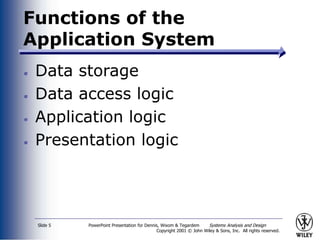
Functions of the
Application System
Data storage
Data access logic
Application logic
Presentation logic
PowerPoint Presentation for Dennis, Wixom & Tegardem Systems Analysis and Design
Copyright 2001 © John Wiley & Sons, Inc. All rights reserved.
Slide 6
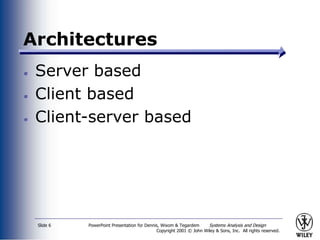
Architectures
Server based
Client based
Client-server based
PowerPoint Presentation for Dennis, Wixom & Tegardem Systems Analysis and Design
Copyright 2001 © John Wiley & Sons, Inc. All rights reserved.
Slide 7
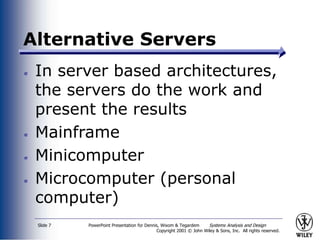
Alternative Servers
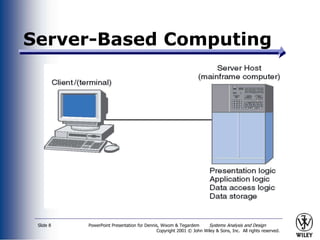
In server based architectures,
the servers do the work and
present the results
Mainframe
Minicomputer
Microcomputer (personal
computer)
PowerPoint Presentation for Dennis, Wixom & Tegardem Systems Analysis and Design
Copyright 2001 © John Wiley & Sons, Inc. All rights reserved.
Slide 8
Server-Based Computing
PowerPoint Presentation for Dennis, Wixom & Tegardem Systems Analysis and Design
Copyright 2001 © John Wiley & Sons, Inc. All rights reserved.
Slide 9
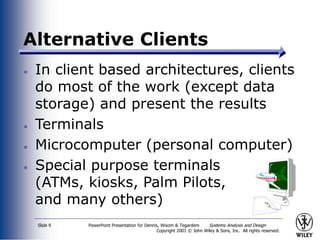
Alternative Clients
In client based architectures, clients
do most of the work (except data
storage) and present the results
Terminals
Microcomputer (personal computer)
Special purpose terminals
(ATMs, kiosks, Palm Pilots,
and many others)
PowerPoint Presentation for Dennis, Wixom & Tegardem Systems Analysis and Design
Copyright 2001 © John Wiley & Sons, Inc. All rights reserved.
Slide 10
Client-Based Computing
PowerPoint Presentation for Dennis, Wixom & Tegardem Systems Analysis and Design
Copyright 2001 © John Wiley & Sons, Inc. All rights reserved.
Slide 11
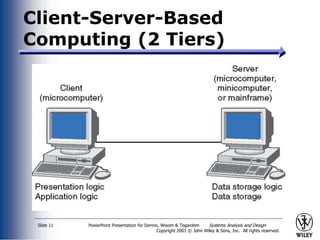
Client-Server-Based
Computing (2 Tiers)
PowerPoint Presentation for Dennis, Wixom & Tegardem Systems Analysis and Design
Copyright 2001 © John Wiley & Sons, Inc. All rights reserved.
Slide 12
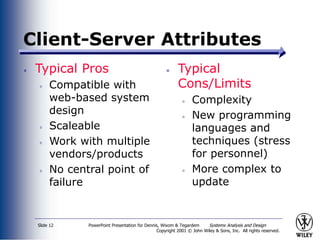
Client-Server Attributes
Typical Pros
Compatible with
web-based system
design
Scaleable
Work with multiple
vendors/products
No central point of
failure
Typical
Cons/Limits
Complexity
New programming
languages and
techniques (stress
for personnel)
More complex to
update
PowerPoint Presentation for Dennis, Wixom & Tegardem Systems Analysis and Design
Copyright 2001 © John Wiley & Sons, Inc. All rights reserved.
Slide 13
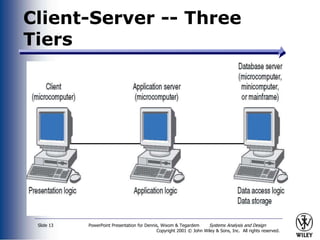
Client-Server -- Three
Tiers
PowerPoint Presentation for Dennis, Wixom & Tegardem Systems Analysis and Design
Copyright 2001 © John Wiley & Sons, Inc. All rights reserved.
Slide 14
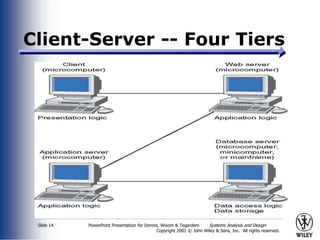
Client-Server -- Four Tiers
PowerPoint Presentation for Dennis, Wixom & Tegardem Systems Analysis and Design
Copyright 2001 © John Wiley & Sons, Inc. All rights reserved.
Slide 15
N-Tiered Client-Server
Attributes
Typical Pros
Separates
processing to
better balance
load
More scaleable
Typical
Cons/Limits
Greater load on
the network
More difficult to
program and
test
PowerPoint Presentation for Dennis, Wixom & Tegardem Systems Analysis and Design
Copyright 2001 © John Wiley & Sons, Inc. All rights reserved.
Slide 16
Distributed Objects
Computing
Middleware between clients and
servers
Update middleware when changing
client code
May reduce efficiency of the
application
CORBA
DCOM
PowerPoint Presentation for Dennis, Wixom & Tegardem Systems Analysis and Design
Copyright 2001 © John Wiley & Sons, Inc. All rights reserved.
Slide 17
Realities of Infrastructure
Design
Most often the infrastructure
will be in place
Coordination of infrastructure
components is very complex
The application developer will
need to coordinate with
infrastructure specialists
PowerPoint Presentation for Dennis, Wixom & Tegardem Systems Analysis and Design
Copyright 2001 © John Wiley & Sons, Inc. All rights reserved.
Slide 18
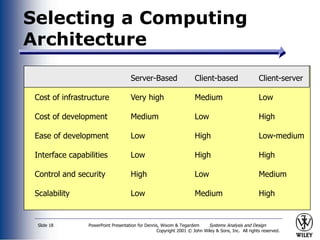
Selecting a Computing
Architecture
Server-Based Client-based Client-server
Cost of infrastructure Very high Medium Low
Cost of development Medium Low High
Ease of development Low High Low-medium
Interface capabilities Low High High
Control and security High Low Medium
Scalability Low Medium High
PowerPoint Presentation for Dennis, Wixom & Tegardem Systems Analysis and Design
Copyright 2001 © John Wiley & Sons, Inc. All rights reserved.
Slide 19
Your Turn
Consider the course registration
system at your university:
What computing architecture does it
use?
What computing architecture would
you use if you were replacing it
today?
PowerPoint Presentation for Dennis, Wixom & Tegarden Systems Analysis and Design
Copyright 2001 © John Wiley & Sons, Inc. All rights reserved.
Slide 20
INFRASTUCTURE
DESIGN
PowerPoint Presentation for Dennis, Wixom & Tegardem Systems Analysis and Design
Copyright 2001 © John Wiley & Sons, Inc. All rights reserved.
Slide 21
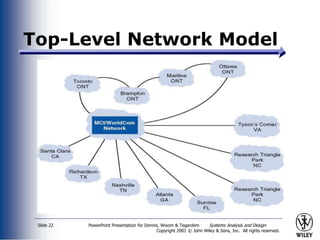
The Network Model
No standard format
Conveys complexity of the system
and how components fit together
Components are
Clients
Equipment
Connection to external systems or
networks
PowerPoint Presentation for Dennis, Wixom & Tegardem Systems Analysis and Design
Copyright 2001 © John Wiley & Sons, Inc. All rights reserved.
Slide 22
Top-Level Network Model
PowerPoint Presentation for Dennis, Wixom & Tegardem Systems Analysis and Design
Copyright 2001 © John Wiley & Sons, Inc. All rights reserved.
Slide 23
Hardware and Software
Specification
Used if new hardware or
software must be purchased
Actual acquisition of hardware
and software usually left to a
purchasing department --
especially in larger firms
PowerPoint Presentation for Dennis, Wixom & Tegardem Systems Analysis and Design
Copyright 2001 © John Wiley & Sons, Inc. All rights reserved.
Slide 24
Steps in Hardware and
Software Specification
Note hardware in low-level network
model to create list of needed hardware
Describe equipment in as much detail as
possible
Consider whether increased processing
and traffic will absorb unused hardware
capacity
Note all software running on each
hardware component
PowerPoint Presentation for Dennis, Wixom & Tegarden Systems Analysis and Design
Copyright 2001 © John Wiley & Sons, Inc. All rights reserved.
Slide 25
GLOBAL ISSUES
PowerPoint Presentation for Dennis, Wixom & Tegardem Systems Analysis and Design
Copyright 2001 © John Wiley & Sons, Inc. All rights reserved.
Slide 26
Global Requirements
Multilingual requirements
Concurrent multilingual systems
Discrete multilingual systems
Local versus centralized control
Unstated norms (e.g. dates,
currency)
24-7 Support
Communications infrastructure
PowerPoint Presentation for Dennis, Wixom & Tegarden Systems Analysis and Design
Copyright 2001 © John Wiley & Sons, Inc. All rights reserved.
Slide 27
SECURITY
PowerPoint Presentation for Dennis, Wixom & Tegardem Systems Analysis and Design
Copyright 2001 © John Wiley & Sons, Inc. All rights reserved.
Slide 28
Identifying Threats to the
System
A threat is any potential adverse
occurrence that can do harm to the
application or its data
Threats come from internal as well
as external sources
Categories of threats
Disruptions, destruction and disaster
Unauthorized access
PowerPoint Presentation for Dennis, Wixom & Tegardem Systems Analysis and Design
Copyright 2001 © John Wiley & Sons, Inc. All rights reserved.
Slide 29
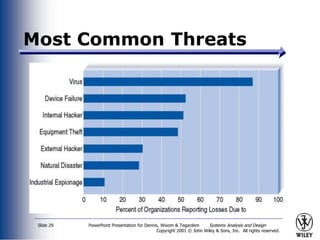
Most Common Threats
PowerPoint Presentation for Dennis, Wixom & Tegardem Systems Analysis and Design
Copyright 2001 © John Wiley & Sons, Inc. All rights reserved.
Slide 30
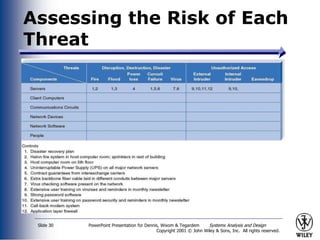
Assessing the Risk of Each
Threat
PowerPoint Presentation for Dennis, Wixom & Tegardem Systems Analysis and Design
Copyright 2001 © John Wiley & Sons, Inc. All rights reserved.
Slide 31
Creating Controls
A control is something that
mitigates or stops a threat
Controls include
redundancy
fault tolerant servers
disaster recovery plans
anti-virus software
PowerPoint Presentation for Dennis, Wixom & Tegardem Systems Analysis and Design
Copyright 2001 © John Wiley & Sons, Inc. All rights reserved.
Slide 32
Additional Controls
Include
A security policy
Passwords and encryption
Firewalls
PowerPoint Presentation for Dennis, Wixom & Tegardem Systems Analysis and Design
Copyright 2001 © John Wiley & Sons, Inc. All rights reserved.
What sort of computer
architecture would you
recommend for CD Solutions?
Explain your preference.
PowerPoint Presentation for Dennis, Wixom & Tegardem Systems Analysis and Design
Copyright 2001 © John Wiley & Sons, Inc. All rights reserved.
Slide 34
Summary
The three fundamental computing
architectures are server-based, client-based,
and client-server based.
The network model shows technical
components of the system and their
geographic location throughout the
organization.
Hardware and software must be specified for
acquisition in the project
The systems analyst needs to also account
for global issues and security measures.
PowerPoint Presentation for Dennis, Wixom & Tegardem Systems Analysis and Design
Copyright 2001 © John Wiley & Sons, Inc. All rights reserved.
Slide 35
Expanding the Domain
To contrast the approaches of
CORBA and DCOM/COM from
Microsoft, check the following
websites:
http://www.corba.org
http://www.microsoft.com/com

system architecture.ppt

  • 1.
    PowerPoint Presentation forDennis, Wixom & Tegarden Systems Analysis and Design Copyright 2001 © John Wiley & Sons, Inc. All rights reserved. Slide 1 System Architecture Design Chapter 10
  • 2.
    PowerPoint Presentation forDennis, Wixom & Tegardem Systems Analysis and Design Copyright 2001 © John Wiley & Sons, Inc. All rights reserved. Slide 2 Key Definitions The system architecture design consists of plans for the hardware, software, communications, security , and global support for the new application The designers must decide if processing will occur in the server (server-based), at the personal computer (client-based), or in some combination of these (client- server based).
  • 3.
    PowerPoint Presentation forDennis, Wixom & Tegardem Systems Analysis and Design Copyright 2001 © John Wiley & Sons, Inc. All rights reserved. Slide 3 Key Definitions The network model shows major components of the system, where they are located and how they will be connected to one another. The hardware and software specifications describe these components in detail and aid those responsible for purchase and acquisition of these products.
  • 4.
    PowerPoint Presentation forDennis, Wixom & Tegarden Systems Analysis and Design Copyright 2001 © John Wiley & Sons, Inc. All rights reserved. Slide 4 COMPUTING ARCHITECTURES
  • 5.
    PowerPoint Presentation forDennis, Wixom & Tegardem Systems Analysis and Design Copyright 2001 © John Wiley & Sons, Inc. All rights reserved. Slide 5 Functions of the Application System Data storage Data access logic Application logic Presentation logic
  • 6.
    PowerPoint Presentation forDennis, Wixom & Tegardem Systems Analysis and Design Copyright 2001 © John Wiley & Sons, Inc. All rights reserved. Slide 6 Architectures Server based Client based Client-server based
  • 7.
    PowerPoint Presentation forDennis, Wixom & Tegardem Systems Analysis and Design Copyright 2001 © John Wiley & Sons, Inc. All rights reserved. Slide 7 Alternative Servers In server based architectures, the servers do the work and present the results Mainframe Minicomputer Microcomputer (personal computer)
  • 8.
    PowerPoint Presentation forDennis, Wixom & Tegardem Systems Analysis and Design Copyright 2001 © John Wiley & Sons, Inc. All rights reserved. Slide 8 Server-Based Computing
  • 9.
    PowerPoint Presentation forDennis, Wixom & Tegardem Systems Analysis and Design Copyright 2001 © John Wiley & Sons, Inc. All rights reserved. Slide 9 Alternative Clients In client based architectures, clients do most of the work (except data storage) and present the results Terminals Microcomputer (personal computer) Special purpose terminals (ATMs, kiosks, Palm Pilots, and many others)
  • 10.
    PowerPoint Presentation forDennis, Wixom & Tegardem Systems Analysis and Design Copyright 2001 © John Wiley & Sons, Inc. All rights reserved. Slide 10 Client-Based Computing
  • 11.
    PowerPoint Presentation forDennis, Wixom & Tegardem Systems Analysis and Design Copyright 2001 © John Wiley & Sons, Inc. All rights reserved. Slide 11 Client-Server-Based Computing (2 Tiers)
  • 12.
    PowerPoint Presentation forDennis, Wixom & Tegardem Systems Analysis and Design Copyright 2001 © John Wiley & Sons, Inc. All rights reserved. Slide 12 Client-Server Attributes Typical Pros Compatible with web-based system design Scaleable Work with multiple vendors/products No central point of failure Typical Cons/Limits Complexity New programming languages and techniques (stress for personnel) More complex to update
  • 13.
    PowerPoint Presentation forDennis, Wixom & Tegardem Systems Analysis and Design Copyright 2001 © John Wiley & Sons, Inc. All rights reserved. Slide 13 Client-Server -- Three Tiers
  • 14.
    PowerPoint Presentation forDennis, Wixom & Tegardem Systems Analysis and Design Copyright 2001 © John Wiley & Sons, Inc. All rights reserved. Slide 14 Client-Server -- Four Tiers
  • 15.
    PowerPoint Presentation forDennis, Wixom & Tegardem Systems Analysis and Design Copyright 2001 © John Wiley & Sons, Inc. All rights reserved. Slide 15 N-Tiered Client-Server Attributes Typical Pros Separates processing to better balance load More scaleable Typical Cons/Limits Greater load on the network More difficult to program and test
  • 16.
    PowerPoint Presentation forDennis, Wixom & Tegardem Systems Analysis and Design Copyright 2001 © John Wiley & Sons, Inc. All rights reserved. Slide 16 Distributed Objects Computing Middleware between clients and servers Update middleware when changing client code May reduce efficiency of the application CORBA DCOM
  • 17.
    PowerPoint Presentation forDennis, Wixom & Tegardem Systems Analysis and Design Copyright 2001 © John Wiley & Sons, Inc. All rights reserved. Slide 17 Realities of Infrastructure Design Most often the infrastructure will be in place Coordination of infrastructure components is very complex The application developer will need to coordinate with infrastructure specialists
  • 18.
    PowerPoint Presentation forDennis, Wixom & Tegardem Systems Analysis and Design Copyright 2001 © John Wiley & Sons, Inc. All rights reserved. Slide 18 Selecting a Computing Architecture Server-Based Client-based Client-server Cost of infrastructure Very high Medium Low Cost of development Medium Low High Ease of development Low High Low-medium Interface capabilities Low High High Control and security High Low Medium Scalability Low Medium High
  • 19.
    PowerPoint Presentation forDennis, Wixom & Tegardem Systems Analysis and Design Copyright 2001 © John Wiley & Sons, Inc. All rights reserved. Slide 19 Your Turn Consider the course registration system at your university: What computing architecture does it use? What computing architecture would you use if you were replacing it today?
  • 20.
    PowerPoint Presentation forDennis, Wixom & Tegarden Systems Analysis and Design Copyright 2001 © John Wiley & Sons, Inc. All rights reserved. Slide 20 INFRASTUCTURE DESIGN
  • 21.
    PowerPoint Presentation forDennis, Wixom & Tegardem Systems Analysis and Design Copyright 2001 © John Wiley & Sons, Inc. All rights reserved. Slide 21 The Network Model No standard format Conveys complexity of the system and how components fit together Components are Clients Equipment Connection to external systems or networks
  • 22.
    PowerPoint Presentation forDennis, Wixom & Tegardem Systems Analysis and Design Copyright 2001 © John Wiley & Sons, Inc. All rights reserved. Slide 22 Top-Level Network Model
  • 23.
    PowerPoint Presentation forDennis, Wixom & Tegardem Systems Analysis and Design Copyright 2001 © John Wiley & Sons, Inc. All rights reserved. Slide 23 Hardware and Software Specification Used if new hardware or software must be purchased Actual acquisition of hardware and software usually left to a purchasing department -- especially in larger firms
  • 24.
    PowerPoint Presentation forDennis, Wixom & Tegardem Systems Analysis and Design Copyright 2001 © John Wiley & Sons, Inc. All rights reserved. Slide 24 Steps in Hardware and Software Specification Note hardware in low-level network model to create list of needed hardware Describe equipment in as much detail as possible Consider whether increased processing and traffic will absorb unused hardware capacity Note all software running on each hardware component
  • 25.
    PowerPoint Presentation forDennis, Wixom & Tegarden Systems Analysis and Design Copyright 2001 © John Wiley & Sons, Inc. All rights reserved. Slide 25 GLOBAL ISSUES
  • 26.
    PowerPoint Presentation forDennis, Wixom & Tegardem Systems Analysis and Design Copyright 2001 © John Wiley & Sons, Inc. All rights reserved. Slide 26 Global Requirements Multilingual requirements Concurrent multilingual systems Discrete multilingual systems Local versus centralized control Unstated norms (e.g. dates, currency) 24-7 Support Communications infrastructure
  • 27.
    PowerPoint Presentation forDennis, Wixom & Tegarden Systems Analysis and Design Copyright 2001 © John Wiley & Sons, Inc. All rights reserved. Slide 27 SECURITY
  • 28.
    PowerPoint Presentation forDennis, Wixom & Tegardem Systems Analysis and Design Copyright 2001 © John Wiley & Sons, Inc. All rights reserved. Slide 28 Identifying Threats to the System A threat is any potential adverse occurrence that can do harm to the application or its data Threats come from internal as well as external sources Categories of threats Disruptions, destruction and disaster Unauthorized access
  • 29.
    PowerPoint Presentation forDennis, Wixom & Tegardem Systems Analysis and Design Copyright 2001 © John Wiley & Sons, Inc. All rights reserved. Slide 29 Most Common Threats
  • 30.
    PowerPoint Presentation forDennis, Wixom & Tegardem Systems Analysis and Design Copyright 2001 © John Wiley & Sons, Inc. All rights reserved. Slide 30 Assessing the Risk of Each Threat
  • 31.
    PowerPoint Presentation forDennis, Wixom & Tegardem Systems Analysis and Design Copyright 2001 © John Wiley & Sons, Inc. All rights reserved. Slide 31 Creating Controls A control is something that mitigates or stops a threat Controls include redundancy fault tolerant servers disaster recovery plans anti-virus software
  • 32.
    PowerPoint Presentation forDennis, Wixom & Tegardem Systems Analysis and Design Copyright 2001 © John Wiley & Sons, Inc. All rights reserved. Slide 32 Additional Controls Include A security policy Passwords and encryption Firewalls
  • 33.
    PowerPoint Presentation forDennis, Wixom & Tegardem Systems Analysis and Design Copyright 2001 © John Wiley & Sons, Inc. All rights reserved. What sort of computer architecture would you recommend for CD Solutions? Explain your preference.
  • 34.
    PowerPoint Presentation forDennis, Wixom & Tegardem Systems Analysis and Design Copyright 2001 © John Wiley & Sons, Inc. All rights reserved. Slide 34 Summary The three fundamental computing architectures are server-based, client-based, and client-server based. The network model shows technical components of the system and their geographic location throughout the organization. Hardware and software must be specified for acquisition in the project The systems analyst needs to also account for global issues and security measures.
  • 35.
    PowerPoint Presentation forDennis, Wixom & Tegardem Systems Analysis and Design Copyright 2001 © John Wiley & Sons, Inc. All rights reserved. Slide 35 Expanding the Domain To contrast the approaches of CORBA and DCOM/COM from Microsoft, check the following websites: http://www.corba.org http://www.microsoft.com/com