Systems Analysis and Design
9th Edition
Chapter 10
System Architecture
Chapter Objectives
• Provide a checklist of issues to consider when
selecting a system architecture
• Describe servers, server-based processing,
clients, and client-based processing
• Explain client/server architecture, including
tiers, cost-benefit issues, and performance
• Compare in-house e-commerce development
with packaged solutions
2
Chapter Objectives
• Discuss the potential impact of cloud
computing and Web 2.0
• Explain the difference between online and
batch processing
• Define network topology, including
hierarchical, bus, ring, and star models
3
Chapter Objectives
• Explain network protocols and licensing issues
• Describe wireless networking, including
wireless standards, topologies, and trends
• Describe the system design specification
4
Introduction
• An effective system combines elements into
an architecture, or design, that is
flexible, cost-effective, technically sound, and
able to support the information needs of the
business
• System architecture translates the logical
design of an information system into a
physical structure that includes
hardware, software, network support, and
processing methods
5
System Architecture Checklist
• Enterprise Resource Planning (ERP)
– The objective of ERP is to establish a company-
wide strategy for using IT resources
– Supply chain management (SCM)
• Initial Cost and TCO
– During the final design stage, you make decisions
that will have a major impact on the initial costs
and TCO for the new system
– You should review all previous cost estimates
6
System Architecture Checklist
• Scalability
– Scalability, also called extensibility, refers to a
system’s ability to expand, change or downsize
easily to meet the changing need of a business
enterprise
– Especially important in implementing systems that
are volume-rated, such as transaction processing
systems
7
System Architecture Checklist
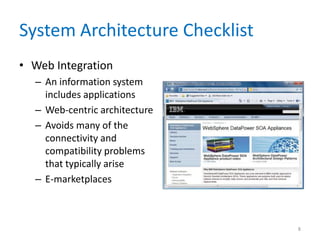
• Web Integration
– An information system
includes applications
– Web-centric architecture
– Avoids many of the
connectivity and
compatibility problems
that typically arise
– E-marketplaces
8
System Architecture Checklist
• Legacy System Interface Requirements
– The new system might have to interface with one
or more legacy systems
– Interfacing a new system with a legacy system
involves analysis of data formats and compatibility
– The analyst must know if the new application
eventually will replace the legacy system
9
System Architecture Checklist
• Processing Options
– In planning the architecture, designers also must
consider how the system will process data - online
or in batches
– Provision must be made for backup and speedy
recovery in the event of system failure
10
System Architecture Checklist
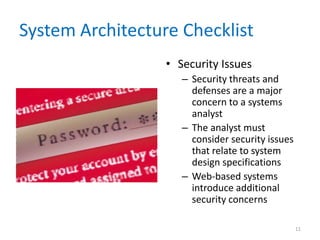
• Security Issues
– Security threats and
defenses are a major
concern to a systems
analyst
– The analyst must
consider security issues
that relate to system
design specifications
– Web-based systems
introduce additional
security concerns
11
Planning the Architecture
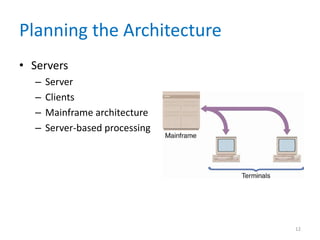
• Servers
– Server
– Clients
– Mainframe architecture
– Server-based processing
12
Planning the Architecture
• Clients
– As PC technology exploded in the mid-1980s and
1990s, powerful microcomputers quickly
appeared on corporate desktops
– Users found that they could run their own word
processing, spreadsheet, and database
applications
– Companies linked the stand-alone computers into
networks
13
Planning the Architecture
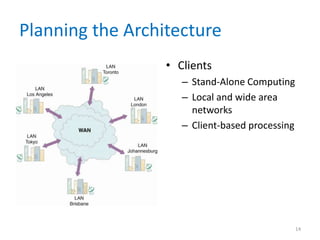
• Clients
– Stand-Alone Computing
– Local and wide area
networks
– Client-based processing
14
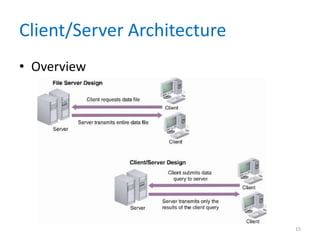
Client/Server Architecture
• Overview
15
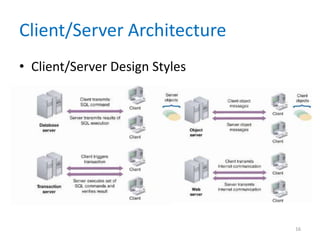
Client/Server Architecture
• Client/Server Design Styles
16
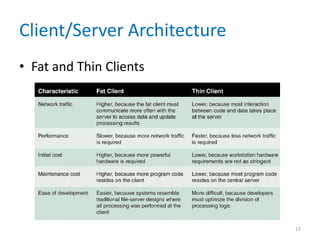
Client/Server Architecture
• Fat and Thin Clients
17
Client/Server Architecture
• Client/Server Tiers
– Two-tier design
– Three-tier design
• Middleware
– Enables the tiers to communicate and pass data
back and forth
– Provides a transparent interface
– Can integrate legacy systems and Web-based
applications
18
Client/Server Architecture
• Cost-Benefit Issues
– Client/server systems enable the firm to scale the
system in a rapidly changing environment
– Client/server computing also allows companies to
transfer applications from expensive mainframes
to less expensive client platforms
– Client/server systems reduce network load and
improve response times
19
Client/Server Architecture
• Client/Server Performance Issues
– In contrast to the centralized system, a
client/server design separates applications and
data
– Distributed database management system
(DDBMS)
– The system is scalable, so new data sites can be
added without reworking the system design
– The system is less likely to experience catastrophic
failure
20
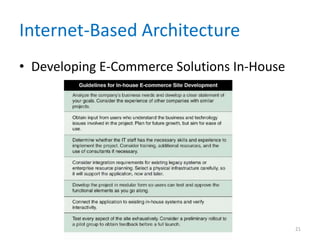
Internet-Based Architecture
• Developing E-Commerce Solutions In-House
21
Internet-Based Architecture
• Packaged Solutions and E-commerce Service
Providers
– Many vendors offer turnkey systems for
companies
– Another alternative is to use an application service
provider (ASP)
– Another option is managed hosting
– Consider the experience of other companies in
the same industry
22
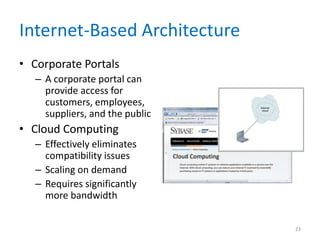
Internet-Based Architecture
• Corporate Portals
– A corporate portal can
provide access for
customers, employees,
suppliers, and the public
• Cloud Computing
– Effectively eliminates
compatibility issues
– Scaling on demand
– Requires significantly
more bandwidth
23
Internet-Based Architecture
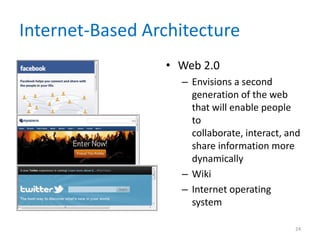
• Web 2.0
– Envisions a second
generation of the web
that will enable people
to
collaborate, interact, and
share information more
dynamically
– Wiki
– Internet operating
system
24
Processing Methods
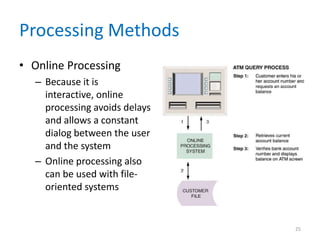
• Online Processing
– Because it is
interactive, online
processing avoids delays
and allows a constant
dialog between the user
and the system
– Online processing also
can be used with file-
oriented systems
25
Processing Methods
• Batch Processing
– The IT operations group can run batch programs
on a predetermined schedule, without user
involvement, during regular business hours, at
night, or on weekends
– Require significantly fewer network resources
than online systems
26
Processing Methods
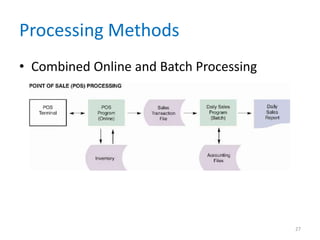
• Combined Online and Batch Processing
27
Network Models
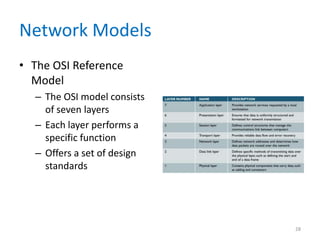
• The OSI Reference
Model
– The OSI model consists
of seven layers
– Each layer performs a
specific function
– Offers a set of design
standards
28
Network Models
• Network Protocols
– In all cases, the network must use a protocol
– Transmission Control Protocol/Internet Protocol
(TCP/IP)
– File Transfer Protocol (FTP)
29
Network Models
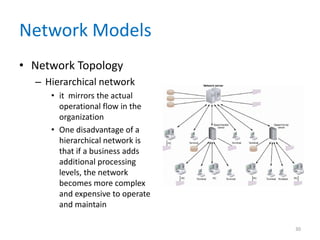
• Network Topology
– Hierarchical network
• it mirrors the actual
operational flow in the
organization
• One disadvantage of a
hierarchical network is
that if a business adds
additional processing
levels, the network
becomes more complex
and expensive to operate
and maintain
30
Network Models
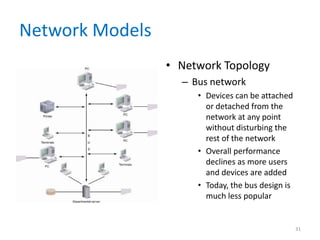
• Network Topology
– Bus network
• Devices can be attached
or detached from the
network at any point
without disturbing the
rest of the network
• Overall performance
declines as more users
and devices are added
• Today, the bus design is
much less popular
31
Network Models
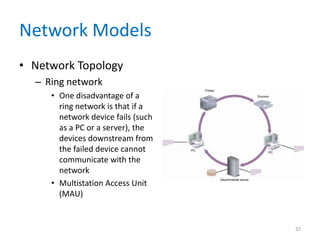
• Network Topology
– Ring network
• One disadvantage of a
ring network is that if a
network device fails (such
as a PC or a server), the
devices downstream from
the failed device cannot
communicate with the
network
• Multistation Access Unit
(MAU)
32
Network Models
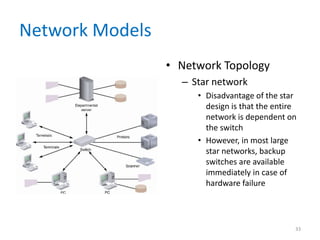
• Network Topology
– Star network
• Disadvantage of the star
design is that the entire
network is dependent on
the switch
• However, in most large
star networks, backup
switches are available
immediately in case of
hardware failure
33
Network Models
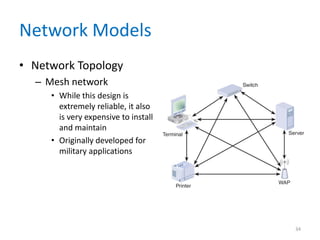
• Network Topology
– Mesh network
• While this design is
extremely reliable, it also
is very expensive to install
and maintain
• Originally developed for
military applications
34
Network Models
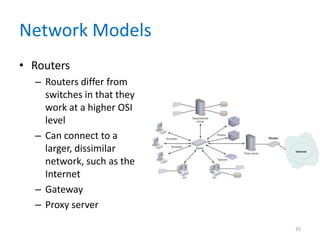
• Routers
– Routers differ from
switches in that they
work at a higher OSI
level
– Can connect to a
larger, dissimilar
network, such as the
Internet
– Gateway
– Proxy server
35
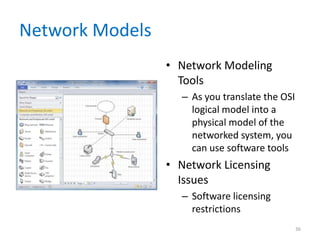
Network Models
• Network Modeling
Tools
– As you translate the OSI
logical model into a
physical model of the
networked system, you
can use software tools
• Network Licensing
Issues
– Software licensing
restrictions
36
Wireless Networks
• A wireless local area network, or WLAN
• Wireless Network Standards
– 802.11
– Institute of Electrical and Electronics Engineers
(IEEE)
– Amendments
– Mbps (megabits per second)
37
Wireless Networks
• Wireless Network Standards
– 802.11g
– 802.11n
– Multiple input/multiple output (MIMO)
– Multipath design
– 802.11y
38
Wireless Networks
• Wireless Network Topologies
– Basic Service Set (BSS) – infrastructure mode
– Access point
– Extended Service Set (ESS)
– Roaming
– Independence Service Set (ISS) – peer-to-peer
mode
39
Wireless Networks
• Wireless Trends
– Wi-Fi Alliance
– Wi-Fi (wireless fidelity)
– BlueTooth
– On addition to 802.11 protocols for LANs, IEEE is
working on 802.16 standards
– MANs (metropolitan area networks)
– WiMAX
40
Systems Design Completion
• System Design Specification
– A typical system design specification uses a
structure similar to the following:
1. Management summary
2. System components
3. System environment
4. Implementation requirements
5. Time and cost estimates
6. Additional material
41
Systems Design Completion
• User Approval
– Users must review and approve the interface
design, report and menu designs, data entry
screens, source documents, and other areas of the
system that affect them
– Other IT department members also need to review
the system design specification
– When the system design specification is complete, you
distribute the document to a target group of users, IT
department personnel, and company management
42
Systems Design Completion
• Presentations
– The first presentation is to the systems
analysts, programmers, and technical support staff
members
– Your next presentation is to department managers
and users from departments affected by the system
– The final presentation is for company management
– Management might reach one of three decisions:
proceed with systems development, perform
additional work on the systems design phase, or
terminate the project
43
Chapter Summary
• An information system combines
hardware, software, data, procedures, and
people into a system architecture
• The analyst must consider enterprise resource
planning, initial cost and TCO, scalability, Web
integration, legacy interface
requirements, processing options, and
security issues
• An architecture requires servers and clients
44
Chapter Summary
• Compared to file server designs, client/server
systems are more scalable and flexible
• In implementing a design, an analyst should
consider e-commerce strategies, the
availability of packaged solutions, and
corporate portals, which are entrances to a
multifunction Web site
• The primary processing methods are online
and batch processing
45
Chapter Summary
• Networks allow the sharing of
hardware, software, and data resources in order
to reduce expenses and provide more capability
to users
• The way a network is configured is called the
network topology
• The system design specification presents the
complete systems design for an information
system
• Chapter 10 complete
46

chapter10-120827115414-phpapp02.pdf

  • 1.
    Systems Analysis andDesign 9th Edition Chapter 10 System Architecture
  • 2.
    Chapter Objectives • Providea checklist of issues to consider when selecting a system architecture • Describe servers, server-based processing, clients, and client-based processing • Explain client/server architecture, including tiers, cost-benefit issues, and performance • Compare in-house e-commerce development with packaged solutions 2
  • 3.
    Chapter Objectives • Discussthe potential impact of cloud computing and Web 2.0 • Explain the difference between online and batch processing • Define network topology, including hierarchical, bus, ring, and star models 3
  • 4.
    Chapter Objectives • Explainnetwork protocols and licensing issues • Describe wireless networking, including wireless standards, topologies, and trends • Describe the system design specification 4
  • 5.
    Introduction • An effectivesystem combines elements into an architecture, or design, that is flexible, cost-effective, technically sound, and able to support the information needs of the business • System architecture translates the logical design of an information system into a physical structure that includes hardware, software, network support, and processing methods 5
  • 6.
    System Architecture Checklist •Enterprise Resource Planning (ERP) – The objective of ERP is to establish a company- wide strategy for using IT resources – Supply chain management (SCM) • Initial Cost and TCO – During the final design stage, you make decisions that will have a major impact on the initial costs and TCO for the new system – You should review all previous cost estimates 6
  • 7.
    System Architecture Checklist •Scalability – Scalability, also called extensibility, refers to a system’s ability to expand, change or downsize easily to meet the changing need of a business enterprise – Especially important in implementing systems that are volume-rated, such as transaction processing systems 7
  • 8.
    System Architecture Checklist •Web Integration – An information system includes applications – Web-centric architecture – Avoids many of the connectivity and compatibility problems that typically arise – E-marketplaces 8
  • 9.
    System Architecture Checklist •Legacy System Interface Requirements – The new system might have to interface with one or more legacy systems – Interfacing a new system with a legacy system involves analysis of data formats and compatibility – The analyst must know if the new application eventually will replace the legacy system 9
  • 10.
    System Architecture Checklist •Processing Options – In planning the architecture, designers also must consider how the system will process data - online or in batches – Provision must be made for backup and speedy recovery in the event of system failure 10
  • 11.
    System Architecture Checklist •Security Issues – Security threats and defenses are a major concern to a systems analyst – The analyst must consider security issues that relate to system design specifications – Web-based systems introduce additional security concerns 11
  • 12.
    Planning the Architecture •Servers – Server – Clients – Mainframe architecture – Server-based processing 12
  • 13.
    Planning the Architecture •Clients – As PC technology exploded in the mid-1980s and 1990s, powerful microcomputers quickly appeared on corporate desktops – Users found that they could run their own word processing, spreadsheet, and database applications – Companies linked the stand-alone computers into networks 13
  • 14.
    Planning the Architecture •Clients – Stand-Alone Computing – Local and wide area networks – Client-based processing 14
  • 15.
  • 16.
  • 17.
  • 18.
    Client/Server Architecture • Client/ServerTiers – Two-tier design – Three-tier design • Middleware – Enables the tiers to communicate and pass data back and forth – Provides a transparent interface – Can integrate legacy systems and Web-based applications 18
  • 19.
    Client/Server Architecture • Cost-BenefitIssues – Client/server systems enable the firm to scale the system in a rapidly changing environment – Client/server computing also allows companies to transfer applications from expensive mainframes to less expensive client platforms – Client/server systems reduce network load and improve response times 19
  • 20.
    Client/Server Architecture • Client/ServerPerformance Issues – In contrast to the centralized system, a client/server design separates applications and data – Distributed database management system (DDBMS) – The system is scalable, so new data sites can be added without reworking the system design – The system is less likely to experience catastrophic failure 20
  • 21.
    Internet-Based Architecture • DevelopingE-Commerce Solutions In-House 21
  • 22.
    Internet-Based Architecture • PackagedSolutions and E-commerce Service Providers – Many vendors offer turnkey systems for companies – Another alternative is to use an application service provider (ASP) – Another option is managed hosting – Consider the experience of other companies in the same industry 22
  • 23.
    Internet-Based Architecture • CorporatePortals – A corporate portal can provide access for customers, employees, suppliers, and the public • Cloud Computing – Effectively eliminates compatibility issues – Scaling on demand – Requires significantly more bandwidth 23
  • 24.
    Internet-Based Architecture • Web2.0 – Envisions a second generation of the web that will enable people to collaborate, interact, and share information more dynamically – Wiki – Internet operating system 24
  • 25.
    Processing Methods • OnlineProcessing – Because it is interactive, online processing avoids delays and allows a constant dialog between the user and the system – Online processing also can be used with file- oriented systems 25
  • 26.
    Processing Methods • BatchProcessing – The IT operations group can run batch programs on a predetermined schedule, without user involvement, during regular business hours, at night, or on weekends – Require significantly fewer network resources than online systems 26
  • 27.
    Processing Methods • CombinedOnline and Batch Processing 27
  • 28.
    Network Models • TheOSI Reference Model – The OSI model consists of seven layers – Each layer performs a specific function – Offers a set of design standards 28
  • 29.
    Network Models • NetworkProtocols – In all cases, the network must use a protocol – Transmission Control Protocol/Internet Protocol (TCP/IP) – File Transfer Protocol (FTP) 29
  • 30.
    Network Models • NetworkTopology – Hierarchical network • it mirrors the actual operational flow in the organization • One disadvantage of a hierarchical network is that if a business adds additional processing levels, the network becomes more complex and expensive to operate and maintain 30
  • 31.
    Network Models • NetworkTopology – Bus network • Devices can be attached or detached from the network at any point without disturbing the rest of the network • Overall performance declines as more users and devices are added • Today, the bus design is much less popular 31
  • 32.
    Network Models • NetworkTopology – Ring network • One disadvantage of a ring network is that if a network device fails (such as a PC or a server), the devices downstream from the failed device cannot communicate with the network • Multistation Access Unit (MAU) 32
  • 33.
    Network Models • NetworkTopology – Star network • Disadvantage of the star design is that the entire network is dependent on the switch • However, in most large star networks, backup switches are available immediately in case of hardware failure 33
  • 34.
    Network Models • NetworkTopology – Mesh network • While this design is extremely reliable, it also is very expensive to install and maintain • Originally developed for military applications 34
  • 35.
    Network Models • Routers –Routers differ from switches in that they work at a higher OSI level – Can connect to a larger, dissimilar network, such as the Internet – Gateway – Proxy server 35
  • 36.
    Network Models • NetworkModeling Tools – As you translate the OSI logical model into a physical model of the networked system, you can use software tools • Network Licensing Issues – Software licensing restrictions 36
  • 37.
    Wireless Networks • Awireless local area network, or WLAN • Wireless Network Standards – 802.11 – Institute of Electrical and Electronics Engineers (IEEE) – Amendments – Mbps (megabits per second) 37
  • 38.
    Wireless Networks • WirelessNetwork Standards – 802.11g – 802.11n – Multiple input/multiple output (MIMO) – Multipath design – 802.11y 38
  • 39.
    Wireless Networks • WirelessNetwork Topologies – Basic Service Set (BSS) – infrastructure mode – Access point – Extended Service Set (ESS) – Roaming – Independence Service Set (ISS) – peer-to-peer mode 39
  • 40.
    Wireless Networks • WirelessTrends – Wi-Fi Alliance – Wi-Fi (wireless fidelity) – BlueTooth – On addition to 802.11 protocols for LANs, IEEE is working on 802.16 standards – MANs (metropolitan area networks) – WiMAX 40
  • 41.
    Systems Design Completion •System Design Specification – A typical system design specification uses a structure similar to the following: 1. Management summary 2. System components 3. System environment 4. Implementation requirements 5. Time and cost estimates 6. Additional material 41
  • 42.
    Systems Design Completion •User Approval – Users must review and approve the interface design, report and menu designs, data entry screens, source documents, and other areas of the system that affect them – Other IT department members also need to review the system design specification – When the system design specification is complete, you distribute the document to a target group of users, IT department personnel, and company management 42
  • 43.
    Systems Design Completion •Presentations – The first presentation is to the systems analysts, programmers, and technical support staff members – Your next presentation is to department managers and users from departments affected by the system – The final presentation is for company management – Management might reach one of three decisions: proceed with systems development, perform additional work on the systems design phase, or terminate the project 43
  • 44.
    Chapter Summary • Aninformation system combines hardware, software, data, procedures, and people into a system architecture • The analyst must consider enterprise resource planning, initial cost and TCO, scalability, Web integration, legacy interface requirements, processing options, and security issues • An architecture requires servers and clients 44
  • 45.
    Chapter Summary • Comparedto file server designs, client/server systems are more scalable and flexible • In implementing a design, an analyst should consider e-commerce strategies, the availability of packaged solutions, and corporate portals, which are entrances to a multifunction Web site • The primary processing methods are online and batch processing 45
  • 46.
    Chapter Summary • Networksallow the sharing of hardware, software, and data resources in order to reduce expenses and provide more capability to users • The way a network is configured is called the network topology • The system design specification presents the complete systems design for an information system • Chapter 10 complete 46