Architectural Design
 To explain the advantages and disadvantages of
different distributed systems architectures
 To discuss client-server and distributed object
architectures
 To describe object request brokers and the principles
underlying the CORBA standards
 To introduce peer-to-peer and service-oriented
architectures as new models of distributed computing.
1
Topics covered
 Architectural design decisions
 System organization
 Decomposition styles
 Control styles
 Reference architectures
2
Software architecture
 The design process for identifying the sub-
systems making up a system and the
framework for sub-system control and
communication is architectural design.
 The output of this design process is a
description of the software architecture.
3
Architectural design
 An early stage of the system design process.
 Represents the link between specification and
design processes.
 Often carried out in parallel with some
specification activities.
 It involves identifying major system
components and their communications.
4
Advantages of explicit architecture
 Stakeholder communication
– Architecture may be used as a focus of discussion
by system stakeholders.
 System analysis
– Means that analysis of whether the system can
meet its non-functional requirements is possible.
 Large-scale reuse
– The architecture may be reusable across a range of
systems.
5
Architecture and system
characteristics
 Performance
– Localize critical operations and minimize communications. Use
large rather than fine-grain components.
 Security
– Use a layered architecture with critical assets in the inner layers.
 Safety
– Localize safety-critical features in a small number of sub-
systems.
 Availability
– Include redundant components and mechanisms for fault
tolerance.
 Maintainability
– Use fine-grain, replaceable components.
6
Architectural conflicts
 Using large-grain components improves
performance but reduces maintainability.
 Introducing redundant data improves
availability but makes security more difficult.
 Localising safety-related features usually
means more communication so degraded
performance.
7
Architectural design decisions
 Is there a generic application architecture that can be
used?
 How will the system be distributed?
 What architectural styles are appropriate?
 What approach will be used to structure the system?
 How will the system be decomposed into modules?
 What control strategy should be used?
 How will the architectural design be evaluated?
 How should the architecture be documented?
8
System organization
 Reflects the basic strategy that is used to
structure a system.
 Three organisational styles are widely used:
– A shared data repository style;
– A shared services and servers style;
– An abstract machine or layered style.
9
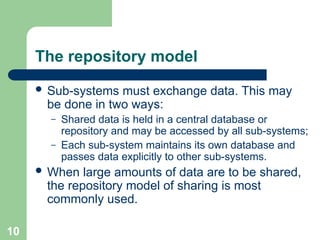
The repository model
 Sub-systems must exchange data. This may
be done in two ways:
– Shared data is held in a central database or
repository and may be accessed by all sub-systems;
– Each sub-system maintains its own database and
passes data explicitly to other sub-systems.
 When large amounts of data are to be shared,
the repository model of sharing is most
commonly used.
10
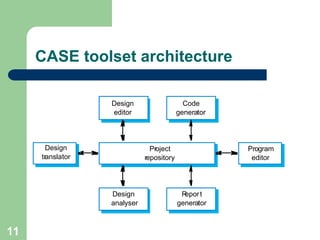
CASE toolset architecture
11
Project
repository
Design
translator
Program
editor
Design
editor
Code
generator
Design
analyser
R
eport
generator
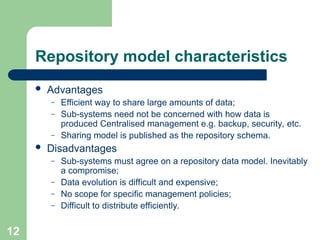
Repository model characteristics
 Advantages
– Efficient way to share large amounts of data;
– Sub-systems need not be concerned with how data is
produced Centralised management e.g. backup, security, etc.
– Sharing model is published as the repository schema.
 Disadvantages
– Sub-systems must agree on a repository data model. Inevitably
a compromise;
– Data evolution is difficult and expensive;
– No scope for specific management policies;
– Difficult to distribute efficiently.
12
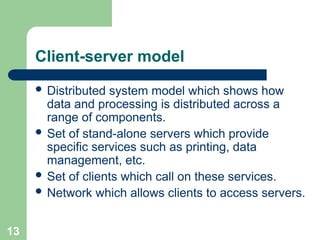
Client-server model
 Distributed system model which shows how
data and processing is distributed across a
range of components.
 Set of stand-alone servers which provide
specific services such as printing, data
management, etc.
 Set of clients which call on these services.
 Network which allows clients to access servers.
13
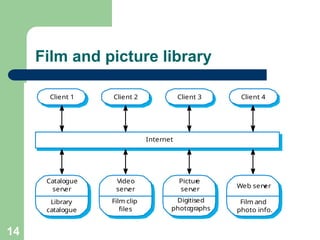
Film and picture library
Catalogue
serv
er
Library
catalogue
Video
serv
er
Film clip
files
Pictur
e
serv
er
Digitised
photo
graphs
Web serv
er
Film and
photo info.
Client 1 Client 2 Client 3 Client 4
Internet
14
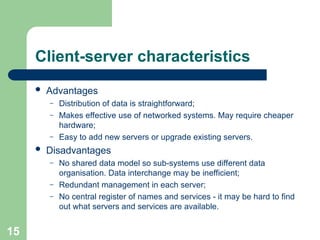
Client-server characteristics
 Advantages
– Distribution of data is straightforward;
– Makes effective use of networked systems. May require cheaper
hardware;
– Easy to add new servers or upgrade existing servers.
 Disadvantages
– No shared data model so sub-systems use different data
organisation. Data interchange may be inefficient;
– Redundant management in each server;
– No central register of names and services - it may be hard to find
out what servers and services are available.
15
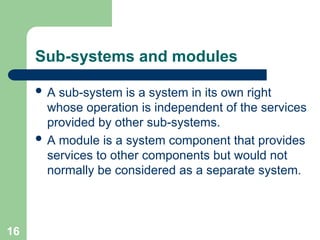
Sub-systems and modules
 A sub-system is a system in its own right
whose operation is independent of the services
provided by other sub-systems.
 A module is a system component that provides
services to other components but would not
normally be considered as a separate system.
16
Modular decomposition
 Another structural level where sub-systems are
decomposed into modules.
 Two modular decomposition models covered
– An object model where the system is decomposed
into interacting object;
– A pipeline or data-flow model where the system is
decomposed into functional modules which
transform inputs to outputs.
17
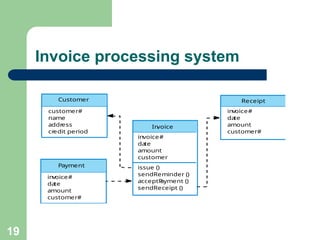
Object models
 Structure the system into a set of loosely
coupled objects with well-defined interfaces.
 Object-oriented decomposition is concerned
with identifying object classes, their attributes
and operations.
 When implemented, objects are created from
these classes and some control model used to
coordinate object operations.
18
Invoice processing system
issue ()
sendReminder ()
acceptP
ayment ()
sendReceipt ()
invoice#
da
te
amount
customer
invoice#
da
te
amount
customer#
invoice#
da
te
amount
customer#
customer#
name
addr
ess
cr
edit period
Customer
Payment
In
voice
Receipt
19
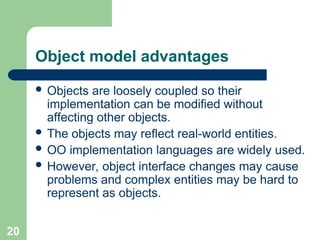
Object model advantages
 Objects are loosely coupled so their
implementation can be modified without
affecting other objects.
 The objects may reflect real-world entities.
 OO implementation languages are widely used.
 However, object interface changes may cause
problems and complex entities may be hard to
represent as objects.
20
Function-oriented pipelining
 Functional transformations process their inputs
to produce outputs.
 May be referred to as a pipe and filter model (as
in UNIX shell).
 Variants of this approach are very common.
When transformations are sequential, this is a
batch sequential model which is extensively
used in data processing systems.
 Not really suitable for interactive systems.
21
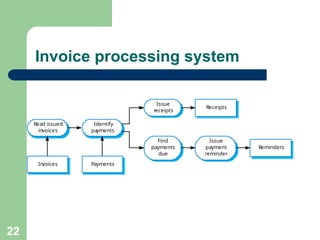
Invoice processing system
Read issued
invoices
Identify
payments
Issue
receipts
Find
payments
due
Receipts
Issue
payment
reminder
Reminders
In
voices Payments
22
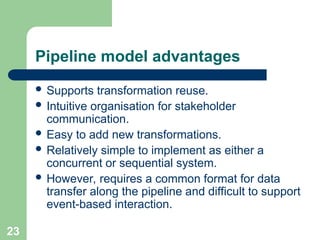
Pipeline model advantages
 Supports transformation reuse.
 Intuitive organisation for stakeholder
communication.
 Easy to add new transformations.
 Relatively simple to implement as either a
concurrent or sequential system.
 However, requires a common format for data
transfer along the pipeline and difficult to support
event-based interaction.
23
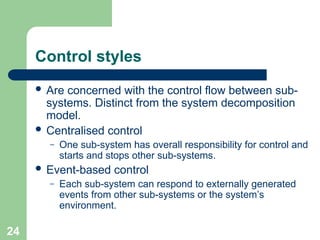
Control styles
 Are concerned with the control flow between sub-
systems. Distinct from the system decomposition
model.
 Centralised control
– One sub-system has overall responsibility for control and
starts and stops other sub-systems.
 Event-based control
– Each sub-system can respond to externally generated
events from other sub-systems or the system’s
environment.
24
Centralized control
 A control sub-system takes responsibility for managing the
execution of other sub-systems.
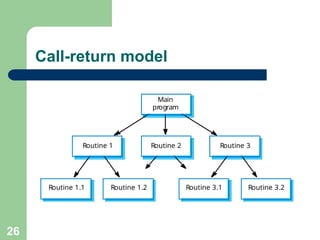
 Call-return model
– Top-down subroutine model where control starts at the top of a
subroutine hierarchy and moves downwards. Applicable to
sequential systems.
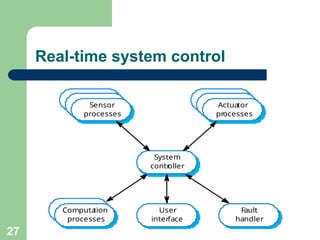
 Manager model
– Applicable to concurrent systems. One system component controls
the stopping, starting and coordination of other system processes.
Can be implemented in sequential systems as a case statement.
25
Call-return model
Routine 1.2
Routine 1.1 Routine 3.2
Routine 3.1
Routine 2 Routine 3
Routine 1
Main
program
26
Real-time system control
System
contr
oller
User
interface
Fault
handler
Computa
tion
processes
Actuator
processes
Sensor
processes
27
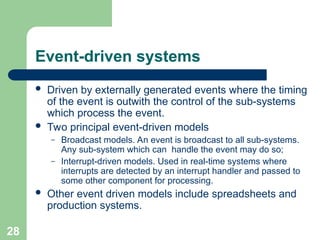
Event-driven systems
 Driven by externally generated events where the timing
of the event is outwith the control of the sub-systems
which process the event.
 Two principal event-driven models
– Broadcast models. An event is broadcast to all sub-systems.
Any sub-system which can handle the event may do so;
– Interrupt-driven models. Used in real-time systems where
interrupts are detected by an interrupt handler and passed to
some other component for processing.
 Other event driven models include spreadsheets and
production systems.
28
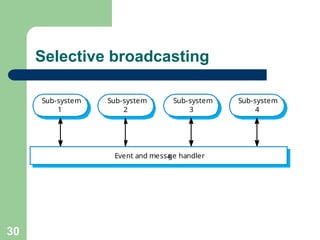
Broadcast model
 Effective in integrating sub-systems on different computers
in a network.
 Sub-systems register an interest in specific events. When
these occur, control is transferred to the sub-system which
can handle the event.
 Control policy is not embedded in the event and message
handler. Sub-systems decide on events of interest to them.
 However, sub-systems don’t know if or when an event will
be handled.
29
Selective broadcasting
Sub-system
1
Event and messa
ge handler
Sub-system
2
Sub-system
3
Sub-system
4
30
Interrupt-driven systems
 Used in real-time systems where fast response
to an event is essential.
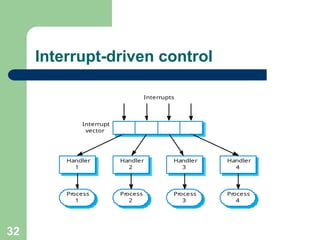
 There are known interrupt types with a handler
defined for each type.
 Each type is associated with a memory location
and a hardware switch causes transfer to its
handler.
 Allows fast response but complex to program
and difficult to validate.
31
Interrupt-driven control
Handler
1
Handler
2
Handler
3
Handler
4
Process
1
Process
2
Process
3
Process
4
Interrupts
Interrupt
vector
32
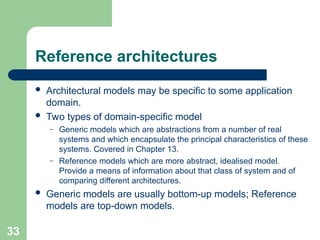
Reference architectures
 Architectural models may be specific to some application
domain.
 Two types of domain-specific model
– Generic models which are abstractions from a number of real
systems and which encapsulate the principal characteristics of these
systems. Covered in Chapter 13.
– Reference models which are more abstract, idealised model.
Provide a means of information about that class of system and of
comparing different architectures.
 Generic models are usually bottom-up models; Reference
models are top-down models.
33
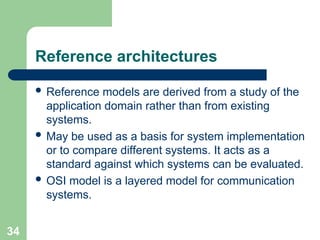
Reference architectures
 Reference models are derived from a study of the
application domain rather than from existing
systems.
 May be used as a basis for system implementation
or to compare different systems. It acts as a
standard against which systems can be evaluated.
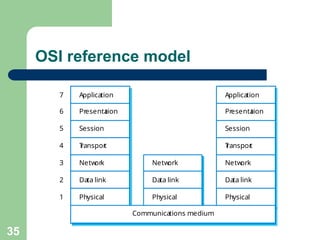
 OSI model is a layered model for communication
systems.
34
OSI reference model
Presenta
tion
Session
T
ranspor
t
Netw
ork
Data link
Physical
7
6
5
4
3
2
1
Communications medium
Netw
ork
Data link
Physical
Application
Presenta
tion
Session
T
ranspor
t
Netw
ork
Data link
Physical
Application
35
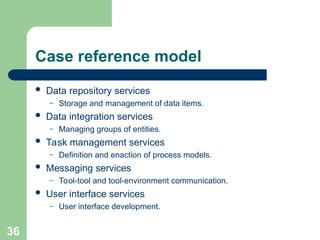
Case reference model
 Data repository services
– Storage and management of data items.
 Data integration services
– Managing groups of entities.
 Task management services
– Definition and enaction of process models.
 Messaging services
– Tool-tool and tool-environment communication.
 User interface services
– User interface development.
36

Architectural Design.pptArchitectural Design.ppt

  • 1.
    Architectural Design  Toexplain the advantages and disadvantages of different distributed systems architectures  To discuss client-server and distributed object architectures  To describe object request brokers and the principles underlying the CORBA standards  To introduce peer-to-peer and service-oriented architectures as new models of distributed computing. 1
  • 2.
    Topics covered  Architecturaldesign decisions  System organization  Decomposition styles  Control styles  Reference architectures 2
  • 3.
    Software architecture  Thedesign process for identifying the sub- systems making up a system and the framework for sub-system control and communication is architectural design.  The output of this design process is a description of the software architecture. 3
  • 4.
    Architectural design  Anearly stage of the system design process.  Represents the link between specification and design processes.  Often carried out in parallel with some specification activities.  It involves identifying major system components and their communications. 4
  • 5.
    Advantages of explicitarchitecture  Stakeholder communication – Architecture may be used as a focus of discussion by system stakeholders.  System analysis – Means that analysis of whether the system can meet its non-functional requirements is possible.  Large-scale reuse – The architecture may be reusable across a range of systems. 5
  • 6.
    Architecture and system characteristics Performance – Localize critical operations and minimize communications. Use large rather than fine-grain components.  Security – Use a layered architecture with critical assets in the inner layers.  Safety – Localize safety-critical features in a small number of sub- systems.  Availability – Include redundant components and mechanisms for fault tolerance.  Maintainability – Use fine-grain, replaceable components. 6
  • 7.
    Architectural conflicts  Usinglarge-grain components improves performance but reduces maintainability.  Introducing redundant data improves availability but makes security more difficult.  Localising safety-related features usually means more communication so degraded performance. 7
  • 8.
    Architectural design decisions Is there a generic application architecture that can be used?  How will the system be distributed?  What architectural styles are appropriate?  What approach will be used to structure the system?  How will the system be decomposed into modules?  What control strategy should be used?  How will the architectural design be evaluated?  How should the architecture be documented? 8
  • 9.
    System organization  Reflectsthe basic strategy that is used to structure a system.  Three organisational styles are widely used: – A shared data repository style; – A shared services and servers style; – An abstract machine or layered style. 9
  • 10.
    The repository model Sub-systems must exchange data. This may be done in two ways: – Shared data is held in a central database or repository and may be accessed by all sub-systems; – Each sub-system maintains its own database and passes data explicitly to other sub-systems.  When large amounts of data are to be shared, the repository model of sharing is most commonly used. 10
  • 11.
  • 12.
    Repository model characteristics Advantages – Efficient way to share large amounts of data; – Sub-systems need not be concerned with how data is produced Centralised management e.g. backup, security, etc. – Sharing model is published as the repository schema.  Disadvantages – Sub-systems must agree on a repository data model. Inevitably a compromise; – Data evolution is difficult and expensive; – No scope for specific management policies; – Difficult to distribute efficiently. 12
  • 13.
    Client-server model  Distributedsystem model which shows how data and processing is distributed across a range of components.  Set of stand-alone servers which provide specific services such as printing, data management, etc.  Set of clients which call on these services.  Network which allows clients to access servers. 13
  • 14.
    Film and picturelibrary Catalogue serv er Library catalogue Video serv er Film clip files Pictur e serv er Digitised photo graphs Web serv er Film and photo info. Client 1 Client 2 Client 3 Client 4 Internet 14
  • 15.
    Client-server characteristics  Advantages –Distribution of data is straightforward; – Makes effective use of networked systems. May require cheaper hardware; – Easy to add new servers or upgrade existing servers.  Disadvantages – No shared data model so sub-systems use different data organisation. Data interchange may be inefficient; – Redundant management in each server; – No central register of names and services - it may be hard to find out what servers and services are available. 15
  • 16.
    Sub-systems and modules A sub-system is a system in its own right whose operation is independent of the services provided by other sub-systems.  A module is a system component that provides services to other components but would not normally be considered as a separate system. 16
  • 17.
    Modular decomposition  Anotherstructural level where sub-systems are decomposed into modules.  Two modular decomposition models covered – An object model where the system is decomposed into interacting object; – A pipeline or data-flow model where the system is decomposed into functional modules which transform inputs to outputs. 17
  • 18.
    Object models  Structurethe system into a set of loosely coupled objects with well-defined interfaces.  Object-oriented decomposition is concerned with identifying object classes, their attributes and operations.  When implemented, objects are created from these classes and some control model used to coordinate object operations. 18
  • 19.
    Invoice processing system issue() sendReminder () acceptP ayment () sendReceipt () invoice# da te amount customer invoice# da te amount customer# invoice# da te amount customer# customer# name addr ess cr edit period Customer Payment In voice Receipt 19
  • 20.
    Object model advantages Objects are loosely coupled so their implementation can be modified without affecting other objects.  The objects may reflect real-world entities.  OO implementation languages are widely used.  However, object interface changes may cause problems and complex entities may be hard to represent as objects. 20
  • 21.
    Function-oriented pipelining  Functionaltransformations process their inputs to produce outputs.  May be referred to as a pipe and filter model (as in UNIX shell).  Variants of this approach are very common. When transformations are sequential, this is a batch sequential model which is extensively used in data processing systems.  Not really suitable for interactive systems. 21
  • 22.
    Invoice processing system Readissued invoices Identify payments Issue receipts Find payments due Receipts Issue payment reminder Reminders In voices Payments 22
  • 23.
    Pipeline model advantages Supports transformation reuse.  Intuitive organisation for stakeholder communication.  Easy to add new transformations.  Relatively simple to implement as either a concurrent or sequential system.  However, requires a common format for data transfer along the pipeline and difficult to support event-based interaction. 23
  • 24.
    Control styles  Areconcerned with the control flow between sub- systems. Distinct from the system decomposition model.  Centralised control – One sub-system has overall responsibility for control and starts and stops other sub-systems.  Event-based control – Each sub-system can respond to externally generated events from other sub-systems or the system’s environment. 24
  • 25.
    Centralized control  Acontrol sub-system takes responsibility for managing the execution of other sub-systems.  Call-return model – Top-down subroutine model where control starts at the top of a subroutine hierarchy and moves downwards. Applicable to sequential systems.  Manager model – Applicable to concurrent systems. One system component controls the stopping, starting and coordination of other system processes. Can be implemented in sequential systems as a case statement. 25
  • 26.
    Call-return model Routine 1.2 Routine1.1 Routine 3.2 Routine 3.1 Routine 2 Routine 3 Routine 1 Main program 26
  • 27.
  • 28.
    Event-driven systems  Drivenby externally generated events where the timing of the event is outwith the control of the sub-systems which process the event.  Two principal event-driven models – Broadcast models. An event is broadcast to all sub-systems. Any sub-system which can handle the event may do so; – Interrupt-driven models. Used in real-time systems where interrupts are detected by an interrupt handler and passed to some other component for processing.  Other event driven models include spreadsheets and production systems. 28
  • 29.
    Broadcast model  Effectivein integrating sub-systems on different computers in a network.  Sub-systems register an interest in specific events. When these occur, control is transferred to the sub-system which can handle the event.  Control policy is not embedded in the event and message handler. Sub-systems decide on events of interest to them.  However, sub-systems don’t know if or when an event will be handled. 29
  • 30.
    Selective broadcasting Sub-system 1 Event andmessa ge handler Sub-system 2 Sub-system 3 Sub-system 4 30
  • 31.
    Interrupt-driven systems  Usedin real-time systems where fast response to an event is essential.  There are known interrupt types with a handler defined for each type.  Each type is associated with a memory location and a hardware switch causes transfer to its handler.  Allows fast response but complex to program and difficult to validate. 31
  • 32.
  • 33.
    Reference architectures  Architecturalmodels may be specific to some application domain.  Two types of domain-specific model – Generic models which are abstractions from a number of real systems and which encapsulate the principal characteristics of these systems. Covered in Chapter 13. – Reference models which are more abstract, idealised model. Provide a means of information about that class of system and of comparing different architectures.  Generic models are usually bottom-up models; Reference models are top-down models. 33
  • 34.
    Reference architectures  Referencemodels are derived from a study of the application domain rather than from existing systems.  May be used as a basis for system implementation or to compare different systems. It acts as a standard against which systems can be evaluated.  OSI model is a layered model for communication systems. 34
  • 35.
    OSI reference model Presenta tion Session T ranspor t Netw ork Datalink Physical 7 6 5 4 3 2 1 Communications medium Netw ork Data link Physical Application Presenta tion Session T ranspor t Netw ork Data link Physical Application 35
  • 36.
    Case reference model Data repository services – Storage and management of data items.  Data integration services – Managing groups of entities.  Task management services – Definition and enaction of process models.  Messaging services – Tool-tool and tool-environment communication.  User interface services – User interface development. 36