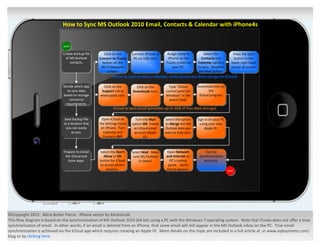
How to Sync MS Outlook 2010 Email, Contacts & Calendar with iPhone4s


                              start

                              Create backup file      Click on the     Connect iPhone to    Assign name to           Select the          Press the Sync
                                of MS Outlook      Connect to iTunes    PC via USB cord.     iPhone on the         Contacts and           button in the
                                   contacts.         button on the                         iTunes screen on      Calendar options       lower right hand
                                                    Wi-Fi Networks                              your PC.         to sync. Deselect      corner of screen.
                                                         screen.                                                  the Mail option.
                                                           iTunes to sync contacts, calendar, notes (preserves data storage on iCloud)

                              Decide which app       Click on the        Click on the        Type “iCloud        Download and run
                                to sync data        Support tab at     Downloads icon.     control panel for            the
                              based on storage     www.apple.com.                          Windows” in the        iCloud program.
                                 concerns/                                                   search field.
                               requirements.
                                                            iCloud to sync email (provides up to 5GB of free data storage)

                               Save backup file     Open iCloud on       Turn the Mail     Select the option     Sign in on your PC
                              to a location that   the Settings menu   option ON. Create   to Merge the MS        using your new
                                you can easily      on iPhone. Turn     an iCloud email    Outlook data you           Apple ID.
                                    access.          Calendar and       account (Apple     want to fully sync.
                                                     Contacts OFF.            ID).


                              Prepare to install   Select the Don’t    Select Mail. Make    Open Network              Test for
                               the iCloud and        Allow or OK        sure MS Outlook     and Internet on       synchronization
                                 itune apps.       button for iCloud        is closed.        PC’s control           accuracy.
                                                   to access phone                           panel. Verify
                                                       location.                            iCloud appears.                           end


©Copyright 2012. Alicia Butler Pierre. iPhone vector by KaishinLab.
This flow diagram is based on the synchronization of MS Outlook 2010 (64-bit) using a PC with the Windows 7 operating system. Note that iTunes does not offer a true
synchronizaton of email. In other words, if an email is deleted from an iPhone, that same email will still appear in the MS Outlook inbox on the PC. True email
synchronization is achieved via the iCloud app which requires creating an Apple ID. More details on this topic are included in a full article at at www.eqbsystems.com/
blog or by clicking here.

How to Sync MS Outlook Email, Calendar & Contacts with iPhone4s & iCloud

  • 1.
    How to SyncMS Outlook 2010 Email, Contacts & Calendar with iPhone4s start Create backup file Click on the Connect iPhone to Assign name to Select the Press the Sync of MS Outlook Connect to iTunes PC via USB cord. iPhone on the Contacts and button in the contacts. button on the iTunes screen on Calendar options lower right hand Wi-Fi Networks your PC. to sync. Deselect corner of screen. screen. the Mail option. iTunes to sync contacts, calendar, notes (preserves data storage on iCloud) Decide which app Click on the Click on the Type “iCloud Download and run to sync data Support tab at Downloads icon. control panel for the based on storage www.apple.com. Windows” in the iCloud program. concerns/ search field. requirements. iCloud to sync email (provides up to 5GB of free data storage) Save backup file Open iCloud on Turn the Mail Select the option Sign in on your PC to a location that the Settings menu option ON. Create to Merge the MS using your new you can easily on iPhone. Turn an iCloud email Outlook data you Apple ID. access. Calendar and account (Apple want to fully sync. Contacts OFF. ID). Prepare to install Select the Don’t Select Mail. Make Open Network Test for the iCloud and Allow or OK sure MS Outlook and Internet on synchronization itune apps. button for iCloud is closed. PC’s control accuracy. to access phone panel. Verify location. iCloud appears. end ©Copyright 2012. Alicia Butler Pierre. iPhone vector by KaishinLab. This flow diagram is based on the synchronization of MS Outlook 2010 (64-bit) using a PC with the Windows 7 operating system. Note that iTunes does not offer a true synchronizaton of email. In other words, if an email is deleted from an iPhone, that same email will still appear in the MS Outlook inbox on the PC. True email synchronization is achieved via the iCloud app which requires creating an Apple ID. More details on this topic are included in a full article at at www.eqbsystems.com/ blog or by clicking here.