


iCloud By Apple
SUBMITTED BY HIMANSHU SONI
SECTION CS-2
ROLL # 1301410040
SUBMITTED TO MR. ANKIT KUMAR VARSHNEY
Contents
1. What is i-Cloud?
2. History
3. Basic Features
4. Backup & Restore
5. Find My iPhone
6. Back To My Mac
7. Find My Friends
8. iCloud Keychain
9. iWork for iCloud
10. Activation Lock
11. Advantages
12. Disadvantages
13. Competitors
14. Conclusion
15. References
What is i-Cloud?
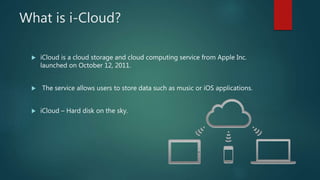
 iCloud is a cloud storage and cloud computing service from Apple Inc.
launched on October 12, 2011.
 The service allows users to store data such as music or iOS applications.
 iCloud – Hard disk on the sky.
History
 Previously been branded as:
 iTools in 2000
 .Mac in 2002
 MobileMe in 2008
 Announced on June 6,2011, at the 2011 Apple Worldwide Developers
Conference(WWDC).
 Official website, www.icloud.com, went live in early August for Apple
Developers.
 On Oct 12, 2011 iCloud became available to use via an iTunes update.
Basic Features
 Backup and Restore
 Back to MyMac
 Email, Contacts and Calendar
 Find My Friends
 Find My iPhone
 iCloud Keychain
 iTunes Match
 iWork for iCloud
Contd…
 Photo Stream
 Storage
 Family Sharing
 iCloud Drive
 Activation Lock
Backup & Restore
 Data backed up include:
 Photos
 Videos
 App data
 Messages
 Ringtones
 Voicemails
 Occur daily when device locked and connected to Wi-Fi and a Power
source.
Find My iPhone
 Allow users to track the location of their iOS devices or Mac if lost.
 User can do following:
 Locate device on map
 Play a sound
 Use Lost Mode
 Remotely erase all personal information
Back To My Mac
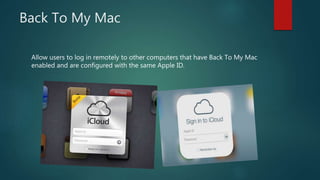
Allow users to log in remotely to other computers that have Back To My Mac
enabled and are configured with the same Apple ID.
Find My Friends
 Users can follow & track people
 Share their location
 Location determined when location services are turned ON.
iCloud Keychain
1- Functions as a secure database
2- Keeps your account names, passwords, and even credit card numbers
stored behind 256-bit AES encryption on Apple's iCloud servers.
iWork for iCloud
3 apps form Apple’s iWork suite:
 Pages(create & edit documents)
 Numbers(create & edit spreadsheets)
 Keynote(create & edit presentations)
Activation Lock
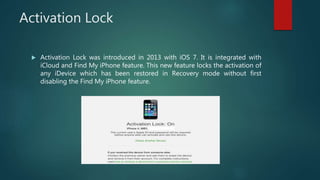
 Activation Lock was introduced in 2013 with iOS 7. It is integrated with
iCloud and Find My iPhone feature. This new feature locks the activation of
any iDevice which has been restored in Recovery mode without first
disabling the Find My iPhone feature.
Advantages
 Don't have to use a USB chord to sync information
 Pushes all your information to listed devices
 Makes it easier to sync information when you get a new device
 It's free to get 5GB of storage
 Easier access to information
Disadvantages
 iCloud service is compatible only with IOS devices and has widespread
accessibility issues
 iTunes has to be open in order to sync music, apps, etc
 Possible security issues when you have multiple devices synced to one
account
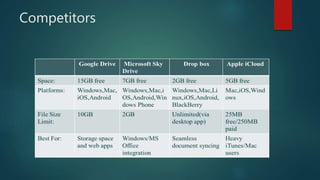
Competitors
Conclusion
Apple’s iCloud can automatically synchronize data from Macs, PCs and iOS
devices, which can help people who are forced to deal with multiple computer
worlds.
References
 http://www.apple.com/in/icloud/
 https://www.icloud.com/
 https://en.wikipedia.org/wiki/ICloud/

iCloud by Apple

  • 1.
    iCloud By Apple SUBMITTEDBY HIMANSHU SONI SECTION CS-2 ROLL # 1301410040 SUBMITTED TO MR. ANKIT KUMAR VARSHNEY
  • 2.
    Contents 1. What isi-Cloud? 2. History 3. Basic Features 4. Backup & Restore 5. Find My iPhone 6. Back To My Mac 7. Find My Friends 8. iCloud Keychain 9. iWork for iCloud 10. Activation Lock 11. Advantages 12. Disadvantages 13. Competitors 14. Conclusion 15. References
  • 3.
    What is i-Cloud? iCloud is a cloud storage and cloud computing service from Apple Inc. launched on October 12, 2011.  The service allows users to store data such as music or iOS applications.  iCloud – Hard disk on the sky.
  • 4.
    History  Previously beenbranded as:  iTools in 2000  .Mac in 2002  MobileMe in 2008  Announced on June 6,2011, at the 2011 Apple Worldwide Developers Conference(WWDC).  Official website, www.icloud.com, went live in early August for Apple Developers.  On Oct 12, 2011 iCloud became available to use via an iTunes update.
  • 5.
    Basic Features  Backupand Restore  Back to MyMac  Email, Contacts and Calendar  Find My Friends  Find My iPhone  iCloud Keychain  iTunes Match  iWork for iCloud
  • 6.
    Contd…  Photo Stream Storage  Family Sharing  iCloud Drive  Activation Lock
  • 7.
    Backup & Restore Data backed up include:  Photos  Videos  App data  Messages  Ringtones  Voicemails  Occur daily when device locked and connected to Wi-Fi and a Power source.
  • 8.
    Find My iPhone Allow users to track the location of their iOS devices or Mac if lost.  User can do following:  Locate device on map  Play a sound  Use Lost Mode  Remotely erase all personal information
  • 9.
    Back To MyMac Allow users to log in remotely to other computers that have Back To My Mac enabled and are configured with the same Apple ID.
  • 10.
    Find My Friends Users can follow & track people  Share their location  Location determined when location services are turned ON.
  • 11.
    iCloud Keychain 1- Functionsas a secure database 2- Keeps your account names, passwords, and even credit card numbers stored behind 256-bit AES encryption on Apple's iCloud servers.
  • 12.
    iWork for iCloud 3apps form Apple’s iWork suite:  Pages(create & edit documents)  Numbers(create & edit spreadsheets)  Keynote(create & edit presentations)
  • 13.
    Activation Lock  ActivationLock was introduced in 2013 with iOS 7. It is integrated with iCloud and Find My iPhone feature. This new feature locks the activation of any iDevice which has been restored in Recovery mode without first disabling the Find My iPhone feature.
  • 14.
    Advantages  Don't haveto use a USB chord to sync information  Pushes all your information to listed devices  Makes it easier to sync information when you get a new device  It's free to get 5GB of storage  Easier access to information
  • 15.
    Disadvantages  iCloud serviceis compatible only with IOS devices and has widespread accessibility issues  iTunes has to be open in order to sync music, apps, etc  Possible security issues when you have multiple devices synced to one account
  • 16.
  • 17.
    Conclusion Apple’s iCloud canautomatically synchronize data from Macs, PCs and iOS devices, which can help people who are forced to deal with multiple computer worlds.
  • 18.