[Type a quote from the document or
                                                             the summary of an interesting point.
                                                             You can position the text box
                                               A             anywhere in the document. Use the
                                                             Text Box Tools tab to change the
                                     Training Report         formatting of the pull quote text box.]

                                               Of
                            Summer Training Project At


                                               On
                                 ADVANCED JAVA
                                            Submitted
                             In The Partial Fulfillment of
                                Bachelor of Technology
                          Department of Computer Science


                  J.P. Institute of Engineering and Technology
                                            2012-13


Submitted to :                                          Submitted by:
Mr. Shreyaskar Gaur                                     Name          :Pallavi Srivastava
Assistant Professor                                     B.Tech (C.S.E):4th yr
Department of Computer Science &                        Semester      :7
Technology                                              Roll no.       :0928210035
J. P. Institute of Engineering Technology

                                                1
Certificate

I am, Pallavi Srivastava, student of B.Tech (CSE), 4th year of J.P Institute of Engineering and
Technology, Meerut completed my summer project from Tata CMC from June 11 ,2012 to July 26,
2012.

During the mentioned period I worked at Advanced JAVA and completed my summer training
project entitled “Centralized Hospital Management” under the guidance of Mr. Vikrant Singh.


Date:                                                                  Name:Pallavi Srivastava


                                              2
[Type a quote from the document or
                                                                         the summary of an interesting point.
                                                                         You can position the text box
                                                                         anywhere in the document. Use the
                                                                         Text Box Tools tab to change the
                                                                         formatting of the pull quote text box.]
                                 Acknowledgement


             “Gratitude is not a thing of expression; it is more matter of feeling."


There is always a sense of gratitude which one express towards others for their help and supervision
in achieving the goals. This formal piece of acknowledgement is an attempt to express the feeling of
gratitude towards people who helpful me in successfully completing of my training


I would like to express my deep gratitude to Mr. Vikrant Singh ,my training coordinator for their
constant co-operation. He was always there with his competent guidance and valuable suggestion
throughout the pursuance of this research project.


I would also like to place of appreciation to all the respondents and group members whose
responses and coordination were of utmost importance for the project.


Above all no words can express my feelings to my parents, friends all those persons who supported
me during my project. I am also thankful to all the respondents whose cooperation & support has
helped me a lot in collecting necessary information


                                                 3
Table of contents


Certificate(by company) .......................................................................................................................... i
Certificate ............................................................................................................................................... ii
Acknowledgement ................................................................................................................................. iii
Table of contents ................................................................................................................................... iv
List of figures ......................................................................................................................................... vi
List of tables...........................................................................................................................................vii


      1. Company Profile ......................................................................................................................... 1
               1.1. Core products/solutions ................................................................................................... 3
               1.2. Some Clients of Company ................................................................................................. 3
               1.3. Company services in technology ....................................................................................... 5
      2. Technology ................................................................................................................................. 6
               1.1. Introduction to JAVA ........................................................................................................ 6
               1.2. J2EE ................................................................................................................................. 6
               1.3. MVC architecture ............................................................................................................. 7
               1.4. JAVABEANS ...................................................................................................................... 8
               1.5. JDBC ................................................................................................................................. 8
               1.6. Servlets .......................................................................................................................... 14
               1.7. JSP ................................................................................................................................. 17
      3. Project ...................................................................................................................................... 24
               1.1. Object ............................................................................................................................ 24
               1.2. Scope ............................................................................................................................. 24
               1.3. Technology to be used ................................................................................................... 25
               1.4. Tools to be used ............................................................................................................. 25
               1.5. Roles of users ................................................................................................................. 25
                                                                              4
4. Modules of Project(on which I worked) ................................................................................... 27
        1.1. EMR ............................................................................................................................... 27
        1.2. Online appointment ....................................................................................................... 28
5. References ............................................................................................................................... 30


                                                                     5
List of Figures


Figure no.      Title                        Page no.
2.1             MVC architecture             7
2.2             JDBC drivers                 11
2.3             Lifecycle of servlet         15
2.4             JSP                          18
2.5             JSP compilation              18
2.6             JSP tags                     19
3.1             Use case for patient         21
3.2             Use case for doctor          27
4.1             EMR module webpage           28
4.2             EMR records webpage          29
4.3             Online appointment webpage   30


                           6
List of Tables


Table no.                                   Title                                     Page no.
4.1                                         EMR                                       7
4.2                                         Appointment Table                         11


                             COMPANY PROFILE

CMC Limited is a leading systems engineering and integration company in India,
offering application design, development, testing services and asset-based
solutions in niche segments through turnkey projects of national importance. CMC
has also been expanding its service presence in international markets offering
off-shoring advantages and delivering value through service level-based and
project scope-based deliveries.


Since its inception on December 26, 1975, CMC has been a frontrunner in providing ITCMC MUMBAI
                                                                                  1 solutions and

services. CMC was the first ever enterprise in India to set up a countrywide data network called
INDONET - a computer network providing access to major cities in India, way back in 1985.


A subsidiary of Tata Consultancy Services Limited (TCS Ltd), one of the world's leading information
technology consulting, services and business process outsourcing organisations, CMC Limited is a
part of the US$ 83.3 billion Tata Group, India's best known business conglomerate.


Today, CMC Limited, an ISO 9001:2000, certified and CMMI Level V accredited organisation, is
positioned as a premier IT solutions provider in the fast growing and competitive IT market.

CMC’s execute large and complex turnkey projects, and have built, managed and supported our
customers' IT systems across the value chain infrastructure, applications and business processes.


A few highlights of CMC’s business

                                                    7
   Over 10775 employees spread across India, USA, UK, Europe, MEA & APAC

   3300+ experts in technologies & domain for Application Development Practice

   978 strong skilled force in Embedded Systems

   11 Development Centres across India and USA

   Experience in setting up large ODCs up to 300+ team

    CMC has 18 offices in major Indian cities and over 150 service locations. CMC’s have a sizable
    resource pool of engineers trained in diverse technologies, with vast domain knowledge and varied
    skill set.


    CMC’s conduct significant research into emerging technologies and competence areas at our state-
    of-the-art, ISO 9001 certified R&D Centre in Hyderabad, India. This gives us an edge in complex,
    high technology projects.


    CMC over the years has followed a multi-dimensional approach to support its growth and expansion
    in becoming a global player.


    Together with Tata Consultancy Services Limited (TCS Ltd), our strategic partner, CMC’s are
    working to target the global market with additional offerings that leverage our combined strengths
    and enable us to follow common best practices.


    CMC's wholly owned subsidiary, CMC Americas Inc, was acquired in 1991 and formerly called Baton
    Rouge International (BRI), before being renamed in 2003. With 9 offices in USA and servicing
    customers across the country, it drives CMC's thrust towards globalisation and business
    development in USA.


    In addition to the following, CMC Americas Inc also maintains offices in Austin, TX; Los Angeles, CA;
    Sunnyvale, CA; Atlanta, Georgia; Baton Rouge, LA; Novi, MI; Edison, NJ; Reston, VA and
    Burlington, MA.


    CMC Informatics UK is the branch office of CMC Limited in the United Kingdom and covers the
    territories of UK, Ireland and Europe. The office is based in the historic city of Guildford in Surrey,
    one of richest counties in the UK.


    CMC's products for transport, law enforcement, banking and insurance verticals, and services in

                                                          8
embedded technologies, IT Consultancy and Infrastructure Development Management and
Outsourcing are offered through this office. The London Underground Limited (LUL), Forth Ports and
TRW are a few of our CMC’sll known clients.


CMC Dubai is the branch office of CMC in west Asia and serves as a front end for CMC's thrusts
towards globalization, especially in terms of business development in the Middle East and Africa.
The Dubai office handles large projects for important clients like the National Bank of Bahrain and
Syrian Railways. In Africa, the Tanzania Police is also handled from this office.


Global presence
    •   CMC Americas – USA

    •   CMC Informatics – UK

    •   CMC Dubai – Middle East

    •   CMC Ltd – Presence in almost all cities of India


Core Products/Solutions
       Transport ARTS, IMPRESS, FOIS, Train Scheduling
       Port Solutions MACH, CALM
       Banking: TC4
       Insurance: GENISYS
       Fingerprint Tracing System FACTS
       Event Management System
       Mining DYNAMINE
       Securities VECTOR, VEDAS
       Tourism VISTA
       Health FHIMS
       Embedded Systems TU, ANIB
       eCommerce ICert, E-bill Pay, E-Cheque
       eGovernance VOICE, VCOPS KHAJANE, MUKHYA VAHINI

                                                   9
   Water Resources WRM


Some of CMC’s Clients

      Reserve Bank of India
      Indian Railways
      Indian Oil Corporation
      Bharat Petroleum Corporation India
      Oil and Natural Gas Corporation Ltd.
      United western Bank
      Bank of India
      Bank of Baroda


Shipping

      Mumbai Port Trust
      Chennai International Terminal
      Adani Port
      Forth Ports Plc, UK
      Norfolklines BV, Netherlands
      P&O Ports


Manufacturing Energy Resources & Utilities

      Sesa Goa
      IOCL
      TATA steel
      TATA Power


Education and training
    Mahindra British Telecom
    ICICI Bank
    WIPRO
    SmithKline Beecham
                                              10
   Robert Bosche
      IIT Kharagpur
      Ministry of External Affairs
      Reserve Bank of India
      State Bank of India
      Calcutta Telecom


Hitech & Telecom

      Tata Teleservices

      Bharat Sanchar Nigam

      IBM Daksh Business Process Services

      Mahanagar Telephone Nigam

      Miro Technologies
      Cadence Technologies


Defence & Space
    Indian Air Force
    Ordnance Factory Board, Ministry of Defence
    Department of Space
    ISRO
    DRDO
    Indian Navy
    National Remote Sensing Agency


Software / Firmware Development in JAVA

      Application Development
      Device Drivers & Board Support Packages
      Protocol Stacks
      Simulators & Tools Development
      GUI Design


                                             11
TECHNOLOGY

Introduction to java
Java is a programming language initially developed by Sun Microsystems and released as a
principal component of Sun Microsystems' Java platform. Although the language gets much of its
syntax from C and C++ it has a less complicated object model and lesser low-level services. Java
applications are typically compiled to byte code (class file)that can run on any Java Virtual Machine
(JVM) regardless of computer architecture .Java is a general-purpose, object-oriented language that
is specifically designed to have as few implementation dependencies as possible. It is intended to
let application developers "write once, run anywhere". Java is currently one of the most standard
programming languages in use, and is extensively used from application software to web
applications. There were five primary goals in the creation of the Java language :.

      It should be "simple, object-oriented and familiar".

      It should be "robust and secure".

      It should be "architecture-neutral and portable".

      It should execute with "high performance".

      It should be "interpreted, threaded, and dynamic".


J2EE
Short for Java 2 Platform Enterprise Edition, J2EE is a platform-independent ,Java- centric
environment from Sun for developing, building and deploying Web-based enterprise applications
online. The J2EE platform consists of a set of services, APIs, and protocols that provide the

                                                  12
functionality for developing multitier, Web-based applications.

Some of the key features and services of J2EE

      At the client tier, J2EE supports pure HTML ,as well as Java applets or applications. It relies
       on Java Server Pages and servlet code to create HTML or other formatted data for the client

      Enterprise JavaBeans(EJBs) provide another layer where the platform's logic is stored. An
       EJB server provides functions such as threading, concurrency ,security and memory
       management. These services are transparent to the author.

      Java Database Connectivity(JDBC), which is the Java equivalent to ODBC,is the standard
       interface for Java databases.

      The Java servlet API enhances consistency for developers without requiring a graphical
       user interface.


MVC Architecture
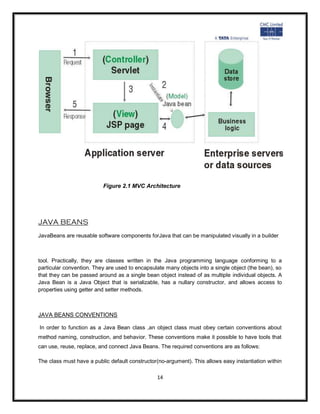
Model–View–Controller (MVC) is an architecture that separates the representation of information
from the user's interaction with it. The model consists of application data and business rules, and
the controller mediates input, converting it to commands for the model or view.A view can be any
output representation of data, such as a chart or a diagram. Multiple views of the same data are
possible, such as a pie chart for management and a tabular view for accountants. The central idea
behind MVC is code reusability and separation of concerns.


                                                  13
Figure 2.1 MVC Architecture


JAVA BEANS
JavaBeans are reusable software components forJava that can be manipulated visually in a builder


tool. Practically, they are classes written in the Java programming language conforming to a
particular convention. They are used to encapsulate many objects into a single object (the bean), so
that they can be passed around as a single bean object instead of as multiple individual objects. A
Java Bean is a Java Object that is serializable, has a nullary constructor, and allows access to
properties using getter and setter methods.


JAVA BEANS CONVENTIONS

In order to function as a Java Bean class ,an object class must obey certain conventions about
method naming, construction, and behavior. These conventions make it possible to have tools that
can use, reuse, replace, and connect Java Beans. The required conventions are as follows:

The class must have a public default constructor(no-argument). This allows easy instantiation within

                                                14
editing and activation frameworks.

The class properties must be accessible using get , set ,is(used for Boolean properties instead of
get) and other methods (so-called accessor methods andmutator methods), following a standard
convention. This allows easy automated inspection and updating of bean state within frameworks,
many of which include custom editors for various types of properties.

The class should be serializable. It allows applications and frameworks to reliably save, store, and
restore the bean's state in a fashion independent of the VM and of the platform.

BASIC BEAN CONCEPTS

Individual Java Beans will vary in functionality, but most share certain common defining features.

      Support for introspection allowing a builder tool to analyze how a bean works.

      Support for customization allowing a user to alter the appearance and behavior of a bean.

      Support for events allowing beans to fire events, and informing builder tools about both the
       events they can fire and the events they can handle.

      Support for properties allowing beans to be manipulated programmatically, as well as to
       support the customization mentioned above

      Support for persistence allowing beans that have been customized in an application builder


       to have their state saved and restored. Typically persistence is used with an application
       builder's save and load menu commands to restore any work that has gone into constructing
       an application.


While Beans are intended to be used primarily with builder tools, they need not be .Beans can be
manually manipulated by text tools through programatic interfaces. Allkey APIs, including support for
events, properties, and persistence, have been designed to be easily read and understood by
human programmers as well as by builder tools.

The JavaBeans™ architecture is based on a component model which enables developers to create
software units called components. Components are self-contained, reusable software units that can
be visually assembled into composite components, applets, applications, and servlets using visual
application builder tools. Java Bean components are known as beans .A set of APIs describes a

                                                 15
component model for a particular language.

The JavaBeans API specification describes the core detailed elaboration for the JavaBeans
component architecture .Beans are dynamic in that they can be changed or customized. Through
the design mode of a builder tool you can use the Properties window of the bean to customize the
bean and then save (persist) your beans using visual manipulation. You can select a bean from the
toolbox, drop it into a form, modify its appearance and behavior, define its interaction with other
beans, and combine it and other beans into an applet, application, or a new bean .The following list
briefly describes key bean concepts.

      Builder tools discover a bean's features (that is, its properties, methods, and events) by a
       process known as introspection. Beans support introspection in twoways:

           o   By adhering to specific rules, known as design patterns, when naming bean
               features. The Introspector class examines beans for these design patterns to
               discover bean features. The Introspector class relies on the core reflection API. The
               trail Getting Startedis an excellent place to learn about reflection.

           o   By explicitly providing property, method, and event information with a related bean
               information class. A bean information class implements the Bean Info interface. A
               Bean Info class explicitly lists those bean features that are to be exposed to
               application builder tools.

      Properties are the appearance and behavior characteristics of a bean that can bechanged at
       design time. Builder tools introspect on a bean to discover itsproperties and expose those
       properties for manipulation.

      Beans expose properties so they can be customized at design time.

      Customization is supported in two ways: by using property editors, or by using
       moresophisticated bean customizers.

      Beans use Events to communicate with other beans. A bean that is to receive events (a
       listener bean) registers with the bean that fires the event (a source bean). Builder tools can
       examine a bean and determine which events that bean can fire (send) and which it can
       handle (receive).

      Persistence enables beans to save and restore their state. After changing a bean's
       properties, you can save the state of the bean and restore that bean at a later time with the
       property changes intact. The JavaBeans architecture uses Java Object Serialization to
       support persistence

      A bean's methods are no different from Java methods, and can be called from other
       beans or a scripting environment. By default all public methods are exported. Beans
       vary in functionality and purpose. You have probably met some of the following beans in
       your programming practice:


                                                16
GUI (graphical user interface)
       Non-visual beans, such as a spelling checker

       Animation applet

       Spreadsheet application


BEAN DEVELOPMENT KIT
JavaBeans are reusable software components written in Java. These components maybe built
into an application using an appropriate building environment. The Bean Development Kit
(BDK) from Sun includes a simple example of a building environment which uses beans, called
the bean box, and some sample beans


The Java Database Connectivity (JDBC)

The Java Database Connectivity (JDBC) API is the industry standard for database-independent
connectivity between the Java programming language and a wide range of databases – SQL
databases and other tabular data sources, such as spreadsheets or flat files. The JDBC API
provides a call-level API for SQL-based database access.
JDBC technology allows you to use the Java programming language to exploit "Write Once, Run
Anywhere" capabilities for applications that require access to enterprise data. With a JDBC
technology-enabled driver, you can connect all corporate data even in a heterogeneous
environment.


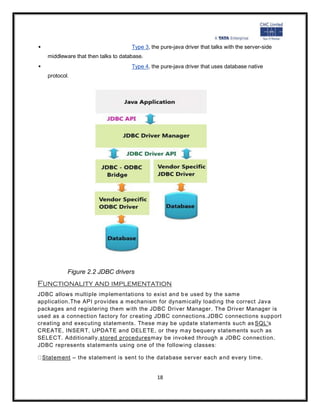
JDBC drivers
There are commercial and free drivers available for most relational database servers. These drivers
fall into one of the following types:


                                       Type 1 that calls native code of the locally available ODBC
    driver.
                                       Type 2 that calls database vendor native library on a client
    side. This code then talks to database over network.


                                                  17
                                    Type 3, the pure-java driver that talks with the server-side
   middleware that then talks to database.
                                    Type 4, the pure-java driver that uses database native
   protocol.


           Figure 2.2 JDBC drivers
Functionality and implementation
JDBC allows multiple implementations to exist and b e used by the same
application.The API provides a mechanism for dynamically loading the correct Java
packages and registering them with the JDBC Driver Manager. The Driver Manager is
used as a connection factory for creating JDBC connections.JDBC connections support
creating and executing statements. These may be update statements such as SQL's
CREATE, INSERT, UPDATE and DELETE, or they may bequery statements such as
SELECT. Additionally,stored proceduresmay be invoked through a JDBC connection.
JDBC represents statements using one of the following classes:

 Statement – the statement is sent to the database server each a nd every time.


                                               18
PreparedStatement – the statement is cached and then the execution path is
predetermined on the database server allowing it to be execute d multiple times in
anefficient manner.

  CallableStatement –used for executingstored procedureson the database.Update
statements such as INSERT, UPDATE and DELETE return an update count that
indicates how many rows were affected in the database.

These statements do notreturn any other information.Query statements return a JDBC
row result set. The row result set is used to walk overthe result set. Individual columns
in a row are retrieved either b y name or by column number. There may be any number
of rows in the result set. The row result set has metadata that describes the names of
the columns and their types.There is an extension to the basic JDBC API in
thejavax.sql. The methodClass.forName(String) is used to load the JDBC driver
class.Example :


Class.forName(―sun.jdbc.odbc.JdbcOdbcDriver‖);

 used to load the JDBC-ODBC bridge driver.When aDriverclass is loaded, it creates an
instance of itself and registers it with the DriverManager. Now when a connection is
needed, one of the DriverManager.getConnection() methodsis used to create a JDBC
connection.

Example;

import java.sql.*;
import javax.sql.*;

public class jdbcdemo{


public static void main(String args[]){
String dbtime;
String dbUrl = "jdbc:mysql://your.database.domain/yourDBname";
String dbClass = "com.mysql.jdbc.Driver";
String query = "Select * FROM users";

try {

Class.forName("com.mysql.jdbc.Driver");
Connection con = DriverManager.getConnection (dbUrl);
Statement stmt = con.createStatement();
ResultSet rs = stmt.executeQuery(query);
                                           19
while (rs.next()) {
dbtime = rs.getString(1);
System.out.println(dbtime);
} //end while

con.close();
} //end try

catch(ClassNotFoundException e) {
e.printStackTrace();
}

catch(SQLException e) {
e.printStackTrace();
}

}   //end main

}   //end class


If a database operation fails, JDBC raises an SQLException.There is typically very
little one can do to recover from such an error, apart from logging it with as much
detail as possible. It is recommended that the SQLException be translated into an
application domain exception (an unchecked one) that eventually results in a
transaction rollback and a notification to the user.


Finally to summarize, the following points can be stated :

     JDBC API provides a database programming interface for Java programs. AJava
      program can send queries to a database b y using the JDBC driver.

     The java.sql package contains classes that help in connecting to a database,
      sending SQL statements to the database and processing the query results.

     The Connection Object represents a connection with a database. It can
      beinitialized using the getConnection() method of the DriverManager class.

     The PreparedStatement object allows you to execute parameterized queries.
      Itcan be initialized using the prepareStatement() method of the Connection
      object.
                                           20
 The setString() method sets the quer y parameters of the
      PreparedStatementobject.

     The executeUpdate() method executes the query statement present in
      thePreparedStatement object and returns the number of rows affected by the
      query.

     The ResultSetMetaData interface is used to obtain information about
      thecolumns stored in a ResultSet object


Servlets
Servlets are protocol and platform independent server-side software components, written in Java.
They run inside a Java enabled server or application server, such as the WebSphere Application
Server. Servlets are loaded and executed within the Java Virtual Machine (JVM) of the Web server
or application server, in much the same way that applets are loaded and executed within the JVM of
the Web client.

Since servlets run inside the servers, however, they do not need a graphical user interface (GUI). In
this sense, servlets are also faceless objects.

Servlets more closely resemble Common Gateway Interface (CGI) scripts or programs than applets
in terms of functionality. As in CGI programs, servlets can respond to user events from an HTML
request, and then dynamically construct an HTML response that is sent back to the client.

The Java Servlet API

The Java Servlet API is a set of Java classes which define a standard interface between a Web
client and a Web servlet. Client requests are made to the Web server, which then invokes the servlet
to service the request through this interface.


The API is composed of two packages:

       javax.servlet
       javax.servlet.http


The Servlet interface class is the central abstraction of the Java Servlet API. This class defines the
methods which servlets must implement, including a service() method for the handling of requests.


                                                   21
The GenericServlet class implements this interface, and defines a generic, protocol-independent
servlet.

To write an HTTP servlet for use on the Web, we will use an even more specialized class of
GenericServlet called HttpServlet.HttpServlet provides additional methods for the processing of
HTTP requests such as GET (doGet method) and POST (doPost method). Although our servlets
may implement a service method, in most cases we will implement the HTTP specific request
handling methods of doGet and doPost.


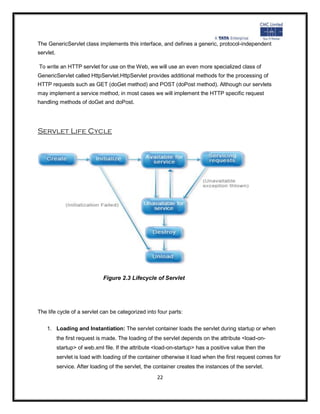
Servlet Life Cycle


                               Figure 2.3 Lifecycle of Servlet


The life cycle of a servlet can be categorized into four parts:


    1. Loading and Instantiation: The servlet container loads the servlet during startup or when
           the first request is made. The loading of the servlet depends on the attribute <load-on-
           startup> of web.xml file. If the attribute <load-on-startup> has a positive value then the
           servlet is load with loading of the container otherwise it load when the first request comes for
           service. After loading of the servlet, the container creates the instances of the servlet.
                                                      22
2. Initialization: After creating the instances, the servlet container calls the init() method and
       passes the servlet initialization parameters to the init() method. The init() must be called by
       the servlet container before the servlet can service any request. The initialization parameters
       persist untill the servlet is destroyed. The init() method is called only once throughout the life
       cycle of the servlet.The servlet will be available for service if it is loaded successfully
       otherwise the servlet container unloads the servlet.
   3. Servicing the Request: After successfully completing the initialization process, the servlet
       will be available for service. Servlet creates seperate threads for each request. The sevlet
       container calls the service() method for servicing any request. The service() method
       determines the kind of request and calls the appropriate method (doGet() or doPost()) for
       handling the request and sends response to the client using the methods of the response
       object.
   4. Destroying the Servlet: If the servlet is no longer needed for servicing any request, the
       servlet container calls the destroy() method . Like the init() method this method is also called
       only once throughout the life cycle of the servlet. Calling the destroy() method indicates to
       the servlet container not to sent the any request for service and the servlet releases all the
       resources associated with it. Java Virtual Machine claims for the memory associated with the
       resources for garbage collection.


A simple servlet example

package itso.servjsp.servletapi;

import java.io.*;

import javax.servlet.*;


import javax.servlet.http.*;

public class SimpleHttpServlet extends HttpServlet {

protected void service(HttpServletRequest req, HttpServletResponse res)

throws ServletException, IOException {

res.setContentType("text/html");

PrintWriter out = res.getWriter();

out.println("<HTML><TITLE>SimpleHttpServlet</TITLE><BODY>");
                                                   23
out.println("<H2>Servlet API Example - SimpleHttpServlet</H2><HR>");

out.println("<H4>This is about as simple a servlet as it gets!</H4>");

out.println("</BODY><HTML>");

out.close();

}

}


JavaServer Pages (JSP)

JavaServer Pages (JSP) is a technology that helps software developers create dynamically
generated web pages based on HTML, XML, or other document types. Released in 1999 by Sun
Microsystems[1], JSP is similar to PHP, but it uses the Java programming language.

To deploy and run Java Server Pages, a compatible web server with a servlet container, such
as Apache Tomcat or Jetty, is required.

Java Server Pages is a technology which permits software developers to create dynamic request
like HTML, XML in order to answer to client request in the net. This technology lets Java code and
definite pre-defined procedures to be implanted into static content. The syntax in Java Server Pages
includes a supplementary XML tag which is known as JSP actions.

It is made use to evoke the utility of the built-in functions. Moreover JSP permits to establish and
form the JSP tag libraries which operate as an extension to the standard XML or HTML tags. These
JSP tag libraries give a good technique to widen the potentiality of the Web server by providing an
independent platform.JSP compiler compiles the JSPs into Java Servlets.


                                                   24
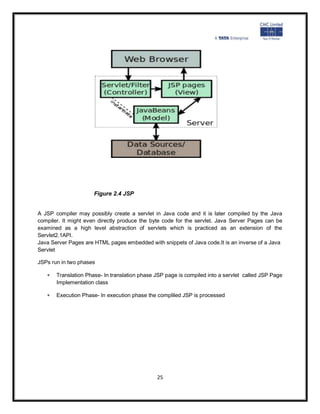
Figure 2.4 JSP


A JSP compiler may possibly create a servlet in Java code and it is later compiled by the Java
compiler. It might even directly produce the byte code for the servlet. Java Server Pages can be
examined as a high level abstraction of servlets which is practiced as an extension of the
Servlet2.1API.
Java Server Pages are HTML pages embedded with snippets of Java code.It is an inverse of a Java
Servlet

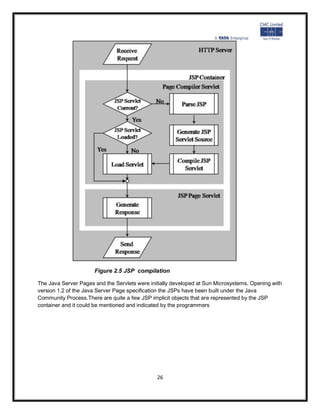
JSPs run in two phases

      Translation Phase- In translation phase JSP page is compiled into a servlet called JSP Page
       Implementation class

      Execution Phase- In execution phase the compliled JSP is processed


                                               25
Figure 2.5 JSP compilation

The Java Server Pages and the Servlets were initially developed at Sun Microsystems. Opening with
version 1.2 of the Java Server Page specification the JSPs have been built under the Java
Community Process.There are quite a few JSP implicit objects that are represented by the JSP
container and it could be mentioned and indicated by the programmers


                                               26
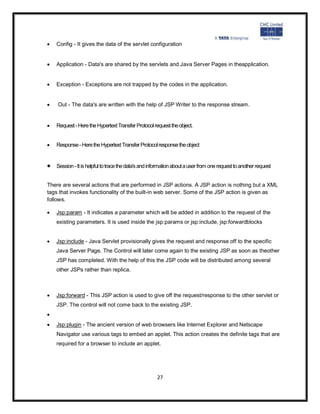
   Config - It gives the data of the servlet configuration


   Application - Data's are shared by the servlets and Java Server Pages in theapplication.


   Exception - Exceptions are not trapped by the codes in the application.


   Out - The data's are written with the help of JSP Writer to the response stream.


   Request - Here the Hypertext Transfer Protocol request the object.


   Response - Here the Hypertext Transfer Protocol response the object


   Session - It is helpful to trace the data's and information about a user from one request to another request


There are several actions that are performed in JSP actions. A JSP action is nothing but a XML
tags that invokes functionality of the built-in web server. Some of the JSP action is given as
follows.

   Jsp:param - It indicates a parameter which will be added in addition to the request of the
    existing parameters. It is used inside the jsp:params or jsp:include, jsp:forwardblocks


   Jsp:include - Java Servlet provisionally gives the request and response off to the specific
    Java Server Page. The Control will later come again to the existing JSP as soon as theother
    JSP has completed. With the help of this the JSP code will be distributed among several
    other JSPs rather than replica.


   Jsp:forward - This JSP action is used to give off the request/response to the other servlet or
    JSP. The control will not come back to the existing JSP.

   Jsp:plugin - The ancient version of web browsers like Internet Explorer and Netscape
    Navigator use various tags to embed an applet. This action creates the definite tags that are
    required for a browser to include an applet.


                                                      27
   Jsp:fallback - This action is used to confirm that if the browser never gives support to
      applets.


     Jsp:getProperty - It obtains a property from the specific JavaBean.


     Jsp:setProperty - It sets a property in the specific JavaBean


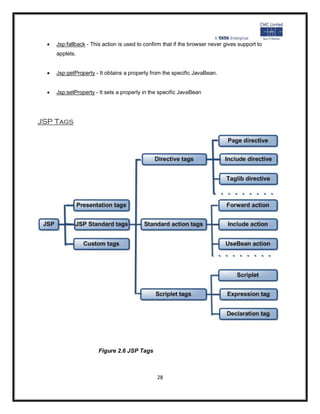
JSP Tags


                        Figure 2.6 JSP Tags


                                                 28
JSP scripting elements

JSP scripting elements let you insert Java code into the servlet that will be generated from the
current JSP page. There are three forms:

       Expressions of the form <%= expression %> that are evaluated and inserted into the output,
       Scriptlets of the form <% code %> that are inserted into the servlet's service method, and
       Declarations of the form <%! code %> that are inserted into the body of the servlet class,
        outside of any existing method


JSP Directive

A JSP Directive affects the overall structure of the servlet class. It usually has the
following form:<%@ directive attribute="value" %>However, you can also combine
multiple attribute settings for a single directive, as follows:

<%@ directive attribute1="value1"attribute2="value2"...attributeN="valueN" %>

There are two main types of directive: page, which lets you do things like import classes,
customize the servlet superclass, and the like; and include, which lets you insert a file into
the servlet class at the time the JSP file is translated into a servlet. The specification also
mentions the taglib directive, which is not supported in JSP version 1.0, but is intended to
let JSP authors define their own tags. It is expected that this will be the main new
contribution of JSP 1.Implicit objects in jsp are the objects that are created by the
container automatically and the container makes them available to the developers, the
developer do not need to create them explicitly. Since these objects are created
automatically by the container and are accessed using standard variables; hence, they are
called implicit objects.


JSP Implicit Objects are as follows:

    1. request implicit object

        The JSP implicit request object is an instance of a java class that implements the
        javax.servlet.http.HttpServletRequest interface. It represents the request made by the client.
                                                   29
The request implicit object is generally used to get request parameters, request attributes,
   header information and query string values.

2. response implicit object

   The JSP implicit response object is an instance of a java class that implements the
   javax.servlet.http.HttpServletResponse interface. It represents the response to be given to
   the client. The response implicit object is generally used to set the response content type,
   add cookie and redirect the response.


3. out implicit object

   The JSP implicit out object is an instance of the javax.servlet.jsp.JspWriter class. It
   represents the output content to be sent to the client. The out implicit object is used to write
   the output content.

4. session implicit object

   The JSP implicit session object is an instance of a java class that implements the
   javax.servlet.http.HttpSession interface. It represents a client specific conversation. The
   session implicit object is used to store session state for a single user.

5. application implicit object

   The JSP implicit application object is an instance of a java class that implements the
   javax.servlet.ServletContext interface. It gives facility for a JSP page to obtain and set
   information about the web application in which it is running.

6. exception implicit object

   The JSP implicit exception object is an instance of the java.lang.Throwable class. It is
   available in JSP error pages only. It represents the occured exception that caused the
   control to pass to the JSP error page.

7. config implicit object

   The JSP implicit config object is an instance of the java class that implements
   javax.servlet.ServletConfig interface. It gives facility for a JSP page to obtain the initialization
   parameters available.

8. page implicit object

                                               30
The JSP implicit page object is an instance of the java.lang.Object class. It represents the
       current JSP page. That is, it serves as a reference to the java servlet object that implements
       the JSP page on which it is accessed. It is not advisable to use this page implict object often
       as it consumes large memory.

   9. pageContext implicit object

       The JSP implicit pageContext object is an instance of the javax.servlet.jsp.PageContext
       abstract class. It provides useful context information. That is it provides methods to get and


       set attributes in different scopes and for transferring requests to other resources. Also it
       contains the reference to to implicit objects.


JSP actions
JSP actions use constructs in XML syntax to control the behavior of the servlet engine. You can
dynamically insert a file, reuse JavaBeans components, forward the user to another page, or
generate HTML for the Java plugin. Available actions include:

    jsp:include - Include a file at the time the page is requested.
    jsp:useBean - Find or instantiate a JavaBean.
    jsp:setProperty - Set the property of a JavaBean.
    jsp:getProperty - Insert the property of a JavaBean into the output jsp:forward - Forward the
     requester to a new page.
    jsp:plugin - Generate browser-specific code that makes an OBJECT or EMBED tag for the
     Java plug-in.


                                                  31
PROJECT


Object
Centralized hospital management is a web application which provides online medical services to
everyone at their doorstep.


Users

    There are three basic users –
            Patient,
            Admin,
            Doctors

Scope
      All users have their own profiles in Medical Clinic.
      Patients can search for doctor and make online appointments. They also can view their health
       record and doctor’s prescription. Patient can also register complaint on any doctor.
      Doctor’s can give appointments, e-prescription and can view patient’s health record
      Admin has the authority to add/delete users, doctors or hospitals and grant permission to
       doctors.


modules
      Login for doctors and patient
      Updates about treatments and surgery
      Patient reviews and ratings for doctor.
      Registration for users.
      Online maintenance of health record.(EMR) or Electronic medical records
      Online prescription from doctor.
      Online appointment facility.


                                                32
Technologies to be used
     UML,
     J2EE,
      XML,
     e-Forms,
     AJAX,
     Web 2.0,
     Web-services,
     SOA


Tools to be used
   Glassfish server
   Netbeans IDE
   Oracle 10G Express Edition


Roles of users
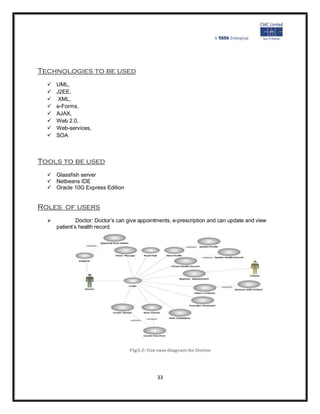
   Doctor: Doctor’s can give appointments, e-prescription and can update and view
  patient’s health record.


                                          33
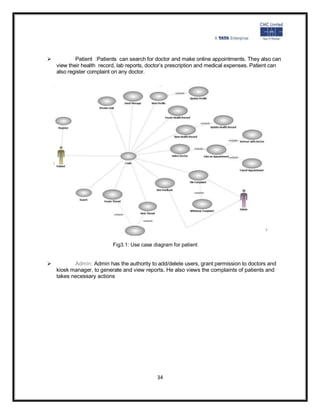
 Patient :Patients can search for doctor and make online appointments. They also can
view their health record, lab reports, doctor’s prescription and medical expenses. Patient can
also register complaint on any doctor.


                          Fig3.1: Use case diagram for patient


 Admin: Admin has the authority to add/delete users, grant permission to doctors and
kiosk manager, to generate and view reports. He also views the complaints of patients and
takes necessary actions


                                            34
MODULES OF PROJECT

electronic medical record (EMR)
An electronic medical record (EMR) is a computerized medical record created in an organization
that delivers care, such as a hospital or physician's office.Electronic medical records tend to be a
part of a local stand-alone health information system that allows storage, retrieval and modification
of records. Some EMR systems automatically monitor clinical events, by analyzing patient data
from an electronic health record to predict, detect and potentially prevent adverse events. This
can include discharge/transfer orders, pharmacy orders, radiology results, laboratory results and
any other data from ancillary services or provider notes.


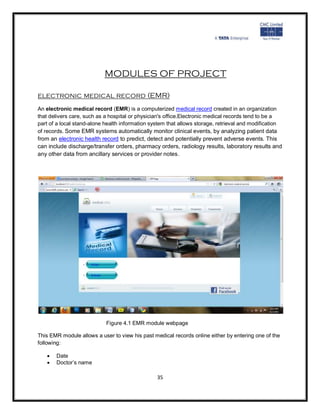
                            Figure 4.1 EMR module webpage

This EMR module allows a user to view his past medical records online either by entering one of the
following:

      Date
      Doctor’s name

                                                 35
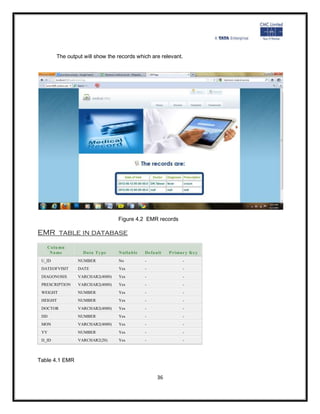
The output will show the records which are relevant.


                                 Figure 4.2 EMR records

EMR table in database
   Colu mn
    Na me         Data T ype     N ulla b le   Defa ult   P rimar y Ke y
 U_ID           NUMBER           No            -                -
 DATEOFVISIT    DATE             Yes           -                -
 DIAGONOSIS     VARCHAR2(4000)   Yes           -                -
 PRESCRIPTION   VARCHAR2(4000)   Yes           -                -
 WEIGHT         NUMBER           Yes           -                -
 HEIGHT         NUMBER           Yes           -                -
 DOCTOR         VARCHAR2(4000)   Yes           -                -
 DD             NUMBER           Yes           -                -
 MON            VARCHAR2(4000)   Yes           -                -
 YY             NUMBER           Yes           -                -
 D_ID           VARCHAR2(20)     Yes           -                -


Table 4.1 EMR


                                                    36
Online Appointment
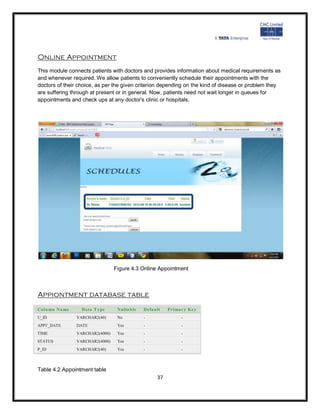
This module connects patients with doctors and provides information about medical requirements as
and whenever required. We allow patients to conveniently schedule their appointments with the
doctors of their choice, as per the given criterion depending on the kind of disease or problem they
are suffering through at present or in general. Now, patients need not wait longer in queues for
appointments and check ups at any doctor's clinic or hospitals.


                                 Figure 4.3 Online Appointment


Appiontment database table
Colu mn Na me     Data T ype      N ulla b le   Defa ult   P rimar y Ke y
U_ID            VARCHAR2(40)      No            -                -
APPT_DATE       DATE              Yes           -                -
TIME            VARCHAR2(4000)    Yes           -                -
STATUS          VARCHAR2(4000)    Yes           -                -
P_ID            VARCHAR2(40)      Yes           -                -


Table 4.2 Appointment table
                                                      37
REFERENCES


*   www.cmcltd.com
*   .wikipedia.org/wiki
*   www.scribd.com
*   Complete Reference to JAVA2
*   Sun Microsystems and Cmc study material


                                         38

Summer Training report at TATA CMC

  • 1.
    [Type a quotefrom the document or the summary of an interesting point. You can position the text box A anywhere in the document. Use the Text Box Tools tab to change the Training Report formatting of the pull quote text box.] Of Summer Training Project At On ADVANCED JAVA Submitted In The Partial Fulfillment of Bachelor of Technology Department of Computer Science J.P. Institute of Engineering and Technology 2012-13 Submitted to : Submitted by: Mr. Shreyaskar Gaur Name :Pallavi Srivastava Assistant Professor B.Tech (C.S.E):4th yr Department of Computer Science & Semester :7 Technology Roll no. :0928210035 J. P. Institute of Engineering Technology 1
  • 2.
    Certificate I am, PallaviSrivastava, student of B.Tech (CSE), 4th year of J.P Institute of Engineering and Technology, Meerut completed my summer project from Tata CMC from June 11 ,2012 to July 26, 2012. During the mentioned period I worked at Advanced JAVA and completed my summer training project entitled “Centralized Hospital Management” under the guidance of Mr. Vikrant Singh. Date: Name:Pallavi Srivastava 2
  • 3.
    [Type a quotefrom the document or the summary of an interesting point. You can position the text box anywhere in the document. Use the Text Box Tools tab to change the formatting of the pull quote text box.] Acknowledgement “Gratitude is not a thing of expression; it is more matter of feeling." There is always a sense of gratitude which one express towards others for their help and supervision in achieving the goals. This formal piece of acknowledgement is an attempt to express the feeling of gratitude towards people who helpful me in successfully completing of my training I would like to express my deep gratitude to Mr. Vikrant Singh ,my training coordinator for their constant co-operation. He was always there with his competent guidance and valuable suggestion throughout the pursuance of this research project. I would also like to place of appreciation to all the respondents and group members whose responses and coordination were of utmost importance for the project. Above all no words can express my feelings to my parents, friends all those persons who supported me during my project. I am also thankful to all the respondents whose cooperation & support has helped me a lot in collecting necessary information 3
  • 4.
    Table of contents Certificate(bycompany) .......................................................................................................................... i Certificate ............................................................................................................................................... ii Acknowledgement ................................................................................................................................. iii Table of contents ................................................................................................................................... iv List of figures ......................................................................................................................................... vi List of tables...........................................................................................................................................vii 1. Company Profile ......................................................................................................................... 1 1.1. Core products/solutions ................................................................................................... 3 1.2. Some Clients of Company ................................................................................................. 3 1.3. Company services in technology ....................................................................................... 5 2. Technology ................................................................................................................................. 6 1.1. Introduction to JAVA ........................................................................................................ 6 1.2. J2EE ................................................................................................................................. 6 1.3. MVC architecture ............................................................................................................. 7 1.4. JAVABEANS ...................................................................................................................... 8 1.5. JDBC ................................................................................................................................. 8 1.6. Servlets .......................................................................................................................... 14 1.7. JSP ................................................................................................................................. 17 3. Project ...................................................................................................................................... 24 1.1. Object ............................................................................................................................ 24 1.2. Scope ............................................................................................................................. 24 1.3. Technology to be used ................................................................................................... 25 1.4. Tools to be used ............................................................................................................. 25 1.5. Roles of users ................................................................................................................. 25 4
  • 5.
    4. Modules ofProject(on which I worked) ................................................................................... 27 1.1. EMR ............................................................................................................................... 27 1.2. Online appointment ....................................................................................................... 28 5. References ............................................................................................................................... 30 5
  • 6.
    List of Figures Figureno. Title Page no. 2.1 MVC architecture 7 2.2 JDBC drivers 11 2.3 Lifecycle of servlet 15 2.4 JSP 18 2.5 JSP compilation 18 2.6 JSP tags 19 3.1 Use case for patient 21 3.2 Use case for doctor 27 4.1 EMR module webpage 28 4.2 EMR records webpage 29 4.3 Online appointment webpage 30 6
  • 7.
    List of Tables Tableno. Title Page no. 4.1 EMR 7 4.2 Appointment Table 11 COMPANY PROFILE CMC Limited is a leading systems engineering and integration company in India, offering application design, development, testing services and asset-based solutions in niche segments through turnkey projects of national importance. CMC has also been expanding its service presence in international markets offering off-shoring advantages and delivering value through service level-based and project scope-based deliveries. Since its inception on December 26, 1975, CMC has been a frontrunner in providing ITCMC MUMBAI 1 solutions and services. CMC was the first ever enterprise in India to set up a countrywide data network called INDONET - a computer network providing access to major cities in India, way back in 1985. A subsidiary of Tata Consultancy Services Limited (TCS Ltd), one of the world's leading information technology consulting, services and business process outsourcing organisations, CMC Limited is a part of the US$ 83.3 billion Tata Group, India's best known business conglomerate. Today, CMC Limited, an ISO 9001:2000, certified and CMMI Level V accredited organisation, is positioned as a premier IT solutions provider in the fast growing and competitive IT market. CMC’s execute large and complex turnkey projects, and have built, managed and supported our customers' IT systems across the value chain infrastructure, applications and business processes. A few highlights of CMC’s business 7
  • 8.
    Over 10775 employees spread across India, USA, UK, Europe, MEA & APAC  3300+ experts in technologies & domain for Application Development Practice  978 strong skilled force in Embedded Systems  11 Development Centres across India and USA  Experience in setting up large ODCs up to 300+ team CMC has 18 offices in major Indian cities and over 150 service locations. CMC’s have a sizable resource pool of engineers trained in diverse technologies, with vast domain knowledge and varied skill set. CMC’s conduct significant research into emerging technologies and competence areas at our state- of-the-art, ISO 9001 certified R&D Centre in Hyderabad, India. This gives us an edge in complex, high technology projects. CMC over the years has followed a multi-dimensional approach to support its growth and expansion in becoming a global player. Together with Tata Consultancy Services Limited (TCS Ltd), our strategic partner, CMC’s are working to target the global market with additional offerings that leverage our combined strengths and enable us to follow common best practices. CMC's wholly owned subsidiary, CMC Americas Inc, was acquired in 1991 and formerly called Baton Rouge International (BRI), before being renamed in 2003. With 9 offices in USA and servicing customers across the country, it drives CMC's thrust towards globalisation and business development in USA. In addition to the following, CMC Americas Inc also maintains offices in Austin, TX; Los Angeles, CA; Sunnyvale, CA; Atlanta, Georgia; Baton Rouge, LA; Novi, MI; Edison, NJ; Reston, VA and Burlington, MA. CMC Informatics UK is the branch office of CMC Limited in the United Kingdom and covers the territories of UK, Ireland and Europe. The office is based in the historic city of Guildford in Surrey, one of richest counties in the UK. CMC's products for transport, law enforcement, banking and insurance verticals, and services in 8
  • 9.
    embedded technologies, ITConsultancy and Infrastructure Development Management and Outsourcing are offered through this office. The London Underground Limited (LUL), Forth Ports and TRW are a few of our CMC’sll known clients. CMC Dubai is the branch office of CMC in west Asia and serves as a front end for CMC's thrusts towards globalization, especially in terms of business development in the Middle East and Africa. The Dubai office handles large projects for important clients like the National Bank of Bahrain and Syrian Railways. In Africa, the Tanzania Police is also handled from this office. Global presence • CMC Americas – USA • CMC Informatics – UK • CMC Dubai – Middle East • CMC Ltd – Presence in almost all cities of India Core Products/Solutions  Transport ARTS, IMPRESS, FOIS, Train Scheduling  Port Solutions MACH, CALM  Banking: TC4  Insurance: GENISYS  Fingerprint Tracing System FACTS  Event Management System  Mining DYNAMINE  Securities VECTOR, VEDAS  Tourism VISTA  Health FHIMS  Embedded Systems TU, ANIB  eCommerce ICert, E-bill Pay, E-Cheque  eGovernance VOICE, VCOPS KHAJANE, MUKHYA VAHINI 9
  • 10.
    Water Resources WRM Some of CMC’s Clients  Reserve Bank of India  Indian Railways  Indian Oil Corporation  Bharat Petroleum Corporation India  Oil and Natural Gas Corporation Ltd.  United western Bank  Bank of India  Bank of Baroda Shipping  Mumbai Port Trust  Chennai International Terminal  Adani Port  Forth Ports Plc, UK  Norfolklines BV, Netherlands  P&O Ports Manufacturing Energy Resources & Utilities  Sesa Goa  IOCL  TATA steel  TATA Power Education and training  Mahindra British Telecom  ICICI Bank  WIPRO  SmithKline Beecham 10
  • 11.
    Robert Bosche  IIT Kharagpur  Ministry of External Affairs  Reserve Bank of India  State Bank of India  Calcutta Telecom Hitech & Telecom  Tata Teleservices  Bharat Sanchar Nigam  IBM Daksh Business Process Services  Mahanagar Telephone Nigam  Miro Technologies  Cadence Technologies Defence & Space  Indian Air Force  Ordnance Factory Board, Ministry of Defence  Department of Space  ISRO  DRDO  Indian Navy  National Remote Sensing Agency Software / Firmware Development in JAVA  Application Development  Device Drivers & Board Support Packages  Protocol Stacks  Simulators & Tools Development  GUI Design 11
  • 12.
    TECHNOLOGY Introduction to java Javais a programming language initially developed by Sun Microsystems and released as a principal component of Sun Microsystems' Java platform. Although the language gets much of its syntax from C and C++ it has a less complicated object model and lesser low-level services. Java applications are typically compiled to byte code (class file)that can run on any Java Virtual Machine (JVM) regardless of computer architecture .Java is a general-purpose, object-oriented language that is specifically designed to have as few implementation dependencies as possible. It is intended to let application developers "write once, run anywhere". Java is currently one of the most standard programming languages in use, and is extensively used from application software to web applications. There were five primary goals in the creation of the Java language :.  It should be "simple, object-oriented and familiar".  It should be "robust and secure".  It should be "architecture-neutral and portable".  It should execute with "high performance".  It should be "interpreted, threaded, and dynamic". J2EE Short for Java 2 Platform Enterprise Edition, J2EE is a platform-independent ,Java- centric environment from Sun for developing, building and deploying Web-based enterprise applications online. The J2EE platform consists of a set of services, APIs, and protocols that provide the 12
  • 13.
    functionality for developingmultitier, Web-based applications. Some of the key features and services of J2EE  At the client tier, J2EE supports pure HTML ,as well as Java applets or applications. It relies on Java Server Pages and servlet code to create HTML or other formatted data for the client  Enterprise JavaBeans(EJBs) provide another layer where the platform's logic is stored. An EJB server provides functions such as threading, concurrency ,security and memory management. These services are transparent to the author.  Java Database Connectivity(JDBC), which is the Java equivalent to ODBC,is the standard interface for Java databases.  The Java servlet API enhances consistency for developers without requiring a graphical user interface. MVC Architecture Model–View–Controller (MVC) is an architecture that separates the representation of information from the user's interaction with it. The model consists of application data and business rules, and the controller mediates input, converting it to commands for the model or view.A view can be any output representation of data, such as a chart or a diagram. Multiple views of the same data are possible, such as a pie chart for management and a tabular view for accountants. The central idea behind MVC is code reusability and separation of concerns. 13
  • 14.
    Figure 2.1 MVCArchitecture JAVA BEANS JavaBeans are reusable software components forJava that can be manipulated visually in a builder tool. Practically, they are classes written in the Java programming language conforming to a particular convention. They are used to encapsulate many objects into a single object (the bean), so that they can be passed around as a single bean object instead of as multiple individual objects. A Java Bean is a Java Object that is serializable, has a nullary constructor, and allows access to properties using getter and setter methods. JAVA BEANS CONVENTIONS In order to function as a Java Bean class ,an object class must obey certain conventions about method naming, construction, and behavior. These conventions make it possible to have tools that can use, reuse, replace, and connect Java Beans. The required conventions are as follows: The class must have a public default constructor(no-argument). This allows easy instantiation within 14
  • 15.
    editing and activationframeworks. The class properties must be accessible using get , set ,is(used for Boolean properties instead of get) and other methods (so-called accessor methods andmutator methods), following a standard convention. This allows easy automated inspection and updating of bean state within frameworks, many of which include custom editors for various types of properties. The class should be serializable. It allows applications and frameworks to reliably save, store, and restore the bean's state in a fashion independent of the VM and of the platform. BASIC BEAN CONCEPTS Individual Java Beans will vary in functionality, but most share certain common defining features.  Support for introspection allowing a builder tool to analyze how a bean works.  Support for customization allowing a user to alter the appearance and behavior of a bean.  Support for events allowing beans to fire events, and informing builder tools about both the events they can fire and the events they can handle.  Support for properties allowing beans to be manipulated programmatically, as well as to support the customization mentioned above  Support for persistence allowing beans that have been customized in an application builder to have their state saved and restored. Typically persistence is used with an application builder's save and load menu commands to restore any work that has gone into constructing an application. While Beans are intended to be used primarily with builder tools, they need not be .Beans can be manually manipulated by text tools through programatic interfaces. Allkey APIs, including support for events, properties, and persistence, have been designed to be easily read and understood by human programmers as well as by builder tools. The JavaBeans™ architecture is based on a component model which enables developers to create software units called components. Components are self-contained, reusable software units that can be visually assembled into composite components, applets, applications, and servlets using visual application builder tools. Java Bean components are known as beans .A set of APIs describes a 15
  • 16.
    component model fora particular language. The JavaBeans API specification describes the core detailed elaboration for the JavaBeans component architecture .Beans are dynamic in that they can be changed or customized. Through the design mode of a builder tool you can use the Properties window of the bean to customize the bean and then save (persist) your beans using visual manipulation. You can select a bean from the toolbox, drop it into a form, modify its appearance and behavior, define its interaction with other beans, and combine it and other beans into an applet, application, or a new bean .The following list briefly describes key bean concepts.  Builder tools discover a bean's features (that is, its properties, methods, and events) by a process known as introspection. Beans support introspection in twoways: o By adhering to specific rules, known as design patterns, when naming bean features. The Introspector class examines beans for these design patterns to discover bean features. The Introspector class relies on the core reflection API. The trail Getting Startedis an excellent place to learn about reflection. o By explicitly providing property, method, and event information with a related bean information class. A bean information class implements the Bean Info interface. A Bean Info class explicitly lists those bean features that are to be exposed to application builder tools.  Properties are the appearance and behavior characteristics of a bean that can bechanged at design time. Builder tools introspect on a bean to discover itsproperties and expose those properties for manipulation.  Beans expose properties so they can be customized at design time.  Customization is supported in two ways: by using property editors, or by using moresophisticated bean customizers.  Beans use Events to communicate with other beans. A bean that is to receive events (a listener bean) registers with the bean that fires the event (a source bean). Builder tools can examine a bean and determine which events that bean can fire (send) and which it can handle (receive).  Persistence enables beans to save and restore their state. After changing a bean's properties, you can save the state of the bean and restore that bean at a later time with the property changes intact. The JavaBeans architecture uses Java Object Serialization to support persistence  A bean's methods are no different from Java methods, and can be called from other beans or a scripting environment. By default all public methods are exported. Beans vary in functionality and purpose. You have probably met some of the following beans in your programming practice: 16
  • 17.
    GUI (graphical userinterface)  Non-visual beans, such as a spelling checker  Animation applet  Spreadsheet application BEAN DEVELOPMENT KIT JavaBeans are reusable software components written in Java. These components maybe built into an application using an appropriate building environment. The Bean Development Kit (BDK) from Sun includes a simple example of a building environment which uses beans, called the bean box, and some sample beans The Java Database Connectivity (JDBC) The Java Database Connectivity (JDBC) API is the industry standard for database-independent connectivity between the Java programming language and a wide range of databases – SQL databases and other tabular data sources, such as spreadsheets or flat files. The JDBC API provides a call-level API for SQL-based database access. JDBC technology allows you to use the Java programming language to exploit "Write Once, Run Anywhere" capabilities for applications that require access to enterprise data. With a JDBC technology-enabled driver, you can connect all corporate data even in a heterogeneous environment. JDBC drivers There are commercial and free drivers available for most relational database servers. These drivers fall into one of the following types:  Type 1 that calls native code of the locally available ODBC driver.  Type 2 that calls database vendor native library on a client side. This code then talks to database over network. 17
  • 18.
    Type 3, the pure-java driver that talks with the server-side middleware that then talks to database.  Type 4, the pure-java driver that uses database native protocol. Figure 2.2 JDBC drivers Functionality and implementation JDBC allows multiple implementations to exist and b e used by the same application.The API provides a mechanism for dynamically loading the correct Java packages and registering them with the JDBC Driver Manager. The Driver Manager is used as a connection factory for creating JDBC connections.JDBC connections support creating and executing statements. These may be update statements such as SQL's CREATE, INSERT, UPDATE and DELETE, or they may bequery statements such as SELECT. Additionally,stored proceduresmay be invoked through a JDBC connection. JDBC represents statements using one of the following classes: Statement – the statement is sent to the database server each a nd every time. 18
  • 19.
    PreparedStatement – thestatement is cached and then the execution path is predetermined on the database server allowing it to be execute d multiple times in anefficient manner. CallableStatement –used for executingstored procedureson the database.Update statements such as INSERT, UPDATE and DELETE return an update count that indicates how many rows were affected in the database. These statements do notreturn any other information.Query statements return a JDBC row result set. The row result set is used to walk overthe result set. Individual columns in a row are retrieved either b y name or by column number. There may be any number of rows in the result set. The row result set has metadata that describes the names of the columns and their types.There is an extension to the basic JDBC API in thejavax.sql. The methodClass.forName(String) is used to load the JDBC driver class.Example : Class.forName(―sun.jdbc.odbc.JdbcOdbcDriver‖); used to load the JDBC-ODBC bridge driver.When aDriverclass is loaded, it creates an instance of itself and registers it with the DriverManager. Now when a connection is needed, one of the DriverManager.getConnection() methodsis used to create a JDBC connection. Example; import java.sql.*; import javax.sql.*; public class jdbcdemo{ public static void main(String args[]){ String dbtime; String dbUrl = "jdbc:mysql://your.database.domain/yourDBname"; String dbClass = "com.mysql.jdbc.Driver"; String query = "Select * FROM users"; try { Class.forName("com.mysql.jdbc.Driver"); Connection con = DriverManager.getConnection (dbUrl); Statement stmt = con.createStatement(); ResultSet rs = stmt.executeQuery(query); 19
  • 20.
    while (rs.next()) { dbtime= rs.getString(1); System.out.println(dbtime); } //end while con.close(); } //end try catch(ClassNotFoundException e) { e.printStackTrace(); } catch(SQLException e) { e.printStackTrace(); } } //end main } //end class If a database operation fails, JDBC raises an SQLException.There is typically very little one can do to recover from such an error, apart from logging it with as much detail as possible. It is recommended that the SQLException be translated into an application domain exception (an unchecked one) that eventually results in a transaction rollback and a notification to the user. Finally to summarize, the following points can be stated :  JDBC API provides a database programming interface for Java programs. AJava program can send queries to a database b y using the JDBC driver.  The java.sql package contains classes that help in connecting to a database, sending SQL statements to the database and processing the query results.  The Connection Object represents a connection with a database. It can beinitialized using the getConnection() method of the DriverManager class.  The PreparedStatement object allows you to execute parameterized queries. Itcan be initialized using the prepareStatement() method of the Connection object. 20
  • 21.
     The setString()method sets the quer y parameters of the PreparedStatementobject.  The executeUpdate() method executes the query statement present in thePreparedStatement object and returns the number of rows affected by the query.  The ResultSetMetaData interface is used to obtain information about thecolumns stored in a ResultSet object Servlets Servlets are protocol and platform independent server-side software components, written in Java. They run inside a Java enabled server or application server, such as the WebSphere Application Server. Servlets are loaded and executed within the Java Virtual Machine (JVM) of the Web server or application server, in much the same way that applets are loaded and executed within the JVM of the Web client. Since servlets run inside the servers, however, they do not need a graphical user interface (GUI). In this sense, servlets are also faceless objects. Servlets more closely resemble Common Gateway Interface (CGI) scripts or programs than applets in terms of functionality. As in CGI programs, servlets can respond to user events from an HTML request, and then dynamically construct an HTML response that is sent back to the client. The Java Servlet API The Java Servlet API is a set of Java classes which define a standard interface between a Web client and a Web servlet. Client requests are made to the Web server, which then invokes the servlet to service the request through this interface. The API is composed of two packages:  javax.servlet  javax.servlet.http The Servlet interface class is the central abstraction of the Java Servlet API. This class defines the methods which servlets must implement, including a service() method for the handling of requests. 21
  • 22.
    The GenericServlet classimplements this interface, and defines a generic, protocol-independent servlet. To write an HTTP servlet for use on the Web, we will use an even more specialized class of GenericServlet called HttpServlet.HttpServlet provides additional methods for the processing of HTTP requests such as GET (doGet method) and POST (doPost method). Although our servlets may implement a service method, in most cases we will implement the HTTP specific request handling methods of doGet and doPost. Servlet Life Cycle Figure 2.3 Lifecycle of Servlet The life cycle of a servlet can be categorized into four parts: 1. Loading and Instantiation: The servlet container loads the servlet during startup or when the first request is made. The loading of the servlet depends on the attribute <load-on- startup> of web.xml file. If the attribute <load-on-startup> has a positive value then the servlet is load with loading of the container otherwise it load when the first request comes for service. After loading of the servlet, the container creates the instances of the servlet. 22
  • 23.
    2. Initialization: Aftercreating the instances, the servlet container calls the init() method and passes the servlet initialization parameters to the init() method. The init() must be called by the servlet container before the servlet can service any request. The initialization parameters persist untill the servlet is destroyed. The init() method is called only once throughout the life cycle of the servlet.The servlet will be available for service if it is loaded successfully otherwise the servlet container unloads the servlet. 3. Servicing the Request: After successfully completing the initialization process, the servlet will be available for service. Servlet creates seperate threads for each request. The sevlet container calls the service() method for servicing any request. The service() method determines the kind of request and calls the appropriate method (doGet() or doPost()) for handling the request and sends response to the client using the methods of the response object. 4. Destroying the Servlet: If the servlet is no longer needed for servicing any request, the servlet container calls the destroy() method . Like the init() method this method is also called only once throughout the life cycle of the servlet. Calling the destroy() method indicates to the servlet container not to sent the any request for service and the servlet releases all the resources associated with it. Java Virtual Machine claims for the memory associated with the resources for garbage collection. A simple servlet example package itso.servjsp.servletapi; import java.io.*; import javax.servlet.*; import javax.servlet.http.*; public class SimpleHttpServlet extends HttpServlet { protected void service(HttpServletRequest req, HttpServletResponse res) throws ServletException, IOException { res.setContentType("text/html"); PrintWriter out = res.getWriter(); out.println("<HTML><TITLE>SimpleHttpServlet</TITLE><BODY>"); 23
  • 24.
    out.println("<H2>Servlet API Example- SimpleHttpServlet</H2><HR>"); out.println("<H4>This is about as simple a servlet as it gets!</H4>"); out.println("</BODY><HTML>"); out.close(); } } JavaServer Pages (JSP) JavaServer Pages (JSP) is a technology that helps software developers create dynamically generated web pages based on HTML, XML, or other document types. Released in 1999 by Sun Microsystems[1], JSP is similar to PHP, but it uses the Java programming language. To deploy and run Java Server Pages, a compatible web server with a servlet container, such as Apache Tomcat or Jetty, is required. Java Server Pages is a technology which permits software developers to create dynamic request like HTML, XML in order to answer to client request in the net. This technology lets Java code and definite pre-defined procedures to be implanted into static content. The syntax in Java Server Pages includes a supplementary XML tag which is known as JSP actions. It is made use to evoke the utility of the built-in functions. Moreover JSP permits to establish and form the JSP tag libraries which operate as an extension to the standard XML or HTML tags. These JSP tag libraries give a good technique to widen the potentiality of the Web server by providing an independent platform.JSP compiler compiles the JSPs into Java Servlets. 24
  • 25.
    Figure 2.4 JSP AJSP compiler may possibly create a servlet in Java code and it is later compiled by the Java compiler. It might even directly produce the byte code for the servlet. Java Server Pages can be examined as a high level abstraction of servlets which is practiced as an extension of the Servlet2.1API. Java Server Pages are HTML pages embedded with snippets of Java code.It is an inverse of a Java Servlet JSPs run in two phases  Translation Phase- In translation phase JSP page is compiled into a servlet called JSP Page Implementation class  Execution Phase- In execution phase the compliled JSP is processed 25
  • 26.
    Figure 2.5 JSPcompilation The Java Server Pages and the Servlets were initially developed at Sun Microsystems. Opening with version 1.2 of the Java Server Page specification the JSPs have been built under the Java Community Process.There are quite a few JSP implicit objects that are represented by the JSP container and it could be mentioned and indicated by the programmers 26
  • 27.
    Config - It gives the data of the servlet configuration  Application - Data's are shared by the servlets and Java Server Pages in theapplication.  Exception - Exceptions are not trapped by the codes in the application.  Out - The data's are written with the help of JSP Writer to the response stream.  Request - Here the Hypertext Transfer Protocol request the object.  Response - Here the Hypertext Transfer Protocol response the object  Session - It is helpful to trace the data's and information about a user from one request to another request There are several actions that are performed in JSP actions. A JSP action is nothing but a XML tags that invokes functionality of the built-in web server. Some of the JSP action is given as follows.  Jsp:param - It indicates a parameter which will be added in addition to the request of the existing parameters. It is used inside the jsp:params or jsp:include, jsp:forwardblocks  Jsp:include - Java Servlet provisionally gives the request and response off to the specific Java Server Page. The Control will later come again to the existing JSP as soon as theother JSP has completed. With the help of this the JSP code will be distributed among several other JSPs rather than replica.  Jsp:forward - This JSP action is used to give off the request/response to the other servlet or JSP. The control will not come back to the existing JSP.   Jsp:plugin - The ancient version of web browsers like Internet Explorer and Netscape Navigator use various tags to embed an applet. This action creates the definite tags that are required for a browser to include an applet. 27
  • 28.
    Jsp:fallback - This action is used to confirm that if the browser never gives support to applets.  Jsp:getProperty - It obtains a property from the specific JavaBean.  Jsp:setProperty - It sets a property in the specific JavaBean JSP Tags Figure 2.6 JSP Tags 28
  • 29.
    JSP scripting elements JSPscripting elements let you insert Java code into the servlet that will be generated from the current JSP page. There are three forms:  Expressions of the form <%= expression %> that are evaluated and inserted into the output,  Scriptlets of the form <% code %> that are inserted into the servlet's service method, and  Declarations of the form <%! code %> that are inserted into the body of the servlet class, outside of any existing method JSP Directive A JSP Directive affects the overall structure of the servlet class. It usually has the following form:<%@ directive attribute="value" %>However, you can also combine multiple attribute settings for a single directive, as follows: <%@ directive attribute1="value1"attribute2="value2"...attributeN="valueN" %> There are two main types of directive: page, which lets you do things like import classes, customize the servlet superclass, and the like; and include, which lets you insert a file into the servlet class at the time the JSP file is translated into a servlet. The specification also mentions the taglib directive, which is not supported in JSP version 1.0, but is intended to let JSP authors define their own tags. It is expected that this will be the main new contribution of JSP 1.Implicit objects in jsp are the objects that are created by the container automatically and the container makes them available to the developers, the developer do not need to create them explicitly. Since these objects are created automatically by the container and are accessed using standard variables; hence, they are called implicit objects. JSP Implicit Objects are as follows: 1. request implicit object The JSP implicit request object is an instance of a java class that implements the javax.servlet.http.HttpServletRequest interface. It represents the request made by the client. 29
  • 30.
    The request implicitobject is generally used to get request parameters, request attributes, header information and query string values. 2. response implicit object The JSP implicit response object is an instance of a java class that implements the javax.servlet.http.HttpServletResponse interface. It represents the response to be given to the client. The response implicit object is generally used to set the response content type, add cookie and redirect the response. 3. out implicit object The JSP implicit out object is an instance of the javax.servlet.jsp.JspWriter class. It represents the output content to be sent to the client. The out implicit object is used to write the output content. 4. session implicit object The JSP implicit session object is an instance of a java class that implements the javax.servlet.http.HttpSession interface. It represents a client specific conversation. The session implicit object is used to store session state for a single user. 5. application implicit object The JSP implicit application object is an instance of a java class that implements the javax.servlet.ServletContext interface. It gives facility for a JSP page to obtain and set information about the web application in which it is running. 6. exception implicit object The JSP implicit exception object is an instance of the java.lang.Throwable class. It is available in JSP error pages only. It represents the occured exception that caused the control to pass to the JSP error page. 7. config implicit object The JSP implicit config object is an instance of the java class that implements javax.servlet.ServletConfig interface. It gives facility for a JSP page to obtain the initialization parameters available. 8. page implicit object 30
  • 31.
    The JSP implicitpage object is an instance of the java.lang.Object class. It represents the current JSP page. That is, it serves as a reference to the java servlet object that implements the JSP page on which it is accessed. It is not advisable to use this page implict object often as it consumes large memory. 9. pageContext implicit object The JSP implicit pageContext object is an instance of the javax.servlet.jsp.PageContext abstract class. It provides useful context information. That is it provides methods to get and set attributes in different scopes and for transferring requests to other resources. Also it contains the reference to to implicit objects. JSP actions JSP actions use constructs in XML syntax to control the behavior of the servlet engine. You can dynamically insert a file, reuse JavaBeans components, forward the user to another page, or generate HTML for the Java plugin. Available actions include:  jsp:include - Include a file at the time the page is requested.  jsp:useBean - Find or instantiate a JavaBean.  jsp:setProperty - Set the property of a JavaBean.  jsp:getProperty - Insert the property of a JavaBean into the output jsp:forward - Forward the requester to a new page.  jsp:plugin - Generate browser-specific code that makes an OBJECT or EMBED tag for the Java plug-in. 31
  • 32.
    PROJECT Object Centralized hospital managementis a web application which provides online medical services to everyone at their doorstep. Users  There are three basic users –  Patient,  Admin,  Doctors Scope  All users have their own profiles in Medical Clinic.  Patients can search for doctor and make online appointments. They also can view their health record and doctor’s prescription. Patient can also register complaint on any doctor.  Doctor’s can give appointments, e-prescription and can view patient’s health record  Admin has the authority to add/delete users, doctors or hospitals and grant permission to doctors. modules  Login for doctors and patient  Updates about treatments and surgery  Patient reviews and ratings for doctor.  Registration for users.  Online maintenance of health record.(EMR) or Electronic medical records  Online prescription from doctor.  Online appointment facility. 32
  • 33.
    Technologies to beused  UML,  J2EE,  XML,  e-Forms,  AJAX,  Web 2.0,  Web-services,  SOA Tools to be used  Glassfish server  Netbeans IDE  Oracle 10G Express Edition Roles of users  Doctor: Doctor’s can give appointments, e-prescription and can update and view patient’s health record. 33
  • 34.
     Patient :Patientscan search for doctor and make online appointments. They also can view their health record, lab reports, doctor’s prescription and medical expenses. Patient can also register complaint on any doctor. Fig3.1: Use case diagram for patient  Admin: Admin has the authority to add/delete users, grant permission to doctors and kiosk manager, to generate and view reports. He also views the complaints of patients and takes necessary actions 34
  • 35.
    MODULES OF PROJECT electronicmedical record (EMR) An electronic medical record (EMR) is a computerized medical record created in an organization that delivers care, such as a hospital or physician's office.Electronic medical records tend to be a part of a local stand-alone health information system that allows storage, retrieval and modification of records. Some EMR systems automatically monitor clinical events, by analyzing patient data from an electronic health record to predict, detect and potentially prevent adverse events. This can include discharge/transfer orders, pharmacy orders, radiology results, laboratory results and any other data from ancillary services or provider notes. Figure 4.1 EMR module webpage This EMR module allows a user to view his past medical records online either by entering one of the following:  Date  Doctor’s name 35
  • 36.
    The output willshow the records which are relevant. Figure 4.2 EMR records EMR table in database Colu mn Na me Data T ype N ulla b le Defa ult P rimar y Ke y U_ID NUMBER No - - DATEOFVISIT DATE Yes - - DIAGONOSIS VARCHAR2(4000) Yes - - PRESCRIPTION VARCHAR2(4000) Yes - - WEIGHT NUMBER Yes - - HEIGHT NUMBER Yes - - DOCTOR VARCHAR2(4000) Yes - - DD NUMBER Yes - - MON VARCHAR2(4000) Yes - - YY NUMBER Yes - - D_ID VARCHAR2(20) Yes - - Table 4.1 EMR 36
  • 37.
    Online Appointment This moduleconnects patients with doctors and provides information about medical requirements as and whenever required. We allow patients to conveniently schedule their appointments with the doctors of their choice, as per the given criterion depending on the kind of disease or problem they are suffering through at present or in general. Now, patients need not wait longer in queues for appointments and check ups at any doctor's clinic or hospitals. Figure 4.3 Online Appointment Appiontment database table Colu mn Na me Data T ype N ulla b le Defa ult P rimar y Ke y U_ID VARCHAR2(40) No - - APPT_DATE DATE Yes - - TIME VARCHAR2(4000) Yes - - STATUS VARCHAR2(4000) Yes - - P_ID VARCHAR2(40) Yes - - Table 4.2 Appointment table 37
  • 38.
    REFERENCES * www.cmcltd.com * .wikipedia.org/wiki * www.scribd.com * Complete Reference to JAVA2 * Sun Microsystems and Cmc study material 38