TRAINING AND PLACEMENT CELL PORTAL
SUBMITED BY
PANASA RAMAIAH
PROBLEM STATEMENT
The 'Training and Placement' is developed to maintain the details of student information, trace the
details of student also maintain the information about the company availability. Using this project
user may know all the details which are provided by the ‘Training and Placement’. Users can view
the availability of company and dates of passing. the tpo officers to control the upload events and
send notifications. all the customers have some common services like adjusting the password,
upgrading details, looking for details, checking the important points, mailing to the supervisor, and
studying the substance submitted by admin if the consumer is a student.
1. The earlier program is not computerized
2. All transactions in the system are performed personally sustaining records.
3. in the earlier program positioning official has to gather student details for placements. Signing these scholar
details requires lots of time
4. Positioning official and pupils have to consult each other straight if any data is needed. If any new
organization come for placements, positioning official and his team has to search the scholar details and they
have to get the eligible prospects for that specific organization placement
EXISTING SYSTEM
DRAWBACKS IN THE EXISTING SYSTEM
1. IT CONSUMES MORE TIME.
2. PAPER WASTAGE.
3. REPEATED WORK IS OBTAINED IN THE SYSTEM
4. REDUCE STORAGE AREA
PROPOSED SYSTEM
1. Training and Placement Cell is fully advanced, which removes most of the disadvantages of the present
system
2. Training and Placement Cell is web based application which can be seen through the entire company and
external as effectively with proper login provided.
3. This technique may be used as a software for the TPO to control the student data with regards to
placement
4. All the customers have some common services like adjusting the password, upgrading details, looking for
details, checking the important points, mailing to the supervisor, and studying the substance submitted by
admin if the consumer is a student.
5. The supervisor has to accomplish the services like putting activities, achievements and he can reply to the
messages sent by users.
6. They can add components, search for scholar details, and he has the best to approve the students
ADVANTAGES
1. Reduce the paperwork and storage area
2. Improve accuracy in results
3. Improve output of operations
4. Allow easy navigation through cv’s and company information
FUNCTIONAL REQUIREMENTS
1 STUDENT LOGIN:
1. View Profile
2. Forget password
3. Update Profile
4. View Training Events
5. View Placement Events
2.TPO LOGIN:
1. Upload Training Events
2. Upload Placement Events
3. View Training Events
4. View Placement Events
5. Send Notifications
6. Get Student Information
7. Change Password
3.STAFF LOGIN:
 get Student Information
 View Events
 Change Password
NON –FUNCTIONAL REQUIREMENTS
1. Usability
2. High Availability
3. Security
4. Performance
The web site must have a simple ,user-friendly interface so customers can save time and confusion
USE CASE DIAGRAM
The use case diagrams describe system functionality
as a set of tasks that the system must carry out and
actors who interact with the system to complete the
tasks.
.
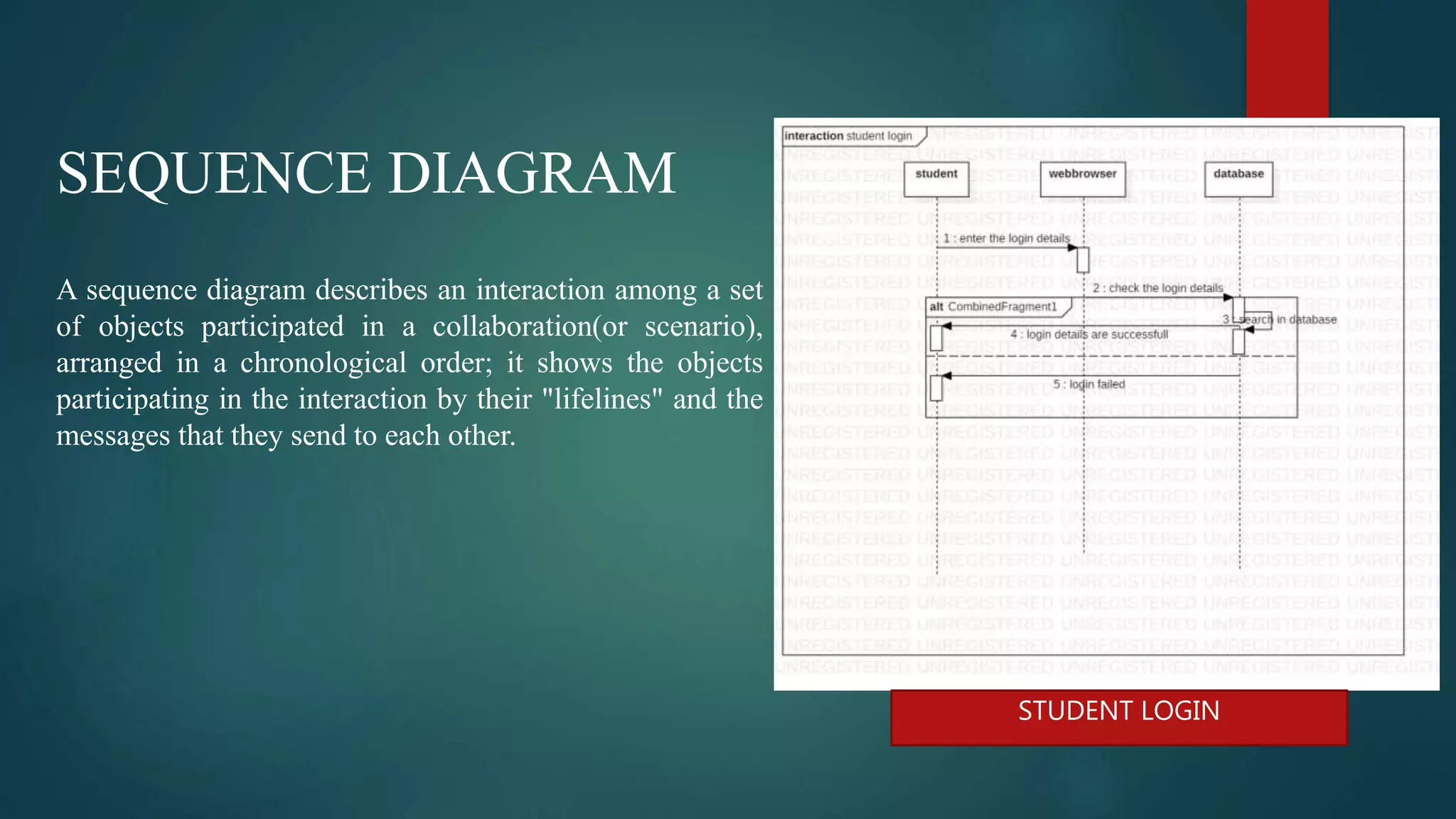
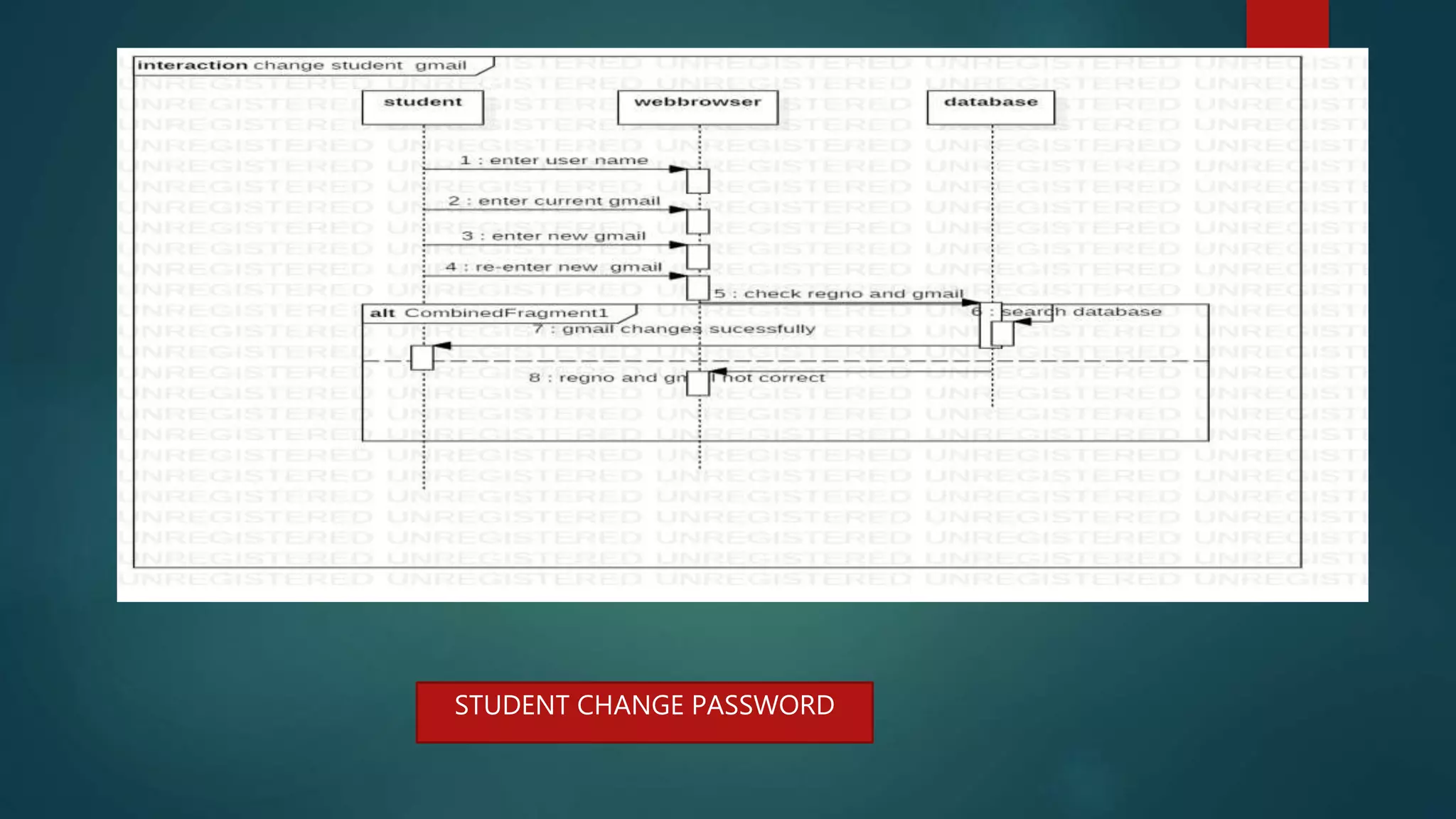
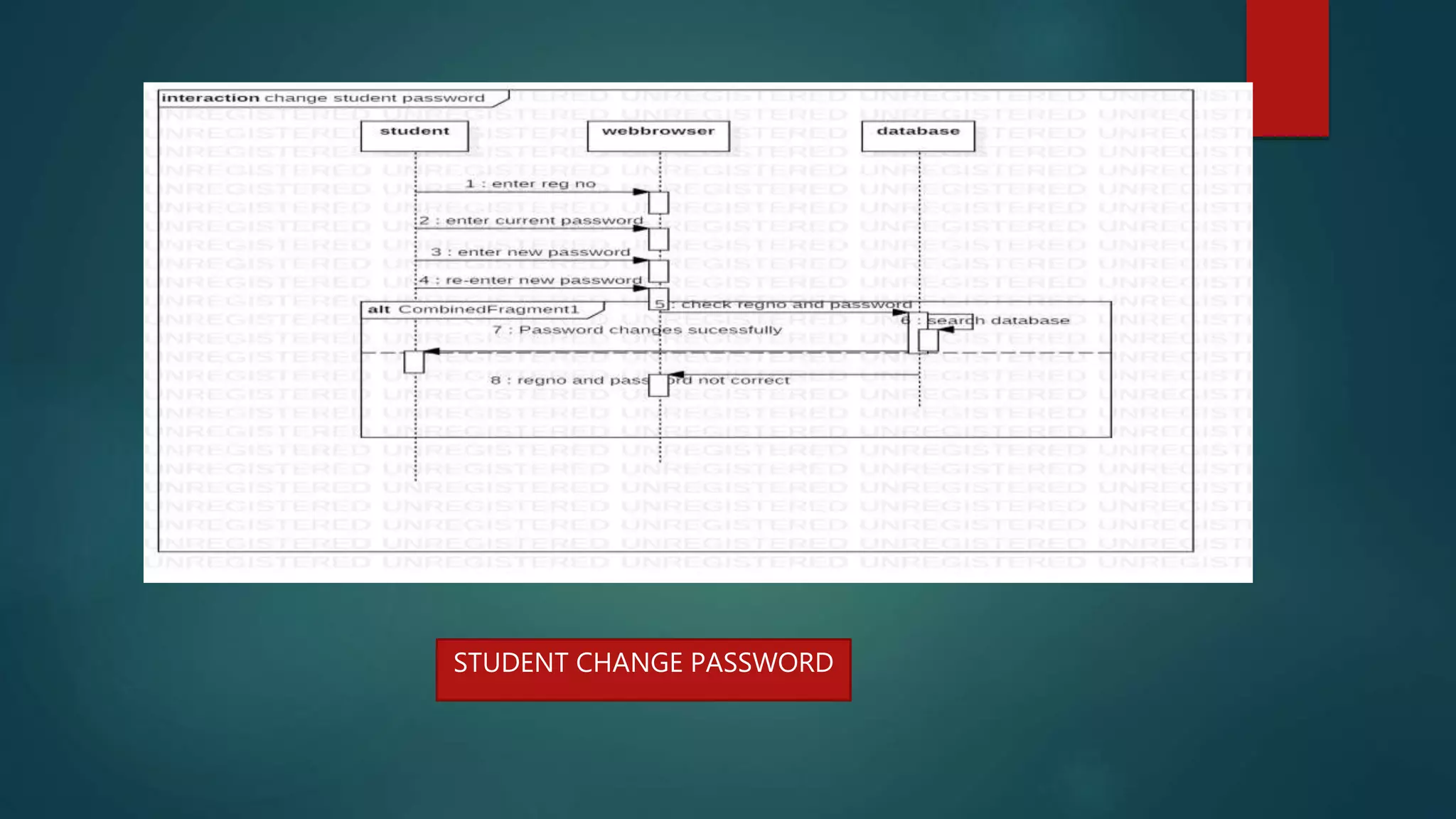
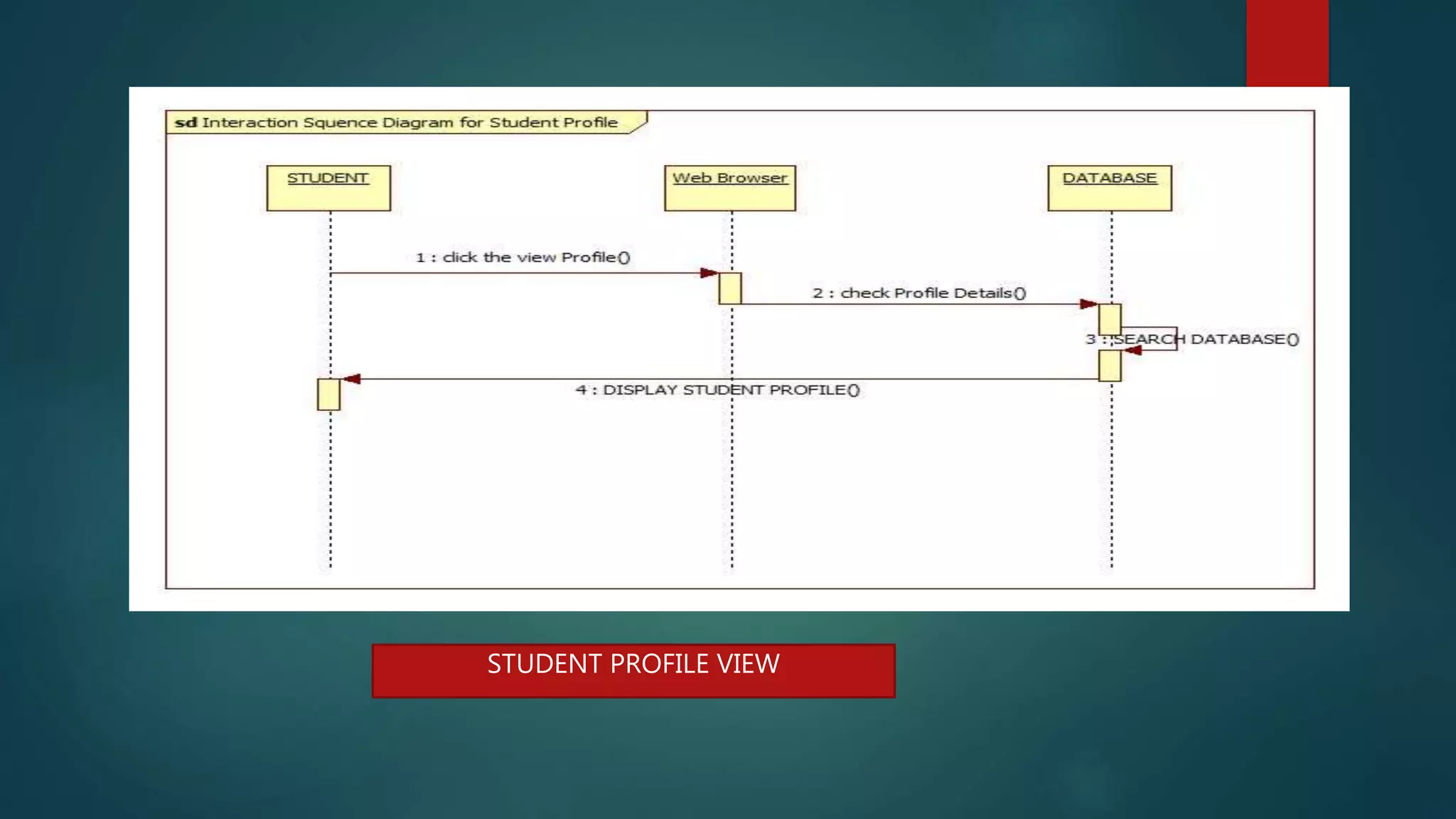
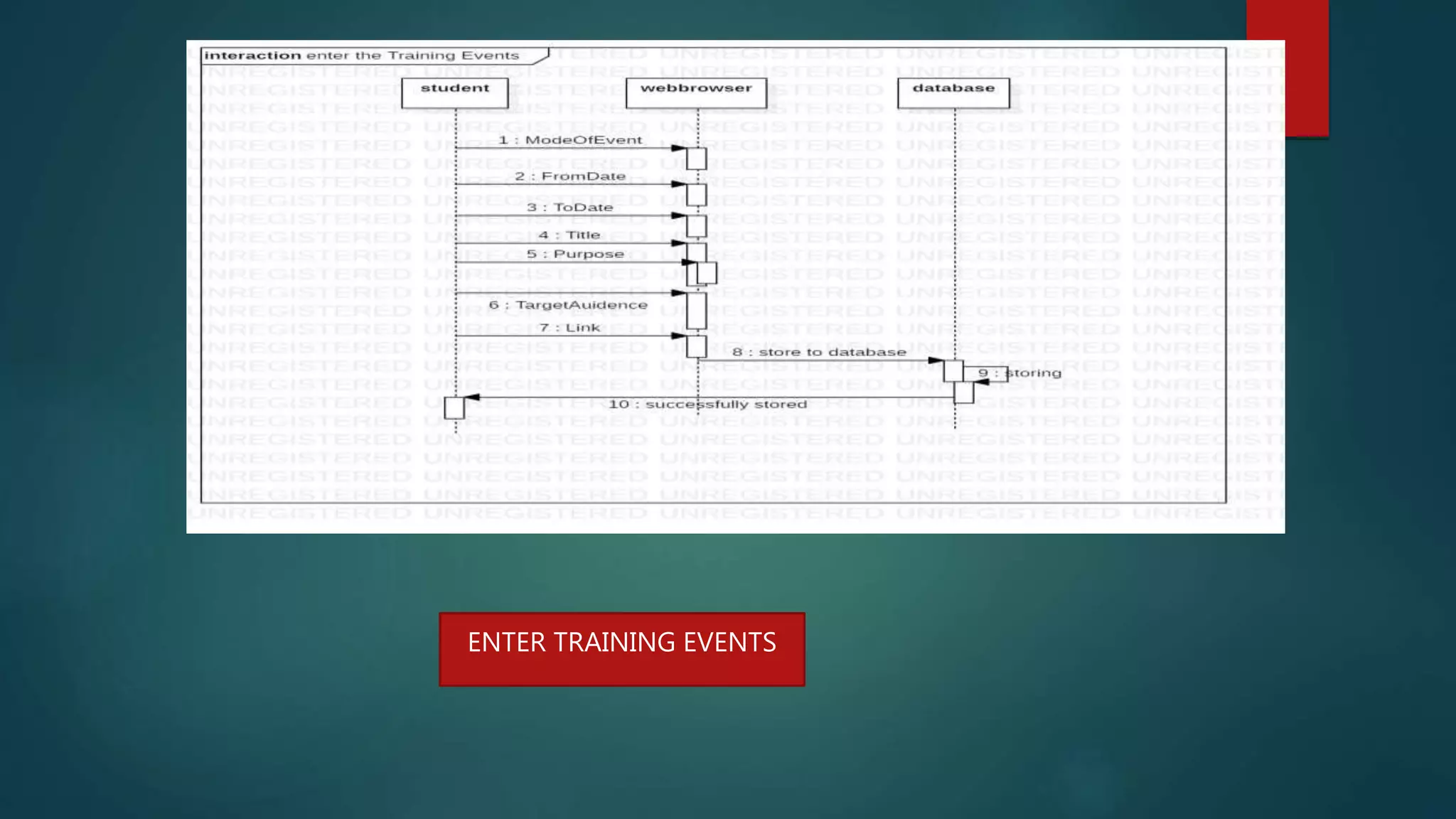
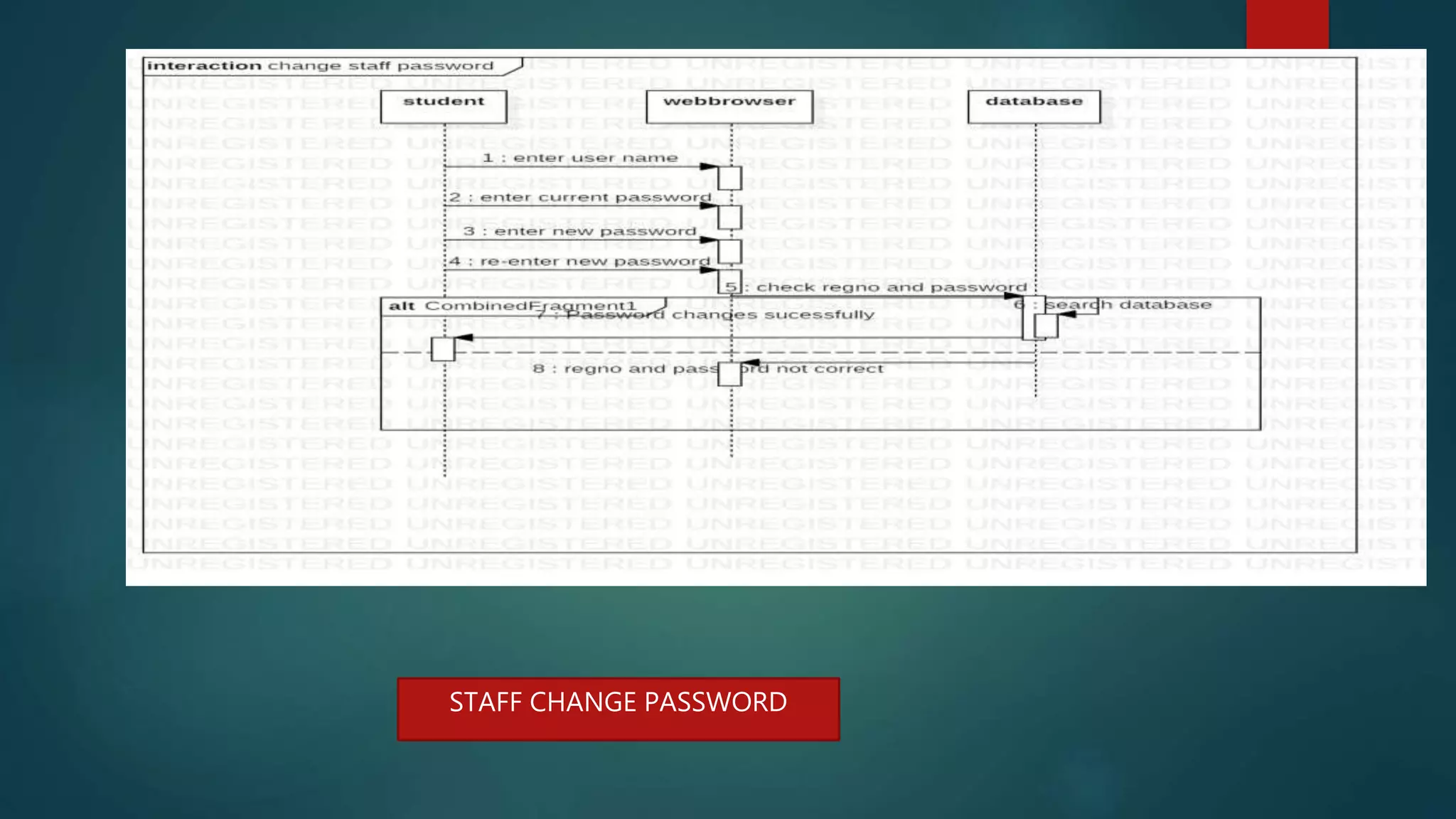
SEQUENCE DIAGRAM
A sequence diagram describes an interaction among a set
of objects participated in a collaboration(or scenario),
arranged in a chronological order; it shows the objects
participating in the interaction by their "lifelines" and the
messages that they send to each other.
STUDENT LOGIN
STUDENT CHANGE PASSWORD
STUDENT PROFILE VIEW
TPO CHANGE PASSWORD
TPO LOGIN
VIEW TRAINING EVENTS
ENTER PLACEMENT EVENTS
ENTER TRAINING EVENTS
STAFF LOGIN
STAFF CHANGE PASSWORD
STAFF CHANGE PHONE NUMBER
STAFF CHANGE GMAIL
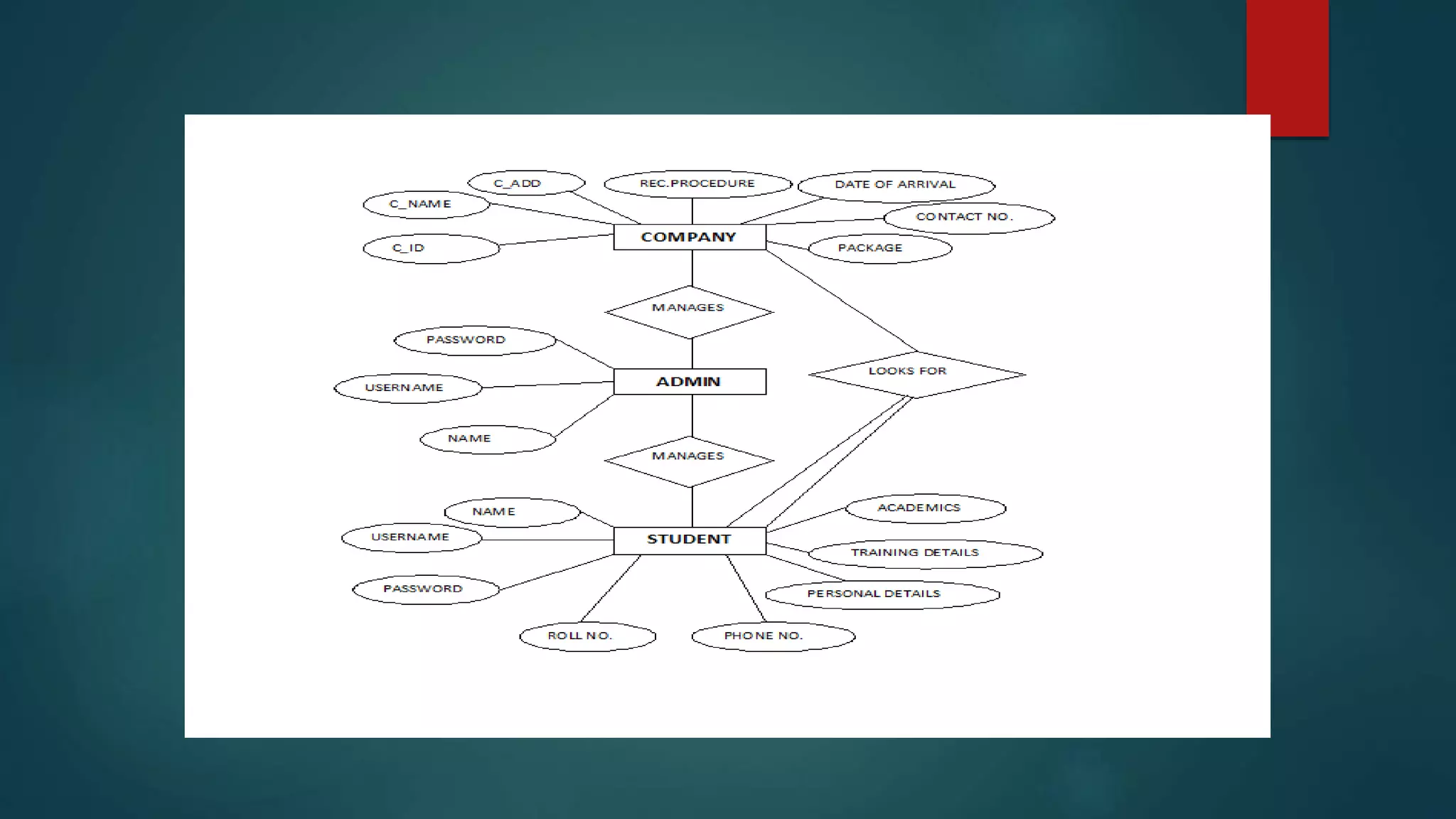
E-R DIAGRAM
An entity-relationship diagram (ERD) is a data modeling technique that graphically
illustrates an information system's entities and the relationships between those
entities. An ERD is a conceptual and representational model of data used to represent
the entity framework infrastructure.
CLASS DIAGRAM
A class diagram in the Unified Modeling
Language (UML) is a type of static
structure diagram that describes the
structure of a system by showing the
system's classes, their attributes,
operations (or methods),and the
relationships among objects.
MODULES:
1. TPO
2. Student
3. Staff
TPO
The TPO module has an authority to add student and Company to the system and provide their valid
user-id and password. The main user of the TPO module is TPO of the college. TPO of the college
will able to update details such as college name, college address, establish year, emp_id, branch,
number of student, email_id, contact number, web address, etc. The various events related to the
training and placement program is uploaded to the system by entering subject means event name and
text that contain detailed information about event. The user can able to change their password by
using change password field. Event option shows the event name, date of event, information about
the event. Company options display the company name and website of that company. The field about
us in the menu bar contains information about the admin module. After the completion of task user
will logout successfully by clicking on logout field at the top menu bar.
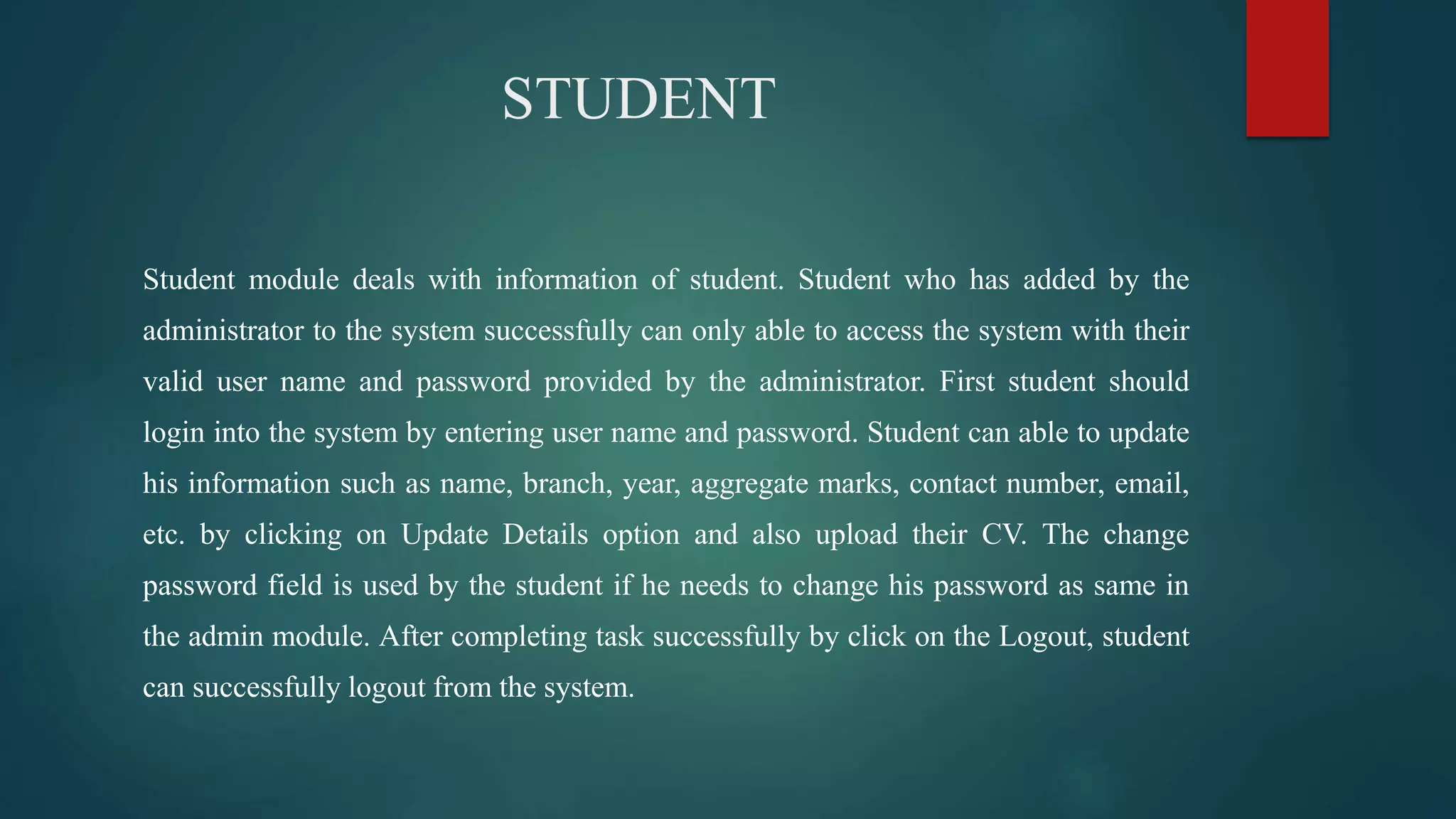
STUDENT
Student module deals with information of student. Student who has added by the
administrator to the system successfully can only able to access the system with their
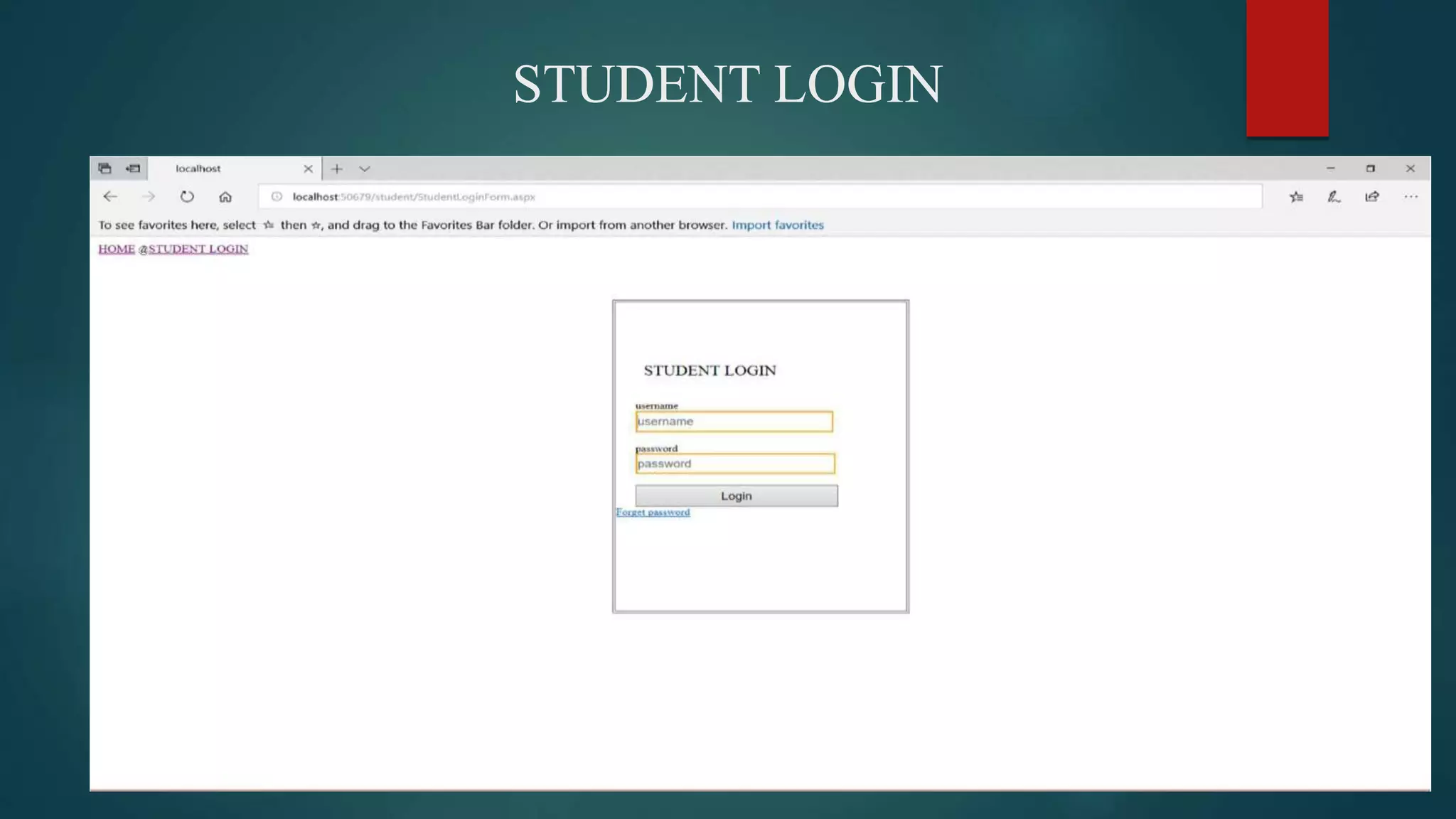
valid user name and password provided by the administrator. First student should
login into the system by entering user name and password. Student can able to update
his information such as name, branch, year, aggregate marks, contact number, email,
etc. by clicking on Update Details option and also upload their CV. The change
password field is used by the student if he needs to change his password as same in
the admin module. After completing task successfully by click on the Logout, student
can successfully logout from the system.
COMPANY
Initially Company must need to login to the system by entering valid user_id and password provided
by the administrator module. The recruiter updates his details like his company name, working
criteria and information about itself. The Company will see the details about the college posted by
the tpo module to the system. The Company will also able to see the student details as name, branch,
aggregate marks, passed out year etc .Company can change his password if he required by using the
change password field. Mailing and messaging option is also available in Company module that
contain email /messages received and send by the TPO. The menu bar at the top can consist of same
field as previous module except that the about us field can contains information about the Company
module. By clicking on logout field the Company can successfully logout from the system
DATA INTEGRITY
Integrity Constraints are used to apply business rules for the database tables . The Constraints can be
specified immediately after the column definition.
Data Integrity is used to maintain accuracy and consistency of data in the table
1. .Primary Key
2. .Unique key
3. .default
STUDENT DATA BASE
Variable Datatype Constraint
Regno nvarchar(50) Primary key
Name nvarchar(50) not null
Password nvarchar(50) not null
Gmail nvarchar(50) not null
Branch nvarchar(50) not null
Phone nvarchar(50) Default null
Hobbies nvarchar(max) Default null
progLa nvarchar(max) Default null
Web nvarchar(max) Default null
Databases nvarchar(max) Default null
Peraddress nvarchar(max) not null
CourseSSC nvarchar(50) Default null
PercentageOfSSC nvarchar(50) Default null
inter_Dioploma nvarchar(50) Default null
PercentageOfInter nvarchar(50) Default null
CourseDEGree nvarchar(50) Default null
PercentageDegree nvarchar(50) Default null
CoursePG nvarchar(50) Default null
PercentagePg nvarchar(50) Default null
ProfileImage Image Default null
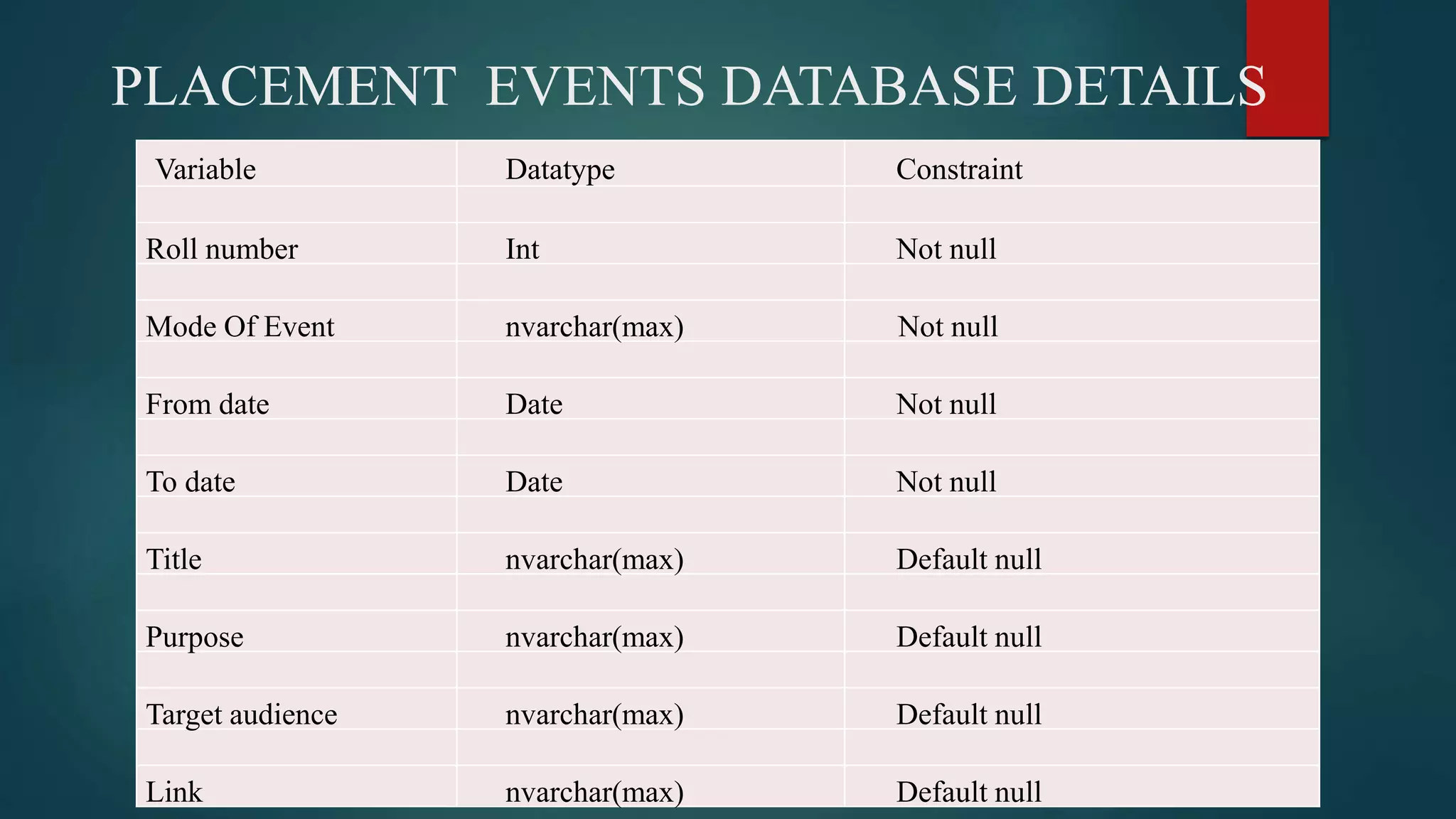
PLACEMENT EVENTS DATABASE DETAILS
Variable Datatype Constraint
Roll number Int Not null
Mode Of Event nvarchar(max) Not null
From date Date Not null
To date Date Not null
Title nvarchar(max) Default null
Purpose nvarchar(max) Default null
Target audience nvarchar(max) Default null
Link nvarchar(max) Default null
TRAINING EVENT DATABASE DETAILS
Variable Datatype Constraint
Rollnumber Int Not null
ModeOfEvent nvarchar(max) Not null
From date Date Not null
To date Date Not null
Title nvarchar(max) Default null
Purpose nvarchar(max) Default null
Target audience nvarchar(max) Default null
Link nvarchar(max) Default null
STAFF & TPO DATA BASE DETAILS
Variable Datatype Constraint
Username nvarchar(50) Primary key
Password nvarchar(max) Not null
Gmail nvarchar(50) Not null
Branch nvarchar(50) Not null
Mobile nvarchar(20) Default null
3.3.2 Staff Database
TPO database
Variable Datatype Constraint
Username nvarchar(50) Primary key
Password nvarchar(50) Not null
3.3.3 TPO Database
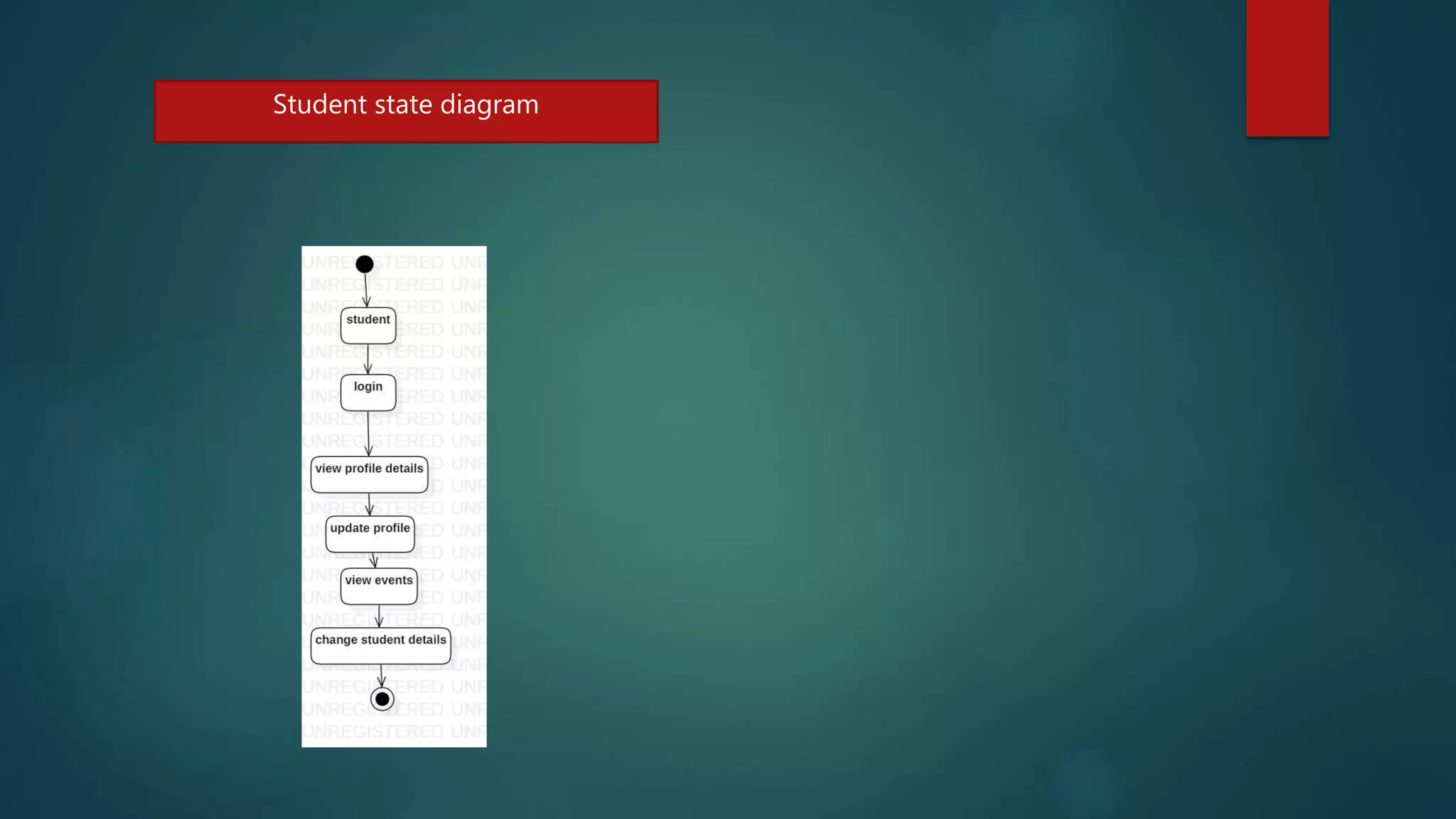
State diagrams
Staff state diagram Tpo state diagram
Student state diagram
USER INTERFACE DESIGN
STUDENT LOGIN
STUDENT HOME PAGE
STUDENT PROFILE VIEW
STUDENT TRAINING EVENTS CHECK
STUDENT CHANGE PASSWORD
STUDENT CHANGE EMAIL
STUDENT CHANGE PHONE NUMBER:
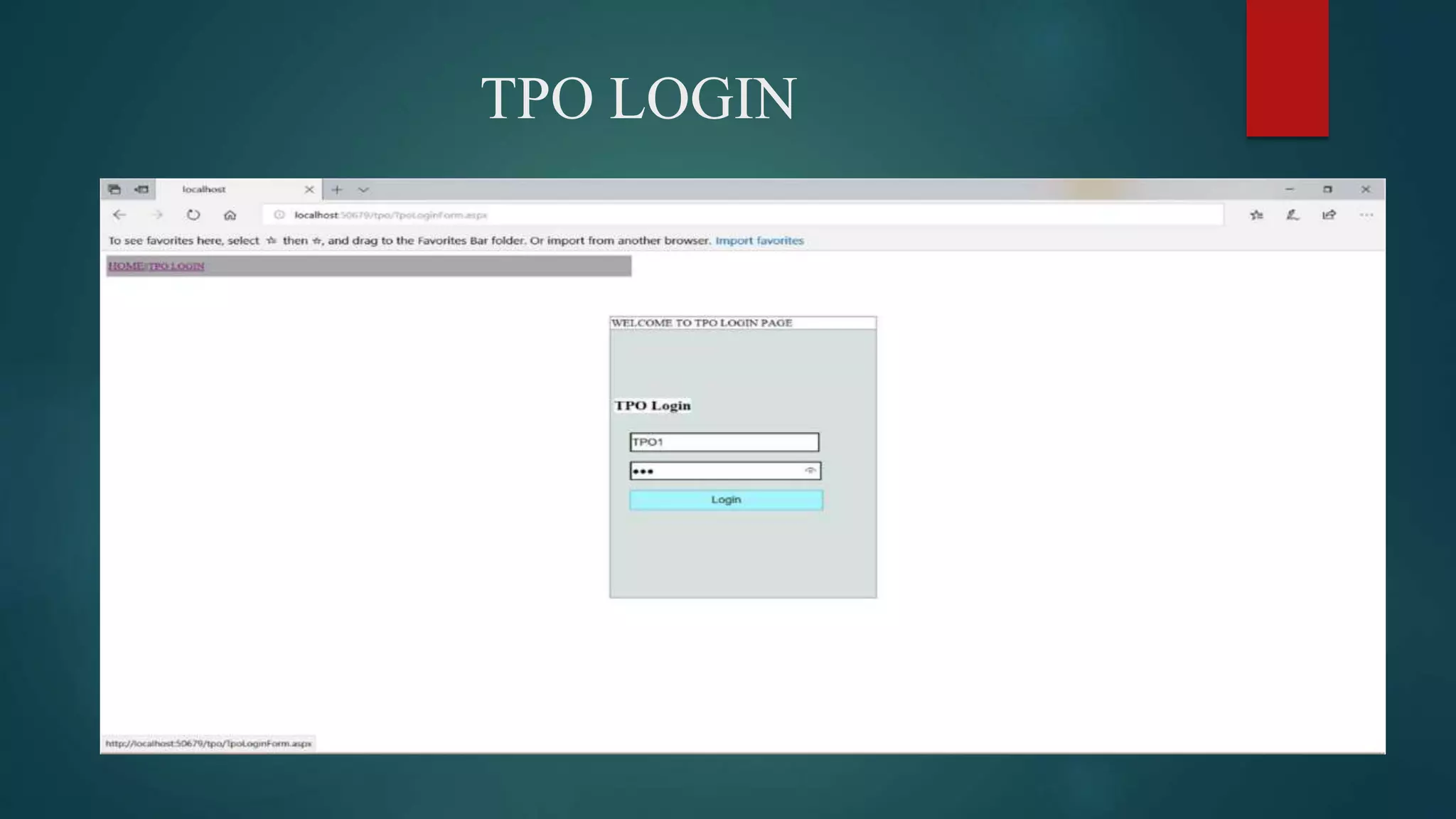
TPO LOGIN
TPO UPLOAD TRAINING EVENTS
TPO SEND MAIL:
COMPANY LOGIN
COMPANY CHANGE PASSWORD
STAFF LOGIN
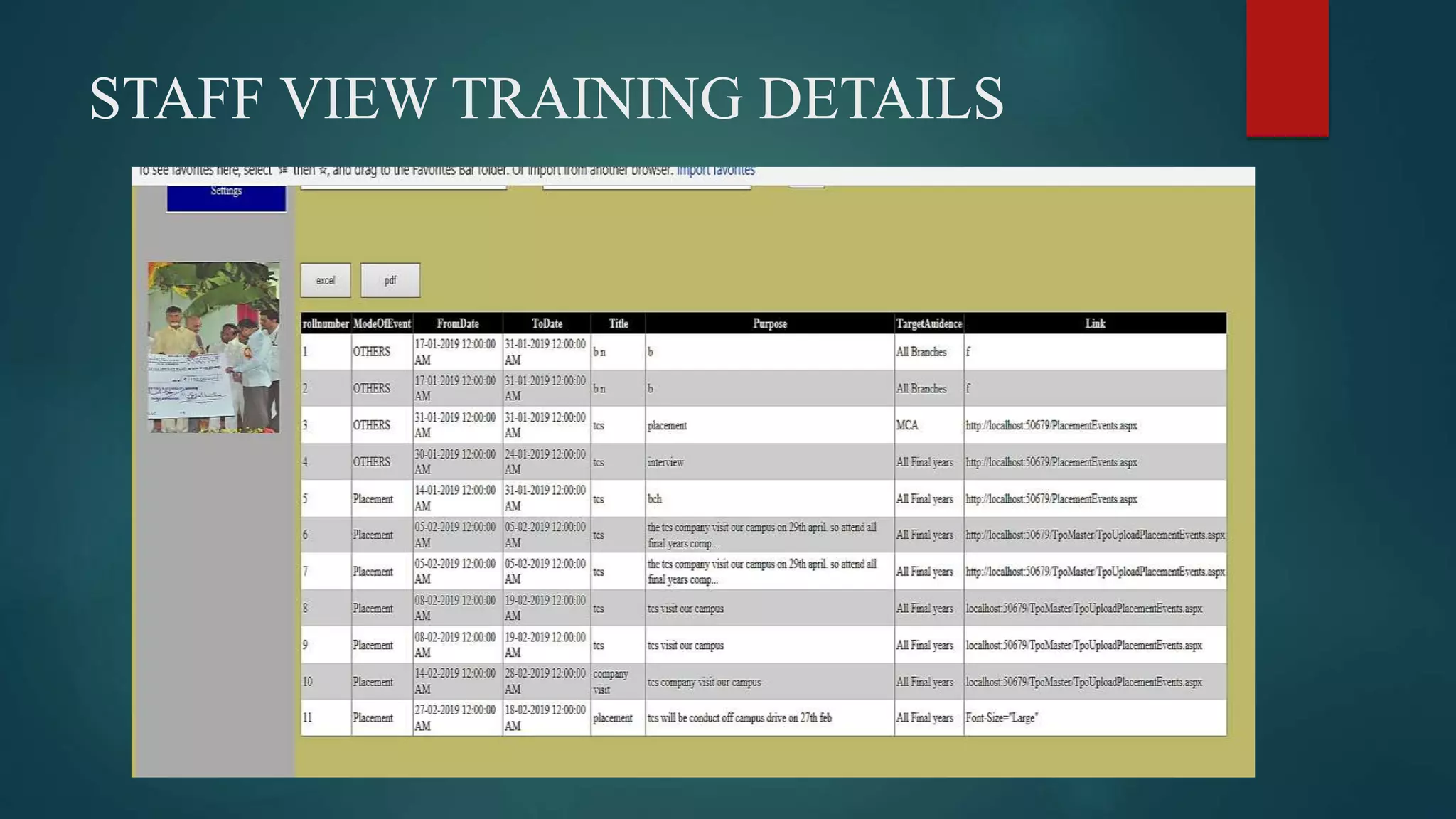
STAFF CHECK TRAINING DETAILS
STAFF VIEW TRAINING DETAILS
STAFF CHANGE MAIL
SYSTEM ARCHITECTURE
Test cases
Test cases can be divided in to two types. First one is Positive test cases and second one is negative
test cases. In positive test cases are conducted by the developer intention is to get the output. In
negative test cases are conducted by the developer intention is to don’t get the output.
TPO TEST CASES
S
.No
Test case Description Actual value Expected value Result
1 Enter the username and
password
Verification of
login details.
Login Successfully true
2 Upload training events
,placement events
Enter event start
date , end date
and description
Update event start
date , end date
and description
into database
successfully
true
3 Change Password Enter old
password, and
new password
Successfully
change password
true
STUDENT TEST CASES
S
.No
Test case Description Actual value Expected value Result
1 Enter the username
and password
Verification of
login details.
Login
Successfully
true
2 View training events
,placement events
Enter event start
date , end date
and description
Display event
start date , end
date and
description from
database
successfully
true
3 Change Password Enter old
password, and
new password
Successfully
change
password
true
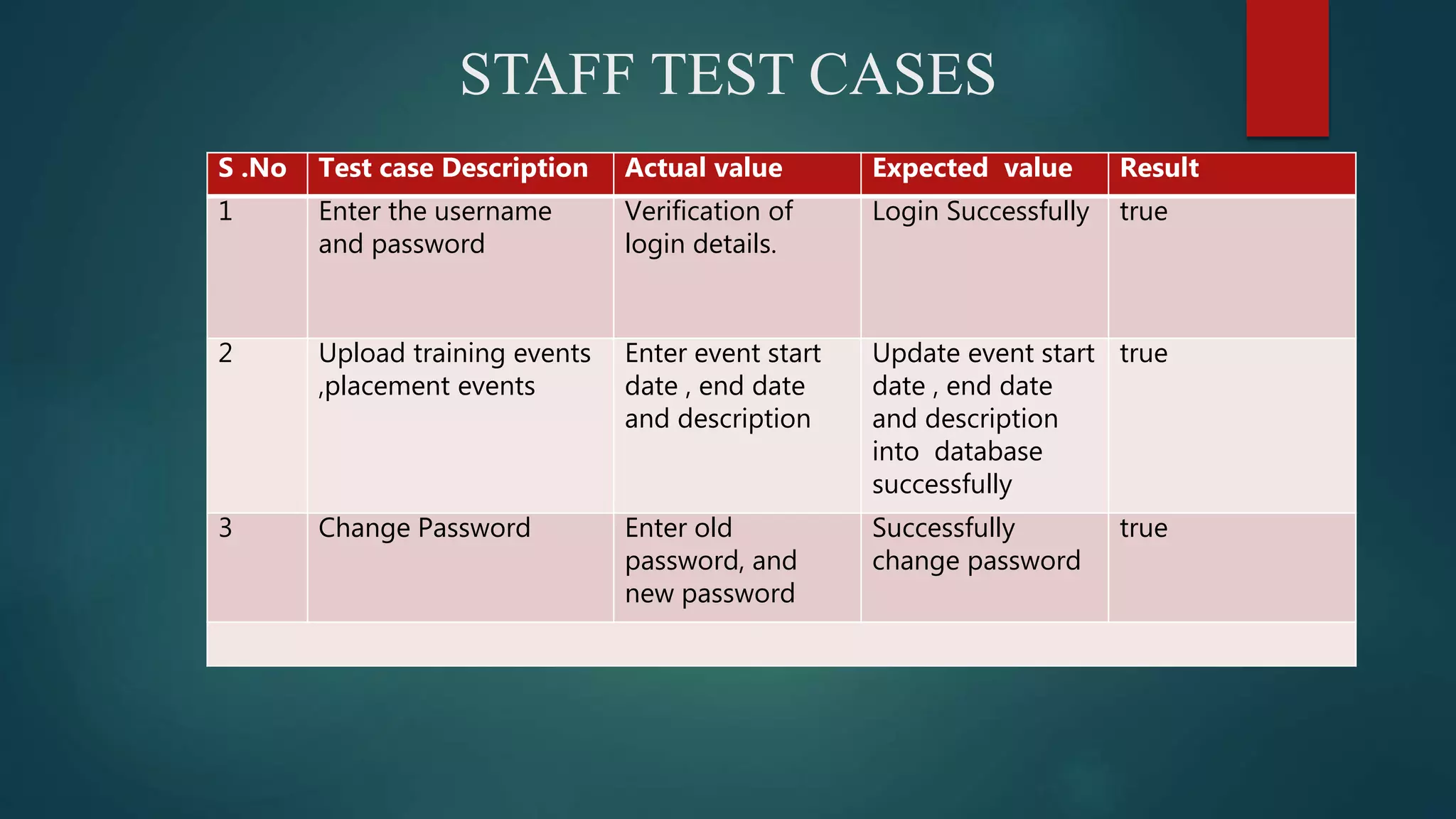
STAFF TEST CASES
S .No Test case Description Actual value Expected value Result
1 Enter the username
and password
Verification of
login details.
Login Successfully true
2 Upload training events
,placement events
Enter event start
date , end date
and description
Update event start
date , end date
and description
into database
successfully
true
3 Change Password Enter old
password, and
new password
Successfully
change password
true
Thank you

training and placement cell portal

  • 1.
    TRAINING AND PLACEMENTCELL PORTAL SUBMITED BY PANASA RAMAIAH
  • 2.
    PROBLEM STATEMENT The 'Trainingand Placement' is developed to maintain the details of student information, trace the details of student also maintain the information about the company availability. Using this project user may know all the details which are provided by the ‘Training and Placement’. Users can view the availability of company and dates of passing. the tpo officers to control the upload events and send notifications. all the customers have some common services like adjusting the password, upgrading details, looking for details, checking the important points, mailing to the supervisor, and studying the substance submitted by admin if the consumer is a student.
  • 3.
    1. The earlierprogram is not computerized 2. All transactions in the system are performed personally sustaining records. 3. in the earlier program positioning official has to gather student details for placements. Signing these scholar details requires lots of time 4. Positioning official and pupils have to consult each other straight if any data is needed. If any new organization come for placements, positioning official and his team has to search the scholar details and they have to get the eligible prospects for that specific organization placement EXISTING SYSTEM
  • 4.
    DRAWBACKS IN THEEXISTING SYSTEM 1. IT CONSUMES MORE TIME. 2. PAPER WASTAGE. 3. REPEATED WORK IS OBTAINED IN THE SYSTEM 4. REDUCE STORAGE AREA
  • 5.
    PROPOSED SYSTEM 1. Trainingand Placement Cell is fully advanced, which removes most of the disadvantages of the present system 2. Training and Placement Cell is web based application which can be seen through the entire company and external as effectively with proper login provided. 3. This technique may be used as a software for the TPO to control the student data with regards to placement 4. All the customers have some common services like adjusting the password, upgrading details, looking for details, checking the important points, mailing to the supervisor, and studying the substance submitted by admin if the consumer is a student. 5. The supervisor has to accomplish the services like putting activities, achievements and he can reply to the messages sent by users. 6. They can add components, search for scholar details, and he has the best to approve the students
  • 6.
    ADVANTAGES 1. Reduce thepaperwork and storage area 2. Improve accuracy in results 3. Improve output of operations 4. Allow easy navigation through cv’s and company information
  • 7.
    FUNCTIONAL REQUIREMENTS 1 STUDENTLOGIN: 1. View Profile 2. Forget password 3. Update Profile 4. View Training Events 5. View Placement Events 2.TPO LOGIN: 1. Upload Training Events 2. Upload Placement Events 3. View Training Events 4. View Placement Events
  • 8.
    5. Send Notifications 6.Get Student Information 7. Change Password 3.STAFF LOGIN:  get Student Information  View Events  Change Password
  • 9.
    NON –FUNCTIONAL REQUIREMENTS 1.Usability 2. High Availability 3. Security 4. Performance The web site must have a simple ,user-friendly interface so customers can save time and confusion
  • 10.
    USE CASE DIAGRAM Theuse case diagrams describe system functionality as a set of tasks that the system must carry out and actors who interact with the system to complete the tasks. .
  • 11.
    SEQUENCE DIAGRAM A sequencediagram describes an interaction among a set of objects participated in a collaboration(or scenario), arranged in a chronological order; it shows the objects participating in the interaction by their "lifelines" and the messages that they send to each other. STUDENT LOGIN
  • 12.
  • 13.
  • 14.
  • 15.
  • 16.
  • 17.
  • 18.
  • 19.
  • 20.
  • 21.
  • 22.
  • 23.
  • 24.
  • 25.
    E-R DIAGRAM An entity-relationshipdiagram (ERD) is a data modeling technique that graphically illustrates an information system's entities and the relationships between those entities. An ERD is a conceptual and representational model of data used to represent the entity framework infrastructure.
  • 27.
    CLASS DIAGRAM A classdiagram in the Unified Modeling Language (UML) is a type of static structure diagram that describes the structure of a system by showing the system's classes, their attributes, operations (or methods),and the relationships among objects.
  • 28.
  • 29.
    TPO The TPO modulehas an authority to add student and Company to the system and provide their valid user-id and password. The main user of the TPO module is TPO of the college. TPO of the college will able to update details such as college name, college address, establish year, emp_id, branch, number of student, email_id, contact number, web address, etc. The various events related to the training and placement program is uploaded to the system by entering subject means event name and text that contain detailed information about event. The user can able to change their password by using change password field. Event option shows the event name, date of event, information about the event. Company options display the company name and website of that company. The field about us in the menu bar contains information about the admin module. After the completion of task user will logout successfully by clicking on logout field at the top menu bar.
  • 30.
    STUDENT Student module dealswith information of student. Student who has added by the administrator to the system successfully can only able to access the system with their valid user name and password provided by the administrator. First student should login into the system by entering user name and password. Student can able to update his information such as name, branch, year, aggregate marks, contact number, email, etc. by clicking on Update Details option and also upload their CV. The change password field is used by the student if he needs to change his password as same in the admin module. After completing task successfully by click on the Logout, student can successfully logout from the system.
  • 31.
    COMPANY Initially Company mustneed to login to the system by entering valid user_id and password provided by the administrator module. The recruiter updates his details like his company name, working criteria and information about itself. The Company will see the details about the college posted by the tpo module to the system. The Company will also able to see the student details as name, branch, aggregate marks, passed out year etc .Company can change his password if he required by using the change password field. Mailing and messaging option is also available in Company module that contain email /messages received and send by the TPO. The menu bar at the top can consist of same field as previous module except that the about us field can contains information about the Company module. By clicking on logout field the Company can successfully logout from the system
  • 32.
    DATA INTEGRITY Integrity Constraintsare used to apply business rules for the database tables . The Constraints can be specified immediately after the column definition. Data Integrity is used to maintain accuracy and consistency of data in the table 1. .Primary Key 2. .Unique key 3. .default
  • 33.
  • 34.
    Variable Datatype Constraint Regnonvarchar(50) Primary key Name nvarchar(50) not null Password nvarchar(50) not null Gmail nvarchar(50) not null Branch nvarchar(50) not null Phone nvarchar(50) Default null Hobbies nvarchar(max) Default null progLa nvarchar(max) Default null Web nvarchar(max) Default null Databases nvarchar(max) Default null Peraddress nvarchar(max) not null CourseSSC nvarchar(50) Default null PercentageOfSSC nvarchar(50) Default null inter_Dioploma nvarchar(50) Default null PercentageOfInter nvarchar(50) Default null CourseDEGree nvarchar(50) Default null PercentageDegree nvarchar(50) Default null CoursePG nvarchar(50) Default null PercentagePg nvarchar(50) Default null ProfileImage Image Default null
  • 35.
    PLACEMENT EVENTS DATABASEDETAILS Variable Datatype Constraint Roll number Int Not null Mode Of Event nvarchar(max) Not null From date Date Not null To date Date Not null Title nvarchar(max) Default null Purpose nvarchar(max) Default null Target audience nvarchar(max) Default null Link nvarchar(max) Default null
  • 36.
    TRAINING EVENT DATABASEDETAILS Variable Datatype Constraint Rollnumber Int Not null ModeOfEvent nvarchar(max) Not null From date Date Not null To date Date Not null Title nvarchar(max) Default null Purpose nvarchar(max) Default null Target audience nvarchar(max) Default null Link nvarchar(max) Default null
  • 37.
    STAFF & TPODATA BASE DETAILS Variable Datatype Constraint Username nvarchar(50) Primary key Password nvarchar(max) Not null Gmail nvarchar(50) Not null Branch nvarchar(50) Not null Mobile nvarchar(20) Default null 3.3.2 Staff Database TPO database Variable Datatype Constraint Username nvarchar(50) Primary key Password nvarchar(50) Not null 3.3.3 TPO Database
  • 38.
    State diagrams Staff statediagram Tpo state diagram
  • 39.
  • 40.
  • 41.
  • 42.
  • 43.
  • 44.
  • 45.
  • 46.
  • 47.
  • 48.
  • 49.
  • 50.
  • 51.
  • 52.
  • 53.
  • 54.
  • 55.
  • 56.
  • 57.
  • 58.
    Test cases Test casescan be divided in to two types. First one is Positive test cases and second one is negative test cases. In positive test cases are conducted by the developer intention is to get the output. In negative test cases are conducted by the developer intention is to don’t get the output.
  • 59.
    TPO TEST CASES S .No Testcase Description Actual value Expected value Result 1 Enter the username and password Verification of login details. Login Successfully true 2 Upload training events ,placement events Enter event start date , end date and description Update event start date , end date and description into database successfully true 3 Change Password Enter old password, and new password Successfully change password true
  • 60.
    STUDENT TEST CASES S .No Testcase Description Actual value Expected value Result 1 Enter the username and password Verification of login details. Login Successfully true 2 View training events ,placement events Enter event start date , end date and description Display event start date , end date and description from database successfully true 3 Change Password Enter old password, and new password Successfully change password true
  • 61.
    STAFF TEST CASES S.No Test case Description Actual value Expected value Result 1 Enter the username and password Verification of login details. Login Successfully true 2 Upload training events ,placement events Enter event start date , end date and description Update event start date , end date and description into database successfully true 3 Change Password Enter old password, and new password Successfully change password true
  • 62.