Whats new?


ISS International School - April 2011
Several areas of Studywiz have undergone a major
           overhaul for the new version.
        The most significant changes are:
Several areas of Studywiz have undergone a major
           overhaul for the new version.
        The most significant changes are:
Several areas of Studywiz have undergone a major
               overhaul for the new version.
             The most significant changes are:

•    Quick Create – allows users to create new Activities quickly
     from wherever they are in the system,
Several areas of Studywiz have undergone a major
               overhaul for the new version.
             The most significant changes are:

•    Quick Create – allows users to create new Activities quickly
     from wherever they are in the system,

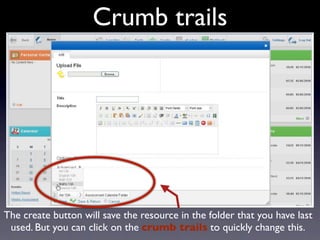
•    Crumbtrails – displays the current location to users when
     creating a new Activity
Several areas of Studywiz have undergone a major
               overhaul for the new version.
             The most significant changes are:

•    Quick Create – allows users to create new Activities quickly
     from wherever they are in the system,

•    Crumbtrails – displays the current location to users when
     creating a new Activity

•    Resource/FastFile – an overhauled Activity with new features
     and improved usability
Several areas of Studywiz have undergone a major
               overhaul for the new version.
             The most significant changes are:

•    Quick Create – allows users to create new Activities quickly
     from wherever they are in the system,

•    Crumbtrails – displays the current location to users when
     creating a new Activity

•    Resource/FastFile – an overhauled Activity with new features
     and improved usability

•    Assignment – also overhauled, including new features and
     improved usability
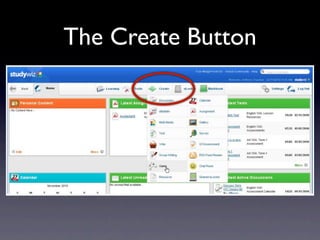
The Create Button
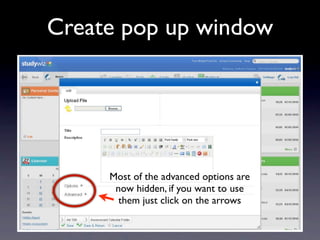
Create pop up window


             Text


     Most of the advanced options are
      now hidden, if you want to use
       them just click on the arrows
Crumb trails


The create button will save the resource in the folder that you have last
 used. But you can click on the crumb trails to quickly change this.
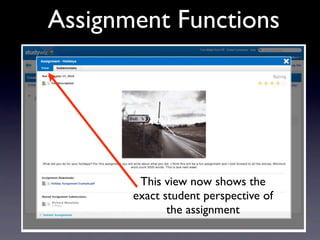
Assignment Functions


          Text


        This view now shows the
       exact student perspective of
              the assignment
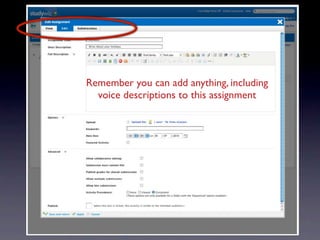
Remember you can add anything, including
  voice descriptions to this assignment

             Text
Text
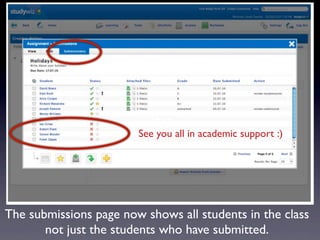
                        See you all in academic support :)


The submissions page now shows all students in the class
       not just the students who have submitted.
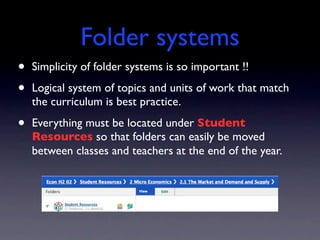
Folder systems
•   Simplicity of folder systems is so important !!

•   Logical system of topics and units of work that match
    the curriculum is best practice.

•   Everything must be located under Student
    Resources so that folders can easily be moved
    between classes and teachers at the end of the year.
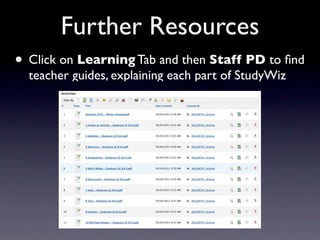
Further Resources
• Click on Learning Tab and then Staff PD to find
  teacher guides, explaining each part of StudyWiz

Studywiz whats new - april 2011

  • 1.
    Whats new? ISS InternationalSchool - April 2011
  • 2.
    Several areas ofStudywiz have undergone a major overhaul for the new version. The most significant changes are:
  • 3.
    Several areas ofStudywiz have undergone a major overhaul for the new version. The most significant changes are:
  • 4.
    Several areas ofStudywiz have undergone a major overhaul for the new version. The most significant changes are: • Quick Create – allows users to create new Activities quickly from wherever they are in the system,
  • 5.
    Several areas ofStudywiz have undergone a major overhaul for the new version. The most significant changes are: • Quick Create – allows users to create new Activities quickly from wherever they are in the system, • Crumbtrails – displays the current location to users when creating a new Activity
  • 6.
    Several areas ofStudywiz have undergone a major overhaul for the new version. The most significant changes are: • Quick Create – allows users to create new Activities quickly from wherever they are in the system, • Crumbtrails – displays the current location to users when creating a new Activity • Resource/FastFile – an overhauled Activity with new features and improved usability
  • 7.
    Several areas ofStudywiz have undergone a major overhaul for the new version. The most significant changes are: • Quick Create – allows users to create new Activities quickly from wherever they are in the system, • Crumbtrails – displays the current location to users when creating a new Activity • Resource/FastFile – an overhauled Activity with new features and improved usability • Assignment – also overhauled, including new features and improved usability
  • 8.
  • 9.
    Create pop upwindow Text Most of the advanced options are now hidden, if you want to use them just click on the arrows
  • 10.
    Crumb trails The createbutton will save the resource in the folder that you have last used. But you can click on the crumb trails to quickly change this.
  • 11.
    Assignment Functions Text This view now shows the exact student perspective of the assignment
  • 12.
    Remember you canadd anything, including voice descriptions to this assignment Text
  • 13.
    Text See you all in academic support :) The submissions page now shows all students in the class not just the students who have submitted.
  • 14.
    Folder systems • Simplicity of folder systems is so important !! • Logical system of topics and units of work that match the curriculum is best practice. • Everything must be located under Student Resources so that folders can easily be moved between classes and teachers at the end of the year.
  • 15.
    Further Resources • Clickon Learning Tab and then Staff PD to find teacher guides, explaining each part of StudyWiz

Editor's Notes